How DanubeNet’s Booking Platform Breaks Revenue Tracking (And the GTM Fix That Recovered $66K)

Ishant
Published : May 23, 2026 at 5:23 am
Updated : September 30, 2026 at 3:00 pm
Ishant
DanubeNet routes bookings through its own subdomain. GA4 loses the session mid-funnel, Google Ads never sees the conversion, and your reports show a big gap where the revenue should be. We ran into this exact issue managing paid campaigns for a driving school network. After digging into the setup, we recovered $66,143 in booking revenue that had been invisible to every tracking tool they had.
The GTM configuration that fixed it uses three things: cross-domain linking to keep sessions alive, a custom variable that scrapes the booking value off the receipt page when there is no data layer, and a transaction ID to block duplicate conversions. Below is exactly how each piece is built.
What this guide covers
- How to configure cross-domain linking in GA4 and GTM so sessions survive the jump to DanubeNet
- A custom JS variable that reads the booking total from the receipt page without a data layer
- A transaction ID variable to prevent duplicate conversions on page reload
- How to fire a GA4 purchase event and Google Ads conversion with real booking value
How to set up cross-domain linking so the session survives
First, tell GA4 and Google Ads that your site and the booking platform are one journey. In the GA4 base config tag, the linker domains list every receipt subdomain where the conversion lands:
// GA4 base config tag, linker setting

linker domains:
  receipt.centralmasafety.com,
  receipt.cmscsouthshore.com,
  receipt.cmscdrivingschool.com
The gclid survives the round trip because of how first-party cookies work. When someone lands from a paid click, the Conversion Linker stores the gclid in a _gcl cookie on the root domain. They hop out to DanubeNet to register, then land back on the receipt. subdomain, which shares that root-domain cookie, so the gclid is still there when the conversion fires. The GA4 linker list covers those receipt subdomains so the client ID stays consistent too. One detail decides whether the linker works: in GA4’s Configure your domains screen, set the match type to Contains, not Exactly matches. Exact match silently excludes every subdomain, including the receipt. and register. ones where the money actually changes hands.
From experience: when we audit broken setups, this single match-type toggle is the most common culprit. Everything looks configured, and nothing tracks, because the subdomains were quietly excluded.
How to pull the purchase value off a receipt page with no data layer
This is the part nobody writes about. DanubeNet, like a lot of booking platforms, doesn’t push a tidy ecommerce purchase event you can just read. So instead of hoping for a data layer, we built a variable that tries three sources in order and takes the first real number it finds. Check the data layer, then scrape the receipt’s total from the page itself, then fall back to a URL parameter.
function() {
  try {
    // 1. Data layer, in case the platform does push a value
    if (window.dataLayer) {
      for (var i = window.dataLayer.length - 1; i >= 0; i--) {
        var dl = window.dataLayer[i];
        if (dl.ecommerce && dl.ecommerce.purchase &&
            dl.ecommerce.purchase.actionField &&
            dl.ecommerce.purchase.actionField.revenue) {
          return parseFloat(dl.ecommerce.purchase.actionField.revenue);
        }
        if (dl.value && dl.event === 'purchase') return parseFloat(dl.value);
      }
    }

    // 2. Scrape the total straight off the receipt DOM
    var selectors = ['.order-total', '.total-amount', '.grand-total',
      '[class*="total"]', '[class*="amount"]', '.receipt-total',
      'td.total', '[data-total]'];
    for (var j = 0; j < selectors.length; j++) {
      var el = document.querySelector(selectors[j]);
      if (el) {
        var m = (el.innerText || '').match(/\$?([\d,]+\.?\d{0,2})/);
        if (m) {
          var v = parseFloat(m[1].replace(/,/g, ''));
          if (v > 0) return v;
        }
      }
    }

    // 3. Last resort: read it from the URL
    var p = window.location.href.match(/[?&](?:total|amount|price|value|revenue)=([0-9.]+)/i);
    if (p) return parseFloat(p[1]);
    return 0;

  } catch(e) { return 0; }
}Start with the data layer since it is the cleanest source. When it is missing, the DOM scrape reads the total the customer sees on screen. The URL fallback covers platforms that pass the amount as a query parameter. Update the selector list to match your receipt page, then run a real booking through GTM Preview to confirm the right number comes back.
How to build a transaction ID for dedupe when the platform won’t give you one
Receipt pages get refreshed, bookmarked, and revisited. Every reload risks firing the conversion again. A unique transaction ID on every order stops both GA4 and Google Ads from counting the same booking twice. When the platform does not expose one in a clean format, you can derive it from the URL:
function() {
  try {
    var url = window.location.href;
    var patterns = [
      /[?&](?:order_id|orderid|order|transaction_id|txn_id|id)=([a-zA-Z0-9_-]+)/i,
      /\/order[s]?\/([a-zA-Z0-9_-]+)/i,
      /\/receipt\/([a-zA-Z0-9_-]+)/i,
      /\/confirmation\/([a-zA-Z0-9_-]+)/i
    ];
    for (var i = 0; i < patterns.length; i++) {
      var m = url.match(patterns[i]);
      if (m && m[1]) return m[1];
    }
    // Fallback so the field is never empty
    return 'TXN-' + Date.now();
  } catch(e) { return 'TXN-' + Date.now(); }
}Note: the timestamp fallback prevents empty IDs, but a real order number from the URL is far better for deduplication. If the platform doesn't expose it in the URL, check with their support team.
How to fire the GA4 purchase and the Google Ads conversion
With both variables built, the tags are simple. Trigger them on the receipt subdomain, on Window Loaded so the page total has rendered before the value variable reads it.
GA4 purchase event
Tag type: GA4 event

Event name: purchase

Parameters:
  value           = {{Receipt Purchase Value}}
  currency        = USD
  transaction_id  = {{Transaction ID}}

Trigger: Page URL contains receipt.your-site.com (Window Loaded)
Google Ads conversion
Tag type: Google Ads Conversion Tracking

Conversion ID:    AW-XXXXXXXXX
Conversion label: your-label
Conversion value: {{Receipt Purchase Value}}
Order ID:         {{Transaction ID}}
Enhanced conversions: on

Trigger: Page URL contains receipt.your-site.com (Window Loaded)Two things make this resilient. The Order ID field is what Google Ads uses to dedupe, so it must carry your transaction ID. And enhanced conversions, switched on here, recover attribution that cookies alone would lose, which matters more every year. If you need a refresher on the value target itself, our guide on calculating break-even ROAS covers where to set it.
What happened after we turned revenue tracking on
Below is the GA4 Traffic Acquisition report for the first three weeks after purchase tracking went live, broken down by channel.
GA4 Traffic Acquisition · May 1 to 21, 2026
$66,143.96 in tracked booking revenue, attributed by channel
87 completed registrations captured as purchase events
$24K+ from paid channels that were previously invisible
For the first time, paid search showed $8,371.79 from 11 bookings and cross-network $15,652.94 from 14, revenue that simply didn't exist in the reports before. Organic search led at $27,843.05, and direct and referral filled in the rest.
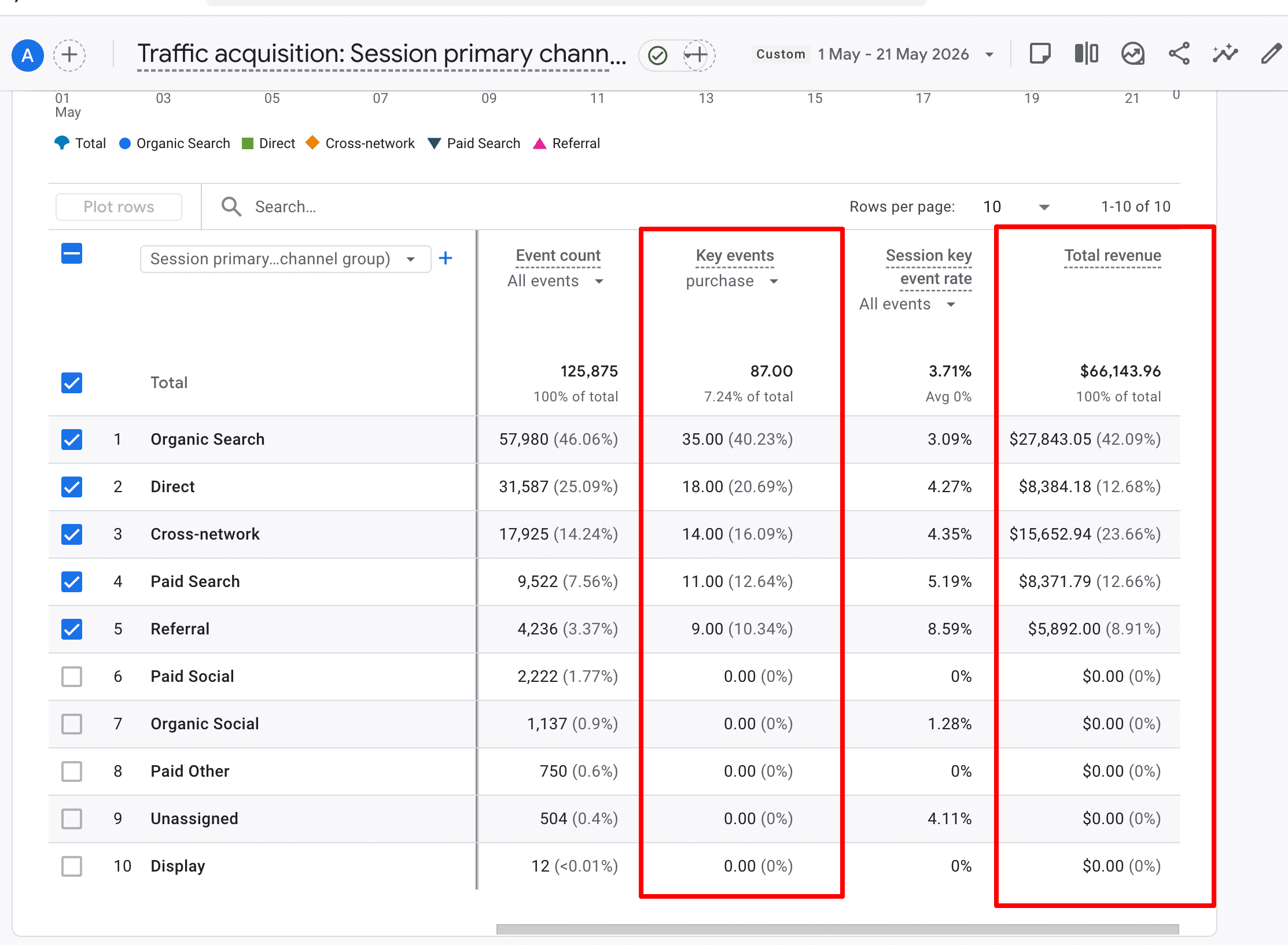
Before this fix, paid search looked like a cost centre because every booking it drove completed on a domain no one was tracking. With attribution restored, paid search showed $8,371.79 from eleven registrations and cross-network added $15,652.94 from fourteen more. That data is what lets value-based bidding actually work: Google Ads can now optimise toward the CDL and adaptive programs that bring in real revenue, not just whatever gets the most clicks. We cover the bidding side of accounts like this in our guide to Google Ads for lead generation.
How to confirm it's actually working before you trust it
A green tag in GTM Preview does not mean the data is correct. Run these three checks with a real test booking before you trust the numbers:
- GTM Preview: complete a test registration and confirm the purchase tag fires once on the receipt page, with a real number in the value variable.
- GA4 DebugView: watch the
purchaseevent arrive with value, currency, and a transaction ID populated. - Google Ads: check the conversion logs the value within a day or two, and reconcile the count against the platform's own booking total.
The bottom line on tracking booking-platform revenue
Getting the actual booking value into your tracking tools is what lets paid campaigns optimise on revenue instead of clicks. Cross-domain linking keeps the session intact, the DOM fallback reads the total when there is no data layer, and the transaction ID stops duplicate conversions. For this account, putting those three pieces together attributed $66K in bookings to the channels that drove them.
Results after turning on revenue tracking
DanubeNet Revenue Tracking FAQs
Can DanubeNet bookings be tracked in GA4?
Yes. DanubeNet does not expose a standard ecommerce data layer, so the booking value has to be read from the confirmation page and sent to GA4 as a purchase event through Google Tag Manager. Cross-domain linking keeps the session intact across the handoff, and a manually built transaction ID stops the same booking being counted twice.
Will this work if my driving school uses a different booking platform?
Yes. The same method applies to any third party booking platform that runs on a separate domain and does not provide a clean data layer. The three pieces stay the same: cross-domain linking to preserve the session, reading the value from the confirmation page, and a transaction ID for deduplication.
How long does the DanubeNet tracking setup take?
Most builds go live within a week. Clean revenue data usually appears within a few days of the first real bookings. Before you trust the numbers, validate the setup with GTM Preview, GA4 DebugView and one real test booking end to end.
Why Driving Schools Choose Hustle Marketers and Ishant Sharma
Most agencies will tell you your DanubeNet bookings cannot be tracked. We have already solved it on a live account, and the numbers above are from that build, not a theory.
We have done this exact fix, not a similar one
The cross-domain linking, the receipt page value scrape and the transaction ID we built for dedupe recovered $66,143.96 in tracked booking revenue and 87 completed registrations in the first three weeks, including more than $24,000 from paid channels that were invisible before. You are not paying us to learn DanubeNet on your account.
We know driving schools, not just tag management
We run SEO and paid media for driving schools and CDL programs, so the tracking work is built around how your enrolments actually happen: permit classes, road tests, adaptive programs and multi-week CDL courses that book weeks before they run.
- CDL school SEO: 2.4X organic traffic and citations in ChatGPT, Gemini and Google AI Overviews
- Driving school SEO: #1 rankings and doubled web traffic
- 35% lead surge and a 300% ROI boost for a Massachusetts driving school
Tracking is only useful if someone acts on it
Once revenue is flowing into GA4 and Google Ads, we use it. That means value-based bidding toward your high-ticket CDL and adaptive programs, budget moved off the keywords that only look cheap, and SEO for your town and program pages so you are not renting every enrolment. If you want the wider context on why your platforms disagree, read why Google Ads, Meta and GA4 report three different ROAS numbers and our Google Ads conversion tracking guide.
Who you actually work with
Ishant Sharma, founder of Hustle Marketers, has worked in performance marketing since 2013 and stays hands on in the accounts. Hustle Marketers is a Google Partner, a Meta Business Partner and Clutch Premier Verified, with over $780M in trackable client revenue generated across 2,500+ brands.
Get your DanubeNet revenue tracked
Send us your site and your DanubeNet booking link. We will tell you exactly what is breaking, what it is costing you in unattributed bookings, and what the fix involves before you commit to anything.
Summarise this article with:
Frequently Asked Questions
Why can't I track revenue from a third-party booking platform?
Can you track completed bookings, not just button clicks?
How do you get the purchase value with no data layer?
How do you stop duplicate conversions on a receipt page?
Does this let Google Ads optimize for revenue?




Call +91 78141 88707
Info@hustlemarketers.com

H-15 C, Zirakpur,
Punjab 160104, INDIA