12 Tips for Lightning-Fast Website Speed

Ishant
Published : February 1, 2025 at 2:52 pm
Ishant

Website speed is no longer optional. It directly drives rankings, sales, ad results, crawl limits, and user confidence. In 2026, speed is not judged by how a site loads on a powerful desktop. It is judged by how fast real people on real phones can use it without delay.
Google’s Core Web Vitals, mobile-first systems, AI-based discovery, and ad platforms all favor fast websites and quietly suppress slow ones. A delay of even one second lowers sales, raises exits, and increases ad spend.
This guide explains clear, tested, and execution-ready tips for website speed to reach very fast website performance without confusion, old tactics, or shallow advice.
Why Website Speed Matters More Than Ever in 2026
Website speed is no longer a background technical topic. In 2026, it directly shapes visibility, credibility, sales, ad efficiency, and AI discovery access. Slow websites do more than annoy visitors. They lose rankings, waste ad money, and get ignored by modern search systems.
Below are the reasons speed now defines digital success.
1. Google’s Ranking Systems Prioritize Real User Speed
Google no longer relies on test environments alone. Rankings now depend heavily on real user data, including Core Web Vitals such as LCP, INP, and CLS. Websites that load slowly on real mobile devices fall behind even if the content is strong. In 2026, speed is the entry point, not a bonus.
2. AI Search Engines Prefer Fast, Stable Sources
AI-powered systems like ChatGPT, Bing Copilot, and Google AI Overviews favor sites that load quickly, render cleanly, and remain stable. Pages weighed down by heavy scripts, late rendering, or unstable behavior rarely get referenced. Speed directly decides whether a site earns AI trust.
3. Paid Ads Penalize Slow Landing Pages
Google Ads, Meta Ads, and Microsoft Ads all score landing page experience. Slow pages lower quality ratings, raise CPCs, and reduce reach. With ad competition at its peak in 2026, slow websites quietly drain budgets without fair returns.
4. Mobile-First Reality Makes Speed Non-Negotiable
Most visitors now arrive from mobile devices with limited processing power and uneven networks. A page that feels acceptable on desktop often feels unusable on mobile. Google evaluates mobile speed first, and users leave slow mobile pages almost instantly. Speed and mobile usability now move together.
5. Conversion Rates Are Directly Tied to Load Time
Industry data consistently shows that even small delays reduce conversions. In 2026, users expect instant responses. Slow product pages, delayed carts, and lagging interactions increase exits and lost sales. Speed directly affects revenue outcomes.
6. Website Speed Influences Brand Trust
Fast websites feel modern and dependable. Slow ones feel outdated and unreliable, especially in ecommerce, healthcare, finance, and SaaS. Users now link speed with brand quality without thinking about it. Perception matters in crowded markets.
7. Core Web Vitals Are Now a Long-Term Signal
Google treats Core Web Vitals as an ongoing quality measure, not a short-term factor. Sites that fail CWV repeatedly struggle to regain visibility later. Maintaining speed consistently is easier than fixing deep problems after losses appear.
8. Speed Affects Crawling & Indexing Efficiency
Search engines adjust crawl activity based on performance. Faster sites receive deeper and more frequent crawling. Slower sites waste crawl resources, delaying page updates, new listings, and content discovery. This hurts large stores and content-heavy platforms most.
9. Modern UX Depends on Performance
Advanced features like filters, dynamic pricing, personalization, and interactivity only work well on fast foundations. Without speed, modern UX becomes a burden instead of an advantage.
Top Tools That Help You Measure Website Speed Performance
Measuring speed in 2026 requires real user data, controlled tests, and deep diagnostics together. No single tool gives full clarity. A combined approach delivers the best insight.
1. Google PageSpeed Insights
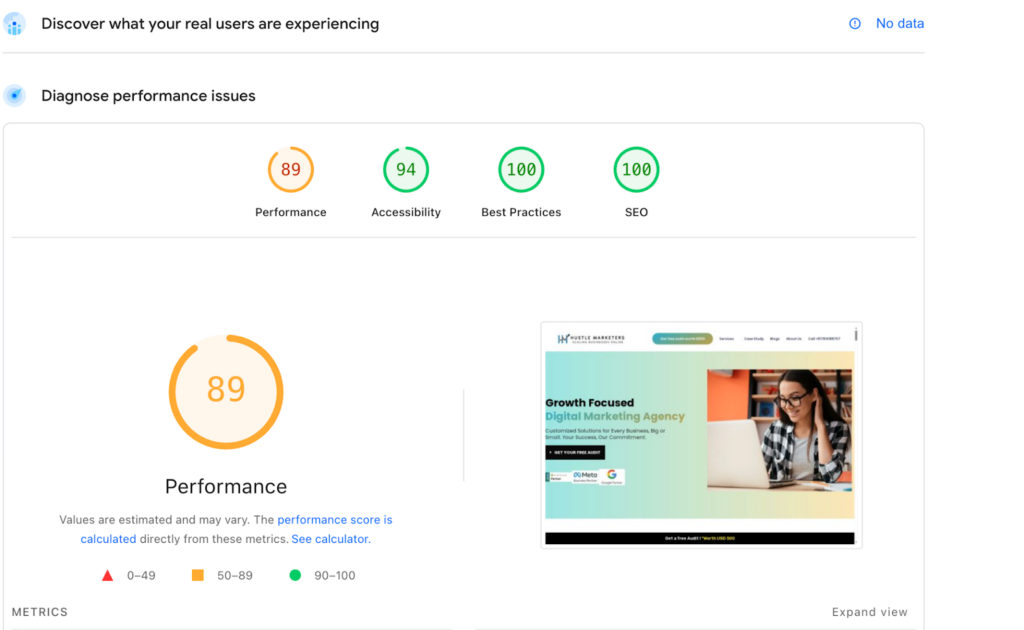
A widely used platform that analyzes performance using real user data and lab testing. It reports Core Web Vitals and lists fixes based on impact level.
Key Benefits:
- Combines real user and lab data
- Clear improvement guidance
- Device-based breakdowns
2. Google Lighthouse
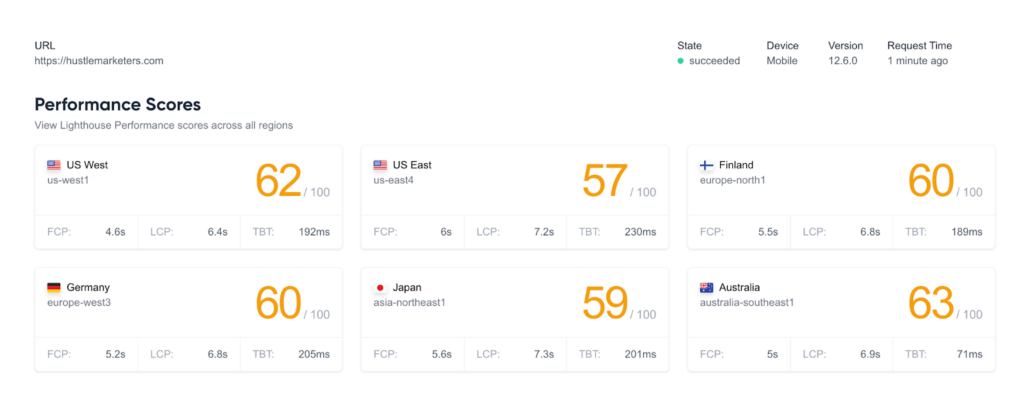
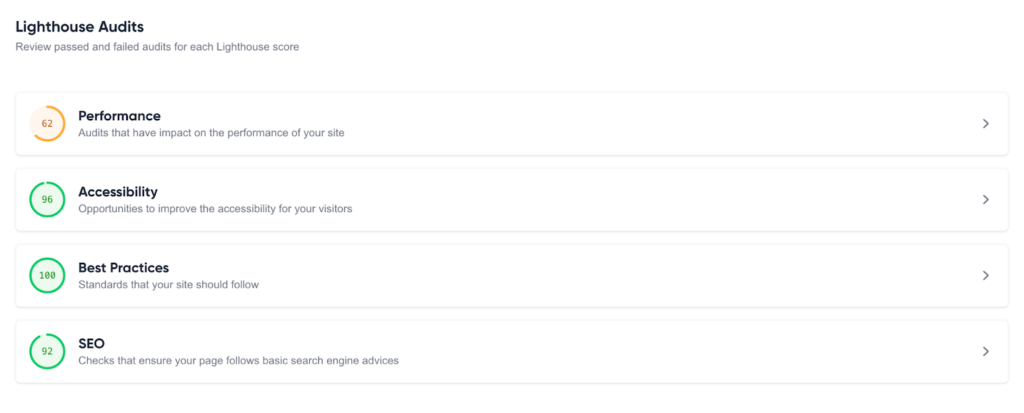
Google Lighthouse is the next-best tool for analysing your website’s speed. This platform provides accurate results and includes metrics such as performance scores across countries. It reviews performance, SEO, accessibility, and best practices.
Key Benefits:
- Broad performance scoring
- Rendering and script diagnostics
- Custom audit options
3. Chrome User Experience Report (CrUX)
CrUX shares real experience data collected from Chrome users. It feeds other tools and can be accessed through dashboards and data platforms.
Key Benefits:
- Real-world user data
- Large-scale trends
- Competitive benchmarking
4. WebPageTest
A detailed testing tool that simulates loading across devices, networks, and locations. It includes waterfall views and visual timelines.
Key Benefits:
- Deep waterfall analysis
- Paint and rendering metrics
- Multi-location testing
5. GTmetrix
GTmetrix blends Lighthouse with its own metrics to show timelines, history, and clear breakdowns.
Key Benefits:
- Performance history
- Waterfall visibility
- Trend tracking
6. Sitespeed.io
An open-source solution built for continuous testing and automation within development pipelines.
Key Benefits:
- Automated testing
- CI/CD integration
- High flexibility
7. New Relic Browser / APM
An enterprise monitoring platform offering real user tracking and backend performance insights together.
Key Benefits:
- Frontend and backend visibility
- Error tracking
- Long-term dashboards
8. SpeedCurve
A visualization tool that connects performance metrics with user behavior and business outcomes over time.
Key Benefits:
- UX tracking
- Custom views
- Outcome correlation
9. Calibre
A monitoring platform focused on scheduled testing, alerts, and competitor comparisons.
Key Benefits:
- Ongoing testing
- Regression alerts
- Benchmarking
12 Actionable Tips to Boost Website Speed in 2026
Website speed is no longer a one-time setup task. In 2026, it affects rankings, AI exposure, sales, ad costs, and trust. Fast sites feel instant and smooth at every step. Below are the most effective techniques used by high-performing websites.
1. Optimize Images the Right Way (Not Just Compression)
Images still make up most page weight. Compression alone no longer solves the issue. Modern optimization focuses on format, delivery, and context.
What actually works:
- Serve WebP or AVIF instead of JPEG or PNG
- Use responsive images for device-specific loading
- Enable lazy loading below the fold
- Remove unnecessary image metadata
Correct image handling alone can cut page size by up to half.
2. Improve Server Response Time (TTFB)
Frontend fixes fail if the server responds slowly. TTFB shows how fast the server answers requests and remains a core signal.
Key improvements include:
- Upgrading from shared to managed or cloud hosting
- Using object caching tools
- Optimizing databases
- Keeping server software current
Competitive sites keep TTFB under 200ms.
3. Use a Content Delivery Network (CDN)
CDNs deliver assets from nearby locations. In 2026, they are essential for performance.
CDNs help by:
- Lowering global latency
- Handling traffic spikes
- Reducing origin load
- Improving uptime
Images, scripts, fonts, and HTML should always load from a CDN.
4. Remove Render-Blocking CSS and JavaScript
Blocking resources pause rendering and delay visible content.
Effective fixes:
- Defer non-essential scripts
- Load JavaScript asynchronously
- Inline critical CSS only
- Remove unused theme styles
This improves perceived speed immediately.
5. Minify and Optimize Code Without Overloading Bundles
Smaller files load faster, but oversized bundles slow execution.
Best practices in 2026:
- Minify CSS, JS, and HTML
- Avoid large bundled scripts
- Split code by page and action
- Remove unused libraries
Lean code improves mobile performance.
6. Enable Smart Browser Caching
Caching prevents repeat downloads for returning users.
What to cache aggressively:
- Images and fonts
- CSS and JavaScript
- Rarely changing assets
Correct headers reduce repeat load time sharply.
7. Limit Third-Party Scripts Ruthlessly
Third-party tools add weight and delay.
Speed-focused approach:
- Remove tools without revenue impact
- Load scripts after interaction
- Replace heavy tools
- Track script impact
If a script adds no value, it should not load.
8. Optimize Fonts for Performance
Fonts can delay visible text.
Best font practices:
- Use system fonts when possible
- Host fonts locally
- Limit font variations
- Preload key fonts
This reduces layout shifts and speeds text display.
9. Reduce DOM Size and Page Complexity
Large DOM structures slow rendering.
How to fix it:
- Remove unnecessary wrappers
- Delete unused sections
- Avoid bloated builders
- Split long pages logically
Cleaner DOMs improve responsiveness.
10. Optimize Core Web Vitals Intentionally
CWV needs direct focus.
Focus areas:
- Improve LCP through server and hero optimization
- Reduce INP by limiting JS work
- Control CLS with reserved spacing
Intentional CWV work delivers ranking gains.
11. Use Modern Caching and Preloading Techniques
Advanced caching improves perceived speed.
Techniques include:
- Full-page caching
- Preloading key assets
- Prefetching next pages
- Selective service workers
These methods make sites feel instant.
12. Monitor Speed Continuously
Every update affects performance.
What to track regularly:
- Load time
- Core Web Vitals
- TTFB
- Script impact
Regular checks prevent slow decline.
Common Website Speed Mistakes to Avoid
Even well-funded brands hurt performance through avoidable habits. Most problems grow slowly through repeated small choices. Below are the most damaging mistakes in 2026.
1. Treating PageSpeed Score as the Goal
A perfect score is not the target. Google ranks real user experience, not lab results. Many sites score high but fail real-world CWV due to poor mobile behavior or slow servers.
2. Ignoring Server & Hosting Performance
Frontend tweaks cannot fix slow servers. Cheap hosting, outdated setups, and poor coverage lead to high TTFB. File compression does not solve server delay.
3. Overloading the Site With Plugins & Apps
Each plugin adds weight. The issue is not tools, but never removing them. Over time, unused apps damage speed and stability.
4. Heavy JavaScript Dependence
Excessive JS delays interaction and hurts INP. Large frameworks and animations block the main thread, especially on mobile.
5. Poor Image Handling
Uploading oversized images and letting browsers resize them remains common. Missing dimensions cause layout shifts, and heavy hero images delay LCP.
6. Render-Blocking CSS & Scripts
Synchronous loading in the head delays content. Without critical CSS and deferred scripts, even simple pages feel slow.
7. Too Many Third-Party Scripts
Each external script adds requests and execution time. Many tools deliver minimal insight but high performance cost.
8. Ignoring Mobile Performance
Desktop-only testing hides real issues. Google judges mobile first, and mobile users leave quickly.
9. No Real-User Monitoring
Without field data, regressions stay hidden. Speed problems grow quietly without alerts.
Conclusion
Website speed now drives revenue directly. In 2026, fast websites earn more clicks, convert better, pay less for ads, rank higher, and appear more often in AI results. Slow websites lose money silently every day.
This is where Hustle Marketers, the best Web development company stands apart from average agencies. The focus stays on performance that supports rankings, conversions, and scale. From Core Web Vitals work to server tuning and conversion-backed speed improvements, speed becomes a business asset, not a score.
If a website feels even slightly slow, it already costs traffic and sales. Fixing it correctly unlocks growth that often goes unseen.
Ready to turn speed into a real advantage.
Hustle Marketers is built for brands that demand outcomes, not explanations.
Frequently Asked Questions
How many pages should an HTML page have for speed?
How often should I optimize my website?
Should I optimize my site separately for mobile?
What are website latency and bandwidth?
Do you have any efficient tips for website load balancing?
Does website speed impact my website’s security?