Limited by Budget in Google Ads: What It Means and What to Do

Ishant
Published : October 5, 2026 at 5:30 pm
Updated : October 7, 2026 at 6:01 am
Ishant

Limited by budget in Google Ads means a campaign’s average daily budget is holding back how often its ads can show. Google flags it when a campaign is underperforming because of its budget, or when a Maximize Clicks campaign could get more traffic with a higher budget. It is a prompt to investigate, not an order to spend more.
The opposite problem is just as common: a campaign that is enabled, eligible and barely spending. This guide covers both, from the main “limited” statuses and the exact spending rules to the August 17, 2026 bidding change, total budgets, raise-or-not decisions and month-end pacing.
Rules below are checked against Google Ads Help and the Google Ads API documentation. Last verified: September 16, 2026.
Key Observations
- A campaign can spend up to 2 times its average daily budget on one day, but for most campaigns a month’s billing is capped at 30.4 times that budget when it stays unchanged.
- Maximize conversions and Maximize conversion value are designed to spend the full daily budget, and Google says they are limited by budget by design.
- Compare Search lost IS (budget) with lost IS (rank) and marginal CPA or ROAS before adding money.
- Since August 17, 2026, budget-limited Target CPA and Target ROAS campaigns deliver closer to their targets, so a campaign that used to beat its target may now drift toward it.
- Campaigns that do not spend are usually held back by targets, bids, targeting, search volume, policy or billing, not by the budget.
- Campaign total budgets let dated Search, Shopping and Performance Max campaigns spend a fixed amount over 3 to 90 days with no daily cap.
What does “Limited by budget” mean in Google Ads?
Limited by budget means Google believes the campaign could show more often, earn more clicks or win more conversions if its average daily budget were higher. Google applies it when a campaign underperforms because of a limited budget, or when a Maximize Clicks campaign could increase traffic by adjusting the budget. Ads may show less often than you want.
Those two triggers come from Google’s article on how to fix the Limited by budget status. Google’s budget optimization tips add that limited ads might show less often than you would like, or not at all. A chart icon next to the campaign opens budget options, including a recommended budget based on recent performance, the current budget, keywords and targeting. Google does not show one if the campaign rarely meets its budget or has limited data.
Is “Limited by budget” bad?
Not always. If the campaign is profitable and losing a meaningful share of auctions to budget, it points at missed sales or leads. If cost per conversion is already above what you can afford, the budget is protecting you. For Maximize conversions and Maximize conversion value, the status is expected.
How do you find every campaign limited by budget?
- In your Google Ads account, open Campaigns.
- Click the Filter icon and choose Status.
- Tick “Limited by budget” and apply the filter.
- Add the Search impression share, Search lost IS (budget) and Search lost IS (rank) columns so you can judge each campaign.
- Open the bid strategy report for portfolio strategies and check whether any show a Limited status.
Agencies checking many accounts can query the BUDGET_CONSTRAINED value in campaign.primary_status_reasons through the Google Ads API, as a Google Ads API Forum Advisor reply recommended in August 2024.
What is the difference between Limited by budget, Eligible (limited) and a Limited bid strategy?
They look alike but point to different problems. Limited by budget is a campaign budget signal. A Limited bid strategy can be caused by budget, bid caps or thin search volume. Eligible (limited) on an ad means a policy restricts where it shows, and Limited Ad Serving is an account-level trust limit. Each needs a different fix.
| Status you see | Level | What Google says it means | What to check first |
|---|---|---|---|
| Limited by budget | Campaign | The campaign is underperforming due to a limited budget, or a Maximize Clicks campaign could get more traffic with more budget | Search lost IS (budget), CPA or ROAS, recommended budget |
| Eligible (limited) | Campaign | Active, but showing ads only occasionally due to budget constraints or a limited bid strategy | Budget status, bid strategy status |
| Bid strategy Limited: budget constrained | Bid strategy | Many keywords using the strategy are limited by budget | Budgets linked to the strategy |
| Bid strategy Limited: bid limits | Bid strategy | Maximum or minimum bid limits stop bids being fully optimized | Max and min CPC bid limits |
| Bid strategy Limited: inventory | Bid strategy | Ads are eligible for only a limited number of searches | Keyword coverage, match types, locations |
| BIDDING_STRATEGY_CONSTRAINED (API) | Campaign | The campaign could capture more conversion value by adjusting CPA or ROAS targets | Target CPA or Target ROAS versus actual results |
| Eligible (limited) | Ad | The ad follows policy but is limited in where and when it can show | Policy details on the ad |
| Limited Ad Serving | Account | Google limits impressions in higher-risk scenarios for advertisers it does not consider qualified, weighing factors such as account maturity, policy compliance history and verification | Account notifications, advertiser verification |
| Low search volume | Keyword | The keyword has very little to no search history on Google | Broader keywords or match types |
Sources: campaign statuses, bid strategy statuses, Eligible (limited), Limited Ad Serving, low search volume and the Google Ads API v25 enums. The API draws a useful line: BUDGET_CONSTRAINED means the budget is the brake, while BIDDING_STRATEGY_CONSTRAINED means your target is.
What is the daily budget in Google Ads, and how does it work?
Your average daily budget is the average you want a campaign to spend per day. Google may spend less on slow days and more on busy days, up to 2 times the average daily budget on a single day for most campaigns. Over a month, most campaigns are not billed more than 30.4 times that average daily budget.
Google explains the model in About average daily budgets and About spending limits. Google shifts spend toward days when search traffic is higher or it predicts better returns, so daily costs move even when nothing changed.
What is the 2x daily spending limit?
The daily spending limit is the most you can be billed for a campaign on a given day: for most campaigns, 2 times the average daily budget. A $50 budget can be billed up to $100 on a busy day. Pay for Conversions campaigns have no daily spending limit, but the monthly limit still applies.
What is the monthly spending limit of 30.4 times the daily budget?
The monthly spending limit is the most you pay for a campaign over a month: average daily budget times 30.4, which is 365 days divided by 12 months. At $50 per day, that is $1,520. Google’s Target CPA article calls the same ceiling the “monthly charging limit”.
| Rule | What Google’s documentation says | Example |
|---|---|---|
| Monthly budget to daily budget | Divide the monthly budget by 30.4 | $1,520 per month / 30.4 = $50 per day. $3,000 per month / 30.4 = $98.68 per day |
| Daily spending limit | 2 times the average daily budget for most campaigns | $50 budget: billed up to $100 on one day |
| Monthly spending limit | 30.4 times the average daily budget for most campaigns | $50 budget: billed up to $1,520 in the month |
| Served cost above a limit | You never pay more than the daily or monthly limit; Google covers the difference | Google’s example: $10 budget, $23 of clicks served, $20 billed, $3 covered by Google |
| Several budget changes on one day | That day’s daily limit is based on the highest budget you set that day | $50, then $80, then $60 on the same day: that day’s limit is $160 |
| Budget change mid-month | Rest of the month is capped at the new budget times the remaining calendar days | Example: $103 spent, raised to $10 per day with 7 days left: $103 + $70 = $173 limit |
| Campaign total budget | No daily spending limit; never billed more than the total budget | $3,000 over 14 days can spend more than $214 on some days |
Why did Google Ads spend more than my daily budget?
Google Ads can spend up to twice your average daily budget on a given day to catch traffic spikes. That is normal. If served costs go past the daily limit, or past 30.4 times the budget over the month, Google calls it overdelivery and does not bill you for the excess.
Google’s overdelivery article separates served cost, the value of clicks and impressions received, from billed cost, what you pay. When a Community thread reports a $10 per day budget with a $25 charge, check that difference, other campaigns billing the same day, and budget edits made that day.
How do you check overdelivery?
In the Report Editor, open the Billing section and run the Billed cost report. Subtract billed cost from served cost: the remainder is overdelivery you were not billed for.
What happens when you change the budget mid-month?
According to How budget changes take effect, spend for the rest of the month will not exceed the new average daily budget times the remaining calendar days. Daily spend also stays within twice the new budget.
Example: a campaign starts September at $50 per day and has spent $700 by the end of September 15. On September 16 you raise it to $100 per day. Sixteen through thirty is 15 calendar days, so the month is capped at $700 + ($100 x 15) = $2,200, and any single day can be billed up to $200.
One gotcha: move a campaign to or from a shared budget mid-day and, per Google’s shared budget article, serving restarts as though it had spent $0 until then. Make those switches early in the day.
Why does my Smart Bidding campaign say Limited by budget?
Maximize conversions and Maximize conversion value are designed to spend the full daily budget, so Google considers them constrained by that budget and “limited by budget” by design. Target CPA and Target ROAS campaigns are typically limited when the budget runs out before the target would stop the strategy from buying more traffic.
Maximize conversions and Maximize conversion value
Google’s Maximize conversions article says the strategy tries to spend your full average daily budget, and warns that a campaign spending well under budget could see spend rise sharply after switching. The same article says these campaigns are “limited by budget” by design. Maximize conversion value works the same way when no target ROAS is set.
So on these strategies the label alone does not tell you whether more budget would be profitable. Google also advises against the Lost IS (budget) column for Maximize conversions, calling it incompatible with the strategy, and recommends the budget simulator. We judge these campaigns on the marginal cost of the extra conversions more budget would buy.
Target CPA and Target ROAS
A Target CPA or Target ROAS campaign is limited by budget when more conversions are available at your target than the budget can pay for. The bid strategy report may show Limited with the reason budget constrained, and Google’s fix is to raise the budgets tied to the strategy. The opposite brake exists too: Google’s Target CPA article warns a target set too low can forgo clicks that would convert, which shows up as underspending.
Maximize Clicks and Manual CPC
Maximize Clicks is named in Google’s definition of the status. Google’s tip for limited campaigns is that slightly lower bids could earn more clicks from the same budget. Go too low and you lose Ad Rank, so change bids in small steps. The CPC calculator shows what a lower average CPC does to click volume.
What changed for budget-limited Target CPA and Target ROAS campaigns on August 17, 2026?
On August 17, 2026, Google updated its bidding systems so that Limited by budget campaigns using Target CPA or Target ROAS deliver more consistently toward the target you set, including after budget changes. Before, some beat their targets. Now a campaign with a $10 target CPA and a $5 actual CPA delivers closer to $10.
Google’s Changes to target based bid strategies article says these campaigns could previously overperform targets and swing when budgets changed. Google will not automatically adjust your targets or budgets.
- Campaigns covered: Search, Shopping, Performance Max, Demand Gen, Display, Hotel and Travel.
- Not covered: App campaigns, Video reach campaigns and Video view campaigns.
- Your options: keep your target, adjust it in line with recent performance, set a custom target, change the bid strategy, or increase the budget. Google says it won’t adjust targets or budgets for you.
Why did they beat targets before? Optmyzr’s analysis of the change explains that when budget runs out first, the scarce budget, not the target, decides which auctions get bought. Search Engine Journal’s pre-change audit guide quoted practitioners who had set loose targets on purpose for that reason.
What should you do about the August 2026 change?
- List Target CPA and Target ROAS campaigns that were limited by budget at any point recently, not just today.
- Compare actual CPA or ROAS with the target for the same dates, allowing for conversion lag.
- Set the target to what you actually want to pay, based on margin. Our guide to ROAS vs break-even ROAS vs target ROAS shows how.
- Raise budget only where extra conversions still clear break-even.
- Change one variable at a time and annotate dates.
Google’s learning period article says a bid strategy can take up to around 50 conversion events or 3 conversion cycles to calibrate to a change, so give target edits a similar window before judging them.
What is Search lost IS (budget) and how do you read it?
Search lost IS (budget) is the percentage of time your ads were not shown on the Search Network because the budget was insufficient. It is reported at campaign level only. Read it next to Search impression share and Search lost IS (rank), which counts auctions lost to poor Ad Rank, to see whether budget or competitiveness is the constraint.
Google defines the columns in Get impression share data. Impression share is impressions divided by estimated eligible impressions, and the data updates within 1 to 2 days.
- High lost IS (budget), low lost IS (rank): you win auctions when you are in them, but money runs out. Budget or efficiency is the lever.
- Low lost IS (budget), high lost IS (rank): more budget will barely move volume. Bids, targets, ad relevance and landing pages are the lever.
- Both high: the campaign is spread too thin. Narrow it before adding money.
- High impression share already: there is little demand left to buy at your current targeting.
Two caveats: Lost IS (rank) is hidden on the Ad groups tab if the campaign ran out of budget at any point in the date range, and Google advises against the Lost IS (budget) column with Maximize conversions. To see who wins the auctions you lose to rank, use Auction Insights.
Should you raise your Google Ads budget when a campaign is limited?
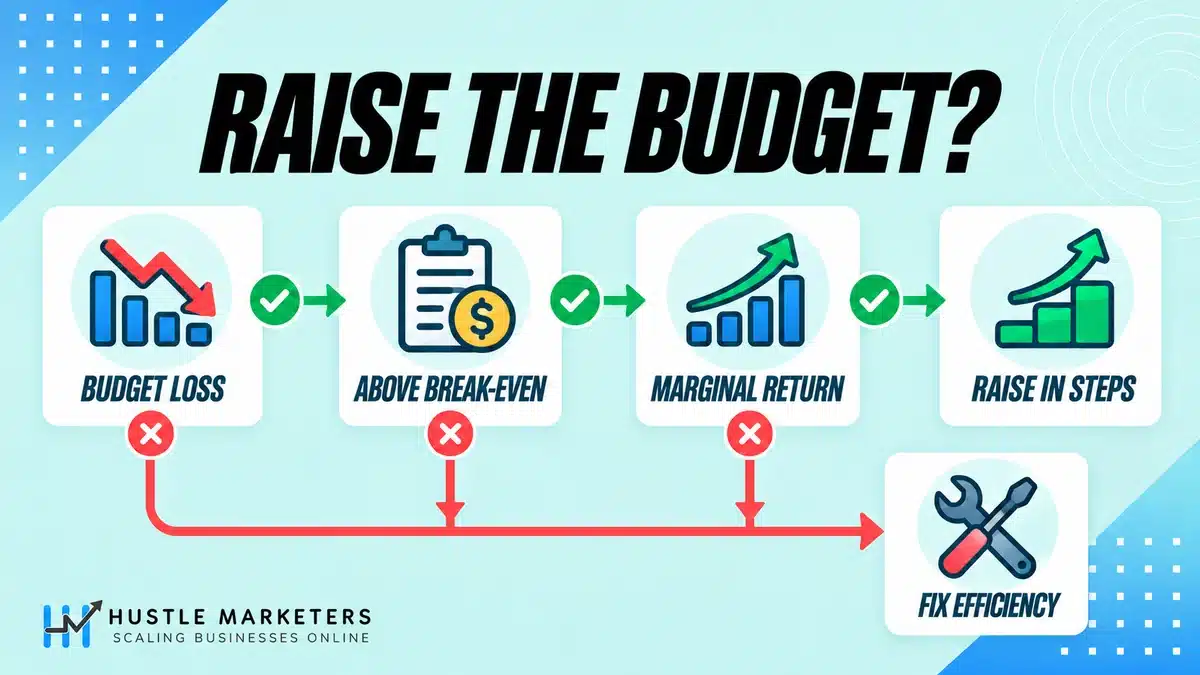
Raise the budget only when three things are true: the campaign loses real impression share to budget rather than rank, its current CPA or ROAS beats your break-even point, and the extra conversions a higher budget buys will also be profitable. If any of these fails, fix efficiency first. Average CPA alone can hide expensive marginal conversions.
| What you see | What it usually means | Decision |
|---|---|---|
| High Search lost IS (budget), low lost IS (rank), CPA or ROAS better than goal | Profitable demand is going unbought | Raise budget in measured steps and check marginal CPA or ROAS |
| High Search lost IS (budget), CPA or ROAS worse than goal | The budget is limiting losses | Do not raise yet; apply the fixes in the next section |
| Low Search lost IS (budget), high Search lost IS (rank) | Ad Rank is the constraint | Work on bids, targets, ad relevance and landing pages, not budget |
| Both lost IS columns high | Budget is spread across too many auctions | Concentrate on the best keywords, locations and hours first |
| Search impression share already high | Little demand left at current targeting | Extra budget adds little; expand targeting instead |
| Maximize conversions or conversion value showing Limited by budget | Expected by design | Use the budget simulator and marginal CPA, not the label |
| Target CPA or ROAS limited by budget, actual results far better than target | Budget, not target, has been setting bids | Set the target to your real goal first; since August 17, 2026 results move toward the target |
How do you calculate marginal CPA before adding budget?
Marginal CPA is (new cost minus current cost) divided by (new conversions minus current conversions), using simulator or test figures. Example: $100 per day buys 5 conversions, a $20 CPA. The simulator estimates $150 for 6.5 conversions. Blended CPA is $23.08, but the extra $50 buys 1.5 conversions: a marginal CPA of $33.33. If you can pay at most $30 per lead, that extra spend loses money. The CPA calculator speeds this up.
How do you calculate marginal ROAS?
Marginal ROAS is (new value minus current value) divided by (new cost minus current cost). Example: $200 per day returns $1,000, a 5x ROAS. At $300 the estimate is $1,350. Blended ROAS is 4.5x, but the extra $100 returns $350, a 3.5x marginal ROAS. With a 4x break-even, that spend is unprofitable. Find yours with the break-even ROAS calculator.
How much should you raise the budget at a time?
We have not found a safe step size in Google’s help articles, but the Google Ads API lists a learning status caused by a recent budget change. We raise budgets in steps we can measure and wait at least one conversion cycle before judging marginal results.
How do budget recommendations, simulators and Performance Planner help?
Google offers three estimating tools. Budget recommendations suggest raising, adjusting or moving budgets. Bid and budget simulators estimate clicks, cost and conversions at other settings using data from the last 7 days. Performance Planner forecasts monthly and quarterly outcomes. All three are estimates, so test them against marginal CPA or ROAS before applying.
| Tool | What it does | Limits to know |
|---|---|---|
| Recommended budget (chart icon) | Shows budget options for a campaign marked Limited by budget | Not shown if the campaign rarely meets its budget or has limited data |
| Recommendations page | Raise your budgets, Move unused budgets, Adjust your budgets for Maximize conversions, and budget or target suggestions for upcoming traffic increases | Built to grow volume; check the cost of that volume yourself |
| Bid and budget simulators | Estimate clicks, cost, impressions, conversions and value at other bids, budgets or targets | Uses the last 7 days; campaign bid simulator unavailable with shared budgets; simulators do not work with experiments running or ended in the last 8 days |
| Performance Planner | Forecasts spend and results for Search, Standard Shopping, Performance Max, Demand Gen and App campaigns | Since March 9, 2026, no Display, Video or impression share based plans; needs recent spend |
| Budget report | Shows the monthly spending limit, forecast, cost to date and daily spend | Only for average daily budgets; not compatible with Performance Max |
Sources: recommendation types, simulators, Performance Planner and the budget report. A detail that is easy to miss: a campaign marked Limited by budget gets budget ideas in a Campaigns page pop-up instead of the campaign bid simulator.
How do you fix Limited by budget in Google Ads without spending more?
Make the same budget buy better traffic. Cut search terms, hours, locations and conversion actions that spend without returning value, tighten targets so bidding is more selective, and move money from campaigns that underspend to efficient ones that are limited. The status may remain, but more of each dollar goes to auctions that pay.
| Fix | Why it frees budget | Watch out for |
|---|---|---|
| Add negative keywords from the search terms report | Stops spend on irrelevant or low-intent queries | Blocking terms that convert; check before adding broad negatives |
| Tighten match types on keywords that spend without converting | Shifts clicks to queries closer to your offer | Smart Bidding with too few queries may lose conversion volume |
| Trim the ad schedule to hours that convert | Keeps the budget for the parts of the day that pay, mainly on Manual CPC and Maximize Clicks | Cutting hours on small samples |
| Exclude or narrow weak locations and review location options | Removes spend from areas that rarely buy or call | Location data is best effort, so look at trends, not single days |
| Lower max CPCs slightly, or cap bids in a portfolio strategy | Google’s tip: slightly lower bids can earn more clicks for a limited campaign | Going too low and losing Ad Rank |
| Lower target CPA or raise target ROAS | Makes bidding pick fewer, cheaper or higher-value conversions | Volume drops, and since August 17, 2026 results track the target more closely |
| Move unused budget from underspending campaigns | Total spend stays the same while limited winners get more | Starving brand campaigns that protect cheap conversions |
| Clean up the conversion actions used for bidding | Stops Smart Bidding chasing soft actions that do not make money | Removing actions without checking what bidding optimizes toward |
Our guide on how to organize keywords for Google Ads covers structure, the keyword wrapper tool formats match types, and the Google Ads optimization checklist covers other settings that waste budget.
Why is my Google Ads campaign not spending its budget?
A campaign that does not spend its budget is not being held back by that budget. The block is elsewhere, such as strict targets or low bids, narrow targeting or low search volume, a learning phase, ads under review or disapproved, billing problems, or account-level Limited Ad Serving. Check impression share, bid strategy status and ad statuses first.
Google Ads Community threads such as “Campaign is eligible but not running” appear constantly. This is the order we diagnose them in.
| Symptom | Likely cause | Where to check | Fix |
|---|---|---|---|
| Zero impressions on a new campaign | Ads under review, disapproved, or billing not set up | Ads status, billing summary, account notifications | Resolve policy issues and payment problems |
| Low delivery on a new account despite approved ads | Limited Ad Serving | In-account notification | Complete advertiser verification and follow policy; Google updates the limits automatically over time |
| Keywords show Low search volume | Terms with little or no search history | Keyword status column | Add broader terms or looser match types |
| High Search impression share but low spend | Demand ceiling at current targeting | Impression share columns; bid strategy Limited by inventory | Expand keywords, match types or locations; accept the ceiling |
| High Search lost IS (rank) | Bids or targets too low, weak ad relevance | Impression share columns, Auction Insights | Raise bids or loosen targets; improve ads and landing pages |
| Target CPA far below actual CPA, or target ROAS far above actual | Target too strict for the market | Bid strategy report, target versus actual | Loosen the target in steps toward realistic results |
| Bid strategy shows Limited by bid limits | Maximum bid limit too low or minimum bid limit too high | Bid strategy status | Raise the maximum or lower the minimum bid limit |
| Status shows Learning after edits | Recent strategy, setting or composition change | Bid strategy status | Wait; avoid stacking more changes |
| Spend stops at certain times or places | Ad schedule, location, audience or demographic limits | Campaign settings | Widen settings that are stricter than the business needs |
| Relevant searches never trigger ads | Negative keywords blocking them | Negative keyword lists | Remove conflicting negatives |
| One campaign in a shared budget never spends | Other campaigns take the shared budget | Shared budget and campaign costs | Give that campaign its own budget |
Why is a new campaign eligible but getting zero impressions?
Eligible only means settings do not block serving. Check that ads are approved, billing is active, keywords are not all Low search volume, and bids or targets can win auctions. New advertisers should look for a Limited Ad Serving notice; Google says those limits update automatically but cannot say how long that takes.
Can targets that are too strict stop a campaign from spending?
Yes. A target CPA far below what the market allows, or a target ROAS far above it, makes Smart Bidding skip auctions it expects to miss the goal. Loosen the target toward recent actual results in steps. Maximize conversion value with a target ROAS behaves like Target ROAS, so the same applies.
What if there is not enough search volume?
Then more budget cannot help. The bid strategy may show Limited by inventory. If impression share is already high, broaden keywords and match types, add relevant locations, or accept a lower budget. Local and niche advertisers hit this ceiling often, which is why our small business PPC management guide sizes budgets to demand first.
Why is Performance Max not spending?
Performance Max has its own causes, including feed problems, weak asset groups, strict targets and slow learning. Google’s Performance Max feed tips suggest running campaigns for at least 6 weeks so the system can gather data. See why Performance Max is not performing.
What is a shared budget in Google Ads, and how does it affect Limited by budget?
A shared budget is one average daily budget used by several campaigns, and Google moves unused money from one to another automatically. That helps when some campaigns underspend while others are limited. Google recommends pairing shared budgets with portfolio bid strategies. They do not work with Performance Max, App campaigns or campaign total budgets.
Google’s About shared budgets page lists Search, Shopping, Display and Video as compatible. Google reports that customers using shared budgets with portfolio bid strategies on Search typically see 13% more conversions. Treat that as Google’s figure, not a promise for your account.
- Adding a campaign adds its budget. When you add a campaign to a shared budget, its own budget is added to the shared amount.
- Mixed strategies cause errors. The bid strategy status can show Misconfigured when a shared budget mixes bid strategies; Google’s fix is one portfolio bid strategy for every campaign in it.
- Simulators switch off. The campaign bid simulator is not available for shared budget campaigns.
- Brand can be starved. Put brand and non-brand in separate budgets if generic terms keep draining the pool. Our guide to branded vs non-branded search explains why they need different goals.
What are campaign total budgets and when should you use them?
A campaign total budget is a fixed amount spent between a start and end date instead of a daily average. Google adjusts daily spend to use the total by the end date, with no daily spending limit and no billing above the total. It suits sales, launches and tests on Search, Shopping, Performance Max, Demand Gen and YouTube.
Google launched campaign total budgets for Search, Performance Max and Shopping in open beta on January 15, 2026. The rules below come from About campaign total budgets and the campaign total budgets FAQ.
| Setting | Average daily budget | Campaign total budget |
|---|---|---|
| Best for | Always-on campaigns | Dated flights such as sales, launches and tests |
| Duration | Ongoing | Minimum 3 days; up to 90 days for Search, Shopping and Performance Max; up to 1 year for Demand Gen and YouTube, where the FAQ recommends at least 7 days |
| Daily cap | 2 times the average daily budget for most campaigns | None; the FAQ says spend can pass twice the implied daily amount after early underspend |
| Billing cap | 30.4 times the budget per month | The total you enter |
| Shared budgets | Supported for Search, Shopping, Display and Video | Not supported |
| Switching type | Budget type cannot change after a campaign is created | Budget type cannot change after a campaign is created |
Because you cannot switch an existing campaign, a total budget means a new dated campaign, or a copy of one that already uses a total budget. Google warns that changing the end date or budget on a new campaign can cause uneven spend. At Google Marketing Live 2026, Google reported a 66% average reduction in manual budget adjustments for advertisers using total budgets.
How do you pace a Google Ads budget to month-end?
Set the starting daily budget to the monthly target divided by 30.4, then check pace weekly. When spend drifts, reset the daily budget to the remaining target divided by the remaining calendar days, including today. Google caps the rest of the month at the new budget times those days, so the math and the platform rule line up.
Example: a $6,000 September target starts at $6,000 / 30.4 = $197.37 per day. On the morning of September 20 you have spent $3,600, against $3,800 at even pace. The remaining $2,400 over 11 days (20th to 30th) gives $218.18 per day. To set a starting number from goals, use the Google Ads budget calculator.
| When | What to check | What to do |
|---|---|---|
| Day 1 | Monthly target per campaign; what limited or held back spend last month | Set average daily budget = target / 30.4 |
| Weekly | Cost to date versus target x days elapsed / days in month; budget report forecast | Reset budgets with the remaining target / remaining days formula |
| Mid-month | Search lost IS (budget) and marginal CPA or ROAS on limited campaigns | Move budget from underspenders to limited campaigns that clear break-even |
| Last 10 days | Size of the pacing gap | Close the gap gradually over several days instead of one large jump |
| Last 2 to 3 days | Remaining budget, conversion lag, marginal returns | Make small changes only; do not force spend into poor auctions to hit a number |
| Sales and promotions | Event dates and expected conversion rate lift | Use a dated campaign with a total budget, or a seasonality adjustment for short events |
| Month close | Served versus billed cost; reasons for under or overspend | Record the cause and set next month’s starting budgets |
Two notes. Performance Max is not in the budget report, so pace it in your own sheet. And Google’s seasonality adjustments suit events of 1 to 7 days; they tell Smart Bidding to expect a conversion rate change, so review budgets separately.
What changed in Google Ads budgets and bidding in 2026?
Three changes matter for budget-limited accounts in 2026: campaign total budgets for Search, Shopping and Performance Max, a narrower Performance Planner, and the August 17 update that makes budget-limited Target CPA and Target ROAS campaigns track their targets. Google has also announced demand-led budget pacing for Search and Shopping.
| Date | Change | What it means for budgets |
|---|---|---|
| January 15, 2026 | Campaign total budgets open beta for Search, Performance Max and Shopping | Fixed spend for dated flights without daily edits |
| March 9, 2026 | Performance Planner stops supporting Display, Video and impression share based plans | Forecast Search, Shopping, Performance Max, Demand Gen and App only |
| May 7, 2026 | Google Marketing Live: total budget results shared; demand-led pacing announced for the coming months | Pacing that follows demand while staying within monthly budget and daily spending limits, once available |
| August 17, 2026 | Budget-limited target-based campaigns deliver more consistently toward targets | CPA can rise, or ROAS fall, toward targets unless you update them |
Demand-led pacing was announced in Google’s Google Marketing Live 2026 bidding and budgeting post. We could not confirm a rollout by September 16, 2026.
What do several guides get wrong about Limited by budget?
Mistakes we see repeated include treating Limited by budget as an order to spend more, calling the daily budget a hard cap, using Search lost IS (budget) with Maximize conversions against Google’s advice, repeating a budget-to-CPA ratio Google’s Target CPA article does not state, and advice written before August 2026 that assumes budget-limited campaigns will beat their targets.
- “Limited by budget means raise the budget.” For Maximize conversions and Maximize conversion value, Google says the status is by design. Otherwise, act only when marginal returns are profitable.
- “Your daily budget is a hard daily cap.” It is an average. Most campaigns can be billed up to twice it on one day.
- “Use lost IS (budget) to size every campaign’s budget.” Google advises against that column for Maximize conversions.
- “Google recommends a daily budget of at least 2x your target CPA.” Some guides repeat this. We could not find it in Google’s Target CPA help article. The 2x there refers to being comfortable spending up to twice your average daily budget.
- “A budget-limited Target CPA campaign will come in under target.” Since August 17, 2026, Google says these campaigns deliver more consistently toward the target.
Where do Google’s own docs disagree?
- Impression share with Maximize conversions. The article that advises against the Lost IS (budget) column also recommends impression share metrics. Use the budget simulator and leave that column out.
- Spending limit or charging limit. Budget articles say monthly spending limit; the Target CPA article says monthly charging limit, and the Target ROAS article describes a month-long billing cycle of 30.4 days. All mean 30.4 times the average daily budget.
- Total budget minimums. The main article sets a 3 day minimum for all types, while the FAQ recommends at least 7 days for Demand Gen and YouTube.
- Total budget pacing. The FAQ says Google tries to spend evenly, yet also that spend can pass twice the daily amount after early underspend. Expect uneven days.
- Beta status. Google’s January 2026 post called total budgets an open beta; the Help Center articles do not mention beta. Availability may differ by account.
Frequently asked questions
These answers cover the budget questions advertisers ask most often in the Google Ads Community and in audits: charges above the daily budget, setting a monthly budget, sizing a daily budget, eligible campaigns that do not spend, Maximize conversions showing Limited by budget, learning after budget changes, shared and total budgets, and the August 2026 bidding change.
Why was I charged more than my daily budget?
Google can spend up to twice a campaign’s average daily budget on a single day to catch traffic spikes. You are not billed above that daily limit, and for most campaigns not above 30.4 times the budget in a month. If a campaign’s billed cost looks higher, check whether its budget was raised that day, because the limit uses the highest budget set that day.
Can Google Ads spend more than my monthly budget?
Served costs can exceed it, but billing cannot. For most campaigns with an unchanged budget, Google bills no more than 30.4 times the average daily budget in a month and covers any overdelivery above that.
How do I set a monthly budget in Google Ads?
Divide the monthly budget by 30.4 and enter the result as the campaign’s average daily budget, which is Google’s own guidance: $3,000 per month becomes $98.68 per day. For most campaigns with an unchanged budget, Google then bills no more than 30.4 times that amount in the month, although a single day can be billed up to twice the daily budget. If the month drifts off pace, reset the daily budget to the remaining target divided by the remaining calendar days, and for a fixed amount over set dates use a campaign total budget instead.
What is a good daily budget for Google Ads?
The Google budget articles this guide cites do not set a universal good amount. What Google documents is a method: divide your monthly budget by 30.4, check the recommended budget Google may show for a campaign marked Limited by budget, and use bid and budget simulators to estimate results at other amounts. As a practitioner method, not a Google rule, we size the budget to the demand the campaign can actually buy, then raise it only while marginal CPA or ROAS stays profitable, and the Google Ads budget calculator turns your goals into a starting number. Some guides repeat a rule of at least 2x your target CPA per day, but we could not find it in Google’s Target CPA help article.
Why is my budget spent in the first few hours of the day?
Small budgets with high CPCs can run out quickly, especially on Manual CPC or Maximize Clicks. The budget articles cited here explain daily and monthly limits, not hour-by-hour pacing. Check the ad schedule, lower bids slightly as Google suggests for limited campaigns, or narrow keywords to the searches that convert.
Does Limited by budget hurt Quality Score?
Budget is not one of the three Quality Score components, which are expected CTR, ad relevance and landing page experience. A limited budget reduces how often you show, not how Google rates your ads. Low impression share caused by rank is a different issue from budget.
Should I raise the budget when Maximize conversions says Limited by budget?
Not because of the label. Google says Maximize conversions and Maximize conversion value are limited by budget by design because they aim to spend the full budget. Use the budget simulator to estimate extra conversions, work out the marginal CPA, and raise the budget only if that marginal CPA is affordable.
How much should I increase my Google Ads budget at a time?
We have not found a step size in Google’s help articles. Increase in steps you can measure, wait at least one conversion cycle, and compare marginal CPA or ROAS with your break-even point.
Why is Google not showing a recommended budget?
Google does not show one when a campaign rarely meets its budget or has limited data. A campaign that underspends needs the not-spending diagnosis, not a bigger budget.
Does changing the budget restart the learning period?
It can. The Google Ads API lists a bid strategy status for learning caused by a recent budget change, alongside learning from new strategies, setting changes and composition changes. Make budget changes in measured steps and avoid stacking them with target or structure edits.
Can Performance Max use a shared budget?
No. Google lists Performance Max among the campaign types that are not compatible with shared budgets, along with App campaigns and campaigns using total budgets. Performance Max can use an average daily budget or, for dated campaigns, a campaign total budget.
Can I switch an existing campaign to a campaign total budget?
No. Google says you cannot change the budget type after a campaign is created. Create a new campaign with start and end dates and a total budget, or copy a campaign that already uses one.
What happens to budget-limited Target CPA campaigns after August 17, 2026?
They deliver more consistently toward the target you set. Google’s example is a $10 target CPA campaign achieving $5 that now delivers closer to $10. Google will not change targets or budgets for you, so review each target yourself: keep it, move it toward recent performance, set a custom one, or change the bid strategy.
How do I find all campaigns limited by budget across accounts?
In one account, filter the Campaigns page by the Limited by budget status. Across many accounts, query campaign.primary_status_reasons for BUDGET_CONSTRAINED through the Google Ads API. Add Search lost IS (budget) so you can rank the campaigns by missed opportunity.
Want a second opinion on a budget-limited Google Ads account?
If your campaigns are limited by budget, not spending, or behaving differently since August 17, 2026, an outside review can separate budget problems from bidding and targeting problems quickly. Hustle Marketers is a Google Partner agency, and our free audit reviews budgets, impression share, targets and wasted spend.
We manage accounts through our Google Ads agency and PPC management services, month to month, and clients always own their ad accounts. See PPC management pricing, try the Google Ads audit checklist, or request your free audit and we will look for the budget and bidding changes most likely to pay back.
About the author: Ishant Sharma is a Google Ads, Microsoft Ads and SEO specialist who has worked in digital marketing since 2013, and the founder of Hustle Marketers, a Google Partner agency. Over that time he has worked with ecommerce brands, local businesses and B2B advertisers, and his agency has worked with more than 2,500 brands. He manages Google Ads budgets, bidding and pacing for the accounts his team runs.
Summarise this article with: