How to List Your Business on Bing Places for Business

Ishant
Published : April 10, 2024 at 4:16 pm
Ishant
It is no longer optional to list your business on Bing Places for Business. By 2026, Bing is bringing visibility beyond Bing Search and making access to Microsoft Edge, Windows Search, Cortana, Copilot, ChatGPT-style products, and AI-assisted local discovery. By not having a functional, tidy Bing Places listing for your business, you will miss out on a growing audience with a clear intention to buy.
Here is the clear truth: Bing Places works like Google Business Profile, but the competition is lower, and traffic quality is often higher.
This guide explains how to list, verify, optimize, and rank your business on Bing Places from start to finish without filler. Whether you run a local service, an ecommerce brand, an agency, or a large enterprise location, this is the only Bing Places guide you need for 2026.
What Is Bing Places for Business?
Bing Places for Business is Microsoft’s local listing system that helps businesses appear in:
- Bing local search results
- Bing Maps
- Microsoft Edge search suggestions
- Windows desktop search
- Voice search across the Microsoft ecosystem
- AI-driven answers that pull business data
A Bing Places listing shows:
- Business name
- Address and phone number
- Business category
- Website
- Hours of operation
- Photos
- Services
- Reviews
- Location signals
When set up correctly, Bing Places becomes a strong local SEO asset, especially in markets where Google competition feels overcrowded.
Why Bing Places Matters More in 2026
Most businesses still skip Bing. That gap creates opportunity.
In 2026:
- Bing has less competition than Google
- Microsoft Ads CPCs cost less
- Local results rank faster
- AI systems pull structured data from Bing sources
Businesses listed on Bing Places gain:
- Faster local visibility
- Stronger trust signals
- More exposure in AI answers
- More calls and direction requests from desktop users
- Wider reach across Microsoft-owned platforms
If you already spend money on local SEO or ads, ignoring Bing Places means lost demand.
Who Should List Their Business on Bing Places?
Bing Places works best for:
- Local service businesses like lawyers, dentists, clinics, and contractors
- Ecommerce brands with physical stores
- Franchises and multi-location companies
- B2B service providers
- SaaS companies with office locations
- Restaurants, hotels, and hospitality brands
- Agencies and consultants
If customers can visit, call, or book you, Bing Places is required. Getting noticed online demands best SEO practices, explore our 25 SEO checklist to boost your ecommerce business.
Requirements Before Listing on Bing Places
Before starting, confirm you have:
- A real business address, not a virtual one
- A working phone number
- A live website, recommended but not required
- Business hours
- Clear category selection
- Access to email and phone for verification
Optional but helpful:
- Google Business Profile for import
- Existing reviews
- A logo and real business photos
Benefits of using bing places for business
As we mentioned, Bing boasts 130 million active users and potentially less competition compared to Google. This translates to several practical advantages for local businesses when they claim and manage their Bing Places for Business listing:
1. Enhanced Local Visibility
Optimizing your Bing Places for Business listing can significantly improve your ranking in local search results. This means appearing higher when potential customers in your area search for businesses like yours, leading to increased online visibility and attracting more targeted traffic.
2. Direct Customer Engagement:
Bing Places for Business goes beyond simply showing your listing. It allows you to engage directly with potential customers. Respond to reviews (both positive and negative!), showcase high-quality photos and videos, and highlight special offers, all within your listing itself. This builds trust, encourages interaction, and ultimately guides customers toward choosing your business.
3. Diversified Online Presence:
Claiming your Bing Places for Business listing expands your online reach beyond Google, tapping into a new audience of Bing users. Remember, Bing users often represent a different demographic with unique search habits. This diversification can open doors to a whole new customer base waiting to be discovered.
By actively managing your Bing Places for Business listing, you unlock valuable opportunities to attract local customers, build brand awareness, and ultimately fuel your business growth.
How to List Your Business on Bing
Step 1: Visit the Bing Places for Business website.
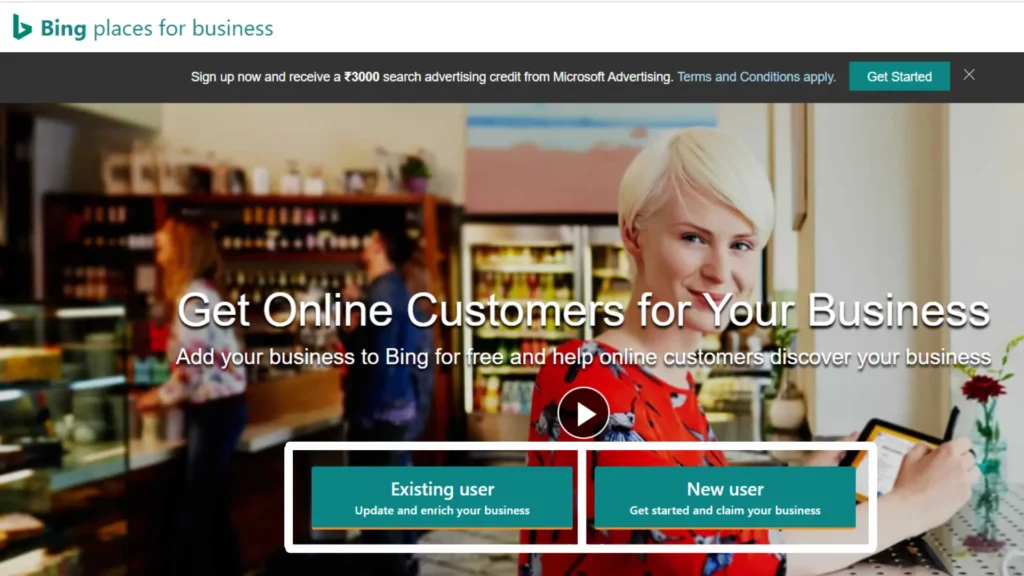
Listing your business on Bing is a simple process. To begin, visit bingplaces.com and click “Existing user” to sign in or “New user” to create a new account.
Step 2: Claim Your Business Listing or Create a New One
Bing provides two simple ways to create your local listing.
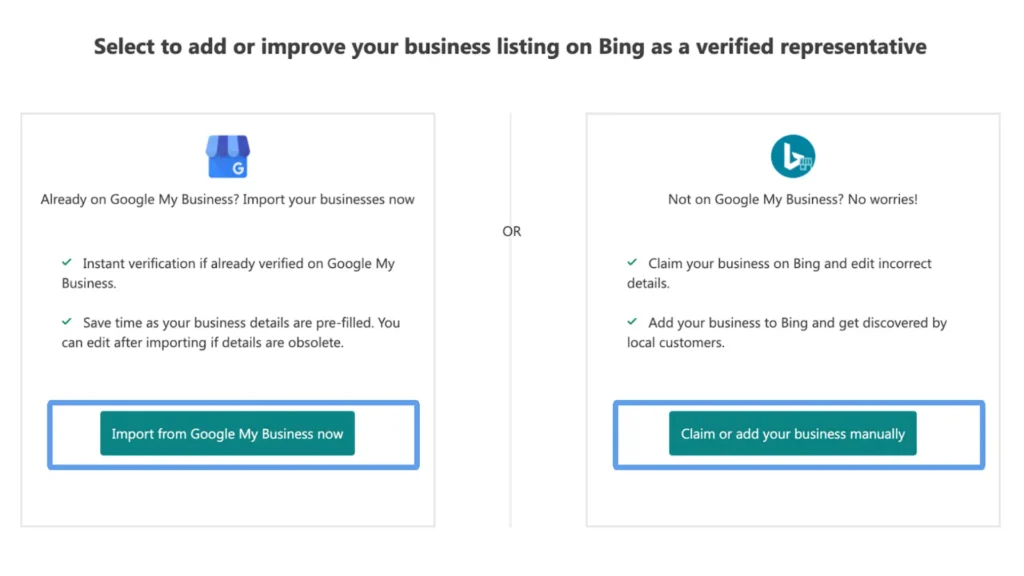
1. Import from existing Google My Business account
If you have an existing listing on your Google Business profile, then you can directly import it from there, and if you have verified Google listing, then you will get instant verification
2. Claim or add your business Manually
To add your business manually, simply enter your business name and location to search for any existing listings.
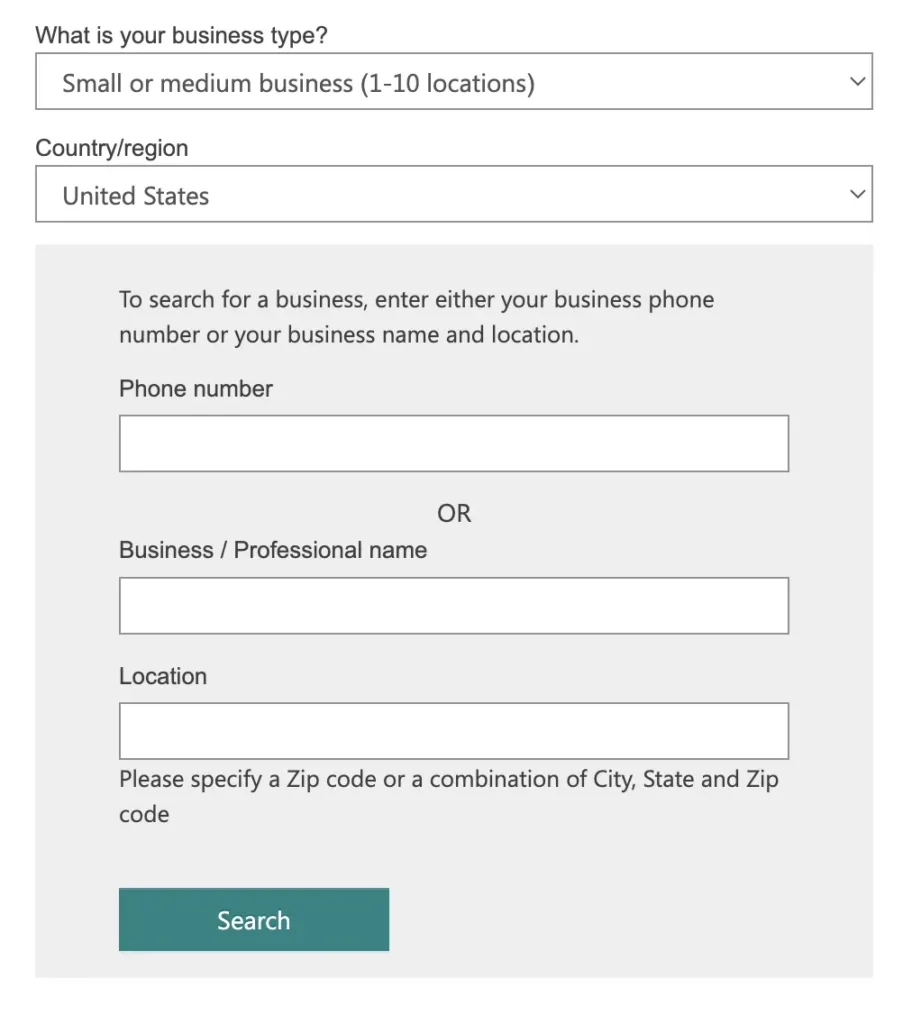
If found, select the correct one and click “Claim Business.”. Don’t see your business listed yet? No worries! Creating a new listing is just as straightforward. Click “Create New Business.”
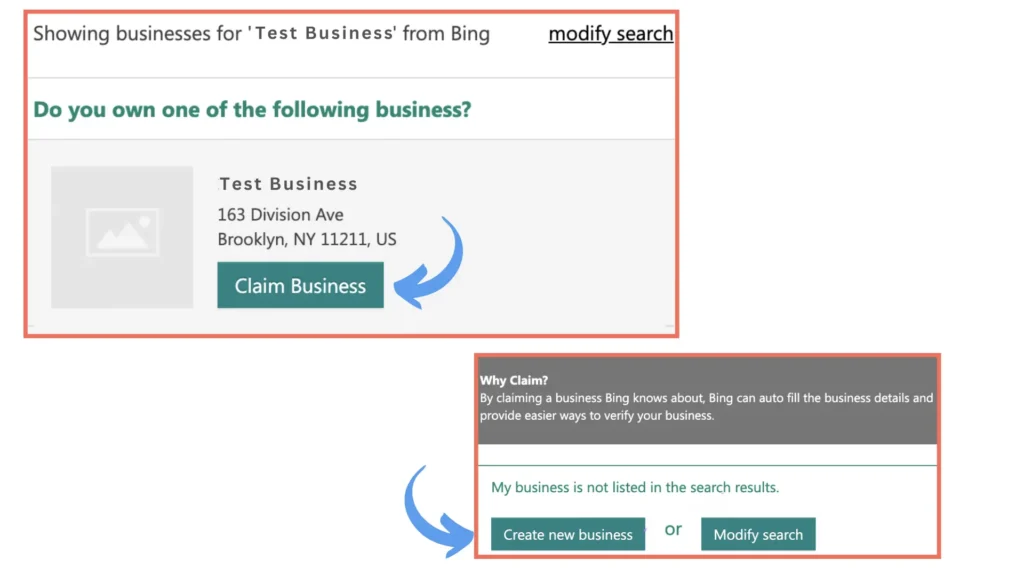
Fill out the form with accurate details about your business, including its name, address, phone number, website URL, and category.
Step 3: Add Your Business Listing Details
1. In this step, if your business is listed, you only need to confirm all the details accurately and edit it if it is not.
2. If you are doing it manually, then you have to fill in certain fields like business name, address, phone number, website, and hours of operation.
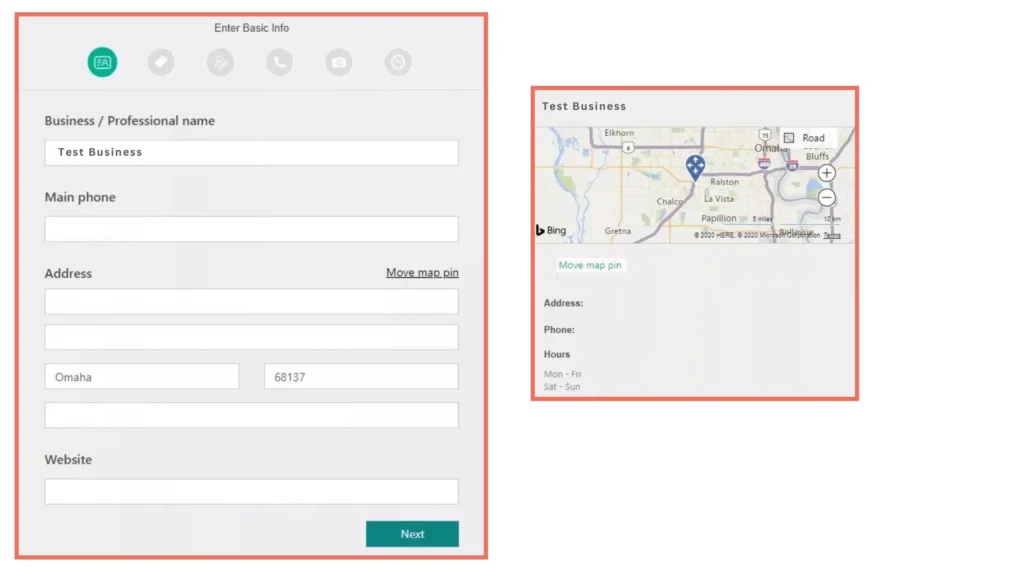
Note: Focus on the NAP accuracy. NAP (name, address, and place) should be the same all across the directories.
Next, you have to fill out the segment stating what sectors you operate in, and you can add up to 10 categories that relate to what your business does. Provide a detailed description of your business.
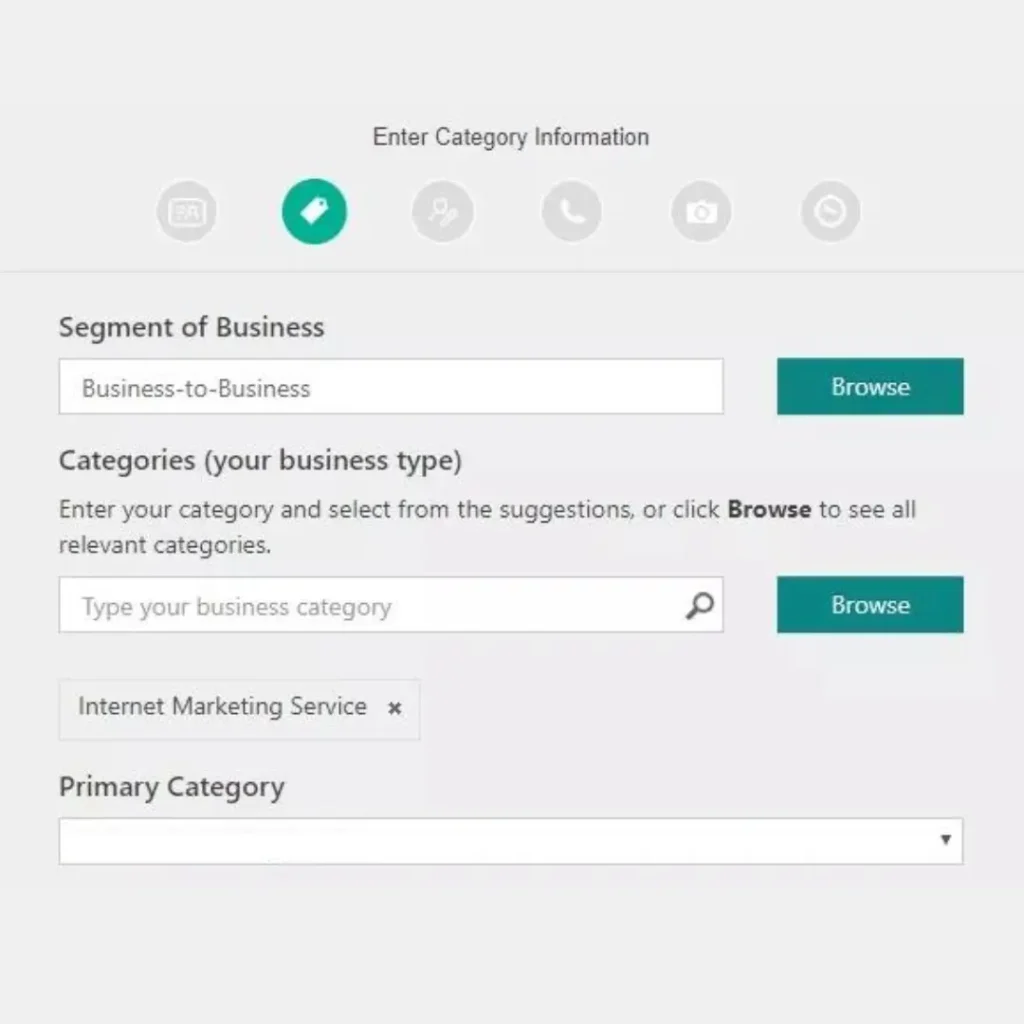
Pro tip: Include relevant keywords in your description for more relevancy.
After that, you will be required to fill in your contact details, like your phone number, email, and other additional details.
Then the last step is to add high-quality photos of your business to stand out from the rest of the competition.
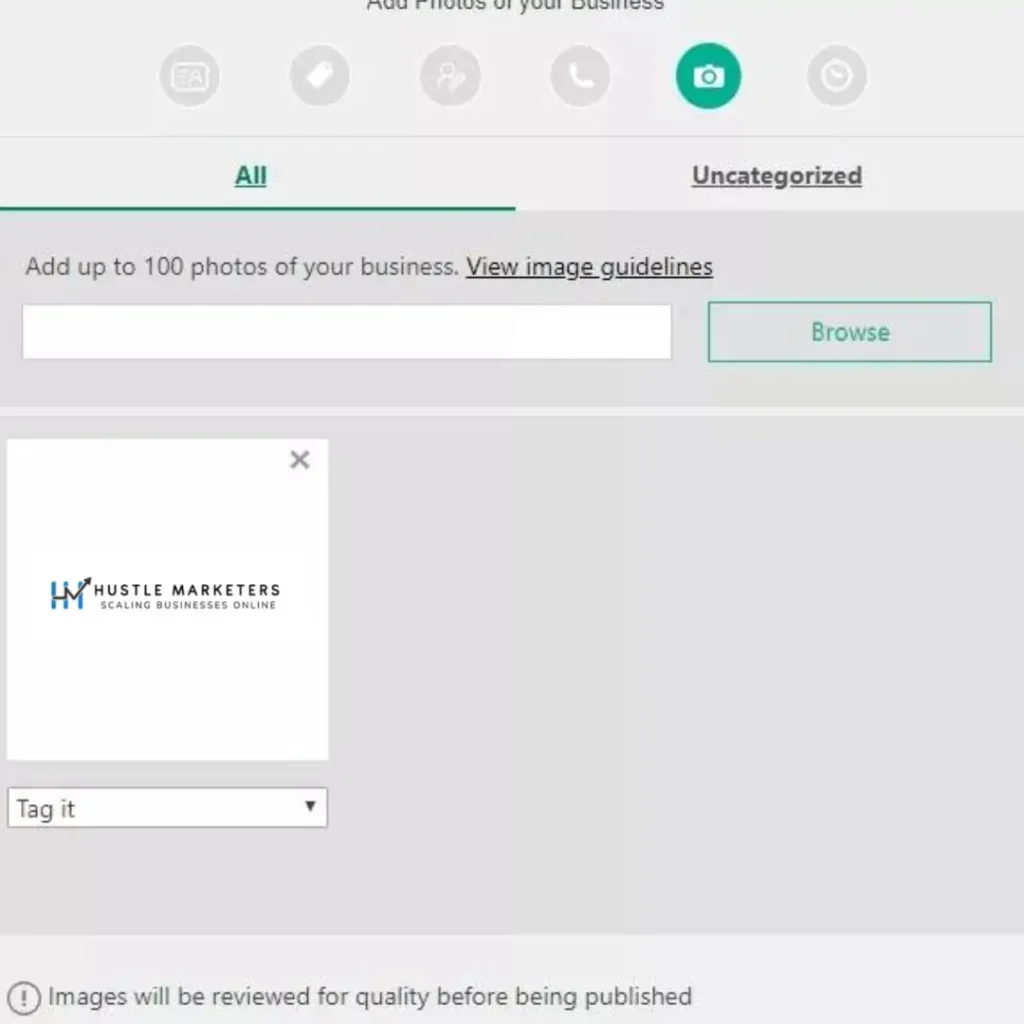
Step 4: Verify your business listing
After completing your Bing business profile, you need to verify your listing.
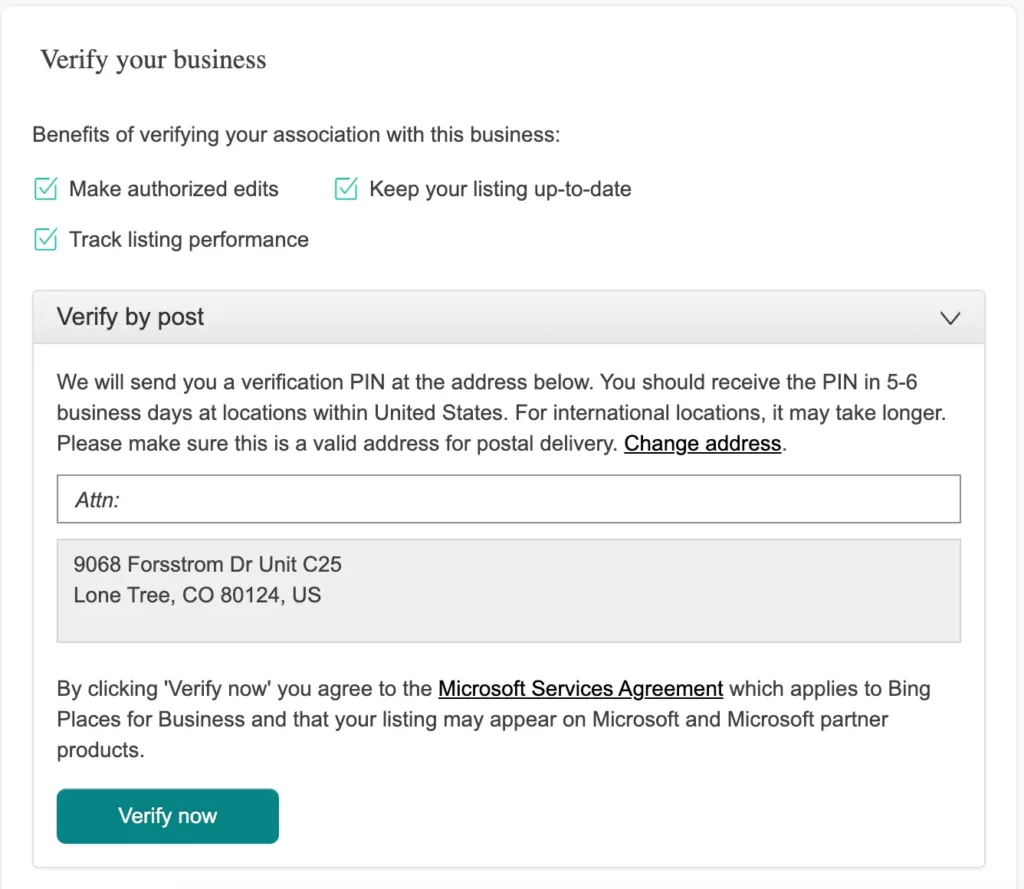
You can verify your account by:
1- Phone number
2- Postcard
3- Email
4 -SMS
5- Web verification
Once your listing has been verified, it will go through a 7–14 day publishing cycle before becoming visible on Bing Maps and Bing’s local SERPs.
Bing Places Optimization Checklist
Bing Places optimization is ongoing. It combines accuracy, trust, engagement, and website alignment. Use this checklist to keep your listing stable and visible long term.
1. Claim, Verify & Lock Ownership
Ownership must stay clean before anything else.
Checklist:
- Claim the listing under the correct Microsoft account
- Finish verification by postcard, phone, or email
- Remove old managers or duplicates
- Secure login access internally
Unverified listings rarely hold rankings.
2. Perfect NAP Consistency Everywhere
Bing reacts strongly to mismatched data.
Checklist:
- Business name matches the website
- Address format stays identical everywhere
- Phone number stays consistent across:
- ○ Website
- ○ Bing Places
- ○ Yelp
- ○ Apple Maps
- ○ Directories
Even small differences weaken trust.
3. Select the Right Primary & Secondary Categories
Categories control where you appear.
Checklist:
- Choose one precise primary category
- Add only relevant secondary categories
- Match categories with:
- ○ Website services
- ○ Page content
- ○ Search intent
Avoid adding unrelated categories.
4. Optimize Business Description for Intent
Descriptions guide relevance.
Checklist:
- Explain your service clearly
- Mention core offerings naturally
- Reference service locations
- Keep text readable
Descriptions that reflect real searches rank better.
5. Add Complete Business Information
Incomplete listings struggle.
Checklist:
- Correct hours including holidays
- Services listed clearly
- Accurate service areas
- Email added if relevant
- Business opening date filled
Completeness improves stability.
6. Upload High-Quality, Real Photos
Images build trust and action.
Checklist:
- Exterior street photos
- Interior photos
- Team images
- Service or product images
- Upload fresh photos every 30 to 45 days
Fresh uploads keep listings active.
7. Optimize Website Before Scaling Bing Places
Bing Places supports your site, not replaces it.
Checklist:
- Service pages match listing categories
- Clear contact details
- Location pages for multiple offices
- Fast loading and mobile-friendly design
- Local business schema
Weak sites cap rankings.
8. Review Strategy & Management
Reviews shape trust and clicks.
Checklist:
- Request steady organic reviews
- Reply to all reviews
- Avoid spikes or fake activity
- Watch sentiment patterns
Consistency matters more than volume.
9. Engagement Signal Optimization
Bing tracks interaction.
Checklist:
- Website clicks
- Phone calls
- Direction requests
- Views versus actions
Low engagement limits growth.
10. Citation & Directory Alignment
External signals matter.
Checklist:
- Yelp optimized
- Apple Maps claimed
- Industry directories updated
- Consistent local listings
Citations confirm legitimacy.
11. Service Area Setup for SABs
Wrong service areas hurt trust.
Checklist:
- Hide address if no walk-ins
- Add real service locations only
- Match website coverage
- Avoid city stuffing
Accuracy beats reach.
12. Regular Listing Activity
Inactive listings fade.
Checklist:
- Update photos monthly
- Adjust seasonal hours
- Review services quarterly
- Monitor insights
Consistency keeps rankings steady.
13. Link Bing Places With Microsoft Ads
This step is often skipped.
Checklist:
- Connect Bing Places to Microsoft Ads
- Enable location extensions
- Use matching landing pages
- Track calls and forms
Paid and organic visibility strengthen together.
14. Monitor Insights & Fix Drops Early
Bing rarely warns you.
Checklist:
- Track impressions weekly
- Watch sudden drops
- Recheck NAP and categories
- Monitor reviews and engagement
Early fixes prevent long-term damage to your Bing Places for Business listing. Contact us today for a free consultation and unlock the full potential of local search.
Bing Places + Microsoft Ads: The Powerful Combination to Boost Performance
Bing Places, on its own, improves local visibility. Microsoft Ads, on its own, creates demand. When both are connected and optimized together, they create a compounding effect that most businesses completely overlook. This combination turns verified local presence into stronger paid performance and converts paid traffic into long-term trust signals that support organic visibility.
Here is how this combination works in the real world.
1. Location Extensions That Actually Convert
When Bing Places is linked with Microsoft Ads, your ads automatically pull verified business information such as address, phone number, hours, and map location. This removes friction for users who want quick action.
Why this matters:
- Ads look more trustworthy the moment they appear
- Users can call or get directions without extra steps
- Local-intent clicks convert at a higher rate
Location extensions are functional, not decorative, and they directly increase CTR and call volume.
2. Higher Ad Rank Without Higher Bids
Microsoft Ads considers relevance and expected engagement when deciding ad rank. A clean and optimized Bing Places listing strengthens both signals.
What this leads to:
- More screen space on search results
- Better visibility without increasing CPC
- Stronger quality signals over time
This is one of the few ways to improve ad position without raising bids.
3. Stronger Trust Signals for Searchers
When users see a verified business with accurate details, hesitation drops. Trust forms before the click.
Trust signals include:
- Verified local listing
- Accurate address and hours
- Reviews connected to the business
- Consistent branding across Bing surfaces
Reduced hesitation leads to higher conversion rates.
4. Better Performance for Local & High-Intent Searches
Searches with clear urgency perform better when Bing Places data feeds directly into Microsoft Ads.
These include:
- “near me”
- “open now”
- “service in [city]”
- “best [service] in [location]”
These queries show buying intent, and the combined setup captures that demand more efficiently.
5. Improved Call Tracking & Offline Attribution
When Bing Places is connected correctly, call data aligns cleanly with ad reporting.
This improves:
- Call extension accuracy
- Phone call conversion tracking
- Offline action attribution
This closes the gap between ad spend and real business outcomes.
6. Competitive Advantage in Low-Saturation Markets
Microsoft Ads still operates with less competition than Google in many industries, especially at the local level.
Key advantages include:
- Lower advertiser density
- Cheaper CPCs
- Strong desktop and enterprise audience
Most competitors either run ads without Bing Places or have listings with no paid integration. Doing both creates an immediate edge.
7. More Consistent Visibility Across the Bing Ecosystem
The benefits of this integration extend beyond standard search ads.
Your business gains exposure across:
- Bing Search
- Bing Maps
- Microsoft Ads results
- Partner networks like Yahoo and AOL
This increases reach while keeping messaging aligned.
8. Faster Learning for Microsoft Ads Algorithms
Microsoft Ads relies on verified data and engagement signals to optimize delivery. Bing Places supplies both.
The result:
- Faster optimization cycles
- Cleaner audience signals
- More efficient budget use
The platform performs better when it clearly understands who you are and where you operate.
How to Connect Bing Places with Microsoft Ads
Connecting Bing Places with Microsoft Ads is not a checkbox task to rush. When the connection is handled correctly, it unlocks location extensions, improves ad trust, and increases click-through rate and call volume. When it is done carelessly, it creates data mismatches, tracking gaps, and wasted impressions. There are various types of Bing extensions that give you the upper hand in maximizing your Microsoft ad campaign. Follow the steps below to ensure clean data flow and stable performance.
Step 1: Make Sure Your Bing Places Listing Is Fully Verified
Before doing anything inside Microsoft Ads, your Bing Places listing must be fully verified and stable.
Checklist:
- Listing is claimed and verified using a postcard, phone, or email
- Business name matches the website exactly
- Address, phone number, and hours are accurate
- Website URL points to the correct domain
- No duplicate or outdated listings exist
If verification is incomplete, Microsoft Ads will not reliably pull location data. Read the complete guide on Bing advertising here.
Step 2: Use the Same Microsoft Account for Both Platforms
This step causes more problems than most people realize. Bing Places and Microsoft Ads must be connected through the same Microsoft account or through full admin access.
Best practice:
- Use one Microsoft email
- Grant full admin access to both platforms
- Avoid partial permissions or agency-only access
Account mismatches often break the sync and prevent location extensions from showing.
Step 3: Log In to Microsoft Ads and Navigate to Extensions
Once logged into Microsoft Ads:
- Go to Tools
- Click Assets
- Select Location Extensions
- Choose Link to Bing Places for Business
At this stage, Microsoft Ads searches for Bing Places listings associated with your account and checks eligibility.
Step 4: Select the Correct Bing Places Business Location
If multiple locations exist, Microsoft Ads will display a list. Before selecting, review each option carefully.
Important checks:
- Address matches the landing page used in ads
- Phone number aligns with the call tracking setup
- The business category reflects the advertised service
- No closed or old locations are selected
For multi-location businesses, you can assign locations to campaigns or ad groups based on targeting needs.
Step 5: Enable Location Extensions at the Campaign Level
After linking locations, assign the extension to active campaigns.
Checklist:
- Attach to campaigns targeting local or high-intent searches
- Prioritize service-based or visit-driven campaigns
- Avoid national or non-local campaigns
Location extensions work best when local intent is clear.
Step 6: Sync Call Tracking Correctly
Call tracking must be configured without breaking NAP consistency.
Checklist:
- Do not permanently replace the Bing Places phone number
- Use dynamic call tracking only
- Test calls from ads and Bing Maps separately
Incorrect call tracking can suppress extensions or reduce trust.
Step 7: Review Location Extension Preview
After setup, confirm everything appears correctly.
Checklist:
- Use the Ad Preview Tool
- Search from the correct city or ZIP code
- Check address, map pin, and call button visibility
If extensions do not appear, recheck permissions, verification status, and campaign eligibility.
Step 8: Monitor Performance Inside Microsoft Ads Reports
Once live, performance tracking becomes critical.
Track regularly:
- CTR changes on campaigns with location extensions
- Call volume and cost per lead
- Impression share improvements
Microsoft Ads optimizes faster when location data stays clean and verified.
Step 9: Keep Bing Places Updated Continuously
Any updates to business details must always be made in Bing Places first.
This includes:
- Business hours
- Address changes
- Phone number updates
- Website URL changes
Microsoft Ads pulls location data from Bing Places, not directly from your website. Outdated listings quietly reduce performance over time. Explore difference between Manual and Automated bing extension to know what you need to automate your ad campaign and explore what fits best for your ad campaign.
Common Bing Places Mistakes to Avoid That Kill Rankings
Most businesses do not lose visibility on Bing Places because of strong competition. They lose it because of small mistakes that slowly erode trust, disrupt data alignment, or prevent Bing from fully validating the listing. Unlike Google, Bing is less forgiving and recovers more slowly once confidence drops. The issues below are the most common reasons Bing Places listings fail to rank or stay visible.
1. Inconsistent Business Information (NAP Mismatch)
Bing relies heavily on consistency between Bing Places, Microsoft Ads, your website, and third-party directories. Even small variations can cause confusion within Bing’s validation system.
Common problems include:
- Different phone numbers on Bing Places and the website
- Slight changes in the business name, such as adding keywords or legal suffixes
- Address formatting differences across platforms
These inconsistencies weaken trust and can prevent listings from appearing in local results or ads.
2. Leaving Listings Unverified or Partially Verified
Unverified or partially verified listings rarely perform well. Bing limits visibility when it cannot fully verify a business’s legitimacy.
Common mistakes include:
- Skipping postcard or phone verification
- Assuming a pending status is acceptable
- Editing key details after verification without rechecking status
If verification is not complete, rankings remain capped.
3. Choosing the Wrong Primary Business Category
Business categories carry more weight than many businesses expect. A poorly chosen primary category pushes the listing into the wrong search space.
Examples include:
- Selecting a broad label instead of a specific service
- Using generic terms that do not match search intent
- Adding multiple loosely related categories
This reduces relevance and limits where the listing can appear.
4. Keyword Stuffing of the Business Name
Adding services, cities, or promotional phrases into the business name may seem helpful, but Bing flags this quickly.
Common examples include:
- Adding city names or service keywords
- Using slogans inside the business name
This often leads to ranking suppression, forced edits, or listing suspension. The business name must reflect real-world usage only.
5. Ignoring Duplicate Bing Places Listings
Duplicate listings split authority and confuse Bing’s local index. This usually happens when businesses move, rebrand, or switch agencies.
Common causes include:
- Old locations left active
- Agencies creating new listings instead of claiming existing ones
- Imported data creating duplicates
Duplicates dilute trust and must be resolved.
7. Weak or Missing Business Description
Bing actively reads the business description to understand relevance. Leaving it empty or generic wastes ranking potential.
Weak descriptions:
- Do not explain services clearly
- Do not reinforce category alignment
- Do not support local relevance
A clear, service-focused description strengthens visibility.
Conclusion
Bing Places for Business is no longer optional. It feeds Microsoft Ads, AI search results, and local discovery across the Microsoft ecosystem.
While most brands focus solely on Google, smart businesses quietly win on Bing through clean listings and structured optimization. Lower competition, faster rankings, and lower conversion costs make Bing Places one of the strongest local channels today.
At Hustle Marketers, we treat Bing Places as part of a full local and paid growth system that drives calls, bookings, and revenue.
If competitors ignore Bing, that gap works in your favor.
Frequently Asked Questions
Is Bing Places for Business free?
Do I need a Google My Business listing to use Bing Places for Business?
How can I improve my ranking in Bing local search results?
How long does it take for my Bing Places for Business listing to appear in search results?
Can Bing Places for Business help me reach new customers?
Is Bing Places worth it in 2026?
How long does ranking take?
Can it replace Google Business Profile?
Do reviews matter on Bing?
Can service-area businesses rank?
Does Bing Places support AI search visibility?