PMAX Checklist: Step-by-Step Guide for Advertisers

Ishant
Published : April 2, 2026 at 10:20 am
Updated : October 13, 2026 at 5:21 am
Ishant
Performance Max campaigns have changed how people use Google Ads. But the truth is, most of them underperform not because the tool itself is bad, but because people set them up and run them poorly. That makes a clear, step-by-step PMAX Checklist all the more important.
Lots of advertisers just trust the automation completely and hope for good outcomes without knowing what goes on beneath the surface. That approach usually backfires. The campaigns that actually work well come from regular review, experiments, and small fixes done over time.
This PMAX Checklist is designed to help you move beyond guessing and give you real command over your campaigns. No matter if you handle online store sales or lead collection, sticking to an organized plan means your choices rest on solid numbers.
What Is Performance Max & Why Do Checklists Matter?
Performance Max stands as Google’s smartest campaign format. It leans on machine learning to show ads everywhere: Search, Display, YouTube, Gmail, and Shopping.
Here is the catch, though.
The system works like something hidden from view.
You lose a lot of the direct control you get in older campaign types, cannot view all keywords and cannot manage every placement completely. For that exact reason, having a solid PMAX Checklist is important.
If you skip regular structured checks:
- The budget ends up spent on traffic that is of no use
- Conversions fall off, and nobody knows exactly why
- Growing the campaign starts feeling unpredictable
Many people see failure after they push campaigns live and sit back, waiting for magic to happen, without a real PMAX Checklist in place. They skip close analysis of the data, leave weak areas as they are, and forget to make regular improvements.
That is the advantage of hiring a Google Ads Specialist like Ishant Sharma. They stick to organized methods rather than handing everything over to automation without thought.
How to Use This PMAX Checklist (Before You Start)
Before you think about fixing or optimizing anything, get clear on the right way to handle this PMAX Checklist.
You do not have to look at every single item every day.
Daily Checks
- Budget spending
- Conversion activity
- Major performance drops
Weekly Checks
- Search terms
- Asset group performance
- Product performance
Monthly Checks
- Auction insights
- Scaling decisions
- Structural changes
One major error people keep making is jumping into optimization too soon. Performance Max has to collect enough information first so it can figure things out. Jump in with changes before solid data exists, and you throw the learning process off track.
That explains why people like Google Ads Expert, Ishant Sharma, stick to this order every time:
- Data first
- Then optimization
- Then scaling
The entire PMAX Checklist aligns exactly with that sequence.
30+ PMAX Checklist to Follow to Maximize Your Campaign Performance
1. Campaign Objective & Conversion Setup
Everything starts here inside your PMAX Checklist. Pick the wrong main goal for the campaign, and Google ends up chasing the wrong target, no matter how nicely you handle the rest. Since Performance Max runs almost entirely on the inputs you give, nailing the right conversion action matters a ton.
Make sure the system pushes toward actual results that help the business, such as completed sales or solid leads, rather than shallow interactions.
Campaign Goal Selection in Google Ads
 ArmorPoxy-Google-Ads-1024×628.webp” alt=”Campaign Goal Selection in Google Ads ” class=”wp-image-20610″/>
Whether you choose sales, leads, or traffic directly impacts how Google optimizes delivery. Selecting the wrong objective sends the algorithm in the wrong direction from the start.
Double-check these points:
- Primary conversions connect directly to actions that bring in money
- Secondary conversions stay out of the way of the main goal
- Conversion values match real income from the business
Turn on enhanced conversions every time because they sharpen the data and strengthen the signals. Mess this part up, and the campaign heads will be heading in the wrong direction from day one. That makes it the single most important item on any PMAX Checklist.
2. Conversion Tracking Accuracy

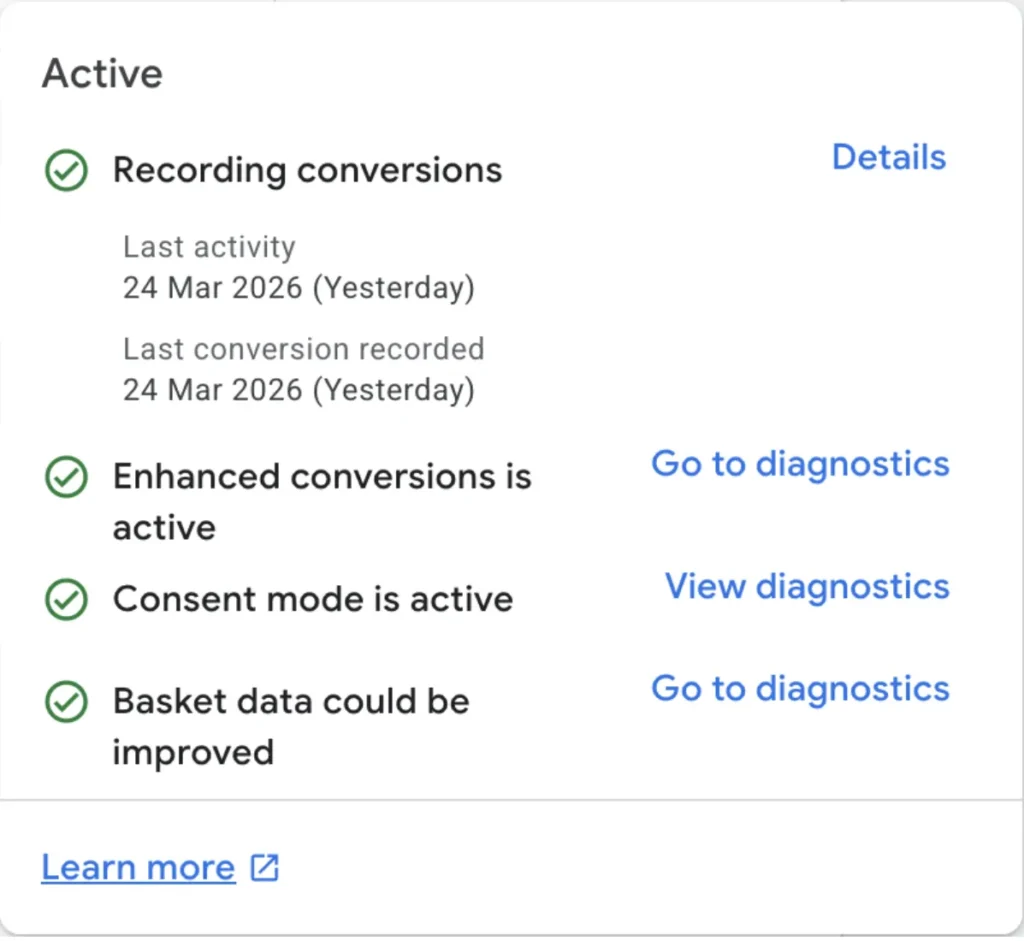
Your PMAX Checklist falls apart quickly if the tracking doesn’t work properly. All the choices you make later rest on clean, trustworthy numbers. Broken tracking, slow reporting, or counting the same action twice means Google learns from bad information and burns money on weak results. You have to go for deep validation instead of assuming everything is fine.
Look closely at:
- Conversion tags trigger properly, right at the key moment
- No extra or repeated conversions show up in reports
- Enhanced conversions run smoothly and send the correct details
Compare everything against GA4 reports too, so you spot any big differences between the two. Tiny mismatches happen sometimes, but big ones point to real trouble. Google Ads Specialist Ishant Sharma always locks down tracking before considering growth.
3. Budget Spending & Delivery
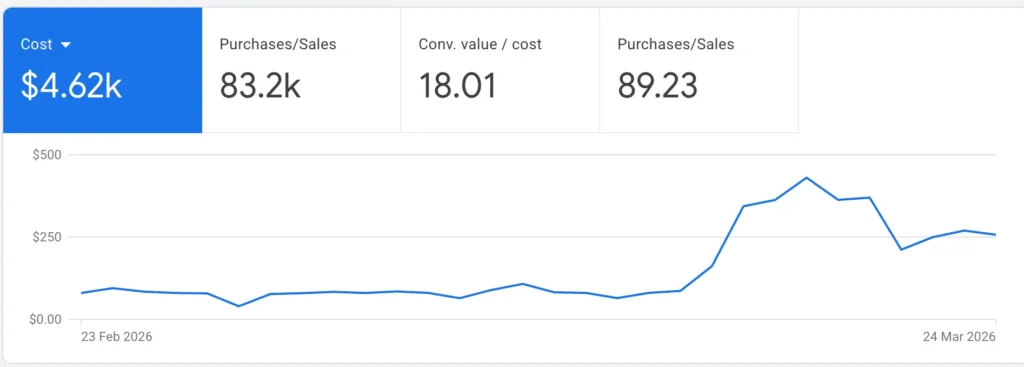
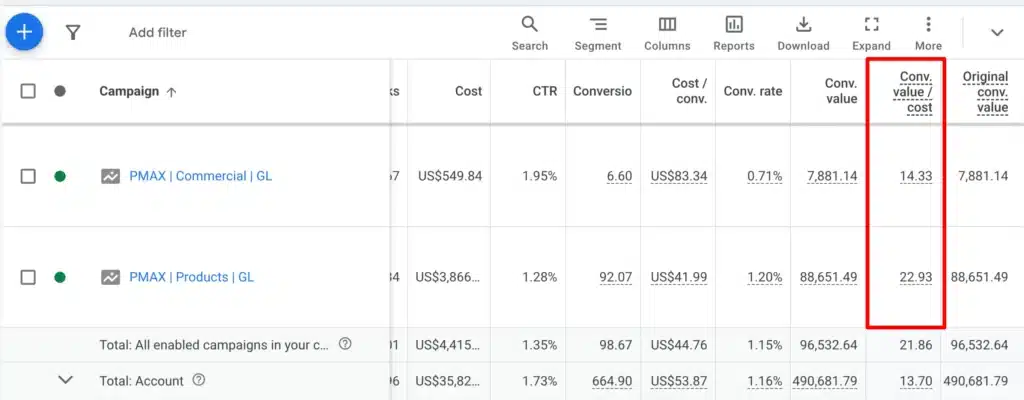
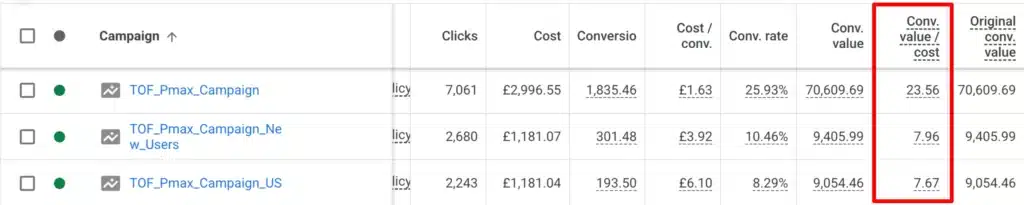
How much you spend matters way beyond the dollar amount. It shapes how fast and how well the campaign picks up patterns. In a good PMAX Checklist, you have to judge whether the budget leaves enough room for useful learning or pours money down the drain with nothing to show for it. Bad budgeting leads to shaky results and makes growth harder than it needs to be.
Cost
Conv. value/cost:
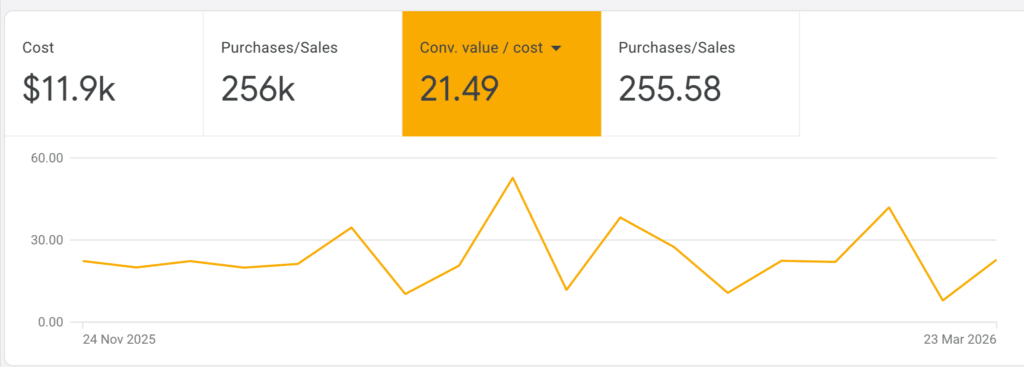
Check these areas:
- Does the campaign hit budget caps and stop showing
- Does daily spending stay even or jump around a lot
- How does the cost line up against actual conversions
Too little budget starves the learning phase. Too much without guardrails wastes money fast. Aim for the sweet spot where the system has room to improve while still keeping profit in sight.
How to go there:
Google Ads account → Campaigns → Select PMax campaign → Overview → Graph
You can also check:
Campaigns → Recommendations / Insights for budget-related alerts
4. Are We Getting Conversions or Not
Even though this feels basic, it ranks among the most necessary pieces of your PMAX Checklist. You cannot stop at glancing at the totals. Look at patterns instead of single-day snapshots. When conversions look good one day and then fade the next, that points to something unsteady that deserves attention right away.
Look into:
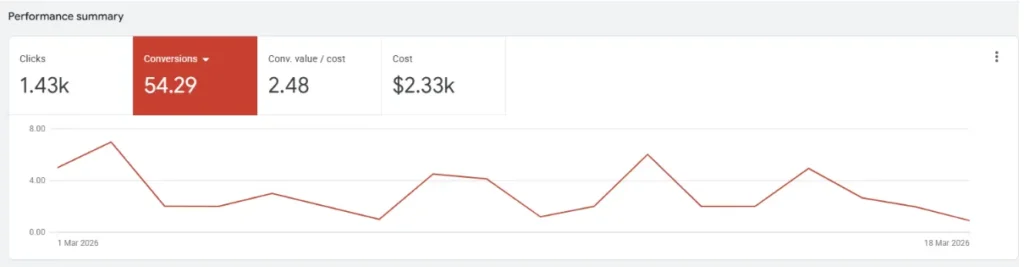
- How conversions move over days and weeks (going up, holding stable, heading down)
- Cost per conversion plus general return
- How much value comes in compared to what you pay out
When numbers swing wildly or head south, look for causes such as off-target audiences, flat creatives, or landing page issues. Campaigns that hold steady open the door to safe growth much more easily than ones that bounce all over.
5. ROAS vs Add-to-Cart Behavior
Here is where things get more advanced, but you still need it in your PMAX Checklist. Many people watch only final sales and miss the disconnect that happens between interest and purchase. Strong add-to-carts paired with weak purchases usually mean traffic arrives in good numbers, but the checkout path loses people.
Put these side by side:
- Add-to-cart percentage against actual purchase percentage
- Spots where people leave during the buying steps
- What users do from the moment they show interest until checkout
Common culprits include high prices, expensive shipping, missing trust elements, or a confusing checkout. Spotting this tells you clearly if the ads did their job or if the website needs work after the click.
Explore ROAS vs. ROI to understand the two key metrics in an ad campaign.
6. Search Terms Analysis
The actual searches people type in give you a clear look at what they want, making this one of the strongest parts of your PMAX Checklist. Performance Max now shows more detail here, letting you see exactly what brought conversions. That uncovers both wasted money and chances to grow.
Go over:
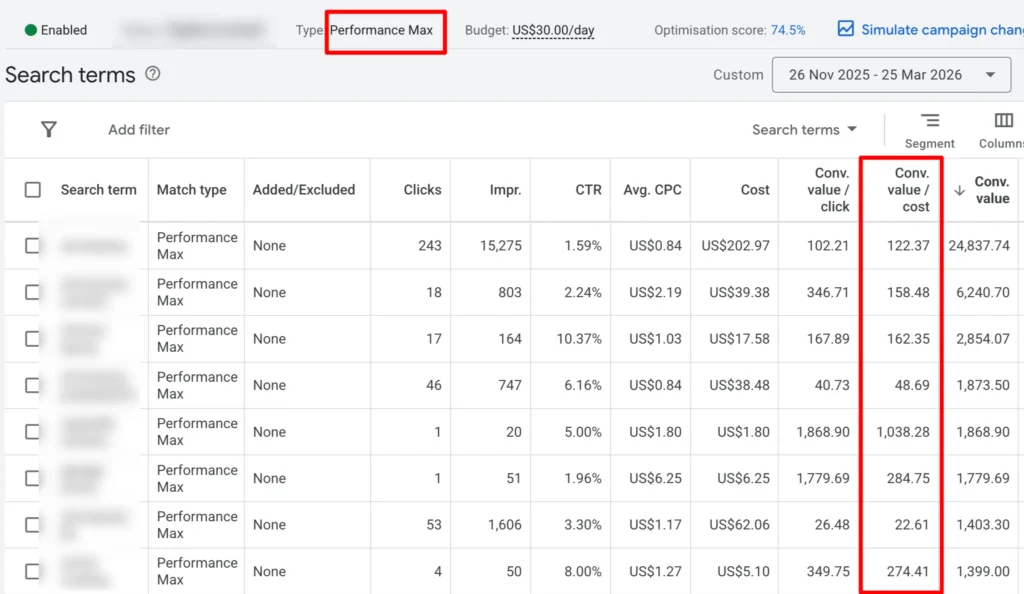
- Searches that do not fit or show low buying interest in the budget
- Terms that bring in solid conversions
- Fresh keyword ideas worth testing for expansion
Seeing lots of off-topic queries usually means your signals do not align well, or your targeting stays too loose. Strong terms, on the other hand, can shape better ad copy and overall setup. Google Ads Experts like Ishant Sharma rely on this information to sharpen targeting and improve accuracy.
7. Search Category Trends & Insights
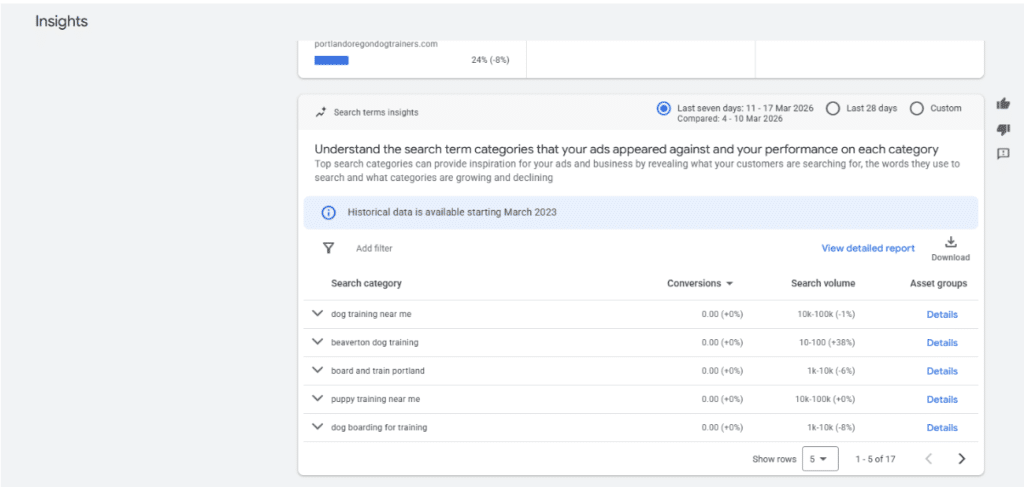
Keeping an eye on category shifts lets you match your campaigns to what the market actually wants right now. This part of the PMAX Checklist prevents you from falling behind and lets you adjust before everyone else. Google’s own reports show which searches climb, which fade seasonally, and which new areas pop up.
Keep track of:
- Categories tied to your products that start growing
- Changes that come with seasons
- Overall growth patterns in search volume
When your setup ignores current trends, results suffer no matter how clean the execution stays. Refreshing images, focusing on different products, or updating copy based on fresh data keeps everything relevant. Advertisers who move first on these shifts pull ahead rather than play catch-up.
How to go there:
Google Ads account → Campaigns → Insights and reports → Insights. Then review the Search trend table and click.
View trend details to see:
- trending search terms
- search growth
- search volume
- your clicks, cost, or impressions against that trend
8. Auction Insights
Knowing who else competes in the same space is a key factor in any PMAX Checklist. The auction insights report compares your campaign directly to others fighting for the same spots. It quickly shows if problems come from inside your setup or from tougher rivals showing up.
Break down:
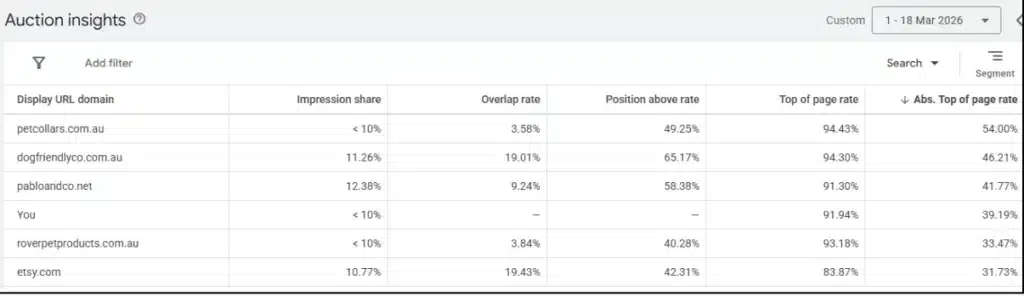
- How often do you and your competitors appear in the same auctions
- Your impression share next to theirs
- How often do you rank higher than them
When others beat you regularly, look at whether your creatives fall short, bids sit lower, or relevance drops off. That information guides whether you fix quality scores or shift budget plans. Sometimes drops happen simply because the market got more crowded, not because your campaign weakened.
9. Asset Group Performance Review
Asset groups do not all carry the same weight, which is why this part of your PMAX Checklist gets analytical. Pinpoint which ones bring real conversions and which drag behind. Treating every group the same wastes money by spreading the budget too thin.
Look at each one for:
How to go there: Google Ads account → Campaigns → Select PMax campaign → Asset groups
- How much conversion value does it produce?
- ROAS numbers and interaction stats
- How much does it add to the total results?
Groups that lag need fixes or complete rebuilds. That might mean better images and copy, updated audience hints, or regrouping products differently.
10. Asset Variation Testing
Constant testing drives improvement, so no PMAX Checklist works without it. Running the same assets everywhere caps what you can learn and holds performance back. Too many people copy-paste identical groups and wonder why nothing gets better.
Confirm that:
- Every asset group carries its own fresh copy and visuals
- You test separate audience signals across groups
- Offers, pictures, and landing pages vary where it makes sense
No differences means Google cannot pick winners. Running tests lets the system discover what actually connects with people.
11. Image & Asset Quality Check
The quality of your creatives hits engagement, click rates, and final sales hard, so treat this as a must-do in your PMAX Checklist. Performance Max pushes assets to tons of different spots, so low-effort visuals hurt results even when everything else lines up. Judge both how good they look and how well they fit, not just that they exist.
Examine:
- How sharp, high-resolution, and polished the images appear
- Whether the visuals match the product or service closely
- Ad strength scores and labels are shown inside each asset group
Skip lazy stock photos and sloppy designs because they kill trust and clicks. Clean, professional pictures lift click-throughs and feed stronger data back to Google.
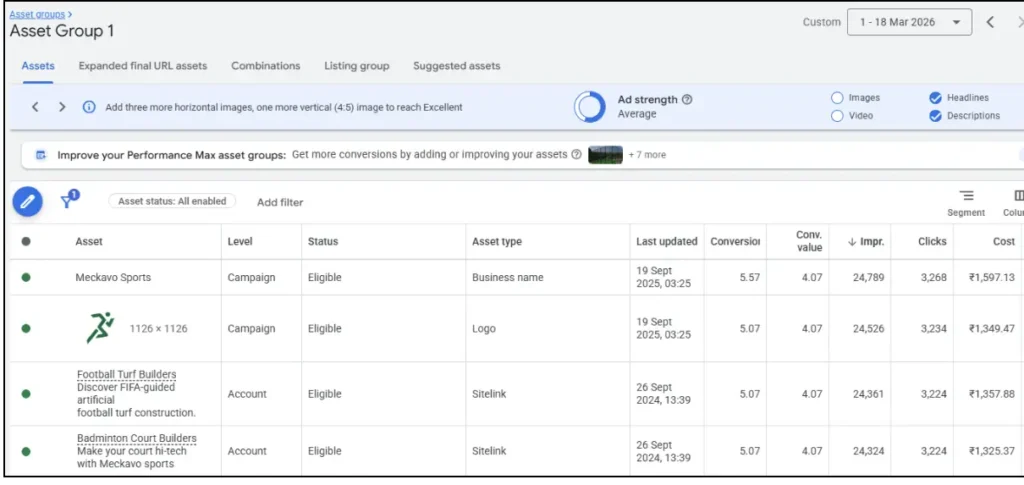
How to go there: Google Ads account → Campaigns → Select PMax campaign → Asset groups → View assets
Then review image assets and their performance labels.
Asset Optimization Settings Inside Performance Max
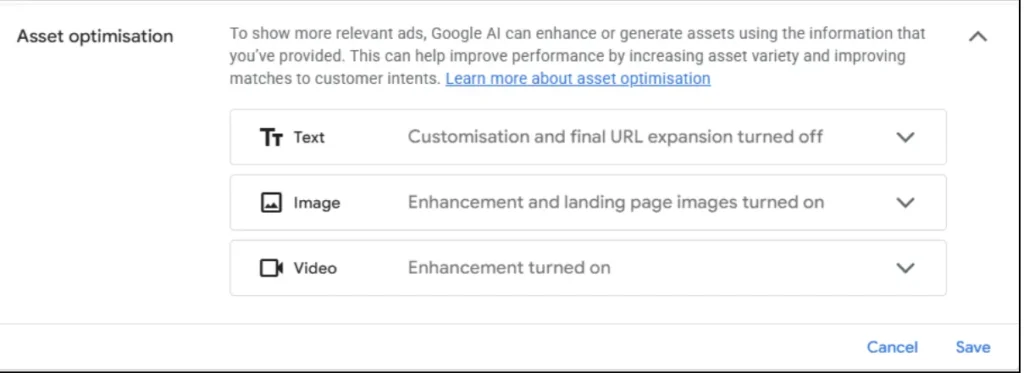
This controls how Google enhances your creatives. Image and video enhancements can expand reach, but they can also distort brand messaging if left unchecked. Always review what’s turned on and align it with your creative strategy.
12. Product Performance Breakdown
Few steps matter more for actual revenue than this one in your PMAX Checklist. Not all products earn the same, so spotting the weak ones prevents the budget from draining away. A lot of campaigns keep losing because slow products quietly eat the budget without bringing anything back.
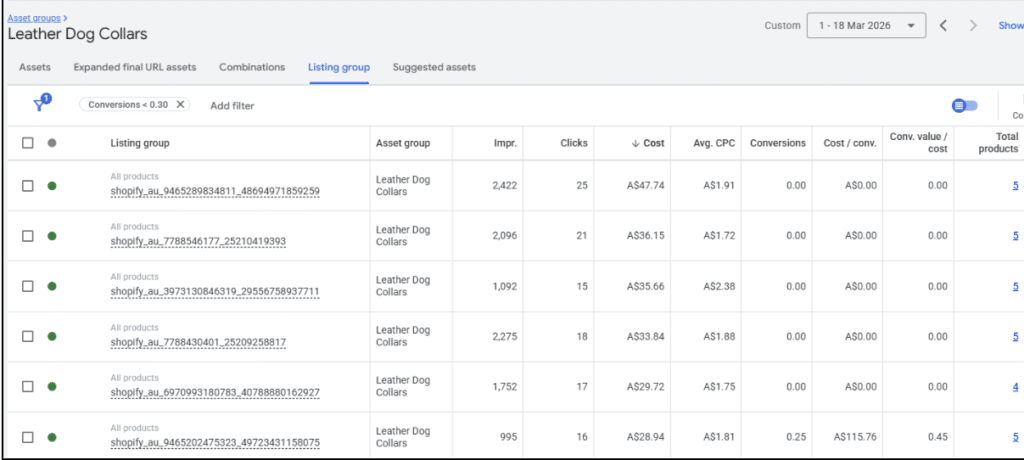
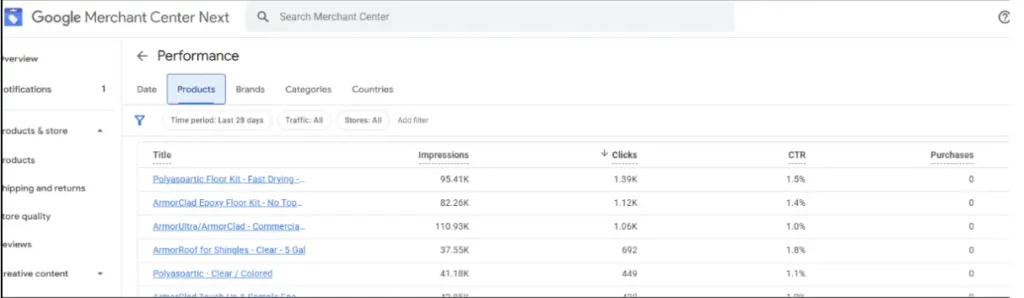
How to go there:
Google Merchant Center → Products → Analytics
Or
Merchant Center → Growth / Pricing
Depending on account availability, review price benchmark or price competitiveness data.
Break it down by:
- Products are burning lots of money but delivering few or zero sales
- Items showing poor ROAS next to the rest
- Patterns across whole categories
After you find them, pause those products, block them, or move them to their own test groups.
13. Best-Selling Product Scaling Strategy
The products that already sell well should fuel growth, and a solid PMAX Checklist makes sure they do not get lost in mixed groups. Do not force them to fight weaker items. Pull the stars into their own focused campaigns to better control and grow them.
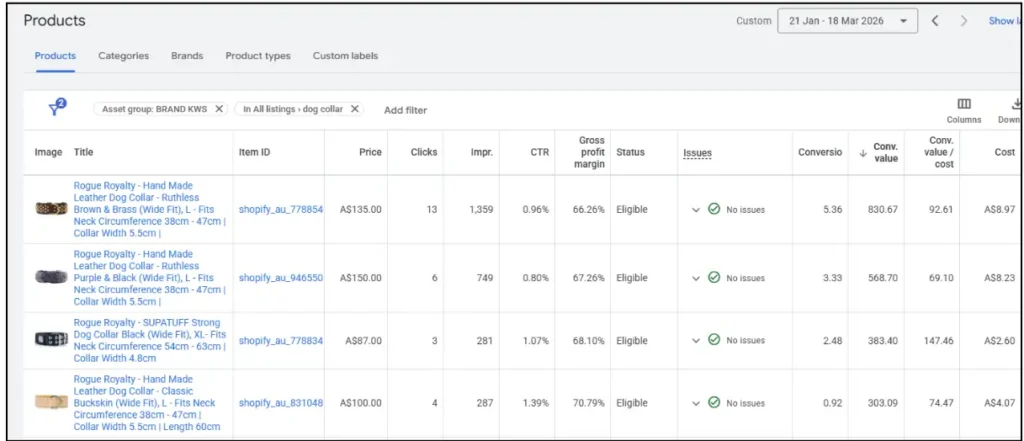
Spot:
- Which products bring in the biggest revenue and sales counts
- Items holding strong ROAS with steady numbers
- Categories that show reliable demand and room to expand
Then build separate campaigns just for those top performers. Doing that gives you:
- Smarter budget splits
- Tighter grip on bids and targeting
- Room to push harder without dragging everything else down
Google Ads Specialists like Ishant Sharma rely on this method to squeeze maximum profit and create e-commerce setups that actually scale.
14. Disapproved Products Check
Products that get rejected cut your reach quietly and hurt results, which is why you cannot skip this in your PMAX Checklist. A perfect campaign setup means nothing if key items are excluded from Shopping ads and never appear in them.
Check regularly for:
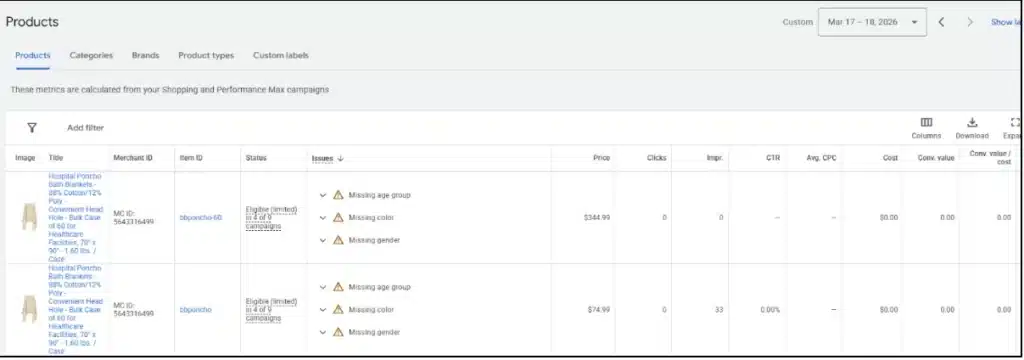
- Disapproved listings inside the Merchant Center diagnostics
- Any policy flags or incomplete information
- Problems with price, stock status, or item details
Clear those blocks fast so everything stays live and eligible. Letting them sit means you lose sales from products that could perform well.
How to navigate there:
Google Merchant Center → Products → Needs attention
Also look for:
Google Ads account → Campaigns → PMax campaign → Listing groups / Products
15. Price Competitiveness Analysis
No matter how sharply your ads run, pricing decides if people actually buy. Every full PMAX Checklist must assess whether your prices hold up against the competition. Great campaigns still struggle when shoppers spot cheaper options somewhere else.
Review:
- Your prices next to what rivals charge
- Cases where high cost-per-click meets low sales, hinting at price problems
- Whether special deals or discounts could lift buy rates
When prices fall behind:
- Fewer people click through
- Buy rates sink
- ROAS takes a hit
Often, the real issue sits in pricing, not the ads themselves. Checking this keeps your campaign results aligned with market expectations.
16. Product Category Mapping
Getting products into the right categories matters for showing up in the right places, so include it in your PMAX Checklist. Google uses those categories to decide where items belong, and wrong ones shrink impressions and weaken performance.
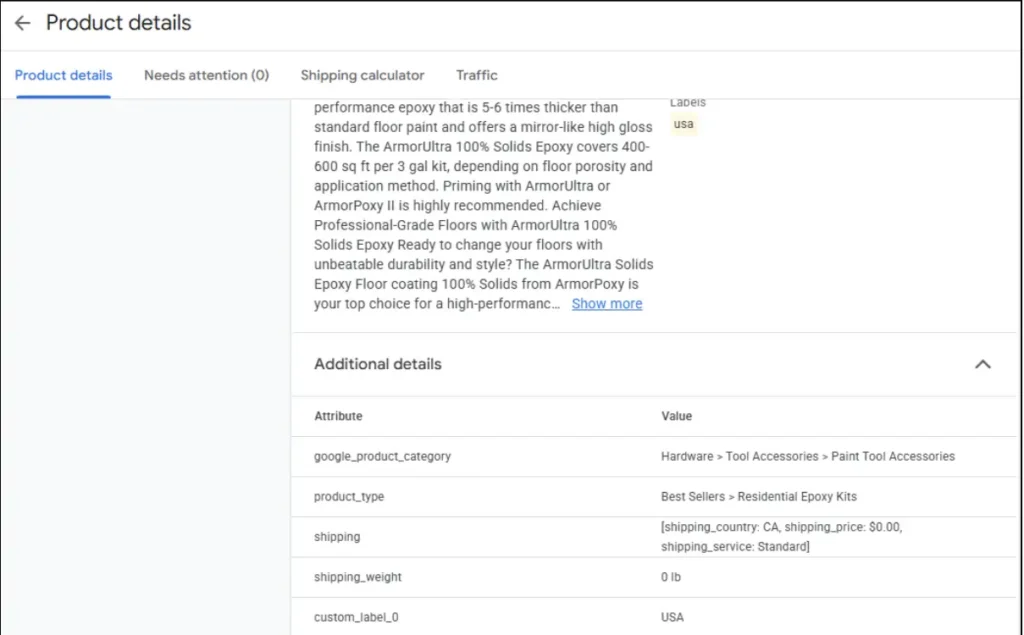
How to visit there:
Google Merchant Center → Products → All products → Select product → Product details
Check the assigned Google product category. If using a feed tool or Shopify app, also verify category mapping there
Confirm:
- Every product sits in the correct Google product category
- Categories match what people search for
- No mix-ups between item type and assigned group
Bad mapping creates:
- Ads are being shown to the wrong people
- Lower click rates
- Fewer sales
Fixing categories makes the ads feel more relevant and helps products rank better in search results. People often skip this step, but doing it correctly noticeably improves results for both Shopping and Performance Max.
17. New vs Existing Customer Analysis
Figuring out whether to bring in new buyers or sell to people who already know you shapes growth, so add this to your PMAX Checklist. That split changes how profitable things stay and how you plan to expand.
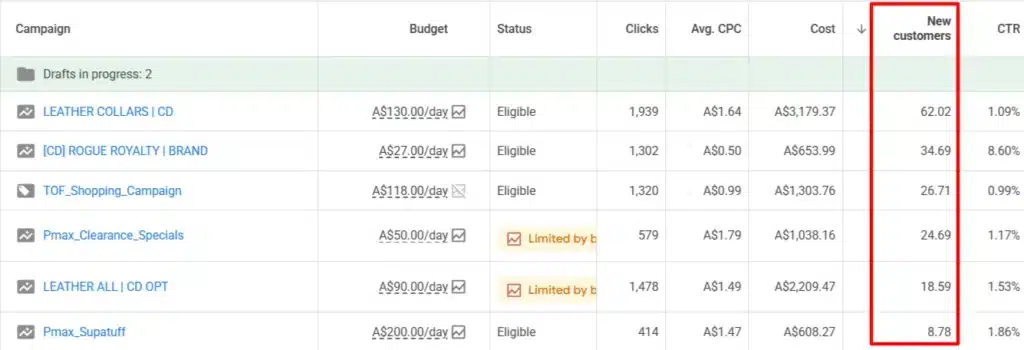
How to go there: Google Ads account → Campaigns → Select PMax campaign → Settings → Customer acquisition
Then review reporting in: Campaigns → Columns → Conversions / New customer metrics. If enabled in your account.
Look at:
- Share of brand-new buyers versus returning ones
- How much revenue each group brings
- Cost to land a new customer
Heavy focus on past buyers caps how much you can grow. Splitting acquisition and retention into separate campaigns lets you:
- Assign budgets smarter
- See performance more clearly
- Make better calls on expansion
People like Google Ads Expert Ishant Sharma split these groups carefully to keep growth strong while protecting profit.
18. Demographic Insights (Income & Gender)
Breaking down who actually converts provides useful clues, making demographic review valuable within your PMAX Checklist. Seeing differences across groups lets you sharpen who you target and what you say.
Check:
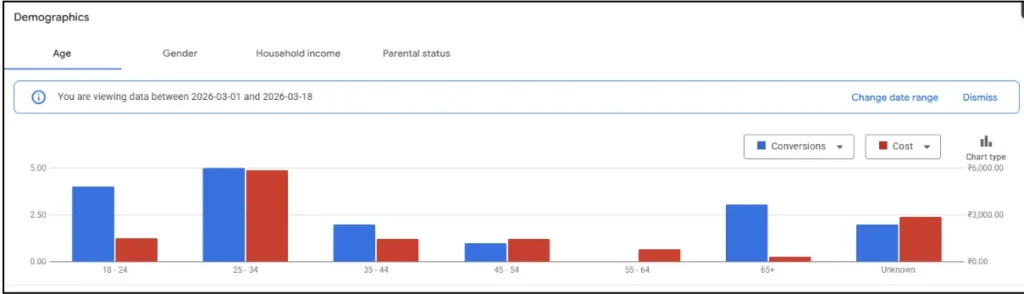
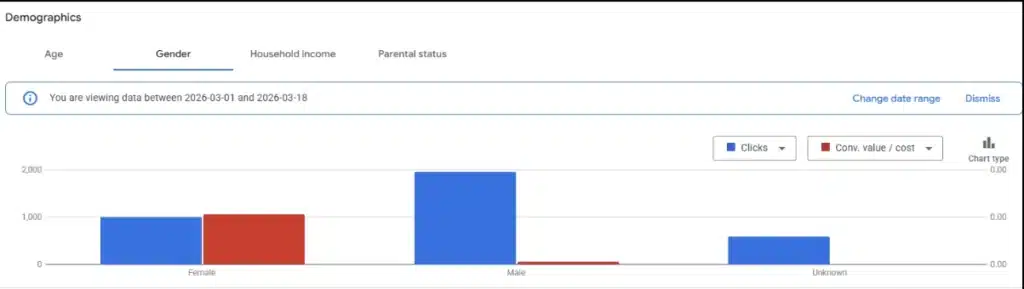
- Sales performance split by gender
- Which income levels produce the best results
- Cost and ROAS gaps between demographic slices
That information points out:
- Audience groups are worth more
- Segments that underperform and might need changes
Putting effort toward the stronger groups cuts waste and raises efficiency.
19. Location Performance Analysis
Where people come from directly affects efficiency, so location review ranks high on your PMAX Checklist. Some areas deliver great returns, while others burn cash with little payoff. Spotting both helps a lot.
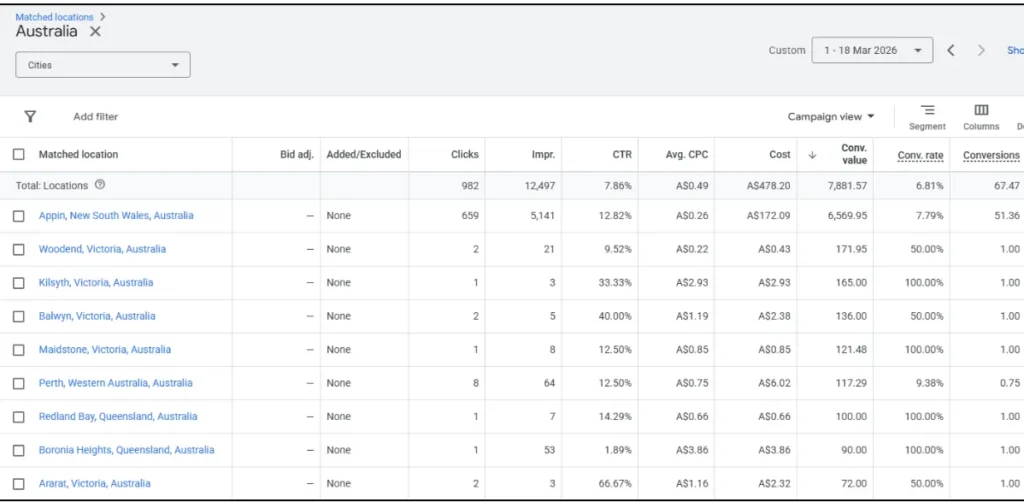
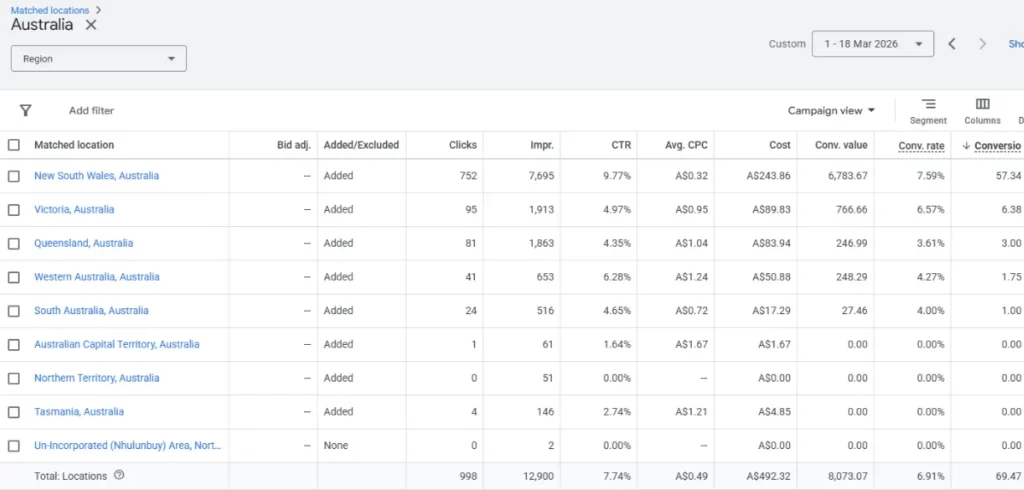
Divide it into:
- Locations that produce solid sales and ROAS
- Places that take budget but give almost nothing back
Smart location adjustments let you:
- Put more money into winning regions
- Cut back or block weak ones
That shift makes your spending work harder and delivers better value overall.
20. Device Performance Analysis
People act differently on phones, computers, or tablets, which is why device checks belong in your PMAX Checklist. Knowing those patterns helps spot roadblocks that stop conversions.
Compare across devices:
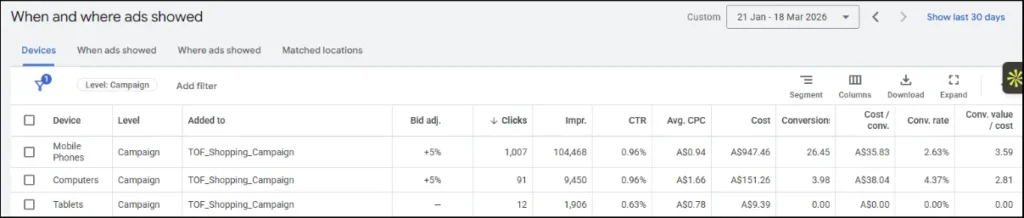
- Conversion percentages
- Cost per sale by device type
- Differences in traffic quality
High mobile visits with low sales often signal:
- Landing pages that do not work well on phones
- Pages are loading too slowly
- Checkout steps that frustrate mobile users
Fixing device-specific issues improves the experience and boosts sales.
21. Channel Performance Breakdown
Performance Max spreads ads everywhere, but not all channels deliver the same. Your PMAX Checklist needs to identify which ones actually drive sales, rather than treating them all equally. That shows if Shopping pulls most weight, Search leads, or Display drags with low intent.
Review contribution from:
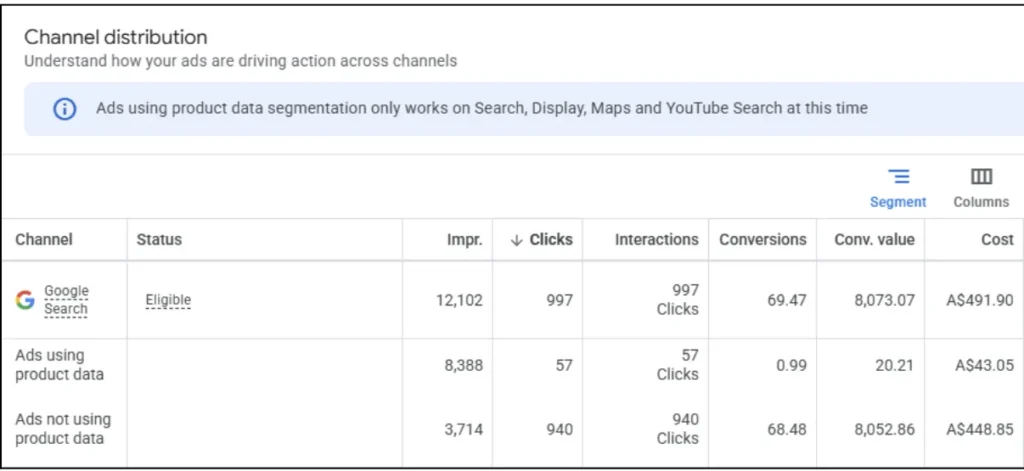
- Search, Shopping, Display, YouTube, and Discover
- Sales volume and value per channel
- Whether feed-based or asset-based traffic leads
Lots of sales from Shopping usually mean your product data shines. Heavy Display volume with weak sales points to low-quality traffic.
22. Placement Analysis
Where exactly your ads appear controls quality, and bad spots can eat budget fast. A thorough PMAX Checklist tracks good versus poor placements to keep traffic useful.
Look through:
- Placements that bring sales and real engagement
- Spots with lots of clicks but zero buys
- Sources of random or low-intent visits
Weak placements tend to come from unrelated sites or apps and just waste money.
23. App Placement Exclusion
Clicks from mobile apps often rank among the worst quality, making them essential to exclude in your PMAX Checklist. Plenty of people overlook this and pay for taps that were never meant to be anything serious.
Make sure:
- App placements get blocked at the account level or campaign level
- Content settings match what you want
- Junk inventory stays removed
App traffic tends to create:
- Lots of clicks with almost no sales
- Weak interaction and fast bounces
Cutting those out cleans up traffic fast. It counts as a quick win that drops waste and boosts campaign health right away.
Example of App Placement Exclusion Setup in Google Ads
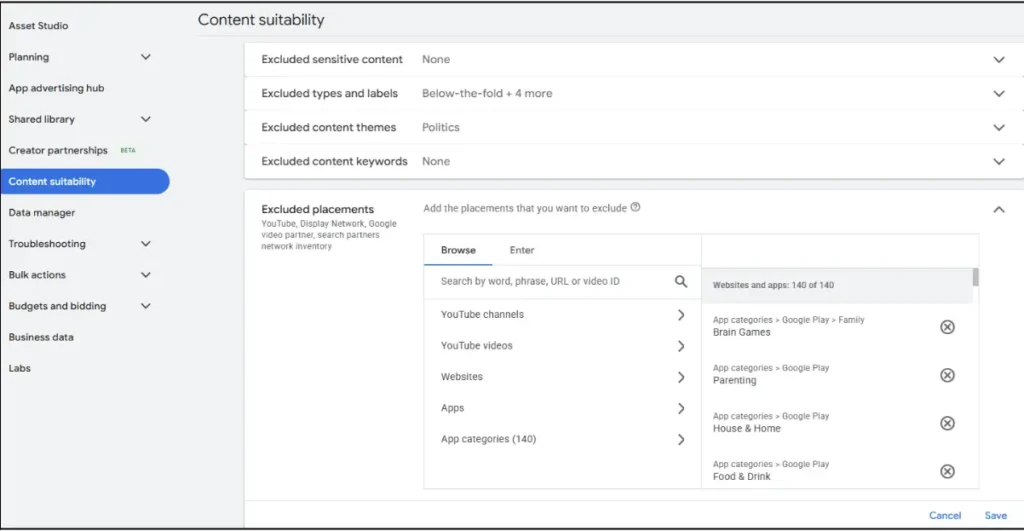
This setting allows you to block entire app categories, such as games, kids’ apps, and low-intent placements, which often generate accidental clicks. Using this correctly helps eliminate wasted spend and improves overall traffic quality.
24. Landing Page Performance Analysis
No ad works if the page it lands on fails users. That is why every good PMAX Checklist checks landing pages since that is where the actual sale or lead happens.
Study:

- Pages are getting visits, but not closing
- Load times and how well they handle mobile
- How closely the page matches what the ad promised
When clicks arrive, but sales do not follow, common reasons include:
- Offers that feel weak
- Design or flow that confuses people
- No clear signs of trust
How to go there:
Google Ads account → Insights and reports → Landing pages. Then compare clicks, conversions, and conversion rate.
25. URL Expansion Settings
Letting Google pick different pages automatically can help or hurt, depending on the setup. Your PMAX Checklist has to confirm that traffic lands where it should.
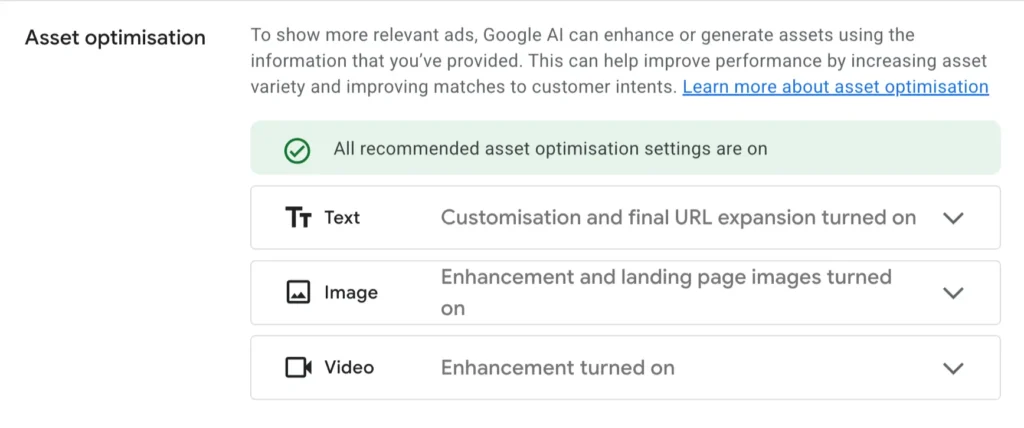
Verify:
- If URL expansion runs free or stays limited
- Whether users reach the best pages for their search
- If random pages pick up clicks, they should not
Wrong expansion causes:
- Fewer people buying
- Worse experience for visitors
- Higher bounce numbers
26. UTM Tracking & Data Clarity
Missing proper tags hides how campaigns perform outside Google Ads. A full PMAX Checklist confirms UTM setup, so reporting stays accurate.
Campaign URL Tracking Setup in Google Ads:
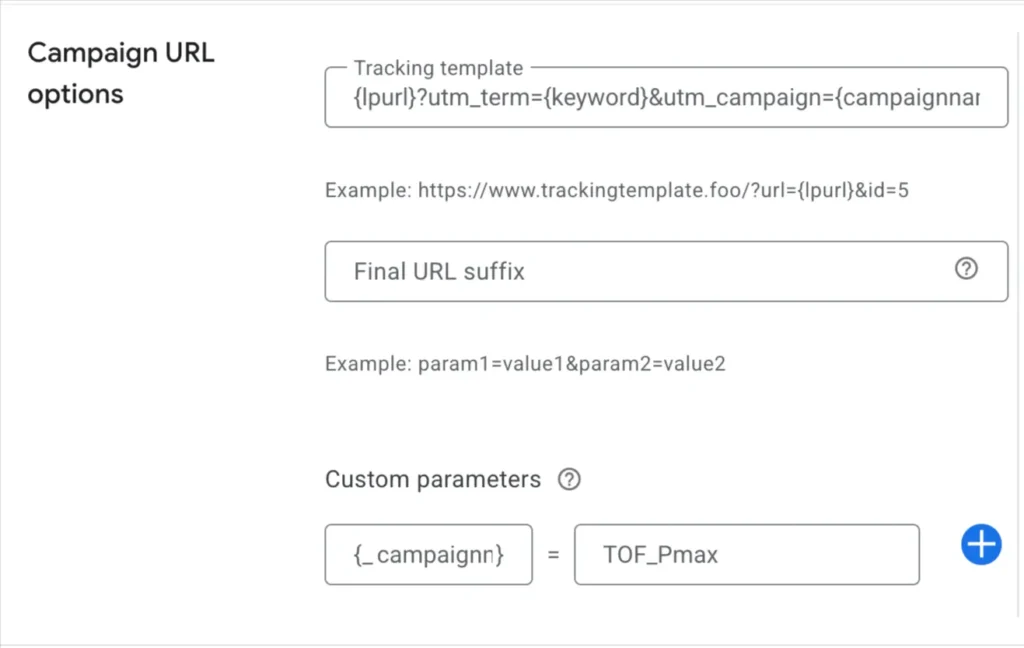
How to go there: Google Ads account → Campaigns → Select PMax campaign → Settings → Campaign URL options
Ensure:
- UTMs attach at the campaign level or account level
- Numbers line up in GA4 and any CRM system
- Sources show up clearly in reports
Without clean UTMs:
- You cannot tell who gets credit
- Analysis gets shaky
- Choices rest on incomplete pictures
Good tracking reveals what happens after the click, so you improve smarter. Solid data supports growth and keeps things working long-term.
27. Impression Share & Visibility
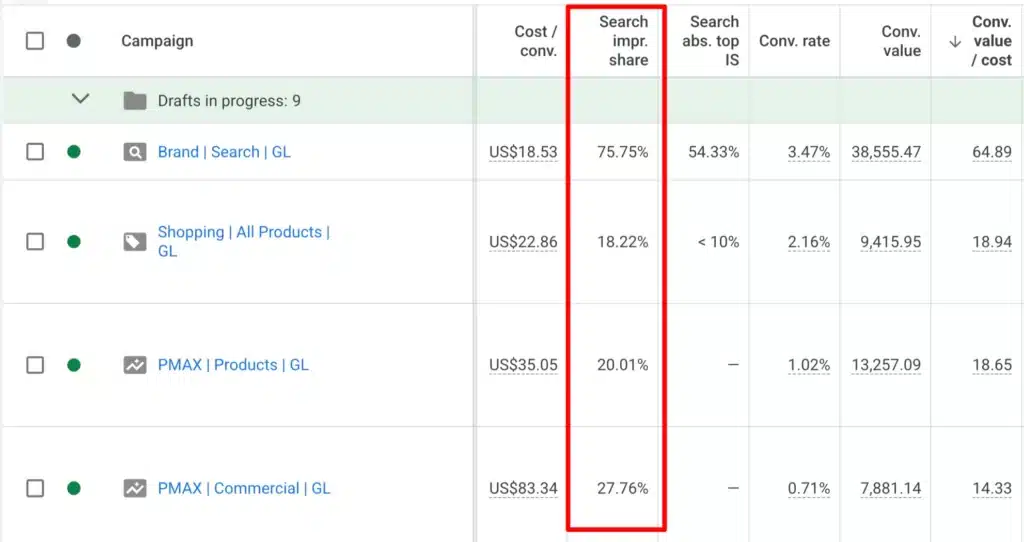
Impression Share and Visibility help you identify whether your PMAX campaign is limited by budget or performance. Review Search Impression Share along with Search Lost IS (budget) and Search Lost IS (rank) to diagnose missed opportunities.
If Budget Lost IS is high, your campaign is constrained by spend and can scale further if performance is strong.
If Rank Lost IS is high, the issue is not budget but weak competitiveness driven by poor creatives, low-quality assets, weak feed optimization, or insufficient signals.
In many cases, both can be high, meaning the campaign needs both budget expansion and performance improvements. This step ensures you’re not scaling inefficient campaigns or ignoring performance gaps that block visibility.
Examine:
- Share lost because the budget ran out
- Share lost because the rank fell short
- Your visibility compared to others
How to go there:
Google Ads account → Campaigns → Columns → Modify columns → Competitive metrics. Then add metrics such as:
- Search impression share
- Search lost IS (budget)
- Search lost IS (rank)
28. Separate Campaign Strategy
Throwing everything together in one campaign clouds everything and cuts control. A smart PMAX Checklist builds separate structures based on goals and results.
Do this:
- Move top products to their own campaigns
- Set up test campaigns for fresh items or audiences
- Keep winners away from losers
That setup delivers:
- Clearer budget use
- Easier-to-read results
- Simpler growth choices
Splitting gives you the power to tune things precisely and protects strong pieces from weak ones.
29. New Customer vs Retention Campaign
Mixing new buyers and past customers in the same campaign hides true performance. A strong PMAX Checklist keeps them apart for better visibility.
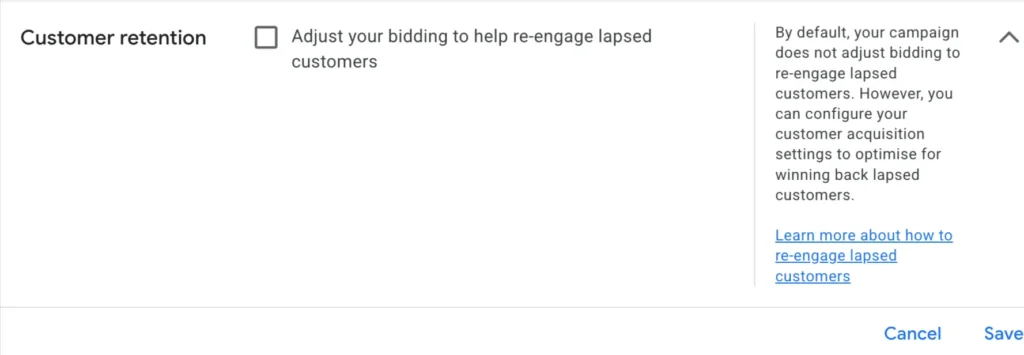
Set up:
- Campaigns built just for finding new people
- Separate ones for keeping current buyers or remarketing
- Budgets matched to whether you chase growth or loyalty
That split improves:
- How sharply you target
- Costs to bring in new sales
- Ability to expand new customer volume
Getting this right matters for lasting profit and steady expansion. It lines your ads up with bigger business aims.
30. Scaling Framework for PMAX
Most people mess up growth by cranking budgets without a plan. A careful PMAX Checklist waits for steady results before adding more spend.
Follow:
- Small, step-by-step budget bumps instead of big leaps
- Watch ROAS and conversion patterns closely while growing
- Change one thing at a time
Rushing causes:
- Broken learning phases
- Higher cost per action
- Weaker returns
Taking it slow and watching data keeps growth steady and safe. Always base increases on numbers, never on hunches or quick wins.
31. Data-Driven Optimization Loop
This cycle sits at the heart of every good PMAX Checklist. Improving never stops. It runs as an ongoing process fed by fresh data.
The steps repeat:
- Review performance numbers on schedule
- Run tests on new ideas and versions
- Adjust based on what shows up
- Grow whatever proves itself
Sticking to this keeps:
- Results climbing steadily
- Choices grounded in reality
- Campaigns stable over months
Doing it regularly lets you polish everything and create setups that grow without breaking.
How Experts Like Ishant Sharma Manage PMAX Campaigns Differently
Many people run Performance Max campaigns. Hardly any truly control them. That gap separates okay outcomes from reliable scaling. Look closely at top performers, especially Google Ads Specialist Ishant Sharma; one pattern stands out. They never just let automation run free. They wrap real systems around it.
A solid PMAX Checklist does not sit on a list. They follow it strictly.
They Build Structured Campaigns, Not Mixed Setups
Regular advertisers toss every product and audience into one big campaign. Experts avoid that completely. The main difference comes down to smart structure. They divide based on results and purpose instead of blending everything.
They make sure to:
- Give bestsellers their own focused campaigns
- Build separate test groups for new ideas or items
- Prevent strong performers from competing with weak ones
That clarity shows exactly what delivers and what drags. A clean PMAX Checklist setup means sharper control, better data, and quicker smart growth calls.
They Follow a Feed-First Optimization Approach
Most people fixate on ad copy alone. Experts realize product information drives Performance Max heavily. That is why Google Ads Expert, Ishant Sharma, puts feed work at the center.
They keep upgrading:
- Titles packed with terms people actually search
- Attributes and correct category placement
- Descriptions that match real search patterns
Better feed data lifts visibility, clicks, and sales. Rather than pointing fingers at the campaign, they repair what feeds it. That single habit explains why their results beat those of others spending the same amount.
They Obsess Over Data Accuracy Before Scaling
Pushing budgets higher on shaky numbers ranks as a classic error. Experts lock in perfect tracking first so their PMAX Checklist rests on truth before any growth step.
They confirm:
- Conversion tracking works without flaws
- Enhanced conversions run and send clean signals
- Numbers match up between Google Ads and Analytics
Bad data pauses scaling. They hold off rather than risk blind moves. That habit guarantees every tweak and growth choice comes from real signals.
They Control Automation Instead of Trusting It
Yes, Performance Max automates a lot, but experts keep their hands on the wheel. They shape the system with careful inputs.
They steer it with:
- Solid audience hints
- Strong, varied asset groups
- Organized campaign layout
Guided automation learns faster and wastes less. Without direction, it wanders into bad spots. Better inputs cut down on random moves and lead to quicker, steadier wins.
They Focus on Revenue, Not Vanity Metrics
Traffic numbers and impressions mean little without sales behind them. Experts judge success purely on business impact, never surface stats.
They watch closest:
- Actual revenue and ROAS
- Cost to acquire each sale
- Real profit instead of raw volume
That focus ties campaigns straight to company growth. Every strong PMAX Checklist tracks money made, not just activity logged.
They Use Controlled Scaling, Not Aggressive Budget Jumps
Experts handle growth very carefully. They avoid huge, sudden increases and build slowly from stable ground.
They wait until:
- Conversions hold consistent patterns
- Budget rises happen in small steps
- Every change gets watched afterward
That protects learning and stops ROAS crashes. They treat scaling as a careful process rather than a quick switch.
They Continuously Test and Refine
Top performers test without stopping. Their PMAX Checklist centers on never-ending small improvements.
They experiment with:
- Fresh copy and creative approaches
- New audience signals
- Different ways to group products
Every round rests on data. Winners get more budget, losers get dropped. That habit keeps pushing performance higher month after month.
Common PMAX Optimization Mistakes
Most people blame Performance Max itself when results stay poor. The real issue almost always comes down to how the campaigns get handled. Even if you follow a good PMAX Checklist closely, certain execution errors can quickly undermine performance. The gap between okay campaigns and ones that actually grow big comes from avoiding these key problems.
Blind Dependence on Automation
Performance Max brings strong capabilities, but it does not run perfectly on its own. Many advertisers set up campaigns and then step back and let Google take over without any direction. That usually causes slow learning and off-target delivery.
You often end up with:
- Money is going to traffic that does not convert
- Audiences that miss the mark
- Conversions that swing up and down wildly
A solid PMAX Checklist directs automation with clear inputs such as audience signals, asset groups, and accurate conversion data. Automation delivers the best outcomes when you guide it carefully rather than leave it completely on its own.
Poor Conversion Tracking Setup
Few errors hurt more than this one. When tracking gives wrong numbers, the entire algorithm makes bad calls.
Frequent problems show up as:
- Same conversions counted multiple times or puffed up
- Enhanced conversions turned off
- The wrong action was picked as the main conversion goal
With broken tracking:
- Google chases the wrong targets
- Costs climb without better sales
- Growing the campaign becomes impossible
People like Google Ads Specialist Ishant Sharma always confirm tracking works cleanly before they consider any adjustments. Bad data blocks every plan from working.
No Campaign or Product Segmentation
Putting all products and audiences into a single campaign is a major error. It muddies the signals and takes away your ability to manage things well.
That creates:
- Performance numbers that mix everything together
- No easy way to spot what succeeds or fails
- Budget is leaking on products that do nothing
A strong PMAX Checklist calls for:
- Pulling top sellers into their own campaigns
- Setting up separate tests for new items
- Organizing asset groups the right way
Clear separation brings better visibility, which leads to sharper adjustments and easier growth.
Ignoring Product Feed Optimization
Many advertisers focus all their attention on the ads and skip the product feed entirely. That hurts badly, particularly for online stores.
Typical feed problems include:
- Weak or generic product titles
- Attributes left blank
- Wrong categories assigned
Those issues cause:
- Products are showing up less often
- Fewer clicks
- Lower sales numbers
Any good PMAX Checklist treats feed work as a main way to drive better results. Google Ads Specialists like Ishant Sharma focus on fixing the feed early, before they push for higher spend.
Weak Creatives and No Testing Strategy
Throwing up whatever images and headlines you have does not count as planning. Poor creatives cut engagement and cap what the campaign can achieve.
Frequent errors involve:
- Relying on plain or low-effort visuals
- Skipping any tests of different versions
- Using identical copy everywhere
Without tests:
- Google gets few signals to learn from
- Results stay flat
A proper creative approach means ongoing tests of:
- Various offers
- Different visual looks
- Fresh ways to phrase messages
That kind of regular testing matters for keeping performance climbing over time.
Scaling Too Early Without Stability
Advertisers frequently jump to bigger budgets the moment they see some early wins. That interrupts the learning period and often sharply drops results.
You usually see:
- Cost per action is going up
- ROAS falling off
- Conversions becoming unpredictable
A good PMAX Checklist waits for:
- Consistent performance first
- Small budget increases only
- Close watching after each change
Growth needs to stay in control and tied to real data.
Ignoring Search Terms and Insights
Performance Max gives useful reports, yet many people never look at them.
That causes:
- Money spent on searches that do not fit
- Missed chances to capture ready-to-buy traffic
- Messaging that does not match what people want
Your PMAX Checklist needs to cover:
- Checking search terms regularly
- Looking at overall patterns
- Making changes based on what the data shows
That keeps targeting sharp and cuts unnecessary spend.
Poor Traffic Quality Control (Placements & Apps)
Not every click helps your business. Many campaigns lose money due to poor placements, especially on mobile apps.
Common problems:
- Clicks from accidental taps in apps
- Traffic that barely engages
- High bounce rates
A solid PMAX Checklist makes sure:
- App placements get blocked
- Poor sources get spotted
- Traffic quality stays under review
Higher-quality traffic increases conversions without extra budget.
Sending Traffic to Weak Landing Pages
Great traffic still fails if the page it reaches does not convert well.
Frequent issues:
- Pages that load slowly
- Bad experience on phones
- No clear trust elements
That leads to:
- People leaving quickly
- Few actual sales
- Higher cost per sale
A complete PMAX Checklist links ad results to what happens on the site. Fixing the page or checkout path often brings bigger gains than adjusting the campaign.
Focusing on Clicks Instead of Revenue
Some advertisers chase clicks and views rather than real business results.
That produces:
- Lots of visits but few sales
- Numbers that look good but mean little
- Profit that stays low
A strong PMAX Checklist keeps attention on:
- Actual revenue from conversions
- ROAS figures
- Overall profit
Google Ads Specialists like Ishant Sharma always prioritize revenue over surface-level stats. That focus creates true business growth.
Conclusion
Performance Max packs serious power, but only if you run it the right way. Following a clear PMAX Checklist swaps chaos for clear steps and turns raw numbers into smart moves.
Stick with the plan every day, and you stop simply launching ads. You start creating systems that grow reliably.
That matches exactly how Google Ads Specialist and founder of Hustle Marketers, Ishant Sharma, handles Performance Max: clear structure, strict follow-through, and choices driven by real performance. Contact us today at Hustle Marketers and schedule a consultation with experts like Ishant Sharma.
Frequently Asked Questions
What is a Performance Max campaign?
How often should I follow a PMAX Checklist?
Why is my PMAX campaign not converting?
How long does PMAX take to show results?
Can I scale PMAX campaigns quickly?
Is product feed important in PMAX campaigns?
Can PMAX replace Search campaigns completely?
What is the biggest mistake in PMAX campaigns?