13 Easy Hacks to Supercharge Your Google Shopping Feed

Ishant
Published : January 25, 2025 at 3:31 pm
Ishant
How do consumers make a purchase?
To understand this, you need to walk a mile in the shoes of your target audience.
For instance, as a customer, you are scrolling through Google, looking for the perfect pair of sunglasses. Among dozens of ads and listings, one product catches your eye instantly- it has a clear, descriptive title, a sleek image, GREAT reviews, smashing discounts and just the right price. Without any hesitation, you click on it, and within minutes you have made the purchase.
Now, flip the script. What if your product was the one that stood out? What if it was your listing that made shoppers stop, click and buy? Sounds incredible, right?
Well, that’s what Google shopping feed optimization can do for your business. A well-optimized Google shopping feed isn’t just about throwing your products online and hoping for the best; it’s also about creating a strategy that gets your products noticed by the right people at the right time.
Whether you are just starting out with Google Shopping, or are looking for Google shopping hacks to fine-tune your campaigns, you are in the right place. In this guide, I will share 12 easy hacks that can take your Google Shopping feed from good to spectacular. Ready? Let’s start!
Why Should You Optimize Your Google Shopping Feed?
Your product might be remarkable, but if your Google shopping feed isn’t up to par, your listings are practically invisible. If you want your products to get noticed, clicked, and purchased, Google shopping optimization is indispensable. Still not convinced? Let me break it down for you-
- More ROI: For one, when you optimize product feed for Google shopping, your ad spend works harder, and delivers better results for every dollar spent.
- Attract High-Intent Shoppers: With accurate and detailed product data, Google can show your ads to people who are ready to buy, not just browse.
- Better Visibility: Having a well-optimized feed invariably and implicitly means your product appears for relevant searches, so you appear directly in front of the right audience.
- Outshine Competitors: A great feed with compelling titles, images and pricing can help you stand out in a crowded marketplace and get a competitive edge over your customers.
- Improve Click-Through Rates (CTR): Detailed and relevant product info ensures that your customers find exactly what they are looking for, so your brand garners more trust and loyalty.
Bottom Line? Feed optimization for more Google shopping ad success isn’t just optional- it’s the difference between selling and thriving.
13 Perfect Hacks To Supercharge Your Google Shopping Feed
1. Optimize Product Titles with Relevant Keywords
Your product title is the first thing that potential customers see, so we call it the prime real estate for your shopping feed. The titles in your Google shopping feed grab audience attention, so they need to be clear, concise and well-optimized with relevant keywords. Always remember that Google uses the product title to determine when and where your products will show up in the search results, so optimize accordingly.
How to Optimize Titles?
In case you are looking for Google shopping ads strategies to optimize your product titles, here you go:
- Write the titles in 70 characters or less.
- Use specific, long-tail keywords that customers actually search for.
- Start with the most important and relevant information (like brand, product type, size, color)
- Include any essential attributes like gender, material, or any other specific descriptors.
- Aim for clarity because the titles should be easy to understand at a glance.
For example, instead of using a title like “Sneakers,” opt for something more detailed like “Adidas Men’s Running Shoes- Size 10, Black, Lightweight.”
2. Perfect Your Product Descriptions
If you are wondering how to optimize Google shopping feed, you need to extensively focus on your product descriptions. PDs give potential customers all the information they need to make an informed purchase decision.
While product descriptions may not directly affect your rankings in Google shopping, they do play a massive role in influencing CTRs and conversions.
How to Write Effective Descriptions?
- While writing your Google ad product descriptions, include essential product details like size, weight, material, and any USPs.
- You can also use compelling language to convey the product benefits.
- Try incorporating keywords naturally without any keyword stuffing.
- To maximize Google shopping ROI, descriptions must be kept concise while still providing valuable information.
Tip: Include product descriptions of around 500-5000 characters to ensure you are covering all the key details without overwhelming your reader.
3. Use High-Quality Images
To improve Google Shopping feed performance, optimize your product images, so users actually click on your listing. A poor-quality image doesn’t just discourage clicks, it can also potentially hurt your overall feed and performance. Why? Because Google wants to deliver the best user experience, and high-quality images are quite a huge part of that.
Best Practices for Google Shopping Ads Images:
- Use high-resolution images (at least 1000 x 1000 pixels).
- Display the product clearly with a white or neutral background.
- Include multiple angles of products.
- Avoid watermarks, logos, or promotional text in the image.
- Provide multiple images showcasing different angles or uses if possible.
- Ensure the image matches the product and variations being sold (color, size, etc.).
Simple, right?
4. Ensure Product Categorization is Spot-On
If you want Google to understand what you are selling, assign the proper product category to your products, so the search engine matches your products to the appropriate search queries. Google’s product categories (also called Google’s product taxonomy) provide a standardized list of categories that help ensure your products are properly indexed. To increase sales with Google Shopping work on the following things to improve categorization.
How to Improve Product Categorization?
- Use the most specific category possible that relates to your product.
- Frequently, try to review Google’s product taxonomy, so you are rest assured about using the latest category definitions.
- Avoid any generic or unrelated categories, if you don’t want to dilute the relevance.
Most brands overlook the categorization aspect for products and this leads to inflated ad budgets and minimal to no returns. This is why I prioritized product categorization at the very first instant when I saw the C7 Carbon case. Before optimization, C7 Carbon struggled with irrelevant search terms and low visibility in Google Shopping ads. However, after optimization, the tables turned.
What did I do?
- Reviewed the product categorization and ensured that every item was assigned the most specific and relevant category from Google’s product taxonomy. For example, instead of categorizing Corvette parts under broad or generic automotive parts, we chose more specific subcategories, like “Corvette Body Parts” or “Car Performance Parts.”
- Next, we integrated Google’s product taxonomy into their product feed, so the products were indexed correctly and displayed to users with relevant buyer intent.
- Lastly, we made sure that no products were placed under vague categories like “car accessories” or “sports cars.” which had previously led to irrelevant searches.
The Results:
- More visibility. C7 Carbon’s products started appearing at the top of SERPs.
- Better ROAS. Rightfully categorized ads started appearing for high-intent customers, which resulted in more purchases and a hike in overall return on ad spend (ROAS).
- Higher Conversion rates with less wasted ad spend.
GTIN & Product Identifiers: Why Google Needs Them
GTINs help Google clearly recognize products and connect them with the right searches and manufacturer data. When GTINs are added correctly, Google understands the product without confusion and shows it to shoppers with strong buying intent. This improves reach and sales quality.
What to know quickly
- Common GTIN types include UPC, EAN, ISBN, and ITF-14
- GTINs are required when manufacturers assign them
- If a product truly has no GTIN, use identifier_exists = no
- GTIN works strongest when paired with brand and MPN
When GTINs are missing or incorrect, Google struggles to recognize the product. That confusion directly limits impressions and reduces conversions.
Google Product Category vs Product Type (They Are Not the Same)
These two fields serve different roles and both play a clear part in feed quality.
- google_product_category follows Google’s official system and tells Google exactly what the product is
- product_type reflects internal grouping and mainly supports reporting and campaign setup
The most precise Google category should always be selected. Loose or incorrect categories lower relevance, waste budget, and may cause disapproval in sensitive areas like clothing or media.
Custom Labels: Control Spend Without Touching Bids
Custom labels do not change rankings, but they decide how budget is allocated.
They are used to separate products by:
- Seasonality
- Profit margins
- Performance tiers
- Price ranges
- Inventory levels
Once applied, custom labels allow accurate campaign segmentation in Standard Shopping and Performance Max. This helps push strong products and limit weak ones.
Supplemental Feeds: Fix and Enhance at Scale
Supplemental feeds allow changes without editing the main feed source.
They are commonly used to:
- Add missing GTINs or brands
- Apply custom labels in bulk
- Correct categories or titles
- Run temporary optimizations
For large catalogs or restricted CMS feeds, supplemental feeds remain one of the most practical tools to maintain clean data.
5. Optimize Product Pricing
Let’s be honest: shoppers do love a good deal, but are you delivering that bang-on price point that your target audience craves?
Most brands think pricing is just about being the cheapest, but it’s not. In fact, it’s more about being competitive. If your product costs 30% more than your competitors, you will need a solid reason why (and you would better highlight it!)
Here’s What You Can Do to Optimize Google Shopping Campaigns for Better Pricing:
- Regularly benchmark your prices against your competitors
- Offer promotions, discounts, or bundles to stand out
- Use sale price fields in your feed to highlight discounts- because Google loves it when you do!
Bonus: The Discount Factor for the Extra Boost Your Products Need
You have probably seen promotions pop up on ads while shopping online, right? Well, it’s high time you start using them too. Add promotions to your Google Shopping feed, and you can get more clicks, better rankings, and of course more chances to make a sale.
Checkout this video how promotion will look on your shopping feed – it’s quick and quite straightforward. Watch the video here. Trust me, you don’t want to skip this simple and best trick!
Shopping Annotations & Badges That Boost CTR
Beyond discounts, Google may display trust and incentive badges such as:
- Price drops
- Merchant promotions
- Free or fast shipping
- Return policy highlights
- Product ratings
- Top Quality Store badge
Google selects badges based on data reliability, account history, and relevance. Clean feeds and verified policies improve eligibility.
6. Website Speed
You know how frustrating it can be when a website takes forever to load right? Guess what- Google knows this too, and it doesn’t like it when websites are low. If your website’s loading speed is sluggish, it can affect both your user experience and rankings on Google Shopping.
In fact, did you know as page load time goes from 1 to 3 seconds, the probability of bounce rate increases by 32%? (Source)Don’t let slow load times hold you back.
Here’s How to Speed Things Up:
- Optimize your images. Often large images are the culprit behind slow load times. So, compress your images to make your site lighter and faster.
- Use Caching: When you do this, the cache can store certain elements of your site locally on your visitors’ devices, so return visits become faster.
- Select a Faster Hosting Provider: If your site is slow from the start, it’s high time that you upgrade your hosting plan.
Key Metrics You Need to Watch
To improve your site’s speed and performance, here are some metrics you can watch to track how quickly your site loads, and how users experience it:
- First Contentful Paint (FCP)
- Largest Contentful Paint (LCP)
- Total Blocking Time (TBT)
- Cumulative Layout Shifts(CLS)
- Speed Index
If you would like to assess your site’s speed and performance and get actionable recommendations for improvement, feel free to use Google’s PageSpeed Insights.
Want to improve Google shopping performance for your products? Upgrade your site for better speed right now!
Structured Data & Feed Consistency
Google compares product feed data with website data. Structured product schema confirms price, stock status, and reviews.
When site data and feed data do not match, price errors and disapprovals increase. Keeping both aligned builds trust, improves eligibility, and supports organic product exposure.
7. Increase Your Shipping Speed
Yes, the offline factors influence the online rankings, so you have to include them in your Google Shopping tactics.
We are talking about shipping speed here.
When it comes to shopping online, people want their items “YESTERDAY!” If you can offer fast shipping, you are already ahead of the game, because Google’s algorithms take shipping speed into account while ranking products.
So, if you are offering quicker delivery times than your competitors, congratulations! You are on the path to higher rankings already.
How to Make Your Shipping Stand Out:
- Offer fast shipping options like next-day delivery or two-day shipping.
- Highlight the shipping options on your feed. Ensure your Google shopping feed shows the shipping options clearly.
- Be transparent. Double check the logistics to make sure your delivery estimates are accurate, so you don’t get any negative feedback from customers.
I would say it’s all about speed- both in shipping and ranking! Besides, it is also one of the leading factors in getting a top-quality score badge, which we are going to talk about in the next point.
8. Earn the Top Quality Score Badge: Get Google’s Seal of Approval
If you always wanted to stand out and show your customers that your products are high-quality, Google’s Top Quality Score Badge can be your ticket. This badge tells customers that your feed is the best in the industry, and that you are providing a seamless shopping experience. Looking for effective Google shopping techniques to get this badge?
Here’s What You Can Do:
- Improve website speed
- Provide accurate data in your product titles, descriptions, and images
- Optimize your feed and keep it up-to-date and error-free because Google loves clean, well-organized data.
Want to learn more? Check out this helpful guide: Top Quality Score Badge. It’s a simple way to show Google and your customers that you are doing things right!
9. Reduce Your Return Costs
Do you know that returns cost businesses about 66% of the original product’s price? In fact, even when the product is returned in immaculate condition, the entire return cycle will still stay cost-intensive. (Source)
Returns can be quite a hassle, and especially when they start eating into your profits, you need to cut down on the high return costs because they can also impact your Google Shopping performance.
What You Can Do:
You cannot stop returns, but you sure can reduce them. Here are some Google shopping campaign tips that can help:
- Simplify your return policy and make it as easy as possible without going overboard on free returns.
- If possible, reduce the cost of return shipping, so your bottom line can stay profitable.
- Be transparent and ensure your return policy is easy to find on your site as well as in your Google Shopping Feed.
Performance Max: Feed Quality Drives Everything
Performance Max depends heavily on feed accuracy.
- Titles act as headlines
- Images act as creatives
- Descriptions guide intent matching
If the feed lacks clarity, automation spreads inefficiency faster. Clean GTINs, correct categories, and clear structure matter even more in automated campaigns.
10. Link PayPal to Your Google Shopping Feed
If you are not offering PayPal as a payment method, you are losing ROI faster than you can say “conversions.” As of October 2024, PayPal had over 429 million active accounts (Source), which is why linking PayPal to your Google shopping feed doesn’t just bolster your brand credibility; it also makes it easier for customers to buy from you.
Why is PayPal a True Ecommerce Gem?
- It is one of the most trusted payment methods online. So, if you have PayPal as a payment option, customers are more likely to buy from you.
- The platform offers faster and easier checkout, so it can reduce your cart abandonment rates.
Here’s how to link PayPal to your feed: Link PayPal. Follow through because this simple step can make a huge difference.
Pro Tip: You can also link any seamless payment method like Apple Pay, Amazon Pay, Google Pay, etc. Just make sure that the payment gateway is easy and customers don’t have to juggle between their patience and intention to pay when they are about to make a transaction.
12. Optimize Your Merchant Center
Your Google Merchant Center is where all your product feed magic happens, so it’s essential to get it right. If your Merchant Center isn’t optimized, it could be holding you back from achieving top rankings in Google Shopping.
Here’s how to improve it:
- Update Your Product Feed Regularly: Always keep your feed fresh and accurate with the latest product details.
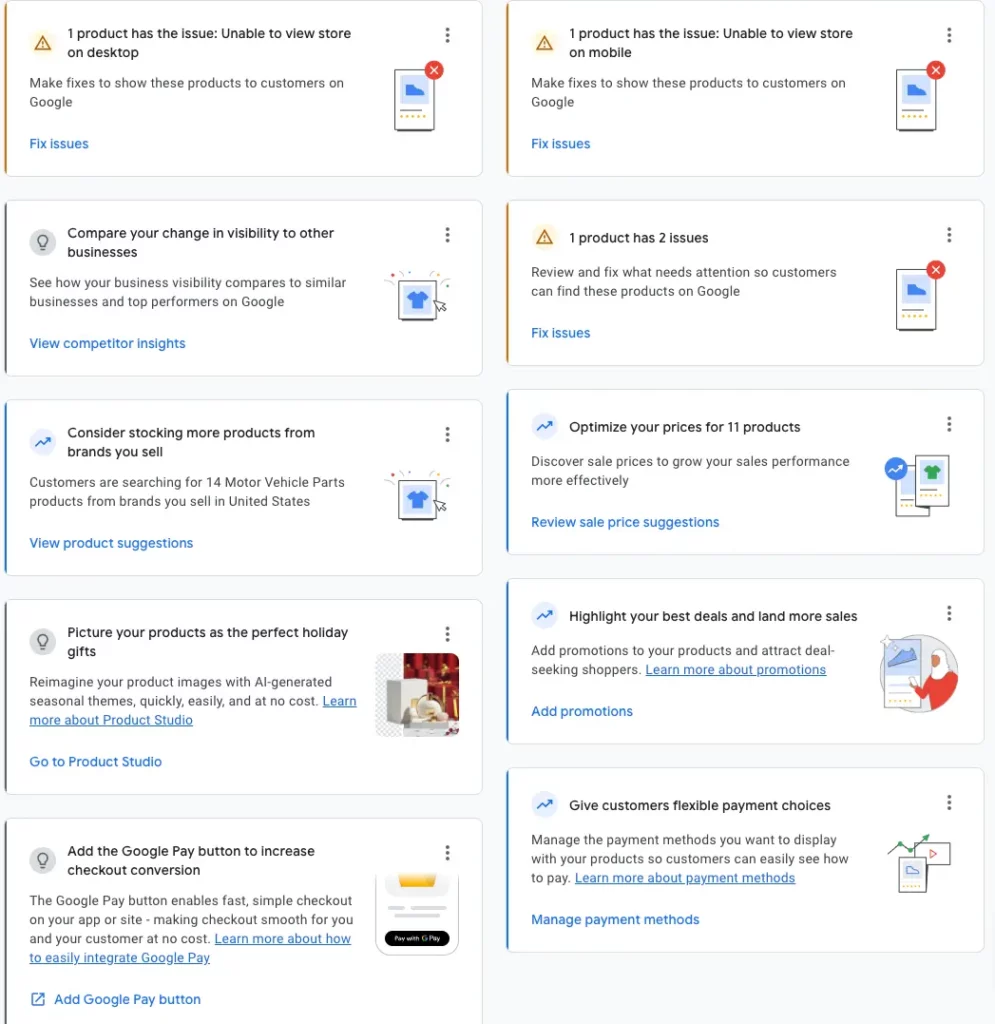
- Fix Errors Fast: Google will notify you of errors in your feed. The quicker you address these, the better your ranking will be.
- Use Accurate Data: The more accurate and detailed your product data is, the better your chances of ranking higher.
Want to dive deeper into the Merchant Center? Check this Screenshot where you can find the errors in your merchant center and explore ways to resolve them.
Google Merchant Center Next: What’s Changed
Merchant Center Next introduces:
- Automatic product data extraction
- Simplified diagnostics
- New metrics like click potential
- Built-in AI tools like Product Studio
It favors clean websites and consistent structured data while reducing manual control. This makes feed accuracy more important than before.
Free Listings & Organic Google Shopping
Google allows products to appear in Shopping results without paid ads through free listings.
After enabling “Surfaces Across Google,” products can appear on:
- Search
- Shopping tab
- Images
- YouTube
Feed quality still controls visibility. Many brands overlook this free traffic source despite strong buyer intent.
Feed Update Frequency & Automation
“Regular updates” must remain specific.
- Price and stock update daily or in real time
- Full feed refresh runs at least every 30 days
- Large or fast-changing catalogs use the Content API
Outdated data leads to disapprovals, lost badges, and reduced visibility.
12. Product and Customer Reviews for the Win
Many brands confuse product reviews with customer reviews, but both of them are different, and once you learn to differentiate between the two, this can prove to be one of the best Google Shopping hacks. Product reviews help potential site visitors to trust the product.
To Integrate Product Reviews:
- Use apps like Loox, Stamped.io, or Yotpo to integrate reviews into your feed.
- Google requires 50+ reviews per product to be eligible for review integration, so focus on gathering reviews.
- Once eligible, apply for review integration through Google Merchant Center.
Check out Google’s recommendations for review apps here: Google’s Recommended Review Apps.
Unlike product reviews that are about a certain product, customer reviews help the target audience to trust the brand, and the overall shopping experience.
How to be eligible for customer reviews:
- You need 100+ customer reviews for your store to qualify for the Customer Review Badge.
- Once you have hit the 100-review mark, apply for integration to get that badge.
Check out the guidelines for customer reviews here: Customer Reviews Eligibility.
13. AI-Powered Feed Optimization
AI already operates inside Google’s system.
Merchant Center Next enriches data automatically, while tools like Product Studio and FeedGen help improve images and attributes. Many external tools now create structured titles and descriptions at scale.
Accuracy remains the priority, not automation alone.
Can You Recommend Tools to Improve My Google Shopping Cart Experience?
When you run a successful Google Shopping campaign, the campaign doesn’t end with a sale. Each second, each click, and every field count the time it takes your users to reach your cart. It is possible to reduce abandonment rates by simplifying the checkout process, building trust, and using the right tools. They keep your cart working efficiently and profitably by acting as anonymous marketers.
1. Payment and Checkout Optimization
When customers feel unsafe or that checkout is slow, they drop off. Ensure your payment system is reliable, familiar, and offers instant approval and one-click convenience.
Recommended tools:
- Shop Pay, Google Pay, and PayPal — quick, verified, and trusted globally.
- Stripe Link or Bolt — Store payment details securely to eliminate friction in the future.
- BNPL (Klarna, Afterpay, Affirm) — increases AOV without cutting prices.
With these tools, checkout is almost effortless, allowing users to make purchases without second-guessing themselves.
2. Cart Personalization and Upsells
Personalization advances the cart from a transactional page to a decision-maker’s nudging.
Try tools like:
- Rebuy, LimeSpot, or Nosto — display complementary items (“Add cleaning kit?”).
- Fera.ai — displays urgency indicators like “Only 3 left!” or “20 people viewing.”
Organically, this approach keeps buyers engaged and increases order value.
3. Review and Trust Tools
Trust does not begin at checkout; it peaks at that point. There is a need for shoppers to feel confident that their choices are safe.
Use:
- Yotpo, Loox, or Stamped.io — include verified reviews in the cart view automatically.
- Trustpilot and Google Customer Reviews — add badges of external credibility.
Providing visible proof during checkout improves user confidence and reduces hesitation.
4. Behavior & Analytics Tools
If you don’t track everything, it’s impossible to address it. It’s easy to see exactly where customers pause or abandon carts when using these tools.
Recommended tools:
- GA4 Enhanced Ecommerce — View your sales funnel from “Add to Cart” to “Purchase.”
- Hotjar or Lucky Orange — analyze drop-offs with heatmaps and replays.
By identifying what breaks conversion rates, you can redesign checkout experiences to increase conversions.
5. Cart Recovery Automation
Despite the best checkout, a few buyers may leave without purchasing, but it doesn’t mean that you have lost the sale.
Automate the recovery process by using:
- Klaviyo or Omnisend — send the abandoned cart a personalized email or SMS.
- PushOwl or OneSignal — send push notifications directly from your browser.
Users return to your product just as they are still thinking about it using these tools.
How Can I Optimize My Google Shopping Cart for Better Sales?
The ads have already drawn qualified traffic; now you need to seal the deal with your cart. When your cart is setup smartly, friction is reduced, you maintain consistency with your ad messaging, and buyers don’t have any reason to hesitate. Adding more isn’t effective here, the goal is to remove everything that slows down or confuses the buyer.
1. Keep Cart Details Consistent with Your Ads
Mismatches lead to low conversions. The ad must show the discount or product variation, and your cart must display it as well.
- Make sure the image, name, and offer on the product are the same as on Google Shopping.
- Be sure to check the shipping cost before clicking to avoid hidden charges.
The consistency of the ad and check-out ensures buyers’ trust.
2. Simplify the Checkout Process
Conversions are lost with every additional step.
- Allow guest to check out and have their address autofill.
- Leave out unnecessary fields like “Company Name” or “Fax.”
- Provide a one-page checkout so that customers can make their decisions faster.
The layout of the site keeps the focus on the purchase rather than the paperwork.
3. Display Transparent Pricing Early
The last thing shoppers want is a surprise at the checkout.
- Upfront pricing, shipping, and taxes.
- Integrate delivery estimator to provide users with an idea of when to expect their order.
4. Offer Express and Trusted Payments
Credibility increases instantly when payment options are available.
- Put PayPal, ShopPay, or Google Pay buttons above the main checkout page
- Use BNPL tools to provide buyers with flexibility.
- Make sure the button displays secure payment icons and encryption badges.
Payments that feel quick and secure result in a higher conversion rate.
5. Optimize for Mobile
Mobile devices are now the most popular means of shopping.
- Use sticky “Checkout” buttons for quick navigation.
- Make sure product thumbnails are visible but small.
- Every second delay can reduce conversions by 20%.
6. Add Smart Incentives
The right offer can convince a hesitant shopper to buy.
- “Free shipping above ₹2,000 / $50” or “Add one more for 10% off.”
- Don’t offer general discounts; instead, offer discounts based on the cart level.
- Time-sensitive offers (“Order within 2 hours for same-day shipping”).
A small incentive triggers fast decision-making without affecting profits.
7. Show Reviews and Social Proof in Cart
Creating social validation is like hiring a digital salesperson who didn’t exist.
- Review and rate products directly below the checkout button.
- You can add small notes like “This item was bought by over 2,000 customers this month.”
Any flashy popup will not close sales as fast as believable proof.
8. Retarget Abandoners via GA4 + Google Ads
GA4 can bring users back when they leave.
- Integrate GA4 with Google Ads and import unfinished checkout audiences.
- Create remarketing ads featuring the same product or offer.
By using cross-channel remarketing, high-intent users can be reactivated.
9. Continuously Test and Improve
The optimization process never ends.
- Use A/B testing tools like VWO or Optimizely to test button, label, or incentive placement.
- Track “Begin Checkout, Add Payment, Purchase” metrics weekly.
The profitability of a data-driven cart remains constant regardless of change in algorithms or buyer behavior.
It’s a Wrap!
And there you have it- 12 simple yet formidable Google shopping hacks to optimize your Google Shopping feed. You can implement these Google shopping tactics in your campaign, and it won’t just help to make your brand more visible and attract the right shoppers; it will also enable you to convert active browsers into loyal customers.
Also, never forget that optimizing your feed isn’t a one-time job, but an ongoing process. So, stay consistent, keep experimenting, and we bet your results will improve over time. What are you waiting for? Put these Google Merchant Center feed tips into action, and get ready to crush the eCommerce game.
Got questions or need help with any of these steps? Drop a comment below, or feel free to reach out. I would love to hear from you!
Frequently Asked Questions
What is a Google Shopping Feed?
Why do I need a Google Shopping Feed?
How to Create a Google Shopping Feed?
What Attributes is Required in Google Shopping Feed?
How do I upload a Google Shopping Feed?