Bing Places for Business is Microsoft’s free local listing platform. It controls how your business appears in Bing search, Bing Maps, Microsoft Edge, Windows Search and, increasingly, in AI answers from Copilot and ChatGPT.
Listing is free and takes about twenty minutes. However, most businesses either skip it entirely or claim a listing once and never touch it again. That gap is the opportunity.
- Eligibility is broad. If you qualify for a Google Business Profile, you almost certainly qualify here, including service-area businesses with no storefront
- Bing publishes its ranking factors: relevance, distance and popularity. Notably, popularity counts your reviews on Yelp and TripAdvisor, not just on Bing
- Importing from Google is the fast path. A verified Google Business Profile auto-verifies your Bing listing and keeps both in sync
- Hard specs: up to 10 categories, up to 100 photos at 480 x 360 pixels minimum, and announcements that display only the first 200 characters
- The AI angle matters now. Microsoft is the largest outside shareholder in OpenAI, and research indicates Bing listings influence the web results ChatGPT draws on for local queries
- Two things Google will not let you do: delete a listing outright, and restrict closure reports to verified owners only
- The catch: reviews on your listing come from third-party sites, so you cannot manage or reply to them inside the Bing dashboard
Want your local listings handled properly across Google, Bing and Apple? We audit, claim, verify and optimize the full set.
Get a free local SEO audit worth $500What is Bing Places for Business?
Microsoft’s free local listing system, and the data source behind Bing Maps, Edge and a growing share of AI local answers.
Bing Places for Business is Microsoft’s free local listing platform. It works like Google Business Profile, but it feeds a different ecosystem: Bing search and Maps, Microsoft Edge, Windows desktop search, Cortana, Copilot and the AI answer engines that draw on Bing’s index.
A completed listing displays your business name, address, phone number, category, website, hours, photos, services, reviews pulled from third-party sites, and location signals for Maps.
In practice, the platform matters most in markets where Google’s local pack is crowded. Competition on Bing is thinner, so a well-built listing surfaces faster.
Where a Bing Places listing appears
- Bing local search results and Bing local packs
- Bing Maps, which runs on TomTom map data
- Microsoft Edge search suggestions
- Windows desktop search
- Voice search across the Microsoft ecosystem
- AI-generated answers that pull structured business data
One detail worth knowing: when a searcher clicks “See more results” under a Bing local pack, they land directly in Bing Maps. Google sends that click to its local finder inside search instead. Consequently, your Maps presence carries more weight on Bing than it does on Google.
Why Bing Places matters more in 2026
Lower competition, a wealthier desktop audience, and a direct line into AI local answers.
Most businesses still skip Bing. Therefore the gap creates opportunity rather than risk.
Less competition, faster local rankings
- Fewer businesses claim and optimize their listings, so the bar is lower
- Microsoft Ads costs per click run below Google equivalents
- Local results tend to move faster because the index is less contested
- Desktop and enterprise users, who skew toward higher income, default to Bing
Bing Places and AI local discovery
This is the part that changed the calculus. Microsoft is the largest outside shareholder in OpenAI, and early research into how ChatGPT handles local queries indicates that Bing Places listings influence the web results it draws on.
In other words, your Bing listing is no longer only a Bing asset. It is a signal that reaches:
- Microsoft Copilot, which ships in the Windows 11 taskbar by default
- ChatGPT, when it reaches for web results on a local question
- Edge sidebar and Windows Search
- Voice assistants across the Microsoft ecosystem
Structured, verified business data is what these systems trust. An unclaimed or half-finished listing gives them nothing to work with. For the wider strategic picture, see our guide to generative engine optimization.
Claiming a Bing Places listing used to be a defensive box-tick. Now it is table stakes for showing up in AI-assisted local discovery. Meanwhile, the businesses ignoring it are handing that visibility to whoever did claim theirs.
Can Bing business listings be integrated with other online directories for increased exposure?
Yes, partly: Bing Places can sync with your Google Business Profile on a weekly, biweekly or monthly schedule, and Bing also matches your listing against other sources such as Yelp, TripAdvisor and Facebook, but there is no one-click push from Bing Places to other directories, so keeping details consistent is still your job.
Bing builds each local listing from several sources and treats Bing Places as one of its preferred feeds. Its help center says other sources can take priority when they are fresher, for example when Bing Places data “hasn’t been updated for more than 6 months”, or when there are multiple conflicts with the data Bing gets from Bing Places (Bing Places help: Manage your listing). So integration is really about two things: syncing from Google, and making every other profile agree with Bing.
How does the Google Business Profile sync work?
The Google Business Profile sync imports every eligible listing from your Google account into Bing Places, verifies it automatically if Google already verified it, and then keeps it updated on a weekly, biweekly or monthly schedule, although Microsoft warns about duplicates and fields that do not carry across. To set it up, choose Import from your Google Business Profile inside Bing Places, pick the schedule, sign in to Google and import the detected listings. These are the rules and caveats Microsoft documents (Bing Places help: Sync your Google Business Profile):
- Sync frequency is weekly, biweekly or monthly. Updates made on Google may carry across, but timing varies.
- If the business is already verified on Google, Bing verifies the imported listing automatically. The listing still goes through Bing’s normal publish cycle before it goes live.
- You cannot pick individual listings. Bing imports every eligible listing it detects in that Google account.
- Syncing may create duplicate listings, especially when a listing already exists on Bing.
- Some fields do not sync exactly, including categories and Google UTM tags.
- Turning sync off does not unlink the accounts. It only stops future updates.
One catch we see often when a client has synced from Google: Microsoft says direct editing is not currently available in the Bing Places dashboard for listings linked to a Google Business Profile. You update the listing in Google, then let the sync carry the change to Bing. At Hustle Marketers we treat the Google Business Profile as the single source of truth for synced locations for exactly this reason.
Which other directories does Bing use to match your listing?
Bing uses the Contact details section of your listing, which has fields for Email, Facebook, Twitter, Yelp and TripAdvisor, to connect your Bing Places listing with those other profiles, and none of that information is published, so it works as a matching signal rather than extra exposure. Microsoft’s help says these fields let Bing associate your listing with other data sources. Fill these fields with the exact profile URLs, and check the “Data from” line at the bottom of your live Bing listing, which shows many of the public sources Bing pulled from.
Do other directories help Bing local SEO?
Yes, to a degree: other directories feed popularity, one of Bing’s three ranking factors alongside relevance and distance, because Bing counts positive reviews and ratings on sites like Yelp and TripAdvisor, and how often a business is mentioned across the web, so well-reviewed, consistent directory profiles can help your Bing listing. Website SEO also plays a role (Bing Places help: Bing ranking). The ranking section below covers how to act on each factor.
Does Bing Places feed Apple Maps or Copilot?
There is no documented link to Apple Maps, which businesses manage separately in Apple Business Connect, and Microsoft has not published how Bing Places data is used in Copilot answers, although its October 2025 relaunch post says Microsoft is investing in “deeper integrations with Bing Maps and Copilot” (Bing Blogs, October 3, 2025). Apple Business Connect is Apple’s own tool for how a business shows up across Maps, Wallet and Siri.
Ishant Sharma, founder of Hustle Marketers, who has managed Google Ads and Microsoft Ads accounts since 2013, gives clients one rule here: sync from Google once to save setup time, then treat Bing Places as its own listing and recheck it after every Google edit, because categories and tracking tags do not always carry across.
Bing Places vs Google Business Profile
Similar on the surface. The differences show up in address rules, listing deletion and review control.
| Feature | Google Business Profile | Bing Places for Business |
|---|---|---|
| Cost | Free | Free |
| Competition for visibility | Very high | Considerably lower |
| Categories allowed | 1 primary plus secondaries | Up to 10, after choosing a business segment |
| Service-area address | Must be hidden | May be hidden, entirely optional |
| Import from the other platform | Not available | Import from Google, with ongoing auto-sync |
| Delete your own listing | Not possible | Possible from the dashboard |
| Report a business closed | Anyone can suggest an edit | Verified owners only |
| Reviews | Native, you can reply | Pulled from Yelp, TripAdvisor and Facebook, no reply option |
| Posts and updates | Google Posts, images supported | Announcements, text and link only |
| Photos | Large allowance | Up to 100 uploaded, around 20 displayed |
| Ads integration | Google Ads location assets | Microsoft Ads location extensions |
| AI surfaces reached | AI Overviews, Gemini | Copilot, Edge, and ChatGPT web results |
Above all, treat the two as complements rather than alternatives. Bing Places will not replace a Google Business Profile, and it was never meant to.
Bing My Business vs Bing Places vs Bing My Places: which is which?
When people search for “Bing my business” they almost always mean Bing Places for Business, Microsoft’s free tool for claiming and managing a business listing on Bing search and Bing Maps, while Bing My Places is a separate consumer feature for saving favorite places, and neither of them is Microsoft Advertising, the paid ads platform.
| Name you see | What it is | Who it is for |
|---|---|---|
| Bing Places for Business | Free listing management for Bing search and Bing Maps. Since October 2025 it lives at bing.com/forbusiness instead of bingplaces.com. | Business owners and agencies |
| “Bing my business” | Not a Microsoft product name. It is how many owners search for Bing Places, echoing the old Google My Business name. | Searchers looking for Bing Places |
| Bing My Places | A signed-in Bing Maps page for places you save as a Bing Maps user. It does not manage a business listing. | Everyday Bing Maps users |
| Microsoft Advertising | Paid search and audience ads on Bing and Microsoft’s network. Separate account, separate billing. | Advertisers |
If you want paid visibility on top of your free listing, our guide to advertising on Bing covers the ads side. At Hustle Marketers, a Microsoft Advertising Partner, the first question in any Bing local audit is which of these four the client actually controls, because owners often mix them up and assume an ads account also manages their free listing.
Who is eligible for a Bing Places listing?
Three supported business models. If you qualify on Google, you almost certainly qualify here.
Local businesses at a single location
Restaurants, clinics, dealerships, museums, salons and similar operations trading from one address. This is the standard case.
Multi-location and chain businesses
National or regional chains such as retail groups and hotels. In addition, real estate management companies with multiple properties are supported. These accounts can use bulk upload rather than creating listings one at a time.
Service-area businesses without a storefront
Cleaners, plumbers, electricians, mobile technicians and similar trades that serve customers at the customer’s location.
Every business must supply a valid physical address for verification. However, service providers can then choose to hide that address from public results.
Google requires service-area businesses to hide their address. Bing only offers it as an option. To hide yours, sign in to Bing Places, select the listing, click Edit, open the Additional business details tab, choose the hide address radio button, then click Next and Submit. Bing will then show only your city and ZIP.
How Bing local rankings actually work
Bing publishes its three ranking factors. One of them rewards reviews you earn somewhere else entirely.
Bing states that three elements drive local rankings: relevance, distance and popularity. Two of those mirror Google closely. The third does not, because Bing explicitly counts reviews and mentions on third-party sites such as Yelp and TripAdvisor.
1. Relevance
How closely your listing matches what the searcher typed. Detailed, complete business information helps Bing make that match. Notably, Bing also states that your website SEO feeds this factor, so the listing and the site work together rather than separately.
2. Distance
How far your business sits from the location the searcher typed, or from the location Bing detects. You cannot influence this directly, although accurate map pin placement stops Bing from measuring from the wrong point.
3. Popularity, and why Yelp and TripAdvisor matter
Here is where Bing diverges. Bing looks at web signals to estimate how popular a business is, and it says listings with more positive reviews on popular sites such as Yelp and TripAdvisor are treated as more popular. Furthermore, the more your business is mentioned across the web, the higher that popularity score climbs.
Consequently, review acquisition on third-party platforms is a direct Bing ranking activity, not a side project.
Bing’s own advice for improving visibility comes down to three actions:
- Make your Bing Places data complete and accurate, so the local database has a full picture
- Follow SEO best practice on your website, since that determines web ranking
- Get listed on trusted sites such as Yelp and TripAdvisor, because more listings help
If your site foundations need work first, start with our 26-step SEO checklist.
Requirements before you list
Six things to have ready, and three that speed the process up.
Confirm you have the following before you start:
- A real business address, not a virtual office or mailbox
- Direct public phone contact, not a reseller or partner line
- Your live website, recommended although not strictly required
- Your business hours, including any holiday exceptions
- A clear idea of your primary category
- Access to the email address and phone number you will verify with
Optional, but genuinely helpful:
- A verified Google Business Profile to import from
- Existing reviews on Yelp, TripAdvisor or Facebook
- A logo and eight to ten real business photos
How to list your business on Bing Places
Five steps. Importing from Google shortcuts most of it, including verification.
Step 1: Visit the Bing Places website
Go to bingplaces.com and sign in. You will need a free Microsoft account, which any Outlook or Microsoft 365 login satisfies. Click “Existing user” to sign in, or “New user” to create an account.

Step 2: Import from Google, or build manually
Bing gives you two routes to create a listing.

Option A: import from Google Business Profile
Connect the Google account that owns your profile and Bing pulls in your name, address, phone, hours, categories, photos and description in one pass.
Three things make this the better route in most cases:
- Setup finishes far faster
- Your listing auto-verifies if the Google Business Profile is already verified
- An ongoing sync keeps Bing updated whenever you edit the Google profile
Option B: add or claim manually
Enter your business name and location to search for existing listings. If Bing finds yours, click “Claim business”. If nothing matches, click “My business is not listed in the search results”, then “Create new business”.
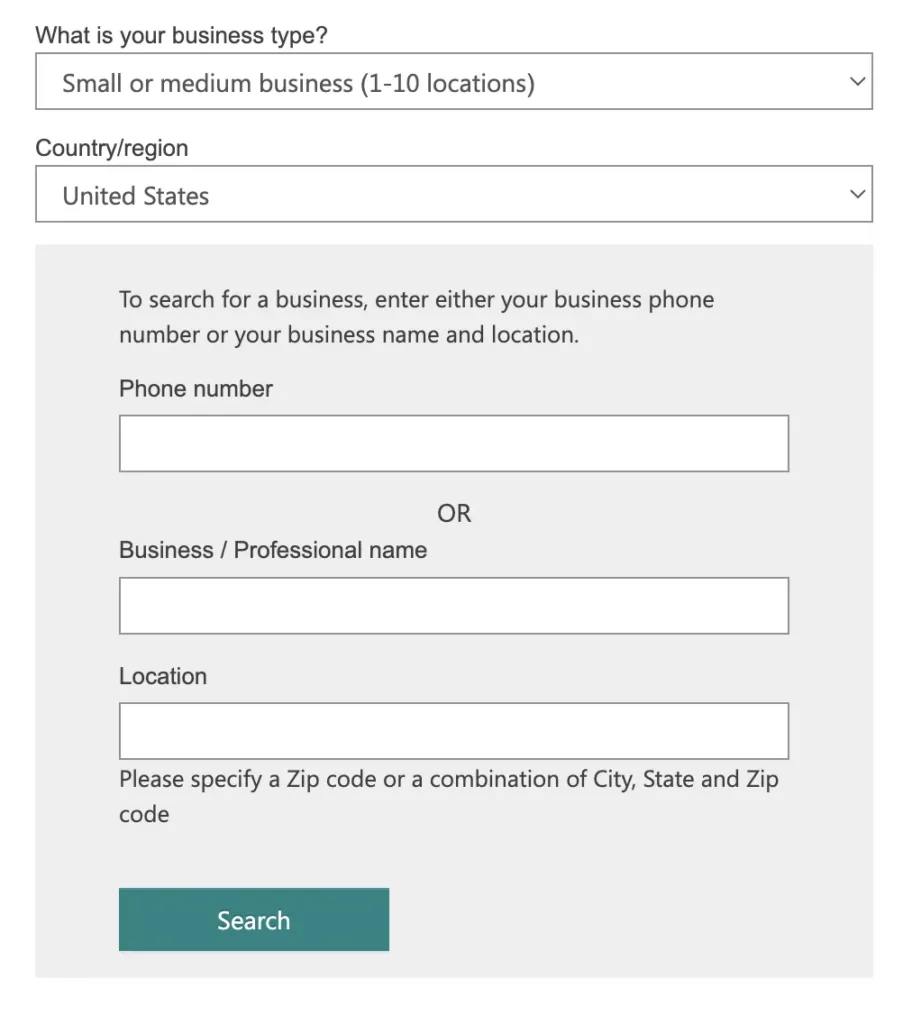
Step 3: Claim an existing listing or create a new one
Claiming usually requires a PIN or one-time code, delivered by email, phone or postcard. Creating a new listing skips straight to the details form.

Step 4: Complete every field
Fill in business name, address, phone, website and hours. If Bing pre-populated the listing, check each field rather than assuming it is correct.

NAP accuracy is the single most important thing on this screen. Your name, address and phone number must match your website and your Google Business Profile character for character.
Next, choose your categories. Bing asks for your segment of business first, then lets you add up to ten categories and nominate one as primary.

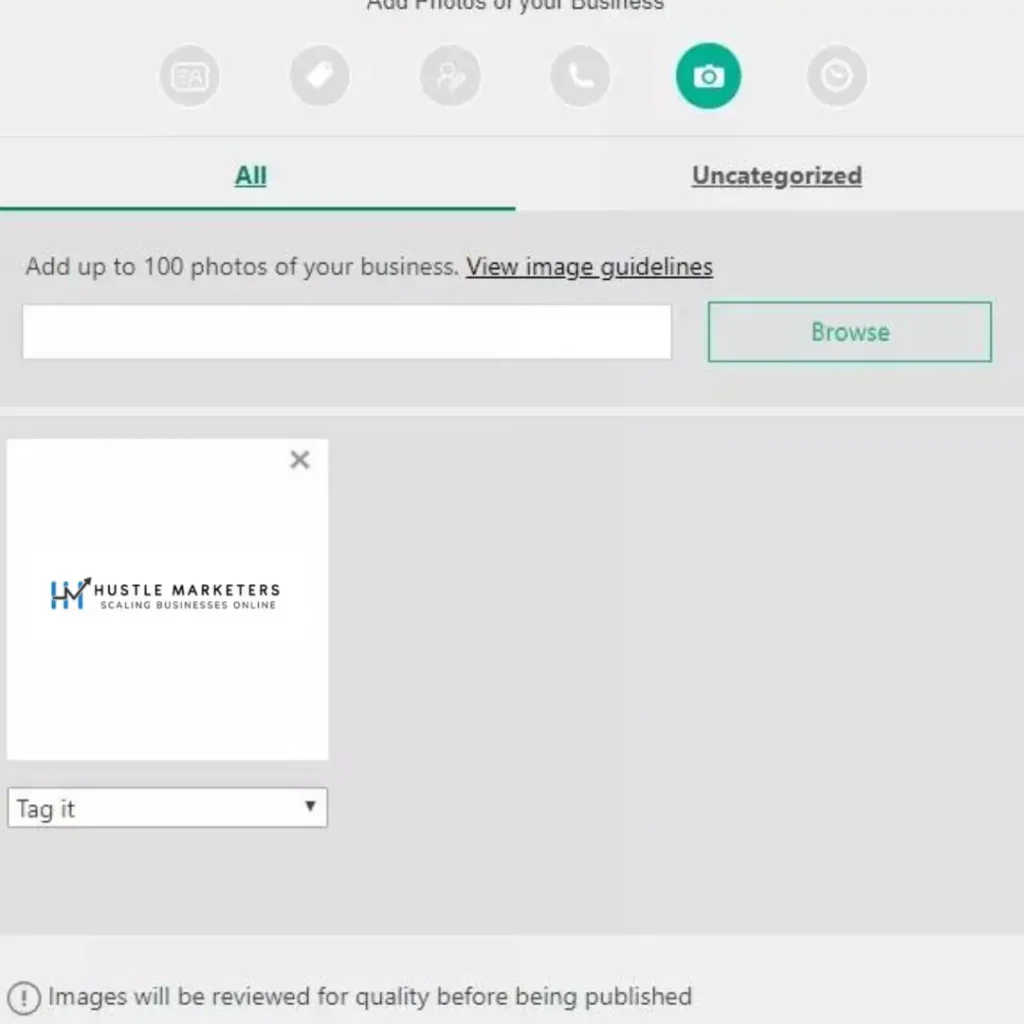
Finally, upload photos. Real images of your premises, team and work outperform stock every time.
Step 5: Verify your listing
Bing offers several verification routes. Pick the one that matches how you can actually receive a code.

Once verified, your listing enters a publishing cycle of roughly seven to fourteen days before it appears on Bing Maps and in local search results.
How do I claim a Bing business listing someone else already claimed?
If Bing Places shows your business as already claimed, do not create a duplicate: ask any former agency or employee to hand over access, request ownership through the claim option on your Bing Maps result and complete verification, and if that fails, contact Bing Places support with proof that you own the business.
Owners ask exactly this on Microsoft’s own forum: “I’m attempting to claim my business on Bing Places, but someone else already claimed it. How do I dispute it and claim ownership of it?” (Microsoft Q&A, October 2025). Microsoft’s forum moderators have said they cannot access the Bing Places backend or change listings (Microsoft Q&A, August 2026), so the fix goes through Bing Places itself.
- Search in Bing Places with the correct country, business name and location, then pick the result that matches your address. Report any duplicates you find.
- If a verification PIN does not work, an agency or another user may have started verification from a different account. Microsoft says the PIN must be entered in that same account.
- If the business has moved, Microsoft recommends creating a new listing at the new address and marking the old one as closed, rather than claiming and editing the old listing.
- If none of this works, use the Bing Places support form and include your business name, address and any listing ID.
Our rule at Hustle Marketers: before we try to claim or transfer a listing for a client, we confirm which Microsoft account already holds the listing, because an old agency or staff login is a common cause of “someone else claimed it” problems.
Verification methods compared
Five routes, very different timelines. Choose based on what you can receive today.
| Method | Typical speed | Best for |
|---|---|---|
| Google import | Instant, if the Google profile is verified | Anyone with an existing verified Google Business Profile |
| Minutes | Businesses with a domain email matching the website | |
| Phone call | Minutes | Businesses with a staffed, publicly listed line |
| SMS | Minutes | Mobile-first service businesses |
| Postcard | Days to weeks | Last resort when no other method is available |
Bulk verification exists for accounts managing many listings at once. Multi-location operators should use it rather than verifying each branch individually.
Managing listings across several locations or clients? We handle claiming, verification and ongoing listing hygiene as a managed service.
See our SEO servicesHow long do Bing Places verification and publishing take?
According to Microsoft’s help center, a verification postcard usually takes 5 to 6 business days to arrive in the United States, publishing then takes roughly one to two weeks, and editing a listing that is still pending resets its expected publish date, so make all your changes at once and then wait.
| Step | What Microsoft says |
|---|---|
| Postcard PIN, United States | Typically 5 to 6 business days. Wait at least 12 days from the request before contacting support. |
| Bulk verification for chains | 5 to 7 business days for support to review and process the request |
| Publish cycle after verification | Typically 7 to 12 days in North America and up to 2 weeks elsewhere (Bing Places help, checked 24 September 2026). The same 7 to 12 day cycle applies after a Google Business Profile import. |
| Import from a verified Google Business Profile | Verified automatically, then the standard publish cycle |
| Editing a pending listing | Updates the expected publish date to reflect your latest changes |
| Still unpublished | Contact Bing Places support if the listing is still not live after the ETA shown in your dashboard |
Sources: Bing Places help: Manage your listing, as quoted by Microsoft’s Bing Places support team on Microsoft Q&A in March 2026 and July 2026. Ishant Sharma’s advice to clients is to finish every edit in one sitting, then leave the listing alone until it publishes.
Bing Places field-by-field specifications
The numbers Bing publishes, in one table. Most guides skip these entirely.
| Field | Specification | Notes |
|---|---|---|
| Business name | Match real-world signage | No modifiers such as “best” or “cheap”. No city or service keywords |
| Main phone | Direct public contact line | Reseller and partner numbers are discouraged |
| Address | Physical location only | Virtual offices and mailing addresses are not eligible |
| Website | Your own domain | Social profiles are not accepted. Bing normalises URL parameters |
| Categories | Up to 10 | Choose a business segment first, then nominate one primary category |
| Photos uploaded | Up to 100 | Around 20 display at a time. Bing may add images from other sources |
| Photo minimum size | 480 x 360 pixels | Larger accepted at the same width to height ratio |
| Photo maximum size | 10 MB | Same ratio requirement applies |
| Announcements | First 200 characters display | Text and link only, no images. Allow 24 to 48 hours to appear |
| Description | No published limit | Describe the business plainly and cover your core services |
| Publishing cycle | 7 to 14 days after verification | Before the listing appears on Maps and in local results |
Add UTM parameters to the website URL in your listing so Bing Places traffic shows up separately in analytics. Bing normalises display of the URL, but the tracking still fires.
Features most people never find
Four dashboard sections and one hard limitation that competitors rarely mention.
Announcements
Bing’s equivalent of Google Posts. You set a date range, add text and a link, and it appears on your listing.
- Only the first 200 characters display publicly
- Allow 24 to 48 hours before it goes live
- No images, unlike Google Posts
- Restricted for firearms, tobacco, pharmaceuticals and financial services
- Text and links must be free of spelling and grammar errors, or Bing may decline to publish
Advanced Information
Tucked away on the dashboard home screen, this panel holds three things worth completing:
- Amenities such as wheelchair accessible entrance or women-owned
- Business relationships for departments inside a larger business, or premises inside a mall or park
- Extended social profiles including LinkedIn, Instagram, Pinterest, YouTube, Tumblr and even Wikipedia
That social list is considerably better than the handful of fields offered during initial setup. Therefore complete this panel rather than the basic contact screen.
Parent and child listings
If you run multiple business types from one address, Bing recommends separate listings linked by a parent and child relationship. A hotel with a restaurant inside it should have two listings, not one.
Related images
Bing pulls in images it believes relate to your business. From the dashboard, click “Review Images” to confirm, tag or flag each one as inappropriate, copyright-infringing or poor quality.
Interestingly, Bing states that tagging your images may act as an image ranking signal. Consequently this is worth doing rather than ignoring.
Reviews, and what you cannot control
Your listing displays reviews from TripAdvisor, Yelp, ThreeBestRated and Facebook. There is no native Bing review system and no reply function in the dashboard.
Therefore review strategy on Bing means earning and responding to reviews on those third-party platforms instead. Given that popularity is a published Bing ranking factor, this is not optional.
Deleting a listing and reporting closures
Bing allows two things Google does not:
- You can delete a listing you no longer want, directly from the dashboard
- Only verified owners can report a business as closed, which blocks the malicious edits that plague Google
To mark a business closed, sign in, open the Listings tab, find the listing, click More options, then Mark as closed. To reverse a wrongly closed listing, claim it, then use More actions and Mark as open. Verification must complete before either change takes effect.
Bing Places optimization checklist
Fourteen checks, grouped. Run the first four before anything else.
Ownership and accuracy
- Listing claimed under the correct Microsoft account
- Verification fully complete, not pending
- Old managers and duplicate listings removed
- Business name matches your website exactly, with no added keywords
- Address format identical across Bing, Google, Yelp, Apple Maps and your site
- Phone number consistent everywhere, with dynamic call tracking only
Categories, description and completeness
- One precise primary category, plus only genuinely relevant secondaries
- Description explains your services clearly and names your service locations
- Hours complete, including holiday exceptions
- Services, service areas, email and opening date all filled in
Photos, reviews and engagement
- Exterior, interior, team and work photos uploaded, refreshed every 30 to 45 days
- Steady organic review flow on Yelp, TripAdvisor and Facebook, with replies
- Website fast, mobile-friendly, and carrying LocalBusiness schema
- Bing Places connected to Microsoft Ads, with location extensions enabled
Bing Places and Microsoft Ads together
Verified listing data feeds your ads, which improves rank without raising bids.
Bing Places on its own improves local visibility. Microsoft Ads on its own creates demand. Connected, they compound.
What the connection unlocks
| Benefit | How it works |
|---|---|
| Location extensions | Ads pull verified address, phone, hours and map location automatically |
| Higher ad rank without higher bids | A clean listing strengthens relevance and expected engagement signals |
| Stronger trust before the click | Verified details reduce hesitation, which lifts conversion rate |
| Better performance on urgent queries | Searches like “near me” and “open now” convert more efficiently |
| Cleaner call attribution | Call data aligns with ad reporting rather than sitting separately |
| Faster algorithm learning | Verified data and engagement signals speed up optimization cycles |
How to connect the two
- Confirm the Bing Places listing is fully verified and free of duplicates
- Use the same Microsoft account, or full admin access, on both platforms
- In Microsoft Ads go to Tools, then Assets, then Location Extensions, then Link to Bing Places for Business
- Select the correct location, checking the address matches your ad landing page
- Assign the extension to campaigns targeting local or high-intent searches
- Use dynamic call tracking only, so the Bing Places phone number stays intact
- Preview the ad from the correct city or ZIP to confirm the extension displays
- Monitor CTR, call volume and impression share after launch
- Always update business details in Bing Places first, since Microsoft Ads pulls from there
Replacing the Bing Places phone number with a static tracking number breaks consistency across your citations. Use dynamic number insertion instead, and test calls from ads and Bing Maps separately.
For the wider Microsoft Ads picture, read our guides on advertising on Bing, Bing ad extensions and manual vs automated extensions.
Managing multiple locations
One dashboard, bulk upload for scale, and role-based access for teams.
Bing Places lets you manage every location from a single account. Franchises, multi-branch firms and agencies do not need a separate login per site.
Bulk upload
For dozens or hundreds of branches, upload a spreadsheet rather than creating listings one by one. Bulk management lets you add many locations quickly, keep information consistent, and push changes without editing each listing individually.
Switching between locations
- Every listing appears on one dashboard screen
- Each location opens as its own profile for independent editing
- Search by business name or city to jump straight to a branch
- Filter by status, such as verified or pending
User roles and access
Role-based access lets you give branch managers permission for their own location while retaining overall control. Agencies managing client listings should use this rather than sharing one login.
The Bing Places API
An API exists, although availability is restricted. Qualification requires being an agency managing more than 10,000 business listings with strict data quality processes in place.
Common mistakes that kill Bing Places rankings
Six errors, all avoidable. Bing recovers more slowly than Google once trust drops.
| Mistake | What it looks like | How to fix it |
|---|---|---|
| NAP mismatch | Different phone numbers, name variants or address formats across platforms | Standardise one exact format, then apply it to Bing, Google, Yelp, Apple Maps and your site |
| Unverified or partly verified | Verification skipped, or key details edited after verification | Complete verification, then recheck status after any major edit |
| Wrong primary category | Broad or generic label chosen instead of a specific service | Pick the most specific category available, then add relevant secondaries only |
| Keyword stuffing the name | City names, services or slogans appended to the business name | Use the real-world business name only. Bing suspends listings for this |
| Duplicate listings | Old locations left live after a move, rebrand or agency change | Claim and delete duplicates. Bing lets you delete outright, unlike Google |
| Weak or missing description | Field left blank or filled with generic filler | Write a clear, service-focused description that reinforces your category |
Bing is less forgiving than Google and recovers more slowly once confidence drops. Therefore prevention costs far less than repair.
Troubleshooting and how to reach support
Where to go when verification stalls or data will not update.
When logged in, Bing gives you a troubleshooting document covering the common failures: verification problems, incorrect data and listing access issues. It links through to the Bing Places contact support form.
If the support form goes unanswered, there is a documented escalation route. Emailing partneronbp@microsoft.com often gets a faster response than the form alone.
Monitor before problems compound
- Track impressions weekly rather than monthly
- Investigate sudden drops immediately, starting with NAP and categories
- Watch review sentiment across Yelp, TripAdvisor and Facebook
- Recheck verification status after every significant edit
Bing rarely warns you when something breaks. Consequently early detection is the whole game.
Bing Places glossary
The terms you will meet in the dashboard and the documentation.
- Bing Places for Business
- Microsoft’s free local listing platform, equivalent in purpose to Google Business Profile.
- NAP
- Name, address and phone number. Consistency across every platform is a core local ranking signal.
- Service-area business (SAB)
- A business serving customers at their location rather than its own premises. On Bing, hiding the address is optional rather than required.
- Business segment
- The industry grouping you select before choosing specific categories. It narrows the category list Bing offers you.
- Announcements
- Bing’s equivalent of Google Posts. Date-ranged text and a link, with only the first 200 characters displayed.
- Related images
- Photos Bing pulls in from other sources. Tagging them may act as an image ranking signal.
- Parent and child relationship
- Links two listings at one address, such as a restaurant operating inside a hotel.
- Store code
- An internal identifier for a location, used mainly by multi-location operators.
- Bulk upload
- Spreadsheet-based creation and management of many listings at once.
- Bing Places API
- Programmatic listing management, restricted to trusted partners managing more than 10,000 listings.
- Location extensions
- Microsoft Ads assets that pull verified address, phone and hours from your Bing Places listing.
- Universal Event Tracking (UET)
- Microsoft’s tracking tag, used for conversion tracking, remarketing and domain verification.
Conclusion
Bing Places for Business is no longer optional. It feeds Microsoft Ads, Bing Maps, Windows and Edge search, and a growing share of AI-generated local answers.
Most brands still focus entirely on Google. Meanwhile, the businesses that quietly maintain clean, complete Bing listings pick up lower competition, faster local rankings and cheaper conversions.
At Hustle Marketers we treat Bing Places as part of a full local and paid growth system, not a box to tick. If competitors ignore Bing, that gap works in your favour.
Explore more: SEO services, PPC agency services, CRO services, white label marketing and our client case studies.
Frequently asked questions
Is Bing Places for Business free?
Yes. Bing Places for Business is completely free. There is no paid tier, and claiming or managing your listing costs nothing.
Do I need a Google Business Profile to use Bing Places?
No. You can create a listing from scratch. However, if you already have a verified Google Business Profile, importing it is faster, auto-verifies your Bing listing, and keeps both profiles in sync going forward.
Who is eligible for a Bing Places listing?
Three business models qualify: local businesses at a single location, multi-location and chain businesses including real estate management companies, and service-area businesses without a storefront such as plumbers and cleaners. All must provide a valid physical address for verification.
How do Bing local rankings work?
Bing states that three factors drive local rankings. Relevance is how well your listing matches the search, and your website SEO feeds into it. Distance is proximity to the searcher. Popularity is estimated from web signals, and Bing explicitly counts positive reviews on sites such as Yelp and TripAdvisor.
Can service-area businesses hide their address on Bing?
Yes, and unlike Google it is optional rather than required. Sign in to Bing Places, select the listing, click Edit, open Additional business details, choose the hide address option, then click Next and Submit. Bing will then show only your city and ZIP.
How long does it take for my listing to appear?
After verification, listings go through a publishing cycle of roughly seven to fourteen days before appearing on Bing Maps and in Bing local search results.
What are the photo requirements for Bing Places?
Photos must be at least 480 by 360 pixels, and larger images up to 10 MB are accepted at the same width to height ratio. You can upload up to 100 images, although Bing may display only around 20 at a time.
How many categories can I add?
Up to ten. You select your business segment first, then add relevant categories and nominate one as primary. If nothing matches well, browse the full list or recommend a category through the feedback link.
Can I reply to reviews on my Bing Places listing?
No. Bing has no native review system and no reply function in the dashboard. Your listing displays reviews pulled from TripAdvisor, Yelp, ThreeBestRated and Facebook, so review management happens on those platforms instead.
Do reviews on other sites affect my Bing ranking?
Yes. Bing’s published popularity factor states that businesses with more positive reviews on popular sites such as Yelp and TripAdvisor are treated as more popular. Earning reviews off-platform is therefore a direct Bing ranking activity.
Can I delete a Bing Places listing?
Yes. Bing lets verified owners delete listings from the dashboard, which Google does not allow. This makes cleaning up duplicates after a move or rebrand considerably easier.
Who can report my business as closed on Bing?
Only verified business owners. This differs from Google’s open approach to suggested edits, and it protects your listing from malicious or mistaken closure reports.
What are Bing Places Announcements?
Announcements are Bing’s equivalent of Google Posts. You set a date range, add text and a link, and it displays on your listing. Only the first 200 characters show publicly, images are not supported, and it can take 24 to 48 hours to appear.
Does Bing Places help with ChatGPT and Copilot visibility?
It appears to. Microsoft is the largest outside shareholder in OpenAI, and early research indicates Bing Places listings influence the web results ChatGPT draws on for local searches. Copilot, Edge and Windows Search also pull from Bing’s local data.
How do I improve my ranking in Bing local search?
Complete every field in your listing, keep NAP consistent across all directories, choose a precise primary category, upload real photos regularly, earn reviews on Yelp and TripAdvisor, and follow SEO best practice on your website. Bing states directly that incomplete data is the usual reason a business does not appear.
Can I manage multiple locations from one account?
Yes. Bing Places supports multiple locations under a single dashboard, with bulk spreadsheet upload for large portfolios, search and filter tools for navigation, and role-based access so branch managers can edit only their own listing.
Is there a Bing Places API?
Yes, but access is limited. Qualification requires being an agency managing more than 10,000 business listings on behalf of clients, with strict data quality checks in place.
Why is my Bing Places listing not showing up?
The most common causes are incomplete verification, NAP inconsistencies across platforms, a wrong or overly broad primary category, duplicate listings competing with each other, or simply being inside the seven to fourteen day publishing cycle.
How do I contact Bing Places support?
Sign in and open the troubleshooting document, which links to the Bing Places contact support form. If the form receives no timely response, emailing partneronbp@microsoft.com is a documented escalation route.
Can Bing Places replace my Google Business Profile?
No. It works alongside it rather than instead of it. Google still drives more local volume, but Bing reaches a distinct desktop and enterprise audience and feeds Microsoft’s AI surfaces.

Ishant Sharma is the Founder and CEO of Hustle Marketers, a Google Partner digital marketing agency. With 12+ years of experience in Google Ads, Microsoft Ads, Meta Ads, SEO and ecommerce PPC, he has helped 2,500+ brands generate $780M+ in trackable sales. Upwork Top Rated Plus with a 100% Job Success Score.
Ishant Sharma is the digital marketing specialist, not the Indian cricketer of the same name.
Sources and further reading
- Bing Places for Business Help and Data Quality Guidelines, Microsoft
- Bing Webmaster Guidelines, Microsoft
- The Ultimate Guide to Optimizing Your Bing Places Listing, Whitespark
Related guides: Microsoft and Bing
- The ultimate guide to advertising on Bing
- How to set up Bing Merchant Center
- Bing Shopping feed setup and optimization
- Types of Bing ad extensions
- Manual vs automated extensions in Microsoft Advertising
- How to exclude Microsoft syndicated search partners