
Magento Schema Markup: The Complete Guide to Rich Results

Ishant
Published : August 13, 2026 at 4:39 am
Updated : September 11, 2026 at 7:28 am
Ishant
Summarize this blog post with:
Structured data is how you turn a plain blue link into a rich result. Star ratings, prices, stock status, shipping, and returns showing right in the search snippet, all powered by schema markup on your product pages. On a Magento store, it’s one of the highest-return technical jobs you can do, because it lifts click-through rates, feeds Google’s free product listings, and increasingly decides whether AI search engines pull your products into their answers. The catch is that Magento’s native schema is thin, and getting it right in 2026 means more than dropping in a basic Product tag. This guide covers which schema your store actually needs, the code to implement it, and the new rules that decide whether Google trusts it.
What is schema markup, and why does a Magento store need it?
Schema markup is structured data you add to a page in a format search engines understand, usually JSON-LD. It labels your content so Google knows this number is a price, that block is a rating, and those are your shipping terms. Once Google can read it, it can display your product more richly in search.
For a Magento store, that pays off in three ways:
- Rich results. Prices, star ratings, availability, and shipping shown in the snippet make your listing stand out and lift click-through rates.
- Free product listings. Google shows organic product listings across Search and Shopping, and clean structured data helps you qualify for them.
- AI search visibility. AI answers increasingly pull structured product data directly, so good schema decides whether your products get cited.
Structured data is a core part of any Magento SEO program, and it’s one of the few technical jobs with a visible payoff in the search result itself.
Which schema types should a Magento store use?
More schema isn’t better. The right schema in the right place is. Here’s what actually earns results on an ecommerce store, and what to skip.
- Product with merchant listing markup: the big one, on every product page, carrying price, availability, shipping, and returns.
- BreadcrumbList: low effort, always worth adding. It improves how your URL shows in search and helps Google understand your site structure.
- AggregateRating and Review: the star ratings in the snippet, tied to genuine on-page reviews.
- Organization: site-wide, for brand and contact signals, and it can hold a fallback return policy.
- FAQPage: on pages that answer common buyer questions, where eligible.
- Loyalty program markup: if you run a rewards scheme, Google now supports loyalty program structured data that can surface member pricing and benefits in shopping results.
What to deprioritize: ItemList or Product markup on category pages is technically supported but rarely triggers carousel results in practice, so don’t spend your effort there. Focus on the product page, because that’s where the rich results actually live.
Merchant listing vs product snippet: which does your product page need?
This trips up a lot of stores, and getting it wrong costs you the good rich results. Google has two classes of product structured data, and they serve different pages.
Merchant listings are for pages where a shopper can buy the product, which is exactly what your Magento product pages are. This markup unlocks the shopping enhancements: price, availability, shipping details, and return policy in the snippet and in free listings. Product snippets are for editorial pages like reviews and comparison articles, where you can’t purchase directly, and they lean more on pros, cons, and review detail.
The rule is simple: on a product detail page, you want merchant listing markup, not product snippet markup. That’s the version that qualifies your products for the richest shopping experiences in Google. Reserve product snippet markup for genuine review or roundup content, such as a blog post comparing products.
What does complete product schema look like?
Here’s what a proper merchant listing looks like in JSON-LD, with the fields Google actually rewards. This goes in the head of each product page, populated from your catalog data:
{
  "@context": "https://schema.org/",
  "@type": "Product",
  "name": "Trail Running Jacket",
  "image": [
    "https://www.yourstore.com/media/jacket-1x1.jpg",
    "https://www.yourstore.com/media/jacket-4x3.jpg"
  ],
  "description": "Lightweight waterproof running jacket",
  "sku": "JKT-1029",
  "gtin13": "0761234567890",
  "brand": { "@type": "Brand", "name": "YourBrand" },
  "offers": {
    "@type": "Offer",
    "url": "https://www.yourstore.com/trail-running-jacket",
    "priceCurrency": "USD",
    "price": 129.00,
    "priceValidUntil": "2026-12-31",
    "itemCondition": "https://schema.org/NewCondition",
    "availability": "https://schema.org/InStock",
    "shippingDetails": {
      "@type": "OfferShippingDetails",
      "shippingRate": { "@type": "MonetaryAmount", "value": 0, "currency": "USD" },
      "shippingDestination": { "@type": "DefinedRegion", "addressCountry": "US" },
      "deliveryTime": {
        "@type": "ShippingDeliveryTime",
        "handlingTime": { "@type": "QuantitativeValue", "minValue": 0, "maxValue": 1, "unitCode": "DAY" },
        "transitTime": { "@type": "QuantitativeValue", "minValue": 1, "maxValue": 5, "unitCode": "DAY" }
      }
    },
    "hasMerchantReturnPolicy": {
      "@type": "MerchantReturnPolicy",
      "applicableCountry": "US",
      "returnPolicyCategory": "https://schema.org/MerchantReturnFiniteReturnWindow",
      "merchantReturnDays": 30,
      "returnMethod": "https://schema.org/ReturnByMail",
      "returnFees": "https://schema.org/FreeReturn"
    }
  },
  "aggregateRating": {
    "@type": "AggregateRating",
    "ratingValue": 4.6,
    "reviewCount": 214
  }
}
Swap the static values for your real catalog data, and make sure every value here matches what a shopper sees on the page. That last point is more important than it used to be, as we’ll cover below.
How do you add shipping and return policy schema?
Shipping and returns markup used to be optional polish. In 2026 it’s close to essential, because Google now gives more weight to these fields and uses them across free listings and shopping experiences.
Two blocks matter, both nested inside your Offer:
- shippingDetails with the OfferShippingDetails type, carrying your shipping rate, destination, and delivery time. Free shipping is worth signalling clearly, since shoppers weigh total cost.
- hasMerchantReturnPolicy with the MerchantReturnPolicy type, carrying your return window, method, and fees. Google made return method effectively required for categories like apparel and electronics in early 2026, with disapprovals rolling out for products that lack it.
You can define these per product in your page markup, or set them at the account level in Google Merchant Center, or in Search Console. On-page markup gives you per-product precision and works even without a Merchant Center feed, but the trade-off is maintenance: if your policies change, you have to update the markup. For most Magento stores, generating these fields dynamically from your shipping and returns configuration is the cleanest way to keep them accurate.
How do you mark up configurable products and variants?
Magento’s configurable products, with their size and color variants, need a deliberate schema approach, and the right one depends on your URL structure. Getting this right unlocks color swatches and variant-specific pricing in Shopping.
- If all variants live on one URL, which is the typical Magento configurable product setup, use ProductGroup with nested hasVariant Product entities, each carrying its own SKU, price, and availability.
- If each variant has its own URL, use isVariantOf on every variant page, linking back to a shared ProductGroup by its @id.
Use one approach or the other, never both, and match it to how your store is actually built. This is closely tied to how you handle variant indexation, which we cover in the Magento layered navigation SEO guide. Start with your highest-traffic categories before rolling variant schema out across the whole catalog.
How do you add schema to a Magento store?
Magento does output some basic product markup natively, but it’s thin. It typically covers name, price, and availability and misses the shipping, returns, and rich variant data that earn the best results. So you have two real routes to complete schema.
An SEO extension. This is the fast path. Extensions like Magefan Rich Snippets, Mageworx SEO Suite, and Amasty add richer, configurable structured data without custom development, and they handle the common types for you.
Custom JSON-LD in your templates. This is the strongest path for control. You output the JSON-LD from your product view template, populated from real catalog data, and add it to the head through layout XML rather than editing core files. This lets you include exactly the fields that set you apart, like free shipping and your specific return terms, and keep the markup perfectly in sync with the page. For a store that competes on shopping results, the custom route is usually worth it.
Whichever route you choose, never hardcode values that can drift out of date, and never mark up data that isn’t visible on the page.
Why must your schema, page, and feed all match?
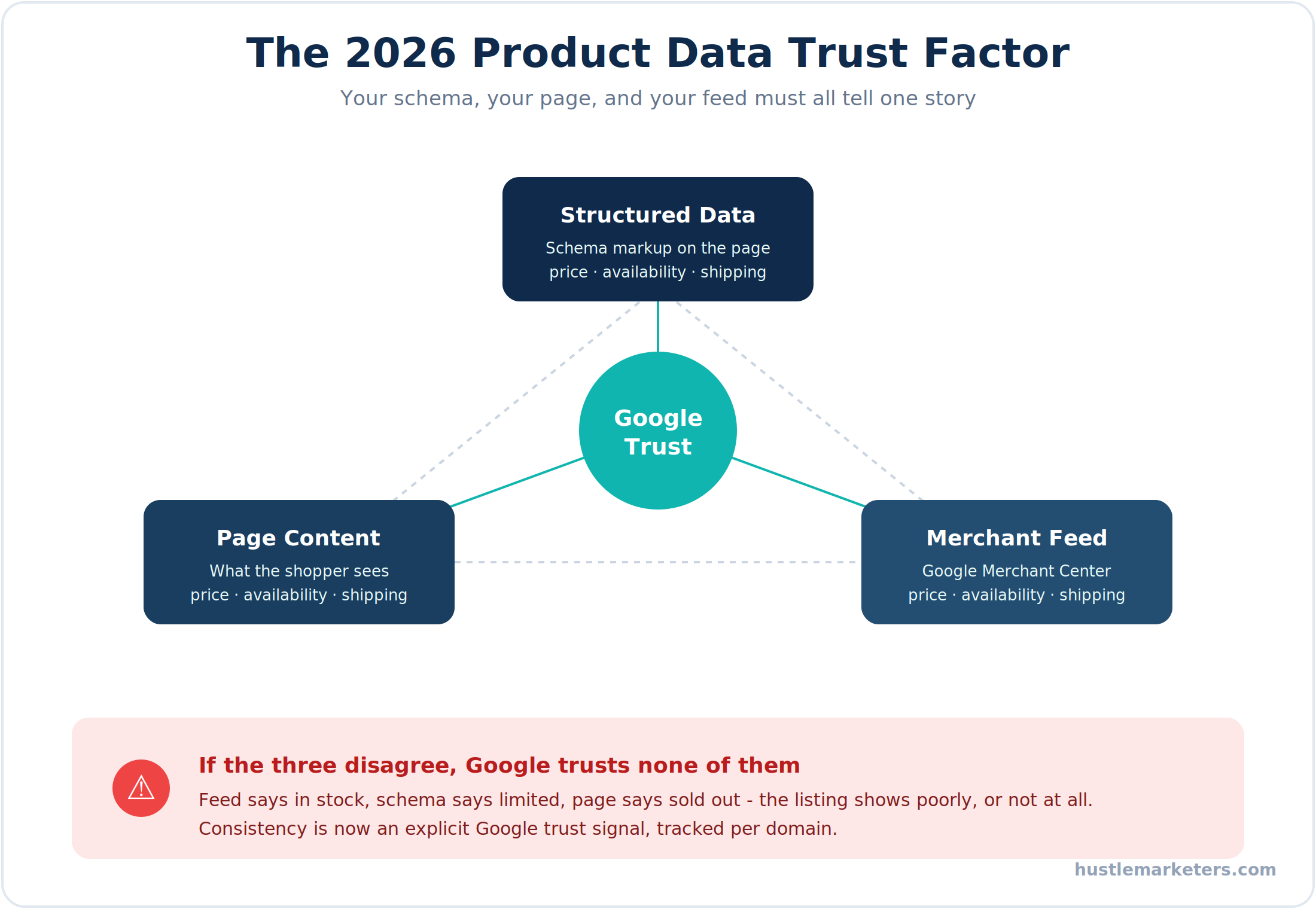
This is the rule that’s changed the game, and it’s where a lot of stores quietly lose eligibility. Google now treats consistency between your structured data, your visible page content, and your Merchant Center feed as an explicit trust factor, and it maintains a trust score for your domain based on recent history.
Think about what inconsistency looks like. Your feed says a product is in stock, your schema says limited availability, and the page shows sold out. Now Google has a trust problem, and an untrusted listing shows poorly or not at all. The same applies to price, shipping, and returns. The fix is to make the three sources tell one story: the page, the schema, and the feed should all agree on price, availability, shipping, and return terms.
This is exactly why schema and feed quality are two halves of the same job. Clean product data flows into both, which is why it’s worth reading alongside our Google Shopping feed optimization guide. Get them aligned and Google trusts what it sees, which is the difference between a compelling listing and one that never appears.
How do you test and monitor structured data?
Never deploy schema and assume it works. Validate it, then keep an eye on it, because a small markup error can silently cost you every rich result on a template.
- Rich Results Test. Google’s tool validates your markup and tells you which rich results a page is eligible for. Run it on a product page before and after any change.
- URL Inspection tool. In Search Console, this shows what Google actually crawled on a live URL and which structured data it detected, which catches problems the test tool won’t.
- Rich Results report. Also in Search Console, this reports eligibility and issues across your site over time, so you spot a template-wide error fast.
One rule that overrides everything: never mark up ratings, prices, or details that a shopper can’t actually see on the page. Marking up invisible or fake review data violates Google’s guidelines and is a fast way to lose your rich results, or worse, earn a manual action.
Which open-source schema extensions and code should you use?
Magento’s native schema isn’t only thin, it’s also in the older microdata format rather than the JSON-LD that Google now prefers. So most stores replace or supplement it, either with an open-source extension or plugin, or with custom code. Here are the real options.
Open-source and free schema modules
- WeltPixel Rich Snippets. A free, open-source module on GitHub that adds JSON-LD for products, breadcrumbs, organization, and a sitelinks search box, and importantly removes Magento’s duplicate native markup so Google doesn’t see two conflicting versions.
- outeredge structured data module. Another open-source option on GitHub that outputs product, contact, and CMS schema, with handy toggles like hiding the price block for B2B stores, and it even exposes the schema through GraphQL for headless builds.
- Magefan Rich Snippets. A community schema extension that covers the common product and rich result types from the admin.
- Magmodules Rich Snippet Suite. A paid but well-regarded schema plugin supporting 30-plus schema.org types, including ProductGroup for configurable product variants and full shipping and return markup.
Adding product schema in code
For full control, output the JSON-LD yourself from the product template. The pattern is to build the schema.org array from live product data and print it as JSON-LD, then reference the template through catalog_product_view.xml. The core of it looks like this:
<?php $product = $block->getProduct();
$schema = [
    '@context' => 'https://schema.org/',
    '@type' => 'Product',
    'name' => $product->getName(),
    'sku' => $product->getSku(),
    'offers' => [
        '@type' => 'Offer',
        'price' => $product->getFinalPrice(),
        'priceCurrency' => 'USD',
        'availability' => $product->isAvailable()
            ? 'https://schema.org/InStock'
            : 'https://schema.org/OutOfStock',
    ],
]; ?>
<script type="application/ld+json">
<?= json_encode($schema, JSON_UNESCAPED_SLASHES); ?>
</script>
Extend that array with your shipping, returns, and rating data, deploy static content, and clear the cache. Because it pulls from live product data, this approach keeps your product schema accurate and in sync with the page, which is exactly what the trust factor above demands. Just remember to disable the native microdata so you don’t end up with duplicate schema.
Do you need help with Magento structured data?
Here’s the honest picture. Basic product schema is straightforward, but complete, current, and consistent structured data across a large catalog is real work. It means dynamic markup pulling from live data, correct variant handling, shipping and returns fields that match your policies, and alignment with your feed, all kept valid as Google’s requirements shift. That rewards a team that knows both structured data and Magento.
If you want it built and maintained properly, a Magento SEO agency can implement schema across your catalog and keep it aligned with your feed. If you have developers and just need the spec, a Magento SEO consultant can hand your team the exact markup and rules to follow. And if you’re choosing a long-term partner, an experienced Magento SEO company that has shipped structured data on large stores will get your rich results live faster.
At Hustle Marketers, structured data is part of the technical foundation we build, and it contributed to growing one specialty Magento store past $14M in lifetime sales. Let me know if you’d like us to audit your product schema.
What’s the Magento schema markup checklist?
Here’s the whole guide as an action plan, ordered by impact. Get the product page right first, then extend and align.
| Priority | Action | Why it matters |
|---|---|---|
| Critical | Add merchant listing Product schema to every product page | Unlocks price, availability, and shopping rich results |
| Critical | Include shipping details and return policy markup | Google weights these heavily and needs them for free listings |
| Critical | Make schema match the visible page and your feed | Consistency is now an explicit Google trust factor |
| High | Add AggregateRating tied to real on-page reviews | Star ratings lift click-through rates in search |
| High | Add BreadcrumbList schema sitewide | Improves SERP display and helps Google read your structure |
| High | Mark up configurable products with variant schema | Unlocks swatches and variant pricing in Shopping |
| Medium | Add Organization schema with a fallback return policy | Provides brand signals and a return policy backup |
| Medium | Add FAQPage schema where eligible | Can earn extra SERP space and helps AI answers |
| Low | Validate with the Rich Results Test and URL Inspection | Confirms eligibility and catches template-wide errors |
| Low | Monitor the Rich Results report monthly | Spots issues before they cost you rich results |
Clear the critical rows and your product pages become eligible for the shopping experiences that pull in high-intent clicks.
Turning structured data into a shopping advantage
Schema markup is one of the rare technical jobs where the payoff shows up right in the search result, as a richer, more clickable listing than the plain links around it. On Magento, the winning approach is to go beyond the thin native markup: add complete merchant listing schema to your product pages, include the shipping and returns fields Google now rewards, handle your configurable product variants correctly, and above all keep your schema, page, and feed telling one consistent story. Do that and you earn Google’s trust, qualify for rich results and free listings, and give AI search a clean source to cite. It’s detailed work, but it’s some of the most visible, high-return technical SEO you can do on an ecommerce store.
Frequently asked questions about Magento schema markup
Does Magento add product schema automatically?
It adds basic markup, but it’s usually thin and often misses shipping, returns, and review data. Most stores need an extension or custom JSON-LD for complete schema.
What schema do Magento product pages need?
Merchant listing Product markup with price, availability, shipping, and returns, plus review ratings and BreadcrumbList. Use merchant listing, not product snippet, on pages where people can buy.
Can I add star ratings to my search results?
Yes, with valid AggregateRating schema tied to real, visible on-page reviews. Never mark up ratings a shopper can’t see, since that violates Google’s guidelines.
Do I need shipping and return schema?
Increasingly yes. Google weights shipping and return markup more in 2026, and missing return methods can hurt your eligibility for free product listings.
Why are my rich results not showing?
Rich results aren’t guaranteed. Common causes are missing required fields, schema that doesn’t match visible content, or inconsistency between your page, schema, and Merchant Center feed.
How do I test Magento schema?
Use Google’s Rich Results Test to validate markup, and the URL Inspection tool in Search Console to see what Google actually crawled and detected on a live page.










