Magento SEO: The Complete Guide to Ranking a Magento 2 Store

Ishant
Published : August 3, 2026 at 5:10 pm
Updated : October 13, 2026 at 5:15 am
Ishant
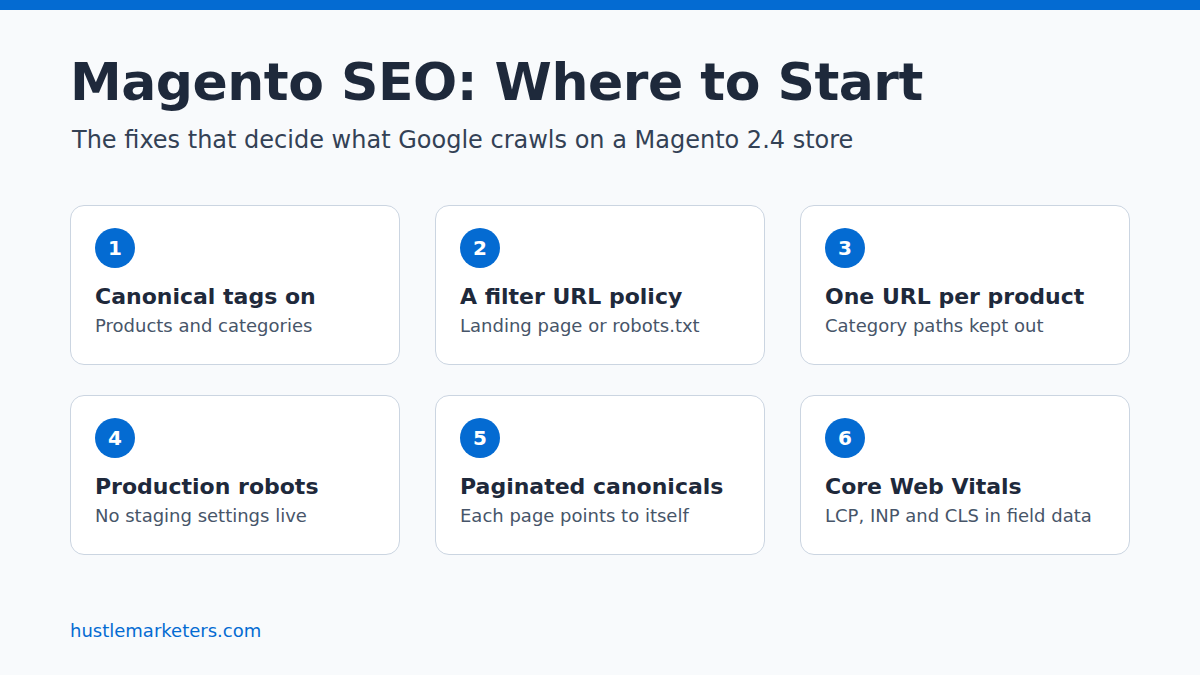
Magento SEO is the work of making a Magento 2 or Adobe Commerce store easy for search engines to crawl, index and rank. Most of it means fixing what the platform does by default: duplicate URLs from filters and category paths, SEO settings left switched off, a heavy frontend and URL rewrite tables that grow with every product you add.
This guide covers the admin settings, layered navigation, pagination, URL rewrites, sitemaps, speed, schema and hreflang, then shows how to measure the result in Search Console. We checked the settings and limits below in October 2026 against Adobe’s Experience League documentation, Google Search Central and, where the documentation is silent, Magento’s source code on GitHub. Key sources are linked next to the claims they support.
Key Observations
- Core Magento has no admin setting to noindex layered navigation pages. A confirmed GitHub issue shows filtered category URLs output INDEX,FOLLOW, so filter control needs robots.txt rules, code or an extension.
- Google’s faceted navigation guidance, updated in December 2025, makes robots.txt the first choice for filter URLs that do not need to rank. It calls canonical and nofollow “generally less effective in the long term.”
- Google no longer uses rel=”next” and rel=”prev”. Each paginated category page should carry its own canonical URL, not point back to page 1.
- Magento 2.4.9 became generally available on May 12, 2026. It runs on PHP 8.5, supports OpenSearch 3 and adds a batch mode for building XML sitemaps on large catalogs. Regular support for 2.4.6 ended on August 11, 2026.
- The Core Web Vitals targets are LCP of 2.5 seconds or less, INP of 200 milliseconds or less and CLS of 0.1 or less, measured at the 75th percentile of page loads.
- FAQ rich results stopped appearing in Google Search on May 7, 2026, so rich results are no longer a reason to add FAQ markup to product or category pages.
- The Hyvä theme has been free since November 10, 2025, so replacing Luma’s RequireJS and Knockout frontend with it no longer carries a license cost.
What is Magento SEO?
Magento SEO covers everything that helps a Magento Open Source or Adobe Commerce store’s categories and products earn steady organic visibility. It spans technical setup, on-page content and store performance, often handled by different people. On Magento, the technical layer carries the most weight, because the platform can generate far more URLs than you have products.
Organic search is worth the effort because the traffic lasts. Paid ads stop when the budget stops, while a category page that ranks keeps bringing in buyers month after month. On Magento, a messy setup can leave part of the catalog unindexed while Google spends its crawling on filter and sort URLs.
Broken down further, the work falls into four areas:
- Technical SEO: crawling, indexing, canonical tags, URL structure, redirects, URL rewrites, sitemaps and duplicate content control.
- On-page SEO: titles, meta descriptions, headings, product copy, category content and internal linking.
- Performance: page speed, Core Web Vitals, caching and image handling.
- Content and authority: buying guides, structured data, product data quality and links from other sites.
Is Magento SEO-friendly out of the box?
Not fully. Magento gives you control over URLs, templates, server settings and structured data that hosted platforms keep closed. But the canonical tag settings for products and categories ship set to No, and layered navigation creates duplicate URLs out of the box.
The problems come from how the store is configured, which means they can be fixed.
Why is SEO harder on Magento than on other platforms?
Magento is harder because it hands you every setting, including several that hurt rankings if nobody checks them. Hosted platforms hide most of that plumbing, but on Magento the filters, sorting, category paths and store views are left to you, and each can multiply your URLs until someone decides how to handle it.
If you are still choosing a platform, our Magento vs Shopify comparison covers where each one fits. If you are already on Magento, this is what makes the work harder:
- It is URL-heavy by default. Layered navigation, sort orders, page size options and pagination all create parameter URLs, and each one can be crawled.
- The default Luma theme is heavy. It loads a large amount of JavaScript and CSS, including RequireJS and Knockout, so pages can be slow without caching and tuning.
- Its SEO defaults are not switched on. The canonical tag settings for products and categories default to No.
- It has no built-in blog. Buying guides and how-to content need an extension or a separate setup on the same domain.
- The deepest fixes need a developer. They live in layout XML, templates, modules and server configuration, not the admin panel.
Magento can still do well in search, but only if SEO is planned in from the start. The same trade applies to open-source rivals: WooCommerce technical SEO also gives you full control of the stack, along with every defect you then have to fix yourself.
What changed for Magento SEO in 2.4.8 and 2.4.9?
Magento 2.4.9 became generally available on May 12, 2026 and is supported until May 31, 2029. It requires PHP 8.5 for production, supports OpenSearch 3 and adds a batch mode for building XML sitemaps on large catalogs. Version 2.4.8, released in April 2025, made Update by Schedule the default indexer mode and marked Elasticsearch as deprecated.
The table below lists the release lines that still matter, with dates from Adobe’s released versions page and the release notes for 2.4.9 and 2.4.8.
| Release line | Released | Regular support ends | What matters for SEO |
|---|---|---|---|
| 2.4.9 | May 12, 2026 | May 31, 2029 | PHP 8.5 (8.4 for upgrades only), OpenSearch 3, batch XML sitemap generation, WYSIWYG editor moved from TinyMCE to HugeRTE |
| 2.4.8 | April 8, 2025 | May 31, 2028 | PHP 8.4, optimized for OpenSearch 2.19, Elasticsearch labeled deprecated, Update by Schedule as the default indexer mode |
| 2.4.7 | April 9, 2024 | May 31, 2027 | Still supported, but the oldest line with regular support |
| 2.4.6 | March 2023 | Ended August 11, 2026 | Extended support until August 31, 2027, for Adobe Commerce only; Magento Open Source merchants can no longer download its regular patches |
Your version affects SEO in more than one way, starting with security. An unpatched store is easier to compromise, and Google’s spam policies describe hacked sites being used to add spammy pages or to redirect visitors to harmful or spammy pages.
The requirements also decide what you can run for catalog search. Adobe’s system requirements note that Elasticsearch 7.17 reached end of support on January 15, 2026, and the 2.4.9 table lists OpenSearch 3, although the release notes say backward compatibility with OpenSearch 2.x is retained.
Some of the changes in these releases also touch SEO work directly:
- Batch sitemap generation. Adobe’s site map documentation describes a new Generation Method field with a memory-optimized Batch option for large catalogs.
- Indexers on schedule. With Update by Schedule as the default since 2.4.8, indexed data such as prices, stock, category assignments and search results reaches the storefront when cron runs. URL rewrites are still written when you save. If cron stops, indexed data and the sitemap go stale without any error on the page.
- A new content editor. HugeRTE replaced TinyMCE in the 2.4.7-p8 and 2.4.8-p3 patches and is the editor in 2.4.9, so spot-check category descriptions and CMS pages after upgrading from an older patch, to make sure headings and links survive intact.
Planning the move itself? Our guide to Magento migration covers the upgrade path and support dates in more detail.
Which technical SEO problems are most common on Magento?
The most common ones are filter URLs that multiply without limit, products reachable through several category paths, canonical tags left off, slow templates, crawlable system pages and URL rewrite tables that keep growing. These are the issues a Magento SEO agency usually fixes before touching content.
- Index bloat from layered navigation. Every filter combination of color, size, price and brand can produce its own URL. A category with a handful of filters can spin off thousands of crawlable URLs, and Google’s crawlers spend time on them that could go to your products.
- Duplicate product URLs from category paths. When category paths are added to product URLs, a product in three categories gets three URLs, and search engines have to guess which one is the real page.
- Canonical tags switched off. With the canonical settings left at No, sort, page size and tracking parameters create near-duplicate versions of the same page with nothing pointing back to the original.
- Slow pages and weak Core Web Vitals. Heavy themes, unoptimized images and no full page cache push the largest image or text block well past Google’s 2.5 second target.
- Crawlable system pages. Cart, checkout, account, wishlist, product compare and internal search result pages often end up crawlable.
- Store codes and session parameters in URLs. On some setups a store code or a ___store parameter gets added to URLs, splitting signals across variants of the same page.
- Orphan and thin pages. Large catalogs hide products that no internal link points to, plus category pages with nothing but a product grid. Our guide to thin content on an ecommerce site shows how to find these pages.
- Growing URL rewrite tables. Category/product rewrites, many store views and repeated URL key changes can push the url_rewrite table into hundreds of thousands of rows, which slows category and product saves.
- Sitemaps that disagree with canonicals. Before 2.4.4, Magento’s sitemap listed category-path product URLs when category paths were on. Current versions list top-level URLs, but sitemap extensions and custom canonical code can still disagree with your canonical tags.
What are the essential Magento admin SEO settings?
The essential settings are the canonical tags for products and categories, category paths in product URLs, automatic 301 redirects when a URL key changes, URL suffixes, meta templates, HTTPS and base URL redirects, robots instructions and the XML sitemap. Most of them sit under Stores > Settings > Configuration, so you can change them without an extension.
Change them in the order listed. Paths are for Magento 2.4 Open Source and Adobe Commerce, and field names follow Adobe’s Catalog configuration reference.
| Setting | Where to find it | Recommended value |
|---|---|---|
| Use Canonical Link Meta Tag for Products | Stores > Settings > Configuration > Catalog > Catalog > Search Engine Optimization | Yes |
| Use Canonical Link Meta Tag for Categories | Same section | Yes |
| Use Categories Path for Product URLs | Same section | No |
| Create Permanent Redirect for URLs if URL Key Changed | Same section | Yes |
| Product URL Suffix and Category URL Suffix | Same section | Keep what your live store already uses |
| Mask for Meta Title and Mask for Meta Description | Stores > Settings > Configuration > Catalog > Catalog > Product Fields Auto-Generation | Set a template for each |
| Use Web Server Rewrites | Stores > Settings > Configuration > General > Web > Search Engine Optimization | Yes, so URLs do not include index.php |
| Add Store Code to Urls | Stores > Settings > Configuration > General > Web > Url Options | No, unless your store views share a domain and need it |
| Auto-redirect to Base URL | Same section | Yes (301 Moved Permanently) |
| Use Secure URLs on Storefront, HSTS and Upgrade Insecure Requests | Stores > Settings > Configuration > General > Web > Base URLs (Secure) | Yes |
| Default Robots | Content > Design > Configuration > Global or your website > Search Engine Robots | INDEX, FOLLOW on production; NOINDEX, NOFOLLOW on staging |
| XML Sitemap | Stores > Settings > Configuration > Catalog > XML Sitemap, then Marketing > SEO & Search > Site Map | Enabled, generated daily, submitted to robots.txt |
| URL Rewrites | Marketing > SEO & Search > URL Rewrites | Audit for chains and dead targets |
| Full Page Cache | Stores > Settings > Configuration > Advanced > System > Full Page Cache | Varnish |
After changing any of these, reindex and flush the cache, then confirm the change on a live product page with view-source rather than trusting the admin screen.
Should you turn on Use Categories Path for Product URLs?
For most stores, no. Leaving it at No gives every product one URL, no matter how many categories it sits in. Google’s ecommerce URL guidance asks you to “minimize the number of alternative URLs that return the same content,” but category paths give a product one URL for each category it sits in.
Category paths also put your links and canonical tags out of step. When product canonical tags are on, Magento points the canonical to the product URL without a category path. Turn category paths on, and your internal links point to one URL while your canonical tag names another. If your store already uses category paths and ranks with them, plan the switch with a crawl first, so you can confirm the old URLs still resolve or redirect afterwards.
Should you remove .html from Magento URLs?
Not on a live store that already ranks. Magento adds .html to product and category URLs by default, and the suffix makes no ranking difference that Google documents. Removing it changes every product and category URL at once, so every old URL then depends on a redirect. On a brand-new store, pick a format and never change it.
How do meta title and description templates work?
The Product Fields Auto-Generation masks set default meta titles and descriptions from placeholders such as {{name}} and {{sku}}, plus any fixed text you add. A template like “{{name}} | Buy Online at Store Name” prefills a usable title on every new product created in the Admin. Then write custom titles for the products and categories that earn most of your traffic.
Products created by import or API, and existing products, are not filled in by the masks. Where their meta title is empty, Magento uses the product name as the page title, so set better titles through import, the API or the product form. Skip the meta keywords mask. Adobe’s own meta data page says “some search engines ignore meta keywords,” and Google is one of them.
How should you handle layered navigation for SEO?
Decide which filter pages deserve to rank, give those a clean indexable URL with their own content, and stop search engines crawling the rest. Google’s guidance now favors robots.txt for filter URLs that do not need to appear in search. Core Magento cannot noindex filter pages, so the noindex route needs code or an extension.
Google’s page on managing crawling of faceted navigation URLs, last updated December 18, 2025, is direct about it: “Use robots.txt to disallow crawling of faceted navigation URLs.” It also says that if filters work through URL fragments (the part after #), they have no effect on crawling at all, and that a filter combination with no results should return a 404.
That changes the advice many Magento guides still give. Canonical tags on filter pages are a hint, and Google describes canonical and nofollow as “generally less effective in the long term” than blocking. Use this table to decide what each filter URL should get:
| Filter URL type | Example | Recommended handling |
|---|---|---|
| Filter with real search demand | Women’s boots filtered to black leather, for “black leather boots” | An indexable landing page with a static URL, its own title, H1 and copy, a self-referencing canonical and a place in the sitemap |
| Stacked or multi-select filters | ?color=49&size=172&price=50-100 | Disallow in robots.txt |
| Sort, page size and view mode | ?product_list_order=price, ?product_list_limit=36, ?product_list_mode=list | Disallow in robots.txt |
| Filter combination with no products | Any filter set that returns zero results | Return a 404 status |
| Filter URLs already in Google’s index | Indexed ?color= pages | Noindex first, then disallow once they drop out |
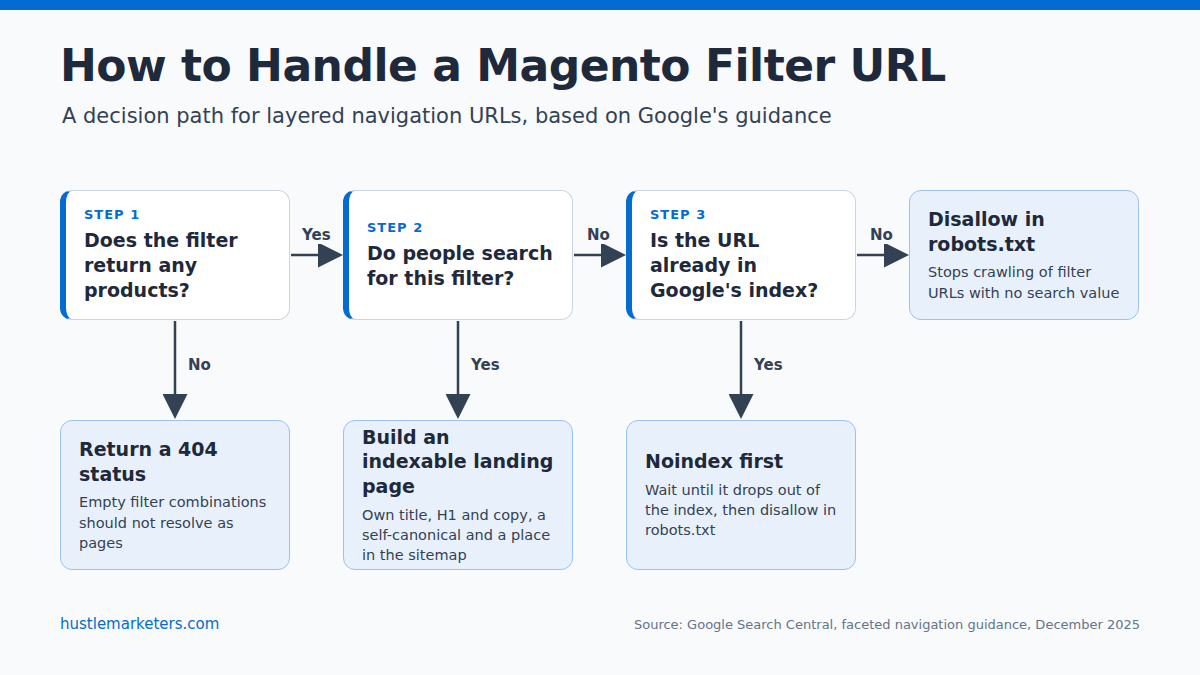
Filters with demand are usually a small set, made up of a category plus one attribute that people search for, such as material, color or brand. Check them against Search Console queries and Magento’s search terms report before you build anything. The rest only use up crawl requests.
Can core Magento noindex filter pages?
No. Adobe’s layered navigation documentation has no robots or noindex option, and the Default Robots setting applies to a whole website, not to single pages. A maintainer confirmed in GitHub issue #40172 that filtered category URLs output INDEX,FOLLOW and that the issue “is indeed reproducible.”
To control filter pages, use an SEO extension with layered navigation controls, a small custom module that sets NOINDEX,FOLLOW when a filter is active, or robots.txt rules. Do not use all of them at once on the same URL. If robots.txt blocks a URL, Google cannot crawl it, so it never sees the noindex tag on that page.
What if filter URLs are already indexed?
Blocking indexed filter URLs in robots.txt first means Google can no longer crawl them to see a noindex, and they can stay in the index as “Indexed, though blocked by robots.txt.” Do it in this order instead:
- Add a noindex to filtered pages through your extension or module, and return a 404 for empty filter combinations.
- Leave those URLs crawlable until Search Console’s Page indexing report lists them under “URL marked ‘noindex’.”
- Then add the robots.txt disallow rules, so Google stops spending crawl requests on them.
If your store uses AJAX layered navigation, which some Hyvä and Luma builds do, apply a filter, then view the rendered page and confirm the canonical tag and robots tag changed with it. A pull request on one layered navigation integration, opened in May 2026, described a case where “the canonical tag would not be updated after AJAX navigation on Hyva storefronts.”
Filter URLs are the biggest single source of index bloat on Magento. Our guide to Magento layered navigation SEO goes deeper into filter handling, extensions and examples.
How should Magento handle pagination for SEO?
Give every page of a category its own URL, which Magento does with ?p=2, ?p=3 and so on, and its own self-referencing canonical tag. Do not point page 2 and beyond to page 1, and do not rely on rel=”next” and rel=”prev”. Google says it no longer uses those tags, although other search engines may still read them.
Google’s pagination guidance puts it plainly: “Don’t use the first page of a paginated sequence as the canonical page. Instead, give each page its own canonical URL.” Keep paginated pages indexable and linked with normal links, because they are how Google reaches products that sit deep in a category.
Check what your store actually outputs. Magento 2.4.8 and later add ?p= to the category canonical on paginated pages.
On 2.4.7 and earlier the canonical points to page 1, as GitHub issue #37338 reports. Extensions and custom themes can also override it. To test your own store:
- Open any large category and add ?p=2 to the URL.
- View the page source and search for “canonical”.
- If the canonical points to the category without ?p=2, fix it with an extension or a small module, then confirm the user-declared canonical with Search Console’s URL Inspection tool.
How do you fix duplicate content and URL bloat in Magento?
Give every product and category one clean URL, then make your internal links, sitemap and canonical tags all agree on it. Google’s ecommerce guidance asks you to “use the same URL in internal links, sitemap files, and” canonical tags. On Magento, that takes the settings above plus a few platform-specific fixes.
- Turn on canonical tags for products and categories, and turn off category paths in product URLs.
- Keep “Create Permanent Redirect for URLs if URL Key Changed” on, so renamed products and categories pass their signals through a 301.
- Serve one version of the domain. Use HTTPS everywhere, set Auto-redirect to Base URL to 301, and redirect the non-preferred host to the preferred one at server level.
- Set the simple products behind a configurable product to “Not Visible Individually” unless they genuinely need their own page. They then have no storefront URL to duplicate the parent.
- Watch for store switcher links that add a ___store parameter. Make sure those URLs carry a canonical to the clean URL.
- Keep cart, checkout, account, wishlist and internal search pages out of the index. The robots.txt section below shows how.
Google also warns against two shortcuts. “Don’t use the robots.txt file for canonicalization purposes,” says its canonicalization guide. It does not recommend noindex for choosing a canonical either, because noindex removes the page from Search completely. Use robots.txt for crawl control, canonicals for duplicates, and redirects for URLs that have moved.
How do URL rewrites affect a large Magento catalog?
Magento stores a row in its url_rewrite table for product, category and CMS page URLs in each store view, plus rows for category-path product URLs when Generate “category/product” URL Rewrites is on, and rows for old URLs kept as redirects. On large catalogs the table grows quickly. Adobe warns that real-time rewrite generation on category save can cause “significant performance issues for categories with many assigned products.”
Category assignments and store views multiply the row count. As an illustration, not data from a real store, take 20,000 products, each in three categories, sold through four store views.
Top-level product URLs need 20,000 x 4 = 80,000 rows. If Generate “category/product” URL Rewrites is Yes, which was the default up to 2.4.5, category-path product URLs add about 20,000 x 3 x 4 = 240,000 more, plus extra rows for parent anchor categories, even if your links never use them. Every URL key change then adds a redirect row on top.
Two reports on the GitHub tracker show what can go wrong. In issue #23748, a Magento 2.1 store with about 290,000 rewrite rows ran out of rewrite IDs because 2.1 deleted and re-created rewrites on save, and saving a product or category with a changed URL key “is no longer working.” A maintainer linked the fix to Magento 2.2.4.
In issue #30519, a root category URL key change on Magento 2.2 took more than five hours to regenerate rewrites for about 4,000 categories and 16,000 products. Maintainers could not reproduce it on 2.4-develop.
Two settings control most of the growth, and a third decides which URL your links use:
- Use Categories Path for Product URLs set to No keeps category-path URLs out of your links. It does not stop those rows being created.
- Generate “category/product” URL Rewrites, in the same section, controls whether those category-path rows are created at all. It has defaulted to No since 2.4.6, but older stores that upgraded may still have it on, so check its value. Adobe warns that switching it to No causes permanent removal of the existing category/product rewrites, and they cannot be restored. Only change it if those URLs were never indexed or linked, or once a redirect plan is in place.
- Product URL Rewrite Scope, added in 2.4.8 and described on Adobe’s automatic redirects page, lets rewrites be generated at store view or website scope, which matters when you run many store views.
How do you audit and regenerate URL rewrites?
Start by measuring the table. A developer can run these two read-only queries against the database (add your table prefix if the store uses one). The first shows where the rows come from. The second finds redirect chains, where a 301 points to a URL that itself redirects.
SELECT entity_type, redirect_type, COUNT(*) AS total_rows
FROM url_rewrite
GROUP BY entity_type, redirect_type;

SELECT a.request_path, a.target_path, b.target_path AS final_target
FROM url_rewrite a
JOIN url_rewrite b ON a.target_path = b.request_path AND a.store_id = b.store_id
WHERE a.redirect_type = 301 AND b.redirect_type = 301;
Fix chains so each old URL redirects straight to its final destination. Then check custom rewrites in Marketing > SEO & Search > URL Rewrites for targets that no longer exist.
Core Magento has no official command for regenerating rewrites, a gap raised in the long-running issue #2619. A common workaround is a community module such as olegkoval/magento2-regenerate_url_rewrites or elgentos/regenerate-catalog-urls. Back up the table first, test on staging, and run it off-peak.
If imports or saves fail with “URL key for specified store already exists,” the usual cause is two products or categories sharing a URL key in the same store view. Make the keys unique, and check url_rewrite for an existing row that already uses the same request path in that store view.
Imports deserve extra care on multi-store catalogs, because GitHub reports show imports regenerating store-view rewrites from the default URL key (fixed in 2.4.6) and deleting rewrites on older versions. Test large imports on staging first.
How do you set up the XML sitemap and robots.txt in Magento?
Enable the XML sitemap under Stores > Settings > Configuration > Catalog > XML Sitemap, generate it from Marketing > SEO & Search > Site Map, and let cron rebuild it daily. Then edit robots.txt under Content > Design > Configuration so crawlers skip system pages, internal search and sort parameters, without blocking the files your pages need to render.
XML sitemap settings and limits
Adobe’s site map documentation gives the defaults: a maximum of 50,000 URLs and 10,485,760 bytes (10 MB) per file. Larger catalogs are split across several files listed in a sitemap index. Set these options as you go:
- Images: choose Base Only or All, so product images are listed with their pages.
- Generation: enabled, daily frequency, at an off-peak hour. Cron must be running, or the file silently stops updating.
- Enable Submission to Robots.txt: Yes, so the sitemap line is added to robots.txt.
- Priority and frequency: leave the defaults. Google’s sitemap guidance says it ignores priority and changefreq values.
- Large catalogs on 2.4.9: set Generation Settings > Generation Method to Batch, a memory-optimized method for large catalogs.
Two checks matter more than the settings. First, open the generated file and compare 20 product URLs with the canonical tags on those pages. GitHub issue #23363 reported sitemaps listing category-path product URLs that differed from the canonical. Core fixed this from 2.4.4, but sitemap extensions and custom code can reintroduce it, so test your own store.
Second, on multi-site setups, give each site its own sitemap file. For Adobe Commerce on cloud, Adobe advises that “the robots.txt and sitemap.xml file names contain the names of the corresponding sites.”
A robots.txt for Magento 2
Magento builds robots.txt from the Search Engine Robots settings, where the “Edit custom instruction of robots.txt File” field holds your rules. On Adobe Commerce on cloud, the file is generated on demand and stored in the database. Adobe’s cloud documentation notes that search engine indexing can only be enabled in Production.
Treat this as a starting point, and check every parameter name against your own store before you use it.
User-agent: *
# Cart, checkout and account pages
Disallow: /checkout/
Disallow: /customer/
Disallow: /wishlist/
Disallow: /catalog/product_compare/
Disallow: /sendfriend/
# Internal search results
Disallow: /catalogsearch/
# Sort, direction, page size and view mode
Disallow: /*?*product_list_order=
Disallow: /*?*product_list_dir=
Disallow: /*?*product_list_limit=
Disallow: /*?*product_list_mode=
# Session IDs
Disallow: /*?*SID=

Sitemap: https://www.example.com/sitemap.xml
Whatever you add, keep to these rules:
- Never list your admin path. Adobe’s robots.txt best practices say: “Do not expose your Admin path in your robots.txt file.”
- Do not block /static/ or /media/. Google needs your CSS, JavaScript and images to render pages properly.
- Add filter attribute rules, such as /*?*color=, only for filters with no search demand, and only once any indexed filter URLs have dropped out.
- If internal search pages are already indexed, noindex them first and add the /catalogsearch/ rule after they drop out, for the same reason as filter pages.
How do you speed up Magento and pass Core Web Vitals?
Start with Varnish full page cache, Valkey for cache and sessions, a CDN and properly sized images, then fix whatever your field data shows failing. The targets are LCP of 2.5 seconds or less, INP of 200 milliseconds or less and CLS of 0.1 or less, at the 75th percentile of page loads. On Luma stores, JavaScript weight is a common cause.
Google’s Core Web Vitals page sets the thresholds, and web.dev sets the 75th percentile as the measuring point. INP replaced FID as a Core Web Vital on March 12, 2024, so any Magento guide still scoring FID is out of date.
| Metric | Good | What it measures | Common Magento cause |
|---|---|---|---|
| LCP (Largest Contentful Paint) | 2.5 seconds or less | How fast the main image or text block appears | Product gallery images loaded by JavaScript, heavy hero banners, slow server response on uncached pages |
| INP (Interaction to Next Paint) | 200 milliseconds or less | How quickly the page responds to taps and clicks | RequireJS and Knockout scripts on Luma, third-party tags, swatch and minicart scripts |
| CLS (Cumulative Layout Shift) | 0.1 or less | How much the layout jumps while loading | Images without width and height, late promo banners, price and swatch blocks that render after load |
The fixes below are listed from highest impact down:
- Full page cache with Varnish. Adobe’s performance best practices say: “We highly recommend using Varnish, as it is an efficient production page cache solution.”
- Valkey for cache and sessions. Adobe’s current system requirements list Valkey, version 9 for 2.4.9, rather than Redis, so check what your host supports before you upgrade.
- A CDN. Fastly ships with Adobe Commerce on cloud. On Open Source, Cloudflare or another CDN serves static files close to your shoppers.
- Images. Serve WebP or AVIF, set width and height on every image, and lazy load images below the fold, but never the main product image.
- JavaScript. Minify it, but test bundling before you switch it on. Adobe says bundling “isn’t recommended for stores where the first page load time is extremely critical” and calls HTTP/2 “a good alternative.”
- Production mode. A live store should run in production mode with static content deployed and dependency injection compiled.
- Search. Keep OpenSearch tuned, so category and search pages respond quickly.
Measure with field data in Search Console’s Core Web Vitals report and PageSpeed Insights, not lab scores alone. A store can pass a lab test and still fail for real visitors on mobile.
For what usually fails on a store, metric by metric, see our guide to ecommerce Core Web Vitals.
For server tuning, caching layers, image handling and the commands to run, see our full Magento speed optimization guide.
Is Hyvä worth it for SEO?
Often, yes, because it removes much of the JavaScript that slows Luma pages. The theme replaces Luma’s RequireJS, Knockout and UI components with Tailwind CSS and Alpine.js. Since November 10, 2025, according to the vendor’s announcement, the theme has been free on GitHub under the OSL3 and AFL3 licenses, with its Hyvä UI component library sold separately.
The vendor says the theme scores 100/100 in PageSpeed out of the box. Treat that as a sales claim and test your own store. The theme changelog does show SEO-relevant work: JSON-LD breadcrumbs, availability in product rich snippets, and gallery images placed in the initial HTML to improve LCP.
The cost is a frontend rebuild, plus compatibility modules for extensions that output their own JavaScript. After switching, recheck your canonical tags, robots tags, hreflang and structured data, because these often live in theme templates.
What code-level changes improve Magento SEO?
Some of the highest-impact fixes never appear in the admin panel. They live in layout XML, templates, small custom modules and server configuration. This is also where you fill the gaps core Magento leaves, such as per-page robots tags, filter noindex rules and hreflang output.
- Layout XML. Add or override head tags, canonical logic and robots tags through layout handles rather than hard-coding them into templates, so changes survive upgrades.
- Templates for structured data. Product, category and breadcrumb templates are where JSON-LD should be generated from real catalog data.
- Small custom modules. Use a module for filter noindex rules, pagination canonicals, hreflang and schema. Never edit core files.
- Server compression and caching. Brotli or gzip compression and browser cache headers belong in your nginx or Apache configuration.
- Varnish VCL. The Varnish configuration decides what gets cached and for how long, which affects how fast pages reach both shoppers and crawlers.
- Deploy mode. Run production mode on the live store, with static content deployed and dependency injection compiled. Developer mode on a live store slows every page.
How do you add schema markup to a Magento store?
Add Product markup with offers to every product page, BreadcrumbList to categories and products, and Organization once for the site, as JSON-LD generated from catalog data. On pages where shoppers can buy, add the merchant listing fields for shipping and returns. Validate everything in the Rich Results Test, and keep the markup matched to what shoppers can see.
Google’s product structured data guide separates product snippets, “for product pages where people can’t directly purchase the product,” from merchant listings, “for pages where customers can purchase products from you.” Most Magento product pages are merchant listing pages. Google also notes that providing both structured data and a Merchant Center feed “maximizes your eligibility.”
- Product with offers. Name, image, price, currency and availability on every product page.
- Merchant listing fields. Shipping details and return policy, which Google can show with your product in search results.
- Configurable products. Mark the parent as a product group with its variants, so color and size options are understood as one product.
- BreadcrumbList. Reinforces your category structure in search results.
- Organization. Once, sitewide, for brand and contact details.
- Review and rating markup. Only for genuine reviews that are visible on the page.
Leave FAQ markup off your priority list. Google’s documentation changelog states the FAQ rich result “will no longer appear in Google Search starting May 7, 2026,” and Google removed the FAQ documentation on June 15, 2026. FAQPage is still valid schema.org markup, but it no longer earns a rich result.
If your store already carries FAQ markup, our guide to FAQ schema markup covers whether to keep, remove or ignore it, and our product schema markup guide covers the variant rules for configurable products.
A structured data extension handles the basics quickly. Custom JSON-LD in your templates lets you go further, with details such as delivery times, warranty terms or size guides.
Our guide to Magento schema markup covers product, shipping, returns and review markup with working examples.
How should you handle multi-store views, languages and hreflang?
Magento has no built-in hreflang setting, so store views for different languages or countries need an extension or a custom module to output it. Each version must list itself and every alternate, the links must be reciprocal, and every hreflang URL should be the canonical, indexable version of that page.
Google’s localized versions guidance sets the rules: “Each language version must list itself as well as all other language versions,” and “If two pages don’t both point to each other, the tags will be ignored.” Google treats HTML tags, HTTP headers and sitemaps as equivalent ways to declare hreflang, so choose the method that is easiest to keep accurate across your catalog.
Watch for these hreflang mistakes on Magento store views:
- Pointing hreflang at URLs with a store code or ___store parameter instead of the canonical URL.
- Matching alternates by URL key when keys differ between store views. Match by product or category ID instead.
- Covering products but leaving categories and CMS pages without hreflang.
- Using invalid codes, such as en-UK instead of en-GB.
- Pointing hreflang at pages that are noindexed, redirected or blocked in robots.txt.
- Leaving out x-default when you have a global or country-selector page.
Hreflang does not translate anything for you. Google says it “doesn’t use hreflang or the HTML lang attribute to detect the language of a page,” so titles, descriptions and content need real localization in each store view. Watch imports too: on 2.4.1 to 2.4.5, GitHub issue #35199 shows imports in default scope rebuilding store-view rewrites from the default URL key. That changes store-view URLs, so recheck rewrites and hreflang output after large imports.
How do you find keywords for a Magento store?
Match each type of search to the Magento page that should rank for it. Broad product types belong to categories, brand and model searches to product pages, a category plus one attribute to filter landing pages, and questions to guides. Then start with data you already own: Search Console queries, Magento’s own search terms report and your Google Ads search terms.
| Search type | Example | Page that should rank |
|---|---|---|
| Product type | leather boots | Category page |
| Product type plus one attribute | black leather ankle boots | Subcategory or filter landing page |
| Brand plus model | A brand name and model number | Product page |
| Question or comparison | how to waterproof leather boots | Guide that links to the category |
| Store and policy searches | your store name plus returns | CMS page |
Magento’s own search data is easy to overlook. Reports > Marketing > Search Terms shows what shoppers type into your store search, how often, and how many results each search returned. Terms that are searched often but return few results point to missing categories, missing synonyms or products that are named differently from how people search.
Search Console’s Performance report then shows which queries each category already earns impressions for. Look for queries landing on the wrong page, such as a product page ranking for a category term, and fix the internal links. If you run Shopping campaigns, the search terms report shows which queries actually convert. Our Magento PPC page covers that side.
What on-page and content steps help a Magento store rank?
Once technical fixes get a store crawled and indexed, on-page work is what gets its categories and products ranked and clicked. Treat category pages as landing pages, give products copy of their own, and link the catalog together so deep pages are easy to reach.
- Write useful category content. A short intro above the product grid and more detail below it help a category rank for more than its name.
- Rewrite product descriptions. Unique, benefit-led copy beats the manufacturer text that many other stores also use.
- Build internal links with purpose. Link from categories to subcategories, from guides to categories, and between related products, so no product depends on pagination alone.
- Add a blog on the same domain. Magento needs an extension for it, but buying guides and comparisons bring in earlier-stage searches and link into the catalog.
- Write answer-first content. Clear headings and a direct answer at the top of each section help readers and search features find what they need.
- Earn links and mentions. Supplier pages, industry publications and genuine press coverage all build authority.
If a category and a product compete for the same keyword, our guide to category page vs product page SEO shows which one should win.
Most of these are ecommerce SEO fundamentals that apply to any store, and our ecommerce SEO checklist lays them out step by step. For a page-by-page list of on-page checks inside Magento, use our Magento SEO checklist.How do you measure Magento SEO in Search Console and GA4?
Track how much of your catalog is indexed, where Google spends its crawl requests, and how much organic revenue each page type earns. Search Console’s Page indexing and Crawl stats reports cover the first two. GA4’s landing page report, filtered to organic search, covers the third.
- Set a baseline. Count what should be indexed: enabled, visible products, plus categories, plus the CMS pages that matter. Compare that with the indexed count in the Page indexing report, which older guides call the Coverage report. A count far above your baseline points to bloat, and one far below points to discovery or quality problems.
- Read the reasons in the Page indexing report with Magento in mind. The table below maps the common ones.
- Open Settings > Crawl stats. Check the example URLs in each breakdown for sort, filter or session parameters. Google says the examples are representative, not complete, so treat them as a signal and confirm with server logs. After your robots.txt and filter fixes, those parameters should appear less often.
- Inspect a sample of URLs. Use URL Inspection on a product, a ?p=2 category page and a filtered URL, and compare the user-declared canonical with the Google-selected canonical.
- Track revenue. In GA4, open Reports > Engagement > Landing page and add a filter for Session default channel group equal to Organic Search. With purchase events tracked, this shows organic revenue by landing page.
What do the Page indexing reasons mean on a Magento store?
| Page indexing reason or warning | What it usually means on Magento | What to do |
|---|---|---|
| Alternate page with proper canonical tag | Sort, filter or category-path URLs pointing to the clean URL | Usually fine. If the count is very large, block those parameters in robots.txt. |
| Duplicate, Google chose different canonical than user | Google prefers another version, often a category-path or parameter URL | Make internal links, sitemap and canonical tags agree |
| Crawled - currently not indexed | Thin categories, near-identical products or empty filter pages | Improve the content, merge pages or return 404 for empty filters |
| Discovered - currently not indexed | Google knows the URL but has not crawled it, common when crawling is spent on parameters | Cut parameter crawling and add internal links to the missing pages |
| Indexed, though blocked by robots.txt (a warning on indexed pages) | URLs blocked before they dropped out of the index | Lift the block, noindex, wait, then block again |
| Soft 404 | Out-of-stock products or empty categories that look like error pages | Show restock options, redirect discontinued products, fill or remove empty categories |
How long before changes show up?
Google says crawling can take anywhere from a few days to a few weeks, and indexing changes show only after the affected URLs are recrawled. Ranking changes on competitive category terms depend on the competition and on how much content work comes with the fixes, so there is no fixed timeline.
Does Magento SEO work for Bing as well as Google?
Yes. Everything technical in this guide, from clean crawling and canonical tags to fast pages and structured data, applies to Bing too. Two Bing-specific steps are worth the time: connect Bing Webmaster Tools, and set up IndexNow so changed products can be submitted as soon as they change.
- Bing Webmaster Tools. You can import your Search Console properties instead of verifying from scratch. Submit your sitemaps there too.
- IndexNow. The protocol lets you notify participating search engines, including Microsoft Bing and Yandex, when a URL is added, updated or deleted. Core Magento does not support it, so it needs an extension or a custom integration. Google is not listed as an IndexNow participant, so keep your XML sitemap current as well.
Which Magento SEO problems do most guides overlook?
Guides most often skip discontinued products, configurable product variants, staging sites that get indexed, and pages the core canonical settings do not cover. Most Magento SEO advice stops at meta tags, canonicals and speed, so these get less attention, even though each one can cost rankings and revenue.
- Out-of-stock and discontinued products. Keep temporarily unavailable products live with restock dates or a notify option. For discontinued products, 301 redirect to the closest live product or the parent category, never the homepage. Return a real 404 only when nothing relevant exists.
- Configurable products and their variants. Only the parent product should be indexable. Child simple products should be “Not Visible Individually” or carry a canonical to the parent.
- Staging and development sites. Set Default Robots to NOINDEX, NOFOLLOW on every non-production environment and protect it with a password. After launch, confirm production is back on INDEX, FOLLOW, because a robots setting copied from staging can deindex a live store.
- Pages outside the canonical settings. Core canonical settings cover products and categories only. Check the homepage and CMS pages in view-source, and add canonicals through your theme, a module or an extension if they are missing.
How does product data and feed quality affect Magento SEO?
Product data affects organic search as well as ads. Accurate titles, complete identifiers such as GTINs, consistent categories and rich attributes help search engines understand a large catalog. The same data feeds your structured data, your Merchant Center feed and Google’s free product listings.
So fixing titles, attributes, categories and missing or malformed identifiers counts as SEO work as well. For the feed side in depth, see our guides to Google Shopping feed optimization and AI feed optimization.
For the Magento side of feeds, including native options, attribute mapping and large catalogs, see our Magento product feed guide.
How do you protect SEO when upgrading or migrating Magento?
Crawl the store before and after any upgrade, theme change or migration, and compare URLs, status codes, canonical tags, robots tags and structured data. Most traffic losses trace back to missing redirects or SEO output that lived in old templates. Plan the SEO checks with the technical work from the start.
For version upgrades and theme changes, such as moving to 2.4.9 or to Hyvä, check these before and after go-live:
- Canonical tags, robots tags, hreflang and JSON-LD on a sample of products, categories and CMS pages.
- The production Default Robots setting and the live robots.txt file.
- Sitemap generation, including the cron job and the URLs it lists.
- The url_rewrite row count and a sample of old URLs that should still redirect.
- Core Web Vitals field data over the following four weeks.
For platform migrations, including the last Magento 1 stores (Adobe ended support for Magento 1 in June 2020):
- Build a complete URL map. Every old URL needs a 301 to its exact new equivalent. Crawl the old site first so deep product and category pages are not missed.
- Carry over what already ranks. Keep titles, descriptions, headings and internal links rather than rebuilding blind. If the old URL structure works, keep it.
- Launch with structured data in place. Product, breadcrumb and organization markup should be live from day one.
- Recrawl and monitor. Submit fresh sitemaps, then watch the Page indexing report, redirect errors and crawl stats in the weeks after launch.
What does Adobe Commerce and enterprise Magento SEO involve?
SEO on Adobe Commerce follows the same rules as Open Source. The differences are in the tooling: Fastly at the edge on cloud, B2B features that create account and quote pages, Live Search and separate staging environments. At enterprise scale, crawl budget and safe deployment take a larger share of the work.
- Crawl budget. With very large catalogs, guide Google toward money pages and away from parameter noise, and use server log analysis to see what is really being crawled.
- B2B pages. Company accounts, quotes, requisition lists and gated catalogs should stay out of the index.
- Edge caching with Fastly. On Adobe Commerce on cloud, Fastly handles full page caching at the edge, which matters for speed at scale.
- Structured data at scale. Generate schema from catalog data through templates, never by hand.
- Staging and safe deployment. Test SEO changes in staging first. On cloud, search engine indexing can only be enabled in Production, which protects staging but also means robots changes must be checked on the live site.
Is Adobe Commerce SEO different from Magento Open Source?
The fundamentals are identical: URLs, canonicals, layered navigation, schema and speed work the same way on both. Adobe Commerce adds B2B features, Live Search, content staging and, on cloud, Fastly. Page Builder is not the difference it once was. Adobe states that basic Page Builder functionality has been available in Magento Open Source since the 2.4.3 release.
What changes on the paid edition, from B2B catalogs to Live Search and Fastly, is covered in our guide to Adobe Commerce SEO.
Do you need a Magento SEO extension?
Most stores need one, but for specific gaps rather than the whole feature list. Core Magento handles canonicals, redirects, sitemaps and meta templates. It does not offer per-page robots tags, noindex for filter pages, hreflang, rich JSON-LD, an HTML sitemap, a rewrite regeneration command or IndexNow. Pick an extension for the gaps your store actually has.
Suites from developers such as Amasty, Magefan, Mageworx and Mageplaza cover most of these. One warning before you install: two extensions that both output canonical tags or Product JSON-LD will produce duplicate or conflicting markup. Check the page source after every install.
For a closer look at which ones earn their place, see our guide to the best SEO extensions for Magento 2.
For extensions beyond SEO, such as reviews, email and search, see our list of Magento marketing extensions.
What are the Magento SEO best practices, in priority order?
Fix canonical tags, filter URLs, category paths and production robots settings first, because those decide what Google can crawl and index. Then work on speed, system pages, structured data and sitemaps, followed by content, internal links and product data. Review indexing, crawl stats and organic revenue every month after that.
| Priority | Action | Why it matters |
|---|---|---|
| Critical | Turn on product and category canonical tags | Stops sort and parameter URLs competing with the real page |
| Critical | Set a filter policy: landing pages for filters with demand, robots.txt for the rest, noindex first if already indexed | Removes the biggest source of index bloat and crawl waste |
| Critical | Keep category paths out of product URLs | Gives every product one URL |
| Critical | Confirm production Default Robots and the live robots.txt | One setting copied from staging can deindex the store |
| High | Self-referencing canonicals on paginated category pages | Keeps products deep in a category discoverable |
| High | Varnish, Valkey, a CDN and correctly sized images | Fixes slow pages and Core Web Vitals |
| High | Keep cart, checkout, account and internal search out of the index | Stops low-value pages using crawl and index space |
| High | Product, breadcrumb and merchant listing schema | Product details such as price, availability and shipping can appear in results |
| High | Sitemaps that list canonical URLs only, rebuilt daily | Sends Google one consistent signal per page |
| High | Handle out-of-stock and discontinued products correctly | Protects rankings and links the pages already earned |
| Medium | Audit url_rewrite for chains and growth | Faster saves and reindexing, cleaner redirects |
| Medium | Reciprocal hreflang across store views | Helps Google show the right store view in each market |
| Medium | Write category and product content | Category pages rank for more than their name |
| Medium | Internal links so no product depends on pagination alone | Spreads authority and helps deep pages get found |
| Medium | Clean product data and identifiers | Feeds organic results, free listings and structured data |
| Low | Bing Webmaster Tools and IndexNow | Faster discovery beyond Google |
| Low | A blog for buying guides and comparisons | Captures earlier-stage searches that link to the catalog |
If you only have time for part of the table, clear the critical rows first. If this work is part of a wider organic push, our ecommerce SEO guide covers where it sits against category pages, internal linking and product data.
Do you need a Magento SEO agency, consultant, expert or in-house team?
It depends on who will implement the fixes. Magento SEO sits between technical SEO and Magento development, and those skills rarely live in one person. You can handle the admin settings yourself. Filter rules, pagination canonicals, schema modules, rewrite clean-up and Varnish tuning need someone who reads both search data and Magento code.
- For one team that owns strategy and implementation, a Magento SEO agency covers both, so nothing falls between your marketers and your developers.
- If you have developers and need direction, a Magento SEO consultant audits the store and hands your team a prioritized roadmap.
- When organic traffic has dropped and you need the cause found first, a Magento SEO expert starts with diagnosis before any fixes.
- For hands-on help inside your codebase alongside your team, a Magento SEO specialist does the implementation work.
Hustle Marketers works with ecommerce clients in the US, UK, Australia and India, from our delivery team in India. We are a Google Partner, Meta Business Partner and Microsoft Advertising Partner, with a 5.0 rating on Clutch from more than 50 reviews. Our Magento SEO case study shows what that work looks like on a specialty store.
How do you choose a Magento SEO partner?
Look for a team that can make the fixes in your code as well as find them. Before you sign, ask:
- Can you implement fixes in layout XML, templates and modules, or will every technical task go back to our developers?
- Can you show ecommerce work on large catalogs, not only small brochure sites?
- What does your audit include? Ask for a sample.
- Do you know the differences between Open Source and Adobe Commerce, including Fastly and B2B features?
- What will you report each month? Look for indexed pages, crawl stats and organic revenue, not rankings alone.
- Will Search Console, GA4 and the code stay in our accounts and repositories?
If you are comparing providers, our list of Magento SEO companies covers what each one offers. If you would like us to look at your own store, get in touch.
How this guide was researched
This guide was updated on October 3, 2026. We read 23 of the top 24 US search results for “magento seo” and “magento seo best practices”, then checked admin paths, defaults and limits against Adobe Experience League pages updated between June and October 2026 and, where those pages are silent, against Magento’s source code at each release tag. Google guidance was checked against Search Central pages on faceted navigation, pagination, canonicalization, product structured data, hreflang and Core Web Vitals.
We also reviewed more than 30 issues and pull requests in the magento/magento2 GitHub repository and community modules, to see which problems store owners actually report. Vendor statements, such as Hyvä’s performance claims, are labeled as vendor claims.
Update log, October 3, 2026: added the 2.4.8 and 2.4.9 changes; rewrote the layered navigation advice to match Google’s December 2025 faceted navigation guidance; added pagination, URL rewrite, sitemap and robots.txt, hreflang, keyword research and measurement sections; corrected the Page Builder edition note; and added sources throughout.
Magento SEO FAQs
Is Magento good for SEO?
Yes, once it is configured. Magento gives deep control over URLs, templates, schema and server settings. But canonical tags ship switched off, filters create duplicate URLs and the default Luma theme is heavy, so an unconfigured store can create far more crawlable URLs than it has products.
Why does my Magento store have so many URLs in Google?
Layered navigation filters, sort and page size parameters, category paths in product URLs and store codes each create extra URLs for the same products. Compare the indexed count in Search Console’s Page indexing report with your count of visible products and categories to see how large the gap is.
How do I noindex filtered pages in Magento 2?
Core Magento has no setting for it, and filtered category URLs output INDEX,FOLLOW. Use an SEO extension with layered navigation controls, or a small module that sets NOINDEX,FOLLOW when a filter is active. Once those URLs drop out of the index, block them in robots.txt.
Should I remove .html from Magento URLs?
Not on an established store. The suffix makes no ranking difference that Google documents, and removing it changes every product and category URL, so all old URLs then depend on redirects. On a new store, choose either format and keep it.
Does Magento 2 support hreflang?
Not natively. Magento supports store views for languages and countries, but it has no hreflang setting. You need an extension or a custom module, and every page must list itself and all its alternates with reciprocal links, or Google ignores the tags.
Why does my Magento sitemap list URLs that differ from my canonical tags?
On Magento 2.4.4 and later, the core sitemap lists only top-level product URLs. A mismatch usually comes from a sitemap or SEO extension, custom canonical code, or base URL and store code settings. Compare a sample of sitemap URLs with each page’s canonical tag and fix whichever source disagrees.
How do I regenerate URL rewrites in Magento 2?
Magento has no official regenerate command. A common workaround is a community module, such as olegkoval/magento2-regenerate_url_rewrites or elgentos/regenerate-catalog-urls. Back up the url_rewrite table first, test on staging and run it off-peak, because regeneration on a large catalog can run for a long time.
Is Hyvä free now, and does it help SEO?
Yes, Hyvä announced that its theme became free on GitHub from November 10, 2025. It replaces Luma’s heavy JavaScript stack with Tailwind CSS and Alpine.js, which can help Core Web Vitals. It still needs a frontend rebuild and compatible extensions, so test the results on your own store.
Does Magento 2.4.9 change anything for SEO?
Mostly indirectly. Version 2.4.9 requires PHP 8.5 for production, supports OpenSearch 3 and adds a batch method for generating XML sitemaps on large catalogs. The bigger SEO risk is an unsupported version: regular support for 2.4.6 ended on August 11, 2026.
Does Magento need SEO extensions?
Usually, for specific gaps. Core settings cover canonicals, redirects, sitemaps and meta templates. Extensions add filter noindex rules, per-page robots tags, hreflang, richer JSON-LD and redirect tools. Choose by the gaps on your store, and avoid two extensions outputting the same tags.
How long does Magento SEO take to show results?
Google says crawling can take anywhere from a few days to a few weeks, so crawl and indexing changes appear only after the fixed URLs are recrawled. Ranking and traffic gains on competitive category terms depend on your competition, your catalog size and how much content work goes with the technical fixes, so no one can promise a fixed timeline.
Does upgrading or migrating Magento hurt SEO?
Only if SEO output is lost. Crawl before and after, keep a complete 301 map for any changed URL, and check canonical tags, robots settings, hreflang and structured data on the new version or theme. Then watch the Page indexing report closely for several weeks.
What should I do with out-of-stock products in Magento?
Keep temporarily unavailable products live with a restock date or a notify option. For discontinued products, 301 redirect the URL to the closest live product or its category. Avoid redirecting everything to the homepage, which Google says might be treated as a soft 404.
Can I do Magento SEO myself?
The admin settings, yes, and the table in this guide covers them. Layered navigation rules, pagination canonicals, hreflang, schema modules, URL rewrite clean-up and Varnish tuning usually need a developer who understands both SEO and Magento code.