Product Schema Markup: The Variant Rules Nobody Covers

Ishant
Published : October 9, 2026 at 12:30 pm
Ishant

Summarize this article with:
Key Observations
Product schema markup is the structured data that makes a product page eligible for a product snippet or a merchant listing in Google Search. Google splits the rules across three documents, not one. The variant rules sit in the document almost nobody reads.
- Google publishes a dedicated Product variant document, stamped “Last updated 2026-09-08 UTC”. It is where the ProductGroup and variant rules live.
- There is no single list of required Product properties. Product snippet and merchant listing are separate experiences with separate requirements.
- ProductGroup has exactly one required property: name. Everything else Google names for it is recommended.
- variesBy accepts six values, written as full schema.org URLs. Two of them describe the audience rather than the item.
- inProductGroupWithID and isVariantOf do different jobs. One carries a text group ID. The other points at a ProductGroup node.
- One technical guideline is about your site, not your markup: every variant needs a distinct URL that preselects it correctly.
- Google now recommends a global shipping policy and return policy under Organization markup, rather than on every Offer.
- Google documents no ranking benefit. Its manual actions policy says losing a rich result “doesn’t affect how the page ranks in Google web search”.
- A dozen error and warning strings that store owners report sit in a table below, transcribed from forum posts.
- The questions at the end carry no FAQPage markup, on purpose. Google retired that rich result.
In this guide
This guide runs in the order you meet the problems. First the decision about which Search experience you want, then the property sets, the platform work, variants, price, reviews, shipping, validation, diagnosis and scale. Jump anywhere that matches the question you arrived with.
- What is product schema markup and what does it do
- Are you eligible for a product snippet or a merchant listing
- Which properties does Google require, recommend and ignore
- How to add product schema markup, by platform
- How to mark up products with variants
- What schema belongs on a category or collection page
- Price, currency, availability and condition
- How reviews and ratings work in product schema markup
- Where shipping and returns belong now
- How to validate product schema, and what validation does not tell you
- Why your product markup is not producing a rich result
- How to run product schema at scale across a whole catalog
- Where product schema ends and the Merchant Center feed begins
- Frequently asked questions
What is product schema markup and what does it do
Product schema markup is structured data that labels a product page for search engines, using the schema.org Product type. Google reads it to work out the product name, price, stock state and rating. Done correctly, it makes the page eligible for a richer search result. It does not make the page rank.
Google sets the ceiling plainly. Add Product markup and the page “can be eligible for display as a product snippet”, says the product snippet guide. The same page adds that Google “does not guarantee that features that consume structured data will show up in search results”.
Markup is a condition, not a cause, and it describes only what a visitor can already see. Google’s structured data policies say: “Don’t mark up content that is not visible to readers of the page”.
The format question is settled. Google supports JSON-LD, microdata and RDFa, and picks one of them. Its introduction to structured data says: “In general, Google recommends using JSON-LD for structured data if your site’s setup allows it”.
| What product schema markup does | What it does not do |
|---|---|
| Makes a page eligible for a product snippet or a merchant listing | Guarantee that either one appears |
| Describes name, price, currency, stock, condition and rating to Google | Change the price, stock or rating a shopper sees |
| Groups variants, so variant information can show in merchant listings | Replace a Merchant Center product feed |
| Helps Google classify page content, which Google calls a route to eligibility | Work as a documented ranking factor |
| Costs nothing when it matches the visible page | Survive a guidelines breach, which removes rich result eligibility |
One boundary is worth setting early. Product markup belongs on a page about one product, or one product and its variants. Google is explicit: “Currently, product rich results only support pages that focus on a single product (or multiple variants of the same product)”.
Are you eligible for a product snippet or a merchant listing
Google runs two Product experiences with two different requirement sets. A product snippet suits pages where a shopper cannot buy. A merchant listing suits pages where a shopper can buy from you. Pick the one you qualify for first, because it decides which property list you have to satisfy.
Google’s own wording draws the line, on the Product overview page. A product snippet suits “product pages where people can’t directly purchase the product”. A merchant listing suits “pages where customers can purchase products from you”.
The merchant listing guide adds a hard restriction. “Only pages where a shopper can purchase a product are eligible for merchant listing experiences, not pages with links to other sites”. So affiliate roundups and spec pages are snippet territory.
| Decision | Product snippet | Merchant listing |
|---|---|---|
| Who it fits | Pages where a visitor cannot buy from you | Pages where a visitor can buy from you |
| Documentation | Product snippet guide, dated 2026-09-08 UTC | Merchant listing guide, no date shown as served |
| Required at Product level | name, plus one of review, aggregateRating or offers | name, image and offers |
| Required at Offer level | price or priceSpecification.price | price and priceCurrency, or their priceSpecification equivalents |
| Price of zero | Allowed | Not allowed. Google requires “a price greater than zero” |
| What Google says it adds | “more options for specifying review information” | “more options for specifying detailed product information, like apparel sizing, shipping details, and return policy information” |
| Search Console report | Product snippets | Merchant listings |
What a product snippet looks like and what it can show
A product snippet is a text result carrying ratings, review information, price and availability. The minimum is small: name, plus at least one of review, aggregateRating or offers.
Google flags the thin version of that minimum in its product snippet guide. The Rich Results Test “may report a warning if you provide offers without review or aggregateRating properties”. Currency is only recommended here. Even so, Google says it is “best to always provide this property”.
What a merchant listing adds, and who is eligible
A merchant listing is the shopping-facing experience, and Google gates it behind a purchase. Only a page where a shopper can buy from you qualifies. The required set grows at both levels, and price gains a floor. “Unlike product snippets, merchant listing experiences require a price greater than zero”.
| Level | Merchant listing properties Google recommends |
|---|---|
| Product | aggregateRating, audience, brand.name, category, color, description, gtin and gtin8, gtin12, gtin13, gtin14 or isbn, hasAdultConsideration, hasCertification, inProductGroupWithID, isVariantOf, material, mpn, pattern, review, size, sku, subjectOf |
| Offer | availability, hasMerchantReturnPolicy, itemCondition, priceValidUntil, shippingDetails, url, validFrom, validThrough |
Two of those names are the variant hooks: inProductGroupWithID and isVariantOf. Some categories cannot use this experience at all. Google lists four prohibited groups: firearms and weapons, recreational drugs, tobacco and vaping products, and gambling-related products.
The two Search Console reports, and why they are separate
Search Console reports these experiences separately, under Merchant listings and Product snippets. Google says both reports cover Product structured data “but are separate due to the different requirements for the associated experiences”.
So one page can sit clean in one report and error in the other. A page with name and aggregateRating satisfies the snippet rules and fails the merchant listing rules, because image and offers are absent. Read the report that matches the experience you chose.
Which properties does Google require, recommend and ignore
Google requires very little and recommends a lot, and the required set depends on the experience you picked. A product snippet needs name plus one of three properties. A merchant listing needs name, image and offers, with a price and a currency inside the offer. Everything else is recommended.
Product level required properties
At Product level the two experiences part company. The table below reads across the product snippet guide and the merchant listing guide, with Google’s descriptions in quotation marks.
| Property | Product snippet | Merchant listing | What it carries |
|---|---|---|---|
| name | Required | Required | “The name of the product”. |
| image | Not named | Required | “The URL of a product photo”. |
| offers | Required as one of three | Required | “A nested Offer to sell the product”. |
| review | Required as one of three | Recommended | Review information for the product |
| aggregateRating | Required as one of three | Recommended | The summary rating |
| sku, mpn, gtin family | Not named | Recommended | Product identifiers |
| brand.name | Not named | Recommended | The brand |
| color, size, material, pattern | Not named | Recommended | Attributes, and the variant axes |
| inProductGroupWithID, isVariantOf | Not named | Recommended | The two links from a variant to its group |
One 2026 change is worth catching. Google’s documentation changelog records a July 7, 2026 update for category. Product.category now works “with both Text and CategoryCode types”, where an older tutorial will have it as plain text only.
Offer level required properties
The Offer node carries the commercial facts and the strictest rules. Google requires price or priceSpecification.price, plus priceCurrency or priceSpecification.priceCurrency. Currency has a stated format in the merchant listing guide, “in three-letter ISO 4217 format”.
Availability, itemCondition, priceValidUntil, shippingDetails, hasMerchantReturnPolicy, url, validFrom and validThrough are recommended. Treat availability and itemCondition as effectively mandatory for a store. Here is a merchant listing shaped Product node, as an example rather than a block to paste unchanged.
{
  "@context": "https://schema.org/",
  "@type": "Product",
  "name": "Wool winter coat, green, size small",
  "image": "https://www.example.com/photos/wool-coat-green.jpg",
  "description": "Mid-weight wool coat with a green herringbone weave.",
  "sku": "WC-GRN-S",
  "gtin13": "0001234560001",
  "brand": {
    "@type": "Brand",
    "name": "Example Outerwear"
  },
  "color": "green",
  "size": "small",
  "offers": {
    "@type": "Offer",
    "url": "https://www.example.com/winter-coat?color=green&size=small",
    "price": 129.99,
    "priceCurrency": "USD",
    "priceValidUntil": "2026-12-31",
    "itemCondition": "https://schema.org/NewCondition",
    "availability": "https://schema.org/InStock"
  }
}
The pros and cons appearance, and why most stores cannot use it
Google supports a pros and cons appearance built on positiveNotes and negativeNotes, and a store product page cannot earn it. The restriction runs to one sentence in the product snippet guide. “Only editorial product review pages are eligible for the pros and cons appearance in Search, not merchant product pages or customer product reviews”. For the appearance itself, Google requires two statements in the Review, from negativeNotes, positiveNotes, or both.
Superseded property names to stop using
| Stop using | Use instead |
|---|---|
| reviews | review |
| awards | award |
| serviceAudience | audience |
| hasProductReturnPolicy | hasMerchantReturnPolicy |
The vocabulary marks four Product property names as superseded. The schema.org Product type marks each one on its property table.
That table also shows the scale. Roughly ninety properties exist for Product, against the short lists Google names. Google does not document whether it consumes anything outside those lists, so treat extra properties as free but unproven.
JSON-LD, microdata or RDFa, and why this is not really a choice
All three formats work, and the Rich Results Test accepts all three. Google recommends JSON-LD for new work. Its introduction to structured data calls it “A JavaScript notation embedded in a <script> tag in the <head> and <body> elements of an HTML page”.
Note that placement wording. Google names the head and the body, so a guide insisting the script must sit in the head is overstating the documentation. Microdata and RDFa sit inside your visible HTML, which is why a theme update breaks them.
How to add product schema markup, by platform
Most stores never hand-write Product markup. The platform, the theme or an SEO plugin emits it. Your job is to find out which one, check what it produces, and add what it leaves out. Whether any markup exists at all depends on your theme.
| Platform | Where the markup usually comes from | First thing to check |
|---|---|---|
| Shopify | The theme, often through the structured_data filter, plus any reviews app | Whether every variant carries a distinct identifier |
| WooCommerce | WooCommerce core, the active theme, and any SEO plugin | Whether the active theme emits Product schema at all |
| Magento or Adobe Commerce | The theme and any schema extension | Whether an extension and the theme both emit a Product node |
| Hand-built or headless | Your own template code | Whether the JSON-LD sits in the initial HTML |
Where the code goes on the page
A JSON-LD block goes in a script tag, and Google documents the head and the body as valid places for it. A plugin that prints the block in the footer breaks no rule. The placement rule with teeth is about rendering instead.
Google’s technical guidelines recommend Product structured data in the initial HTML “for best results” for merchants. They also warn that dynamically generated markup “can make Shopping crawls less frequent and less reliable”, naming price and availability as the risk.
Shopify, including the structured_data filter
Shopify themes can emit Product markup through the structured_data filter. That filter also carries a reported defect: every variant can come out with the same identifier.
A Shopify Community thread sets out the symptom. The reporter writes that “the [@id] field of an entity is its unique identifier. In the output, this ID is the same for all the product variants”. A 2026 reply calls it “a confirmed bug in Shopify’s structured_data filter”.
The thread reports the filter shipping in Dawn 15.0.2 and triggering Search Console alerts. Posters suggest reverting to an older Dawn version, or building the identifier by hand from the shop URL, product handle and variant ID. Treat that as a workaround, not a documented fix, alongside our notes on common Shopify SEO issues.
WooCommerce and WordPress, including whether your theme emits it
On WooCommerce, whether Product markup exists is a property of your active theme. Two themes on one store version can behave differently, and WooCommerce support has confirmed such a case. Check your theme before debugging anything else.
In a WordPress.org support thread, a store owner reports that “the products schema (rich snippets) are not shown”. WooCommerce support replies: “I checked the TT4 theme on my test site and I can see that it is missing product schema”. Astra had it. Twenty Twenty-Four did not.
So view source on a product page, search the JSON-LD for Product, and count the nodes. None means your theme. Two means the duplicate problem below. Our WooCommerce technical SEO guide covers the wider template audit.
Adding properties to markup you cannot edit, the shared @id method
Platform-generated markup often omits something you want, and you cannot edit the block that produced it. The community answer is not a second Product node. It is a second JSON-LD block carrying the same @id, so the two merge into one node.
A Shopify Community thread states it directly. The advice is to “Extend this snippet with another JSON-LD snippet using the same @id”. The two blocks then merge into one valid object. A second thread applies it to Yotpo ratings, with the caution that “Using multiple Product blocks can sometimes lead to ‘AggregateRating’ conflicts”.
The merging block looks like this. Your platform block has to carry that same @id already, or you have built a separate node.
{
  "@context": "https://schema.org/",
  "@type": "Product",
  "@id": "https://www.example.com/winter-coat#product",
  "aggregateRating": {
    "@type": "AggregateRating",
    "ratingValue": "4.6",
    "reviewCount": "38"
  }
}
Hand-coding without a plugin
Hand-coding suits a headless build or a custom template. The work is not the JSON. It is the mapping from template variables to Google’s property names, kept honest as the page changes.
- Decide the experience first, from the decision table above.
- Map the required properties to real template variables, never to a constant.
- Add the recommended properties your catalog holds. Leave out the rest.
- Render server side, so price and availability reach the crawler in the initial HTML.
- Test one page of each template type, not one page per product.
- Re-test after every theme or template deployment.
How to mark up products with variants
Use ProductGroup for variants, with variesBy, hasVariant and productGroupID, in addition to Product markup on each variant. Google publishes a dedicated document for this, stated date 2026-09-08 UTC. It is the largest gap in every guide ranking for this term, and the place most store markup goes wrong.
The variant document states the problem and the payoff. Use ProductGroup “To help Google better understand which products are variations of the same parent product”. Then: “Adding this markup also makes your products eligible for display with variant information in merchant listing experiences”.
It also saves work. ProductGroup lets you state what all variants share, “such as brand and review information”, which “can reduce the duplication of information”. The property set is short, with exactly one required property.
| ProductGroup property | Type | Level | What it does |
|---|---|---|---|
| name | Text | Required | The name of the product group |
| aggregateRating | AggregateRating | Recommended | One rating shared by the group |
| brand | Brand | Recommended | The brand, stated once |
| brand.name | Text | Recommended | Brand set here needs no repeating on each Product |
| description | Text or TextObject | Recommended | The common description |
| hasAdultConsideration | AdultOrientedEnumeration | Recommended | Google says you “must use this property” for adult-oriented products |
| hasVariant | Product | Recommended | A nested variant Product |
| productGroupID | Text | Recommended | The parent sku |
| review | Review | Recommended | Reviews shared by the group |
| url | URL | Recommended | Single-page sites only. Google says don’t use it for multi-page sites |
| variesBy | DefinedTerm | Recommended | Which aspects vary, as full schema.org URLs |
Two details catch people out. The hasAdultConsideration property is the only must inside that recommended block, and url is scoped to single-page sites. Google also publishes eight technical guidelines, and the competitor set cites none of them.
- Each variant needs a unique ID in its own markup, with sku or gtin given as the examples.
- Each product group needs a unique ID, through inProductGroupWithID on the variants or productGroupID on the group.
- Variant properties are additive. Add Product structured data too, following the merchant listing or product snippet requirements.
- For single-page sites, one distinct canonical URL covers the whole ProductGroup.
- For multi-page sites, each page needs full self-contained markup, so off-page entities are never a requirement.
- Your site must preselect each variant from a distinct URL, using query parameters.
- For merchants optimizing across shopping results, Google recommends Product structured data in the initial HTML.
- On JavaScript-generated markup, Google warns about less frequent and less reliable Shopping crawls, and advises enough server capacity.
Guideline 6 is the one to read twice, because it is a requirement about your site rather than your markup. Google’s wording is that the site “must have the ability to preselect each variant directly with a distinct URL (using URL query parameters)”. Preselection has to show the right image, price and availability, and allow an add to cart. So a store whose color selector never changes the URL fails this guideline, however perfect the JSON-LD is.
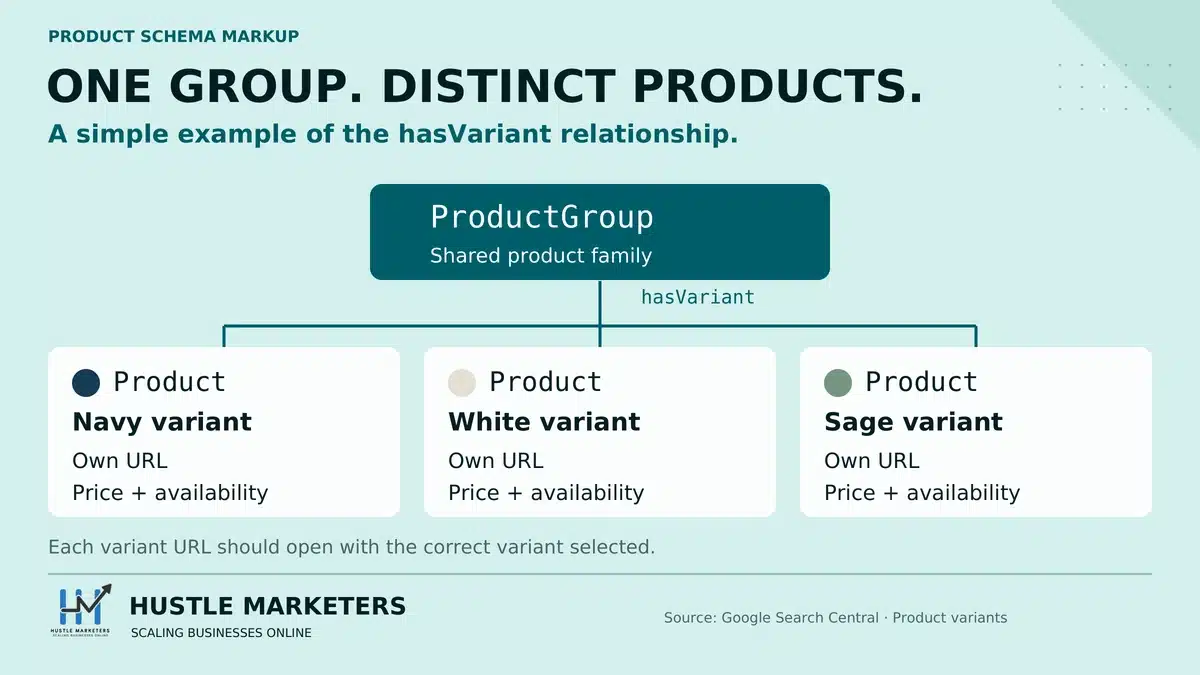
ProductGroup, hasVariant and isVariantOf
ProductGroup is the parent node. The hasVariant property hangs the variants underneath it. The isVariantOf property does the same job from the other end. It lets a separate variant Product point back up at its parent, so you use one direction or the other.
Google defines hasVariant as “A nested Product property that is one of the variants of the ProductGroup property, if applicable”. It then names the alternative. “Alternatively, a variant Product property can reference back to its parent ProductGroup using the isVariantOf property on the Product property”.
Read that carefully. The reverse-direction property Google names is isVariantOf, not inProductGroupWithID. Plenty of guides treat the two as interchangeable. They are not.
The variesBy property is the third piece, and a closed list. Google says to “Reference these variant-identifying properties through their full Schema.org URL”, and supports six values.
| Supported variesBy value | What it varies |
|---|---|
| https://schema.org/color | Color |
| https://schema.org/size | Size |
| https://schema.org/suggestedAge | Suggested age of the audience |
| https://schema.org/suggestedGender | Suggested gender of the audience |
| https://schema.org/material | Material |
| https://schema.org/pattern | Pattern |
So bare strings such as “color” are not what Google documents. And the list includes suggestedAge and suggestedGender, which describe the audience rather than the item. Guides that cover variants at all tend to stop at size and color.
Here is the nested shape, which Google calls “the most compact and natural representation of a product group and its variants”.
{
  "@context": "https://schema.org/",
  "@type": "ProductGroup",
  "name": "Wool winter coat",
  "description": "Mid-weight wool coat, cut for layering.",
  "url": "https://www.example.com/winter-coat",
  "brand": {
    "@type": "Brand",
    "name": "Example Outerwear"
  },
  "productGroupID": "WC-PARENT",
  "material": "wool",
  "pattern": "herringbone",
  "variesBy": [
    "https://schema.org/color",
    "https://schema.org/size"
  ],
  "hasVariant": [
    {
      "@type": "Product",
      "sku": "WC-GRN-S",
      "gtin13": "0001234560001",
      "image": "https://www.example.com/photos/coat-green.jpg",
      "name": "Wool winter coat, green, size small",
      "color": "green",
      "size": "small",
      "offers": {
        "@type": "Offer",
        "url": "https://www.example.com/winter-coat?color=green&size=small",
        "price": 129.99,
        "priceCurrency": "USD",
        "itemCondition": "https://schema.org/NewCondition",
        "availability": "https://schema.org/InStock"
      }
    },
    {
      "@type": "Product",
      "sku": "WC-NVY-L",
      "gtin13": "0001234560002",
      "image": "https://www.example.com/photos/coat-navy.jpg",
      "name": "Wool winter coat, navy, size large",
      "color": "navy",
      "size": "large",
      "offers": {
        "@type": "Offer",
        "url": "https://www.example.com/winter-coat?color=navy&size=large",
        "price": 139.99,
        "priceCurrency": "USD",
        "itemCondition": "https://schema.org/NewCondition",
        "availability": "https://schema.org/BackOrder"
      }
    }
  ]
}
Look at where material and pattern sit. They are on the parent, because this coat does not vary by material or pattern, and variesBy names only color and size. The documented rule is that a property belongs on the variant when it varies, and every varying aspect appears in variesBy.
The unnested alternative exists for a reason Google states. “This approach might be easier for some content management systems (CMSes) to generate”. There, each variant is a separate top-level node carrying isVariantOf with an @id reference, and the parent holds the only @id.
One caution on that unnested example. Google marks omitted blocks with inline comments, such as other ProductGroup-level properties. Those are placeholders for reading. JSON has no comment syntax, so copying it verbatim ships a block that will not parse.
productGroupID and inProductGroupWithID
The productGroupID property is the parent sku, sitting on the ProductGroup. The inProductGroupWithID property is the same identifier carried on each variant instead. Google accepts either route, and states one hard rule if you use both.
The definition is worth quoting in full, because the short version circulating online drops the scope. “This identifier must be provided for the ProductGroup property or, alternatively, using inProductGroupWithID property for variants of the ProductGroup property”.
Then the rule with teeth: “If you provide the identifier for both the ProductGroup property and its variant Product properties, they must match”.
Now the distinction most write-ups miss. Swapping inProductGroupWithID for isVariantOf is the easiest way to get variant markup wrong. Both definition rows sit in the merchant listing guide.
| Question | inProductGroupWithID | isVariantOf |
|---|---|---|
| What it carries | Text. The group ID itself | A reference to a ProductGroup node |
| Type Google gives | Text | ProductGroup |
| Where its definition row lives | The merchant listing guide, under Product | The merchant listing guide, under Product |
| How the variant document treats it | Named three times in passing, with no definition row | Named as the reverse of hasVariant |
| Google’s description | “The ID of a product group that this product variant belongs to”. Google adds “Specify at most one value” | “A product group that this product variant belongs to, if applicable” |
| Feed equivalent | Google points to Item Group Id in Merchant Center Help | None stated |
| What Google’s unnested example uses | Not used | Used, with an @id reference to the parent |
Why all your variants share one identifier
If the Rich Results Test shows one variant or none, look at your identifiers first. Google requires a unique ID per variant. A build that emits one shared @id across variant nodes hands a parser statements about a single product, so the variants collapse.
Two separate things are true here, and mixing them up leads to bad advice. The first is a Google requirement. Guideline 1 says: “Each variant must have a unique ID in its corresponding structured data markup (for example, using the sku or gtin properties)”.
The second is a property of JSON-LD, not a Google rule. In JSON-LD, @id is the node identifier, so two nodes carrying the same @id merge. Google’s examples avoid the problem by never giving a variant an @id. In both single-page examples, only the parent and the shared policy nodes carry one.
That matches what implementers report. A Shopify Community reporter writes that “when all variants share the same [@id], Google’s parser treats them as the same entity”. A second thread describes the result: the Rich Results Test “either fails to recognize multiple variants or shows only one variant”.
Be precise about the split. Google’s documentation does not discuss @id collision, node merging, or the Rich Results Test showing one variant. Those are not documented. Attribute the collapse to JSON-LD node identity, and the uniqueness requirement to Google.
One page per variant, or one page for the group
Google documents two design approaches and treats both as valid. Single page means every variant is selectable on one page, usually through query parameters. Multi page means variants live on different URLs. Your architecture picks the approach, and the markup follows.
| Point of difference | Single page | Multi page |
|---|---|---|
| Canonical URL | One distinct canonical URL for the group | Google says the ProductGroup “doesn’t have a canonical URL” |
| ProductGroup url property | Use it, without variant selectors | Google says don’t use it |
| Where the group definition lives | Once, on the one page | Repeated in full on every variant page |
| Self-contained markup | Naturally satisfied | Required. Off-page entities must not be necessary |
| Pointing at variants elsewhere | Not needed | Include stub variants carrying url only |
The multi-page rule feels wrong until you read Google’s reasoning. The group has to reference common attributes such as brand, material and age group. So “the full ProductGroup definition needs to be repeated on each of the variant pages”.
Google also documents a stub technique here, and no competitor cites it. Each page fully defines its own variants, then adds a variant entry carrying only the url property, pointing at variants elsewhere. Google’s stated purpose is helping it find them.
Now the question people actually ask. Can you skip ProductGroup and put size, color, material and pattern flat on one Product node? The answer needs both halves.
- A flat Product node carrying color, size, material and pattern is valid Product markup. All four are documented recommended properties of Product, so a reviewer can fairly say it is not an error.
- It cannot express a variant relationship. No ProductGroup means no productGroupID and no way to satisfy the group ID guideline. No variesBy means nothing declares which aspects vary. No hasVariant or isVariantOf means nothing relates one variant to another.
- So it does not earn what the variant document offers, which is eligibility for display with variant information in merchant listing experiences.
Google nowhere writes a sentence forbidding the flat approach. On the flat node as an alternative to ProductGroup, the documentation is silent rather than permissive. Say silent, not prohibited, and judge it on what it cannot do.
Two more gaps deserve naming, because guides fill them with invention. The variant document states no limit on how many variants you can mark up, and no pagination or truncation behavior. It also says nothing about product feeds. The phrase Merchant Center does not appear on it, so no claim about feed precedence can cite that page.
Should availability describe the product or the variant
Availability belongs to the variant, because stock is a fact about a sku rather than a product line. Google’s nested example puts a full Offer inside each variant, with its own url, price and availability. Two variants sit on InStock while a third sits on BackOrder, at a higher price.
The failure we see most often is not an invalid value. It is availability computed across the whole variant set by theme logic. A Shopify Community thread pins it exactly. “The issue is that the default behavior checks if ANY variant is out of stock rather than if ALL variants are out of stock”.
That thread names Focal and Impulse, and it sat unresolved. Read your theme’s availability logic before touching the markup.
What schema belongs on a category or collection page
Not Product markup. Google limits product rich results to pages that focus on a single product, or on variants of one product. A category page lists many different products, so it falls outside that scope. What you can put there instead is a shorter answer than most people want.
What practitioners put on collection pages, and what it earns
The seoClarity guide advises that you “avoid using Product schema on product category pages”. Its reason is that Product “is specifically designed to describe a single, individual product or service”.
The community answer is ItemList, injected into collection templates conditionally. A Shopify Community thread works through exactly that, gated on the template name. Nobody in it warns against Product schema, and nobody states which feature ItemList makes the page eligible for.
- Product markup on a category page contradicts Google’s stated scope for product rich results. Do not add it.
- Any collection-page rich result built on ItemList is not documented in the Google pages we read. Treat a promise of one as unproven.
- If you mark up a collection page, mark up what is genuinely there, and keep every value visible to a reader.
- Put the Product markup effort into product pages, where the documented experiences live.
Category pages still deserve technical attention, just not this kind. Our structured data guide covers which types are worth adding sitewide, and our ecommerce Core Web Vitals guide covers the speed side.
Price, currency, availability and condition
Price and currency are the only required Offer properties, and a merchant listing needs a price above zero. Availability, itemCondition and priceValidUntil are recommended, but a store that leaves them out gives up most of the value. Every one of these values has to match the page a shopper sees.
One prohibition belongs here, because variable-product plugins walk into it. The product snippet guide says: “Don’t use AggregateOffer to describe a set of product variants”. A plugin emitting lowPrice and highPrice for a variable product is doing exactly that.
Google also added a Sale duration section covering validFrom, validThrough and priceValidUntil. Its changelog entry, dated July 7, 2026, ties that to the Merchant Center feed attribute sale_price_effective_date.
Availability values, including out of stock, pre-order and backorder
Availability sits on the Offer as a schema.org URL. Google documents four acceptable values for merchant listings. Pick the one that describes that variant right now, and change it when the state changes.
| State on your site | Value to use |
|---|---|
| Available to buy and ship now | https://schema.org/InStock |
| Sold out with no orders taken | https://schema.org/OutOfStock |
| Orderable now, shipping when stock returns | https://schema.org/BackOrder |
| Orderable before release | https://schema.org/PreOrder |
The community layer says nothing about BackOrder or PreOrder specifically, which is worth stating rather than papering over. What it evidences heavily is the stale value problem, and that is a different failure. The value stays valid, so validators pass it, and Google still disapproves the item later.
A Shopify Community post sets out the cycle. A feed provider presented seventeen out-of-stock items as available. Google approved them, found the true stock state, then disapproved them, and the same items kept returning.
priceValidUntil, what date to use and what expiry does
priceValidUntil is a recommended Offer property stating how long the current price holds. Google warns that a “product snippet may not display if the priceValidUntil property indicates a past date”. An expired date is worse than a missing one, because it actively tells Google the price is stale.
Search Console reports its absence as a warning, with the string “Missing field ‘priceValidUntil’ (in ‘offers’)”. A WordPress.org thread with an Automattic reply explains why so many stores see it. The warning appears “because the price of the product does not change and is not currently on sale”.
Our position for client stores is narrower. Set the date when you run real promotions, using validFrom and validThrough for the window. If prices sit still, leaving the field out is defensible. A date in the past never is.
Keeping priceValidUntil current across a catalog
There is no built-in automation for this in WooCommerce, which is why the field goes stale. Any solution has to be a rule rather than a value. Derive the date from the sale end date, or from a rolling window, and never store a constant in a template.
Here is the trap, and it is a live one. A WordPress.org support thread carries a vendor-supplied PHP filter that loops variations and derives priceValidUntil from the sale end date. With no sale, it falls back to a hardcoded 2025-12-31.
That fallback expired long before this guide went up. Anyone who pasted a snippet of that shape now serves an expired priceValidUntil across the whole catalog. Before you reuse any snippet like it, search your theme and plugin code for a hardcoded priceValidUntil date.
Multiple currencies on one page
One Offer carries one price and one currency. Repeating price and priceCurrency several times on one Offer is not a documented pattern. A page that changes its price by visitor also runs into a separate Google rule, so the cleaner answer is one URL per market.
A WebmasterWorld thread works through one product sold in three currencies on one page. The poster observes that “it seems invalid to list price and priceCurrency several times”, and a reply points at eligibleRegion on the Offer.
The same reply raises the constraint that decides it: “Your landing page cannot change based on information about the user”. For multi-market clients we use separate market URLs with their own markup. We keep price, currency and availability consistent from feed to page to markup.
How reviews and ratings work in product schema markup
Reviews reach Search through two properties: review for individual reviews and aggregateRating for the summary. Either one satisfies the product snippet minimum on its own. Both carry required sub-properties, and both carry a guideline risk no validator can see, which is where most star ratings quietly die.
| Property | Required sub-properties | Recommended sub-properties |
|---|---|---|
| review | author, itemReviewed, itemReviewed.name, reviewRating, reviewRating.ratingValue | datePublished, reviewRating.bestRating, reviewRating.worstRating |
| aggregateRating | itemReviewed, itemReviewed.name, ratingCount or reviewCount, ratingValue | bestRating, worstRating |
Product is one of the types Google documents review snippets for, alongside Book, Event, Local business, Movie, Recipe and several media types. That guide also sets the visibility rule people break without noticing. Marked-up review content must be “readily available to users from the marked-up page”.
A 2026 addition tightened things further. Google’s changelog records a guideline on fake and undisclosed incentivized reviews, dated July 24, 2026. It names reviews written in exchange for money, discounts, vouchers or free products without clear disclosure.
Self-hosted and self-serving reviews, what is actually documented
Read this one precisely, because it is the most misquoted rule in the topic. Google writes its self-serving restriction for LocalBusiness and Organization markup. It does not write it as a restriction on Product markup, so extending it to Product is an inference rather than a citation.
Google’s sentence covers pages using “LocalBusiness or any other type of Organization structured data”. Those pages “are ineligible for star review feature” where the reviewed entity controls the reviews about itself. Its sourcing rule is scoped the same way: “Ratings must be sourced directly from users”.
Some guides go further than the text supports. The seoClarity guide writes that “you must host the reviews and/or ratings on your own site. Third-party reviews are not allowed”.
Semrush says “Google won’t show star ratings if the entity being reviewed is the same entity hosting the review”. Those two claims point in opposite directions.
Practitioners hit a related wall. In a WordPress.org thread, a store owner reports stars that worked and then stopped, with markup that validated. A plugin contributor answers that “you should not use stars in archive pages”. Treat that as a practitioner position, not a documented Product rule.
How many reviews should enter the markup
Google documents no minimum number of reviews for aggregateRating eligibility, and no maximum. In a WordPress.org support thread, plugin support confirmed there is no feature to cap them. So every WooCommerce review on the product goes in, and the poster raised page weight as the consequence.
The same thread carries a sharper lesson. HTML markup inside review author names breached Google’s guidelines, and cost the store its structured data fields. Our working rule for client stores: emit the aggregate rating always, a bounded set of individual reviews, and plain text author fields.
Duplicate ratings from a reviews app and an SEO plugin
A reviews app and an SEO plugin will both emit aggregateRating if you let them, and Google responds by dropping the rating. The fix is not a merge. You switch the duplicate off at one source, and the community settles on switching it off in the app.
A Shopify Community thread with a Yoast staff reply documents the case. Judge.me and Yoast SEO each emitted aggregate rating JSON-LD. Search Console returned “The review has several composite ratings” across 26 product pages, and the poster reported Google removing the ratings.
The resolution was one toggle: switch off the aggregate rating JSON-LD setting inside Judge.me. So before adding anything to review markup, count what already emits it.
Where shipping and returns belong now
Google’s default has moved. For both shipping and returns, it now recommends a global policy under Organization markup instead of a policy on every Offer. Offer-level shippingDetails and hasMerchantReturnPolicy are for the narrower case, where specific products need their own terms.
The wording is almost identical for each. The merchant listing guide says: “We recommend you provide a global shipping policy for your business under Organization markup instead”. For returns it says: “We recommend you provide a global return policy for your business under Organization markup instead”.
That is a real change in guidance. A 2023 era guide teaches Offer-level shippingDetails and hasMerchantReturnPolicy as the norm. If you followed one, your markup still has a place for products with their own terms, but the store-wide policy now belongs on Organization.
Google’s scoping sentence for the Offer-level version is worth keeping: use shippingDetails “Only if some of your products have specific shipping policies”. The same logic covers hasMerchantReturnPolicy, for product-specific overrides or a store with no global policy.
When you do need Offer-level policies, Google’s variant example shows the efficient pattern. It defines OfferShippingDetails and MerchantReturnPolicy once as top-level nodes with their own @id values, then references them from each variant’s Offer.
{
  "@type": "Offer",
  "url": "https://www.example.com/winter-coat?color=green&size=small",
  "price": 129.99,
  "priceCurrency": "USD",
  "availability": "https://schema.org/InStock",
  "shippingDetails": {
    "@id": "#shipping_policy"
  },
  "hasMerchantReturnPolicy": {
    "@id": "#return_policy"
  }
}
One community position needs correcting. A Shopify Community responder told a store owner to ignore shippingDetails and hasMerchantReturnPolicy warnings when Merchant Center already holds the equivalent settings. Treat that as a practitioner view. Google’s documented recommendation is the global policy under Organization markup.
How to validate product schema, and what validation does not tell you
Use the Rich Results Test for Google features and the Schema Markup Validator for the vocabulary. They answer different questions. A clean pass in the validator tells you the syntax holds, and tells you nothing about whether a rich result can appear.
| Question | Rich Results Test | Schema Markup Validator |
|---|---|---|
| Who runs it | schema.org, the project behind the vocabulary | |
| What it checks | Which Google rich results your markup can generate | “all Schema.org-based structured data that’s embedded in web pages, without Google feature specific warnings” |
| Formats accepted | JSON-LD, RDFa and microdata | All schema.org markup |
| Use it for | Product snippet and merchant listing eligibility | Syntax checks, including types Google has no feature for |
| Where it lives | search.google.com/test/rich-results | validator.schema.org |
Google states the order: start with the Rich Results Test “to see what Google rich results can be generated for your page”. Two tooling errors are worth flagging. Google retired its own Structured Data Testing Tool, and the Rich Results Test is not a Search Console feature.
Now the part almost nobody publishes. A warning is not an error. A Shopify Community reply puts it plainly: “Warnings are just a heads up. They require zero action and can be ignored”.
Validation also cannot answer the question clients ask, which is whether the markup is working. The Search Console Enhancements reports count valid items, not effectiveness. One poster puts it exactly: Enhancements reports “are not a report to measure how effective the data is”.
Why your product markup is not producing a rich result
Five causes account for most of it. Duplicate markup, a guidelines problem, an error in the report for your chosen experience, a Merchant Center mismatch, or plain reporting lag. Valid markup is only the first requirement, and only one of those five shows up as an error.
Google is explicit that validity is not enough. Its policy page says a breach can stop “syntactically correct structured data from being displayed as a rich result in Google Search”. A manual action removes rich result eligibility, though “it doesn’t affect how the page ranks in Google web search”.
When two things on your site both emit Product schema
Duplicate Product markup is common. A typical store has three candidates: the theme, a reviews app and an SEO plugin. Two of them emitting the same property is enough to lose the feature.
| Collision | What happened |
|---|---|
| Judge.me and Yoast SEO | Both emitted aggregateRating. Search Console returned “The review has several composite ratings” across 26 product pages |
| Judge.me and a Shopify theme filter | The theme emitted structured_data output while the app injected aggregateRating separately |
| A Turbo theme and a JSON-LD app | Two JSON-LD sources, so Google saw two products on one page |
| Yotpo and the structured_data filter | App review data merged into markup the store could not edit in place |
One widely repeated community claim needs care. A Shopify Community poster states that “Google Merchant Center only reads the first structured data, all preceding data is not read”. That sentence contradicts itself as written, and no Google documentation we read supports it. Log it as what practitioners believe, not as behavior to rely on.
Markup that validates but is withheld on guidelines
This is the failure a validator cannot catch. The markup is correct, the test is green, and Google declines the feature because of a content rule. Star ratings are where it bites hardest, usually over visibility or self-serving content.
Google’s structured data policies give the rules in three sentences.
- “Don’t mark up irrelevant or misleading content, such as fake reviews or content unrelated to the focus of a page”.
- “Don’t use structured data to deceive or mislead users”.
- “Don’t mark up content that is not visible to readers of the page”.
Google also names hidden content as a reason valid markup does not show. Its wording: “The content referred to by the structured data is hidden from the user”. A rating inside a tab that never renders qualifies.
Search Console errors and warnings, with the real strings
Here are the strings store owners actually report, gathered from forum threads. None appears on any page ranking for this term, which makes them hard to search for and easy to misread. Read the caveat under the table before quoting any of them.
| String as reported | Where it appears | What it means |
|---|---|---|
| “Either ‘offers’, ‘review’, or ‘aggregaterating’ should be specified”. | Search Console | The product snippet minimum is unmet |
| “Either ‘offers’, ‘review’, or ‘aggregateRating’ should be specified” | Search Console | The same issue, different capitalization |
| “Either ‘review’, or ‘aggregateRating’ should be specified” | Search Console | A thread-title variant. Wording unconfirmed |
| “Missing field ‘priceValidUntil’ (in ‘offers’)” | Search Console | A warning, not an error. No price validity date |
| “Missing field ‘aggregateRating'” | Search Console | No summary rating in the markup |
| “Missing field ‘review'” | Search Console | No individual review in the markup |
| “Missing Field ‘description’ (optional)” | Search Console | Flagged as optional in the string itself |
| “Invalid items can’t be used to generate rich results on Google” | Search Console | A required property check failed |
| “The review has several composite ratings” | Search Console | Two sources emit aggregateRating. Switch one off |
| “price in the feed is 23.00GBP but the price on the website is 20.00GBP” | Merchant Center | Feed price and crawled page price disagree |
| “Mismatched value (page crawl) [price]” | Merchant Center | The standard price disapproval |
| “price on landing page doesn’t match” | Merchant Center | As characterized by a responder. Blocks merchant snippets without showing in Search Console |
The caveat matters. Each string above is as a practitioner transcribed it into a forum post, not as read from Google’s interface by us. Treat them as what store owners report seeing, which is still more than any competing guide offers, rather than as canonical Google copy.
They come from four threads: a feed and structured data thread, a priceValidUntil thread, a variant description thread and a mismatched price thread. One responder draws the boundary. “Those issues from Search Console are not the same as the product feed you have going to Merchant Center”.
Merchant Center mismatches that never reach Search Console
Some failures live entirely in Merchant Center. A price disagreement between your feed, your page and your markup disapproves the item there while Search Console stays clean. If Shopping results vanish while your structured data reports look healthy, look here first.
A 2026 Shopify Community thread describes the class of error directly. Price on landing page mismatch errors do not surface in Search Console, and still block merchant snippets.
The variant version is repeatable enough to name. In one disapproval thread, a store had three variants at three prices. Google approved the cheapest and disapproved the other two, even though the page defaulted to a mid-priced variant. The responder’s diagnosis: “The reason is the structured data”.
When Search Console is reporting on markup you no longer have
Search Console reports on what Google last crawled, not on what your page serves now. So a report can describe markup you removed weeks ago, or markup that was never there. Check the live page before debugging the report.
A WordPress.org thread shows the trap at full size. The owner writes that Search Console “shows warnings related to product schema (like missing review or brand)”. A moderator inspected the site: “I can’t find any Schema.org markup on your website at the moment”.
Markup that works on one market and not another
Multi-market stores get a failure with no error message anywhere. The markup renders on the primary market and disappears on locale subfolders, because the condition that injects it tests the URL path exactly. Nothing in Search Console tells you half your countries are bare.
A Shopify Community thread records the fix. Hand-rolled JSON-LD validated on the primary market and failed silently elsewhere, because of an exact path comparison. Switching to a contains comparison let the condition survive a locale prefix. Test one product URL per market, not one per store.
How to run product schema at scale across a whole catalog
At catalog scale the unit of work is the template, not the product. You write the mapping once, validate a sample of each template type, and watch for regressions after every deployment.
Templated output and validating at volume
Validate by template, not by URL. A store with thousands of products has a handful of product templates. One clean sample from each tells you more than fifty random URLs.
- A simple product with stock and no variants.
- A variable product with several variants at different prices.
- A product with one variant in stock and the rest sold out.
- A product on sale, so validFrom, validThrough and priceValidUntil all fire.
- A product with no reviews, so review warnings appear where you expect them.
- One product URL per market, if you run more than one country.
Two rules keep the mapping honest. Never write a literal value into a template, because a constant becomes a catalog-wide error once it goes stale. And never derive a group-level value from the first variant, because the first variant is not the product.
The hardcoded date case above is the clearest example of rule one. A vendor snippet with an expired fallback does not fail on one page. It fails on every page at once, silently. Our technical SEO checklist treats template-level markup as a release gate for that reason.
Monitoring for regressions after a theme or template change
Theme and template changes are where product markup breaks, and nobody is watching at that moment. Microdata lives inside the HTML, so a redesign removes it by accident. A theme filter can change its output between versions, and an app update can start emitting a property that was clean yesterday.
One Shopify Community thread has a poster reporting “No errors, no manual actions, no GSC warnings” while rich results kept declining. The cause named in the thread was a theme emitting structured_data output while a reviews app injected ratings separately.
Be careful what you take from that thread. A platform migration, a theme change and a markup conflict all landed in the same window, and the poster reports direction without figures. It is a diagnosis story, not evidence that fixing markup moves traffic.
- Re-test your template samples after every theme, plugin or app update.
- Count Product nodes per page, not just validity. Two nodes is a defect even when both parse.
- Watch the Merchant listings and Product snippets reports separately, and treat a step change in valid items as an incident.
- Record which source owns each property, so the next person knows where to switch a duplicate off.
Where product schema ends and the Merchant Center feed begins
They are two systems, and you need both. The feed carries product data to Merchant Center, and the markup describes the page Google crawls. Google matches the two against each other, and against the visible page price. Disagreement between any two of the three costs you the listing.
A Shopify Community thread carries the clearest statement of that rule anywhere in the community record. “Google uses the data sent from the feed and matches it with what’s visibly displayed on the page and the structured data”. Three sources, one required agreement. Our guide to Merchant Center errors covers the feed side in full.
Does the feed or the markup win when they disagree
Google publishes no precedence rule that we could find, and its variant document says nothing about feeds at all. So neither wins. A disagreement is itself the failure, and the fix is agreement rather than a choice between sources.
What Google does document is a correspondence. The merchant listing guide points inProductGroupWithID at Item Group Id in Merchant Center Help. It cross-references color, material, pattern and size to their feed equivalents. That is an attribute-level mapping, not a precedence rule.
The practical fix is often on the feed side. In a mismatched price thread, the diagnosis was that “Your product feed should be using the variant URL, not the product URL”. The resolution was a feed attribute: “adding an ‘item_group_id’ has solved this. All products are now approved”.
The same thread carries a warning worth weighing rather than swallowing: “having multiple variants in the structured data will confuse Google”. That is a practitioner view, and Google’s variant documentation says the opposite about correctly grouped variants.
Does markup populate Merchant Center attributes by itself
No. Markup on the page does not fill in feed attributes for you. One store owner assumed size values would reach Merchant Center through a site crawl. The thread answers plainly: “The structured data, does not automatically add size values in GMC”.
So treat the two as parallel obligations. Feed attributes come from your feed, and markup comes from your template. In our work on feeds and Merchant Center accounts, one pattern holds. The accounts that stay approved are the ones where a single source of truth writes both.
Frequently asked questions
These are the questions store owners and developers ask most often about product schema markup. This block carries no FAQPage markup, deliberately: Google retired the FAQ rich result, so marking it up would earn nothing.
Is product schema a ranking factor
No, on the documentation available. Google describes structured data as a route to rich result eligibility, and documents no ranking effect. Its clearest statement sits in the policy on manual actions. Losing a rich result “doesn’t affect how the page ranks in Google web search”.
Treat any promise of ranking gains from schema alone with caution. Semrush puts it plainly: “No, schema markup is not a direct Google ranking factor”. What markup changes is how a result can look, not where it ranks.
Do I need product schema for AI search and AI Overviews
Not as a requirement. Google’s AI features guide says: “There’s also no special schema.org structured data that you need to add.” Semrush writes the same: “You do not need to add schema markup to be visible in AI responses”.
Accurate markup keeps price, stock and rating consistent wherever a machine reads your page, which is worth having. It is not the lever that gets you cited. For that work, see our guides to AI search optimization and entity SEO.
How do I fix product schema errors in Search Console
Start by reading the right report, because Merchant listings and Product snippets have different requirements behind them. Open the item, read the property named in the string, then check the live page. Fix the template, not the single URL.
Can I ignore the priceValidUntil warning
Yes, in most cases, because it is a warning rather than an error. A WordPress.org support reply explains that it appears “because the price of the product does not change and is not currently on sale”. Add the field when you run real sales, and never leave a past date in place.
Can I add placeholder review data to clear the warnings
No. A Shopify Community reply puts the risk bluntly. Fake data to clear warnings means “you risk a Google violation (for false information)”. Google’s own policies bar markup that misleads users, so a store with no reviews should carry no review markup.
Why do my star ratings validate but not show
Because validity and eligibility are different tests. A validator checks syntax, while Google also applies content rules. It withholds the feature when review content is hard to see, reads as self serving, or sits on an archive page. Check for a second source emitting aggregateRating.
Can I put Product schema on a category page
No. Google limits product rich results to pages focused on a single product or its variants, and a category page lists many products. Mark up what is really on the page instead.
Do I still need markup if I have a Merchant Center feed
Yes. The feed and the markup do different jobs, and Google matches them against each other and against the visible page. The markup is what makes the page itself eligible for a product snippet or a merchant listing. A feed does not give you that.
How long until I see a change after fixing markup
Nobody can give you a reliable number, and the honest answer is a range of expectations rather than a measurement. Two responders in one Shopify Community thread offered windows of four to eight weeks and eight to twelve or more weeks. No before and after evidence exists in the record we read.
Do the Search Console Enhancements reports tell me if it is working
No. They count valid and invalid items, which is a different question from effectiveness. A poster in the same thread puts it exactly: Enhancements reports “are not a report to measure how effective the data is”. Track the performance of the pages themselves for an outcome.
Is a warning the same as an error
No, and the difference decides how you spend your week. An error means the item cannot generate the rich result. A warning flags a recommended property you left out, and one Shopify Community reply puts it plainly: “Warnings are just a heads up”.
Does an app injecting the markup cause a problem
It can, in two ways. An app that emits a property your theme already emits creates a duplicate, and Google can drop the affected feature. An app that renders markup only after page load gives Google less reliable data, which matters most for price and stock.
Do I need Product schema on every product page
Yes, if you want every product eligible. Eligibility works page by page, so a product page with no markup earns nothing whatever the rest of the catalog carries. That is why the work belongs in the template, where one fix covers thousands of pages.
What happens if my priceValidUntil date has passed
Google may stop showing the snippet. Its product snippet guide warns that a “product snippet may not display if the priceValidUntil property indicates a past date”. An expired date is worse than an absent one. Check any vendor snippet you pasted for a hardcoded fallback.
What to do next with your product markup
Run four checks in order. Count the Product nodes on one product page, then confirm which experience you are targeting. Test one sample per template rather than one per product. Then read your theme’s variant and availability logic, because that is where correct markup still fails.
Related reading here. Our structured data for SEO guide covers the wider type decisions. Our LocalBusiness schema guide covers physical locations, and our Magento schema markup guide covers Adobe Commerce.
For the vocabulary side, read our semantic search primer. For checking pages at volume, see our AI SEO tools rundown.
Hustle Marketers is a Google Partner, a Meta Business Partner and a Microsoft Advertising Partner. We hold a 5.0 rating on Clutch from more than fifty reviews, and 4.9 out of 5 from 591 reviews. Ishant Sharma has worked in digital marketing since 2013, including ecommerce feed and Merchant Center work. If you want this audited on your own catalog, our SEO packages cover the template-level work.