Technical SEO Checklist 2026: 105 Checks for AI Search

Ishant
Published : August 23, 2026 at 4:18 pm
Updated : October 16, 2026 at 12:15 pm
Ishant
Most technical SEO checklists still audit for one reader. That reader is Googlebot. But your pages now get judged by a second group as well, and that group behaves nothing like a search crawler. GPTBot, OAI-SearchBot, PerplexityBot and ClaudeBot arrive with less patience, weaker rendering and different goals. Some of them never arrive at all, yet still quote you. This checklist covers all 105 checks we run on client sites, split across 18 categories. Every item tells you why it matters and how to check it, so you can hand the list straight to a developer. For the strategy sitting on top of these fixes, see what Google documents about AI search and what it stays silent on.
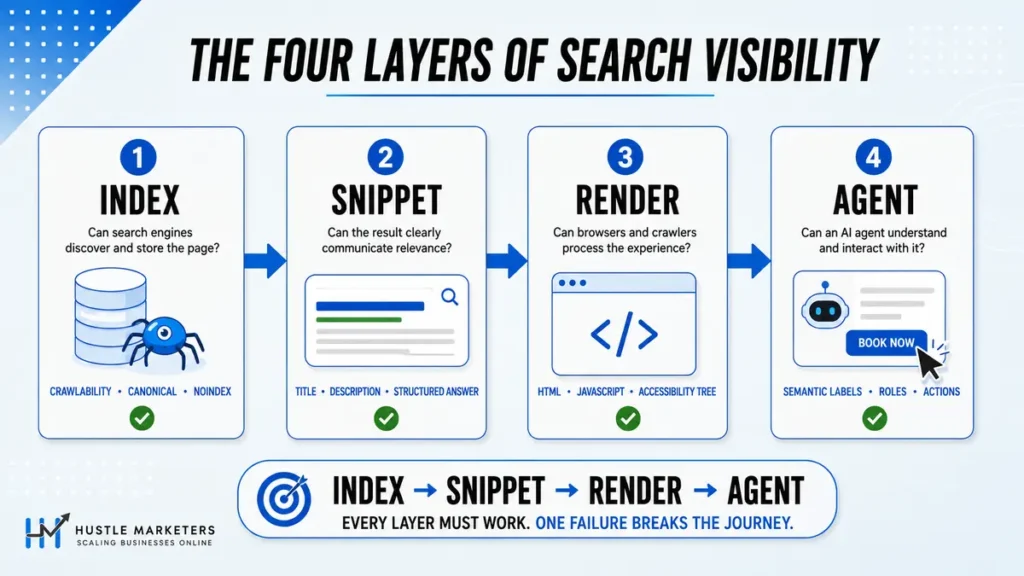
The shift nobody has priced in yet is this: AI systems are not simply crawlers you allow or block, they are users who have to read your page, render it, and increasingly act on it.
Key Takeaways
- 105 checks, 18 categories, 4 priority levels. Every item states why it matters and exactly how to check it.
- Fix these four first: the four-variant redirect test on a deep URL, the
filetype:search for exposed documents, each AI user agent line in robots.txt, and your crawled-but-not-indexed ratio. Under an hour combined. - Ten things here appear in no other published technical SEO checklist we audited, including the log file method for finding rendering gaps, accessibility tree testing, agent commerce readiness, and why you get cited by bots that never visit you.
- llms.txt is not robots.txt for AI. Three widely-shared checklists get this wrong. Add it if you want, but do not count it as strategy.
- Do not noindex thin pages. Noindex still leaves them crawled and still counted in sitewide quality. Remove them or improve them.
- Short on time? The 47-item version for small sites is near the end, and it covers roughly 90% of the risk.
What Is a Technical SEO Checklist and Who Needs One
A technical SEO checklist is a repeatable list of infrastructure checks that confirm search engines and AI systems can reach, read, render and trust your website. It sits underneath content and links. When it breaks, nothing above it works.
You need one in four situations. First, before a migration or replatform. Second, when organic traffic drops without an obvious content cause. Third, when you inherit a site and have no history on it. Fourth, on a fixed cadence, because technical debt accumulates quietly as a site grows.
Run the full 105 checks quarterly on a large site. On a small brochure site, run the 47-item short version twice a year. Then use SEO automation tools to monitor the critical items monthly.
How This Checklist Is Prioritised
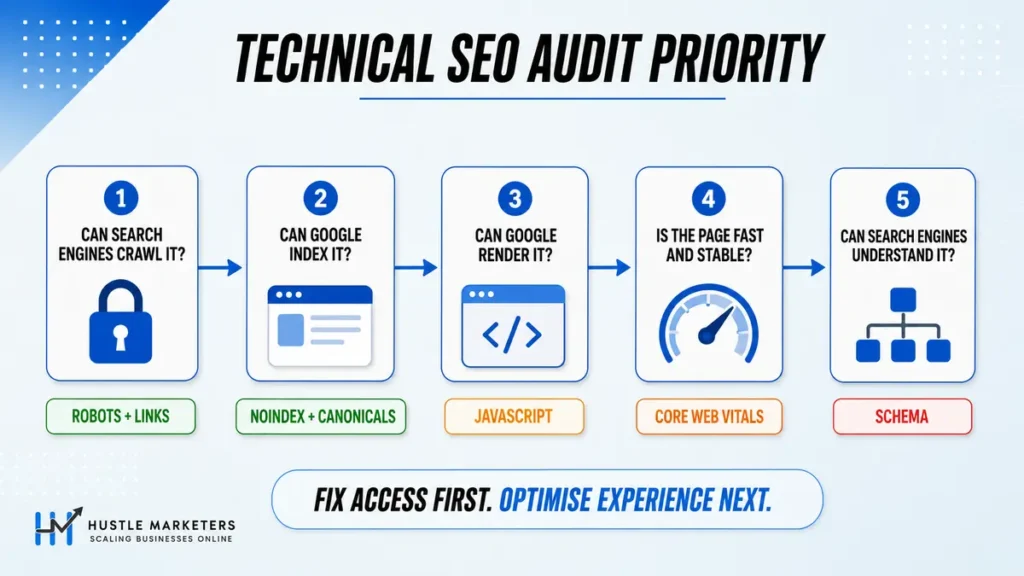
Every check carries one of four labels. Treat them as a work order, not a suggestion.
| Priority | What it means | Fix window |
|---|---|---|
| Critical | Blocks crawling, indexing or revenue right now | Same week |
| High | Costs rankings or crawl efficiency at scale | Within 30 days |
| Medium | Compounding drag, cheap to fix in batches | Within the quarter |
| Low | Housekeeping or speculative upside | When capacity allows |
Setup and Access: The Three Checks That Come First
You cannot audit what you cannot measure. So before anything else, confirm you actually own the data.
| # | Check | Why it matters | How to check | Priority |
|---|---|---|---|---|
| 1 | Set up and verify Google Search Console | It is the only first-party record of how Google crawls, indexes and ranks the site | Verify the domain property in GSC, not just the URL prefix | Critical |
| 2 | Create and submit an XML sitemap | Tells search engines which URLs you consider important enough to crawl | Yoast, RankMath or a generator, then submit in GSC and Bing Webmaster Tools | High |
| 3 | Set up Google Analytics 4 | Shows engagement and behaviour signals that a crawl report cannot see | GA4 property plus a working tag, confirmed in DebugView | Medium |
Add Bing Webmaster Tools to that list too. It costs ten minutes and it matters more than it used to, because ChatGPT leans on the Bing index for live answers. We cover that properly in our guide to ranking in ChatGPT search.
Crawlability: 12 Checks Before Anything Else Counts
Crawlability is the first prerequisite. Without a crawl there is no index, and without an index there is no ranking and no AI citation. So this section runs before every other section in a real audit.
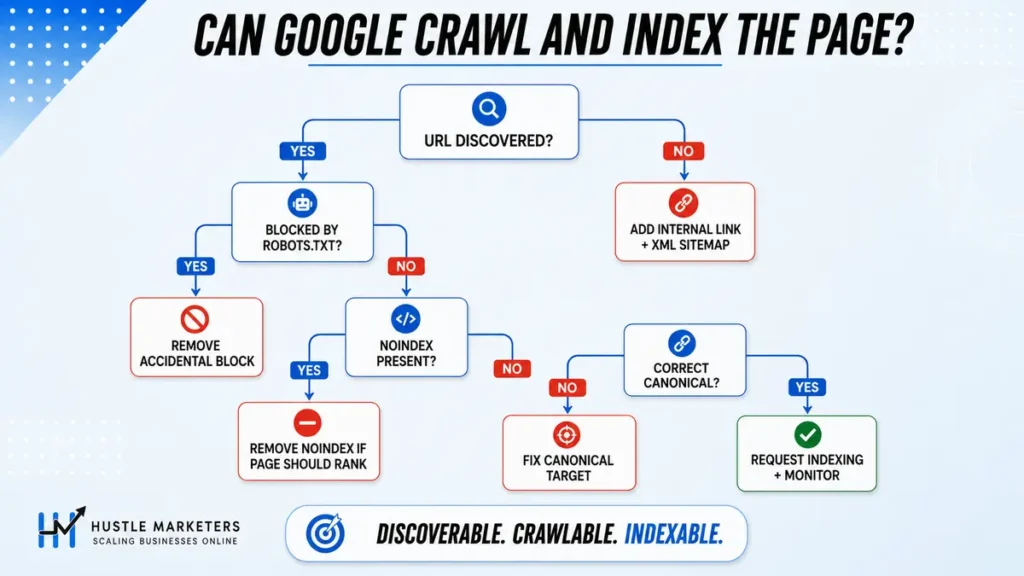
| # | Check | Why it matters | How to check | Priority |
|---|---|---|---|---|
| 4 | Score overall crawlability before anything else | If Google cannot crawl efficiently, the rest of the audit is theoretical | Semrush Site Audit crawlability score, or Screaming Frog crawl completion rate | Critical |
| 5 | 301 redirect retired posts that hold backlinks | Deleting a page without a redirect throws away link equity you already paid for | Check backlinks first, then 301 to the closest replacement | High |
| 6 | Run a full site crawl to catch domain-level issues | A crawler checks 100+ predefined issues that accumulate as you add pages | Screaming Frog, Ahrefs Site Audit or Semrush Site Audit | High |
| 7 | Schedule an on-demand crawl instead of relying on search operators | Google does not recrawl low value pages often, so operator results go stale | Weekly scheduled crawl in your audit tool | High |
| 8 | Serve 410 for spam or fabricated parameter URLs | 410 removes URLs from the index faster than 404 because it signals permanence | htaccess or server config rule matched on the injected pattern | High |
| 9 | Track crawl requests per day and improve them | Crawl capacity decides how quickly new and updated pages get seen | GSC Crawl Stats report, then server logs for the detail | High |
| 10 | Watch for parameter bloat and unexpected URL count growth | A sudden jump in discovered URLs is usually an attack or a faceted nav bug | Compare GSC indexed count trend against crawl totals month over month | High |
| 11 | Count 3xx redirect chains and 404 pages from the crawl | Chains waste crawl budget and are invisible unless you crawl for them | Site Audit redirect and broken page reports | Medium |
| 12 | Fix broken landing pages, 404s and 403s | A high broken response rate damages perceived site quality | Screaming Frog status code report cross-checked with logs | Medium |
| 13 | Fix internal and external broken links | Broken links waste equity and frustrate users mid-journey | Site Audit report for pages linking to broken pages | Medium |
| 14 | Use custom crawl queries to find template-level issues | Lets you export every affected URL and hand the developer one fix instead of fifty | Screaming Frog custom extraction or Ahrefs Data Explorer | Medium |
| 15 | Do not rely on XML sitemaps for LLM discovery | LLMs build no index of their own, so they have no reason to read your sitemap | Keep sitemaps for search engines and treat AI discovery separately | Low |
How Far Crawl Budget Can Actually Move
Crawl budget gets treated as a fixed constraint. It is not. In one case reported by Jairo Guerrero of AirOps, a client site went from roughly 8,000 crawl requests per day to about 1.2 million. The practical effect was that a full-site crawl fell from an estimated thirteen years to around a month.
That is a single practitioner account rather than a published study, so treat the exact figures as directional. The mechanism behind it is not in dispute though. Crawl capacity responds to server speed, internal link structure, response codes and the ratio of useful pages to junk. All four are things you control.
Track the number in the Search Console Crawl Stats report month over month. A flat line while you publish is a warning. A falling line while your URL count grows is the shape that usually precedes a ranking drop.
Why 410 Beats 404 for Injected URLs
This one deserves more than a table row, because almost every other checklist recommends robots.txt or noindex for parameter junk. That advice fails when the URLs were never yours.
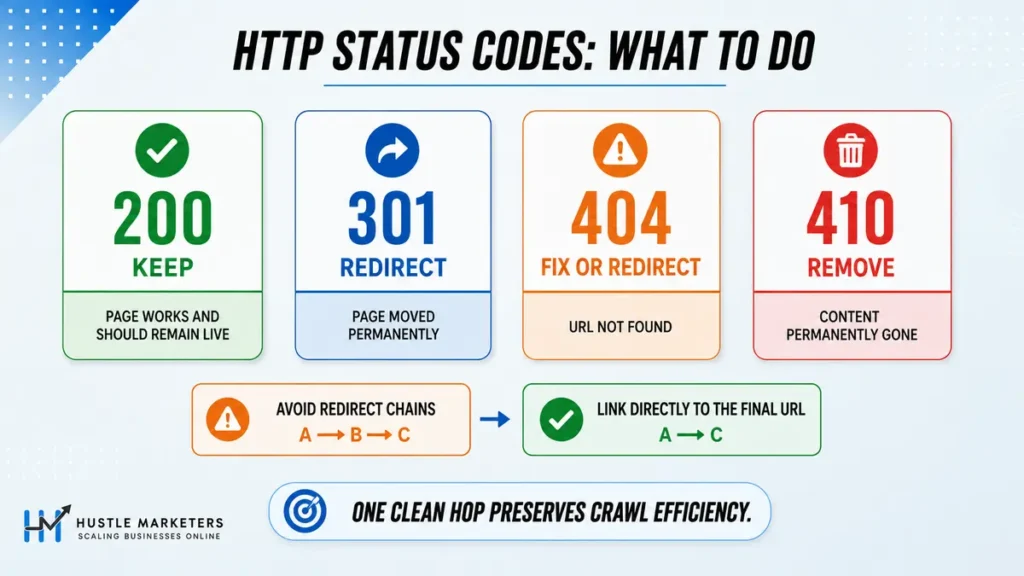
A negative SEO attack or a compromised plugin can generate hundreds of thousands of fabricated URLs overnight. In one case we reviewed, a site went from roughly 10,000 known pages to over 500,000 discovered URLs, and rankings fell within days. Blocking those URLs in robots.txt makes it worse. Google can no longer crawl them, so it cannot see that they are gone, and they linger in the index.
Serve 410 Gone instead. A 404 says the page might come back. A 410 says it will not, and Google documents that difference directly. In practice Google drops 410 URLs noticeably faster. Match the injected pattern at server level rather than page by page, because you cannot hand-edit half a million URLs.
Blocking junk URLs in robots.txt is the most common wrong answer in a spam cleanup. You are not hiding the problem from Google, you are hiding the solution.
Indexation: 8 Checks That Decide If You Exist
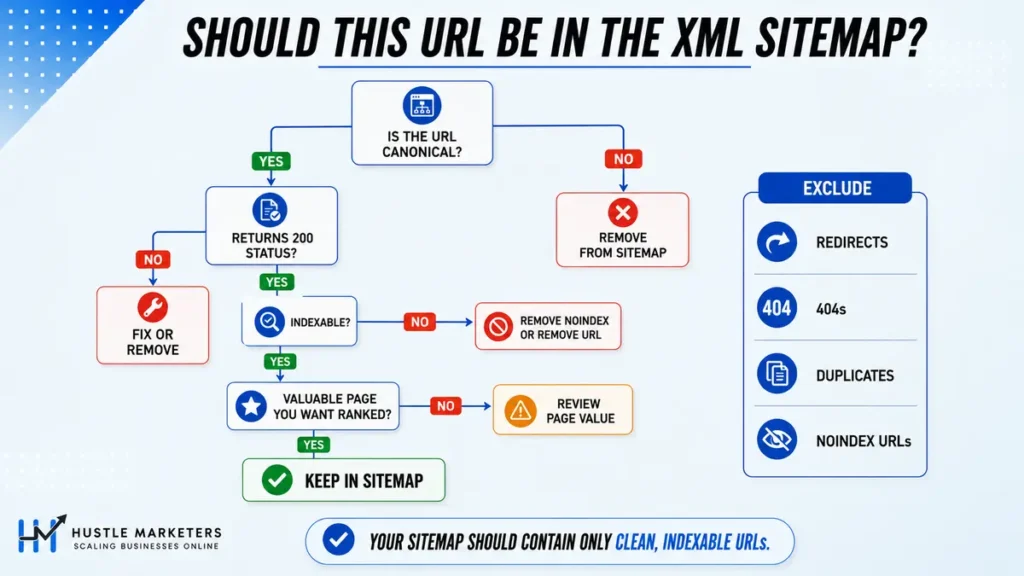
Crawling gets you read. Indexing gets you eligible. And because AI systems retrieve from search indexes first, an unindexed page cannot be cited even by a chatbot that has never visited your server.
| # | Check | Why it matters | How to check | Priority |
|---|---|---|---|---|
| 16 | Verify money pages are indexed in Google and Bing | AI assistants retrieve from search indexes, and several lean on Bing | GSC Pages report, Bing Webmaster Tools URL Inspection, site: operator | Critical |
| 17 | Look for indexed pagination and sort parameter URLs | Faceted URLs waste crawl budget and create near-duplicates at scale, and our ecommerce SEO checklist makes this its own step | site:domain.com inurl:page and site:domain.com inurl:sort | High |
| 18 | Measure the crawled-but-not-indexed ratio | A high ratio means Google is reading pages and choosing to reject them | GSC Page indexing report, divide indexed by total known | High |
| 19 | Find insecure pages still sitting in the index | Reveals http URLs that never redirect and still compete with your https set | site:domain.com -inurl:https | High |
| 20 | Treat site quality as a bulk judgement, not a page judgement | A strong page on a weak site inherits the site score, and vice versa | Compare indexed URL count against total URL count | High |
| 21 | Check WordPress footprints that should not be indexed | Tag, author and paginated archives get indexed by default and duplicate content | site:domain.com inurl:tag OR inurl:author | Medium |
| 22 | Do not noindex thin content, remove it or improve it | A noindexed page is still crawled and still counted in sitewide quality | View source for noindex, then cross-check against traffic data | Medium |
| 23 | Find leftover default WordPress install pages | Indexed sample pages signal an unfinished, low care site | site:domain.com inurl:hello-world OR inurl:sample-page | Low |
How to Read Your Crawled-But-Not-Indexed Ratio
Most guides tell you to open the GSC Page indexing report. Very few tell you what the number means, or why automated reports never match Search Console when you cross-check it. Here is the version we use with clients.
Take indexed pages and divide by total known pages. Then band the result.
| Indexation rate | What it usually means | What to do next |
|---|---|---|
| Above 80% | Healthy. Google broadly agrees with your URL set | Monitor quarterly, no action |
| 50% to 80% | Bloat is forming, usually parameters or thin archives | Find the pattern, then remove or consolidate it |
| Below 50% | Google is actively rejecting most of what it crawls | Treat as a quality problem, not a crawl problem. Prune first |
The reason the low band is a quality problem rather than a crawl problem is worth spelling out. Guerrero describes a client where roughly 80 percent of crawled pages carried no value at all, and the effect was not confined to those pages. It dragged down the whole-site assessment, including the pages that were fine.
The instinct at that point is to noindex the weak pages. Resist it. Noindex removes the page from results but Google still crawls it and still weighs it when judging the site. Deleting or genuinely improving the page is what changes the sitewide picture. We go deeper on this in our programmatic SEO guide, where the problem shows up fastest.
Robots and Directives: 3 Checks With Outsized Consequences
One wrong character in robots.txt can switch off an entire site. This is the shortest section in the checklist and the most dangerous.
| # | Check | Why it matters | How to check | Priority |
|---|---|---|---|---|
| 24 | Check for Allow versus Disallow typos in robots.txt | A single wrong directive silently blocks every bot, and nothing alerts you | Read the file manually, then test in the GSC robots.txt tester | Critical |
| 25 | Confirm robots.txt does not block AI user agents | Blocking the agent sets your AI crawl budget to zero even if you rank in Google | Open domain.com/robots.txt and check each named agent line | Critical |
| 26 | Confirm robots.txt exists and returns plain text | Controls where bots go, for example cart, search and feed URLs | Visit domain.com/robots.txt and confirm a 200 plain text response | High |
The AI User Agents Worth Naming Individually
Blocking AI crawlers is a real business decision, not a default. But most sites block them by accident, through an inherited rule or a security plugin. So check each agent separately, because they do different jobs.
| User agent | Operator | What it does | Consequence of blocking |
|---|---|---|---|
| GPTBot | OpenAI | Collects content used for model training | You lose training presence, not live citations |
| OAI-SearchBot | OpenAI | Indexes content for live ChatGPT search answers | You lose live ChatGPT citation eligibility |
| ChatGPT-User | OpenAI | Fetches a page when a user action requires it | Users cannot pull your page into a session |
| PerplexityBot | Perplexity | Indexes for Perplexity answers | You lose Perplexity visibility |
| ClaudeBot | Anthropic | Collects content for Claude | You lose Claude presence |
| Google-Extended | Controls Gemini and AI training use, separate from Googlebot | You keep Google Search, you lose Gemini grounding |
Note the split in that last row. Google-Extended is not Googlebot. Blocking it does not affect your Google Search rankings, which is exactly why so many teams get the decision wrong in both directions.
A Straight Answer on llms.txt
Several checklists now recommend llms.txt as if it were robots.txt for AI. That framing is wrong, and it is worth saying plainly.
llms.txt is a proposed plain-text file listing your key pages for language models. No major AI provider has committed to reading it. Google has said publicly it is not needed. More importantly, it does not match how these systems actually work, because they retrieve through search indexes rather than browsing a directory of your choosing.
Add it if you like. It takes ten minutes and costs nothing. Just do not count it as an AI visibility strategy, and do not let it displace the checks in this list that genuinely move the needle.
Duplicate Content and Canonicals: 5 Checks
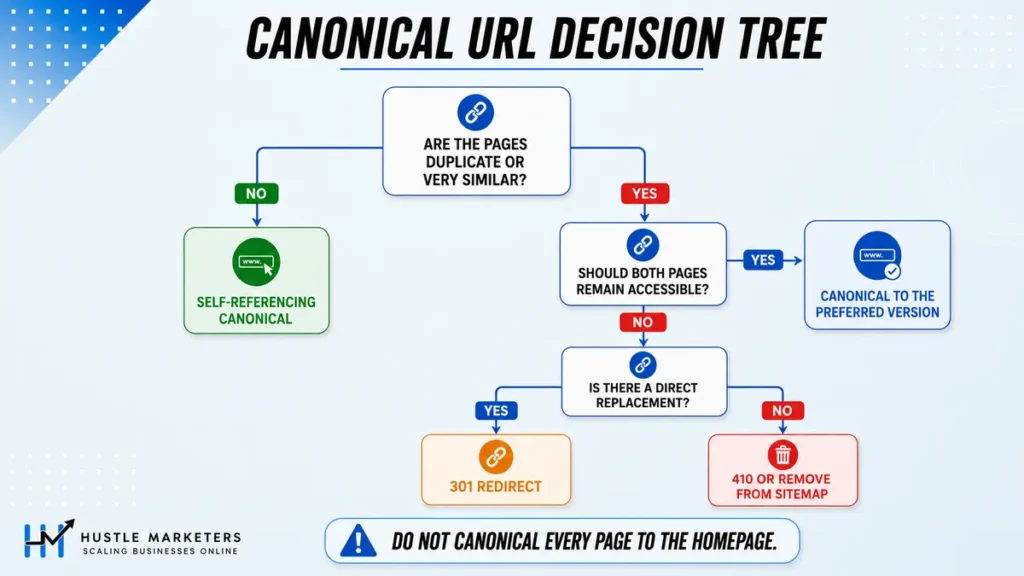
Duplicate content rarely arrives as a copy-paste problem. It arrives as an architecture problem, and the fix is usually a redirect rule rather than a rewrite.
| # | Check | Why it matters | How to check | Priority |
|---|---|---|---|---|
| 27 | Pick one canonical version: http vs https, www vs non-www | Four live variants split signals and leave insecure duplicates indexed | Load all four variants and confirm each 301s to the same target | Critical |
| 28 | Apply the chosen redirect site-wide, not only on the home page | A home-page-only redirect leaves every inner page duplicated | Test a deep product or blog URL across all four variants, not the root | High |
| 29 | Check whether an old domain still has indexed pages | Redirecting only the home page leaves the old domain competing with you | site:olddomain.com | High |
| 30 | Hunt keyword cannibalisation by sorting URLs and title tags | Two pages on one intent split clicks and both underperform | Screaming Frog crawl filtered by title, then compare GSC query overlap | High |
| 31 | Delete useless tag archives on small sites | Tag pages add crawl depth and duplication with no ranking upside | Site Audit crawled pages sorted by crawl depth | Medium |
The Four-Variant Test Almost Nobody Runs Properly
Here is the check itself, and it takes two minutes. Pick a deep URL, not your home page. A product page or a blog post is ideal. Then request all four of these and record the response.
http://domain.com/deep-page/https://domain.com/deep-page/http://www.domain.com/deep-page/https://www.domain.com/deep-page/
Three of them should return a single 301 to the fourth. If any of them returns a 200, you have a live duplicate. If any of them returns a chain of two or more redirects, you are leaking crawl budget on every request.
We test the deep URL rather than the home page because home-page-only rules are the single most common miss. A server rule that redirects the root correctly can still pass inner paths through untouched.
Site Architecture and Internal Linking: 8 Checks
Internal links are how discovery actually happens, and they are the cheapest ranking lever most sites still ignore.
To see which links on a page are followed, including a page-level meta robots nofollow, run it through our free dofollow link checker.
| # | Check | Why it matters | How to check | Priority |
|---|---|---|---|---|
| 32 | Add internal links from relevant existing pages to each new post | Passes equity and speeds up discovery of the new URL | site:yourdomain.com + keyword, then add contextual links | High |
| 33 | Avoid nesting a keyword-optimised page as a folder for child pages | Structures like /city-attorneys/wrongful-death/ raise cannibalisation risk | Review folder depth in Screaming Frog | High |
| 34 | Investigate pages blocked from crawling and confirm the reason | Some blocks are intentional, others silently hide pages you want ranked | Site Audit blocked list, then view source for noindex | High |
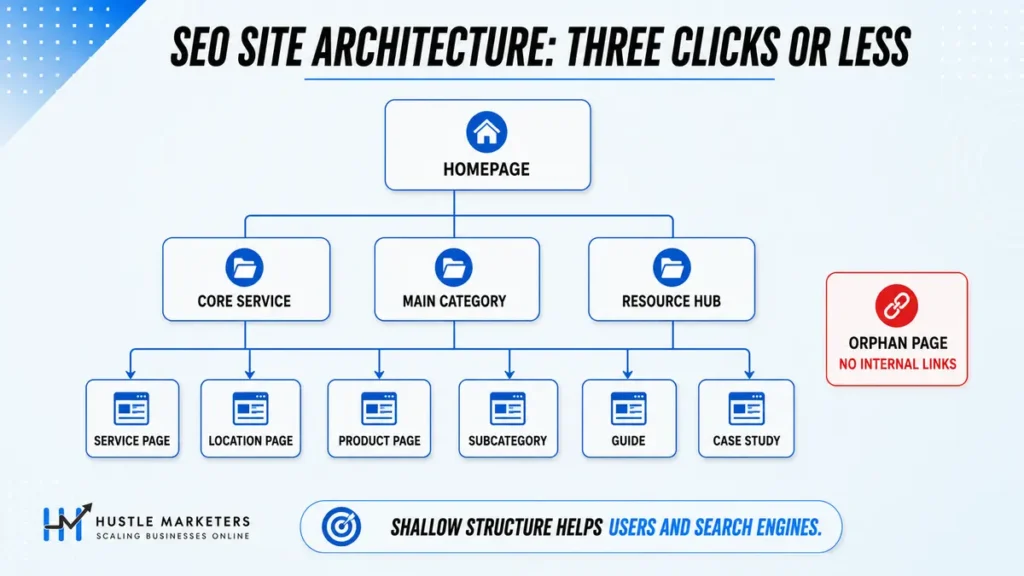
| 35 | Keep every important page within three clicks of the home page | Deep pages read as low priority and crawlers may never reach them | Site Audit crawl depth report | High |
| 36 | Automate internal linking and pruning with agents or purpose-built tools | Scales two tasks that directly affect crawl efficiency and relevance | Internal linking tool or a scripted candidate-scoring pass | Medium |
| 37 | Build internal links to new and important pages deliberately | Search engines discover pages through links before sitemaps | Internal link report in your crawler | Medium |
| 38 | Find and fix orphan pages | No internal links means poor discovery and no user path to money pages | Crawl output cross-referenced against sitemap and logs | Medium |
| 39 | Link out to relevant high authority external resources | Correlation work suggests pages that cite strong sources tend to rank better | Manual review during content production | Medium |
Rendering and JavaScript: The Section Most Checklists Skip
Googlebot renders JavaScript. Most AI crawlers do not, or they give up far sooner. So a page that looks complete in your browser can reach an AI system as an empty shell.
| # | Check | Why it matters | How to check | Priority |
|---|---|---|---|---|
| 40 | Keep HTML lean and avoid bloated markup | Heavy DOMs waste the limited patience and budget of AI crawlers | Lighthouse DOM size and page weight metrics | High |
| 41 | Move client-side rendering to server-side rendering | Simpler AI crawlers miss anything that needs JavaScript to appear | Compare view-source HTML against the rendered DOM | High |
The Two-Minute Raw HTML Test
Open the page, then use view-source rather than inspect element. View-source shows what the server sent. Inspect shows what your browser built afterwards.
Now search that raw HTML for your H1, your first paragraph, your price and your primary call to action. If any of them is missing from view-source but visible on screen, JavaScript is producing it. Googlebot will probably still see it. An AI crawler often will not.
The Log File Check That Finds Rendering Gaps
This is the check we have not seen in any competing checklist, and it is the one that finds problems the other 98 items miss.
When a bot fetches a page, it requests the HTML document. If it then also renders, it requests the JavaScript and CSS assets that page depends on. So you can compare the two counts directly in your server logs.
Filter your logs by user agent. Count HTML document requests. Then count requests for the JS bundles those pages load. If a bot fetched a page template 10,000 times but pulled the associated JavaScript only a few hundred times, that bot is not rendering your pages. Whatever your JavaScript produces is invisible to it.
That single ratio tells you whether server-side rendering is a nice-to-have or an emergency. And it is measurable today, with logs you already have.
| What you see in logs | What it means | Action |
|---|---|---|
| HTML fetches high, JS fetches near zero | The bot reads raw HTML only | Move critical content to server-rendered HTML |
| HTML and JS fetches roughly proportional | The bot renders | No rendering action needed |
| No fetches at all for a named agent | Blocked, or never discovered | Check robots.txt, then internal links and index status |
Speed and Core Web Vitals: 4 Checks
Speed stopped being purely a ranking conversation. It is now also a citation conversation, because a crawler on a budget abandons slow responses.
| # | Check | Why it matters | How to check | Priority |
|---|---|---|---|---|
| 42 | Find and fix slow-loading pages | Page experience affects both rankings and conversion rate | PageSpeed Insights, GTmetrix, then real user data in GSC | High |
| 43 | Improve server response time specifically | Time to first byte governs whether a crawler waits or moves on | Server response time in PageSpeed Insights, plus hosting logs | High |
| 44 | Review the Core Web Vitals section of your site audit | Google has confirmed Core Web Vitals as a ranking input | GSC Core Web Vitals report by URL group | Medium |
| 45 | Use CWV as the 28-day baseline and site speed as the instant check | CWV is a rolling field-data window, lab speed is immediate | GSC for CWV, PageSpeed Insights for the instant read | Medium |
There is emerging evidence that this now affects citations as well as rankings. A study of more than 2,000 sites, cited in the AirOps session, reported that faster sites were referenced roughly 20 to 30 percent more often in AI answers, with one slide putting the gap at 1.47 times. We have not reviewed the underlying methodology, so treat those numbers as a direction of travel rather than a benchmark.
The mechanism is intuitive enough. A crawler working through a large candidate set on a fixed budget abandons slow responses. Googlebot usually comes back later. An AI crawler often does not.
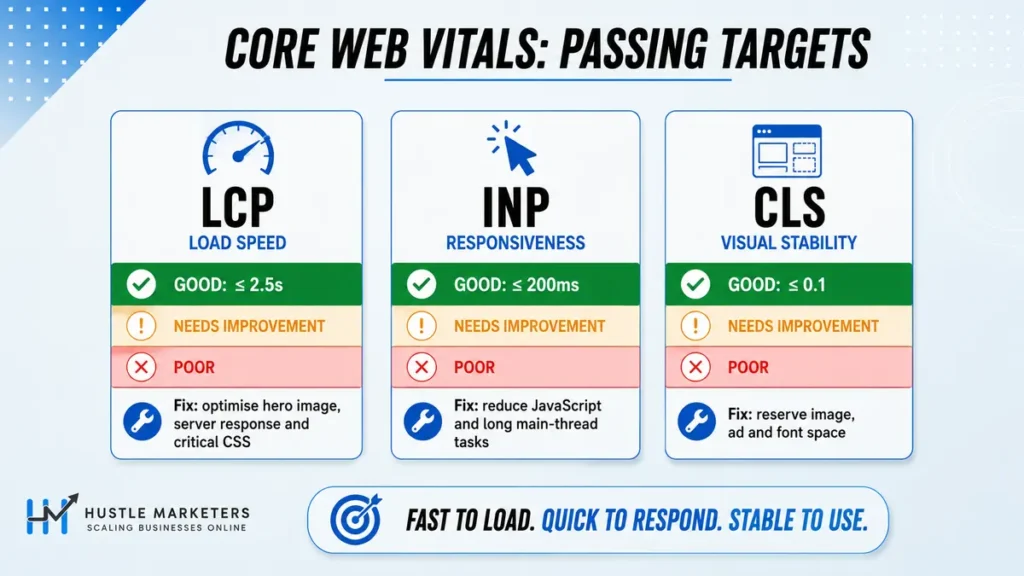
Google’s published Core Web Vitals thresholds are LCP under 2.5 seconds, INP under 200 milliseconds and CLS under 0.1. Measure against field data where you have it, because lab scores flatter you.
Server and Security: 4 Checks That Are Really Business Risk
This section is short, and every item in it is Critical. That is not padding. Each one can take a site off the map in a week.
| # | Check | Why it matters | How to check | Priority |
|---|---|---|---|---|
| 46 | Investigate strange outbound links on indexed pages | Unrelated outbound links usually mean the site has been compromised | site: search plus manual review, then a malware scan | Critical |
| 47 | Monitor server uptime and 5xx error rate | During downtime crawlers get nothing and you lose citations for that window | Uptime monitor plus 5xx rate in server logs | Critical |
| 48 | Put bot protection in front of the server | Spoofed crawler floods can crash the origin and kill visibility | Cloudflare or equivalent WAF with bot challenge rules | Critical |
| 49 | Search indexed file types for exposed private documents | Indexed PDFs and spreadsheets routinely leak salaries, addresses and client data | site:domain.com filetype:pdf, then repeat for xls, doc, csv | Critical |
Run the Exposed File Search Before Your Client Does
Check 49 is the one that changes the temperature of a client meeting. Run these four searches on any site you take over.
site:domain.com filetype:pdfsite:domain.com filetype:xls OR filetype:xlsxsite:domain.com filetype:doc OR filetype:docxsite:domain.com filetype:csv
Most of the time you find old brochures. Sometimes you find an internal payroll sheet or a client contact export sitting in an uploads folder. Fix it by removing the file and serving 410, then requesting removal in GSC. Do not simply noindex it, because the file itself remains publicly downloadable.
Mobile: 1 Check, Still Non-Negotiable
| # | Check | Why it matters | How to check | Priority |
|---|---|---|---|---|
| 50 | Confirm pages are genuinely mobile friendly | Google indexes the mobile version, so mobile is the version that counts | GSC mobile usability signals plus manual device testing | High |
On-Page Technical: 5 Checks at Template Level
These are on-page items, but you audit them technically. You are looking for template errors that affect hundreds of pages at once, not for one weak title.
| # | Check | Why it matters | How to check | Priority |
|---|---|---|---|---|
| 51 | Write title tags and meta descriptions that earn the click | Exact-match keywords do not correlate with position, but clicks still bring traffic | SERP preview tool, then GSC CTR by query | High |
| 52 | Run an on-page checker per target page and keyword | Surfaces concrete gaps such as missing variations and weak readability | Semrush On Page SEO Checker in manual mode | Medium |
| 53 | Skim your site: results for title tag problems | Wrong brand or domain in titles hurts CTR and looks broken | site:domain.com, then read the SERP titles | Medium |
| 54 | Use intitle: to count pages carrying a wrong or outdated title | Finds template-level title errors at scale instead of one at a time | site:domain.com intitle:"old brand name" | Medium |
| 55 | Use short, descriptive URLs | Shorter URLs correlate with better rankings and are easier to cite | Set the slug to the primary keyword, drop stop words | Medium |
Structured Data: 6 Checks After Google Removed FAQ Rich Results
Structured data is the one area where a 2026 checklist has to be more careful than a 2023 one. Google removed FAQ rich results from Search on 7 May 2026. HowTo went the same way in 2023. Plenty of checklists still tell you to add both. Six checks below, then two things worth saying plainly.
| # | Check | Why it matters | How to check | Priority |
|---|---|---|---|---|
| 56 | Map every template to a schema type that still earns a Search appearance | Markup built for a retired feature costs dev time and returns nothing | Compare each template against Google’s structured data gallery, one template at a time | Critical |
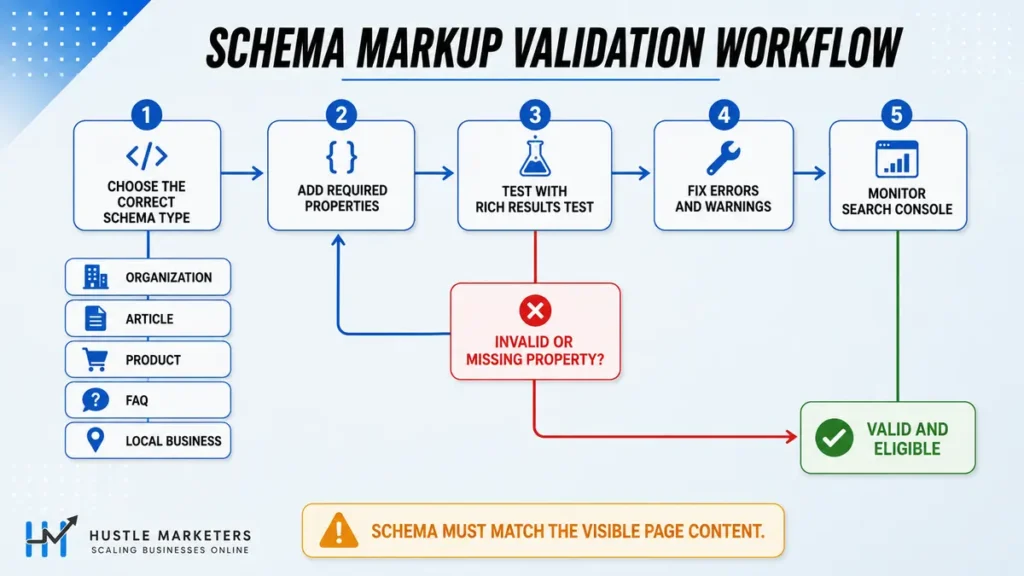
| 57 | Make structured data match the visible text on the page | Google states this outright, and a mismatch risks a manual action for spammy markup | Rich Results Test, then read the rendered page beside the output | Critical |
| 58 | Validate with the Rich Results Test and the Schema.org validator | The first tells you what Google can use, the second tells you what is syntactically broken. They answer different questions | Run both on one representative URL per template | High |
| 59 | Confirm your JSON-LD survives rendering, not just view-source | Schema injected by a tag manager or by JavaScript is invisible if the page is judged on raw HTML | Compare view-source against the rendered DOM, the same test as check 40 | High |
| 60 | Keep one Organization block with sameAs, consistent sitewide | Conflicting entity blocks across templates weaken the entity you are trying to establish | Crawl for duplicate Organization nodes on the same URL | Medium |
| 61 | Watch the Enhancements reports in Search Console for silent drops | Valid items fall off after a template release and nobody files a bug | GSC, Enhancements, per type, month over month | Medium |
The Schema Types That Stopped Paying in 2026
FAQPage and HowTo are two of the most commonly recommended types in technical SEO checklists. Neither produces a result in Google Search any more.
| Type | Current status | What to do |
|---|---|---|
| FAQPage | Rich results stopped appearing on 7 May 2026. The appearance filter, rich result report and Rich Results Test support were dropped in June 2026, and Search Console API support ended in August 2026 | Leave existing markup in place if removing it is costly, because it causes no harm. Stop counting it as a deliverable and stop reporting FAQ impressions that no longer exist |
| HowTo | Removed from mobile in August 2023 and desktop in September 2023. No Search appearance since | Remove it from new templates. Do not add it to a 2026 build |
| Speakable | Still in the gallery, still beta, still aimed at news publishers in a limited set of locales | Skip it unless you are a news publisher inside that set |
The wider point is that markup follows Google’s feature list, not schema.org’s vocabulary. Schema.org publishes hundreds of types. Google renders a couple of dozen. Build for the second list.
A Straight Answer on Schema and AI Search
You will read everywhere that schema is how you get cited by AI. Google’s own documentation on AI features says the opposite in one line: there is no special schema.org structured data you need to add to appear in AI Overviews or AI Mode.
What Google does ask for is that the page is indexed, eligible to be shown with a snippet, and that its structured data matches the visible text. That last part is the useful instruction. Schema does not buy you a citation. Inaccurate schema can cost you one.
The studies reporting large citation lifts from schema are correlational. Sites that mark up properly tend to be sites that do everything else properly too. Mark up for the Search features you are genuinely eligible for, keep it accurate, and treat any AI benefit as a side effect rather than the business case.
Logs and Monitoring: 4 Checks Nobody Else Teaches
Search Console reports only on Google. Your server logs are currently the only reliable source of truth on AI crawler behaviour. That makes this section the highest-leverage part of a modern audit.
| # | Check | Why it matters | How to check | Priority |
|---|---|---|---|---|
| 62 | Analyse logs for absence of signal | Important pages with zero bot hits effectively do not exist | Screaming Frog Log Analyser, OnCrawl or JetOctopus | High |
| 63 | Identify which AI bots hit your server and how often | GSC reports Google only, so logs are your sole AI crawler dataset | Filter logs by user agent string per bot | High |
| 64 | Compare bot HTML fetches against JavaScript file loads | A large gap reveals a rendering blind spot for that specific bot | Cross-reference HTML and JS asset entries per user agent | Medium |
| 65 | Prefer a platform that gives you raw server log access | Some hosted platforms block log access entirely, so you fly blind on AI crawling | Ask your host or platform for raw access logs before you commit | Medium |
What to Do When Your Platform Will Not Give You Logs
Hosted ecommerce platforms are the usual problem here. Shopify, for example, does not expose raw server logs, so you cannot confirm whether an AI crawler ever reached a product page.
You are not completely blind though. Three workarounds get you most of the way.
- Put the site behind a CDN such as Cloudflare and read the CDN logs instead. The request still passes through it.
- Use GSC Crawl Stats as a proxy for Googlebot behaviour, then treat it as a floor rather than a full picture.
- Add lightweight server-side logging through an app or middleware layer where the platform allows it.
If none of those is possible, factor it into your platform decision. Losing log visibility is a real cost, and it is worth naming at the point of choosing a stack rather than two years later.
AI Search, GEO and AEO: 7 Checks
This is where a 2026 checklist earns its title. These items are not content advice, they are infrastructure decisions about how retrieval works.
| # | Check | Why it matters | How to check | Priority |
|---|---|---|---|---|
| 66 | Cover topics and entities, not only exact keywords | Retrieval works on semantic similarity, then reranks candidates | Entity and subtopic coverage audit against the SERP | High |
| 67 | Expect the impressions-up, clicks-down pattern | AI answers raise impressions while cutting clicks on informational queries | GSC Performance, compare impressions and clicks trend lines | High |
| 68 | Optimise beyond Google: YouTube, Reddit, Amazon, TikTok, LinkedIn | Demand is fragmenting, and AI systems cite those platforms heavily | Map where your audience searches, then build for each surface | High |
| 69 | Optimise the title and snippet that the search API returns | That short extract is frequently all the model ever sees of your page | SERP preview plus GSC, then check what text actually gets pulled | High |
| 70 | Plan for organic click decline while still harvesting it | Click share is compressing on informational intent, so diversify in parallel | Track click share trend by intent type, not sitewide | High |
| 71 | Accept that citations can happen without a crawl | If the index snippet answers the prompt, no AI bot ever visits your server | Compare AI citation tracking against your server log hits | Medium |
| 72 | Implement llms.txt but keep expectations low | Cheap to add, unproven in practice, and not how retrieval works | Add /llms.txt in root, then measure nothing from it | Low |
How Retrieval Picks Candidates Before It Picks an Answer
Check 60 tells you to cover topics and entities rather than exact keywords. The reason sits in how retrieval works, and it runs in two stages. Our guide to generative engine optimization covers what to do with that on the content side.
First the system finds candidates by meaning rather than by string match. Your query becomes a numerical representation, and passages that sit close to it in meaning get pulled in. That is why a page can be retrieved for a phrasing it never literally contains.
Then it reranks that pool before choosing what to quote. Guerrero puts the size of that shortlist in the region of 150 results. We have not found published documentation confirming that specific figure, so treat it as a practitioner estimate. The two-stage shape, retrieve broadly then rerank, is well established regardless of the exact number.
The practical instruction is the same either way. Name the entities. List the tools, standards, competitors, regulations and adjacent concepts a knowledgeable person would expect. Breadth of coverage gets you into the candidate pool. Repeating one phrase does not.
Why You Can Get Cited by a Bot That Never Visited You
This is the most misunderstood mechanic in AI search, and it changes what you should optimise.
When someone asks an AI assistant a question, the system does not usually crawl the open web in that moment. It queries a search index, gets back a set of results, and each result arrives as a title plus a short text extract. If that extract already answers the prompt, the model can write its answer and cite you without ever requesting your page.
Two consequences follow. First, your server logs will under-report AI visibility, because many citations leave no trace there. Second, the snippet is the artefact being judged, not your full page.
So the practical move is to make the first 200 characters of the relevant section carry the answer. Front-load the fact. Put the number, the definition or the direct response near the top of the passage rather than after three paragraphs of setup.
The scale of the click compression is worth naming, even though the numbers move around by study. Eric Siu cites work putting the organic traffic reduction from AI Overviews at more than 37 percent on affected queries. Published figures in this area vary widely, so use it to size the risk rather than to forecast your own result. Segmenting your own Search Console data by intent gives a far more useful answer than any industry average.
We got this wrong on our own site for most of 2025. We optimised full pages for depth and buried every direct answer under context. Impressions climbed, citations did not.
Agent Readability: 3 Checks for the Web That Clicks Back
AI agents are starting to complete tasks rather than just summarise pages. That means your site now needs to be operable by software, not only readable by it. No other technical SEO checklist we audited covers this at all.
| # | Check | Why it matters | How to check | Priority |
|---|---|---|---|---|
| 73 | Test key conversion flows in the accessibility tree | It shows exactly what an agent understands as a button, link or plain text | Chrome DevTools, Elements panel, Accessibility pane | High |
| 74 | Use real semantic tags for interactive elements | A styled div has no role and no accessible name, so agents cannot act on it | Compare the accessibility tree against the visual UI | High |
| 75 | Track agent commerce protocols from Google, Shopify, PayPal and Stripe | Agent-led purchasing is being built now and needs machine-readable checkout | Follow the published protocol documentation for your platform | Medium |
How to Read Your Own Accessibility Tree
The check takes about five minutes and needs no tools beyond Chrome.
- Open the page and press F12 to launch DevTools.
- Go to the Elements panel, then open the Accessibility pane on the right.
- Enable the full-page accessibility tree view.
- Find your primary action, for example Add to Cart or Request a Quote.
- Read its role and its accessible name.
You want to see a role of button or link with a clear name. What you often see instead is a generic node with no name at all. That happens when the element is built like this:
<div class="btn" onclick="submitOrder()">Add to Cart</div>
Visually that is a button. Structurally it is a rectangle. An agent reading the accessibility tree sees no interactive control, so it cannot complete the task. The fix is genuinely this simple:
<button type="submit">Add to Cart</button>
Same appearance with the right CSS, completely different machine meaning. Run this on your cart, your quote form and your booking flow first, because those are the pages where failure costs money.
Keyword and Intent: 13 Checks
Technical work gets you eligible. Intent work decides whether eligibility turns into traffic. These checks belong in a technical audit because they are diagnostic, not creative.
| # | Check | Why it matters | How to check | Priority |
|---|---|---|---|---|
| 76 | Assess search intent before writing anything | If the SERP shows blog posts, a product page will not rank there | Search the keyword, study page type and format of the top ten | Critical |
| 77 | Pull keywords ranking in positions 2 to 15 | Small gains here move traffic fastest, so start the campaign here | Organic Research positions report, custom range 2 to 15 | Critical |
| 78 | Check the organic keyword trend before diagnosing anything | A sharp decline points to a penalty or link problem that outranks all else | Semrush or Ahrefs organic overview, 24-month view | High |
| 79 | Collect related queries from autocomplete and People Also Ask | These reveal the questions the page must answer to satisfy intent | SERP features plus the questions report in your keyword tool | High |
| 80 | Filter keyword lists by city or region for local businesses | Prioritises high transactional local terms over national noise | Keyword filter on the location modifier | High |
| 81 | Find intent mismatches on pages that already rank badly | A commercial page cannot rank for informational intent, however good it is | Compare your page type against the SERP result types | High |
| 82 | Find subtopics from what the top pages already rank for | A winning page typically ranks for hundreds of related terms | Keyword tool, filter competitor keywords to positions 1 to 5 | High |
| 83 | Only create a new page when the intent is genuinely different | Same intent belongs on one page, different intent needs its own | Manual SERP comparison of the two candidate terms | High |
| 84 | Pick one primary keyword target per page | Every page needs a single main target so the topic is unambiguous | Keyword mapping sheet, one primary per URL | High |
| 85 | Target long tail queries of four or more words | Lower volume, far higher conversion, and AI queries run much longer | Filter your keyword set by word count, then screen for intent | High |
| 86 | Assess difficulty using competitor metrics, not just a KD score | KD is a rough estimate and should never be used alone | Backlink and referring domain counts of the top ten pages | Medium |
| 87 | Audit positions 16 to 50 as existing opportunities | Fixing the strongest pages usually lifts this band as a knock-on effect | Organic Research positions 16 to 50 | Medium |
| 88 | Treat positions 51 to 100 as clustering opportunities | Ranking that low usually means no focused page exists for the intent | Organic Research positions 51 to 100 | Medium |
Why the Page Above You Has Already Done Your Research
Check 76 is the cheapest research method on this list, and the scale of it surprises people. Ahrefs analysis of roughly 3 million searches found that the page ranking first typically also ranks for close to 1,000 other keywords.
So the page beating you has already mapped the topic. Pull its full keyword profile, filter to positions 1 to 5, and read the result as a coverage map. You are not copying the page. You are reading the evidence of what the topic actually contains.
The same body of work sits behind check 55. A study of around 2 million keywords found shorter URLs correlate with better positions, which is why the slug should carry the primary keyword and nothing else. And check 39 comes from correlation work suggesting pages that link out to high authority resources tend to rank better, not worse.
The Position Band Framework
Most guides stop at low-hanging fruit and mean positions 2 to 10. We widen the first band and add two more, because SERP features and AI answers have pushed the click cliff further up the page.
| Position band | What it usually means | First action |
|---|---|---|
| 2 to 15 | Google already trusts the page, it just is not the best answer yet | Improve on-page depth, add internal links, refresh the data |
| 16 to 50 | Relevance is recognised but authority or coverage is thin | Expand coverage, fix intent match, add supporting internal links |
| 51 to 100 | No focused page exists for this intent, you are ranking by accident | Build a dedicated page, or fold the term into the right cluster |
Content Quality: 10 Checks
Quality is a technical concern because it is measured in bulk. A hundred weak pages will drag down the twenty good ones sitting beside them.
| # | Check | Why it matters | How to check | Priority |
|---|---|---|---|---|
| 89 | Keep content, links and E-E-A-T as the core building blocks | First-hand experience and named authorship matter more as AI content floods the web | Author bios, sourced data, real case studies, named reviewers | High |
| 90 | Make sure the content solves the searcher’s actual problem | Generic advice fails, practical and measurable advice wins | Compare your page against the PAA questions on the SERP | High |
| 91 | Run a content audit against GA4 and GSC data | Sorting pages into rewrite, remove, update and review makes the site leaner | Content audit tool with GA4 and GSC connected | High |
| 92 | Apply a business lens before deleting any page | Some low-traffic pages serve sales, legal or proof functions a tool cannot see | Manual review of every flagged page with the commercial owner | Medium |
| 93 | Check engagement and traffic together before keeping a page | Low dwell time plus no traffic is a losing page that needs a decision | Content audit table view, sorted by both metrics | Medium |
| 94 | Check reading comprehension level | Complex writing loses readers regardless of how correct it is | Hemingway Editor or Yoast readability analysis | Medium |
| 95 | Define writer guidelines before generating anything with AI | Style-matched output reaches usable quality, generic output does not | Have the model extract patterns from your best existing posts | Medium |
| 96 | Improve visual readability with short sentences and useful images | A wall of text drives readers away, and charts add meaning stock photos cannot | Manual review, remove filler imagery | Medium |
| 97 | Search for dummy placeholder text still live on the site | Indexed placeholder text signals an unfinished, low quality site | site:domain.com "lorem ipsum" | Medium |
| 98 | Write an introduction that confirms the reader is in the right place | A weak intro loses the reader before the useful part arrives | Resonate, build credibility, then promise the specific outcome | Medium |
Two Content Quality Numbers Worth Holding On To
Check 88 exists because reading level is a distribution problem, not a matter of taste. Around half the adult population in the United States reads below an eighth grade level. A page written at graduate reading level is therefore not more authoritative. It is less accessible to half of its audience.
Check 89 is the one most teams skip when they start generating with AI. Eric Siu’s framing is that output reaches roughly 95 percent of usable quality when the model has learned your house style first, against generic output when it has not.
The method is straightforward. Have the model read ten of your strongest existing posts and extract the patterns: typical length, sentence rhythm, how you use tables, how you cite data, where links sit, how you open and close. Save that as a standing instruction. Then generate.
Off-Page: 7 Checks
Links are still the clearest external trust signal, and they now feed AI citation patterns as well as rankings.
| # | Check | Why it matters | How to check | Priority |
|---|---|---|---|---|
| 99 | Audit the backlink profile for toxic and unnatural links | Public network patterns and spammy web 2.0 links cause real problems | Semrush Backlink Audit or Ahrefs referring domains review | Medium |
| 100 | Check that anchor text is mostly branded and generic | Aggressive exact match anchors are the classic over-optimisation signal | Backlink Audit anchors report | Medium |
| 101 | Prospect links from sites already linking to top-ranking pages | They have proven they will link to content on this topic | Top ten pages, then their backlinks report | Medium |
| 102 | Treat citations broadly: links, reviews and unlinked mentions | AI systems weigh brand mentions, not only hyperlinks | Backlink tools plus a brand mention and local citation audit | Medium |
| 103 | Expand prospecting with a content database filtered by referring domains | Finds pages with genuine link pull beyond the current top ten | Content Explorer style search, minimum 20 referring domains | Low |
| 104 | Only disavow for genuinely nasty links such as negative SEO | Disavow is rarely needed and very easy to misuse | Disavow tool, treated as a last resort | Low |
| 105 | Build the prospect list before you publish, not after | Prospecting first guarantees you have people to promote to on day one | Outreach list assembled during the research phase | Low |
Full Comparison: What Every Major Technical SEO Checklist Covers
Before writing this, we audited fourteen published technical SEO checklists, including the ones from Semrush, Ahrefs, Backlinko, DebugBear, Sitebulb, seoClarity, Yotpo and Page One Power. We logged what each one covers and, more usefully, what none of them do.
Here is the whole comparison. Everything below reflects those pages as published in August 2026, and every one of them is a genuinely useful resource. The point is not that they are weak. The point is that the field has a shared blind spot.
| Checklist | Approx words | Items | AI crawler robots.txt | Log file analysis | HTML vs JS fetch gap | Accessibility tree | Agent commerce | Citation without crawl |
|---|---|---|---|---|---|---|---|---|
| Hustle Marketers (this page) | ~9,500 | 105 | Yes, per agent | Yes, with method | Yes | Yes | Yes | Yes |
| DebugBear | ~6,800 | 74 | Yes, full table | No | No | No | No | No |
| Yotpo | ~6,800 | Narrative | Yes | Named, not taught | No | No | No | No |
| Semrush | ~3,700 | ~21 | Yes | No | No | No | Mentioned, no protocol | No |
| NoGood | ~4,800 | ~60 | Partial | No | No | No | No | No |
| Wellows | ~5,300 | ~50 | No | Googlebot only | No | No | No | No |
| Page One Power | ~3,000 | ~60 | Yes, training vs retrieval | Yes | Gestures at it | No | No | No |
| Ahrefs | ~4,200 | 82 | Yes, one line | No | No | No | No | No |
| Backlinko | ~4,800 | 35 to 40 | Yes | Named, not taught | No | No | No | No |
| GWContent | ~3,800 | 47 | Yes | No | No | No | No | No |
| cognitiveSEO | ~9,500 | 31 | No | No | No | No | No | No |
| Shortlist.io | ~3,000 | 50+ | No | Googlebot only | No | No | No | No |
| DashThis | ~2,900 | 11 | No | No | No | No | No | No |
| seoClarity | ~5,000 | 16 | No | No | No | No | No | No |
| Sitebulb | ~850 | Sheet only | No | No | No | No | No | No |
The Ten Things No Other Checklist Explains
Four of the columns above are empty across all fourteen competitors. Five more items are covered so thinly elsewhere that they may as well be. Here is the full list, with an honest note on who else touches each one.
| # | What we cover | Who else covers it | Find it in |
|---|---|---|---|
| 1 | Comparing bot HTML fetches against JavaScript loads to find rendering gaps | Nobody. One competitor gestures at raw HTML differences without a method | Logs section |
| 2 | Reading your accessibility tree in Chrome DevTools to see what an agent understands | Zero of fourteen | Agent readability |
| 3 | Agent commerce protocols from Google, Shopify, PayPal and Stripe | Zero of fourteen. One names the concept without naming a protocol | Agent readability |
| 4 | Why you get cited by AI systems that never request your page | Zero of fourteen. All assume a crawl happens | AI search section |
| 5 | Serving 410 for injected and spam URLs, not just dead products | Three mention 410, all for discontinued products only | Crawlability |
| 6 | The crawled-but-not-indexed ratio as a banded quality metric | The GSC status is common. The ratio with thresholds appears nowhere | Indexation |
| 7 | Site quality judged in bulk, built into audit steps rather than mentioned | Two glancing mentions, no action attached | Indexation |
| 8 | llms.txt with its actual limitations stated plainly | Two are honest about it. Three recommend it uncritically and one describes it incorrectly | Robots and directives |
| 9 | The four-variant redirect test run on a deep URL rather than the home page | Canonical choice is universal. Testing inner URLs across all four variants is not | Duplicate and canonical |
| 10 | That FAQPage and HowTo markup no longer earn a Search appearance, with the dates | Zero of fourteen. One still recommends adding both types in a 2026 checklist | Structured data section |
The pattern underneath all ten is the same. Every other checklist treats an AI system as a crawler you either permit or block. None of them treats it as a user that has to read the page, render it, and increasingly act on it.
The 47-Item Short Version for Small Sites
Running all 105 checks on a twelve-page site is a poor use of a morning. So here is the reduced set. Run these, and skip the rest until the site grows past a few hundred URLs.
Keep every Critical item: 1, 4, 16, 24, 25, 27, 46, 47, 48, 49, 70 and 71. Then add these High items: 2, 5, 6, 8, 9, 10, 17, 18, 19, 20, 26, 28, 29, 30, 32, 33, 34, 35, 40, 41, 42, 43, 50, 51, 56, 57, 60, 61, 62, 63, 64, 67, 68, 72, 73 and 83.
That is 47 checks, and it covers roughly 90% of the risk on a small site.
How Often to Run a Technical SEO Audit
Cadence depends on site size and on how much changes between audits. If you are budgeting for one rather than running it yourself, our breakdown of what an SEO audit costs covers the ranges and what drives them.
| Site size | Full 105-point audit | Critical items only | Log analysis |
|---|---|---|---|
| Under 500 URLs | Twice a year | Quarterly | Twice a year |
| 500 to 10,000 URLs | Quarterly | Monthly | Quarterly |
| Over 10,000 URLs | Quarterly | Monthly | Monthly |
| After any migration | Immediately, then at 30 days | Weekly for a month | Weekly for a month |
Where the Data in This Checklist Comes From
Most technical SEO checklists cite nothing. Of the fourteen we audited, four of the highest-authority pages carry no external statistics at all. So it is worth being explicit about where the numbers on this page came from.
The field observations quoted throughout are drawn from five practitioner sessions, each linked below. Where a figure is a single practitioner’s reported client result rather than a published study, we have said so in the text rather than dressing it up as research.
| Source | What it contributed to this checklist |
|---|---|
| AirOps and Jairo Guerrero, Tech SEO Checklist for AI Search Visibility | Crawl budget scaling, the 410 spam fix, log file analysis for AI bots, rendering gaps, accessibility tree, agent commerce, citation without crawl |
| Ahrefs, A Basic Yet Powerful Technical SEO Audit for Beginners | Search operator recipes, the four-variant redirect test, exposed file discovery, WordPress footprints, title tag auditing at scale |
| Ahrefs, SEO Checklist: How to Get More Organic Traffic | Intent assessment, subtopic discovery, URL length, readability, internal and outbound linking, link prospecting |
| Semrush and Nathan Gotch, Comprehensive SEO Audit Guide | Position band analysis, cannibalisation auditing, intent mismatch, content audit decisions, backlink and anchor auditing |
| Eric Siu, Complete Guide to AI SEO in 2026 | Impressions up clicks down, multi-platform search, long tail strategy, AI automation of internal linking, citations as a broad category |
Google’s own documentation is the source for the Core Web Vitals thresholds, the 404 versus 410 distinction and the sitemap size limits.
Frequently Asked Questions
What is the difference between a technical SEO checklist and a technical SEO audit?
The checklist is the list of things to check, the audit is the act of checking them on a specific site. A checklist is reusable and generic. An audit produces findings, priorities and owners for one property at one point in time. Use this checklist as the input to your audit template.
How long does a technical SEO audit take?
Between four hours and three weeks, depending almost entirely on site size and log access. A small brochure site running the 47-item version takes a focused morning. A large ecommerce site with faceted navigation, multiple templates and log file analysis realistically takes two to three weeks including the write-up.
Do I need to fix every item on the checklist?
No, and trying to is the fastest way to fix nothing. Clear every Critical item first, because those block crawling, indexing or revenue outright. Then work through High items over the following month. Medium and Low items are batch work you schedule, not emergencies.
Should I block AI crawlers like GPTBot in robots.txt?
Only if you have a specific commercial reason, and even then, block selectively. GPTBot collects training data while OAI-SearchBot powers live answers. Blocking the second one removes you from ChatGPT citations entirely. Most businesses that want AI visibility should allow the retrieval agents and decide separately about the training ones.
Is llms.txt worth adding to my site?
It is cheap to add and currently unproven, so treat it as optional housekeeping rather than strategy. No major AI provider has committed to reading it, and it does not reflect how retrieval actually works. Add it if you want, then spend your real effort on indexation, snippets and rendering.
How do I know if AI systems can actually read my page?
Use view-source rather than inspect element, then check whether your key content is present in the raw HTML. If your headline, price or main answer only appears after JavaScript runs, most AI crawlers will miss it. Follow that with a server log check comparing HTML fetches against JavaScript loads for each named AI agent.
Why do my server logs show no AI crawler visits even though I get cited?
Because many citations never require a visit. AI systems query a search index first and receive a title plus a short snippet for each result. When that snippet answers the prompt, the model writes its answer without fetching your page. Your logs will therefore always under-report AI visibility.
Can an AI agent complete a purchase on my website?
Only if your interactive elements are real semantic HTML. Open Chrome DevTools, view the accessibility tree, and check whether your primary action has a button or link role with a clear accessible name. A styled div reads as an inert rectangle to an agent, so the flow fails silently.
What is the most commonly missed check on this list?
Confirming that the http to https and www redirect applies site-wide rather than only on the home page. We find this on a meaningful share of audits. The root redirects perfectly, every inner URL stays reachable on all four variants, and the whole site quietly runs as duplicates.
Does schema markup help you get cited in AI search?
Not directly. Google’s own documentation on AI features states there is no special schema.org structured data you need to add to appear in AI Overviews or AI Mode. What it does ask is that the page is indexed, eligible to be shown with a snippet, and that its structured data matches the visible text. Accurate schema will not win you a citation on its own, but inaccurate schema can cost you one.
Should I remove FAQ schema now that Google has dropped FAQ rich results?
No need to rip it out. Google stopped showing FAQ rich results on 7 May 2026 and confirmed the markup causes no problems if it stays. Just stop treating it as a deliverable, remove it from new templates, and stop reporting FAQ impressions that no longer exist.
Where to Start This Week
Pick three things. Run the four-variant redirect test on a deep URL. Run the filetype searches for exposed documents. Then open your robots.txt and check each AI user agent line individually. Those three take under an hour combined and they surface the most expensive problems in this list.
After that, work the Critical items in order, then move to High. Do not start at item one and grind forward, because the numbering is a category order, not a priority order.
If you want a second pair of eyes on the results, we run this exact 105-point process for clients. Grab a Free ROI Audit and we will send you the findings with owners and priorities attached.