Ecommerce Technical SEO: Architecture Fixes for Crawling, Indexing and AI Search

Ishant
Published : October 22, 2026 at 12:30 pm
Updated : October 22, 2026 at 6:52 am
Ishant

Ecommerce technical SEO is the work that lets search engines and AI crawlers find, render, index and refresh every product and category you want seen. Stores need more of it than other sites because filters, variants, stock changes and feeds multiply URLs faster than any team can review them. This guide takes an architecture-first view: how the pieces fit together, which problems cost the most revenue, and the fix for each.
Quick Answer: What does ecommerce technical SEO need to fix first?
Fix anything that stops money pages being crawled or indexed first: robots or noindex mistakes, CDN bot blocks, JavaScript-only product grids and wrong canonicals. Then cut crawl waste from filters and action parameters, keep feeds and structured data consistent, and only then tune templates for speed and AI crawler access.
Key Observations
- Links build your hierarchy, not URLs. Google says it “generally doesn’t look at the structure of URLs to work out the structure of a site.”
- Facets and action parameters dominate crawl problems. In Google’s 2025 crawl report, faceted navigation was about half of crawl issues and add-to-cart style action parameters about a quarter.
- Google’s facet advice changed. Its December 2024 guidance says to prevent crawling of facets you do not need indexed, and calls canonical tags “generally less effective” long term.
- Googlebot reads the first 2MB of HTML. Heavy category templates can push products past the cutoff.
- AI crawlers and CDNs add new risks. The studied AI crawlers did not run JavaScript, and since September 15, 2026 Cloudflare’s “Block” setting can stop Googlebot too.
Most store problems fall into five tiers, in this order of revenue risk:
| Tier | Problem type | Typical examples |
|---|---|---|
| 1 | Money pages blocked or not indexed | Robots or noindex errors, CDN blocks, JS-only grids, wrong canonicals |
| 2 | Crawl waste on large catalogs | Filter combinations, sort orders, add-to-cart URLs |
| 3 | Stale or inconsistent product data | Feed and markup mismatches, inaccurate lastmod |
| 4 | Slow templates | Category and product templates failing Core Web Vitals |
| 5 | AI crawler access and rendering | Search bots blocked, product data loaded by script |
Want to know which tier your store’s problems sit in? We check indexing, crawl waste, canonicals, feeds and AI crawler access on your real templates. Get Free Audit Worth $500
What is ecommerce technical SEO, and why is it an architecture problem?
Ecommerce technical SEO makes sure every product and category you want found can be crawled, chosen as the canonical URL, rendered and refreshed by Google and by AI crawlers. It is an architecture problem because most store issues come from how the site generates URLs and links, not from one broken page.
A store with 2,000 products can easily expose hundreds of thousands of URLs once every filter, sort order, variant and tracking parameter is crawlable. Google’s crawl team said faceted navigation made up about 50% of the crawl issues it reported for 2025, and action parameters such as add-to-cart links about 25%, on its Search Off the Record podcast in February 2026. Fixing the template that creates those URLs fixes thousands of pages at once.
The same architecture now feeds AI search. Google’s generative AI optimization guide says “The way Google Search finds and processes your pages remains the core of how our AI systems access your data.” A store that Google cannot crawl cleanly will not do well in AI Overviews or AI Mode either.
Which technical problems cost a store the most revenue?
The problems that cost the most revenue are the ones that stop pages that already sell from being crawled or indexed. Rank every issue by the revenue flowing through the affected template, not by how many URLs a crawler flags. A warning on 50,000 filter URLs can matter less than one wrong canonical on your best category.
We estimate revenue at stake with a simple sheet:
- Group URLs by template: product, category, filtered category, search, content.
- Pull 90 days of Search Console clicks for each group.
- Multiply by conversion rate and average order value from GA4 or your store reports.
- Estimate the share at risk from each issue, then sort by that figure and by effort.
This table maps the most common store problems to the symptom you will see and the fix:
| Store problem | Symptom in Search Console or logs | Fix |
|---|---|---|
| Filter URL explosion | Huge “Crawled – currently not indexed” or “Discovered – currently not indexed” counts | Block unneeded facet patterns, keep demand facets clean |
| Action parameter URLs | Bot hits on ?add-to-cart= style URLs | Make actions buttons or POST requests, disallow the pattern |
| Collection-path product links | “Duplicate, Google chose different canonical than user” | Link to the canonical product URL everywhere |
| Paginated category canonical to page 1 | Deep products not indexed | Self-referencing canonical on every page |
| JS-only product grid or links | Products missing from rendered HTML or links not found | Server-render grids and use a href links |
| HTML over 2MB | Lower products or footer links not indexed | Trim inline JSON, SVG and mega menus |
| Out-of-stock soft 404s | “Soft 404” in the Page indexing report | Keep product content and alternatives on the page |
| Internal search pages crawlable | Thousands of /search? URLs crawled | Disallow search URL patterns |
| Sitemap lists non-canonical URLs | Sitemap URLs reported as alternates or redirects | List only canonical, 200-status URLs |
| CDN or bot rules blocking crawlers | Crawl Stats host errors, sudden crawl drop | Review CDN bot settings after every change |
For a full audit process, see our step-by-step ecommerce SEO audit guide.
How should a store’s category and URL architecture be built?
Build store architecture with links: menus link to categories, categories to subcategories, and subcategories to products. Keep URLs short, readable and stable, but do not rely on URL folders to explain your structure. Google reads the hierarchy from how pages link to each other.
Does your URL structure tell Google how the store is organized?
No. Google’s ecommerce site structure guide says “Google generally doesn’t look at the structure of URLs to work out the structure of a site.” Nested folders such as /mens/shoes/running/ are fine for people, but they do not replace links. A flat /products/name URL with strong category links works just as well.
How many clicks from the home page should a product be?
There is no fixed number. Google considers “the number of links it needs to follow to reach a page,” and says “the more links a page has to it within a site, the higher the relative importance.” The popular “three clicks” rule is a guideline from practitioners, not a Google rule.
Pagination is where depth hides. Picture 2,400 products in one subcategory at 48 per page: that is 50 pages. If each page links only to the next one, products on page 50 sit 49 clicks deeper than products on page 1. Fix it with:
- Smaller subcategories that match real search demand
- Numbered page links, not only “next”
- Links to top sellers from the home page and popular content
- Breadcrumbs built from normal a href links
- A check that every product you want indexed is linked from at least one category page
Google states plainly: “It’s strongly recommended to link to all products that you wish indexed.” If categories cannot link to every product, a sitemap or a Merchant Center feed is the fallback. Our SEO silo structure guide covers how to group categories.
Should product URLs include the collection path?
Product links should point to one canonical product URL. Shopify, for example, can link products as /collections/boots/products/trail-boot while the canonical is /products/trail-boot. Shopify Community threads describe stores where Google ignored declared canonicals for many products when internal links and sitemaps disagreed, as in this 2023 thread.
Make the theme link to the canonical URL so every signal agrees. Our Shopify SEO issues guide walks through the theme change.
How do you stop filters and faceted navigation from wasting crawl?
Stop facet crawl waste by preventing crawling of filter URLs that do not need to rank, and keeping the few that do as clean, linked URLs. Google’s faceted navigation guidance, published in December 2024, says “Oftentimes there’s no good reason to allow crawling of filtered items,” and recommends robots.txt disallow patterns for facets you do not need indexed.
Use search demand to decide. This table shows the default treatment by facet type:
| Facet type | Search demand? | Treatment |
|---|---|---|
| Subcategory or curated filter (for example “women’s trail running shoes”) | Yes | Index as a clean URL with its own title, H1 and links |
| Brand within category | Often yes | Index when keyword volume exists |
| Color, size, material | Usually no | Prevent crawling, or canonical to the parent (not both) |
| Price ranges and sliders | No | Prevent crawling |
| Sort, view, items per page | No | Prevent crawling |
| Multi-select combinations | No | Prevent crawling |
| Empty filter results | No | Return 404 |
| Session and tracking parameters | No | Never link them internally |
Source: Google, Managing crawling of faceted navigation URLs. Demand thresholds are our judgment, based on keyword volume.
Should filter pages be canonicalized, noindexed or blocked in robots.txt?
Pick one method per URL pattern. A URL blocked in robots.txt cannot have its canonical or noindex read, because Google never fetches it. Google’s December 2024 guidance says rel canonical may reduce crawling of non-canonical versions over time but is “generally less effective” than blocking in the long term. That differs from advice John Mueller gave in Office Hours in 2016 and 2017, as summarized by Lumar, which is why some older guides still recommend canonicalizing facets instead of blocking them.
Noindex is not a crawl saver either. Google’s crawl budget guide says “Don’t use noindex, as Google will still request, but then drop the page.” The full facet playbook is in our faceted navigation SEO guide, and Magento stores should read our layered navigation guide.
What are action parameters, and why do they waste crawl?
Action parameters are URLs that perform an action, such as ?add-to-cart=123 or ?add_to_wishlist=123. When a theme or plugin renders them as normal links, crawlers follow every one. Google’s crawl team said they made up about a quarter of reported crawl issues in 2025, and that it filed a bug against WooCommerce, which fixed it quickly, according to Search Engine Journal.
Our fix: make cart and wishlist actions buttons or POST requests rather than a href links, disallow the action parameter patterns in robots.txt, and check your logs after any plugin update.
How should product variants get URLs and canonicals?
Each variant should have its own URL that preselects that variant, using a path or a key=value parameter, never a fragment. Google’s URL structure guide says “Google does not use fragment identifiers in indexing.” If the parameter is optional, the canonical should be the URL without it.
Google’s variant documentation separates two setups. Single-page variant sites should use one canonical for the product group. Multi-page variant sites, where each variant has its own page, do not share one canonical.
In Search Console, “Alternate page with proper canonical tag” on variant parameter URLs is usually expected, not an error. The markup side is covered in our product schema markup guide.
How should pagination, load more and infinite scroll work on category pages?
Give every page in a category sequence its own URL and its own self-referencing canonical. Google’s pagination guide says not to use page 1 as the canonical for the sequence, and Google no longer uses rel next and prev.
Load more buttons and infinite scroll need care because “Google’s crawlers don’t “click” buttons.” Back them with real paginated URLs linked in the HTML so products beyond the first batch can be found. Our infinite scroll SEO guide shows the implementation.
What should happen to out-of-stock and discontinued product pages?
Keep temporarily out-of-stock pages live with a 200 status, the full product content and an OutOfStock or BackOrder availability value. Redirect permanently discontinued products to a close replacement when one exists, and let pages with no replacement and no value return 404. The table below is our decision framework built on Google’s status code rules.
| Situation | HTTP status | Page content | Availability value |
|---|---|---|---|
| Temporarily out of stock | 200 | Full content, restock note, alternatives | OutOfStock or BackOrder |
| Discontinued, close replacement exists | 301 to the replacement | n/a | n/a |
| Discontinued, still searched or linked | 200 | Info page linking to alternatives | Discontinued |
| Discontinued, no traffic or links | 404 or 410 | Helpful not-found page | n/a |
404 and 410 behave the same. Google’s HTTP status documentation says “All 4xx errors, except 429, are treated the same.” Watch for soft 404s instead: an out-of-stock page stripped down to “Sorry, unavailable” can be treated as an error page while still returning 200, and Google’s crawl budget guide warns that soft 404 pages “will continue to be crawled, and waste your budget.”
What about empty categories and empty filter results?
Google suggests a noindex robots meta tag for categories with no items, and says to consider a 404 if your site automatically removes an empty category from on-site search and browse. For filter combinations with no results, duplicate filters and pagination URLs that do not exist, its faceted navigation guidance says to return a 404 rather than redirecting to a generic page.
Should internal site search result pages be crawled or indexed?
Keep internal search result pages out of the crawl with a robots.txt pattern. Google’s URL structure guidance lists URLs that “generate search results” among problematic dynamic URLs, and Shopify’s current default robots.txt no longer includes a /search rule, per its robots.txt help page, so check your store’s live file. If a common internal search deserves to rank, build a real category or landing page for it instead.
How do you run a multi-currency or international store without indexing problems?
Give each locale its own URL with hreflang, and avoid redirecting visitors automatically by IP or language. Google’s locale-adaptive pages guide explains that Googlebot’s default IPs “appear to be based in the USA” and that it crawls without setting Accept-Language, so a US crawler must be able to reach every locale version.
- Use separate locale URLs such as /en-gb/ or a subdomain, with reciprocal hreflang.
- Avoid IP-based content swaps on one URL. Google says “Don’t use IP analysis to adapt your content.”
- Match Merchant Center rules: Google requires structured data to “match the values that are shown to the customer,” so price and currency on a landing page cannot change by visitor location.
Does JavaScript or a headless storefront stop Google and AI crawlers from seeing products?
JavaScript can stop crawlers from seeing products in two ways: Google may render the page later than it crawls it, and the AI crawlers studied so far do not render it at all. For a store, the safe setup is server-side rendering or static rendering for product names, prices, availability, links and structured data.
How does Google render a JavaScript store?
Google crawls, renders and indexes in separate phases, and pages can wait in the render queue. Its JavaScript SEO basics say “server-side or pre-rendering is still a great idea” and that “Google can only discover your links if they are <a> HTML elements with an href attribute.” Two store-specific traps:
- A noindex in the initial HTML may stop Google from rendering at all, so a script that later removes it may not work as expected.
- JavaScript must not change the canonical to a different URL than the one in the original HTML.
Dynamic rendering, which serves bots a different version, is “a workaround and not a recommended solution,” per Google.
Is your category HTML over Googlebot’s 2MB limit?
Googlebot for Google Search reads the first 2MB of a supported file, uncompressed, and does not index content after the cutoff, according to its Googlebot documentation updated in February 2026. Most pages are far below this. Store templates that inline large JSON state objects, hundreds of SVG icons or mega menus with thousands of links can get close. Check the uncompressed size of View Source on your largest category page.
Do AI crawlers render JavaScript?
The best-known published log study says the major ones do not. Vercel and MERJ found in December 2024 that “none of the major AI crawlers currently render JavaScript,” covering OpenAI, Anthropic, Meta, ByteDance and Perplexity, while AppleBot rendered and Gemini used Googlebot’s rendering, as reported on the Vercel blog. The same study found ChatGPT and Claude spent about 35% of fetches on 404 pages, against about 8% for Googlebot, and Vercel’s advice was to keep redirects and sitemaps current and URL patterns consistent.
How should you build sitemaps for a large product catalog?
Build a sitemap index with separate sitemaps for products, categories and content, list only canonical URLs that return 200, and use lastmod only when it is accurate. Google’s sitemap documentation limits each sitemap to 50MB uncompressed or 50,000 URLs, uses lastmod only “if it’s consistently and verifiably” accurate, and ignores priority and changefreq.
Segmenting matters because Search Console reports indexing per sitemap, so you can see at a glance whether products or categories are the problem.
For Bing and other engines, add IndexNow. Bing recommends sitemaps and IndexNow together in its July 2025 guidance. Google does not use IndexNow. When crawl volume is the real constraint, our crawl budget guide goes deeper.
Which canonical signals should a store use, and where do they conflict?
Use redirects and rel canonical as your main signals and keep every other signal pointing the same way. Google’s canonicalization guide calls redirects and rel canonical strong signals and sitemap inclusion a weak one, and warns “Don’t use the robots.txt file for canonicalization purposes.”
The conflicts we see most often on stores:
- The sitemap lists /products/ URLs while internal links use collection paths
- Paginated category pages canonical to page 1
- Facet URLs both blocked in robots.txt and tagged with a canonical
- Tracking parameters linked internally, creating extra URL versions
- JavaScript rewriting the canonical after load
When Search Console shows “Duplicate, Google chose different canonical than user,” Google thinks another URL makes a better canonical, often because your signals disagree. Align the links, sitemap and canonical, then request reindexing.
How do you keep structured data and Merchant Center feeds consistent?
Keep structured data and feeds consistent by generating both from the same product source and putting the markup in the initial HTML. Google recommends using both a Merchant Center feed and on-page structured data in its product data guide, and warns that feed lag “can lead to data inconsistency issues.”
- Markup in HTML: Google says dynamically generated markup “can make Shopping crawls less frequent and less reliable,” which hurts fast-changing price and stock.
- Frequent price changes: Merchant Center’s automatic item updates now say “Automations may not work for products with frequent price or availability value changes,” and products “may be disapproved instead of updated” on a mismatch. Use the Merchant API for frequent changes.
- Shared crawl capacity: Google’s crawl capacity limit “is shared across all crawlers,” including Storebot-Google, which crawls for Shopping surfaces.
Our product page SEO guide covers how the page, markup and feeds should match, and the product feed optimization guide covers the feed itself.
How do you fix Core Web Vitals across templates instead of single pages?
Fix Core Web Vitals at the template level, because that is how Google reports them. Search Console groups “pages that have a similar user experience,” and a group’s status is its “most poorly performing metric,” per Search Console Help. The targets are LCP within 2.5 seconds, INP under 200 milliseconds and CLS under 0.1, at the 75th percentile of visits.
Start with the product, category and search templates, which carry most of a store’s traffic. Our LCP guide covers Largest Contentful Paint in depth.
What do log files and the Crawl Stats report show that audits miss?
Logs and Crawl Stats show what crawlers actually request, while a site crawler only shows what could be requested. On a large store, the gap is where crawl waste hides. Google says the Crawl Stats report is “aimed at advanced users” and sites with “fewer than a thousand pages” should not need it, but stores with large catalogs pass that size quickly.
In the logs, measure:
- The share of Googlebot hits on facets, action parameters, redirects and 404s
- How often top products and categories are recrawled
- Hits from OAI-SearchBot, Claude-SearchBot, PerplexityBot and Bingbot by template
- Fake Googlebot traffic, verified by reverse DNS or Google’s IP lists
Which AI crawlers should an online store allow, and how do you control them?
An online store that wants AI visibility should allow Googlebot, Bingbot and the search crawlers of each AI assistant, and decide separately about training crawlers. Google’s AI Overviews and AI Mode use Googlebot and normal Search indexing, and Google says you “don’t need to create new machine readable files, AI text files, or markup” for them, per its AI features documentation.
| Crawler | Owner and purpose | Obeys robots.txt? | Effect of blocking |
|---|---|---|---|
| Googlebot | Google Search, AI Overviews, AI Mode | Yes | Stops Google Search crawling; blocked URLs can drop out or show without content |
| Google-Extended | Google: Gemini training and grounding control (no own user agent) | Yes | No effect on Search ranking or inclusion |
| Storebot-Google | Google Shopping surfaces | Yes | Stops crawling for Shopping surfaces |
| OAI-SearchBot | OpenAI: ChatGPT search | Yes | Not shown in ChatGPT search answers |
| GPTBot | OpenAI: model training | Yes | Opts out of training only |
| ChatGPT-User | OpenAI: fetches for a user request | May not apply | Limited |
| Claude-SearchBot | Anthropic: search results | Yes | May reduce visibility in Claude search |
| ClaudeBot | Anthropic: training | Yes | Opts out of training |
| PerplexityBot | Perplexity search, not training | Yes | Reduces visibility in Perplexity |
| Perplexity-User | Fetches for a user request | Generally ignores | Limited |
| Applebot-Extended | Apple: training opt-out | Yes | Search inclusion unaffected |
Sources: Google crawlers, OpenAI, Anthropic, Perplexity, Apple, checked October 2026.
Search Console also has a “Search generative AI features” setting. Google’s announcement says it rolled out to all websites worldwide as of August 31, 2026, and that opting out is not used as a ranking signal outside those features. The exact robots.txt lines for each bot, and the llms.txt question, are covered in our AI SEO for ecommerce guide.
Could your CDN be blocking Googlebot by accident?
Yes, on Cloudflare it now can. Cloudflare’s September 15, 2026 update introduced a “Disallow AI Training” setting that keeps sites indexed for search, and says its “Block” setting “will stop Applebot, Bingbot, and Googlebot from reaching your site.” A store that now selects “Block” to stop AI training will also stop Googlebot. Cloudflare says sites on the old “Block AI Bots” setting were moved to “Disallow AI Training,” so check what your zone shows today. Check the setting, then confirm in Crawl Stats that Googlebot requests are normal.
Shopify stores have a separate nuance. Shopify says blocking AI crawlers in robots.txt “affects only open-web discoverability” and does not stop Shopify Catalog sending product data to agentic storefronts, per its robots.txt help page.
How do these fixes differ on Shopify, WooCommerce, Magento, BigCommerce and headless builds?
The fixes are the same everywhere, but each platform hides different defaults. Check these first on yours:
| Platform | Check first | Deeper guide |
|---|---|---|
| Shopify | Collection-path product links; robots.txt.liquid edits are unsupported and risky; default rules block filtered and sorted collections, but no longer /search | Shopify SEO issues |
| WooCommerce | Add-to-cart and wishlist parameter URLs from plugins; filter plugins creating crawlable URLs | WooCommerce technical SEO |
| Magento / Adobe Commerce | Layered navigation duplicates and parameter URLs | Magento layered navigation SEO |
| BigCommerce | Theme and app settings for facets, canonicals and markup | BigCommerce SEO |
| Headless | Server-render product data, links and markup; no client-only routing for products | This guide, JavaScript section |
Shopify warns that editing robots.txt.liquid “is an unsupported customization” and “Incorrect use of the feature can result in loss of all traffic,” so test every change on one pattern and watch Crawl Stats afterwards.
In what order should a store fix technical SEO?
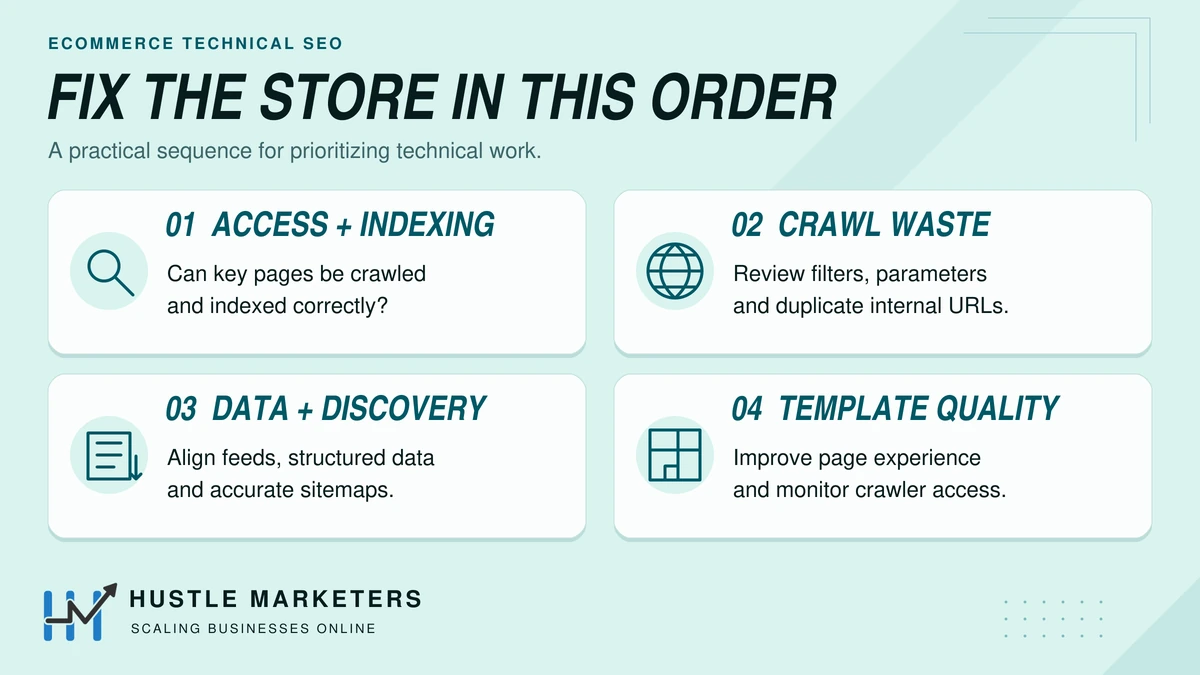
Fix in order of revenue risk, over roughly a quarter:
- Weeks 1 to 2, access and indexing: robots.txt, noindex, CDN bot settings, canonicals on top templates, JavaScript-only content on money pages.
- Weeks 3 to 6, crawl waste: facets, action parameters, site search URLs, internal links to non-canonical URLs.
- Weeks 7 to 10, data and discovery: feed and markup consistency, sitemap segments, accurate lastmod, IndexNow.
- Weeks 11 to 13, templates and AI access: Core Web Vitals by template, 2MB check, AI crawler decisions, log monitoring.
Run this crawler access check before and after any CDN, theme or app change:
- robots.txt fetch status in Crawl Stats host status
- robots.txt rules cover facets, action parameters and search pages, but not CSS or JavaScript
- CDN bot setting is “Disallow AI Training,” not “Block,” if you want search crawling
- Search Console generative AI setting checked
- Decisions recorded for OAI-SearchBot, Claude-SearchBot and PerplexityBot
- URL Inspection live test on one product, one category and one filtered URL
For a general checklist beyond ecommerce, see our technical SEO checklist.
How does Hustle Marketers handle ecommerce technical SEO?
Hustle Marketers runs technical SEO for stores alongside their Google Shopping and Merchant Center work, so we see both sides of every crawl and feed problem. Ishant Sharma, our founder, has worked in digital marketing since 2013 and specializes in Google Ads, Microsoft Ads and SEO. The agency holds Clutch Award wins in 2023, 2024, and 2026 and has 591+ client reviews across Google, Trustpilot, Clutch, G2 and other platforms.
We start every store with the revenue-at-stake sheet above, fix tier 1 issues before anything cosmetic, and verify each change in Search Console and the logs. Published results, with their data sources, are in our ecommerce SEO case studies, and our technical SEO services page explains how we scope the work.
Ecommerce technical SEO FAQs
Is 410 better than 404 for discontinued products?
No. Google says “All 4xx errors, except 429, are treated the same.” Choose based on whether a replacement exists, not on the status code.
Does noindex save crawl budget?
No. Google still requests noindexed URLs, then drops them. To reduce crawling of low-value URLs, block their patterns in robots.txt instead.
Do I need llms.txt for AI search?
Not for Google. Google says you do not need new machine-readable files or AI text files for AI Overviews and AI Mode. Server-rendered content and crawler access matter far more.
How often should I update my XML sitemap?
Generate it automatically so it always reflects the live catalog, and update lastmod only when the page content really changes. Google ignores lastmod values that are not consistently accurate.
Why are so many of my store’s pages not indexed?
Usually because most of them are filter, variant, sort or parameter URLs that should not be indexed. Check the Page indexing report by sitemap. If your canonical products and categories are indexed, the rest is often expected.
Can my developer handle technical SEO alone?
A developer can implement most fixes, but someone needs to decide which URLs should rank, using search demand and revenue data. The best results come when SEO sets the rules and development builds them into templates.
How we created this guide
We reviewed 12 pages ranking in the US for ecommerce technical SEO, Lumar’s summaries of Google Office Hours answers on faceted navigation, coverage of Google’s crawl team podcast, and Shopify Community threads on canonicals and indexing. Every rule, figure and date was checked against Google Search Central, Merchant Center, Cloudflare, OpenAI, Anthropic, Perplexity, Apple and Shopify documentation in October 2026. AI tools helped organize the research, and a person checked every fact, figure and link against its source before publishing.
Get a free ecommerce technical SEO audit
If Search Console shows thousands of crawled but unindexed URLs, or your best categories are slipping, the cause is usually in the architecture. Hustle Marketers will review your templates, facets, canonicals, feeds and crawler access and send a prioritized fix list ranked by revenue at stake. Get Free Audit Worth $500.