Shopify SEO Issues: The Errors That Keep Stores Out of Google

Ishant
Published : September 28, 2026 at 9:30 am
Updated : October 16, 2026 at 12:14 pm
Ishant
You have submitted the sitemap. You have clicked Request Indexing. You have clicked Validate Fix and watched it fail. You have run PageSpeed Insights, converted images to WebP, uninstalled two apps and rewritten your meta descriptions in Search engine listing preview. Google still shows a number in Search Console that is larger than your product count, and you still cannot tell whether anything you did worked.
This post skips the part where someone explains what a canonical tag is. It is a catalogue of the actual errors a Shopify store throws, written from the code out: what the exact string means, what in the platform generates it, whether you can fix it in Liquid at all, and what to do when you cannot.
I have written it the way I would hand it to a developer on a live store. Some of these are Shopify doing its job and merchants panicking. Some are Shopify generating URLs you never created and giving you no tool to remove them. Telling those two apart is most of the work.
Written by Ishant Sharma, founder of Hustle Marketers, working in Google Ads, Microsoft Ads and SEO since 2013. Every error string, default rule and platform limit below was checked in September 2026 against primary Shopify and Google documentation, live Shopify storefront output, and community threads. Where a string could not be verified word for word, I describe it instead of quoting it, and I say so.
Key takeaways
- Shopify returns HTTP 200 for any string appended to a collection path, because it is parsed as a tag filter. That single behaviour is behind most Shopify soft 404s, and Shopify does not document it.
- Collection scoped product URLs cannot be 301 redirected. The admin URL Redirects tool does not see dynamic routes, so the entry saves and the old URL keeps returning 200.
- The default robots.txt only blocks filter URLs with two or more facets. Single facet filter URLs are fully crawlable, which is the opposite of what most guides say.
- The default theme emits no gtin, mpn, shippingDetails, hasMerchantReturnPolicy, aggregateRating or review, so every stock store carries merchant listing warnings.
- Products with variants are emitted as ProductGroup, not Product, which quietly drops the required property set to name alone.
- Uninstalling an app does not remove its code from your theme. That one fact explains the speed that never came back, the orphaned schema block and the Liquid error printing on your product page.
- Before you fix anything, work out which of the three failure classes you have: not crawled, crawled and rejected, or crawled and duplicated. The fixes do not overlap.
Table of Contents
- Why does Shopify create SEO errors you never made?
- How do you work out which Shopify SEO issue you actually have?
- What do the Google Search Console indexing statuses mean on Shopify?
- Why does Shopify produce so many soft 404 errors?
- Which Shopify URLs are duplicating your own pages?
- What does Shopify’s default robots.txt actually block?
- Why is your Shopify structured data throwing errors?
- Why are your products disapproved in Google Merchant Center?
- Why does your Shopify store fail Core Web Vitals?
- Why is a Liquid error printing on your live storefront?
- Why do Shopify Markets stores lose rankings after going international?
- Why does your SEO crawler return a half finished crawl of a Shopify store?
- Which theme errors cost you rankings on Shopify?
- What hard limits does Shopify put on your site architecture?
- What should you fix first on a Shopify store?
- What this looked like on a real Shopify store
- What the top ranking pages on Shopify SEO issues get wrong
- Why choose Hustle Marketers or Ishant Sharma for Shopify SEO
- Shopify SEO issues FAQs
Why does Shopify create SEO errors you never made?
On WordPress or a custom build, the set of URLs on your site is the set of URLs somebody created, which is why WooCommerce technical SEO is a job of closing down what plugins open rather than fighting the platform. On Shopify that is not true. The platform generates routes from your catalogue, and several of them exist whether you link to them or not.
That is the difference that matters. A merchant with 170 products can legitimately have tens of thousands of crawlable URLs, none of which they made. The most common emotional reaction in the Shopify community is that the platform did this without asking, and that reading is correct.
What URLs does Shopify create that you never made?
Every one of these is a real, reachable route on a standard store.
| Route pattern | Where it comes from | Crawlable by default |
|---|---|---|
| /products/handle?variant=id | Shopify appends a variant ID to product links, and a product has a default variant even with one option | Yes |
| /collections/handle/products/handle | Generated when a theme links products through the within filter | Yes |
| /collections/handle/any-string | Any string in that position is parsed as a tag filter and returns 200 | Yes |
| /collections/all | A real route that serves your entire catalogue | Yes |
| /collections/handle?page=2 | Shopify pagination | Yes |
| /collections/handle?filter.v.option.color=red | Search and Discovery filtering, single facet | Yes |
| /en-ca/products/handle and similar | Shopify Markets subfolders, one per market | Yes |
Multiply the last five against a catalogue of any size and you have a crawl space several orders of magnitude larger than your product count. That is the arithmetic behind a merchant reporting 13,000 duplicate URLs against a far smaller catalogue. Nothing is broken in the sense of a bug. The platform is doing exactly what it was built to do.
Why can you not fix these the way you would on another platform?
Because three of the normal tools are either absent or do not reach.
You cannot return a real 404 status from Liquid. A developer who documented the full attempt on Shopify’s own developer community in December 2025 states that Online Store 2.0 does not allow returning a real 404 HTTP status and that the return tag is not supported. That thread received no answers at all.
You cannot redirect a dynamic route. Before you try, settle which page you actually want ranking for the term, because that is the category page vs product page SEO decision and it changes what you do here. The URL Redirects tool in the admin works on stored source paths. Collection scoped product URLs are generated at request time, so a redirect entry for one of them saves without error and changes nothing.
You cannot rely on robots.txt to remove anything. A disallow stops crawling, not indexing, which is why merchants see Indexed, though blocked by robots.txt on their cart and account pages and assume something is wrong. Google cannot read a noindex on a page it is not allowed to fetch.
What is left is canonical hygiene, internal link discipline, template level noindex, and knowing which problems are genuinely not worth solving. That is what the rest of this post is.
How do you work out which Shopify SEO issue you actually have?
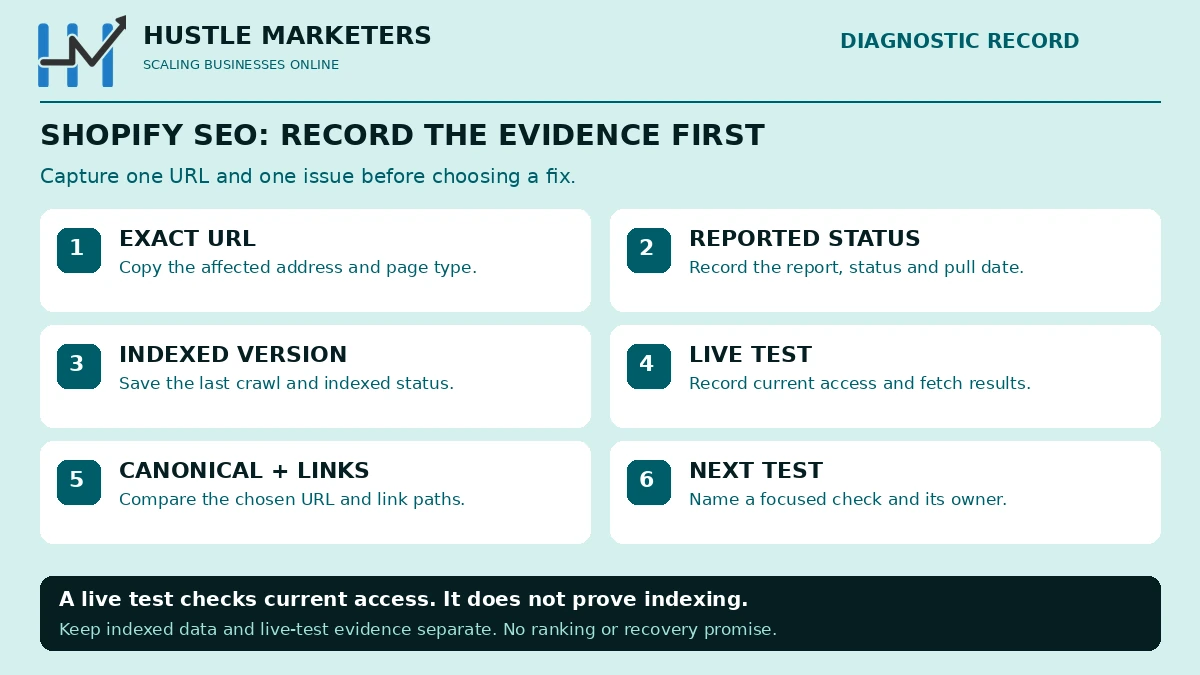
Every Shopify indexing problem falls into one of three classes, and the fixes do not transfer between them. Running the wrong fix is how merchants spend three months on a problem they never had. The fourth thing that looks like an indexing problem and is not one is thin content on an ecommerce site, which needs a different diagnosis entirely.
| Failure class | What it looks like | What actually fixes it |
|---|---|---|
| Not crawled | Discovered – currently not indexed. Pages sit for weeks | Cut the duplicate crawl space, add real internal links, earn links |
| Crawled and rejected | Crawled currently not indexed, Soft 404 | Add unique content, or stop generating the URL |
| Crawled and duplicated | Duplicate without user-selected canonical, Alternate page | Canonical and internal link consistency, usually nothing else |
Why does Search Console disagree with the URL Inspection tool?
Because they are not the same data. The Page indexing report is an aggregate that lags. The URL Inspection tool queries the live index.
A merchant raised this in August 2024 after finding pages listed as Crawled – currently not indexed that Inspection reported as indexed. The answer given, and it is the right one, was that if Inspection says the page is indexed, that result is correct. The report catches up later.
Practical rule: never resubmit a thousand URLs because of an aggregate report. Inspect five of them first. If Inspection says indexed, you have a reporting lag, not a problem.
What does a site colon search tell you that Search Console does not?
It gives you an order of magnitude in about four seconds. Run a site colon search for your domain and compare the rough count against your product count plus collections plus pages plus blog posts.
If the number is far higher than your real page count, you have index bloat from generated URLs, and your priority is the section on which Shopify URLs duplicate your own pages. If it is far lower, you have a discovery or quality problem, and your priority is the section on Search Console indexing statuses. If your homepage is the only result, crawling works and discovery does not, so start with internal linking and crawl demand. If nothing comes back at all, treat it as an access problem: check that the storefront password is off and that robots.txt has not been edited.
Which tool answers which question?
| Question | Tool | What it will not tell you |
|---|---|---|
| Is this URL indexed right now | URL Inspection, live test | Anything about other URLs |
| What status code does this URL return | A HEAD request from your terminal | Whether Google treats 200 as a soft 404 |
| Does my markup validate | Rich Results Test | Whether the values match the page |
| Is my markup duplicated | View source and count the ld+json blocks | Which block Google chose |
| Why is this product disapproved | Merchant Center Needs attention tab | What on the page caused the mismatch |
| Is my store slow for real users | Core Web Vitals field data | What to change, and it lags behind your fixes |
The gap between a list of fixes and a working diagnosis is this table. On a Shopify store, the same symptom has four or five different causes, and only the diagnostic order separates them.
What do the Google Search Console indexing statuses mean on Shopify?
Google’s Page indexing report uses a fixed set of status names. Below is every one that matters, with the Shopify specific cause rather than the generic explanation. Two naming notes before the table. Google’s documentation headings are URL blocked by robots.txt and URL marked ‘noindex’. The interface and the community have also used shorter labels for the same states, so if you are searching for help you will see both. And the hyphenated statuses below are written the way Google’s documentation writes them.
| Status | What it means on a Shopify store | Priority |
|---|---|---|
| Discovered – currently not indexed | Crawl demand exhausted on generated URLs before Googlebot reached your products | Critical |
| Crawled – currently not indexed | Thin collection or tag page, grid with no copy | High |
| Duplicate without user-selected canonical | A route served outside your canonical logic, or injected spam paths | Critical |
| Duplicate, Google chose different canonical than user | Market subfolders, leftover translated URLs, near identical variants | High |
| Alternate page with proper canonical tag | Variant and collection scoped URLs canonicalising correctly | None |
| URL marked ‘noindex’ | A hand added conditional in theme.liquid, often matching more than intended | High |
| URL blocked by robots.txt | Usually Shopify’s own defaults working. Check the live file before acting | Low |
| Indexed, though blocked by robots.txt | An externally linked disallowed URL. Robots.txt cannot deindex | Medium |
| Soft 404 | Tag path or empty filtered view returning 200 with no products | Critical |
| Not found (404) | Handle changed or product deleted with no redirect | High |
| Page with redirect | Manual redirects, handle changes, Markets country redirection | Low |
| Redirect error | Stacked redirect entries plus a Markets hop | High |
| Server error (5xx) | Almost always an app proxy or a CDN layer, rarely Shopify’s origin | Critical |
| Blocked due to unauthorized request (401) | Storefront password still on | Critical |
| Blocked due to access forbidden (403) | Bot protection rejecting the requester | High |
| Page indexed without content | A JavaScript rendered template, or a Liquid failure that emptied the body | Critical |
Why are my pages Discovered – currently not indexed?
Google’s own definition is that the page was found but not crawled yet. On Shopify the reason is almost never that your products are bad. It is that Googlebot spent its crawl allocation on URLs the platform generated.
Work the cause, not the symptom. Reduce the generated crawl space first, then make sure every product is reachable from a collection page in two clicks or fewer. Do not mass request indexing. On a store where the crawlable set is ten times the real page count, resubmitting does not change the arithmetic.
The advice you will get in most threads is to be patient. That is not wrong, it is just not an answer when you are burning runway. Patience works after the crawl space is cut, not instead of it.
Why does Google say Crawled – currently not indexed on my collection pages?
Because a Shopify collection page, out of the box, is a heading and a product grid. Every other collection on your store is also a heading and a product grid. Google crawled it, decided it added nothing, and moved on.
This is the one status where writing helps. Add genuinely useful copy that only applies to that collection: what the buyer is choosing between, what the sizing or compatibility trap is, which product suits which use. Placement matters less than substance, but below the grid is the safe default because it keeps the products above the fold.
A Shopify moderator gave the same advice for the collection list page in September 2025, suggesting a paragraph after the grid so the crawler can see the value in the page.
What causes Duplicate without user-selected canonical on Shopify?
Two very different things, and they need opposite responses.
The benign one is a template where the canonical tag is missing. This happens when a developer wraps the canonical in a conditional. Shopify documents exactly one correct form, an unconditional link rel canonical using the canonical_url object, on every template. If somebody has branched it by template type, the templates not covered by a branch have no canonical at all.
The ugly one is injected spam paths. Merchants have reported junk URLs indexed under their own collection paths, with patterns that have nothing to do with their catalogue. They land in this status because they are duplicates of a real collection and nothing declares a preference. How the paths get created is not established in any thread I could find, and no clean fix emerged in the one that documented it, so treat this as an open problem rather than a solved one.
Why am I getting Duplicate, Google chose different canonical than user?
On Shopify this is usually international. Shopify Markets creates a subfolder per market, each with its own self referencing canonical. If a translation app also wrote canonicals or hreflang, or if one was uninstalled and left its output behind, Google gets two stories and picks its own.
One merchant reported 13,000 URLs in this state within three days of uninstalling a translation app. The fix that worked was not a canonical tag change alone. It was finding the app’s leftovers in the theme code and settings, correcting the canonicals, rebuilding the sitemap so it contained only original pages, and then requesting a recrawl.
Is Alternate page with proper canonical tag a problem?
No. This is variant URLs and collection scoped product URLs canonicalising to the real product page, which is the system working. Only investigate when the count dwarfs your indexed count, and even then the action is to reduce how many of those URLs you generate, not to change the canonical.
Why does Shopify produce so many soft 404 errors?
This is the most under explained behaviour on the platform, so I want to be precise about it.
Append any string you like to a collection path. Not a real tag, not a real collection, anything. Shopify parses that final segment as a tag filter, finds no matching products, and returns HTTP 200 with the collection page rendered around an empty grid. A merchant summarised it in a 2023 thread: all tag filters will load without a 404.
That is an unbounded crawl space attached to every collection on your store, it is not blocked by the default robots.txt, and I could not find primary Shopify documentation describing it anywhere. When Google finds one of these, it sees a 200 response with no meaningful content, which is the textbook definition of a soft 404.
Why does noindex not make the soft 404 report go away?
Because noindex and soft 404 are answers to different questions.
The most commonly accepted fix in Shopify threads is to open those pages and mark them noindex. That is the single most repeated piece of bad advice in this topic. A noindex tag tells Google not to index the page. It does not change the fact that the URL returns 200 with no content, and it does not stop Google classifying and reporting it. You have changed the outcome, not the diagnosis.
Noindex is still worth applying, for a different reason: it keeps the URL out of the index while you deal with the real problem. Just do not expect the report to clear because of it.
Can a Shopify store return a real 404 for these URLs?
Not from Liquid. In December 2025 a developer documented the full attempt on Shopify’s developer community: parsing the request path to detect invalid segments, conditionally suppressing the collection sections, rewriting the title in JavaScript, setting noindex. The two platform constraints they stated are the important part. Online Store 2.0 does not allow returning a real 404 HTTP status, and the return tag is not supported. Sections render independently, so you cannot inject 404 content across the whole page.
The thread received no replies. That is worth saying plainly, because every article that tells you to just make it return a 404 is describing something the platform does not offer.
So what actually works on Shopify tag paths?
Here is the honest ranking, including what each option does not do.
| Mitigation | What it does | What it does not do |
|---|---|---|
| Conditional noindex when the filtered set is empty | Keeps junk URLs out of the index | Clear the soft 404 report, or stop the crawl |
| A robots.txt.liquid rule for the tag path pattern, scoped tightly and tested | Stops the crawl, saves crawl demand | Remove anything indexed, and a loose rule can block your catalogue |
| Never linking tag URLs from navigation or filters | Cuts discovery at the source, the highest leverage fix | Help with URLs already discovered externally |
| Canonical to the parent collection | Consolidates signals where Google accepts it | Guarantee anything, canonicals are a hint |
| Adding real content to the collection page | Makes the legitimate page defensible | Apply to the invalid sub-paths at all |
Do the third one first. The vast majority of these URLs are discovered because something on your own site links to them.
Why is the /collections list page itself flagged Soft 404?
Because on most themes it is a page of subcollection tiles and nothing else. One merchant with exactly this problem reported that the page held only images and names of three subcollections, had resubmitted it for indexing, had run a crawler that reported the page as indexable, and still had it failing. Their own words about the validation loop, that they tried validating again and it failed, are the most accurate description of this state I have seen.
The fix is the boring one. Give the page a reason to exist in text.
Which Shopify URLs are duplicating your own pages?
Soft 404s come from URLs with no content. This section is the opposite problem: URLs with your content on them, more than once.
Why do collection scoped product URLs exist, and why can you not redirect them?
Shopify has a Liquid filter called within that generates a product URL in the context of a collection, turning a product link into a path that includes the collection. Themes use it so breadcrumbs and back links stay in context.
Shopify’s own documentation warns that this puts the same content on separate URLs and tells you to consider the SEO implications. What it does not tell you is the part that catches people out. These are dynamic routes, generated at request time. The URL Redirects tool in the admin stores source paths, so it never sees them. You can create a redirect for one of these URLs, save it without an error, and the URL will keep returning 200. A developer thread in December 2025 confirmed the same thing in a different way, noting that native redirects do not apply to these paths.
The fix is upstream, in the theme. Link products with the plain product URL object instead of piping it through within. Then let the canonical do its job. Do not wait for a redirect that cannot exist.
Is /collections/all indexable on your store right now?
Almost certainly yes, and almost nobody checks. It is a first class Shopify route. It serves your entire catalogue, it duplicates every collection you have, it is not in the default robots.txt, and I rarely see it checked.
Open it on your own store now. If it returns a full product listing, decide deliberately whether you want it crawled. The usual answer is no: keep it out of your internal links, and add a rule for it in robots.txt.liquid if it is being crawled. If it is already indexed, serve a noindex first and block it only once it has dropped out. I would not noindex it blindly, because some stores genuinely use it as a shop all page. Decide, do not default.
Why does ?page=1 duplicate your collection page?
Shopify’s pagination emits page parameters and does not link page one, but apps, filters and sitemaps sometimes do. When something links it, you get two URLs sharing a title, an H1 and a grid. A merchant who hit this in 2023 described the two URLs as sharing the title and the h1 heading, which is exactly the problem.
Google’s guidance on ecommerce pagination is explicit on the mistake to avoid: do not use the first page of a paginated sequence as the canonical page for the deeper pages. So canonical page one to itself, do not canonical page four to page one, and find whatever is linking page one and stop it.
Should you block variant URLs?
Variant parameters appear on nearly every product link on a Shopify store, because the cart needs a variant ID and every product has a default variant. They usually land in Search Console as Alternate page with proper canonical tag, which is harmless in isolation.
Two reasons to care anyway. At scale they consume crawl demand you need elsewhere. And combined with OpenGraph price tags they are part of the Merchant Center price mismatch described later in this post.
If you decide to block them, the community documented rule goes inside the main user agent group in robots.txt.liquid, and placement in that group matters. Remember the limit: this saves crawl budget, it does not remove anything already indexed.
| Duplicate pattern | Typical Search Console status | Best action |
|---|---|---|
| /collections/x/products/y | Alternate page with proper canonical tag | Stop generating it in the theme |
| /collections/all | Duplicate without user-selected canonical | Remove from internal links, consider a robots rule |
| ?page=1 | Duplicate, Google chose different canonical | Find the link source and remove it |
| ?variant= | Alternate page with proper canonical tag | Usually leave it, block only at scale |
| Market subfolders | Duplicate, Google chose different canonical | Fix hreflang and canonical conflicts, see below |
What does Shopify’s default robots.txt actually block?
Most guides tell you Shopify blocks filtered URLs. Read the file on a live store and that turns out to be half true in a way that matters. What follows is the default set as generated on a live Shopify storefront in September 2026. Shopify updates the defaults regularly and your store may have customised the file, so read your own rather than trusting any list including this one.
The default file disallows cart, checkout, account, orders, search, policies, sort_by parameters on collections, plus tag combination patterns using plus signs and their encoded forms on collections and blogs. It carries dedicated blocks for several crawlers, including a crawl delay of ten seconds for Ahrefs and MJ12bot, and it lists three sitemaps.
Why are your filter URLs still being crawled?
Because of one character. The filter rule in the default file requires two filter occurrences in the URL. In other words it blocks multi facet filter URLs and leaves single facet filter URLs completely crawlable.
Shopify’s Search and Discovery filtering supports up to twenty five filters per store. One facet at a time, across twenty five filters, across every collection, all crawlable by default. This is the most commonly misreported fact I came across while researching this post, and it is trivially checkable: open your own robots.txt and look at the filter line.
What is also not blocked, and this surprises people: variant parameters, page parameters, /collections/all, collection scoped product URLs, and arbitrary tag paths. The crawlable set on a default Shopify store is far larger than the submitted set in your sitemap. That gap is the mechanism behind most Discovered – currently not indexed reports.
What breaks when you edit robots.txt.liquid?
Shopify is blunt about this. It calls the file an unsupported customization, says support cannot help with edits to it, and warns that incorrect use can result in loss of all traffic.
The specific failure mode is not the one people expect. It is not a typo. It is replacing the templated file with flat text. The default rules are updated regularly by Shopify, and the Liquid objects exist so your store keeps receiving those updates. Paste a static file over the top and you have frozen your robots.txt at today’s defaults forever.
Use the documented pattern instead: iterate the default groups and rules, add your rule inside the group you want, or wrap the rule you want to remove in an unless. Keep everything else flowing through from Shopify.
Does robots.txt remove a page from Google?
No, and this is the concept half of this post rests on.
Robots.txt controls crawling. The index is a separate thing. If a disallowed URL is linked from somewhere Google can see, Google can index the URL without ever fetching it. That is what Indexed, though blocked by robots.txt means, and it is why merchants see cart and account pages in the report and assume Shopify has broken something.
Google states the consequence directly: if a page is disallowed from crawling, indexing and serving rules on that page will not be found. So if you actually want a page out of the index, you have to let Google crawl it and serve a noindex, or use the removals tool for something urgent. Blocking harder does the opposite of what you want.
Why is your Shopify structured data throwing errors?
Shopify’s default theme emits product markup through a single Liquid filter. That one line is responsible for a surprising share of the schema problems merchants see, and I did not find a page that traced the errors back to it.
What does the default product schema leave out?
The documented output of the structured data filter contains context, id, type, brand, category, description, image, name, offers and url. What it does not contain is the interesting part: no gtin, no mpn, no shippingDetails, no hasMerchantReturnPolicy, no aggregateRating and no review.
Consequences on a stock store, in the order you will meet them:
- Google’s rich result message about no global identifier being provided fires, because no identifier is emitted at all.
- Merchant listing warnings appear for missing shipping details and missing return policy. These are recommended properties, so they are warnings, not errors. Fixing them is still worth doing because they affect how your listing can appear.
- No review stars come from the theme, which is precisely why review apps inject a second markup block, which creates the problem two headings down.
Why do variant products emit ProductGroup instead of Product?
This one is quiet and important. A product without variants is output as Product. A product with variants is output as ProductGroup.
Google’s required property set for ProductGroup is name. That is the whole list. Everything else, including the product group ID and the varies by property, is recommended. So on a store where most products have variants, validators go quiet while the markup is genuinely thin, and you conclude your schema is fine because nothing is red.
If you want merchant listing eligibility on variant products, you need the variant level Product nodes with their offers, identifiers and availability, not just the group wrapper.
What causes Unparsable structured data on Shopify?
Usually a conditional written in the wrong place. In an August 2024 thread, a store had an if statement inside the script tag itself, so when the condition failed the script contained text that was not valid JSON. The fix is to wrap the script tag in the conditional, not the conditional in the script tag. On a product template the conditional is often unnecessary in the first place.
This is worth checking by hand rather than by tool. View source on a product page, find each block of ld+json, and confirm each one parses on its own.
Why do you have two Product blocks on one page?
Because the theme emits one and an app emits another. Review apps and SEO apps add their own markup precisely because the theme’s output has no ratings or reviews in it.
Two product nodes for one page means conflicting offers data, and it is one of the contributors to the Merchant Center price mismatch in the next section. Google’s message list includes both a duplicate field message and a message about a review having multiple aggregate ratings.
Pick one emitter. Either strip the theme block and let the app own product markup completely, or switch the app’s schema off and extend the theme. Do not run both and hope.
Why does your markup show the wrong currency?
Because the currency was hard coded, or because the theme used the store’s base currency rather than the currency the customer is actually seeing. On a store selling into multiple markets, that makes your structured data disagree with the visible price on every non base market, which is a direct Merchant Center mismatch trigger. A store hitting this in 2023 fixed it by reading the currency from the cart rather than the shop.
For the full Merchant Center catalog rather than the Shopify slice of it, including account suspensions, feed quotas and the review cool down, see our guide to Google Merchant Center errors.
Why are your products disapproved in Google Merchant Center?
Merchant Center problems feel different from indexing problems because there is a number attached and a clock running. Ads are off. It is also the area where Shopify specific causes are clearest, because almost every disapproval traces back to a field in your admin or a tag in your theme.
Some vocabulary first, because it changes how urgent something is. Warnings mean products keep showing. Disapprovals mean products stop showing. Account level suspensions are a separate and worse category. A preemptive disapproval can also be applied for price and availability mismatches before anything goes wrong at scale.
What causes Mismatched value (page crawl) [price]?
The exact string is Mismatched value (page crawl) followed by the price attribute in square brackets. It is the most common Shopify specific disapproval, and the mechanism is not what most people assume. It is not usually a stale feed.
Google crawls your landing page and compares what it reads there against the feed. Your feed carries the variant price Shopify sends. The crawler often reads a different price from the page, because OpenGraph price meta does not update per variant when no variant is preselected. A merchant described the pattern precisely in 2023: Google was taking the default variant price and failing the others.
Two fixes have been independently reported as working. One is emitting correct per variant structured data rather than relying on OpenGraph price tags. The other is adding item_group_id to the feed, which one merchant confirmed resolved the disapprovals across their catalogue after responders had suggested three other things that did not.
Why do subscribe and save and bundle products get disapproved?
Two distinct causes, both worth knowing because they look identical in the interface.
The first is a default selection problem. If the subscription option is the one checked by default on the landing page, the price a customer sees on arrival is the subscription price, which matches neither your feed nor your structured data.
The second is a prominence rule that almost no Shopify article covers. The price you submit has to be the clear and obvious price on the page. If your final price is not the most prominent price, you can be disapproved even when the number technically appears somewhere on the page.
Design consequence: if you run subscriptions, decide which price goes to Merchant Center, then make sure that price is the one a first time anonymous visitor sees largest.
Which identifier errors come straight from empty Shopify fields?
Most of them. This table maps the issue to the exact admin field.
| Merchant Center issue | Shopify field behind it | Fix |
|---|---|---|
| Missing GTIN, limited performance warning | Variant Barcode is empty | Populate Barcode per variant, or supply brand and MPN |
| Missing brand | Vendor is blank or set to your store name for resold stock | Set Vendor to the real manufacturer |
| Incorrect product identifier, a disapproval | identifier_exists set to false on genuinely branded stock | Only use it for one of a kind or vintage items |
| GTIN not correct length | A SKU was pasted into the Barcode field | Clear it, use a real barcode |
| Conflicting values for GTIN and brand | Vendor holds a distributor name that contradicts the barcode | Align Vendor with the barcode owner |
| Excessive capitalization | Product titles typed in all capitals | Rewrite the titles in sentence case |
| Missing colour, size, gender or age group | Variant options named in a way Google cannot map | Rename options, or map them in the Google channel |
On apparel this is not optional. Google requires brand for apparel and accessories, and requires age group, colour, gender and size for apparel in several major markets including the US and the UK.
What about images?
Three image rules cause disapprovals and warnings, and all three are Shopify merchandising habits rather than technical faults.
A logo or a placeholder set as the first product image gets treated as a generic image, and those products stay disapproved. Promotional text, calls to action and watermarks burned into the image file are disapproved as overlays, so keep sale badges in your theme HTML rather than in the asset. And the size minimum is rising: the current minimums are low, but Google has published a five hundred pixel square standard taking effect in January 2027, with warnings appearing during 2026. If your product images came across from a legacy import, check them now rather than in December 2026.
Why is your store active in Merchant Center but showing nothing in free listings?
Because being approved is not the same as being shown. Google says plainly that approval does not guarantee your products will be shown.
The Shopify specific blockers worth checking first are mundane. A refund policy that exists but is not linked in your footer menu. Contact information that is not on a visible page. Shipping settings not synced. Shopify’s own documentation names a missing refund policy and insufficient contact information as account level issues, and requires the refund policy and terms to be available in the footer menu.
This matters more than merchants think, because free listings are organic surface area. A clean product feed is an SEO asset, not only an advertising one. We cover the mechanics of that in our guide to free listings in Google Merchant Center and the trade offs in free Shopping listings against paid ads. If you want the feed itself rebuilt properly rather than patched, that is product feed optimisation work.
The same feed powers more than Google. If you are running Meta catalogue ads from the same product data, the error classes overlap almost exactly, and we have written the Shopify specific version of that in our Meta catalog sync guide for Shopify. Microsoft Shopping pulls from a feed too, which is where Bing Ads work usually starts on an ecommerce account.
Why does your Shopify store fail Core Web Vitals?
The thresholds first, because the pass mark is measured in a way that surprises people. All three metrics are assessed at the seventy fifth percentile of real page loads, split by mobile and desktop. A fast store for you can be a failing store for your customers. That gap between what you see and what Google records is the whole reason ecommerce Core Web Vitals gets diagnosed wrongly so often.
| Metric | Good | Poor | Most common Shopify cause |
|---|---|---|---|
| LCP | 2.5 seconds or less | Over 4.0 seconds | Lazy loaded hero image, oversized slideshow |
| INP | 200 milliseconds or less | Over 500 milliseconds | Variant picker and cart drawer JavaScript, app scripts |
| CLS | 0.1 or less | Over 0.25 | Injected widgets with no reserved height, images with no dimensions |
What is the number one self inflicted LCP bug on Shopify?
Lazy loading the hero image. Theme store rules require images to load only as they are needed, and that rule gets applied to everything including the one image that must load immediately.
In a 2023 thread with an accepted answer, a store failing on both form factors was told three things: convert the PNG slideshow images to JPEG because JPEG compresses far more, make sure the above the fold slideshow images are not lazy loaded because only images below the fold should be, and investigate the excessive DOM size coming from the slider library. That is a good checklist because it is in the right order.
Two related checks while you are in the theme. Every image tag needs width and height attributes. Shopify’s own theme checker treats missing dimensions as an error rather than a warning, and it is a CLS fix as much as an LCP one. And check for assets loaded from third party domains, which add a DNS lookup and a TLS handshake before your main image can even start.
Why did your speed drop when you made no changes?
Because something changed that was not yours. The usual candidates are an app update, a theme update, or a tag added inside a tag manager rather than in the theme.
Shopify’s own list of what slows a store names the apps you install, third party code you have added manually including tag managers and the tags inside them, and having too many sections on page templates. The theme checker treats script tags without defer or async as an error, which is the single most useful of the automated SEO checks you can run here.
Why did uninstalling apps not give the speed back?
This is the most useful sentence in this entire post, and it comes straight from Shopify: uninstalling an app does not automatically remove its code from your theme.
That one behaviour explains three separate symptoms that merchants normally treat as unrelated problems. A render blocking script that no longer does anything but still blocks paint. An orphaned schema block conflicting with your theme’s. And a Liquid error printing on a live page because a snippet was deleted while the call to it survived.
The removal procedure, as documented in a recent community thread, is worth following exactly:
- Duplicate your theme before touching anything.
- Open the theme layout file and search for script and link tags belonging to vendors you have removed.
- Check the snippets folder for orphaned files, then search the theme for the render and include calls that reference them.
- Cross check against your installed apps list so you do not remove something still in use.
- Remove the complete reference, not just the file. Deleting a snippet while leaving the call to it is exactly how you create the Liquid error in the next section.
- Preview and test the home, product, cart and checkout pages before publishing.
- Remember that app embed blocks and custom Liquid sections do not always appear in the code editor.
Why can you not judge a fix from the Shopify speed report?
Because of two limits in the report itself. It holds only the last ninety days, and the data can be delayed by up to thirty six hours. So a change you shipped this morning cannot be evaluated this afternoon, no matter how many times you refresh.
Use lab tooling for the immediate before and after, and field data for the verdict a few weeks later. Judging a fix on the wrong dataset is how teams roll back changes that were working.
Why is a Liquid error printing on your live storefront?
Because a template is calling a file that is not there, and Shopify renders the failure into the page instead of hiding it.
What does a Liquid error line actually tell you?
The format is consistent and it gives you everything you need. A real one, verified from a 2025 case, reads like this:
Liquid error (sections/header line 515): Could not find asset snippets/icon-caret.liquidThat is a file, a line number and a missing asset. Open the named file at the named line, and you will find a render or include call pointing at a snippet that no longer exists. Either restore the snippet or remove the call.
A second variant names a missing product template snippet. A merchant hit exactly that in 2023 on a product section, had made no theme edits, and the developer who built the store said he had not used a template. The fix was to download a fresh copy of the theme and restore the missing snippet file, losing only the dashboard customisations for that one template.
Why does this happen after you uninstall an app?
Because of the behaviour in the previous section. The app’s snippet file went away. The call to it did not. The next page render fails at that line and prints the failure.
This is why the two problems belong in the same audit. If you are debugging a Liquid error, check your recently removed apps before you check anything else.
What does that error string do to your SEO?
It becomes indexable body text on a commercial page. You now have a product page whose content includes a file path and an error message, which is not what you want Google extracting, and not what you want a customer reading. On a German language store a merchant described it as an error message visible in the shop, which is the right way to think about the severity. This is not a reporting problem. It is live.
Check for it the fast way: search your own site in Google for the phrase Liquid error restricted to your domain. If anything comes back, you have had it long enough to be indexed.
What about memory limits exceeded?
There is a separate Liquid failure that references memory limits rather than a missing asset. Merchants do report it, but I could not verify its cause or its fix from primary documentation, so I will not give you one. If you are seeing it, treat it as a template doing too much work per render and start by reducing what your heaviest template loops over.
Why do Shopify Markets stores lose rankings after going international?
Because Shopify starts generating a full set of localised URLs with automatic international annotations, and anything else in your stack that also writes those annotations now contradicts them.
What creates duplicate or conflicting hreflang on Shopify?
Shopify injects hreflang automatically through the header object. A country specific market produces a region qualified tag, a broader market a language only tag, and each market version gets its own self referencing canonical.
Shopify’s warning is explicit: adding your own tags on top of the automatic ones can produce duplicate or conflicting annotations. And in the other direction, turning the automatic tags off can negatively affect your store’s SEO. There is now an admin toggle for this under your online store preferences, which makes it newly easy to get wrong in both directions.
The decision rule Shopify gives is narrow, and it is the right one. Manage hreflang yourself only if your theme or apps already output it, or if you are linking alternates across separate Shopify stores. Otherwise leave it alone. If you do take it over, build the tags from the localization object rather than hard coding them, so they stay correct when you add a market.
One documented case is instructive. A store had Shopify auto adding hreflang for every country in an international market, all pointing at one subfolder holding identical content, and Google was indexing the duplicates. The resolution was to edit the hreflang block and exclude the international market with conditionals while keeping the real markets, tested on a duplicated theme first.
What happens when you remove a translation app?
The translated URLs and the markup they injected do not always leave with it. The 13,000 URL case earlier in this post happened within three days of an uninstall. Treat removing a translation or localisation app as a migration, not an uninstall: audit the theme, audit the settings, rebuild the sitemap, then ask for a recrawl.
Why does your international pricing break your structured data?
Because the store’s base currency and the currency the customer is seeing are two different values. If the theme emits the base currency, every non base market has structured data that disagrees with its own visible price. That is a Merchant Center mismatch trigger and a trust problem in the same line of code.
Why does your SEO crawler return a half finished crawl of a Shopify store?
Because Shopify may be throttling it, and the crawl report will not say so.
Shopify introduced an authorisation mechanism for custom crawlers in August 2025, using signed request headers. Signatures are generated in your online store preferences under crawler access. Two limits matter. They expire automatically and cannot be renewed, with a maximum validity of three months. And the diagnostic Shopify gives is that a crawler receiving rate limiting errors has an invalid signature.
Separately, the default robots.txt applies a ten second crawl delay to two widely used SEO crawlers. On a large catalogue that alone turns a crawl into an overnight job.
Why does your crawler say the page is fine when Google says soft 404?
Because they are answering different questions. Your crawler checks the HTTP status and the markup, and a Shopify tag path genuinely returns 200 with valid markup, so it reports the page as indexable. Google evaluates whether the response has meaningful content, and decides it does not.
One merchant ran exactly this test, had their crawler report the page as indexable, and still had Google failing it. Neither tool was wrong. If your crawl comes back clean and Search Console does not, believe Search Console, and check your crawler was not being throttled while it worked.
Which theme errors cost you rankings on Shopify?
Shopify ships a linter for themes, and it separates errors from warnings. The severities are useful because they tell you what Shopify itself considers unacceptable rather than untidy.
| Theme check finding | Severity | Why it matters for rankings |
|---|---|---|
| Script tags without defer or async | Error | Blocks first paint, hits LCP and INP directly |
| Image tags without width and height | Error | Primary CLS cause, also affects LCP stability |
| Oversized theme JavaScript and CSS | Error | Main thread work, hits INP |
| Missing asset | Error | This is the Liquid error printing on your storefront |
| Unclosed HTML element, syntax errors | Error | Can break the document outline and content extraction |
| Missing required layout objects | Error | The header object is what injects hreflang, do not strip it |
| Third party hosted assets | Warning | Extra DNS and TLS before your main content |
| Non performant pagination sizes | Warning | Crawl and render cost on collections |
| Orphaned snippets, unused assigns | Warning | The trail left by removed apps |
| Deprecated filters and tags | Warning | Technical debt that breaks on theme updates |
Two notes for accuracy. Shopify’s own pages disagree on the severity of the deprecated tag check, listing it as an error in one place and a warning in another, so treat it as something to fix without relying on the label. And the required layout objects rule is enforced at save time: the code editor will not let you save a layout file that is missing them.
If you are choosing a theme rather than fixing one, the theme store gates are a useful floor. Themes need a minimum average Lighthouse performance score of sixty across home, product and collection on both desktop and mobile, a minimum accessibility score of ninety, a responsive image strategy, and lazy loading below the fold. A theme that only just clears sixty is not a fast theme.
What hard limits does Shopify put on your site architecture?
These are not errors. They are ceilings, and they produce symptoms that look like errors.
Why do your deepest categories become orphan pages?
Because navigation menus stop at two levels of nesting below the top level item. On a catalogue with a four or five level taxonomy, the deepest categories cannot be reached from the menu at all. They are then reachable only from the sitemap, which is exactly the recipe for Discovered – currently not indexed.
The fix is not to fight the menu. Flatten the taxonomy where you can, and build in page hub links and breadcrumbs so deep categories have real internal links from real pages. Menus can hold thousands of items, so the limit is depth, not volume.
Why did your biggest collections lose their filters?
Because filters are not displayed on collections containing more than five thousand products. Search results producing more than one hundred thousand results also lose filters.
This is quiet and it is expensive. Your largest collections are the ones where filtered browsing was providing the internal links into the depths of your catalogue, and that is exactly where the feature switches itself off. Split oversized collections, and build curated subcollections with real links.
What other ceilings should you know about?
| Limit | The number | Symptom when you hit it |
|---|---|---|
| Pagination depth | Paginates to the 25,000th item, no further | Products reachable only from the sitemap |
| Page size | Between 1 and 250 per page | Either crawl depth or render cost, pick carefully |
| Filters per store | 25 filters, 100 values displayed | Facets silently missing from the storefront |
| URL redirects | 100,000 on standard plans | No documented error message, plan bulk imports around it |
| Unique handles per template | Exceeded by roughly twenty featured product sections | An error in the theme editor |
| Menu depth | Two nested levels below top level | Level four categories orphaned |
Why do redirect chains build up on their own?
Because the redirect tool stores flat source and target pairs with no chain detection. You redirect A to B this quarter. Next quarter someone redirects B to C. Nobody revisits A. Add a Markets geolocation redirect on top and you have three hops.
Google’s redirect error covers chains that are too long and redirect loops. After any bulk redirect import, crawl your own redirect sources and re point every historical entry at the final URL.
What happens to SEO when you change a product handle?
The old URL 404s. Shopify’s documentation describes creating redirects manually and advises against editing handles often. I could not verify any automatic redirect behaviour or a checkbox for it in Shopify’s documentation, so plan on doing it yourself: create the redirect under your online store navigation before you change the handle, not after.
This is also the single biggest migration risk. Shopify’s link structure differs from other platforms, so old links will not resolve, and redirects should be mapped and imported before the domain moves rather than afterwards.
What should you fix first on a Shopify store?
Order matters more than completeness. Fixing schema on a store that Google cannot crawl properly is wasted work. This is the order I use.
| Priority | Fix | Why it goes here |
|---|---|---|
| Critical | Storefront password off, robots.txt read, canonical on every template | Nothing else can work until Google can crawl and choose |
| Critical | Stop generating tag paths, collection scoped product URLs and page one links | Removes the crawl waste at source rather than treating symptoms |
| Critical | Liquid errors printing on live pages | Customer facing and indexable, fix today |
| Critical | Merchant Center disapprovals blocking ads | Revenue is off while this runs |
| High | Hero image eager loaded, width and height on all images | Largest single ranking relevant speed gain on most themes |
| High | Remove leftover code from uninstalled apps | Fixes speed, schema duplication and Liquid errors at once |
| High | Unique copy on collection pages that matter commercially | Converts crawled and not indexed into indexed |
| High | Markets hreflang and canonical conflicts, if international | Compounds quickly as you add markets |
| Medium | Variant level product markup with identifiers and availability | Merchant listing eligibility, not core rankings |
| Medium | Redirect chains flattened, handle change redirects created | Slow leak rather than acute failure |
| Medium | Internal link paths into deep categories | Fixes the orphan problem the menu depth limit creates |
| Low | Blocking variant and single facet filter URLs | Crawl efficiency, only matters at scale |
If you only do three things: read your live robots.txt, open a made up tag URL on your own store and see what status it returns, and search your own domain for the phrase Liquid error. Those three checks take five minutes and find real problems on most stores.
What this looked like on a real Shopify store
An Australian pet ecommerce brand on Shopify came to us with the pattern this whole post describes: authority fragmented across generated URLs, collection pages that Google had crawled and passed over, and structured data that validated while saying very little.
The work was not exotic. We checked crawlability, indexation and canonical tags, found internal linking gaps, and worked on the faceted navigation and collection duplicates that fragment authority on this platform. Then we added and verified product and collection level structured data including price, availability and category, rebuilt internal linking so high authority pages fed the underperforming ones, and rewrote and expanded the collection pages with buying guide content covering material differences, sizing guidance and use case framing. That last part is the answer to Crawled – currently not indexed on collection pages, and it is the part most stores skip.
Over a three month comparison the store recorded clicks up 56.3 percent, impressions up 37.6 percent, average click through rate up 0.21 points and average position improved by 0.9 positions. Over a six month trend, AI visibility moved too: citations up 54.1 percent, cited pages up 16.7 percent and mentions up 6.1 percent. The full numbers are in the pet ecommerce SEO case study.
The reason I use this one as the example is that nothing in it was a clever trick. It was crawl hygiene, honest collection content and schema that actually carried values. The same sequence in the same order.
On the feed side, the equivalent piece of work is visible in our Google Merchant Center and Shopping case study, where the problems were the identifier attribute for products without standard barcodes, price synchronisation between the feed and the live site, and shipping configuration gaps causing instant disapprovals on newly added products.
What the top ranking pages on Shopify SEO issues get wrong
I went through the pages ranking in the US results for these queries in September 2026 before writing this one. Three patterns are worth naming, because they will cost you time if you follow them.
The first is treating faceted navigation as a solved problem. The default rule matches filter URLs with two or more facets, so single facet filter URLs stay crawlable across every filter on the store. I did not find a page that counted the ampersand in that rule, and at least one widely shared robots.txt guide credits the default file with handling the paths faceted navigation creates.
The second is a comparison table that puts canonical tags and robots.txt in a column labelled as things Shopify handles for you. Shopify does generate canonicals, and it does generate a robots.txt, and both are genuinely good defaults. But a canonical is a hint rather than a directive, your internal links have to agree with it, and the default robots.txt leaves several duplicate route classes crawlable on purpose. Presenting those as solved problems is how stores end up with index bloat nobody is looking at.
The third is treating soft 404s as a redirect problem. A redirect does not address a URL that Shopify generates on demand and answers with a 200, and on collection scoped product URLs the admin redirect tool cannot see the path at all. The more careful pages stop at the theme fix and the canonical, which is the right place to stop. Advice that recommends an action the platform does not support is worse than no advice, because you will spend a day proving it does not work.
There is also a date problem. A large share of the accepted answers about Shopify SEO on the public web predate 2024, which means they predate Markets maturing, the current interaction metric replacing the old one, and the current Search Console report names. The fixes are often still directionally right. The interface paths and the metric names are not.
Several of these issues came up on a Shopify collectibles store we work with. The hobby store SEO case study covers what we fixed first and how Google clicks moved from 71.2K to 103K.
Why choose Hustle Marketers or Ishant Sharma for Shopify SEO
Most agencies that sell Shopify SEO are running a content plan against a platform they have not read the documentation for. The difference in this work is whether the person doing it knows what Shopify generates, what it will not let you change, and where the honest ceiling is.
What that looks like in practice:
- We read your live robots.txt, your rendered markup and your actual status codes before we write a proposal. Not a tool export with a score out of 100.
- We tell you when a problem is not worth fixing. Alternate page with proper canonical tag is not a project. Neither is a warning for a recommended schema property on a product nobody searches for.
- We work in the theme, not around it. Liquid, sections, snippets, the structured data output, the robots template. Fixes go where the problem is, which is usually six lines of code rather than an app.
- We do not install an app to solve something the theme should do. Every app you add is main thread work on every page view, and the code stays behind when you uninstall it.
- SEO, feed and paid sit in one place. The same product data that breaks your rich results breaks your Shopping feed, so we do not hand you two conflicting diagnoses. If you need the paid side too, that is ecommerce PPC management, Google Ads and Shopify Google Ads work running off the same fixed feed.
- Reporting shows what changed and what did not. Our position on that is written down in reporting integrity.
Ishant Sharma has worked in Google Ads, Microsoft Ads and SEO since 2013, across ecommerce, local service, SaaS and white label agency accounts. The Shopify work sits inside a broader ecommerce practice: Shopify SEO for the platform view, ecommerce SEO platform comparisons when you are deciding whether to stay, BigCommerce against Shopify for SEO if you are mid decision, and AI search visibility now that a meaningful share of product research starts in an assistant rather than a search box.
If you want this run as a project, the three ways in are a Shopify SEO agency engagement with the full team and reporting, a Shopify SEO specialist as a dedicated resource on your store, or a Shopify SEO consultant for the diagnosis and roadmap with no long contract. General SEO and Shopify marketing work sits alongside all three, and if your tracking is also unreliable, Shopify server side tracking is usually the first thing to fix before you judge any of it.
Let me know if you want me to check a specific error on your store.
Shopify SEO issues FAQs
Why is my Shopify store not showing up on Google?
Check three things in order before anything else. Is the storefront password still on, which returns an unauthorised response to crawlers and blocks the sitemap. Has robots.txt.liquid been edited, either by you or by an app. And does a site colon search for your domain return your homepage only, or nothing at all. Homepage only means crawling works and discovery does not, which points at internal linking and crawl demand. Nothing at all usually means access.
How long does it take for Google to index a new Shopify store?
There is no fixed number, and anyone who gives you one is guessing. What you can control is discovery. Make sure every product is reachable from a collection page, that the sitemap is submitted, and that the crawlable URL space is not ten times larger than your real page count. Requesting indexing on individual URLs does not scale and is not a substitute for those three.
Why are my Shopify collection pages not indexed?
Most often because they are a heading and a product grid with no unique content, which Google crawls and then declines. The fix is real copy that applies to that collection only, covering what the buyer is choosing between. If the status is Discovered rather than Crawled, the cause is different: crawl demand went to generated URLs before Googlebot reached your collections.
How do I fix soft 404 errors on my Shopify store?
Find where the URLs are coming from first. On most stores they are tag paths, because Shopify returns a 200 for any string appended to a collection path. Stop linking them first, because that is where most of them are discovered. Then apply a conditional noindex when a filtered view is empty, and add a robots rule for the pattern only once those URLs have dropped out of the index. Do not do both to the same URL at the same time, because Google cannot read a noindex on a page it is not allowed to fetch. Be aware that noindex will not clear the soft 404 report either, because the URL still returns 200 with no content.
Can Shopify return a real 404 for invalid collection URLs?
Not from Liquid, according to the developer who documented the full attempt on Shopify’s developer community in December 2025. They state that Online Store 2.0 does not allow returning a real 404 HTTP status and that the return tag is not supported. That thread received no answers. Plan around it with robots rules, noindex and internal link hygiene rather than waiting for a status code you cannot send.
How do I stop Google indexing variant, filter and sort URLs?
Sort parameters are already disallowed in Shopify’s default robots.txt. Multi facet filter URLs are too. Single facet filter URLs and variant parameters are not, so if you want those blocked you need a rule inside the main user agent group of robots.txt.liquid. Remember that blocking prevents crawling, not indexing, so anything already indexed needs a crawlable noindex instead.
How do I remove the variant number from a Shopify product URL?
You cannot remove it from the platform, because the variant ID is how the cart identifies what to add. What you can control is whether your theme links to the bare product URL in collection grids, related products and internal links. Do that, keep the canonical pointing at the bare product URL, and the variant URLs will normally settle as alternates rather than duplicates.
Is it safe to edit robots.txt.liquid on Shopify?
It is allowed, and Shopify describes it as an unsupported customisation that support cannot help with, with a warning that incorrect use can cause loss of all traffic. The specific mistake to avoid is replacing the file with static text, which freezes your rules at today’s defaults. Use the Liquid objects to iterate the default groups and add or remove single rules so future Shopify updates still reach you.
Why is Google indexing my cart and account pages when robots.txt blocks them?
Because robots.txt prevents crawling, not indexing. If Google finds the URL linked somewhere, it can index the URL without fetching the page. Google’s own documentation is clear that a page disallowed from crawling cannot have its indexing rules read. If you want those pages out, allow the crawl and serve a noindex, or use the removals tool for something urgent.
What causes Mismatched value (page crawl) [price] in Merchant Center?
Google crawls the landing page and compares it against the feed. On Shopify the common cause is OpenGraph price meta that does not change per variant when no variant is preselected, so the crawler reads one price while the feed carries another. Two fixes have been reported as working: emitting correct per variant structured data instead of relying on OpenGraph price tags, and adding item_group_id to the feed.
Why does my structured data show errors when Shopify generates it?
Because the default output is narrower than people assume. It carries no identifiers, no shipping details, no return policy, no ratings and no reviews, so merchant listing warnings are the default state on a stock store. Products with variants are also emitted as a product group rather than a product, which reduces the required property set to the name alone, so validators stay quiet while the markup is thin.
Why did my Shopify store get slower after I uninstalled apps?
Because uninstalling an app does not remove the code it added to your theme. Script tags, snippets and stylesheets keep loading on every page view with nothing behind them. Duplicate the theme, search the layout file for tags belonging to removed vendors, check the snippets folder for orphans, then remove the complete reference rather than just the file, or you will create a Liquid error.
How do I fix a Liquid error showing on my storefront?
Read the error. It names a file and a line number and the asset it could not find. Open that file at that line, and you will find a render or include call pointing at a snippet that no longer exists. Either restore the snippet from a fresh copy of the theme or remove the call. Check your recently uninstalled apps, because that is usually where the missing file went.
Should I turn off Shopify Markets hreflang tags?
Only if your theme or your apps already output hreflang, or if you are linking alternates across separate Shopify stores. Shopify warns that adding your own tags on top of the automatic ones can produce duplicate or conflicting annotations, and that turning the automatic tags off can negatively affect your SEO. If you do take it over, build the tags from the localization object rather than hard coding them.
Why does my crawler say the page is fine when Google says soft 404?
Because your crawler checks the status code and the markup, and a Shopify tag path genuinely returns 200 with valid markup. Google evaluates whether the response has meaningful content. Both tools are working correctly and reporting different things. Also check whether your crawler was being throttled, because Shopify applies a crawl delay to some SEO crawlers by default and rate limits unsigned custom crawlers.
Why is my title and meta description not showing on Google?
In my experience it is one of three things, and I am giving this as a working diagnosis rather than a documented list. The change has not been recrawled yet, which you can confirm with the URL Inspection tool rather than by searching. An app is overwriting the field you edited in the admin. Or Google has rewritten the snippet because it judged your description a poor match for the query, which it is allowed to do and which no setting overrides.
Sources and verification
Everything in this post was checked in September 2026 against primary documentation, live Shopify storefront output, and community threads, including several where no fix was ever found. Where a string could not be verified word for word, I described the behaviour instead of quoting a label. Community threads are treated as reports of real merchant experience, not as specification.
Primary documentation used: the Google Search Console page indexing report, Google’s structured data message reference, merchant listing requirements, product variant structured data, canonicalization, ecommerce pagination guidance, crawl budget guidance, and the Core Web Vitals thresholds published on web.dev.
Shopify documentation used: the structured data Liquid filter, the within filter, robots.txt customisation, theme metadata and canonical tags, hreflang on Markets, storefront filtering, theme check rules, store speed guidance, and crawler access.
Merchant Center references: product data requirements and issue names, image requirements, landing page crawl issues, and free listings requirements.
Community threads cited for real world confirmation include the tag filter soft 404 thread, the Online Store 2.0 soft 404 attempt, the leftover app code procedure, the Merchant Center price mismatch resolution, the unparsable structured data diagnosis, the crawl versus index explanation, the duplicate canonicals after a translation app uninstall, and the Liquid error missing asset case, and the header snippet Liquid error the error string in this post is taken from.
If you are fixing this as part of a wider organic push, our ecommerce SEO guide covers where it sits against category pages, internal linking and product data.