Magento Migration and Upgrade Guide (2026): Moving to 2.4.9

Ishant
Published : March 9, 2026 at 12:29 pm
Updated : October 3, 2026 at 8:48 pm
Ishant
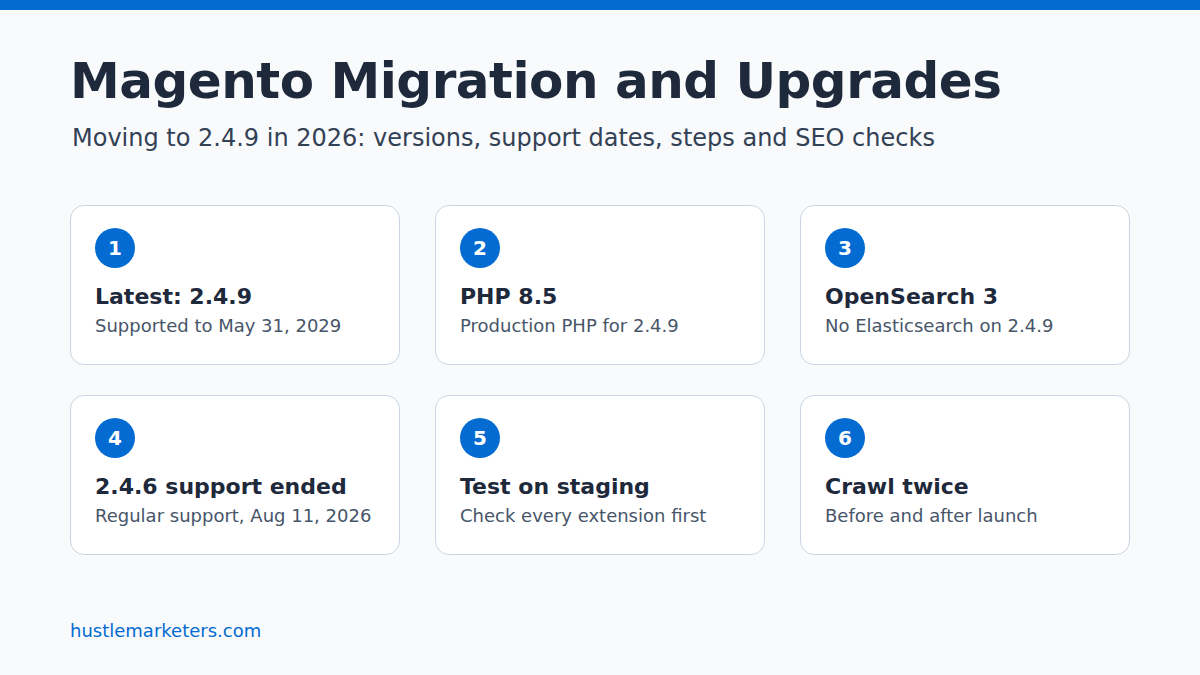
Magento migration usually means one of three moves: upgrading Magento 2 to a newer 2.4 release, moving a Magento 1 store to Magento 2, or leaving Magento for another platform. In October 2026, most stores should target Magento 2.4.9, released May 12, 2026, which Adobe supports until May 31, 2029.
This guide covers which version to target, Adobe’s support dates, what 2.4.9 needs from your servers, the upgrade steps, Magento 1 migration and the SEO checks that keep rankings intact. We checked the dates and requirements in this guide against Adobe’s Experience League pages and security bulletins in October 2026. Sources are linked next to the claims they support.
Key Observations
- Magento 2.4.9 is the latest release, and Adobe’s released versions page lists nothing after it.
- Regular support for 2.4.6 ended on August 11, 2026. Adobe Commerce customers get extended support until August 31, 2027, but Adobe’s September 8, 2026 bulletin says Open Source merchants can only download patches for 2.4.7 or later.
- On September 7, 2026, Adobe published an urgent bulletin, APSB26-146, for a vulnerability exploited in the wild. It lists Adobe Commerce 2.4.4 to 2.4.9 and Magento Open Source 2.4.6 to 2.4.9 as affected. Patching cannot wait for the next upgrade.
- Magento 2.4.9 needs PHP 8.5 in production. Adobe allows PHP 8.4 only for the upgrade itself and dropped PHP 8.2 and 8.3.
- 2.4.9 also moves the stack to OpenSearch 3, MariaDB 12.3 or MySQL 8.4, Valkey 9 and Composer 2.10, so for most stores the work sits in hosting and extensions rather than in Magento’s own code.
- Adobe’s Upgrade Compatibility Tool is for Adobe Commerce only. Open Source stores need another way to check custom code.
- A version upgrade does not change your URLs on its own. The SEO risk comes from theme changes, staging settings reaching production, broken URL rewrites and slower pages, so crawl the store before and after.
What is the latest Magento version?
The latest Magento version is 2.4.9, released on May 12, 2026 for both Magento Open Source and Adobe Commerce. Adobe’s released versions page gives it regular support until May 31, 2029, and lists no later release.
Updates to 2.4.9 also look different. Older lines still have numbered patch releases such as 2.4.8-p5, while 2.4.9 has none on the released versions page. Adobe’s September 2026 security bulletin labels every line by month instead, such as 2.4.9-2026-aug, and ships monthly isolated patch files such as 2-4-9-sep-2026.zip. Check the bulletin for your exact version rather than relying on the patch number alone.
Is Magento 2 still relevant?
Yes. Adobe released 2.4.9 in May 2026 with three years of regular support and ships security fixes for every supported line. Its release schedule plans a full patch for each supported 2.4.x line every May. Whether Magento still suits your business is a separate question, covered in the platform section below.
Which Magento versions are still supported?
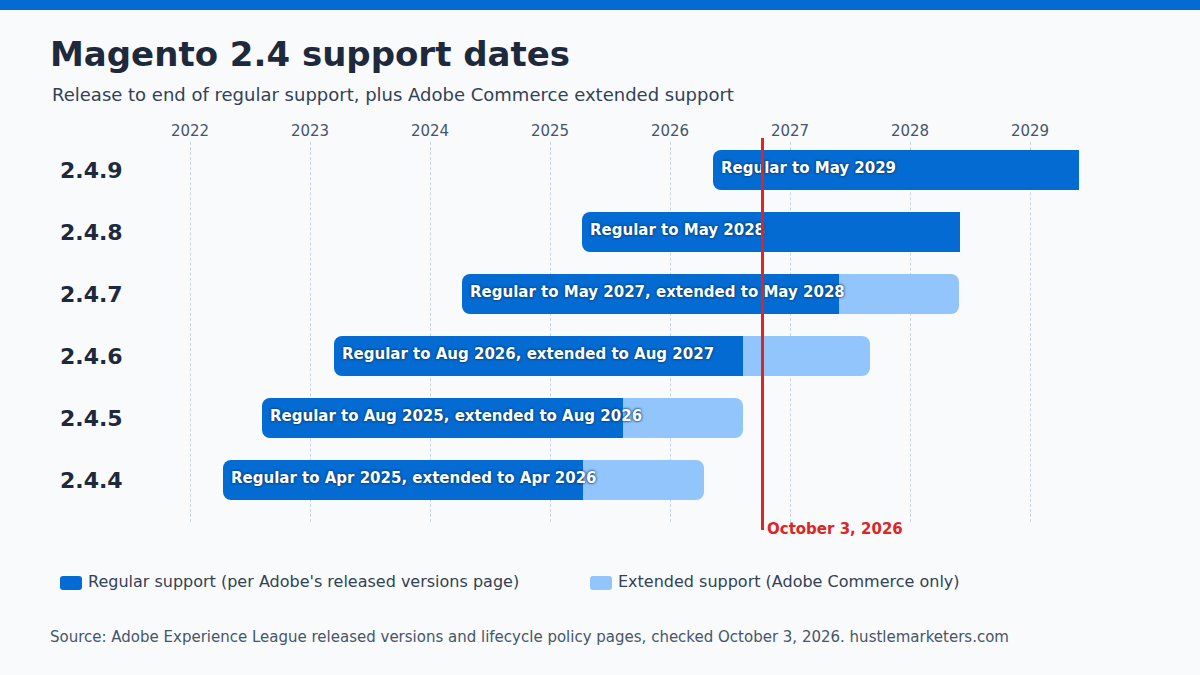
Magento 2.4.7, 2.4.8 and 2.4.9 still have regular support. 2.4.6 left regular support on August 11, 2026, and 2.4.4 and 2.4.5 are past both regular and extended support. Adobe Commerce customers on 2.4.4, 2.4.5 and 2.4.6 also get a one-time security-only period with isolated security fixes. Magento Open Source stores on 2.4.6 or older no longer get Adobe’s regular patch downloads.
The table combines Adobe’s released versions page and lifecycle policy, both checked on October 3, 2026.
| Version | Released | Regular support ends | Extended support ends (Adobe Commerce only) | Security-only fixes end (Adobe Commerce only) | Status on October 3, 2026 |
|---|---|---|---|---|---|
| 2.4.9 | May 12, 2026 | May 31, 2029 | TBD | N/A | Latest release |
| 2.4.8 | April 8, 2025 | May 31, 2028 | TBD | N/A | Supported |
| 2.4.7 | April 9, 2024 | May 31, 2027 | May 31, 2028 | N/A | Supported |
| 2.4.6 | March 14, 2023 | August 11, 2026 | August 31, 2027 | May 31, 2028 | Extended support (Adobe Commerce only) |
| 2.4.5 | August 9, 2022 | August 12, 2025 | August 11, 2026 | May 31, 2027 | Security-only fixes for Adobe Commerce; out of support for Open Source |
| 2.4.4 | April 12, 2022 | April 12, 2025 | April 14, 2026 | May 31, 2027 | Security-only fixes for Adobe Commerce; out of support for Open Source |
Does Magento Open Source get the same support as Adobe Commerce?
Not after regular support ends. The security patch overview says extended support patches are for Adobe Commerce and are not available for the Magento Open Source code base. The lifecycle policy, including its security-only period, covers Adobe Commerce only, even though many guides apply its dates to both editions.
The download rules confirm the gap. The July and August 2026 bulletins said Open Source customers could download patches for 2.4.6 or later. The September 8, 2026 bulletin (APSB26-138) moved that to 2.4.7 or later. An Open Source store on 2.4.6 can no longer download the regular monthly patches, although the urgent APSB26-146 bulletin of September 7, 2026 still listed Open Source 2.4.6 among affected versions.
Adobe Commerce on cloud has more deadlines. The security enforcement policy requires every cloud project on 2.4.4 through 2.4.9 to update third-party services. The first deadline is October 30, 2026, when any Elasticsearch must have moved to OpenSearch, and the next is May 31, 2027.
Cloud projects on 2.4.4 or 2.4.5 must also upgrade Magento by June 1, 2027, and projects on 2.4.6 or 2.4.7 by June 1, 2028. Adobe warns that otherwise your Commerce storefront will go offline. The policy covers Adobe Commerce on cloud only, not on-premises or Open Source stores. Our Adobe Commerce SEO guide covers Fastly and the other Adobe Commerce settings that affect search.
What happened to Magento 1?
Adobe released the final security patches for Magento 1 in June 2020, and its bulletin APSB20-41 says support for Magento Commerce 1.14 and Magento Open Source 1 ended that month. A Magento 1 store in 2026 has gone more than six years without official patches. The Magento 1 section below covers the way out.
What changed in Magento 2.4.8 and 2.4.9?
Magento 2.4.8, released April 8, 2025, added PHP 8.4, MySQL 8.4 and OpenSearch 2.19 support and made Update by Schedule the default indexer mode on new installs. Magento 2.4.9, released May 12, 2026, moved production to PHP 8.5, OpenSearch 3 and Valkey 9 and replaced several framework parts that extensions depend on.
The table summarizes the release notes for 2.4.8 and 2.4.9. The editor row also uses the 2.4.8 patch notes, and the sitemap row comes from the site map page.
| Area | 2.4.8 (April 2025) | 2.4.9 (May 2026) |
|---|---|---|
| PHP | Adds PHP 8.4, keeps 8.3, removes 8.1 | PHP 8.5 for production; 8.4 allowed for the upgrade only; 8.2 and 8.3 dropped |
| Search | Optimized for OpenSearch 2.19; Elasticsearch 7 and 8 labeled deprecated | Fully compatible with OpenSearch 3; Elasticsearch is not listed in the requirements |
| Database | MySQL 8.4 LTS and MariaDB 11.4 LTS | MySQL 8.4 or MariaDB 12.3 |
| Cache | Valkey 8 support added | Valkey 9; the deprecated Zend_Cache replaced by Symfony Cache |
| Framework | Breaking changes needed for PHP 8.4 compatibility | Native MVC replaces Laminas MVC; Symfony dependencies move to 7.4 LTS |
| Content editor | TinyMCE at release; HugeRTE from 2.4.8-p3 (October 2025) | HugeRTE |
| Indexing | Update by Schedule is the default mode for new installs | Not mentioned in the release notes |
| Sitemaps | Standard generation | New memory-optimized Batch generation method for large catalogs |
| APIs and security | Support for RabbitMQ 4.x | CAPTCHA on account creation now also applies to REST and GraphQL; admins configure only one 2FA provider |
| Fixes | 581 issues fixed in Adobe Commerce, 497 in Open Source | 666 issues fixed in Adobe Commerce, 580 in Open Source |
Two of these changes reach your storefront directly. Content written in the old editor should be spot-checked after the HugeRTE switch, so headings and links in category descriptions survive. And if your indexers run on Update by Schedule, the default for new 2.4.8 installs, prices, stock and category changes reach the storefront only when cron runs.
Upgrading does not switch existing indexers, so check the mode in Index Management after the move. For the SEO side of each setting, see our Magento SEO guide.
Which Magento version should you upgrade to?
Target 2.4.9 if you are on 2.4.7 or older, because it carries the longest support window and you move the stack once. If you are on 2.4.8, you can stay patched until May 31, 2028 and move to 2.4.9 when your extensions and theme support PHP 8.5. Anything on 2.4.6 or older should upgrade now.
Use the row that matches your store. Stack changes come from Adobe’s system requirements page, checked October 3, 2026.
| You are on | Support position | Recommended target | Main stack changes to reach 2.4.9 |
|---|---|---|---|
| 2.4.8 | Regular support to May 31, 2028 | 2.4.9 once extensions confirm PHP 8.5, otherwise the latest 2.4.8 patch | PHP 8.4 to 8.5, MariaDB to 12.3 (or MySQL 8.4), Valkey 8.1 to 9 |
| 2.4.7 | Regular support to May 31, 2027; Adobe Commerce extended to May 31, 2028 | 2.4.9, planned for 2026 to early 2027 | PHP 8.2 or 8.3 to 8.5, MariaDB 10.11 or 11.8 to 12.3 or MySQL 8.4, Elasticsearch or OpenSearch 2 to OpenSearch 3, Valkey 9 |
| 2.4.6 | Regular support ended August 11, 2026; Adobe Commerce extended to August 31, 2027; no regular Open Source patch downloads since September 8, 2026 | 2.4.9, now | PHP 8.1 or 8.2 to 8.5, MariaDB 10.11 to 12.3 or MySQL 8.4, OpenSearch 3, Composer 2.2 to 2.10 |
| 2.4.4 or 2.4.5 | Regular and extended support ended; Adobe Commerce security-only fixes until May 31, 2027 | 2.4.9, now; cloud projects must move by June 1, 2027 | Every service in the stack, plus code compatibility work |
| 2.3.x or 2.4.0 to 2.4.3 | Long out of support | 2.4.9, scoped as a project rather than a routine update | Every service, custom modules and usually the theme |
| Magento 1 | Support ended June 2020 | Rebuild on 2.4.9 or move platform | New platform; data moves, code and theme do not |
Adobe’s upgrade best practices note that skipping releases makes the next upgrade more complex, while upgrading from consecutive versions makes it easier and cheaper. That is the case for regular, smaller upgrades. It does not mean you have to install every version in between: Composer targets one version, but every service in your stack must meet that version’s requirements first.
Should you upgrade to 2.4.8 or 2.4.9?
Choose 2.4.9 unless something in your stack cannot run PHP 8.5 yet. A payment module, ERP connector or theme that has not confirmed PHP 8.5 is the usual blocker. In that case the latest 2.4.8 patch is a reasonable stopgap, with the move to 2.4.9 planned before 2.4.8 support ends.
If you are planning an upgrade, our Magento SEO consultant service sets the SEO requirements your developers test against before launch.
What does Magento 2.4.9 require?
Magento 2.4.9 needs PHP 8.5, OpenSearch 3, MariaDB 12.3 or MySQL 8.4, Valkey 9, Composer 2.10 and RabbitMQ 4.3. PHP 8.4 is allowed only while you run the upgrade. Most hosts that supported 2.4.7 need several services upgraded first, which is why the hosting plan usually decides the timeline.
Figures below are from Adobe’s system requirements page for on-premises installs, updated September 18, 2026.
| Component | 2.4.9 | 2.4.8-p5 | 2.4.7-p10 |
|---|---|---|---|
| PHP | 8.5 | 8.4, 8.3 | 8.3, 8.2 |
| Composer | 2.10 | 2.10 | 2.10 |
| OpenSearch | 3 | 3 | 2, 3 |
| Elasticsearch | Not listed | 8 | 8 |
| MariaDB | 12.3 | 11.4, 11.8 | 10.11, 11.8 |
| MySQL | 8.4 | 8.4 | Not supported |
| Valkey | 9 | 8.1 | 8.1 |
| RabbitMQ | 4.3 | 4.3 | 4.3 |
| Varnish | 8 | 8 | 8 |
| nginx | 1.30 | 1.30 | 1.30 |
The same page carries two notices worth acting on: MySQL 8.0 reached end of support on April 30, 2026, and Elasticsearch 7.17 on January 15, 2026. A store still on either is running unsupported software even if its Magento version is current. For caching and server tuning once the new stack is in place, see our Magento speed optimization guide. Adobe’s 2.4.9 release notes give slightly different RabbitMQ and MariaDB versions, so we used the newer requirements table.
How do you upgrade Magento 2 to the latest version?
Upgrade on a staging copy of the live store first. Bring PHP, the database, OpenSearch and Valkey up to 2.4.9’s requirements, check every extension and custom module, then run Adobe’s Composer upgrade, setup:upgrade and a full regression test. Only then repeat the same steps on production, during a quiet trading window.
Adobe’s upgrade prerequisites come first. Convert any COMPACT tables to DYNAMIC and MyISAM tables to InnoDB, and set the open files limit to at least 65536. Confirm cron is running and install the magento/composer-root-update-plugin. Then follow its perform an upgrade sequence:
- Put the store into maintenance mode.
- Stop cron, then let the message queue consumers finish.
- Back up composer.json.
- Require the target version with composer require-commerce, without updating yet.
- Run composer update.
- Clear var/cache, var/page_cache and generated/code.
- Run setup:upgrade, then take the store out of maintenance mode and restart Varnish if you use it.
For a Magento Open Source store moving to 2.4.9, the core commands look like this:
bin/magento maintenance:enable
bin/magento cron:remove
bin/magento cron:run --group=consumers
cp composer.json composer.json.bak
composer require-commerce magento/product-community-edition 2.4.9 --no-update
composer update
rm -rf var/cache/* var/page_cache/* generated/code/*
bin/magento setup:upgrade
bin/magento maintenance:disable
Adobe Commerce uses magento/product-enterprise-edition instead, and cloud projects disable cron with ece-tools. Adobe’s documentation adds two warnings. The built-in backup feature is deprecated, so take database and file backups with your host’s tools. And the Upgrade Compatibility Tool, which checks custom code against a target version, works on Adobe Commerce only.
What breaks most often when upgrading to 2.4.9?
Usually extensions, custom modules and PHP 8.5 behavior rather than Magento’s core. Adobe says the number of third-party modules and the amount of custom work strongly affect upgrade complexity. Reports on Magento’s GitHub tracker from the 2.4.8 and 2.4.9 cycles show where to test:
- PHP 8.5 deprecations in core code. Issues filed on 2.4.9 with PHP 8.5 report deprecation notices in downloadable product orders, PDF printing and currency formatting. On stores that turn deprecations into exceptions, the first two break order placement and PDF printing.
- Product 404s. Issue #40891 reports product pages returning 404 on 2.4.9 and PHP 8.5 when opened without category context, for example from a homepage widget, site search results or a CMS block. A visitor arriving straight from Google has no category context either, so test direct product URLs.
- Extensions that block Composer. On 2.4.8, a payment module released the same day conflicted on a dependency and had to be removed to finish the upgrade. Snowdog’s menu module, for instance, still had an open request for 2.4.9 and PHP 8.5 compatibility with no release date when we checked.
- Framework changes. Custom code that uses Zend_Cache or Laminas MVC, or extends Symfony classes, needs changes, because 2.4.9 replaced the first two and moved Symfony to 7.4 LTS. TinyMCE plugins need rework too, unless the store already moved to HugeRTE in 2.4.7-p8 or 2.4.8-p3.
- Database steps. Even a patch-to-patch move can fail at setup:upgrade, as in a foreign key error reported on 2.4.8-p5. Test with a copy of the production database, not an empty one.
- Search cutover. When the search engine is unavailable, category pages can render empty and the full page cache can store them, as issue #38284 describes. Flush the cache after switching to OpenSearch and check category pages before reopening the store.
Do Hyvä stores need anything extra?
Yes: confirm PHP 8.5 support before you switch. The Hyvä theme has been free since November 10, 2025, according to Hyvä’s announcement.
But its requirements page, when we checked it, listed PHP 8.1 to 8.4 and did not mention 2.4.9. Hyvä’s paid Commerce package does say its 1.2.1 release is “primarily to support PHP 8.5 and Magento 2.4.9.” Ask Hyvä or your developer for written confirmation for your theme version and every compatibility module.
How long does a Magento upgrade take, and what does it cost?
A minor 2.4.x upgrade on a store with few extensions can take days, while a heavily customized store can take weeks. In the agency price lists below, minor upgrades run from under $1,000 (AgentoSupport) to $35,000 (IWD Agency). Magento 1 migrations run from about $50,000 to over $500,000 (Elogic). Extension count, custom code and theme work decide where your store lands.
These are figures agencies publish on their own sites, linked in each row. They are not survey data:
| Source | Type of work | Published figure |
|---|---|---|
| AgentoSupport | Basic 2.4.x upgrade | $800 to $1,500 |
| scandiweb | Minor 2.4.x version jump | $3K to $8K, 2 to 4 weeks |
| IWD Agency | Magento 2.x to 2.y | $8,000 to $35,000 |
| IWD Agency | Luma to Hyvä theme | $35,000 to $80,000 |
| IWD Agency | Magento 1 to Magento Open Source 2 | $75,000 to $200,000, 10 to 18 weeks |
| Elogic | Magento 1 to Magento 2 | About $50,000 to $500,000+, typically 4 to 12 months |
When you compare quotes, ask each developer what is included. The numbers above differ mostly because of scope:
- How many third-party extensions and custom modules the store runs, and whether each vendor supports the target version.
- How far the stack has to move: PHP, database, search engine, cache and hosting.
- Whether the theme is Luma, Hyvä or heavily custom.
- Integrations such as ERP, PIM, payments and shipping.
- Store views, languages and B2B features.
- Whether testing, a staging environment and post-launch fixes are included.
Timing matters as much as budget. In the fourth quarter, a code freeze before Black Friday may make a January upgrade safer than a rushed November one. Urgent security bulletins are the exception.
How do you migrate from Magento 1 to Magento 2?
A Magento 1 to Magento 2 migration is a rebuild, not an upgrade. Adobe’s Data Migration Tool moves settings, products, customers and orders, but themes, extensions and custom code have to be rebuilt or replaced for Magento 2. In 2026 the target should be 2.4.9, and every URL that changes needs a 301 redirect.
Adobe’s page on how data migration works describes three modes, run in order:
- Settings: system configuration and website-related settings.
- Data: database records in bulk, such as products, categories, customers and orders.
- Delta: changes made in Magento 1 since the last run, such as new orders, so the old store can keep trading until launch.
The tool supports Magento Open Source 1.6.x to 1.9.x and Magento Commerce 1.11.x to 1.14.x as sources, according to its GitHub README. Its install guide says the Data Migration Tool and Magento 2 versions must match exactly, so confirm a release exists for the version you are targeting before you plan the project around it.
URLs are where most Magento 1 migrations lose traffic. Category and product paths often change, and Adobe’s troubleshooting guide covers duplicate URL rewrites created during migration with an auto_resolve_urlrewrite_duplicates option that adds a hash string to the conflicting URLs. Crawl the Magento 1 store before you start, so every old URL has a mapped destination, and read our Magento SEO guide for the settings to apply on the new store.
How do you protect SEO during a Magento upgrade or migration?
Record how the store looks to search engines before the move, then compare the same things on staging and again after launch. Check status codes, canonical tags, robots tags, hreflang, structured data, sitemaps and page speed. For migrations that change URLs, map every old URL to its new equivalent with a 301 and keep those redirects for at least a year.
Will upgrading Magento affect your SEO rankings?
Not by itself. A version upgrade keeps your URLs and content, so rankings usually hold if nothing else changes. Drops after an upgrade come from side effects. The usual ones are a staging robots setting copied to production, SEO output lost with a theme or extension, broken URL rewrites, empty category pages during the search cutover, or slower templates.
Run this checklist around every upgrade:
| When | Check | Why |
|---|---|---|
| Before | Crawl the live store and export URLs, status codes, titles, canonicals, robots tags, hreflang and structured data | Gives you a baseline to compare against |
| Before | Export the url_rewrite table and XML sitemaps | Lets you restore any redirect that disappears |
| Before | Note Search Console indexed pages, Core Web Vitals and GA4 organic revenue by landing page | Shows whether a later dip is real |
| Staging | Set staging to NOINDEX, NOFOLLOW and protect it with a password | Keeps the copy out of Google |
| Staging | Compare product, category, CMS, filter and search templates with the baseline crawl | Finds SEO output lost with the theme or an extension |
| Staging | Open product URLs directly, change a category URL key, and run layered navigation and site search | Catches 404s, missing rewrites and search changes after the OpenSearch move |
| Launch day | Confirm Default Robots is INDEX, FOLLOW, robots.txt is the production file and sitemaps regenerate on cron | Stops a staging setting from deindexing the store |
| Launch day | Flush the full page cache and check category pages | Avoids caching empty results from the search cutover |
| Weeks after | Watch Page indexing, Crawl stats and GA4 organic revenue against the baseline | Shows problems Google finds after recrawling |
For a Magento 1 migration or a move to another platform, add Google’s site move guidance. Map old URLs to new ones and redirect straight to the final destination. Keep any chain to three hops or fewer, do not send many old URLs to the homepage, and remove migration-only noindex or robots.txt blocks. Google says a small to medium site can take a few weeks for most pages to move, and recommends keeping redirects for at least a year.
Two outputs often change with a theme or extension, so compare them closely: structured data, covered in our Magento schema markup guide, and filter URLs, covered in our layered navigation SEO guide. For page-level checks, use our Magento 2 SEO checklist.
Product feeds need the same care, because a new URL structure or price format can disapprove Shopping products. Our Magento product feed guide covers what to check in Merchant Center. If traffic has already fallen after an upgrade, our Magento SEO expert service starts with finding the cause.
How do Magento security patches work in 2026?
Every May brings a full patch release for each supported 2.4.x line, and isolated security patch files fix specific vulnerabilities in between. The September 8, 2026 bulletin describes a monthly isolated patch. Apply each bulletin’s patch for your exact version, test it on staging, and treat urgent bulletins as same-week work.
A few rules from Adobe’s own pages:
- Isolated patches are standalone and non-cumulative. Adobe’s security patch overview says they include fixes for vulnerabilities only.
- Extended support patches are for Adobe Commerce, not Magento Open Source.
- Since the September 8, 2026 bulletin, Open Source merchants can only download patches for 2.4.7 or later.
- Test every patch in a staging or development environment before production, as Adobe recommends.
On September 7, 2026, Adobe published APSB26-146 for CVE-2026-75650, a zero-day vulnerability that it says has been exploited in the wild against Adobe Commerce merchants. It affects Adobe Commerce 2.4.4 through 2.4.9 and Magento Open Source 2.4.6 through 2.4.9, August 2026 releases and earlier. The instructions are to apply the hotfix for your version, rotate your encryption keys, then rotate related credentials such as admin passwords, API tokens and payment gateway credentials.
Subscribe to Adobe’s security bulletins rather than waiting for the next upgrade. A store that is one release behind but fully patched is in a far better position than one that skipped months of bulletins.
Should you upgrade Magento or move to another platform?
Upgrade if Magento’s flexibility still earns its cost for your catalog, store views, B2B setup or integrations, and you have developers who maintain it. Consider moving if most of your budget goes on keeping the platform patched rather than improving the store. Either way, the SEO risk is in the URLs, and a platform move carries more of it than an upgrade.
Moving to another platform changes almost every URL, so the redirect map, structured data and feeds all need rebuilding. Our Magento vs Shopify comparison covers the trade-offs, and our Magento to Shopify migration guide covers the SEO side of the move. Mage-OS, a community distribution of Magento Open Source, is another option some Open Source stores evaluate; its 3.0.0 release in May 2026 builds on 2.4.9. Check its support policy before choosing it.
Hustle Marketers does not run Magento upgrades or platform builds. We handle the search side: the requirements before launch, the crawl comparison and the monitoring after. That work sits in our Magento SEO agency and consultant services.
How this guide was researched
This guide was rewritten on October 3, 2026. We checked each version, date and requirement against Adobe Experience League pages updated between April and September 2026 and Adobe’s security bulletins APSB26-73, APSB26-92, APSB26-138 and APSB26-146. Google Search Central’s site move guidance, Hyvä’s documentation and issues on Magento’s GitHub tracker filled the gaps. On top of that, we read 40 third-party pages ranking for Magento upgrade and migration searches.
More than 20 of those pages still had out-of-date details, such as 2.4.9 described as beta, PHP 8.3 listed for 2.4.9, or end-of-support dates that no longer match Adobe’s. Where pages disagreed with Adobe, we used Adobe. Agency cost figures are shown as published by each agency.
Update log, October 3, 2026: replaced the earlier 2.4.8 overview with 2.4.9 guidance, Adobe’s current support and requirements tables, a version decision table, upgrade steps, Magento 1 migration, SEO checks and security patch rules.
Magento migration and upgrade FAQs
What is the latest version of Magento?
Magento 2.4.9, released on May 12, 2026 for both Magento Open Source and Adobe Commerce. Adobe lists regular support until May 31, 2029 and no later release.
When was Magento 2.4.8 released?
Adobe released Magento 2.4.8 on April 8, 2025. Its regular support runs until May 31, 2028. The latest patch on Adobe’s released versions page is 2.4.8-p5, from May 12, 2026.
When was Magento 2.4.7 released?
Magento 2.4.7 was released on April 9, 2024. Regular support ends on May 31, 2027, and Adobe Commerce customers get extended support until May 31, 2028.
Should I upgrade to Magento 2.4.8 or 2.4.9?
Pick 2.4.9 when your extensions, theme and hosting run PHP 8.5. Otherwise take the latest 2.4.8 patch for now and schedule 2.4.9 before 2.4.8 support ends on May 31, 2028.
Can I upgrade Magento from 2.3 to 2.4.9?
Yes, Composer can target 2.4.9 directly, but PHP, the database, the search engine and the cache all have to meet 2.4.9’s requirements first, and custom code usually needs rework. Treat it as a project with full testing on staging, not a routine update.
How long does a Magento 2 upgrade take?
It depends on extensions, custom code and how far the hosting stack must move. Agency figures published in 2026 range from a few days for a simple minor upgrade to several weeks for a customized store, and months for a Magento 1 migration.
Will upgrading Magento affect my SEO rankings?
Not by itself. A version upgrade keeps your URLs and content, so rankings usually hold. Problems come from side effects such as staging robots settings reaching production, SEO output lost with a theme or extension, broken URL rewrites or slower pages. Crawl before and after to catch them.
Does Magento Open Source get extended support?
No. Adobe says extended support patches are for Adobe Commerce only. The September 8, 2026 bulletin also says Open Source merchants can only download patches for version 2.4.7 or later.
Is Magento 1 still supported?
No. Adobe released the final Magento 1 security patches in June 2020, when support for Magento Commerce 1.14 and Magento Open Source 1 ended. Stores still on Magento 1 need a rebuild on Magento 2 or a move to another platform.
Is there a Magento 2.5 or Magento 3?
Adobe has not listed one. Its released versions page ends at 2.4.9, so plan around 2.4.9 and treat any future release date as unconfirmed until Adobe publishes it.
What is the difference between a Magento upgrade and a Magento migration?
An upgrade moves the same store to a newer Magento 2 release, such as 2.4.7 to 2.4.9, and keeps its URLs. A migration moves the store to a new codebase or platform, such as Magento 1 to Magento 2 or Magento to Shopify, which usually changes URLs and needs a full redirect map.
Do I need a developer to upgrade Magento?
For almost every live store, yes. The upgrade itself is a short set of Composer commands, but the work around it, from server changes and extension updates to code fixes and testing, needs someone who knows Magento. Keep the SEO checks in the same plan.