Magento Product Feed: The Complete 2027 Guide to Google Shopping and Merchant Center

Ishant
Published on November 7, 2026
Ishant

Written by Ishant Sharma, Google Ads, Microsoft Ads and SEO specialist since 2013 | Facts checked October 29, 2026
If your Magento product feed stopped updating in Google Merchant Center at any point since September 2026, you are not imagining it and your extension is probably not broken in the way you think.
Google’s Content API for Shopping was sunset on August 18, 2026, and from September 1, 2026, Google began returning progressive errors to anything still calling it. Every Magento extension that pushes product data straight into Merchant Center over the old Content API v2.1 is now either failing outright or quietly degrading. However, the symptom most merchants notice first is not an error message. It is a “last updated” date in Merchant Center that has stopped moving.
We manage Merchant Center and product feeds for ecommerce clients, including the specialty Magento store in our Magento SEO case study. This guide covers the migration check to run first, and then the full technical picture of getting product data out of Magento and into Google, including the parts that every other guide skips.
Updated for 2027: on October 28, 2026 we rechecked Google’s Content API sunset pages, Adobe’s supported versions and the Merchant API PHP packages on Packagist. Google still plans to switch off every Content API endpoint in early 2027. New in this update: an eight-step setup walkthrough, a comparison of the four ways to deliver a Magento feed, and a table of which Magento versions can run a Merchant API extension. On October 29, 2026 we added Google’s 2027 image rule, new variant attributes, promotions and a first-feed check.
Summarize this article with:
Quick Discussion
A Magento product feed is the file or API connection that sends your Magento catalog data to Google Merchant Center and other shopping channels. Magento has no built-in Google feed, so every store needs an extension or feed software. In short, this guide covers:
- Deadline: Google sunset the Content API on August 18, 2026 and plans to switch it off in early 2027. So any extension still on it must move to the Merchant API.
- Setup: eight steps take a store from attributes to an approved data source, followed by a first-feed check.
- Mapping: Magento fields map to Google attributes, including the new variant and conversational fields, while price rules map to promotions.
- Traps: configurable URLs, missed cron jobs, stale indexers and images under 500 x 500 pixels cause most disapprovals.
- Choices: ten extensions, four delivery methods and the Magento versions that can run a Merchant API feed.
Table of Contents
- Why Did My Magento Feed Stop Working After the Content API Sunset?
- How Do You Set Up a Magento Product Feed Step by Step?
- Verify Your First Feed in Merchant Center
- Does Magento Have a Native Google Shopping Feed?
- Is Adobe Commerce “Product Feed” the Same as a Google Shopping Feed?
- How Do Magento Attributes Map to Google Shopping Attributes?
- Which Magento Products Should Actually Go in the Feed?
- Why Does My Magento Feed Generate But Never Update?
- How Do I Set Up Feeds for Multiple Stores and Currencies?
- Promotions and Store Inventory
- Which Magento Product Feed Extension Should I Use?
- Which Magento Versions Can Run a Merchant API Feed in 2027?
- How Do I Handle Very Large Magento Catalogs?
- What Are the Most Common Magento Feed Disapprovals?
- How Does the Magento Feed Fit With Performance Max?
- Magento Product Feed FAQs
Why Did My Magento Google Shopping Feed Stop Working After the Content API Sunset?
Because Google turned off the API your extension was probably using.
So the timeline matters here. These dates come from Google’s Content API deprecation and sunset page and its Merchant API release notes:
| Date | What happened |
|---|---|
| July 2025 | Merchant API v1, the official successor to the Content API for Shopping, becomes generally available |
| August 18, 2026 | Content API for Shopping sunset |
| September 1, 2026 | Progressive errors begin: calls from clients without approved extended access start failing intermittently with HTTP 410 Gone |
| Early 2027 | Full decommissioning: all Content API endpoints are turned down and every request fails |
The replacement is the Merchant API. However, it is not a drop-in swap. It uses different client libraries, a different resource model and different authentication scopes, which is why extension vendors had to ship real code changes rather than a config update.
What makes this painful for Magento specifically is that the failure is often silent. If your extension writes a file and Google fetches it on a schedule, nothing changed and you are fine. If your extension pushes to Merchant Center over the API, the push can fail while your Magento admin still shows the feed generating successfully, because the generation step and the transmission step are separate. In other words, your feed file is perfect. It just never arrives.
For the wider picture of what this shutdown affects beyond Magento, also see our Content API shutdown checklist.
How Do I Check Whether My Magento Extension Is Affected?
In fact, you can answer this in about sixty seconds without opening the admin. Look in your project’s composer.lock or composer.json for the Google client libraries your feed extension depends on.
If you find these, you are on the legacy Content API and you need to migrate:
google/apiclient
google/apiclient-services
Note that google/apiclient alone proves nothing, because it is the generic Google API client used for dozens of unrelated services. The reliable tell is in code, where the Content API service class appears as:
Google_Service_ShoppingContentor in its namespaced form:
Google\Service\ShoppingContentIf you find these, you are on the Merchant API and you are fine:
google/shopping-merchant-products
google/shopping-merchant-datasources
google/shopping-merchant-accounts
From the command line:
grep -rE "google/(apiclient|shopping-)|ShoppingContent" composer.lock app/code vendor/*/module-*As of October 2026, Mirasvit has migrated. Its product page says Merchant Center uploads go through Google’s Merchant API and need PHP 8.1 or newer, with Google’s own SDK installed alongside the extension. However, check which version of that SDK you end up with. On Packagist, releases of google/shopping-merchant-datasources from 1.3.5 (September 14, 2026) onward, including 1.4.0, require PHP 8.2, while 1.3.4 and earlier require 8.1, so a store on PHP 8.1 has to pin to 1.3.4 or earlier. Similarly, Webkul installs google/shopping-merchant-products. Several other vendors have not publicly stated their migration status, which is itself useful information: if your vendor has not said anything about the Merchant API, assume you need to ask them directly before your next billing cycle.
What Does the Content API Shutdown Error Look Like in Magento?
The Content API shutdown error is an HTTP 410 Gone response. Its message says the Content API for Shopping was sunset on August 18, 2026 for your Google Cloud project. Google’s sunset page, checked October 29, 2026, gives the error reason as content_api_sunset, so you can search your Magento logs for that exact string.
grep -rl "content_api_sunset" var/logA match means a module still calls the old API. Google says ecommerce platforms migrate their own integrations for merchants. However, an extension that asked you for a Google Cloud project or a service account key runs under your project, so the migration is yours.
An extension request form buys time, but only against the intermittent errors. According to the same page, extensions end at the final shutdown in early 2027, a date Google says may still be revised.
Should I Use API Push or Scheduled Fetch for Magento?
This is where we take a position that differs from most extension vendors, who naturally prefer to sell you the API integration.
For Magento specifically, publishing a static XML or TXT file and letting Google fetch it on a schedule is more upgrade proof than pushing over the API. After all, the file format Google accepts has been stable for years. Google’s APIs have now churned twice in the lifetime of Magento, killing Magento 1’s native module the first time and breaking a large share of Magento 2 extensions the second time.
Still, scheduled fetch gives up some things. You lose near real time price and stock updates, and you lose the granular per item error reporting the API returns. For most catalogs those are acceptable trades, and you can close the freshness gap with a supplemental feed for price and availability, which we cover in our guide to supplemental feeds in Google Shopping.
Which Feed Delivery Method Fits a Magento Store?
Use API push when you genuinely need sub hourly updates: flash sales, heavily discounted stock, or catalogs where items sell out in minutes. Otherwise a well built file on a scheduled fetch will cause you fewer 3am problems.
Google offers four ways to get a Magento feed into Merchant Center. This is how they compare on the points that matter for a Magento store:
| Method | How it works | What Google requires | Best for Magento when |
|---|---|---|---|
| Scheduled fetch | Merchant Center downloads your feed file from a URL on the schedule you set | The URL starts with http, https, ftp or sftp, points straight at the data file, the file is under 4 GB, and Googlebot and AdsBot-Google are not blocked | Most catalogs. The file format has outlived two API changes |
| File upload | You or your server upload the file manually, by SFTP or from Google Cloud Storage | A valid file extension and no special characters in the file name | Very large exports your server pushes after generation finishes |
| Google Sheets | Products sit in a generated template or an existing sheet | No size limit stated on Google’s data source page | Tiny catalogs, or testing a mapping before you build it |
| Merchant API | Your extension pushes items and updates over Google’s API | An extension built on the Merchant API packages, not the Content API | Prices and stock that change many times a day |
For the upload rules in full, see Google’s pages on creating a product data source and updating a data source on a schedule.
How Do You Set Up a Magento Product Feed Step by Step?
Eight steps take a Magento store from no feed to approved products in Merchant Center: check the stack, create the missing attributes, choose a delivery method, install a Merchant API ready extension, map attributes and categories, generate one feed per store view, register the data source, then confirm cron and diagnostics. Each step links to the detail further down this guide.
| Step | Where you do it | Check before you move on |
|---|---|---|
| 1. Check your Magento and PHP versions | Server and composer.json | 2.4.7, 2.4.8 or 2.4.9 for regular Adobe support, and a PHP version the Merchant API packages accept (version table) |
| 2. Create GTIN and brand attributes | Stores, Attributes, Product | gtin at Global scope, manufacturer filled for branded goods (how to add GTIN) |
| 3. Choose a delivery method | Your feed plan | Scheduled fetch of a file for most stores, Merchant API push for fast price and stock changes (table above) |
| 4. Install an extension that uses the Merchant API | composer.lock | google/shopping-merchant-* packages present, no Google_Service_ShoppingContent class (how to check) |
Once the extension is installed, its settings sit under the vendor’s own menu in the Magento admin. With Magefan, for example, the path is Magefan, then Google Shopping Feed, then Configuration.

How Do You Finish Setup in Steps 5 to 8?
Steps 5 to 8 turn your attributes into a live feed. You map fields and categories, generate one file per store view and register it in Merchant Center. Then you confirm that cron and diagnostics stay clean.
| Step | Where you do it | Check before you move on |
|---|---|---|
| 5. Map attributes and categories | Extension feed profile | id, title, link, image_link, price, availability, brand, gtin, item_group_id and google_product_category filled (mapping table) |
| 6. Generate one feed per store view | Extension feed profiles | A distinct file name, the store view base URL and its display currency (multi-store rules) |
| 7. Register the data source in Merchant Center | Merchant Center, Data sources | Country and language match the store view, and the fetch URL returns the file, not an HTML page |
| 8. Confirm cron, indexers and diagnostics | cron_schedule table, bin/magento indexer:status, Merchant Center diagnostics | No missed feed jobs, valid indexers and a last updated date that keeps moving (cron fixes) |
In particular, steps 4 and 8 are where most broken feeds hide. A feed can generate perfectly in the Magento admin and still never reach Google, so check the last updated date in Merchant Center a day after launch, not just the file in your server folder. Then, if disapprovals appear in the first week, our Merchant Center errors guide lists the fixes by error name.
What Is a Magento Product Feed URL?
A Magento product feed URL is the public address of the file your extension generates, such as https://www.example.com/media/feed/google_us.xml (an example path; each extension sets its own folder). Merchant Center fetches it on your schedule, so it must return the raw file. Google’s rules sit in the scheduled fetch row above, and three Magento checks catch most failed fetches:
- Access: no maintenance page or login sits in front of the file. If the folder needs a password, add it to the fetch schedule in Merchant Center.
- Robots.txt: nothing blocks Googlebot or AdsBot-Google from that folder.
- Redirects: no store code or country redirect sends the request to a home page.
Then test the URL from outside your network. You want a 200 status and an XML or text content type:
curl -I https://www.example.com/media/feed/google_us.xmlHow Do You Move From API Push to a File Without Losing Item History?
Keep every product ID the same, and add the new data source before you delete the old one. Google’s data source help, checked October 29, 2026, says that order lets item IDs and their history transfer to the new source. If the new extension writes IDs in a different format, such as SKU instead of entity ID, Google sees new products instead. Google’s id rules also ask for the SKU where possible and the same ID in every country and language.
While both sources run, Google assigns each product to the source that updated it last. So follow this order:
- Set the new feed profile to send the same
idvalues as the old extension. - Register the file as a new product source and let it fetch once.
- Compare product counts and a sample of IDs in Merchant Center.
- Then disable the old API module and delete its data source.
How Do You Verify Your First Magento Feed in Merchant Center?
To verify a first Magento feed, check three things within a day of the first fetch. The file should process without file-level issues, the product count should match your export, and price and availability should match a logged-out product page. After that, confirm that the last update date keeps moving.
In Merchant Center, open Settings, then Data sources, then your product source. On the Latest update tab, the Download report button lists the line numbers of affected products, so each one traces back to a Magento SKU.
What Should You Check in the First Week?
Work through these checks in order:
| Check | Where to look | What good looks like |
|---|---|---|
| File processed | Data sources, Latest update tab | No file-level issues, or only ones you expected |
| Product count | Products in Merchant Center against your feed file | The same number of items as the feed file contains |
| Price and availability | A logged-out product page for five SKUs of each product type | Feed values match the page exactly, including sale prices |
| Links | The link of a configurable child and of a bundle | The canonical product URL, never a filtered category URL |
| Images | Needs attention, item issues | No “Image too small for upcoming enforcement” warnings |
| Freshness | Data sources list | The update date moves after each run, and the Update button refetches on demand |
Run the price check logged out, because Googlebot sees what a guest sees. Google’s disapproval help, checked October 29, 2026, says price and availability mismatches lead to preemptive item disapproval, which is account-level enforcement. So those two checks matter most.
Also watch for a product source you did not create, because Merchant Center can add products from your site’s structured data. Our Magento schema markup guide explains why schema, page and feed must agree. For the link check, our Magento layered navigation SEO guide shows how filter URLs multiply. Account rules, such as a claimed website, sit outside the feed and are covered in our Google Merchant Center requirements guide.
Does Magento Have a Native Google Shopping Feed?
No, not today, and not since April 2020. Every competing guide states this as a throwaway line before selling you an extension. None of them tell you what actually existed or when it went away, so here is the real history with dates, because it explains why the extension market looks the way it does.
To be precise about it, because the distinction matters: Magento 2 core has never shipped a standalone feed file generator that writes Shopping XML or CSV. What it did briefly ship was a channel connector that pushed products to Merchant Center over Google’s API, and that was deprecated and removed in 2020. Since then there has been nothing in core for Google Shopping at all.
Magento 1 Had a Native Module, and Google Killed It
At first, Magento 1 shipped Mage_GoogleShopping, a genuine core module that synced products to Google using Content API v1. When Google retired v1, the module broke. Later, the community fork bluevisiontec/GoogleShoppingApi picked it up and added v2 and OAuth2 support.
If you are still on Magento 1 or OpenMage LTS, you are in a small group that no editorial content serves. XTENTO still ships a separate Magento 1 extension covering 1.4.1.0 through 1.9.4.5 plus OpenMage, and Apptrian also maintains an M1 build. Note that these are separate licenses from the Magento 2 versions, because they are genuinely different codebases.
Magento 2 Never Shipped a Feed File Generator
What Magento 2 briefly had was different, and it was a connector rather than a file generator: a “Google Shopping ads Channel” bundled extension, managed from the Advertising Channels section of the admin. Adobe’s knowledge base says it reached end-of-life, was deprecated in the core code of 2.3.5 and 2.3.4-p1, and will not be supported nor function anymore.
So the honest answer to “does Adobe Commerce connect to Merchant Center out of the box” is: there has been no native path since the 2.3.5 and 2.3.4-p1 releases, and the thing that existed before that pushed products over Google’s API rather than generating a feed file you control.
This matters practically because it means every solution you evaluate is third party, and the quality range is enormous.
Is Adobe Commerce “Product Feed” the Same as a Google Shopping Feed?
No, and this trips up a lot of people searching for help.
Adobe Commerce does have a feature called product feeds, delivered by the magento/saas-export module and the SaaS Data Export framework. However, it has nothing to do with Google Merchant Center. Instead, it exists to feed Adobe’s own services: Live Search, Catalog Service, Product Recommendations and Adobe Commerce Optimizer.
You can recognize it by its CLI:
bin/magento saas:resync --feed products
bin/magento saas:resync --feed prices --cleanup-feed
bin/magento saas:resync --feed variants --dry-run
Its feed names include products, prices, variants, productAttributes, categories, scopesWebsite, scopesCustomerGroup, inventoryStockStatus and orders. Its logs are:
var/log/commerce-data-export.log
var/log/data-export-errors.log
var/log/saas-export.log
var/log/saas-export-errors.log
Errors split by phase, so collection problems land in commerce-data-export-errors.log while transmission problems land in saas-export-errors.log. For debugging there are environment variables: EXPORTER_EXTENDED_LOG=1 writes the payload to the log, PERSIST_EXPORTED_FEED=1 retains the payload in the index table on 103.3.0 and later, and EXPORTER_PROFILER=1 outputs performance data when a resync is slow.
Can I Build a Merchant Center Feed on Top of SaaS Data Export?
You can, and for large Adobe Commerce catalogs it is worth considering, because the data is already denormalized and indexed. As a result, it avoids the expensive EAV collection queries most extensions run.
The honest limits: the schema is designed for Adobe’s services rather than Google’s, so you will be mapping and supplementing rather than reading fields straight across. Also, shipping and tax have no natural home. You extend the schema through etc/et_schema.xml and providers implementing DataProcessorInterface. It is an architect’s solution, not a store manager’s, and if nobody on your team writes Magento modules it is the wrong path.
How Do Magento Attributes Map to Google Shopping Attributes?
Magento attributes map to Google Shopping attributes field by field. For example, sku or entity_id becomes id, name becomes title, special_price becomes sale_price and manufacturer becomes brand. Every guide has a version of this table, so ours adds the Magento gotcha that actually causes disapprovals.
Which Magento Field Feeds Each Google Attribute?
Here it is:
| Google attribute | Magento source | What goes wrong |
|---|---|---|
id | sku or entity_id | Must be stable forever. If you regenerate SKUs on import you lose all item history and performance data |
title | name | 150 character limit, roughly 70 display. Variant titles that all read identically trigger generic title warnings |
description | description, short_description or meta_description | Strip HTML. 500 to 1,000 characters performs best. Raw Magento WYSIWYG output often carries markup that Google rejects |
link | product_url | See the configurable URL trap below. This is the single biggest Magento specific disapproval cause |
image_link | image_url | Must be the full size image, not a cached resize. Placeholder images cause disapprovals |
additional_image_link | media gallery | Up to 10, excluding the main image |
availability | is_in_stock, quantity | With MSI, stock is per source and per stock, not a single global value. Extensions that read the legacy table report wrong availability on multi source setups |
price | price | Must include currency and match the landing page exactly |
sale_price | special_price | Only populate when actually on sale. A permanent sale price is a policy problem |
sale_price_effective_date | special_from_date, special_to_date | Format as an ISO 8601 range. A missing end date means the sale never ends |
Which Magento Fields Cover Identifiers, Categories and Variants?
| Google attribute | Magento source | What goes wrong |
|---|---|---|
brand | manufacturer | Frequently empty in Magento because it is an optional default attribute. This is the most common missing required field |
gtin | custom attribute | Not a default Magento attribute. You have to create it |
mpn | custom attribute or sku | Only valid as a fallback when a real GTIN does not exist |
identifier_exists | static | Set to no for custom made or vintage items with no GTIN. Do not set it to no just to silence warnings on branded goods |
condition | static or custom attribute | new, refurbished or used |
google_product_category | category mapping | Map once at category level, override at product level for exceptions |
product_type | category_path | Your own taxonomy. Useful for campaign structure and custom labels |
item_group_id | parent_id | Required to group variants. Get this wrong and variants compete with each other |
shipping_weight | weight | Include the unit |
custom_label_0 to custom_label_4 | any attribute or rule | Where margin tiering lives, covered in our guide to custom labels and margin tiers |
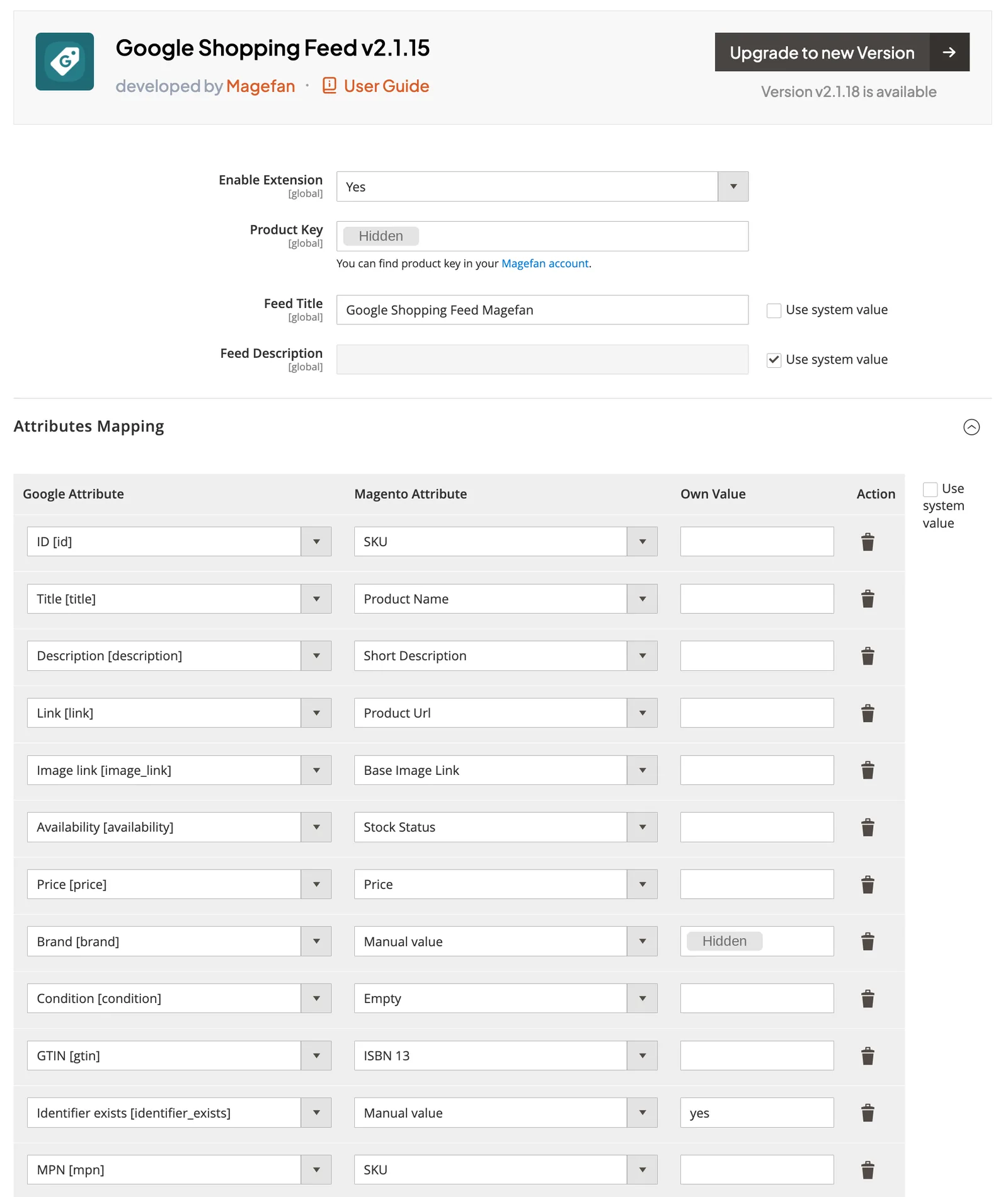
Here is the same mapping inside a feed extension, using the Magefan Google Shopping Feed settings screen. Each Google attribute is matched to a Magento attribute, and choosing Manual value lets you type a fixed value in the Own Value column. Before you copy a setup like this, check the brand, MPN and identifier_exists rows against the table above, because a store name as brand or a SKU as MPN only fits products you make yourself.
Do You Still Need Two of GTIN, Brand and MPN?
One correction worth making, because a lot of agency material still repeats it: there is no longer a “submit at least two of GTIN, brand and MPN” rule. That was Google’s requirement before 2016. Instead, the current rule is simpler and stricter. If a product has a GTIN assigned by its manufacturer, submit the GTIN, the brand and the MPN. If no GTIN exists, for example on custom made or handmade goods, submit brand and MPN instead. Google also warns explicitly against guessing or borrowing values from similar products, and states that products which have an assigned GTIN but are submitted without one may get limited visibility.
GTIN is the identifier Magento does not give you, so see our GTIN guide for Google Shopping and our check digit calculator if you are validating barcodes in bulk.
If you want to map your own attribute set against Google’s specification before building anything, our feed attribute mapper does that step.
How Do I Add a GTIN Attribute in Magento 2?
Create it as a product attribute, then add it to the attribute sets that need it.
Go to Stores, then Attributes, then Product, then Add New Attribute. Set the default label to GTIN, the catalog input type to Text Field, and under Advanced Attribute Properties set the attribute code to gtin and the scope to Global. Under Storefront Properties, however, you can leave it hidden. Then go to Stores, Attribute Set, and drag the new attribute into the relevant sets.
Set scope to Global rather than Store View. A GTIN identifies a physical product and does not change between store views, and a store view scoped attribute creates rows you will later have to keep in sync for no reason.
How Do You Map Magento Categories to Google Product Categories?
Map Magento categories to Google product categories only where Google gets the category wrong, because google_product_category is optional. Google assigns every product a category from its own taxonomy automatically. According to Google’s attribute page, checked October 29, 2026, it accepts an override in three cases:
- Google placed the product in a category with extra required fields, such as apparel, that do not apply to it.
- Your Google Ads campaigns are organized by Google product category.
- The product is alcohol, which must sit in Google’s alcoholic beverages categories.
When you override, send the numeric ID or the full path, never both; the ID also avoids language mismatches across store views. For your own structure, use product_type. Since a Magento product can sit in several categories and Google uses only the first product_type value for bidding, pick one primary path per product. Our Google product data specification guide compares the two attributes.
Which Magento Fields Can Fill Google’s Conversational Attributes?
Google’s conversational attributes are six optional fields that help AI-driven shopping surfaces answer product questions, and most can come from data Magento already holds. Two of them, item_group_title and variant_option, come from configurable products, as the variants section below shows. The other four map like this:
| Google attribute | Magento source | Notes |
|---|---|---|
related_product | Related products, up-sells and cross-sells | Up to 30. Our suggestion: cross-sells as often_bought_with, up-sells as substitute, related products as accessory |
popularity_rank | Units sold per product from your order data | A number from 0 to 100 with one decimal |
question_and_answer | No standard Magento field | A custom text attribute |
document_link | No standard Magento field | A custom attribute or attachment extension holding a PDF URL |
Google recommends a supplemental data source for these fields and says they do not change the approval status of existing products. So they are a low-risk addition once the core feed is stable. Our guide to Google Merchant Center AI attributes covers each field and how to measure it.
Which Magento Products Should Actually Go in the Feed?
This is the question that separates a feed that works from one that produces disapprovals for months, and it is where Magento’s product types cause more trouble than any other platform.
Overall, the governing principle is simple: only export products a customer can actually buy.
| Product type | What to export | Why |
|---|---|---|
| Simple, visible | The product | Straightforward |
| Simple, not visible individually (a variant) | The child, with item_group_id | This is what the customer buys |
| Configurable | The children, not the parent | A configurable parent cannot be added to cart directly |
| Grouped | The parent | The group is the purchasable unit |
| Bundle | The parent | Pricing applies to the bundle, not the components |
| Virtual and downloadable | Usually exclude | Most are not eligible for Shopping |
| Disabled or out of stock | Exclude, or mark availability correctly | Do not silently drop items you want to keep indexed |
Which Values Can Variants Inherit From the Parent?
In fact, this distinction causes the generic title problem that Merchant Center flags.
Safe to inherit from the parent: name, description, brand, condition, and usually category and image when the child has none.
Must stay unique per variant: GTIN, MPN, color, size, and any other attribute that defines the variant.
If you inherit color and size from the parent you produce a set of items that are identical apart from their IDs, which is exactly what the generic title warning is telling you about.
In general, most extensions expose this as parent fallback settings. The pattern that works is: use the parent value only when the child value is empty, and apply that fallback only to simples that are not visible individually. Otherwise, applying it to standalone simple products overwrites legitimate data.
How Do Configurable Products Map to Google’s Variant Attributes?
A Magento configurable product maps to a Google item group. Each child becomes one item, the parent supplies the group ID and title, and the configurable attributes define what makes each child different. Google’s specification, checked October 29, 2026, now adds item_group_title and variant_option to the long-standing item_group_id.
| Google attribute | Take it from | Rule Google sets |
|---|---|---|
item_group_id | Parent SKU | Same on every child; use the parent SKU where possible and keep it unchanged |
item_group_title | Parent name | Same on every child, up to 150 characters |
variant_option | Configurable attribute labels and the child’s values | Name and value pairs, up to 30, for every variant-defining property |
color, size, material, pattern, gender, age_group | The child’s own values | Send them as well as variant_option when they define the variant |
The variant_option field matters most for properties Google has no field for, such as width, capacity or pack size. So send those as name and value pairs instead of forcing them into size. If your extension cannot map the two newer fields, a supplemental data source keyed on each child’s ID can add them without touching the main feed.
The Configurable Product URL Trap Nobody Writes About
Here is the most useful thing in this article, and as far as we can tell no other guide connects these two facts.
Every extension recommends exporting variant URLs with an auto-link fragment so the shopper lands on the product page with the right variant preselected. The URL looks like this:
https://example.com/product.html#100=1That is sensible advice for user experience. It is also a disapproval vector on Magento.
Magento issue #38110 documents that hash based configurable URLs update the displayed price client side through JavaScript. However, Google Merchant Center reads the server rendered HTML source. So when a configurable product has different prices per combination, for example red at $30 and blue at $40, the server rendered page shows the parent’s default price while your feed carries the variant price. Merchant Center sees a mismatch between the feed price and the landing page price, and disapproves the item.
The issue was reported against 2.4.6-p2 at severity S0 and closed as needing update, with no patch and no documented workaround.
Your realistic options:
- Point
linkat the parent URL without the fragment and make sure the parent page renders a price that matches, or renders a range that contains the feed price. Simplest, and loses the preselection. - Use server side variant parameters instead of a fragment, so the page renders the correct price in source HTML. However, this requires development work and usually a controller change.
- Keep the fragment and accept periodic price mismatch disapprovals on multi price configurables, monitoring them in Merchant Center.
Option one is what we implement on client accounts unless there is a strong reason not to. A preselected swatch is worth less than an approved item.
What Happens When One Simple Belongs to Two Configurables?
Magento allows a simple product to be linked to more than one configurable parent through catalog_product_super_link. Your feed then has to decide which item_group_id wins, and most extensions make that choice for you without telling you.
This is a real and current bug class rather than a theoretical one. Mageplaza’s release notes record a v4.7.6 fix for exactly this scenario. If your catalog shares simples across configurables, export a test feed and check those SKUs specifically, because a wrong item_group_id silently merges unrelated variant groups.
Why Does My Magento Feed Generate But Never Update?
Cron. Almost always cron. Every other guide says “make sure cron is enabled” and stops there, which is not useful when cron is enabled and the feed is still stale. So here are the actual failure modes.
The Missed Cron Trap
Feed extensions usually register their own cron group rather than using the default. In addition, that group has its own “Missed if Not Run Within” setting, found under Stores, Configuration, System, Cron, in the section for that group.
If your system crontab fires less often than that window, the job is marked missed in the cron_schedule table and never runs. Worked example: a crontab firing at minutes 1, 30 and 59 leaves a 29 minute gap, so a group with a 2 minute missed window is permanently missed. As a result, the feed never regenerates and nothing in the admin looks broken.
Check it directly:
SELECT job_code, status, COUNT(*)
FROM cron_schedule
WHERE scheduled_at > NOW() - INTERVAL 1 DAY
GROUP BY job_code, status;
If your feed job shows a stack of missed rows, that is your answer. Fix it by raising the missed window, adjusting the schedule in the module’s etc/crontab.xml, or tightening the system crontab so it runs every minute as Magento expects.
The 2.3.5 Cron Locking Change
This one explains the complaint that a feed is “randomly corrupt about once a week”, and we have not seen it written about in a feed context anywhere.
Magento 2.3.5 introduced a backward incompatible change to cron locking. Commit ce5b6f6 under MC-22819, aimed at fixing deadlocks related to crons and consumers, moved processPendingJobs() in Magento\Cron\Observer\ProcessCronQueueObserver outside the group level lock, leaving only job level locking. Magento issue #29924 records the consequence in the reporter’s words: cron jobs from the same group could not previously run simultaneously, and now they can.
For feeds, therefore, this is significant. A long running generation job that used to be serialized by its group can now overlap with another instance of itself. Two processes writing the same XML path produce truncated, interleaved or zero byte files, and Merchant Center reports parse errors that you cannot reproduce on demand because the next run completes cleanly.
Mitigations: give the feed job a generous missed window so a slow run is not re-queued on top of itself, run generation through the CLI on a system cron rather than Magento cron for large catalogs, or add your own lock file around generation.
Adobe Commerce Cloud Cron Starvation
Adobe documents that only one cron job can run at a time on the web instance of a Cloud project, because of the read only nature of those environments. On older Pro projects in particular, where crons are not self managed, a twenty minute feed job therefore blocks every other cron group on the instance. The symptoms, as a result, are unprocessed product updates and missed transactional emails.
The fix is to request self managed crons from Adobe support and then declare them in .magento.app.yaml:
crons:
  cronrun:
    spec: "* * * * *"
    cmd: "php bin/magento cron:run"
Then verify with crontab -l after deployment. Also look at use_separate_process per group, which stops one heavy group blocking the rest.
Indexers and Stale Feed Data
Most feed extensions read indexed price and stock tables rather than recalculating values, which is the right decision for performance and the wrong one when your indexers are behind.
If catalog_product_price or inventory is invalid or stuck in “Update by Schedule” with a backlog, your feed exports yesterday’s prices perfectly happily. Check with:
bin/magento indexer:statusAny indexer showing invalid or reindex required while your feed job runs means the feed is publishing stale data. On large catalogs, sequence the feed generation to run after reindexing rather than in parallel with it.
Feed generation speed is also a symptom of the same underlying issues that slow the storefront. Our guide to Magento speed optimization covers the indexer and caching side in more depth.
How Do I Set Up Feeds for Multiple Stores and Currencies?
One feed per store view. Not per website, per store view, because store view is where language and currency resolve.
The practical rules:
- Generate a separate file per store view with a distinct filename, for example
google_us.xml,google_uk.xml,google_de.xml. In fact, shared filenames across store views are a common and confusing failure. - Create a separate Merchant Center feed for each target country and language, and match the feed’s country and language to the store view’s.
- Make sure product URLs in each feed use that store view’s base URL, including the store code if you use them in URLs.
- Currency must be the store view’s display currency, and prices must match what a shopper in that country sees, including tax treatment for that market.
- Where you have market specific stock, availability has to resolve per source rather than globally.
For the Merchant Center side of multi currency setup, including when you need separate feeds versus currency overrides, see our guide to multi-currency feed setup, which covers the Merchant Center rules that apply regardless of platform.
How Do You Send Magento Promotions and Store Inventory to Google?
Magento promotions reach Google through a separate promotions data source in Merchant Center, while in-store stock uses a local inventory data source. The main feed carries only the price a shopper sees, so the type of Magento price rule decides where each discount goes.
| Magento discount | What Google sees | What to do |
|---|---|---|
| Catalog price rule for the Not Logged In group | A lower price on the product page | Export the final price after rules as price or sale_price in the main feed |
| Catalog price rule for logged-in groups only, such as Wholesale | Nothing, because Google views pages as a guest | Leave it out of the feed |
| Cart price rule with No Coupon | A discount that applies in the cart | Send it as a promotion with offer_type set to no_code |
| Cart price rule with a Specific Coupon | One code that every shopper can use | Send it as a promotion with generic_code and that code |
| Cart price rule with Use Auto Generation | Many generated codes | Leave it out, because Google supports only no_code and generic_code |
What Does Google Require for Each Promotion?
Google’s promotions specification, checked October 29, 2026, requires a promotion ID, the products it covers, the offer type, a title, dates, a channel and a destination. A promotion can run for at most 183 days, so a Magento rule with no end date still needs one in Google. Free shipping promotions also need a code that shoppers can enter.
To limit a promotion to some products, filter them in the promotion source or add the same promotion_id to those products in your feed. For physical stores, our Google local inventory ads guide covers local inventory. Some Magento feed extensions ship a promotions template too, so check yours first.
Which Magento Product Feed Extension Should I Use?
Prices below are as published in September 2026. Check current pricing before you buy, and check Merchant API status before you renew.
| Extension | Price | Best for | Watch out for |
|---|---|---|---|
| WeltPixel | Free | Trying the approach before paying | Fewest features, no CLI |
| Apptrian | $39.99 CE | Multi channel on a budget, M1 build available | Less depth on configurables |
| Magmodules | $99, or EUR 99 direct | Google specifically. Best configurable docs in the market | Google only |
| Magefan | $99 one time | Per SKU exclusion diagnostics | Google Shopping focused |
| Plumrocket | $99 | Straightforward setups | Thin on product type handling |
| Wyomind | from €145 | Technical teams. Strongest templating and performance controls | Steep learning curve |
| Mageplaza | $179 CE / $379 EE | Many output formats and delivery methods | Release notes show variant bugs still being fixed in 2026 |
| XTENTO | $169 one time | Magento 1 and OpenMage, XSL templating | Not suitable for non technical users |
| Amasty | $249 per year | Performance knobs, multi process generation | Subscription, and GTIN is not addressed in their materials |
| Mirasvit | $179 CE / $290 EE / $580 ECE | Largest template library, CLI, confirmed Merchant API migration | Highest price at the top tiers |
What Should You Weigh Before Choosing a Magento Feed Extension?
Three things to weigh that the comparison listicles do not mention:
Merchant API status is now the most important column. An extension that has not migrated is a liability regardless of features.
One time versus subscription matters more on Magento than elsewhere, because Magento upgrades break extensions and a one time license often means paying again for compatibility with the next minor version.
Middleware such as Feedonomics, DataFeedWatch, Channable and GoDataFeed is a different category. It moves the mapping logic out of Magento entirely, which insulates you from Magento upgrades and gives you many channels at once, at a much higher monthly cost. It makes sense above roughly 20,000 SKUs or when you are selling on more than three or four channels.
Which Magento Versions Can Run a Merchant API Feed in 2027?
Magento 2.4.7, 2.4.8 and 2.4.9 can all run the current Merchant API packages, because each supports PHP 8.2 or newer. The newest releases of Google’s PHP packages need PHP 8.2, so a store still on PHP 8.1 has to pin older package versions, and stores on 2.4.6 or older are also outside Adobe’s regular support.
| Magento line | Adobe regular support ends | PHP versions Adobe lists | Can use the newest Merchant API packages (PHP 8.2+)? |
|---|---|---|---|
| 2.4.9 | May 31, 2029 | 8.5 | Yes |
| 2.4.8 | May 31, 2028 | 8.3, 8.4 (2.4.8-p5) | Yes |
| 2.4.7 | May 31, 2027 | 8.2, 8.3 (2.4.7-p10) | Yes |
| 2.4.6 | Ended August 11, 2026 (Adobe Commerce extended support to August 31, 2027) | Check your patch level | Only if the store already runs PHP 8.2 or newer |
| 2.4.5 and older | Ended | 8.1 for 2.4.5 | No, pin older packages |
The package cut-off is recent. On Packagist, google/shopping-merchant-products moved to PHP 8.2 from version 1.7.4 (September 14, 2026) and google/shopping-merchant-datasources from version 1.3.5 (the same day). Both shipped new releases on October 28, 2026 that still require PHP 8.2.
Which 2027 Dates Matter for Magento Feeds?
Three dates in 2027 matter for Magento feeds:
- Early 2027: Google plans to switch off every Content API endpoint, and extensions to the old API do not run past it.
- May 31, 2027: regular support for 2.4.7 ends, according to Adobe’s released versions page.
- June 1, 2027: Adobe Commerce on cloud projects still on 2.4.4 or 2.4.5 must have upgraded, or Adobe may suspend admin access or storefront traffic.
So if your feed extension forces a Magento upgrade, plan both together. Our Magento migration and upgrade guide covers which version to target and the SEO checks to run, and a Magento PPC review can confirm the feed and campaigns survive the move.
How Do I Handle Very Large Magento Catalogs?
Above roughly 50,000 SKUs, feed generation stops being a configuration task and becomes an engineering one.
Generate from the CLI rather than through Magento cron, so you control memory and timeout directly. Most serious extensions provide a command, for example:
bin/magento wyomind:simplegoogleshopping:generate
bin/magento xtento:productexport:export
Raise the memory limit for that command specifically rather than globally. For instance, 1024M is a common working figure for six figure catalogs.
Also, tune batch size if your extension exposes it. For example, Wyomind exposes items in buffer and items per SQL request, defaulting to 10 and 1500. Similarly, Amasty exposes products per iteration plus multi process generation. Smaller batches use less memory and take longer, and the right number depends on your row size rather than your SKU count.
Write to a temporary file and rename on completion, so Google never fetches a half written file. Some extensions do this and many do not, so it is worth confirming.
Split by store view or by category rather than generating one enormous file, then submit multiple feeds to Merchant Center.
Run generation outside peak traffic, because a feed job reading the full catalog competes with the storefront for database connections.
What Are the Most Common Magento Feed Disapprovals?
| Disapproval | Magento specific cause | Fix |
|---|---|---|
| Price mismatch | Configurable hash URL rendering the parent price server side | Link to parent URL, or render variant price server side. See the trap section above |
| Missing brand | manufacturer empty because it is optional in Magento | Populate the attribute, or map a fallback |
| Missing GTIN | No native GTIN attribute exists | Create the attribute, or set identifier_exists correctly |
| Generic titles for variants | Variants inheriting color and size from the parent | Inherit only name, description, brand and condition |
| Image not found | Feed carrying a cached resize URL or placeholder | Export the base image URL |
| Availability mismatch | Extension reading legacy stock tables on an MSI setup | Use a source and stock aware extension |
| Duplicate items | Same simple exported under two configurable parents | Decide the item_group_id rule explicitly |
| Stale data | Missed cron, invalid indexers, or an overlapping job | Work through the cron section above |
| Landing page unreachable | Store view base URL mismatch in a multi store feed | One feed per store view with the correct base URL |
If an account level suspension has already happened rather than item level disapprovals, our guides to Merchant Center suspensions and misrepresentation appeals cover the reinstatement process.
Will Small Magento Product Images Be Disapproved in 2027?
Yes. From January 31, 2027, Google enforces a minimum of 500 x 500 pixels for every image_link and additional_image_link, across all product categories. Google announced the rule in its 2026 product data specification update and began showing “Image too small for upcoming enforcement” warnings on April 14, 2026.
On Magento, small images usually come from two places. Either the feed exports a resized copy from /media/catalog/product/cache/ instead of the original, or the original was uploaded small. Google says it will optimize some smaller images and flag them with a warning. Even so, a sharp original is the safer fix.
To list small originals, run this from the pub folder. It follows the find pattern in Adobe’s image resizing guide and needs ImageMagick:
find ./media/catalog/product -path ./media/catalog/product/cache -prune -o -type f -print | xargs identify -format "%w %h %i\n" 2>/dev/null | awk '$1 < 500 || $2 < 500'How Does the Magento Feed Fit With Performance Max?
Feed quality determines Performance Max outcomes more than any other input, because the feed is most of what you still control in a campaign type that hides so much.
In particular, the Magento implication is that your custom labels have to be generated from data Magento actually holds. Margin is the usual example and it is rarely a Magento attribute, so you either create one and maintain it, or compute margin tiers in middleware. Doing it by rule inside the extension is possible but brittle, because the rule has no access to cost data unless you have populated cost on the product.
Our guide to Performance Max and feed optimization covers the campaign side, and product feed optimization covers the attribute level work that applies across platforms.
Magento Product Feed FAQs
Does Magento 2 have a built in Google Shopping feed?
No, and it has nothing for Google Shopping in core today. Magento 2 has never shipped a standalone feed file generator that writes Shopping XML or CSV. What it did briefly include was a Google Shopping ads Channel extension, which pushed products to Merchant Center over Google’s API rather than generating a file. Adobe deprecated it in 2.3.5 and 2.3.4-p1, and it no longer works. Since then every route from Magento to Merchant Center requires a third party extension or external feed middleware.
Why did my Magento feed stop uploading to Merchant Center in September 2026?
Most likely because your extension still uses Google’s Content API for Shopping, which was sunset on August 18, 2026 with progressive errors beginning September 1, 2026. Check your code for the Google_Service_ShoppingContent class, or its namespaced form, which is the reliable indicator of the legacy API, and check composer.lock for google/shopping-merchant-products or google/shopping-merchant-datasources, which indicate the current Merchant API. Note that google/apiclient on its own proves nothing, since it is the generic Google client used for many services. Extensions on the legacy libraries need updating or replacing.
Should I export configurable parents or their child products?
Export the children, not the parent, because a configurable parent cannot be added to cart directly. Give every child the same item_group_id so Google groups them as variants. Children should inherit name, description, brand and condition from the parent, but must keep their own GTIN, MPN, color and size. Bundle and grouped products are the opposite case: export the parent, because that is the purchasable unit.
Why does Google say my Magento price does not match my landing page?
On configurable products this is usually caused by variant URLs using a hash fragment, such as product.html#100=1. Magento updates the displayed price client side with JavaScript, while Merchant Center reads the server rendered HTML, so Google sees the parent’s default price rather than the variant price. This is documented in Magento issue 38110 and has no official patch. The practical fix is to point the feed’s link attribute at the parent URL and ensure the parent page renders a matching price.
How do I add GTIN to Magento 2 products?
GTIN is not a default Magento attribute, so create it under Stores, Attributes, Product, Add New Attribute. Use a Text Field input type, set the attribute code to gtin, and set the scope to Global rather than Store View, since a barcode does not change between store views. Then add the attribute to the relevant attribute sets. If genuine GTINs do not exist for your products, for example custom made or vintage items, set identifier_exists to no rather than inventing values.
Why does my Magento feed generate successfully but show old data?
Two usual causes. First, cron: feed extensions register their own cron group with a Missed if Not Run Within setting, and if your system crontab interval exceeds that window the job is silently marked missed and never runs. Check the cron_schedule table for missed rows. Second, indexers: most extensions read indexed price and stock tables, so if catalog_product_price or inventory indexers are invalid or backlogged, the feed faithfully exports stale values. Run bin/magento indexer:status to confirm.
Do I need a separate feed for each Magento store view?
Yes. Store view is where language and currency resolve, so generate one file per store view with a distinct filename, and create a matching Merchant Center feed for each country and language combination. Make sure each feed uses that store view’s base URL for product links and its display currency for prices. Sharing one filename across store views is a common cause of feeds overwriting each other.
Is it better to use a Magento extension or feed management software?
Extensions are more cost effective below roughly 20,000 SKUs and when Google is your main channel, with one time licenses from around $40 to $290. Feed management software such as Feedonomics, DataFeedWatch or Channable costs considerably more per month but moves the mapping logic outside Magento, which protects you from Magento upgrades breaking the integration and supports many channels from one setup. The tipping point is usually catalog size, channel count, or having been burned by an upgrade.
Can I still get a product feed from Magento 1?
Yes, though the options are limited. Magento 1’s native Mage_GoogleShopping module broke when Google retired Content API v1, and the community fork bluevisiontec/GoogleShoppingApi added v2 support. For current setups, XTENTO maintains a Magento 1 extension covering versions 1.4.1.0 to 1.9.4.5 plus OpenMage LTS, and Apptrian also ships an M1 build. These are separate licenses from the Magento 2 versions because the codebases differ.
What is Adobe Commerce SaaS Data Export and is it a Shopping feed?
It is not a Shopping feed. SaaS Data Export, delivered by magento/saas-export, publishes product data to Adobe’s own services: Live Search, Catalog Service, Product Recommendations and Adobe Commerce Optimizer. You can identify it by CLI commands like bin/magento saas:resync --feed=products. It is possible to build a Merchant Center feed on top of it for large catalogs, since the data is already denormalized and indexed, but the schema targets Adobe’s services rather than Google’s, so it requires development work.
How do I create a Google Shopping feed in Magento 2?
Install a feed extension that uses Google’s Merchant API, create a GTIN attribute, map Magento fields to Google attributes, and generate one feed file per store view. Then add the file in Merchant Center as a scheduled fetch, or let the extension push items over the API. Finally, check that cron runs the feed job and that Merchant Center shows fresh data.
Will my Magento feed stop working in 2027?
It will if your extension still calls the Content API for Shopping. Google plans to turn off every Content API endpoint in early 2027, and extensions to that API do not run past the shutdown. Feeds delivered by scheduled fetch of a file, or by an extension that already uses the Merchant API, are not affected by the shutdown.
What image size does Google require for Magento product images in 2027?
At least 500 x 500 pixels for the main image and every additional image, enforced from January 31, 2027 across all product categories. Google has flagged smaller images with an “Image too small for upcoming enforcement” warning since April 14, 2026. On Magento, export the original upload rather than a cached resize, and replace originals that were uploaded small.
Do I need google_product_category in my Magento feed?
No, it is optional. Google assigns every product a category automatically and accepts an override only in specific cases, such as a wrong apparel category, campaigns built on Google categories, or alcohol. Use the numeric ID or the full path, not both. For your own catalog structure, map one Magento category path to product_type instead.
Can Magento cart price rules become Google promotions?
Yes, if the rule needs no coupon or uses one shared code. Google’s promotions specification supports only no_code and generic_code offers, so cart price rules that auto-generate coupon codes cannot be sent. Send each eligible rule through a promotions data source with its own promotion ID, title and dates, and keep each promotion to 183 days or less.
Can I reuse my Magento Google feed for ChatGPT or other channels?
Usually through a separate feed profile rather than the same file. Each channel publishes its own specification. For example, OpenAI’s product feed spec for ChatGPT calls the ID field item_id and the product page url, where Google uses id and link. So clone your Google profile, adjust the fields per channel and keep the same product ID values everywhere.
Need a Magento feed built or rescued? We manage Merchant Center and product feeds for ecommerce clients, including the specialty Magento store in our Magento SEO case study. See our Magento SEO services and Magento PPC management, or read our wider Magento SEO guide.
About the author: Ishant Sharma has worked in digital marketing since 2013 as a Google Ads, Microsoft Ads and SEO specialist, across ecommerce, local service, SaaS and white label agency accounts in the US, UK, Australia and India. His platform work spans Magento SEO and Magento PPC. He leads ecommerce PPC management and Google Ads at Hustle Marketers. He is the founder of Hustle Marketers, a best digital marketing agency for ecommerce and local service brands, a Google Partner and Meta Business Partner agency. On Upwork, he is Top Rated Plus. More about Ishant.