Feed Management Software: Real Prices Compared and When You Actually Need It (2027)

Ishant
Published on October 30, 2026
Ishant

Written by Ishant Sharma, Google Ads, Microsoft Ads and SEO specialist since 2013 | Prices checked October 29, 2026
For a store with 5,000 products that wants its catalog in Google Shopping, the same job costs $13.99 a month with a platform app, $84 a month on DataFeedWatch’s Merchant plan, or $750 a month and up once you hand it to a managed service, depending entirely on which vendor you call first.
That is more than a 50 times spread for what looks on paper like the same deliverable. No comparison page we could find puts those three numbers next to each other, because almost every page ranking for this topic is published by one of the vendors.
We build and manage product feeds for ecommerce clients, so we sit on the buying side of this decision regularly. So this guide gives you the honest version: what these tools actually do, what they genuinely cost, the specific conditions that justify moving up a tier, and the things that will bite you that no vendor page mentions.
Updated for 2027: on October 29, 2026, we rechecked every price here against the vendor’s own pricing page. Both full price lists were unchanged, and GoDataFeed now lists fixed plans next to its plan builder. Earlier 2027 additions cover cost per 1,000 products, free Merchant Center tools, the Content API shutdown and trial questions. This round also adds a tool comparison, cost per daily sync, a store-size table, first rules and a weekly check.
Summarize this article with:
Quick Discussion
Feed management software, also called product feed management software, turns your store’s product data into a correct feed per channel. It then keeps those feeds in sync and flags rejected items. So the right tier depends on your channels, data sources and sync speed, not on product count.
- Four tiers, four jobs: apps, self-serve SaaS, managed services and enterprise PIM solve different problems, so compare within a tier.
- Entry prices we checked: $13.99 a month for an app plan, $84 for mid-market SaaS and $750 for managed service.
- Sync speed decides the upgrade: daily sync caps force more upgrades than SKU limits, so price each daily sync first.
- Merchant Center is free but Google only: it handles uploads, fetches and attribute rules, not other channels or order writeback.
- Check the Merchant API first: Google ends the Content API in early 2027, so tools still on it are risky.
- Test before you sign: use the store-size table, the eight trial questions and the weekly health check further down.
Table of Contents
- What Does Feed Management Software Actually Do?
- The Four Tiers of Feed Management Software
- What Does Feed Management Software Cost in 2027?
- When Do You Actually Need Feed Management Software?
- Which Feed Management Software Fits Your Store Size and Channels?
- Can You Manage Product Feeds for Free in Merchant Center?
- Features Feed Management Software Should Have
- First Feed Rules to Set Up
- When Vendors Merge or Change Plans
- What Should You Ask a Feed Vendor Before You Sign?
- The Google CSS Angle That Changes the Math
- What Do Practitioners Actually Complain About?
- Weekly Feed Health Check
- How Do We Choose for Clients?
- Feed Management Software FAQs
What Does Feed Management Software Actually Do?
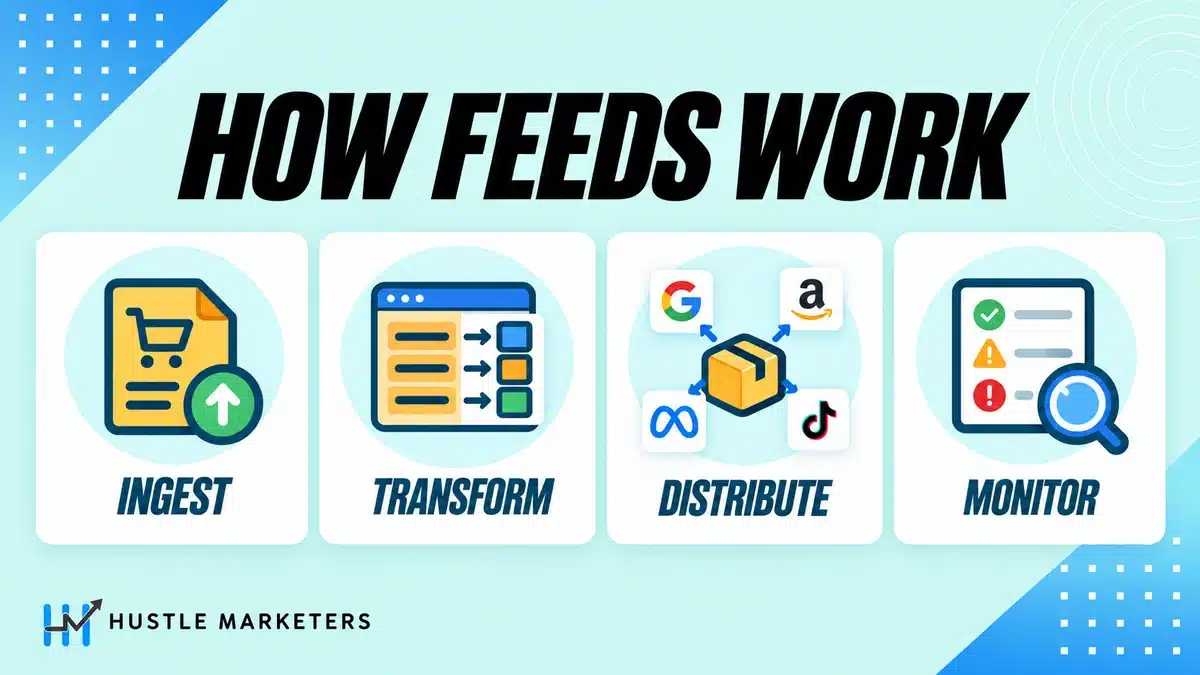
Four things, in sequence.
It ingests your product data from a source, which might be your store platform, a spreadsheet, an ERP, a PIM or a supplier file. Next, it transforms that data: rules rename fields, split or combine values, strip HTML, fix capitalization and fill gaps. It outputs a separate correctly specified feed for every channel you sell on, because Google, Meta, Bing, TikTok, Pinterest and Amazon all want different fields in different formats. Then it monitors the result and tells you when items get rejected.
In practice, the transformation layer is the part people underestimate. Your store holds product data shaped for humans browsing your site. Channels, however, want data shaped for machines matching queries. So everything valuable that these tools do sits in the gap between those two things.
If you want the underlying attribute work rather than the tooling, our guide to product feed optimization covers what good output looks like regardless of which software produces it.
Why Does the Product Feed Matter So Much for Shopping Ads?
Google Shopping ads and the Shopping side of Performance Max are built from your feed. So feed quality caps both. That matters because these campaigns take most ecommerce budgets. In our 2026 study of 22 Google Ads accounts, Performance Max alone took a median 53.1% of ecommerce spend.
That study, Google Ads Performance Benchmarks by Campaign Type (Sharma, 2026), covers October 2025 to September 2026. It also found median ROAS of 5.62x for Standard Shopping and 4.95x for Performance Max, against 3.09x for non-brand Search. In other words, both feed-driven campaign types returned more per dollar than non-brand Search in that sample.
According to Google’s May 2025 Shopping update, the Shopping Graph holds more than 50 billion product listings. More than 2 billion of them refresh every hour. As a result, a stale or thin feed competes against listings that update constantly. Our guide to Performance Max feed optimization shows how the feed shapes those campaigns.
What Are the Four Tiers of Feed Management Software?
Every comparison page presents fifteen tools in one flat list, which is why the price spread looks irrational. In fact, it is not irrational. There are four genuinely different categories of product being sold, and they are not competing with each other.
Tier 1: Platform Apps
Apps installed directly into Shopify, WooCommerce, BigCommerce or Magento. Examples include Simprosys, AdNabu, Multiple Google Shopping Feeds, FeedHub and Feeditor.
These read your store catalog, apply a modest set of rules and publish feeds to the major channels. They cost between roughly $5 and $30 a month. However, they are built for one store on one platform.
Tier 2: Self-Serve Mid-Market SaaS
Standalone platforms you connect your store to. DataFeedWatch (owned by Revmatics since June 2026), GoDataFeed, Channable, WakeupData, Shoptimised and Koongo sit here.
These bring a real rule engine, a large channel library, better error reporting and the ability to combine multiple sources. Still, you run them yourself. Expect roughly $40 to $250 a month for a normal store, considerably more at agency scale.
Tier 3: Managed Service
Feedonomics, VersaFeed, Shoppingfeed and Lengow. Here you are not really buying software, you are buying a team that owns your feeds as a job. In other words, someone else fixes the rejections.
Because you pay for people, pricing is quote only and lands in the high hundreds to low thousands per month.
Tier 4: Enterprise PIM and Syndication
Productsup, Rithum (the merged ChannelAdvisor and CommerceHub), Salsify and Plytix. These are product information management platforms where channel feeds are one output among many. You buy these when product data governance across an organization is the problem, not Shopping ads.
Pricing is quote only here too, so budget in the thousands per month.
So the mistake that costs money is shopping across tiers. A 3,000 SKU Shopify store comparing Simprosys against Feedonomics is not comparing two solutions to its problem. Instead, it is comparing a solution to its problem against a solution to a much larger company’s problem.
What Does Feed Management Software Cost in 2027?
Here is the side by side that vendor pages leave out. We checked every figure on the vendor’s own pricing page on October 29, 2026. Even so, vendor pricing moves and is sometimes localized by country, so confirm it on your own quote.
How Do the Main Feed Tools Compare on Price and Trial?
The main feed tools differ less on features than on how openly they price and how long trials run. So before any feature demo, check whether a real price exists. The table below shows what each vendor’s own pricing page said on October 29, 2026.
| Tool | Tier | Price on the vendor page | Free trial |
|---|---|---|---|
| Simprosys Google Shopping Feed | Platform app | From $4.99 a month for up to 500 products | 21 days |
| DataFeedWatch | Mid-market SaaS | From $64 a month for 1,000 SKUs; managed service from $750 | 15 days, card required |
| GoDataFeed | Mid-market SaaS | Plus plan at $99 a month for 5,000 SKUs, plus a plan builder | 14 days |
| Channable | Mid-market SaaS | Not published; priced by package, core plan and modules | Free account with no time limit, but channels need a paid plan |
| Shoptimised | Mid-market SaaS with Google CSS | Promotional £0.99 on all four tiers; managed feed operations from £500 | 14 days |
| Feedonomics | Managed service | Not published; tailored quote | None, according to TrustRadius |
| Productsup | Enterprise PIM and syndication | Not published; customized quote | Demo on request |
Read the price column as a floor, not a budget. In practice, extra shops, channels and SKUs add up fast, as the sections below show. Also, a missing price does not make a tool expensive. It just means your quote is the only reliable figure.
Published Pricing
DataFeedWatch is the only major mid-market player that still publishes a full pricing matrix.
| Plan | Monthly (USD) | SKUs | Feeds | Shops |
|---|---|---|---|---|
| Shop | $64 | 1,000 | 3 | 1 |
| Merchant | $84 | 5,000 | 10 | 2 |
| Agency | $239 | 30,000 | 150 | Unlimited |
| Enterprise | Quote | 100,000 | Unlimited | Unlimited |
Add-ons matter here and are easy to miss when budgeting: an extra shop is $24, another 50 feeds is $50, and their managed service starts at $750. There is also a 17 percent annual discount and a 15 day trial that requires a card.
GoDataFeed now lists fixed plans next to its plan builder. For example, its Plus plan is $99 a month for 5,000 SKUs, four PPC feeds and four daily syncs. It has a 14 day trial and no long term commitment. However, watch the overages: $5 per extra 1,000 SKUs, $29 a month per additional PPC channel, and $99 a month per additional marketplace channel, with marketplaces requiring their Pro plan as a minimum.
For the platform app floor, Simprosys Google Shopping Feed publishes clean tiers: $4.99 up to 500 products, $8.99 up to 1,000, $13.99 up to 5,000 and $17.99 up to 10,000. Every tier also includes Meta, Bing and Pinterest feeds, Performance Max support and three multi currency feeds, with a 21 day trial. Their AI optimization, however, is billed separately as a one-time $1.00 per 25 products.
Quote-Only Pricing, and What We Can Honestly Say About It
Channable has stopped publishing prices. Their pricing page now explains only the structure: a package tier such as “medium business” covering 5,000 items, two projects and six channels, multiplied by a core plan level of Standard, Plus or Pro, plus optional modules. There is also a CSS only plan priced on active shops. A third party listicle reports a $69 a month entry point, which we would treat as indicative rather than confirmed.
In contrast, Feedonomics publishes no pricing, and its own pricing page only offers a tailored quote. TrustRadius states plainly that it has no pricing plans listed, and that cost varies by SKU count, channels, commitment length and service level, with no long term contracts, no revenue share and no free trial. We could not find a published Feedonomics rate, so the only reliable number is the one on your own quote. So for a floor on what managed feed work costs, DataFeedWatch’s managed service starts at $750 a month and Shoptimised’s managed feed operations start at £500.
Similarly, Productsup is quote only. A third party estimate puts it around $7,080 a month, but that figure is modeled by anchoring against DataFeedWatch rather than sourced from Productsup, so we would not budget from it. Treat enterprise PIM as a conversation rather than a price.
One vendor pricing page we will not quote: Shoptimised currently renders 99 pence a month across all four of its tiers, which is clearly a first month promotional artifact rather than real pricing. Still, the usable figures from that page are extra feeds at £10 a month each, managed feed operations from £500 a month, Premium Google CSS included on all plans, and a 14 day trial.
The Comparison That Actually Matters
For example, take one store with 5,000 SKUs publishing to Google Shopping:
| Option | Monthly cost | What you are buying |
|---|---|---|
| Simprosys (platform app) | $13.99 | A feed that works, limited rules |
| DataFeedWatch Merchant | $84 | A real rule engine and 10 feeds |
| Managed service (DataFeedWatch managed, or a Feedonomics quote) | from $750 | A team who owns the problem |
In fact, all three will put your products in Merchant Center. What separates them is how much transformation logic you need, how many channels you are feeding, and whether you want to be the person who fixes it at 11pm before a sale starts. If not, a Google Shopping ads agency can own the feed for you.
Platform matters as much as tier here. On WooCommerce the decision is not really “which feed tool” but “file-based or API-push”, because that single choice determined which stores broke when Google sunset the Content API in August 2026 and which never noticed. Also, our WooCommerce product feed guide breaks down every major plugin by architecture, install base and failure mode.
What Does Feed Software Cost per 1,000 Products?
Per 1,000 products, the platform app tiers above work out at $1.80 to $9.98 a month, the mid-market plans at $7.97 to $64.00, and managed service at $150 or more for a 5,000 product store. Cost per product falls fast as you fill a plan, so the tier you sit in matters more than the vendor you pick.
| Option | Monthly price | Products included | Cost per 1,000 products |
|---|---|---|---|
| Platform app, smallest tier | $4.99 | 500 | $9.98 |
| Platform app, second tier | $8.99 | 1,000 | $8.99 |
| Platform app, third tier | $13.99 | 5,000 | $2.80 |
| Platform app, top tier | $17.99 | 10,000 | $1.80 |
| Mid-market SaaS, Shop plan | $64 | 1,000 | $64.00 |
| Mid-market SaaS, Merchant plan | $84 | 5,000 | $16.80 |
| Mid-market SaaS, Agency plan | $239 | 30,000 | $7.97 |
| Managed service, starting price | from $750 | 5,000 (our example store) | from $150.00 |
The platform app tiers are the ones in the published pricing section above, and so are the three mid-market plans. Read the last row with care: managed pricing is a starting point, not a rate card, so the real figure depends on your quote.
When Does a Bigger Feed Plan Actually Save Money?
On product count alone, rarely. The mid-market tool above charges $3.50 per extra 1,000 SKUs on its Merchant plan, so even a 30,000 SKU store pays $171.50 a month on Merchant against $239 on Agency. In other words, the upgrade is really a purchase of sync frequency, feeds and shops.
| Catalog size | Merchant plan plus SKU overage | Agency plan | Cheaper on price alone |
|---|---|---|---|
| 5,000 SKUs | $84.00 | $239 | Merchant |
| 10,000 SKUs | $84 + 5 x $3.50 = $101.50 | $239 | Merchant |
| 20,000 SKUs | $84 + 15 x $3.50 = $136.50 | $239 | Merchant |
| 30,000 SKUs | $84 + 25 x $3.50 = $171.50 | $239 | Merchant |
| What the $67.50 gap buys at 30,000 SKUs | 2 syncs a day, 10 feeds, 2 shops | 5 syncs a day, 150 feeds, unlimited shops | Agency, if you need the syncs |
The same pattern also shows one tier down. The Shop plan at 5,000 SKUs costs $64 plus 4 x $5 overage, which is $84, exactly the Merchant price, but with one sync a day instead of two. That is the case this guide makes throughout: check sync frequency before SKU limits, and model your real catalog size before you upgrade. However, if the extra syncs are only needed for price and stock, a supplemental feed for price and availability can sometimes close the gap more cheaply.
What Does Each Daily Sync Cost at 5,000 SKUs?
At 5,000 SKUs, one daily sync costs from about $25 to $84 a month, depending on the plan. Price and stock changes only reach Google when a sync runs. So this is the number fast-moving catalogs should compare. Also, the cheapest plan per product is not always the cheapest per update.
| Plan at 5,000 SKUs | Monthly price and syncs a day | Cost per daily sync |
|---|---|---|
| DataFeedWatch Shop, plus 4 x $5 SKU overage | $84 for 1 sync | $84.00 |
| DataFeedWatch Merchant | $84 for 2 syncs | $42.00 |
| DataFeedWatch Agency | $239 for 5 syncs | $47.80 |
| GoDataFeed Plus | $99 for 4 syncs | $24.75 |
Our calculation: monthly price divided by syncs a day, from each vendor’s pricing page, checked October 29, 2026.
So on sync speed alone, the $99 plan beats the $84 plan for a 5,000 SKU store. However, it covers four PPC feeds against ten feeds on the $84 plan, so count your channels before you switch. In addition, the Simprosys plan cards we checked list no sync limit. So ask before you rely on an app for flash sales.
When Do You Actually Need Feed Management Software?
This is the question every vendor page avoids, because the honest answer is that a lot of stores do not need one.
You Probably Do Not Need One If
You sell on one platform, in one country, in one currency, to Google and Meta only, with a catalog under a few thousand SKUs and product data that is already reasonably clean. In that case, a platform app or your store’s native channel integration will do the job for a fraction of the cost.
Our guide to apps for shopping feeds covers the app tier in more detail, and for Shopify specifically a lot of what people buy software to fix can be handled with supplemental feeds instead.
The Genuine Upgrade Triggers
These are the specific conditions where paying more starts to pay for itself.
Multiple storefronts, countries or currencies. This is also the most common trigger and the most expensive. For example, DataFeedWatch charges per shop. Channable reviewers specifically flag multi webshop cost, with one noting it is “a pricy solution” if you have several. So if you are running three regional stores, the per shop model changes the math completely. Our guide to multi currency feed setup covers what the complexity actually involves.
More than two channels beyond Google and Meta. This is when per channel overages bite. GoDataFeed’s $29 per PPC channel and $99 per marketplace channel are reasonable individually and add up quickly across TikTok, Pinterest, Bing and a marketplace or two. If Microsoft is on your list, our Bing Shopping feed guide covers how its requirements differ.
Marketplaces with order writeback. Selling on Amazon or Walmart is categorically different from advertising, because orders have to flow back into your system. Platform apps, however, do not do this. This is a real dividing line rather than a feature gap.
Which Upgrade Triggers Come From Your Data and Stock?
Source data that does not live in your store. If your pricing sits in an ERP, your descriptions in a PIM and your stock in a warehouse system, you need something that can join those before generating a feed. As a result, this is the strongest single argument for the mid market tier and above.
Sub daily inventory sync. Here is the limit that is almost invisible on comparison pages and catches high velocity catalogs out. For instance, DataFeedWatch caps sync frequency by tier: once a day on Shop, twice on Merchant, five times on Agency. So if you are selling fast moving stock, that cap, not the SKU limit, is what forces the upgrade. Check sync frequency before you check anything else if your stock turns over quickly.
Someone needs to own feed errors as a job. In fact, this is the real product the managed tier sells. If nobody on your team will notice a 400 item rejection on a Friday afternoon, you are either buying that attention or accepting the loss.
Which Feed Management Software Fits Your Store Size and Channels?
Match the tier to your store profile, not to a ranking list. A single store selling on Google and Meta usually fits a platform app. However, several stores, marketplaces or outside data sources push you into mid-market SaaS or a managed service. The table below shows where common store profiles land.
| Your store | Tier that usually fits | Why |
|---|---|---|
| One Shopify, WooCommerce or BigCommerce store, Google and Meta only, clean data | Platform app, such as Simprosys from $4.99 a month, or the free native channel | Because you need few rules, one source and one market |
| One store, four or more ad channels, prices changing daily | Mid-market SaaS, such as DataFeedWatch Merchant at $84 or GoDataFeed Plus at $99 | Because you need channel-specific rules and more syncs a day |
| Several storefronts, countries or currencies | Mid-market SaaS on a multi-shop plan, such as DataFeedWatch Agency at $239 | Because per-shop pricing and feed limits then decide the cost |
| Amazon or Walmart with order writeback | Mid-market plan with marketplace support, such as GoDataFeed from its Pro plan, or a managed service | Because orders must flow back to your store, which apps do not handle |
| Prices in an ERP, copy in a PIM, stock in a warehouse system | Mid-market SaaS or enterprise PIM, such as Channable or Productsup | Because the sources must be joined before any feed is built |
| Nobody in-house to fix rejections | Managed service, such as DataFeedWatch managed from $750 or Shoptimised from £500 | Because you are paying for a team, not software |
Use the table as a starting point, and then run the trial questions further down before you commit. If you sit between two rows, choose the tier that fits the next year, since migrating rules later is costly.
Can You Manage Product Feeds for Free in Merchant Center?
Partly. Merchant Center itself has no fee and covers the basics: several ways to submit products, scheduled fetches, supplemental data sources and a rule engine for editing attributes. However, it does not feed other channels, join data from several systems or write marketplace orders back to your store.
| Job | What Merchant Center does for free | Where paid software still earns its fee |
|---|---|---|
| Submit products | A file uploaded manually, by SFTP or from Google Cloud Storage, a Google Sheets template, or the Merchant API | Pulling from your store, ERP, PIM and supplier files at once |
| Keep the file fresh | Scheduled fetch from a URL that starts with http, https, ftp or sftp, for files under 4 GB | Sync schedules set per channel, with alerts when a run fails |
| Fix or add attributes | Supplemental data sources, which can update attributes but cannot add or remove products | Bulk edits that flow to every channel feed at once |
| Rewrite values by rule | Attribute rules such as Set to, Extract, Find and Replace, Calculate, Prepend and Append, with AND or OR conditions, once you add the Advanced data source management add-on | The same rules applied to Meta, Microsoft, TikTok and marketplace outputs |
| Sell on other channels | Not covered | One source with a separate output for each channel |
Which Google Rules Shape the Free Route?
Two rules from Google shape the decision. Google recommends submitting all of your products in a single primary data source, and its attribute rules run in sequence, so rule order matters. For a scheduled fetch, the URL must point straight at the data file and must not block Googlebot or AdsBot-Google.
In our experience, a Google-only store can run for a long time on these free tools plus a platform app. But once a second channel or data source appears, the free route turns into spreadsheet work. Our Merchant Center errors guide shows what to fix first when the free setup starts throwing disapprovals, and our WooCommerce product feed guide compares file-based and API-push plugins.
What Features Should Feed Management Software Have?
Good feed management software needs six things. These are imports from every source, conditional rules, per-channel outputs, enough syncs, item-level error reports and a rules export. Everything else, including AI titles, is a bonus that you should test rather than trust.
- Import sources: your store platform plus files, sheets or an API, so ERP or supplier data can join the feed.
- Conditional rules: if and then logic for titles, categories, exclusions and custom labels, with a preview before you publish.
- Channel outputs: one source, then a separate, correctly specified feed for each channel and country.
- Sync control: enough syncs a day for your price and stock changes, as well as alerts when a run fails.
- Error reporting: rejections by item and by reason, rather than a single total.
- Portability: an export of your rules and mappings, so switching vendors later is a project, not a rebuild.
Are AI Title and Description Features Worth Paying For?
AI title and description features can save hours, but only if the output lands in the right attribute. Google’s title help page (checked October 2026) says AI-generated titles must go in the structured_title attribute. The digital_source_type value must be trained_algorithmic_media. So before you switch AI titles on, ask the vendor which attribute the tool writes to.
For example, a tool that pushes AI copy into the plain title attribute leaves the disclosure off every item. For that reason, our guide to AI product titles for Google Shopping shows how to test AI copy first.
What Feed Rules Should You Set Up First?
Set up the rules that fix rejections and steer spend first: identifiers, titles, categories, custom labels and exclusions. You can build all five in any mid-market tool. For Google alone, Merchant Center attribute rules can also handle most of them once the add-on is switched on.
- Identifiers first: map your barcode field to
gtinand fillbrandeverywhere, because missing identifiers often cause rejections. - Titles next: build them from brand, product type and a key attribute, such as size or color, to match searches.
- Categories: then map your collections to
product_type, and overridegoogle_product_categoryonly where Google guesses wrong. - Custom labels: set a label for margin tier or price band, so campaigns can bid harder on high earners.
- Exclusions: keep out items you never want advertised, such as low-margin or out-of-stock lines, before they reach any channel.
For the attribute detail behind each rule, see our Google product data specification guide. Also, for the margin version of custom labels, see custom labels by margin tier.
What Happens to Your Feeds When Vendors Merge or Change Plans?
This section exists because we could not find it covered anywhere, and it is a material buying consideration.
The feed tooling market has consolidated significantly, and the ownership now matters:
DataFeedWatch was owned by Cart.com until Revmatics bought it in a deal announced on June 30, 2026. Before that sale, reviewers reported integration friction from the Cart.com period, including one in July 2026 describing “API connection issues with Cart.com; fields missing”.
Meanwhile, Feedonomics was acquired by BigCommerce. So if you run a Shopify store, you are buying critical infrastructure from a direct competitor to your platform. That may never matter. It is still worth knowing before you sign.
Rithum is the merged ChannelAdvisor and CommerceHub.
The practical question to ask any vendor is simple: who owns you now, and does their roadmap point at my platform or away from it? After all, feed software sits between your catalog and your revenue. Migrating it later is genuinely painful, because all your transformation logic lives inside it in a proprietary format.
What Should You Ask a Feed Vendor Before You Sign?
Start with one question: does the tool already send your data through Google’s Merchant API? Google sunset the Content API for Shopping on August 18, 2026, requests without an approved extension have failed intermittently with HTTP 410 errors since September 1, 2026, and Google plans to turn every endpoint off in early 2027. Also, extensions do not run past that shutdown.
If you sync through an ecommerce platform or a third-party partner, Google says the partner manages the migration on your behalf, so you do not need to act. Custom integrations, however, are different: Google’s Merchant API migration guide says the code has to move to the new API. Our Content API shutdown checklist covers how to tell which case you are in.
Which Eight Questions Should You Test in a Free Trial?
Then use a free trial to test the things that cause trouble later. These are the eight questions we ask on behalf of clients:
| Question | Why it matters | How to test it during the trial |
|---|---|---|
| 1. Does it send data through the Merchant API? | Content API connections stop working in early 2027 | Ask when they moved, then confirm in Merchant Center that the data source keeps updating |
| 2. How many syncs a day does my plan include? | Daily caps cause price and availability mismatches | Change one price in your store and time how long Merchant Center takes to show it |
| 3. Can it combine several data sources? | ERP, PIM or supplier data cannot be joined inside a store app | Connect a second source and map one field from it |
| 4. What does each extra channel cost? | Per channel overages add up faster than the base plan | Price your real channel list for the next twelve months |
| 5. Can rules use conditions? | Margin labels and title rewrites need if and then logic | Build one custom label rule from price or margin data |
| 6. How are item errors reported? | You need rejections by item and by reason | Send one product with a missing GTIN and see where it surfaces |
| 7. Can I export my rules and mappings? | Moving vendors later means rebuilding the logic | Ask for an export of the rule set in a readable format |
| 8. Who fixes rejections, and how fast? | This is what the managed tier really sells | Get the support response target in writing |
Which Two Trial Questions Matter Most?
Above all, questions 1 and 7 matter most this year. A tool that has not moved to the Merchant API is a liability whatever its features, and a rule set you cannot export is the real switching cost. If you want a structured check of your current setup first, our Merchant Center audit template is the same review we run before recommending a tier.
The Google CSS Angle That Changes the Math
One cost offset that no comparison page prices in: several feed tools bundle a Google Comparison Shopping Service membership.
Shoptimised includes Premium Google CSS on every plan. Channable sells a CSS only plan priced on active shops. However, CSSs only place Shopping ads in the European countries on Google’s list, including Switzerland and the UK. The US is not on that list (checked October 2026), so a bundled CSS plan only matters there.
So in those markets, CSS participation can affect what you effectively pay for Shopping clicks. If that advantage is real for your account, it can be worth considerably more than the subscription difference between two tools, which reframes “which is cheapest” entirely. We would test this rather than assume it, because the size of the effect varies a lot by market and competition, and vendor claims about it are not neutral.
What Do Practitioners Actually Complain About?
Feature tables tell you what a tool does. Reviews, on the other hand, tell you what it is like to live with. These are dated and attributed so you can weigh them yourself.
Feedonomics
The consistent themes are price and support latency, from customers who otherwise rate it well.
One reviewer in June 2025 described “a complex usability challenge due to the steep learning curve”. Similarly, a July 2024 review put it simply: “Feedonomics are definitely at the pricier end of the market”. Also, a smaller brand in September 2024 noted it “can get pricey” once advanced feeds are added.
On support, an October 2024 reviewer cited “mainly timeliness of answers”, an August 2025 review said “the SLA could be better in getting back and resolving the ticket”, and an August 2024 reviewer reported that losing dedicated account representatives “can create longer response times”. One enterprise customer in January 2025 was blunter: if a ticket is not marked urgent, “the response and action rate is a lot slower”. A feed specialist in October 2024 also noted the software “can be a little on the slower side, especially when complex transformers are involved”.
DataFeedWatch
Rated 4.7 out of 5 across 137 reviews on G2, with themes around dated interface and post acquisition friction.
A September 2026 reviewer described a “bad user interface which takes a lot of time to get used to” with excessive clicking. Earlier, a 2023 review put it more harshly: “functionality and UX are early 2000s at best”. Then an April 2026 reviewer rating it 1.5 called it “very basic” with “not much customization”. A July 2026 review found supplemental feed setup “a bit clunky”, flagged a missing Rakuten integration, and said the AI features “still need a bit of work”. Others also reported problems pushing data to Walmart and TikTok, no account wide templates for channel field imports, and limited API access.
Channable
Rated 4.5 out of 5 across 54 reviews on G2, with themes around setup burden and hard functional limits.
Reviewers describe it as “pretty technical to setup so you need external support” (March 2026) and “quite difficult to use without extensive help” (October 2023). On cost, one reviewer also called it “quite expensive for what it does”. A November 2024 reviewer flagged a real gotcha: you pay based on the entire catalog even if you only feed part of it.
Still, the most useful negative is a one star review from December 2023 listing three hard limits: no ability to limit feed items by criteria, no exclusion based on historical data, and no consolidation of multiple outbound feeds. If any of those describe your requirement, that is a disqualifier rather than a complaint.
The Native Shopify Channel
Worth noting because it is where many stores start. The Shopify Community has a recurring pattern of merchants moving off the native Google channel, including a thread titled bluntly enough that we will paraphrase it: merchants asking for any alternative at all. In one thread, a well known Merchant Center specialist recommends Multiple Google Shopping Feeds as “simple for users who don’t want to make edits, but has a very high level of advanced functionality”.
Also telling: in that same thread, the merchant’s question about tooling for Meta and Amazon together went unanswered. So multi channel guidance for small stores is genuinely scarce.
What Should a Weekly Feed Health Check Cover?
A weekly feed health check covers six areas: syncs, rejections, price and stock mismatches, new products, labels and rule changes. It works the same whichever tool you use. In fact, we run this routine on the Shopping accounts we manage, so problems surface early.
- Sync runs: confirm every scheduled run finished, because one failed run leaves old prices live until the next one.
- Rejections by reason: compare totals with last week, then look for new reasons, since each usually traces to one rule.
- Price and stock mismatches: check your best sellers first, because a mismatch there costs the most clicks.
- New products: compare the Merchant Center product count with active products in your store, so missing items show up early.
- Custom label coverage: filter for products with no label, because unlabeled items can fall outside your bid tiers.
- Rule changes: review every rule or mapping edit from the past week, then undo anything nobody can explain.
If the same issue comes back two weeks running, fix it at the source instead of adding another rule. For identifier rejections, our GTIN guide for Google Shopping explains which products need one.
How Do We Choose for Clients?
Our default order of questions, which you are welcome to use directly.
- How many storefronts, countries and currencies? More than one of any of these moves you out of the app tier immediately.
- Which channels, now and in the next twelve months? Then count them and price the overages, not the base plan.
- Where does the product data actually live? If the answer is anything other than “the store”, you need a real rule engine.
- How fast does stock move? Check sync frequency caps before SKU caps.
- Who owns rejections? Then name the person. If you cannot, buy the managed tier or accept the losses.
- What is the migration cost if this vendor’s roadmap changes? In short, ask who owns them.
Most stores under about 20,000 SKUs sell to Google and Meta in one market. For them, a platform app plus disciplined attribute work beats expensive software. Above that, or once marketplaces and multiple regions arrive, the mid market tier earns its cost. Meanwhile, the managed tier is a staffing decision dressed as a software decision, and it is sometimes the right one.
Still, the part no tool fixes is the underlying data. For example, a rule engine can rename a field and strip HTML. However, it cannot invent a GTIN you never captured, and it cannot make a bad product title good. Rebuilding feed foundations is what got Silicon Lightworks live on Google Shopping, and clean data was the starting point in our building block toy brand case study. Both were attribute problems before they were tooling problems.
If you want to check your own attribute mapping against Google’s specification before you buy anything, our feed attribute mapper does that for free.
Feed Management Software FAQs
What is the cheapest way to get products into Google Shopping?
For a single store on Shopify, WooCommerce or BigCommerce, a platform app is the cheapest route that still works properly. Simprosys starts at $4.99 a month for up to 500 products and $13.99 for up to 5,000, including Meta, Bing and Pinterest feeds. Your platform’s native Google channel is free but tends to offer little control over attribute mapping, which is where most disapprovals come from. Free plus a supplemental feed for the gaps is a viable starting point for small clean catalogs.
Is Feedonomics worth the price?
It depends on whether you are buying software or labor. Feedonomics is a managed service, so the cost covers a team who own your feeds and fix rejections. Customers consistently rate the outcome well while describing it as expensive, and Feedonomics publishes no rates, so you will be working from a quote. If nobody in your business will notice and fix a bulk rejection quickly, that cost may be cheaper than the lost revenue. If you have a competent in house owner, mid market software at under $250 a month usually delivers the same feed.
What is the difference between feed management software and a PIM?
Feed management software takes product data you already have and reshapes it for sales channels. A PIM, such as Productsup, Salsify or Plytix, is the system of record where product data is created, enriched and governed in the first place, with channel feeds as one output among many. If your problem is that Google rejects your items, you need feed software. If your problem is that nobody agrees what the product description should say, you need a PIM. Buying a PIM to fix a feed problem is the most expensive mistake in this category.
Do I need separate software for Google and Meta feeds?
No, and you should avoid it. Every tool in the mid market tier and most platform apps output to both from one source, which matters because maintaining two separate transformation setups means two places for your data to drift out of sync. Meta’s catalog requirements do differ from Google’s in specific ways, which our guide to Meta catalog sync covers.
How many SKUs before I need paid feed software?
SKU count is usually the wrong trigger. Plenty of 50,000 SKU stores run fine on an inexpensive app because their data is clean and they sell to one channel in one country, while some 2,000 SKU stores genuinely need a rule engine because their data comes from three systems and they sell on five channels. The real triggers are multiple storefronts or currencies, more than two channels beyond Google and Meta, marketplaces with order writeback, product data living outside the store, and sync frequency needs that exceed your plan’s cap.
What sync frequency do I actually need?
Match it to how fast your stock and prices move. Once daily is fine for stable catalogs. If you run flash sales, sell fast moving stock, or have items that sell out within hours, once daily will show shoppers unavailable products and cause price mismatch disapprovals. This is worth checking carefully because sync frequency is capped by plan tier on several platforms, for example once a day, twice a day and five times a day across DataFeedWatch’s tiers, and it is rarely shown on comparison pages.
Does feed software include Google CSS?
Some do. Shoptimised includes Premium Google CSS on all plans, and Channable offers a CSS only plan priced on active shops. Others do not include it at all, and none of this applies to US-only campaigns. This is worth factoring in because any CSS bid advantage applies to all your Shopping spend in the CSS countries, which can outweigh the subscription difference between two tools. We would test the effect on your own account rather than take a vendor’s word for its size, since claims about CSS benefits are not neutral.
Can I build my own product feed instead of buying software?
Yes, and for simple cases it is sensible. A scheduled export from your platform, or a generated XML file that Google fetches on a schedule, handles a single clean catalog going to Google. It stops being sensible once you need per channel transformation, multiple sources joined together, or error monitoring, because you are then building and maintaining the software rather than buying it. On Magento specifically the calculus differs again, which our Magento product feed guide covers in detail.
Who owns the main feed management platforms now?
Worth checking before you commit, because the market has consolidated. DataFeedWatch was sold by Cart.com to Revmatics in June 2026. Feedonomics was acquired by BigCommerce, which is a consideration if you sell on a competing platform. Rithum is the merged ChannelAdvisor and CommerceHub. Ownership matters here more than in most software categories, because your transformation logic lives inside the vendor’s system in a proprietary format, so migrating later is genuinely costly.
What is product feed management?
Product feed management is the work of turning your store’s product data into the files each sales channel accepts, then keeping those files accurate. It covers mapping attributes, fixing titles and identifiers, scheduling updates and resolving rejected items. Software automates the rules and the syncing, but a person still decides what the data should say.
How much does feed management software cost?
Feed management software costs from $4.99 a month for a small app plan to $239 for a mid-market agency plan. A managed service starts at $750 a month, while enterprise PIM tools are quote only. However, your real bill depends on shops, channels, SKUs and syncs a day. So price your own setup, not the headline plan.
What is the best product feed management software?
There is no single best tool, because the four tiers solve different problems. For one store selling on Google and Meta, a shopping feed app is usually the best value. Once you add channels, data sources or fast-moving stock, a mid-market tool wins on rules and syncs. If nobody can own rejections, a managed service is the better buy.
What is the best free product feed management tool?
Google Merchant Center is the best free tool if you only sell on Google. It accepts uploads, scheduled fetches and supplemental sources, plus attribute rules once you add the Advanced data source management add-on. However, neither it nor your platform’s free Google channel gives you one rule set for every channel. That is where paid tools start to earn their fee.
What is the difference between a feed tool and a marketplace integrator?
A feed tool formats product data and sends it to ad channels such as Google, Meta and Microsoft. A marketplace integrator also works in reverse: it pulls Amazon or Walmart orders into your store and syncs stock. So if you only advertise, a feed tool is enough. If you sell on marketplaces, you need order writeback, which platform apps do not offer.
Do I need to upload a new feed file every time I add products?
No. If a platform app or feed tool syncs your catalog, new products reach Merchant Center on the next sync. If you use a file instead, a Merchant Center scheduled fetch pulls the updated file from your URL. So you only need to keep the file at that address current, rather than upload it by hand.
Do I need to switch feed tools before the Content API shuts down?
Only if your tool still uses it. Google sunset the Content API for Shopping on August 18, 2026 and plans to turn it off completely in early 2027. Merchants who sync through an ecommerce platform or third-party partner do not need to act, because the partner migrates for them. Custom integrations must move to the Merchant API before the shutdown.
Need help choosing, or fixing a feed setup that is not delivering? We manage product feeds and Merchant Center for ecommerce clients across Google, Microsoft and Meta. See our ecommerce PPC management or read our guide to Merchant Center requirements.
About the author: Ishant Sharma has worked in digital marketing since 2013 as a Google Ads, Microsoft Ads and SEO specialist, across ecommerce, local service, SaaS and white label agency accounts in the US, UK, UAE and Australia. His platform work spans Shopify SEO, Shopify marketing, Magento SEO and Magento PPC. He leads ecommerce PPC management and Google Ads at Hustle Marketers. He is the founder of Hustle Marketers, a best digital marketing agency for ecommerce and local service brands, a Google Partner and Meta Business Partner agency. Trackable client sales across his work have passed $780M, and he is Top Rated Plus on Upwork. More about Ishant.