Magento to Shopify Migration: How to Move Without Losing SEO

Ishant
Published : October 3, 2026 at 8:44 pm
Updated : October 11, 2026 at 7:23 pm
Ishant

A Magento to Shopify migration moves your products, customers and content to Shopify, but it also changes almost every URL, because Shopify uses fixed /products/ and /collections/ paths. Rankings are most likely to hold up when every old URL that matters is redirected to its closest new page, within Shopify’s redirect limits, and the content, titles and structured data stay consistent.
This guide is written for the person responsible for SEO and ads during the move. It covers what moves, how Magento URLs map to Shopify and how to build the redirect map. It also covers Shopify’s limits, the launch checklist and what to watch in the weeks after. We checked every Shopify, Adobe and Google rule on their own pages on October 3, 2026, and link the sources in each section.
Key Observations
- Shopify’s own Store Migration app lists Square, WooCommerce, Etsy, Wix, Amazon, eBay, Clover and Lightspeed, but not Magento. Magento moves use third-party tools such as Matrixify, LitExtension or Cart2Cart, or custom scripts.
- Almost every Magento category and product URL changes, because Shopify keeps products under /products/ and collections under /collections/.
- Shopify allows up to 100,000 URL redirects, or 20,000,000 on Plus, and only redirects URLs that are broken. You can add redirects before the domain moves, and they start working immediately.
- Magento’s admin export does not include URL rewrites, and on many stores a product resolves at several category paths, so the old URL list has to come from crawls, sitemaps, Search Console and analytics as well.
- Customer passwords cannot be migrated by CSV, and historical orders need a migration app or Shopify’s API.
- Shopify caps each product at 2,048 variants and three options, so some configurable products need restructuring.
- Google says a small to medium site can take a few weeks for most pages to move, and recommends keeping redirects for at least a year.
Sources for each point are linked in the sections below.
Can you migrate from Magento to Shopify, and what moves?
Yes. Products, customers, categories, CMS pages, blog posts and orders can all move, but not all by CSV: products and customers import with Shopify’s CSV files, while orders, blog posts and pages need a migration app or Shopify’s API. Customer passwords cannot move by CSV, and images move to Shopify’s servers under new URLs.
Shopify’s migration guide lists the options for each type of data and says to import “your products first, then your customers, and then any historical orders”. The table below adds the SEO risk for each item.
| Data | How it moves to Shopify | SEO and ads watch-outs |
|---|---|---|
| Products | Product CSV (up to 15 MB per file) or a migration app | New /products/ URLs; titles, descriptions, meta fields and images must come across intact |
| Categories | Become collections, usually through a migration app | New /collections/ URLs; nested categories become a flat list |
| Customers | Customer CSV, a migration app or the Customer API | Passwords do not move; customers are invited to create new ones |
| Historical orders | Migration apps, Order API or Transaction API | Staff set to receive order emails get one for each imported order |
| CMS pages and blog posts | Migration apps or the Page, Blog and Article APIs | New /pages/ and /blogs/ URLs; internal links inside content point to old URLs |
| Reviews | A review app’s import tool | Review stars in search depend on the new app’s structured data |
| URL redirects | Redirect CSV import or a migration app | Only broken URLs redirect; the 100,000 cap applies outside Plus |
The file limit comes from Shopify’s product import page: “Your product CSV can’t exceed 15 MB.” On customers, Shopify’s customer import page says you “can’t migrate customer passwords from another online store using a CSV”. On reviews, Shopify’s own Product Reviews app is listed as not currently available, so the choice of review app matters.
Before planning the data move, check product structure. Shopify’s variants help page allows “up to 2,048 variants for a product” and “up to three options”. A Magento configurable product built on four attributes, such as size, color, material and length, has to be split or remodeled, and every split changes which URL inherits the old product’s rankings.
Which migration tool should you use for Magento to Shopify?
Magento stores move with third-party tools such as Matrixify, LitExtension or Cart2Cart, or with custom scripts, because Shopify’s own Store Migration app does not list Magento. The tools differ mainly in how they handle redirects and SEO fields. None of them can redirect URLs they do not know about, such as old campaign pages, filter URLs or links found only in backlinks, so you still need your own URL list.
Shopify’s Store Migration app listing names Square, WooCommerce, Etsy, Wix, Amazon, eBay, Clover and Lightspeed as supported sources. The tools below support Magento. Prices and features are from each vendor’s own page, checked October 3, 2026. We have no commercial relationship with any of them.
| Tool | How it works | Redirects and SEO fields | Published price |
|---|---|---|---|
| Matrixify | Shopify app that imports Magento’s standard CSV export | Its Magento tutorial says it will “automatically create Redirects for your Products and Collections from the old Magento URL” | Free plan with 10 redirects; $20, $50 and $200 a month plans with 10,000, 100,000 and unlimited redirects, per its App Store listing |
| Cart2Cart | Hosted service that connects to both stores | 301 redirects and SEO URL migration are paid options at $29 each | Priced by the number of entities, with an online estimator |
| LitExtension | Hosted service, self-service or managed | Lists “Create 301 Redirects” as an additional option | From $59, per its pricing page |
| Custom scripts | Your developer reads Magento’s database and writes through Shopify’s APIs | Whatever you build; redirects can be created through the API | Developer time |
Whichever tool you choose, run a test migration on a sample of products and categories first, then compare titles, descriptions, meta fields, images, variants and generated redirects against the Magento originals. A mistake found in a test costs little to fix. The same mistake repeated across a full catalog can take weeks to clean up after launch.
How do Magento URLs map to Shopify URLs?
Magento lets each store choose its own URL format, with or without category paths and an .html suffix. Shopify uses fixed patterns: products at /products/[handle], collections at /collections/[handle], pages at /pages/[handle] and blog posts at /blogs/[blog]/[post]. So the handle can match your old URL key, but the path in front of it changes.
Shopify’s URL guide shows the product and collection patterns, and its migration guide gives /pages/ as the page format. Blog posts sit under the blog’s handle, and every store starts with a default blog called “News”, according to Shopify’s blog help page.
| Magento page type | Typical Magento URL | Shopify URL | What to decide |
|---|---|---|---|
| Product | /helena-hooded-fleece.html | /products/helena-hooded-fleece | Keep the same handle where you can |
| Product with category path | /women/tops/helena-hooded-fleece.html | /products/helena-hooded-fleece | Redirect every category-path version, not just one |
| Category | /women/tops.html | /collections/womens-tops | Handles must be unique, so nested names need new handles |
| CMS page | /shipping-policy | /pages/shipping-policy | Move the full content, not a summary |
| Blog post (extension) | /blog/how-to-choose-a-hoodie | /blogs/news/how-to-choose-a-hoodie | Choose blog handles before import |
| Filtered category | /women/tops.html?color=50 | /collections/womens-tops | Redirect only filter URLs that had traffic or links |
| Product image | /media/catalog/product/h/e/helena.jpg | Shopify’s file servers | Check image search traffic before deciding |
The second row is the one most redirect maps miss. Adobe’s catalog URL guide says “By default, the category path is not included in product URLs”, but its product URL rewrite page explains that, when the Generate “category/product” URL Rewrites setting is on, saving a category also creates category-path rewrites for its products. That setting defaulted to Yes up to Magento 2.4.5 and to No from 2.4.6, according to GitHub issue #37772, so stores that started on older versions often have these URLs. A product can then resolve at its short URL and at a category-path URL for each category it sits in, and Google may have indexed or linked any of them.
Categories need a decision too. Shopify collections sit in one flat list, so /men/shoes.html and /women/shoes.html cannot both become /collections/shoes. Give each its own handle, keep the category’s content and products on the collection that replaces it, and redirect each old category to that collection. If you merge two categories, the merged collection should cover both search intents, or one of them will lose its rankings.
How do you build a Magento to Shopify redirect map?
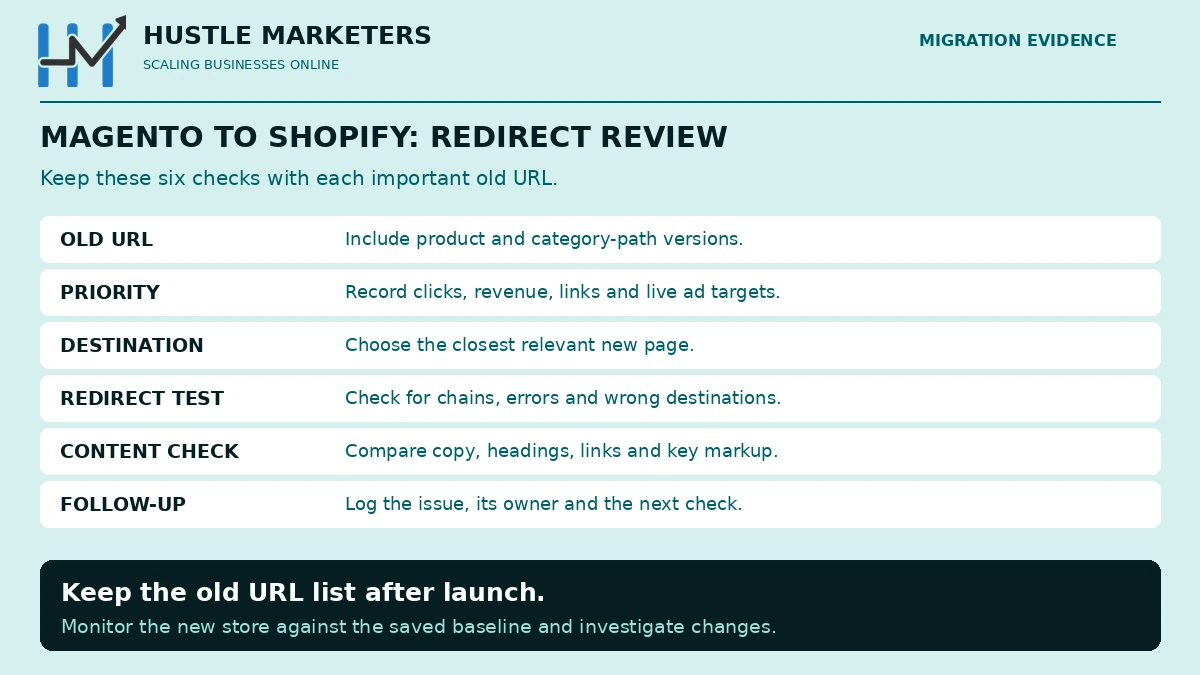
Build a complete list of old URLs first, then map each one that has traffic, links or rankings to its closest new page. Prioritize by organic clicks, revenue and backlinks, import the map into Shopify before launch, and test every old URL after the domain moves. Each one should return a single 301 to a page that returns 200.
Where do you get the full list of old Magento URLs?
Use several sources, because each one misses something:
- Crawl and export. Crawl the live Magento store and its XML sitemaps, export Search Console and GA4 landing pages, pull backlink targets from your link tool and, if you can, server logs. Magento’s admin export covers products, customers, pricing and stock, but not URL rewrites, so ask your developer to export the rewrite data from the database.
- Get more than 1,000 rows from Search Console. Google’s export help page says UI exports are truncated to 1,000 rows. The Search Analytics API returns up to 25,000 rows per request. If you want the bulk export to BigQuery, set it up well before launch, because it does not backfill earlier data.
How do you map, import and test the redirects?
- Rank the list. Put URLs with organic clicks, revenue, backlinks and live ad destinations at the top. These must map to the closest equivalent, not to a category or the homepage.
- Map to the closest match. Google’s site move guide warns that redirecting many old URLs to the homepage “might be treated as a soft 404”. For products you no longer sell, use the closest category, or let the URL return 404 or 410 if nothing relevant exists.
- Check the count. Shopify’s URL redirect help page caps redirects at 100,000, or 20,000,000 on Plus. If your list is longer, cut low-value URLs with no clicks or links first.
- Import before launch. Shopify’s migration guide says you can set up URL redirects “before you transfer your domain”, and its URL redirect page says you import them by CSV under Content, Menus, URL redirects and that “URL redirects start working immediately”.
- Avoid chains. Point every old URL straight at its final destination. Google follows several hops, but its site move guide advises “redirecting to the final destination directly”.
- Test after the domain moves. Crawl the full old URL list against the live Shopify store and fix anything that returns 404, chains through several redirects or lands on the wrong page.
- Keep the redirects live for at least a year. Google’s site move guide says to keep them “for as long as possible, generally at least 1 year”.
Which Shopify redirect rules catch Magento stores out?
Three Shopify rules on the same help page catch Magento stores out. URLs with query strings “might not work as expected” with redirects, which affects Magento filter and store-switcher URLs. If you use Markets subfolders, redirects do not apply to every subfolder automatically. And Shopify can only redirect broken URLs, so an old URL that now loads a live Shopify page cannot be redirected anywhere else.
Do not rely on Magento’s rewrite table alone, even with a developer export. Magento’s GitHub tracker has an open issue on 2.4.4 to 2.4.6 where moving a category created a 301 for the category but not for its products’ URLs. URLs like that still exist in Google’s index and in backlinks, but not in the table.
Which Shopify limits affect SEO after a Magento move?
Five Shopify rules shape what you can carry over from Magento. They are the fixed URL segments, the redirect cap and broken-URL rule, duplicate product URLs inside collections, limited robots.txt control and the per-product variant cap. None of them stops a store from ranking, but each one changes how you plan the move.
| Shopify rule | What it means for a Magento move | Source |
|---|---|---|
| Fixed /products/ and /collections/ segments | Every product and category URL changes; handles can stay the same | Shopify URL guide and URL redirect help, which calls them “fixed Shopify paths” |
| Up to 100,000 redirects (20,000,000 on Plus), only from broken URLs | Large catalogs must prioritize; URLs that load a live page cannot redirect | URL redirect help |
| Products also load inside collections | The canonical points to the /products/ URL, so check which URL version your theme links to | Shopify canonical article |
| robots.txt.liquid is “an unsupported customization” | Magento robots rules cannot be copied over one to one | robots.txt help |
| 2,048 variants and three options per product | Some configurable products must be split or remodeled | Variants help |
International Magento stores have one more change. Shopify Markets creates hreflang tags automatically for each international domain or subfolder, according to Shopify’s hreflang help page. Map each Magento store view to the matching market URL, and remember that redirects have to be set for each subfolder. Our Magento vs Shopify comparison covers these limits in more detail, and our Shopify SEO guide covers Shopify’s SEO defaults, limits and fixes once you are on the platform.
What should you check before and after launch?
Record a baseline before the move and keep the new store hidden while it is built. Compare it with the old store before launch, then switch the domain, make the store public and submit the sitemap. In the weeks after launch, crawl the old URL list, watch Search Console daily and fix 404s and wrong redirects as they appear.
| When | Check | Why |
|---|---|---|
| Before the build | Crawl the Magento store and export URLs, status codes, titles, meta descriptions, H1s, canonicals and structured data | Gives you a baseline to compare against |
| Before the build | Export Search Console and GA4 data by landing page, and set up the Search Console bulk export if you want it | Shows which URLs carry traffic and revenue |
| During the build | Keep the Shopify store in private mode | Shopify says pages in private mode are “hidden from visitors and search engines” |
| During the build | Compare titles, meta descriptions, body copy, internal links and structured data on Shopify templates with the baseline | Content and markup lost in the move cause drops that redirects cannot fix |
| During the build | Import the redirect map and spot-check it | Redirects can be added before the domain transfers |
| Launch day | Connect the domain, set it as primary and switch the store from Private to Public | Shopify redirects the myshopify.com address and other domains to the primary domain |
| Launch day | Submit sitemap.xml in Search Console | Shopify generates it automatically, but Google cannot read it while the store is private |
| Launch week | Crawl the old URL list and the new site; check status codes | Finds 404s, chains and wrong destinations |
| Launch week | Check Merchant Center, feed item IDs and conversion tracking | Protects Shopping and Performance Max campaigns |
| First weeks | Watch Page indexing, crawl stats and organic landing pages against the baseline | Shows problems Google finds as it recrawls |
The private mode wording is from Shopify’s store access page. The domain steps are on Shopify’s domain connection page, which says DNS changes usually take effect within two hours but can take up to two days. Its primary domain page says the myshopify.com address and your other domains redirect to the primary domain. Shopify’s sitemap page covers the sitemap and Search Console steps.
If you keep the same domain, you do not need Google’s Change of Address tool. Google says it is for moves “from one domain or subdomain to another”, not for URL changes within the same site. If the domain does change, use it as well as the redirects.
How long does organic traffic take to recover after a Magento to Shopify move?
Expect some movement for a few weeks. Google’s site move guide says a small to medium site can take a few weeks for most pages to move, and larger sites take longer. A drop that is still getting worse after a month often points to a fixable cause, such as missing redirects, lost content or broken hreflang, rather than normal recrawling.
Published outcomes vary. In scandiweb’s write-up of the Kouboo migration, the agency reports an 8 to 9% organic traffic dip after a Magento 2 to Shopify move that recovered within a month.
In Shopify’s community forum, one merchant reported a 49.75% traffic drop despite 301s, and another reported a decline in UK organic traffic just over three months after migrating. Replies in those threads pointed to redirects, hreflang and content changes. Agency case studies report their own results, so treat them as examples rather than benchmarks.
If traffic keeps falling, work through the likely causes in this order:
| What you see | Likely cause | What to check |
|---|---|---|
| 404s rising in Search Console | Old URLs missing from the redirect map | Compare the 404 list with your old URL list, then add redirects to the closest pages |
| Old URLs still indexed weeks later | Redirect chains, or internal links and sitemaps still pointing at old URLs | Crawl for chains; update links, sitemaps and canonicals to the new URLs |
| Category rankings lost, product rankings stable | Collections have less content than the old category pages | Compare old category copy, headings and internal links with the new collection |
| Traffic lost in one country | hreflang or Markets setup, or redirects missing in a subfolder | Check hreflang tags and redirects for each market URL |
| Product rich results gone | Structured data or reviews not carried over | Test product pages for price, availability and review markup |
| Shopping and Performance Max performance dropped | Feed item IDs changed | Compare Merchant Center item IDs before and after the move |
What happens to Google Shopping and ads during the move?
Shopping and Performance Max campaigns depend on the product feed, so the main risk is changed item IDs. Shopify’s Google & YouTube app sends products to Merchant Center with its own ID format, which will not match a Magento feed that used SKUs. Decide before launch whether to keep your old IDs through a feed app or accept a reset, and update ad final URLs and conversion tracking on launch day.
Shopify says its Google & YouTube channel “automatically syncs your products” with Merchant Center. Google’s syncing help page gives “shopify_ZZ_” as an example of the raw product IDs that come from Shopify. Google’s product data specification says that once you assign an ID, “don’t change it”, and that changing it overwrites the product and its history.
- Item IDs. If campaign history matters, use a feed app that lets you set the ID to match your Magento feed. If you accept new IDs, expect Shopping and Performance Max to relearn, and rebuild any custom labels or product exclusions that used the old IDs.
- Duplicate products. Turn off the Magento feed when the Shopify feed goes live, so Merchant Center does not receive the same products from two sources. Our guide to Shopify Merchant Center duplicates covers this.
- Final URLs. Redirects keep old ad links working, but update final URLs, sitelinks and tracking templates to the new URLs so clicks do not pass through a redirect.
- Conversion tracking. Shopify’s checkout no longer runs checkout.liquid, and its developer documentation says script tags on the thank you and order status pages were sunset for non-Plus stores on August 26, 2026. Rebuild tracking with Shopify’s customer events and pixels, then test a real order. Our Shopify server side tracking guide covers the setup.
For feed errors after the switch, see our guide to Merchant Center errors.
How long does a Magento to Shopify migration take, and what does it cost?
It depends mostly on catalog size, custom features and how much of the design is rebuilt. Paid data tool plans start at tens of dollars and rise with catalog size, but most of the budget goes on the theme, apps, integrations and testing. Vendors’ published timelines run from weeks for simple stores to months for mid-market ones.
On tools, Matrixify’s plans run from free to $200 a month, LitExtension starts at $59, and Cart2Cart charges $29 each for its redirect and SEO URL options, as shown in the tools table above. For full projects, LitExtension’s guide says agency rebuilds can cost over $30,000, and Charle, a Shopify agency, puts a typical mid-market Magento to Shopify Plus migration at three to six months. These are vendor figures, so get quotes based on your own catalog, integrations and design scope.
Leave time for SEO checks. Building the old URL list, mapping it and testing it usually takes longer than importing the data, and it is the part that protects organic revenue. Avoid launching just before your busiest season, so that any post-launch fixes do not land during peak trading.
Should you move from Magento to Shopify at all?
Move if the cost of running Magento, such as hosting, upgrades, security patches and developer time, outweighs what its flexibility gives you, and your catalog fits Shopify’s limits. Stay and upgrade if you rely on features Shopify cannot match without heavy workarounds, or if your Magento store is stable on a supported version.
Our Magento vs Shopify comparison sets out verified costs, B2B features and SEO controls side by side. If you decide to stay, our Magento upgrade guide covers moving to Magento 2.4.9.
Hustle Marketers does not build stores or run platform migrations. We handle the search and ads side of a move: the old URL list and redirect map, SEO requirements for the new templates, crawl comparisons, feed and tracking checks, and monitoring after launch. That work sits in our Magento SEO consultant service.
How this guide was researched
This guide was written on October 3, 2026. We checked every Shopify, Adobe and Google rule on their own help, developer and documentation pages that day, and took tool features and prices from each vendor’s own pages. We also read the top 10 results for magento to shopify migration and related searches, plus three more guides, and the Shopify community threads linked above.
Eight of those 10 results were written by migration tool vendors, app vendors or Shopify itself. None of them explained Shopify’s redirect cap or the rule that only broken URLs can be redirected, and two tool vendors sell redirects as add-on options. Where a page disagreed with Shopify, Adobe or Google, we used the platform’s own documentation.
Magento to Shopify migration FAQs
Can I migrate from Magento to Shopify without losing SEO?
You can keep most of it if you plan the redirects. Build a full list of old URLs, redirect each one with traffic, links or rankings to its closest new page, keep titles, content and structured data consistent, and monitor Search Console after launch. Expect some movement for a few weeks while Google processes the new URLs.
Does Shopify’s free migration app support Magento?
No. Shopify’s Store Migration app lists Square, WooCommerce, Etsy, Wix, Amazon, eBay, Clover and Lightspeed, but not Magento. Magento stores use third-party tools such as Matrixify, LitExtension or Cart2Cart, or custom scripts that use Shopify’s APIs.
Will my Magento URLs stay the same on Shopify?
Mostly not. Shopify keeps products under /products/ and collections under /collections/, so Magento URLs with category paths or an .html suffix change. You can keep the same handle at the end of the URL, but you need 301 redirects from every old URL that matters.
How many redirects can Shopify handle?
Shopify allows up to 100,000 URL redirects, or 20,000,000 on the Plus plan, and only redirects URLs that are broken. Redirects can be imported by CSV before the domain moves and start working immediately. Large Magento stores with more old URLs than that need to prioritize by traffic, revenue and links.
Can customer passwords be migrated from Magento to Shopify?
Not by CSV. Shopify says you can’t migrate customer passwords from another online store using a CSV, so imported customers are invited to create new passwords. Plan an email that explains the change, because customers who try their old password may otherwise contact support.
Can I migrate orders from Magento to Shopify?
Yes, but not through Shopify’s built-in CSV import. Shopify lists migration apps, the Order API and the Transaction API for historical orders. Import products first, then customers, then orders, and turn off new order notifications for staff, because each imported order triggers one.
Can I migrate Magento categories and subcategories to Shopify?
Yes, as collections. Shopify collections sit in one flat list, so nested Magento categories become separate collections with unique handles, and menus recreate the hierarchy. Redirect each old category URL to the collection that replaces it, and carry over its description and headings.
Do I need Shopify Plus to migrate from Magento?
No. The Basic, Grow and Advanced plans can all receive a Magento migration, but Shopify’s Starter plan cannot group products into collections, so it does not suit a Magento catalog. Plus matters if you need more than 100,000 redirects, unlimited B2B catalogs, deeper checkout customization or expansion stores for several countries.
Will my store go offline during the migration?
It does not have to. The Magento store keeps trading while the Shopify store is built in private mode. On launch day you point the domain at Shopify, which Shopify says usually takes effect within two hours and can take up to two days, so plan the switch for a quiet period.
How long does a Magento to Shopify migration take?
Simple stores can move in a few weeks, while mid-market stores with integrations and custom features often take several months. Data import is usually the quick part. Design, apps, integrations, the redirect map and testing take most of the time.