
Free tool · Link building · No sign-up
Check if a link is dofollow or nofollow, on any page
Enter a page URL to see every link on it, labelled dofollow, nofollow, sponsored or ugc, with its anchor text. The checker also reads the page-level signal most tools skip: a meta robots nofollow tag cancels every link on the page, even links with no rel attribute. Check one page, or verify up to 10 backlinks at once.
- Dofollow, nofollow, sponsored and ugc
- Page-level nofollow and noindex
- Bulk check 10 backlink pages
- CSV export
- Highlighter bookmarklet
- Free, no login
Pasted HTML is checked inside your browser and never leaves it.
For URLs, our server fetches the page so your browser can read its links. We do not save the pages you check or your results. Limit: 30 pages an hour.
Site blocking the checker or page behind a login? Use the Paste HTML tab, or run the dofollow highlighter bookmarklet on the page itself.
How to check if a link is dofollow or nofollow
There are three quick ways. Use the one that fits the page you are checking.
- Use this checker. Paste the page URL and press Check links. Every link is listed with its rel value and a plain result. Add your domain in the second box and your link is highlighted in yellow.
- Inspect the link in your browser. Right-click the link and choose Inspect. Look at the
<a>tag. If it hasrel="nofollow",rel="sponsored"orrel="ugc", it is not a dofollow link. If there is no rel, or only values likenoopener, it is dofollow. Then check the page’s<meta name="robots">tag too. - Use the highlighter on any page you have open. Drag the button below to your bookmarks bar. Click it on any page, including pages behind a login, and every link gets a green outline (dofollow) or a red dashed outline (nofollow, sponsored or ugc).
No extension to install. It runs only when you click it and does not send anything anywhere.
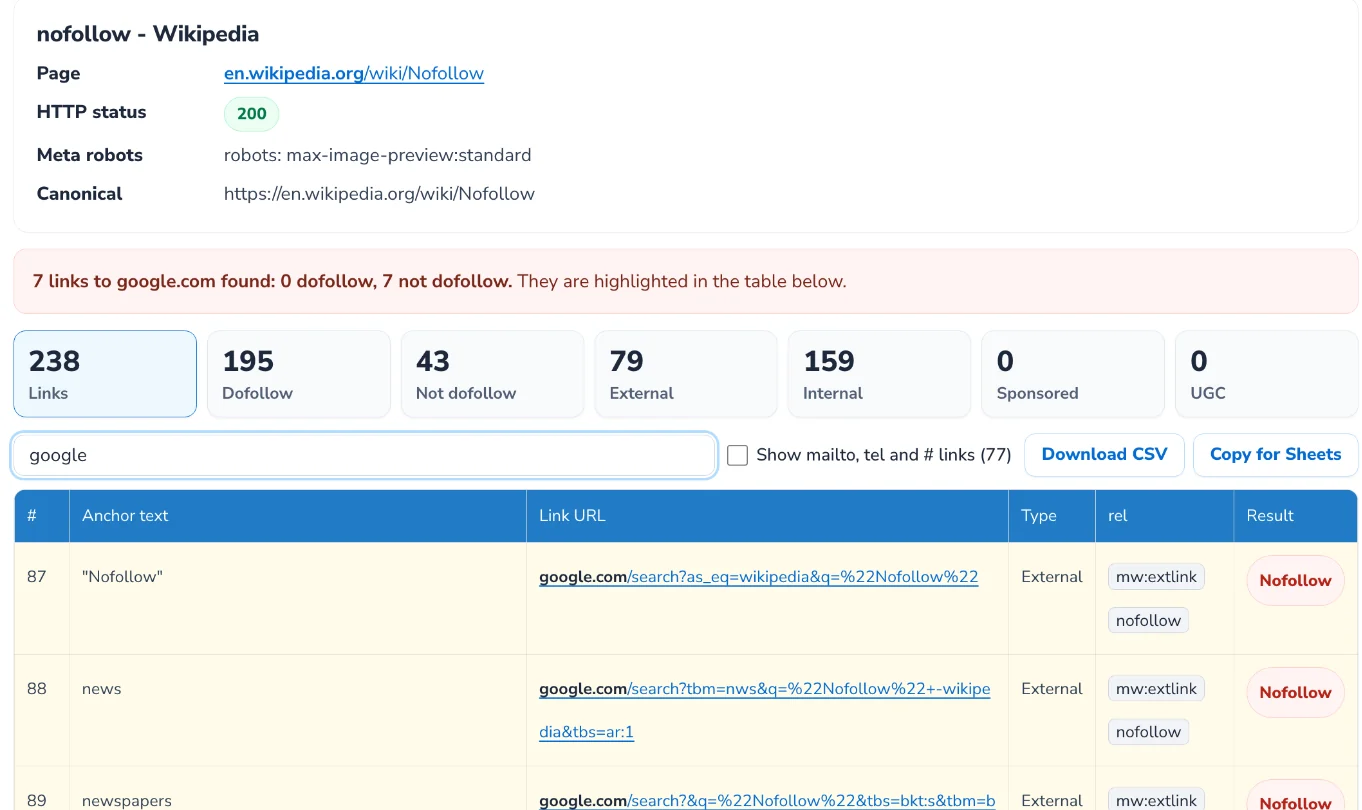
What dofollow, nofollow, sponsored and ugc mean
“Dofollow” is not a real HTML attribute. It is shorthand for a link with no rel value that tells search engines not to follow it. Google reads these values as hints, not strict rules, since 2020.
| What the link has | What it tells Google | Result in this tool |
|---|---|---|
No rel, or only noopener, noreferrer or external | A normal editorial link that can pass ranking signals | Dofollow |
rel="nofollow" | Do not associate this page with the link target | Nofollow |
rel="sponsored" | The link is paid, an ad, a sponsorship or an affiliate link | Sponsored |
rel="ugc" | The link was added by users, for example in comments or forum posts | UGC |
<meta name="robots" content="nofollow"> or an X-Robots-Tag: nofollow header | Do not follow any link on this page | Nofollow (whole page) |
noopener and noreferrer are security and privacy settings for links that open in a new tab. They do not change how search engines treat the link. Google’s own guide to these values is Qualify your outbound links to Google.
Why a dofollow link can still pass nothing
Most checkers stop at the rel attribute. These are the cases we see most often in backlink audits where a link looks fine but is not doing its job:
The whole page is nofollow
A meta robots tag with nofollow or none overrides every link on the page, and an X-Robots-Tag header can do the same. This checker flags the meta tag at the top of your results.
The page is noindex
If the page is kept out of search results, links on it carry far less weight, and Google crawls long-term noindex pages less often.
The page returns an error
A link on a 404 or a page that redirects elsewhere is not counted. Check the HTTP status in your results.
The link is added with JavaScript
If a link only appears after scripts run, it may not be in the HTML we receive. Use the Paste HTML tab with the rendered source, or the highlighter.
The link goes through a redirect
Links that pass through a tracking or redirect URL on another domain often do not pass value to you. Check that the link URL in your results points straight to your site.
The canonical points to another URL
If the page names a different URL in its canonical tag, Google may index that URL and drop this copy. Syndicated articles and print versions often do this.
Your link is most likely to count if the canonical page carries it too. The checker flags a canonical that points elsewhere. Google covers canonical tags in its guide to duplicate URLs.
Google has not indexed the page
A link on a page Google never indexed cannot help you. Search Google for site: followed by the page URL. If nothing comes up, the page may not be indexed yet. New guest posts can take days or weeks.
The page is blocked or thin
A page blocked in robots.txt, or a page with nothing on it but links, adds little. A relevant page that real people read is worth more than ten of these.
How to check dofollow backlinks in bulk
If you buy guest posts, run digital PR or manage links for clients, checking each placement by hand takes hours. Here is the process we use:
- Collect the page URLs where you were promised a link. Your outreach sheet or the publisher’s report is enough.
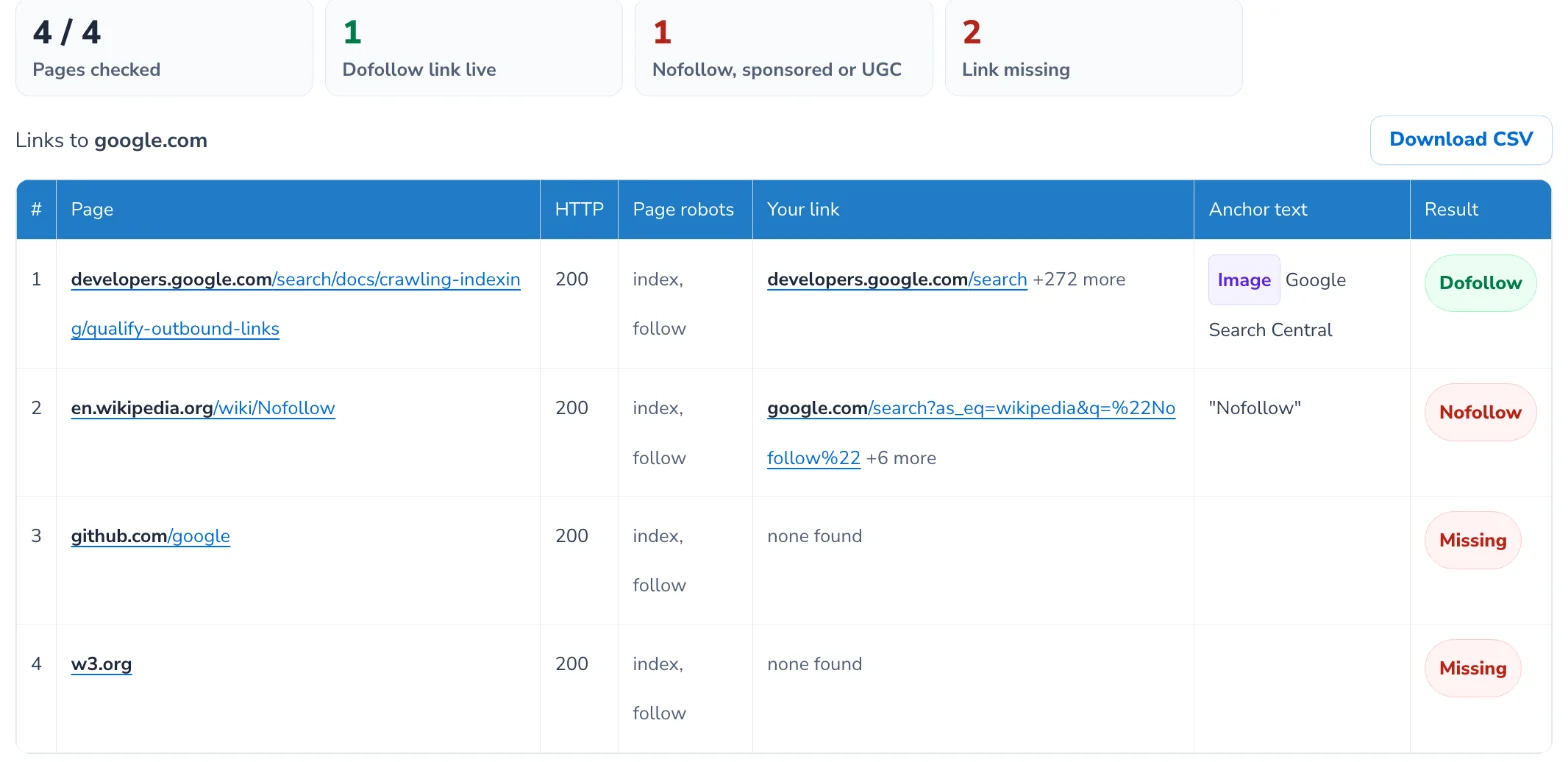
- Open the Verify my backlinks tab, paste up to 10 URLs and enter your domain.
- Read the Result column: Dofollow, Nofollow, Sponsored, UGC or Missing. Pages marked noindex or nofollow as a whole are flagged too.
- Download the CSV and send the list of missing or nofollow links back to the publishers.
- Run it again a month later. Links get removed or changed after the invoice is paid more often than you would think. Use the re-check schedule below.
Want to find dofollow backlinks you did not know about? This tool checks pages you give it. To discover pages that already link to you, export the latest links from the Links report in Google Search Console, then paste those pages into the bulk tab.
Can a dofollow backlink turn nofollow later?
Yes. A publisher can add nofollow, sponsored or ugc to your link, change the anchor text, point it somewhere else or delete it, long after the post went live. The page still loads and looks the same, so nothing seems wrong until you check the HTML.
The usual reasons we see:
- An old post gets refreshed. The editor trims outbound links or rewrites the paragraph your link was in.
- The site changes theme or CMS. Some themes and plugins add nofollow to every outbound link.
- The publisher changes its link policy. This often follows a warning about selling links.
- The anchor text is swapped. A keyword anchor becomes your brand name or a bare URL.
Backlink tools update their index on their own schedule, so a change can take a while to show up there. Checking the live page is the quickest way to know. A simple re-check schedule:
| Type of link | First check | Then re-check |
|---|---|---|
| Paid placement or guest post | About 7 days after it goes live | Monthly for 3 months, then every quarter |
| Digital PR coverage | The day the article is published | Every quarter |
| Directory or profile listing | When the listing is approved | Every 6 months |
| Links you earned without asking | When you find them | Every quarter |
Keep your bulk list in a sheet, run it on that schedule and compare each CSV with the last one.
Paid for links that came back nofollow?
Our SEO team checks every link in your backlink profile, flags the ones that changed or disappeared and tells you which publishers to chase first.
What can you use a dofollow checker for?
A dofollow checker is useful any time you need to know whether a link passes value, before you pay for it, after you get it, or on your own site.
Verify guest posts and paid placements
Paste the pages you paid for into the bulk tab and confirm each link is live and dofollow before you approve the invoice.
Audit your own outbound links
Check your blog posts to see which outbound links pass value. Paid links should carry rel="sponsored" and links in comments rel="ugc".
Find internal links set to nofollow
A theme or plugin can add nofollow to menus or footers by mistake. Check one of your pages and click Internal in the results to spot them.
Check a site before you pitch it
Run a few of the site’s existing articles through the checker. If every outbound link is nofollow, or the pages are noindex, a placement there will not pass value.
Study a competitor’s link sources
Check the pages that link to a competitor to see which of those links are dofollow and worth chasing for your own site.
What does this checker not check?
This dofollow checker reads one page at a time and tells you how each link on it is marked. It does not do everything:
- It does not crawl a whole website. Enter each page you want checked.
- It reads the HTML the server sends. Links added later by JavaScript can be missing, so paste the rendered HTML instead.
- It does not test whether each linked URL works or redirects.
- It cannot read the X-Robots-Tag header on fetched pages, which can also make a whole page nofollow.
- It cannot find backlinks you do not know about yet. Use the Links report in Google Search Console for that.
- It checks up to 30 pages an hour, with up to 10 pages per bulk run.
Should your outbound links be dofollow or nofollow?
| Type of link | Use |
|---|---|
| A source or a resource you recommend | Leave it as a normal (dofollow) link |
| Paid placements, sponsored posts, affiliate links | rel="sponsored" (Google also accepts nofollow) |
| Blog comments, forum posts, user profiles | rel="ugc" |
| A link you do not want to vouch for | rel="nofollow" |
| Your own internal links | Leave them dofollow. Nofollow on internal links does not reliably stop crawling and throws away the value of the link. |
For the full background, with examples from WordPress and Shopify, read our guide to nofollow links.
FAQs
Is this dofollow link checker free?
Yes. There is no sign-up and no paid plan. You can check up to 30 pages an hour, and up to 10 pages per run in the bulk tab.
How do I check if a link is dofollow or nofollow?
Enter the page URL in the checker above and look at the Result column. A link is dofollow when its rel attribute has no nofollow, sponsored or ugc value and the page itself is not set to nofollow.
Are nofollow links useless for SEO?
No. Google treats nofollow as a hint, so it may still use some nofollow links, and they can send real visitors. A natural link profile has a mix of both.
Can this find all of my dofollow backlinks?
It checks the pages you enter. To find pages that link to you, export them from the Links report in Google Search Console, then paste them into the bulk tab to see which are dofollow.
Why does the checker show no links or the wrong links?
Some sites block automated visitors or build their links with JavaScript. Paste the page source into the Paste HTML tab, or use the highlighter bookmarklet on the page.
Are links from social profiles dofollow?
Most large platforms, including social networks, Q&A sites and forums, add nofollow or ugc to outbound links. Profile pages can also be behind a login. Check the exact page with the highlighter to be sure.
Does noopener or noreferrer make a link nofollow?
No. They only control what the new browser tab can see. A link with rel="noopener noreferrer" and nothing else is still a dofollow link.
Do you store the pages or URLs I check?
No. We fetch the page for your browser, the links are read on your device, and we keep nothing. Pasted HTML never leaves your browser.
What does a nofollow link look like in HTML?
A nofollow link has nofollow in its rel attribute: <a href="https://example.com" rel="nofollow">Example</a>. A dofollow link is the same tag with no rel, or with values like noopener only: <a href="https://example.com">Example</a>.
Does Google Search Console show if a backlink is dofollow?
No. The Links report lists the sites and pages that link to you, but not the rel value of each link. Export the linking pages and paste them into the bulk tab to see which ones are dofollow.
Can a dofollow link become nofollow later?
Yes. Publishers edit old posts, change themes or change their link policy, and your link can turn nofollow or disappear without notice. Check paid links about a week after they go live, then monthly.
How many of my backlinks should be dofollow?
There is no target ratio. A natural link profile has a mix, because social networks, forums and many news sites use nofollow. Focus on whether each dofollow link comes from a relevant page that real people read.
Does a canonical tag affect a backlink?
It can. If the page with your link points its canonical to a different URL, Google may index that URL instead, and the copy with your link may not count. The checker flags a canonical that points elsewhere.
More free SEO tools
Want backlinks that actually move rankings?
Our SEO team audits your link profile, removes the guesswork from link building and reports every link we build, checked for dofollow, indexing and relevance. SEO plans start from $500 a month.
Built by Ishant Sharma, founder of Hustle Marketers, running SEO and link audits since 2013Last checked October 16, 2026









