Local Business Schema: What Google Actually Requires

Ishant
Published : October 9, 2026 at 11:30 am
Ishant

Summarize this article with:
Key Observations
Google asks for two things in a local business schema block: a name and an address. The rest of its list is advice, not a rule. For this page we read Google’s own docs and forty-odd forum threads and issue reports from people shipping this markup.
- Google names exactly two required properties, name and address, then seventeen recommended ones.
- Image, logo, areaServed and @id do not appear on Google’s local business page at all, whatever a checklist says.
- A schema.org maintainer settled the argument in one line: every property in the vocabulary is optional. Google then sets its own floor on top of that.
- Star ratings for reviews your business controls break Google’s review snippet rules, and Google sends a manual action for exactly that. We quote the notice below.
- Nobody on any platform we could reach reports a measured ranking gain. The one test anyone published came back negative.
- Google documents no tie between this markup and your Business Profile, the map pack or Google Maps.
Contents
The page runs in the order you would work in. Start with the requirements. Then copy the reference block. Then jump to whichever hard case you have.
Every quote below links to the thread, issue or page it came from.
What is local business schema, and what does it actually do?
Local business schema is a block of code that names your business, its address and its trading details in a format Google reads. Google calls it local business structured data. Adding it makes a page eligible for a richer search result. It does not move the page up the results.
Google’s own line on the payoff is narrow and worth reading twice. The documentation says local business structured data “can help pages appear in a unique Google Search result”. Note the word “can”. Eligibility is the promise, and that is all of it.
Schema, structured data, JSON-LD: which word means what?
People use the three words as if they mean one thing. They do not. Schema.org is the shared vocabulary that defines the type LocalBusiness and its properties. Structured data is the general name for machine-readable data on a page.
JSON-LD is one of three formats for writing it down. Google supports all three and “recommends using JSON-LD for structured data if your site’s setup allows it”. Microdata and RDFa still work. The Rich Results Test still “supports structured data in JSON-LD, RDFa, and Microdata”.
So “local schema”, “business schema”, “schema local business” and “local schema markup” all point at the same job. The vocabulary calls the type LocalBusiness. Our wider guide to structured data for SEO covers the other types.
Is “location schema” a real schema.org type?
No. Nobody at schema.org defined a type called Location. People search for “location schema” when they mean one of three real things, and the fix differs for each.
- A LocalBusiness node on a store or branch page. This is what most people want.
- The Place type, or the location property on an Event, which points at where something happens.
- The address and geo properties inside a business node, which is where a street address and coordinates live.
If you came here for “location schema”, the reference block further down is the thing you want. The schema.org LocalBusiness page lists the full property set.
What does schema markup for local SEO give you in the results?
Google names two result shapes on its local business page, and neither is the map pack. One is a knowledge panel. The other is a carousel of businesses for searches on a type of business.
The documentation also lists what the marked-up detail can carry into those results: business hours, departments within a business, and reviews. For bookings it points elsewhere, to the Maps Booking API. That is the whole feature set, and it is smaller than most people expect.
What is the Restaurant carousel, and can you have one?
Google names a “Restaurant carousel (limited access)” as a separate feature on the same page. Limited access means registration, not markup. You cannot open it by adding properties.
That distinction matters when a restaurant client asks why a competitor has a carousel. The answer is a gated program, not better code. Our restaurant schema markup guide covers the menu and cuisine properties that do apply. For the broader question of how machines read entities on a page, see how semantic search works.
What properties does Google require, and which does it only recommend?
Google requires two properties: name and address. It then recommends seventeen more. Miss a recommended property and the page stays eligible; miss name or address and it does not. That is the whole rule, printed on one Google page.
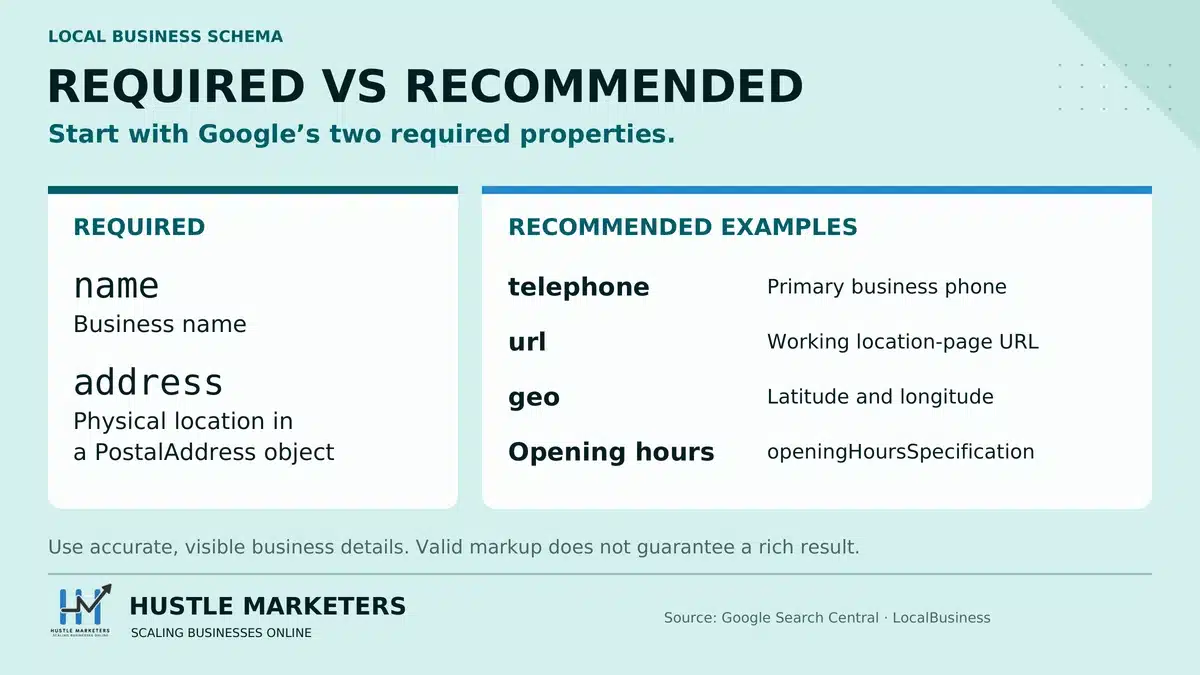
Google’s required properties
| Property | Level | What goes in it |
|---|---|---|
name | Required | The business name, as customers see it on the page. |
address | Required | A nested PostalAddress with the street, town, region, postal code and country. |
That is the list. Two entries. Schema App, which sells schema tooling, words the stake well.
Google’s recommended properties
Recommended means Google will use the value if you supply it. Nothing breaks if you leave it out. Here is the full set, with the nested sub-properties grouped under their parents.
| Property | Sub-properties Google names | Why bother |
|---|---|---|
telephone | None | The number you want calls on, in international format. |
url | None | The canonical page for this location. |
geo | geo.latitude, geo.longitude | Coordinates, as numbers. |
openingHoursSpecification | opens, closes, dayOfWeek, validFrom, validThrough | Trading hours, and dated exceptions to them. |
priceRange | None | A short price indicator such as a run of dollar signs. |
department | None | A nested node per department with its own hours or number. |
menu | None | A link to the menu, for food businesses. |
servesCuisine | None | The cuisine served, for food businesses. |
aggregateRating | None | A rating summary. Read the review section first. |
review | None | Individual reviews. Read the review section first. |
Two names are missing from both lists, and their absence matters. Google’s local business page does not name image, and it does not name logo. It also never names areaServed or serviceArea. Anyone who calls one of those four required is inventing a rule.
Which properties get mistaken for required ones?
Plenty of checklists and plugin screens treat more properties as required than Google does. Here is what Google’s local business page actually says about the ones that turn up most often.
| Property | What Google’s local business page says |
|---|---|
url | Recommended, not required. |
telephone | Recommended, not required. |
geo | Recommended, not required. |
openingHours | Not named. Google uses openingHoursSpecification, and only recommends it. |
image | Not named on the page. |
logo | Not named on the page. |
areaServed | Not named on the page. |
mainContentOfPage | Not named on the page. |
@id | Not a property at all. It is a JSON-LD identifier, covered next. |
If a validator, plugin or audit tells you one of these is required for local business rich results, it is not quoting Google. Fill the recommended ones you can fill accurately, because Google will use them, and leave the rest alone.
Is @id a required property?
No. Google does not name it, and schema.org does not require it. The @id key is a JSON-LD mechanism, not a Google requirement. You use it to give a node a stable identifier so other nodes can point at it.
Why does Google require address when schema.org says it is optional?
Both statements are true. They come from two different systems with two different jobs, and confusing them is how so many contradictory “required” lists get written.
Schema.org publishes the vocabulary. Google consumes it. A maintainer closed the reported mismatch with one line: “The schema only defines types and their properties and all properties are optional.”
The reporter was not a hobbyist. He was rolling markup out across 5,000 European franchise locations. He reported four different answers from four Google teams on one question. So the confusion is structural, not yours.
The working rule: schema.org tells you what you may say. Google tells you what it needs before it will show a rich result. Validate against both, and treat Google’s two as the floor.
How do you add local business schema to your website?
Google’s own page sets out four steps. The fourth is the easy one to skip: check the live page after you deploy, because what a plugin or theme outputs can differ from the block you tested.
- Add the two required properties, then the recommended ones you can fill honestly.
- Read the structured data guidelines and check your block against them.
- Test the block in the Rich Results Test.
- Deploy it, then confirm with the URL Inspection tool in Search Console.
Which type should you use: LocalBusiness, a subtype, or Organization?
Use the most specific LocalBusiness subtype that honestly fits the business. Fall back to plain LocalBusiness only when nothing fits. Keep Organization for the company as a whole. Then link the two nodes with a stable identifier, rather than swapping one out for the other.
Google’s page puts it plainly. It says to “Use the most specific LocalBusiness sub-type possible” and names three as examples: Restaurant, DaySpa and HealthClub. Those are examples, not a menu. Google publishes no closed list of the subtypes it supports.
How do you pick a subtype, and where is the list?
The list lives at schema.org, not at Google. LocalBusiness has thirty direct subtypes, and most of them have children of their own. Dentist, Restaurant and HairSalon all sit somewhere in that tree.
- Retail and trade: Store, ShoppingCenter, AutomotiveBusiness, HomeAndConstructionBusiness, DryCleaningOrLaundry
- Food, stays and leisure: FoodEstablishment, LodgingBusiness, EntertainmentBusiness, SportsActivityLocation, TravelAgency
- Health and care: Dentist, MedicalBusiness, HealthAndBeautyBusiness, ChildCare, AnimalShelter
- Professional and financial: ProfessionalService, LegalService, FinancialService, RealEstateAgent, EmploymentAgency
- Public and civic: GovernmentOffice, Library, ArchiveOrganization, RecyclingCenter, TouristInformationCenter
- Other: EmergencyService, InternetCafe, SelfStorage, RadioStation, TelevisionStation
Pick the deepest node that is true. A criminal defense practice is a LegalService, and a LegalService is a LocalBusiness. The deeper type tells Google more, and it costs you nothing.
What if your plugin does not list the subtype you need?
You will hit this. Plugin subtype lists are short on purpose. Rank Math support turned down a request for Optometrist, a type the vocabulary does define. The reason it gave was policy: “we cannot add all the options to the plugin as that would be a never-ending list”.
So Google’s instruction to go as specific as possible is not implementable in the most popular free tool for the job. Two ways round it, in order of preference:
- Import your own JSON-LD block into the plugin’s schema generator, where the plugin allows it. You keep the exact type.
- Take the nearest parent the plugin does offer, then stop worrying. A correct parent beats a wrong sibling.
Can you use an @type array when the business is two things?
Yes, JSON-LD accepts an array of types on one node. Use two at most, and only where both are true of the same premises. A restaurant with a bar qualifies. Five trades on one node describes a holding company.
One service business in a public thread stacked five types on a single node, plus a long list of service types and postal codes. The practitioner asked whether trimming would work better, and nobody in the thread answered him. The five were:
- HomeAndConstructionBusiness
- HVACBusiness
- Plumber
- Electrician
- RoofingContractor
Does Organization or LocalBusiness change what you rank for?
No. Neither type is a ranking input, so the choice is about description, not position. LocalBusiness inherits from both Organization and Place, which is why it accepts company properties and premises properties on the same node.
A forum administrator answering this exact question advised LocalBusiness on the homepage and on each location page. That works for one set of premises. For a company with branches, another thread landed on a cleaner split.
If LocalBusiness replaces Organization, what breaks on your blog?
A practitioner asked this in a public thread and nobody answered him. It matters. Article markup normally names the Organization node as its publisher. Swap that node out and the reference dangles.
Do not swap. Give each node a stable @id and point at it. The Organization node stays the publisher; the LocalBusiness node describes the premises and links back.
{
  "@context": "https://schema.org",
  "@graph": [
    {
      "@type": "Organization",
      "@id": "https://example.com/#organization",
      "name": "Ridge Road Hardware",
      "url": "https://example.com/"
    },
    {
      "@type": "HardwareStore",
      "@id": "https://example.com/stores/burbank/#localbusiness",
      "name": "Ridge Road Hardware Burbank",
      "parentOrganization": { "@id": "https://example.com/#organization" },
      "address": {
        "@type": "PostalAddress",
        "streetAddress": "418 Ridge Road",
        "addressLocality": "Burbank",
        "addressRegion": "CA",
        "postalCode": "91506",
        "addressCountry": "US"
      }
    }
  ]
}
Now the Article node on a blog post can keep naming the Organization @id as its publisher. Nothing breaks when you add premises. This is the same identifier discipline we describe in our note on entity SEO and how nodes reference each other.
What does a correct local business schema markup example look like?
It looks like this block. It carries both required properties, the recommended ones a real business can fill, and nothing Google does not name. Change the values, keep the shape.
JSON-LD, Microdata or RDFa: which format?
JSON-LD, unless your platform blocks it. Google recommends it, and the Rich Results Test reads all three. The other two still work. JSON-LD wins because it sits in one place instead of threading through your HTML.
Google documents the script tag in the head and in the body. A guide that insists on the head is over-stating the rule.
The reference block
<script type="application/ld+json">
{
  "@context": "https://schema.org",
  "@type": "HardwareStore",
  "@id": "https://example.com/stores/burbank/#localbusiness",
  "name": "Ridge Road Hardware Burbank",
  "url": "https://example.com/stores/burbank/",
  "telephone": "+1-818-555-0148",
  "priceRange": "$$",
  "address": {
    "@type": "PostalAddress",
    "streetAddress": "418 Ridge Road",
    "addressLocality": "Burbank",
    "addressRegion": "CA",
    "postalCode": "91506",
    "addressCountry": "US"
  },
  "geo": {
    "@type": "GeoCoordinates",
    "latitude": 34.180782,
    "longitude": -118.308968
  },
  "openingHoursSpecification": [
    {
      "@type": "OpeningHoursSpecification",
      "dayOfWeek": ["Monday", "Tuesday", "Wednesday", "Thursday", "Friday"],
      "opens": "07:00",
      "closes": "18:00"
    },
    {
      "@type": "OpeningHoursSpecification",
      "dayOfWeek": "Saturday",
      "opens": "08:00",
      "closes": "16:00"
    },
    {
      "@type": "OpeningHoursSpecification",
      "dayOfWeek": "Sunday",
      "opens": "00:00",
      "closes": "00:00"
    }
  ]
}
</script>
Line by line: what each property is doing
JSON-LD permits no comments, so a block you can paste cannot carry its own notes. Here are the notes instead. Level comes from Google’s page, not from us.
| Line | Level | What it does and what to watch |
|---|---|---|
@context | Mechanical | Always the plain schema.org address with no www prefix. Yoast’s own example uses the www form, which is not the canonical one. |
@type | Mechanical | The deepest honest subtype. Swap HardwareStore for yours. |
@id | Optional | A stable identifier so other nodes can point here. Not a Google requirement. |
name | Required | Match the name on the page. Do not append a town or a keyword the page does not use. |
url | Recommended | The canonical URL for this location page. |
telephone | Recommended | International format. Keep it the same number the page shows. |
priceRange | Recommended | A short indicator. Dollar signs are conventional, a range works too. |
address | Required | A nested PostalAddress. A plain string will validate and tells Google less. |
geo | Recommended | Numbers, not strings. Pull them from the map pin, not from the town center. |
openingHoursSpecification | Recommended | An array. The third entry marks Sunday closed, which is the documented way to say it. |
How do you write the address block?
Use a nested PostalAddress with five fields. Street, town, region, postal code, country. Google reads a string too, but the nested form separates the parts for it.
streetAddress: house number and street, plus a unit if one exists.addressLocality: the town or city.addressRegion: the state, as the two-letter code in the US.postalCode: the ZIP code for that street address, not for the region.addressCountry: the two-letter country code.
That fourth point sounds trivial. Localo’s service area example pairs a Chicago street address with ZIP 97201, an Oregon code. It then adds a Boston service area and a 617 phone prefix. A reader who copies that block ships a business in four places at once.
Where does the block go, and on which pages?
Put it on the page that describes the premises. For one location, that is the homepage or the contact page. For several, it is each location page, one node each.
Whether the same markup belongs in the footer of every page splits experienced people. Two long-standing contributors answered one thread differently.
Phil Rozek: “it’s still a good idea to put that info on every page, at least for a bricks-and-mortar business.”
Rich Owings, in reply: “You don’t need to duplicate that schema elsewhere if it is already somewhere on the page.”
Can you mark up details that are not visible on the page?
No. This is the rule people break by accident, and it is the one with teeth. Google’s structured data policies say: “Don’t mark up content that is not visible to readers of the page.”
The local business page adds the cost. Its guidelines warn that “Google may issue a manual action against it” when a site breaks one or more of them.
One forum retitled a question about where to place this markup as a warning about deceptive content practices. The post bodies no longer render, so we cannot report the reasoning. The retitling itself records how that forum read the problem. Treat placement as a guidelines question, not a tidiness one.
How do you write opening hours, including the awkward cases?
Use openingHoursSpecification, not the older string form. It is an array, so one entry per pattern. Google documents two odd cases: open all day, and closed all day. The rest of the awkward cases have no documented answer, and we say so where that is true.
openingHours or openingHoursSpecification: which one?
Both validate. Only one appears on Google’s recommended list, and that is openingHoursSpecification. Use it.
Two formats exist because nobody ever removed the first one. Dan Brickley raised a formal schema.org issue about it in 2013, titled “Schema.org has two ways to express opening hours”. The issue is now closed. Both forms still work.
The argument that won at the time explains why the edge cases stayed unmodeled. Bernard Vatant, in that thread, argued to “keep the expressivity as simple as possible to cover the 80% of simple cases without ambiguity”. Simple won. Split shifts and appointment-only trading are what simple left out.
The six cases, in one block
Here is the array with a normal week, a split shift, a dated holiday closure, a seasonal window and a day off. Each entry is independent. Order does not matter.
"openingHoursSpecification": [
  {
    "@type": "OpeningHoursSpecification",
    "dayOfWeek": ["Monday", "Tuesday", "Wednesday", "Thursday"],
    "opens": "09:00",
    "closes": "17:30"
  },
  {
    "@type": "OpeningHoursSpecification",
    "dayOfWeek": "Friday",
    "opens": "09:00",
    "closes": "13:00"
  },
  {
    "@type": "OpeningHoursSpecification",
    "dayOfWeek": "Friday",
    "opens": "16:00",
    "closes": "20:00"
  },
  {
    "@type": "OpeningHoursSpecification",
    "dayOfWeek": "Sunday",
    "opens": "00:00",
    "closes": "00:00"
  },
  {
    "@type": "OpeningHoursSpecification",
    "dayOfWeek": ["Thursday", "Friday"],
    "opens": "00:00",
    "closes": "00:00",
    "validFrom": "2026-11-26",
    "validThrough": "2026-11-27"
  },
  {
    "@type": "OpeningHoursSpecification",
    "dayOfWeek": ["Saturday", "Sunday"],
    "opens": "10:00",
    "closes": "16:00",
    "validFrom": "2026-06-01",
    "validThrough": "2026-08-31"
  }
]| Case | How to write it | Documented by Google? |
|---|---|---|
| Normal week | One entry, dayOfWeek as an array of day names. | Yes |
| Split shift | Two entries for the same day, one per shift. | No. Valid vocabulary, no Google example. |
| Closed all day | Set opens and closes both to 00:00. | Yes |
| Open 24 hours | Set opens to 00:00 and closes to 23:59. | Yes |
| Holiday closure | A closed entry plus validFrom and validThrough for those dates. | Partly. The two date properties are on Google’s recommended list for seasonal closures. |
| Seasonal hours | A normal entry plus the two date properties, bounding the season. | Yes, as seasonal closures |
| By appointment only | No documented pattern exists. See below. | No |
How do you say open 24 hours a day?
Google answers this in one line, and the line is easy to miss.
The same trick with different values marks a day off:
“To show a business is closed all day, set both opens and closes properties to ’00:00′.”
That answer exists, and it still does not reach people. A plugin user asked support plainly: “Please advise on how to correctly enter open 24 hours every day.” The plugin author asked for a video. The thread ends with no answer posted, and the forum marks it resolved.
How do you mark holiday closures and seasonal hours?
Add validFrom and validThrough to an entry, in year, month, day order. Both sit on Google’s recommended list for seasonal closures. An entry with those two dates applies only inside that window.
This question is old. Martin Hepp wrote the vocabulary that openingHoursSpecification came from, and he answered it in 2011 with worked examples. His advice then was to “attach more granular opening hours information using GoodRelations as an extension for schema.org”.
Do not follow that route now. The two date properties are native today, so the extension buys you nothing. We cite the message to show how long the question has run, and how the right answer moved.
What about by-appointment-only trading?
Google documents nothing for it, and neither does schema.org. We found no community answer either. Anyone who names a property for it is guessing.
What we do on client sites is state it in visible page copy, then leave the hours property out rather than invent a fake window. An empty property says less than a wrong one. If you also hold consultation slots, publishing real slots as hours is more honest than publishing none.
What do you do when there is no address customers can visit?
This is the hardest case on the topic, and Google documents nothing for it. Address is one of two required properties, so a mobile trade, a home-based practice or a delivery-only business has a real conflict. Four practitioner positions exist. Pick one deliberately, because none of them is free.
Before the options, one measurement, because it changes the usual advice. Somebody asked Joy Hawkins, a forum administrator who runs tests for a living, whether areaServed markup helps. Her answer: “My advice would be to skip this schema type. We tested it and it doesn’t impact ranking”.
That is the only test result we could find in either direction, and it is negative. The person who asked the question implemented it anyway, on a future-proofing argument. Both choices are defensible. Only one of them has a test behind it.
The four options, and what each one costs
| Option | Who argues for it | What it costs you |
|---|---|---|
| Keep LocalBusiness, supply a street address anyway | Colan Nielsen, forum administrator | Publishes an address your Business Profile hides. Nobody has reconciled the two. |
| Drop to the Service type instead | Rich Owings | Service needs no address. Google documents no rich result for Service at all, so you trade an error for zero eligibility. |
| Keep LocalBusiness, ship it with the error | Tried in a Google repository issue | A validator error on every location page, forever. No rich result while the required property is absent. |
Model the area as an Offer with eligibleRegion | Martin Hepp, on the schema.org tracker | The most defensible route in the vocabulary. Google documents no use for it, so expect no feature. |
Should you supply an address your Business Profile hides?
Colan Nielsen’s answer is the majority instinct: “I would use LocalBusiness and include the street address if possible. Otherwise I think it will throw an error.”
He is right about the error. The collision is with Business Profile guidance, which tells service-area businesses to hide the address. No thread we read reconciles the two, and Google’s structured data page does not mention the profile at all.
Our own line, from multi-location Business Profile work: markup describes the page, and the profile describes the listing. If the page shows a service address a customer could turn up at, mark it up. If the page shows no address, do not invent one, because the visible-content rule applies.
Is the Service type a legitimate substitute?
It is legitimate vocabulary. Rich Owings put it directly: “Address is a required property for localBusiness schema, but you could use Service instead:”
The thread does not name the cost, so we will. Google publishes no guide for schema.org Service, and Service is absent from its gallery of supported features. Review stars do not apply to it either. A clean validator pass on a Service block buys you no Google feature.
Should you ship markup that errors, or none at all?
Somebody tried the error route on a Google-owned repository. The block was a RealEstateAgent node with an areaServed GeoCircle and no postal address. The validator returned “missing field Address”, and the reporter asked whether to drop the markup instead.
Our answer for a real estate agent, or any trade working from home: use the address you do have. Agents almost always show a broker office address on the page. Mark that up, and describe the coverage area in visible copy.
Can you express the area as an Offer with eligibleRegion?
Yes, and no commercial page on this topic mentions it. The suggestion comes from Martin Hepp on schema.org’s own tracker. Somebody opened that issue for plumbers and contractors whose base differs from where they work.
His line: “simply define one Offer with a broad name and use eligibleRegion”. The issue remains open, so treat this as the vocabulary’s unfinished business, not a settled pattern.
"makesOffer": {
  "@type": "Offer",
  "name": "Emergency plumbing callout",
  "eligibleRegion": [
    { "@type": "City", "name": "Burbank" },
    { "@type": "City", "name": "Glendale" }
  ]
}
How many areas should you list, and in what form?
Use typed entities, not bare strings, and keep the list short. Localo’s examples pass plain text arrays such as four Boston-area town names. That validates. It also tells a machine nothing about what those words are.
"areaServed": [
  { "@type": "City", "name": "Burbank" },
  { "@type": "AdministrativeArea", "name": "Los Angeles County" },
  {
    "@type": "GeoCircle",
    "geoMidpoint": {
      "@type": "GeoCoordinates",
      "latitude": 34.180782,
      "longitude": -118.308968
    },
    "geoRadius": "32000"
  }
]- One or two City entries for the towns you actually work in.
- One AdministrativeArea for the county or state, if the coverage is that wide.
- A GeoCircle with a midpoint and a radius in meters, instead of a list of forty postal codes.
Why is serviceArea the wrong property?
Schema.org supersedes serviceArea with areaServed. The older name still parses, so nothing warns you. Two of the four blocks on the page ranking first for one variant use it.
Here is the part that matters more. Google’s local business page lists neither property. Not serviceArea, not areaServed. So a guide promising that areaServed drives service-area visibility describes something Google never documented.
How do you mark up a business with more than one location?
One page per location, one LocalBusiness node on each. That is the pattern most practitioners use and the one we deploy. Google documents only one alternative, the department property. Two more circulate in the community, and schema.org has an open proposal saying none of the four is adequate.
A node per location page, or all locations on the homepage?
A node per location page. Blake Denman, answering the longest multi-location thread we found: “Industry best practices would be to create a page for each location”.
The pattern to avoid is every location stacked on the homepage. One reply in another thread proposes it as the pragmatic agency choice at scale. It breaks the visible-content rule, because the homepage does not describe nine sets of premises.
Do you need an @id per location URL?
Not for Google. A practitioner asked exactly this about five location pages. The reply came back plain: “You don’t need to add anything special or fancy for Google.”
department, subOrganization or branchOf: which property?
Four patterns, four camps, and experienced people disagree by name in the same threads. Google documents only the first.
| Pattern | Who argues for it | Status |
|---|---|---|
| A node per location page | Blake Denman, and the thread on five location pages | Not documented as a multi-location instruction, but consistent with Google’s page-level model. |
department on one parent node | James Watt, with sample code and a caveat | The only one Google documents. |
subOrganization | Tim Colling, disagreeing in the same thread | Valid vocabulary. Implies a separate legal entity, per the open proposal below. |
branchOf | David Deering | Valid vocabulary. No Google guidance. |
Note what James Watt attached to his own answer. He proposed department, then added a caveat: “I don’t trust Google to correctly interpret something like this that’s not already a pretty common best practice.”
Tim Colling, posting as a moderator in the same thread, went the other way: “I’d consider using Organization and subOrganization for cases like these.”
What does Google actually say about department?
Google documents department for a business whose parts have their own hours or phone numbers. Its instruction is that “you can mark up the department property with an element for each department”.
There is a naming rule, and people miss it. Combine the store name with the department name, in that order. Google’s examples are gMart and gMart Pharmacy. Where the department carries its own brand, use the brand alone, as in Best Buy and Geek Squad.
{
  "@context": "https://schema.org",
  "@type": "HardwareStore",
  "name": "Ridge Road Hardware Burbank",
  "address": {
    "@type": "PostalAddress",
    "streetAddress": "418 Ridge Road",
    "addressLocality": "Burbank",
    "addressRegion": "CA",
    "postalCode": "91506",
    "addressCountry": "US"
  },
  "department": [
    {
      "@type": "GardenStore",
      "name": "Ridge Road Hardware Garden Center",
      "telephone": "+1-818-555-0162",
      "openingHoursSpecification": {
        "@type": "OpeningHoursSpecification",
        "dayOfWeek": ["Saturday", "Sunday"],
        "opens": "08:00",
        "closes": "14:00"
      }
    }
  ]
}
Where did department come from? A working group proposal in 2013 asked to “add ‘department’ property to Organization, with expected type of Organization”. Its stated motivation was the Walmart and United States Postal Service store locators. So the store locator case shaped the property from the start.
Are your two offices equals, or is one a branch?
- Peers with one brand: a node per location page, plus a shared Organization node.
- Parts of one site, such as a pharmacy inside a store:
department. - A satellite of a head office:
branchOf, pointing at the parent. - A franchise or a separately incorporated arm:
subOrganization.
How do you template this across hundreds of pages?
Build the block from the same fields the page renders, never from a second data source. That one rule prevents most drift. It also means a fix in the data fixes every page.
- Hold one row per location: name, street, town, region, ZIP, country, phone, coordinates, hours.
- Render the visible address and hours from that row.
- Render the JSON-LD from the same row, in the same template.
- Set the identifier from the page URL, so it cannot collide.
- Spot-check three pages in the Rich Results Test, not three hundred.
What if a location page and a store locator both describe the same location?
Nobody has a good answer, including us. We found no thread that resolves it, and the location data vendor ranking third for this term does not cover it either.
What we do is name one owner. The location page owns the LocalBusiness node. The store locator lists links and, at most, an ItemList of pages. Two nodes describing one set of premises on two URLs invites the duplication problem in the next section.
Why does schema.org say multi-location is unsolved?
Because it is. There is an open proposal on schema.org’s own tracker arguing that every current option is wrong. Its opening claim: “There is simply not a good way to disambiguate multiple locations that are part of a single organization in schema.org.”
The proposal makes three specific complaints. Google’s validator reads branches as separate organizations. subOrganization implies a separate legal entity, such as a franchise, rather than a branch. And the vocabulary cannot tie a service to the location that performs it.
Can you put your own reviews and star rating in the markup?
No, not reviews you control. Google blocks the star feature when a business controls the reviews about itself. The type is fine, because Google lists local business among the types stars can apply to. What breaks the rule is whose reviews they are.
The rule is narrow and precise. Where a business controls its own reviews, Google’s review snippet page says this.
You have 50 Google reviews. How do you get the stars on your own site?
You do not, by marking them up yourself. This is the most common request on the topic, and the honest answer lands badly. Copy your own Google reviews into your own markup and you invite the manual action below.
A second rule closes the obvious workaround. Google’s line is that “Ratings must be sourced directly from users”. It then tells you not to let editors compile ratings for local businesses.
What you can do instead, all of it legitimate:
- Show the reviews on the page for humans, with no review markup on them.
- Point at your Business Profile, where Google already holds the stars.
- Use a third-party review platform that publishes its own markup on its own pages.
- Put your effort into review volume and recency, which feed the profile Google does use.
What does the review manual action actually say?
Here is the notice itself. A forum administrator posted it in November 2018, after several of her clients got it at once. The heading line reads: “Review policy violation: Review written by the site or person providing the service.”
Then the body: “Google has detected rich result structured data on your site that violates our structured data quality guidelines.”
A second agency reported two more hit clients that January.
How do you recover from it?
Make the marked-up reviews real and visible, then file for a review of the action. Colan Nielsen put the first step simply: “Make sure that the review marked-up in Schema is also visible on the page”.
Google’s own visibility rule says the same thing from the other side: “It must be immediately obvious to users that the page has review content.”
One honest caveat from inside that thread. People there argued over whether datePublished is mandatory on each review. One poster noted, rightly, that Google lists it as recommended, not required, for most review types. Add it anyway, because a dated review reads as real.
Why does a standalone AggregateRating block never show?
Because a rating with nothing to rate is not eligible. A rating block on its own validates cleanly and produces nothing, which is why people lose days to it.
Google’s required fields for a rating block include itemReviewed and its name, plus a value and a count. A loose block has no item. Nest the rating inside the thing it rates.
"aggregateRating": {
  "@type": "AggregateRating",
  "ratingValue": "4.6",
  "reviewCount": "128",
  "itemReviewed": { "@id": "https://example.com/stores/burbank/#localbusiness" }
}
A practitioner hit exactly this. His own rating block passed the test and never showed. Nesting it inside a parent node fixed it, after another member pointed him at Google’s gallery to check what qualifies.
Does the review property belong on a service business at all?
Experienced people still disagree, and we would rather report that than flatten it. A four-post exchange in October 2025 ended with no answer. A forum administrator took one side and a technical member took the other.
The skeptical view came from the member called fisicx: “Review is generally used for a review of a creative work.”
The same poster on validators: “You can do whatever you want with schema… But Google will only take note of correctly formatted and structure schema.”
How do you add it in WordPress, Shopify, Squarespace or Wix?
Every route comes down to one decision: let a plugin or theme own the block, or own it yourself. Mixing the two is what breaks sites. Before you pick, check what your plugin includes, because the free tier of the most popular one does not include this type at all.
Does free Yoast SEO include LocalBusiness, and what does Local SEO cost?
Free Yoast SEO ships Organization schema. It does not ship LocalBusiness. That type sits in Yoast Local SEO, which Yoast now bundles into its paid plans, starting with Yoast SEO Premium at $118.80 a year excluding VAT. Rank Math includes local business schema in its free version. All in One SEO keeps it for the Plus plan and above.
So on free Yoast, the realistic choices are a paid Yoast plan or a hand-written LocalBusiness block that points at Yoast’s Organization node by its @id. Adding a second SEO plugin just for this one type is the kind of mixing that breaks sites.
A seven-year Yoast user raised the gap in the plugin’s own support forum. Support routed the question to premium channels, where add-on questions belong, and he replied that he was weighing up Rank Math instead.
| Tool | Local business schema included? | What to watch |
|---|---|---|
| Yoast SEO, free | No. Organization only. | Your homepage node will be Organization unless you add your own block. |
| Yoast Local SEO (in Yoast SEO Premium) | Yes, paid, from $118.80 a year excluding VAT | Adds the type and the settings fields for it. |
| Rank Math | Yes, free | Subtype list is short. See the type section above. |
| All in One SEO | Yes, paid, Plus plan and above | Check it is not duplicating a theme block. |
Do you need to disable Yoast to use your own block?
Usually not. You need one owner per node, which is a narrower fix than switching the plugin off. Turn off only the node type you are replacing, then check the raw HTML.
Feelings run high here. One responder in a long thread went straight for it: “Yoast schema is absolute garbage, you should be disabling it.”
What goes wrong with Rank Math and a second plugin?
Integrations quietly take ownership. One user turned on the Rank Math Pro integration inside a review plugin. Local business schema then appeared twice in the raw HTML, and after that it vanished.
The plugin author named the mechanism. Once the integration is live, “you will not be able to set any schema properties in the Site Reviews settings”. The settings panel keeps showing fields that no longer do anything.
How do you import your own block into a plugin’s generator?
Most schema plugins accept a custom JSON-LD block or a custom schema type. That route gets you the exact subtype the plugin’s dropdown lacks, and it keeps one owner.
- Write the block and test it in the Rich Results Test as a code snippet first.
- Open the plugin’s schema generator and add a custom type or custom JSON-LD entry.
- Paste the block, then map any dynamic fields to the plugin’s variables.
- Turn off the plugin’s built-in local business node so only one ships.
- View the page source and count the blocks before you call it done.
How do you add it on Shopify without breaking the theme’s markup?
The accepted community route is hand-editing the theme. One Shopify Community thread gives the path as Online store, Themes, Actions, Edit Code. The block goes at the end of the head section.
Nobody in that thread raised the risk this creates, so we will. Many themes already emit structured data, and an app may add more.
A thread on the Dawn theme shows what happens when two sources claim one entity. The line worth memorizing: “One of the two needs to own it. Right now both are trying to and that’s the whole problem.”
Your platform generates the block and leaves the name out
Check the platform’s own business details panel before you touch any code. This looks like a markup bug and usually is not.
Squarespace users report a generated block that carries an image, opening hours and a type, but no name. Some report it across hundreds of URLs. Squarespace staff called the items warnings rather than critical errors. The community fix was to fill the Business Name field under Website Settings, Business Information, Physical Location.
The second fix offered in that thread was to replace the automatic block with hand-written JSON-LD through Settings, Advanced, Code Injection. On Wix, the same principle holds: fill the business info fields first, then add custom code only if the generated block is still wrong.
For a store on Adobe Commerce, the pattern is the same but the template layer differs. Our Magento schema markup guide covers where the block belongs there.
How do you validate it, and confirm Google actually saw it?
Two tools, two jobs. The Rich Results Test tells you which Google features your block could earn. The Schema Markup Validator tells you whether the markup is valid schema.org. Neither tells you what Googlebot indexed, and for that you need the URL Inspection tool in Search Console.
Which tool does what?
| Tool | What it answers | What it cannot tell you |
|---|---|---|
| Rich Results Test | Which Google rich results your block could generate. | Whether Googlebot indexed it. The tool renders the page itself. |
| Schema Markup Validator | Whether the markup is valid schema.org, of any type. | Anything about Google features. It omits them on purpose. |
| URL Inspection, in Search Console | What Google crawled and rendered for that URL. | What the block could earn. Use the first tool for that. |
Google’s own page names the order to work in.
The validator describes its own narrower scope. Its job is to “Validate all Schema.org-based structured data” in web pages, and to do it “without Google feature specific warnings”. That last clause is the one people skip. A clean validator pass proves nothing about eligibility.
One tool to stop using: the old Structured Data Testing Tool. Google moved generic validation to the schema.org validator. If a guide still sends you to the retired tool, nobody has checked it since that move.
How do you confirm Google has actually seen it?
Use URL Inspection, not the Rich Results Test. This is the distinction we see missed most often, and it costs whole afternoons.
The Rich Results Test fetches and renders the page itself. It will happily report a block that Googlebot has never indexed. URL Inspection shows you the crawled and rendered HTML for that URL, which is the only view that answers the question.
It passes the test and nothing appears. Why?
Most often, because a script adds the block after first render. Tony McCreath put the rule on schema.org’s own mailing list in May 2024.
“If the structured data is not added when the page is first rendered, it is not seen.”
His worked example was a product list with infinite scroll, not a local business block. He offers the sentence as a general rule, and the mechanism is the same. Tag managers, review widgets and single-page frameworks all inject markup this way.
Three other reasons a valid block shows nothing:
- The feature does not exist. A rating block on its own earns nothing, however clean it is.
- The marked-up detail is not visible on the page, so the guidelines rule out the result.
- Google has the markup and chose not to show a rich result, which it never promises to do.
Can markup pass every test and still be wrong?
Yes, and this caveat belongs at the top of every validation checklist. A member in a December 2025 thread put it best.
“Schema can be correctly formatted and pass all the tests but be 100% wrong for the page”
Your markup stopped working and your developer blames a deprecation
Ask for the documentation. That claim is common and often wrong. One site owner watched his restaurant pages lose their markup results. His developer told him Google had dropped the type, and that he should move to product markup.
His own words on the symptom:
He could find no Google page saying the type had gone. Two administrators joined the thread and nobody diagnosed it.
How long does it take, and what should change?
Sometimes longer than two weeks, and Google commits to no number. Its page puts it this way.
Localo gives a firmer figure with no source behind it, saying it takes “1-2 weeks for Google to recrawl your site”. We would not quote that to a client. Google’s own wording is looser, and it is the one you can defend.
Watch three things, in this order. First, the block appearing in URL Inspection. Then the Search Console enhancement report for local business items. Then any change in how your result renders.
Is there a sitewide schema checker?
Not one that does this properly, as far as anyone in the community could name. A December 2025 thread asked for exactly this and nobody produced an answer.
What works in practice is a crawl plus a filter. Crawl with a tool that extracts JSON-LD, then export one row per URL. Look for pages carrying two blocks of the same type, pages carrying none, and values that disagree between pages. We run the same pass inside our technical SEO checklist.
What do you do when a plugin or theme already emits this markup?
Find out which thing emitted which block before you delete anything. One node should have one owner. The fastest way to identify an owner is to read the class attribute on the script tag. Then divide the work rather than deduplicating blindly.
You inherited several identical blocks in the head. What comes out?
Keep the one that is correct and complete, and remove the rest. First establish what is there. The symptom, as one site owner described it, is “multiple blocks of the same kind of schema pasted one after another in the head scripts”.
Work in this order:
- View source, not the rendered DOM, and count every script tag of type application/ld+json.
- Read the class attribute on each one. That usually names the plugin.
- Decide which single source should own the business node.
- Turn the others off at the setting, not by deleting template code you cannot maintain.
- Recount in view source, then confirm in URL Inspection.
Which plugin emitted this block?
Read the class attribute on the script tag. This is the best diagnostic we found anywhere in the community, and it came from a vendor support reply rather than a blog.
A user reported a missing-name error to Yoast and blamed Yoast. Support did not argue theory. It ran the URL through the Rich Results Test and looked at the offending block.
The class was saswp-schema-markup-output, which belongs to a different plugin entirely. Yoast was not the source. Three minutes of reading an attribute settled a question that could have cost a day.
Your framework emits WebPage and your plugin Organization. A conflict?
No. Different types describing different things is normal and correct. A page can carry a WebPage node, an Organization node and a LocalBusiness node at once, as long as each one is true.
A practitioner raised this exact pair, with the Genesis Framework emitting WebPage while Yoast emitted Organization. The thread landed on a division of labor rather than a cull.
Your theme and your app both emit markup. Which one owns it?
Pick one, and turn the other off for that entity. The clearest statement of this rule came from a Shopify thread about a theme and a review app fighting over the same node.
“One of the two needs to own it. Right now both are trying to and that’s the whole problem.”
An integration duplicated your schema, then deleted it
Check what the integration took over. Turning on a schema integration can move ownership silently, and the old settings panel keeps pretending it is in charge.
In one case the plugin author explained the mechanism directly. With the integration live, “you will not be able to set any schema properties in the Site Reviews settings”. So the duplicate and then the disappearance were both the integration doing its job.
Plugin conflicts are not always about markup either. In one case a directory plugin clashed with an SEO plugin’s schema module. The vendor named it a conflict between “the Business Directory plugin” and that module. What broke there was shortcode rendering, not markup validity, so read the symptom before you guess the cause.
One limit on all of this: these patterns recur in the forums and issue trackers we read, which tells you they happen, not how common they are.
What do the common error messages actually mean?
Usually something other than a schema mistake. We collected four real error strings from public threads and traced each to its cause. Only one turned out to be a property problem. The others were a platform settings field, a different plugin, and text corrupted by a copy and paste.
So check in this order: which script emitted the block, then the platform’s own fields, then paste corruption, then the property itself. That order will save you more time than any error lookup table.
| Error string | What it usually means | Where to look first |
|---|---|---|
missing field Address | A real property problem. The node has no postal address. | The service area section above. This one is a genuine conflict. |
Unnamed item with Missing field 'Name' | A different plugin is emitting the block you are looking at. | The class attribute on the script tag. |
| Local business items reported invalid on hundreds of URLs | An empty field in the platform’s business details panel. | Your CMS settings, not your code. |
Missing ',' or ']' in array declaration. | Corrupted text, usually from pasting through a rich-text editor. | The raw characters in the block, especially around URLs. |
missing field Address
This is the one honest schema error in the set, and the service area section above deals with it at length. Somebody hit it on a Google-owned repository with a real estate agent block that carried a coverage circle and no postal address.
The validator returned “missing field Address”, which is exactly correct. Google requires address. The question the reporter asked, whether to ship markup that errors or ship none, has no documented answer.
Unnamed item, and Missing field ‘Name’
Read this error closely, because the wording gives the game away. The full string a user posted names three things at once.
Unnamed itemMissing field "Name"Either "offers,"review", or "aggregateRating" should be specified.
Offers and a rating are not local business properties in that combination. They belong to product markup. So the block the validator read was never the local business block the owner had in mind.
That is the tell. When an error names properties your type does not use, go and find out which script emitted it. In the reported case the answer was a third plugin nobody suspected.
Local business items reported invalid, on hundreds of URLs
Look in the CMS settings panel before you look at code. Squarespace users have reported this at scale, on sites where the generated block carried an image, hours and a type but no name.
The fix was a text field. Fill Business Name under Website Settings, Business Information, Physical Location, and the generated blocks start carrying a name. Nobody needed to edit a template.
Platform staff in that thread described the items as warnings rather than critical errors. Users there reported the problem lasting a year or more. A settings gap survives a long time when everyone assumes it is a bug.
Missing ‘,’ or ‘]’ in array declaration
This is a text corruption error, not a logic error. A practitioner asking schema.org’s own public mailing list for help hit it in 2023.
The cause in that message was URL values wrapped in angle brackets and duplicated. That is what an email client or a rich-text editor does to a pasted link. The JSON was fine when it left its author.
Does local business schema affect your Business Profile, the map pack or Maps?
Google documents no connection to any of the three. Not to the Business Profile, not to the map pack, not to Maps. We looked on the local business page and on the page about business details, and found nothing linking them.
Does markup feed or update your Business Profile?
Not documented, and you can run the check yourself. Open Google’s local business structured data page and search it for “Business Profile”. There are no matches. The words do not appear.
Then open Google’s own page on establishing business details. It covers the profile in its own right:
What it does not do is compare the two mechanisms. It never says markup feeds the profile, never says markup verifies it, and never says a profile makes markup unnecessary. Google documents two systems and no interaction between them.
Does it get you into the local pack?
Not documented. Google’s local business page names a knowledge panel and, for restaurants in a limited-access program, a carousel. It never mentions the local pack, Google Maps or any ranking effect.
Search Engine Journal’s local schema guide says the same thing in one sentence:
Does it help rankings?
Google documents no ranking effect. It does not publish a sentence saying structured data is not a ranking factor either, so we will not put one in its mouth.
What it does publish is a clean separation between two things people conflate. The structured data policies page explains what happens when markup breaks the rules.
That sentence is about manual actions, so read it for what it says. A markup violation costs you rich result eligibility, not position. Google treats the two as separate systems, and that is the strongest documented statement available here.
On the positive side, Google says markup helps it understand a page. It also says “Adding structured data can enable search results that are more engaging to users”. Understanding and engagement are the documented benefits. Position is not one of them.
If local visibility is the goal, the work that moves it sits elsewhere. That is the ground our local SEO services cover, and markup is a small, tidy part of it.
Must your markup match your Business Profile, or your website?
Match the page, and keep the page and the profile consistent. One practitioner asked the three questions clients actually ask, in a single post, and the answer he got is the right rule.
Markup that contradicts the page breaks Google’s visible-content rule, which has teeth. Markup that matches the page but contradicts your profile is a data problem, not a markup problem. Fix it in both places.
Your profile name has keywords in it. Must the markup match?
No. Put the real business name in the markup and on the page. A keyword-stuffed listing name is a profile problem in its own right, and copying it into your markup spreads the problem rather than solving it.
In our own multi-location profile work, name mismatches are the most common thing we find between a listing and a location page. Fix the listing. Do not bend the markup to match a name the business does not use.
What about AI answers and assistants?
Google’s guidance on its AI features is direct: “There’s also no special schema.org structured data that you need to add.” It asks only that any structured data you use matches the visible text on the page. Nobody we have read has published evidence that local business markup earns AI citations.
Our position is narrow and we hold to it. Clean, honest, visible business data helps any machine describe you correctly, and that is worth doing. We do not tell clients it earns citations. Our note on AI search optimization sets out what we can and cannot show.
Has anyone measured a change, and how should you measure it?
Nobody we could reach reports a measured gain from adding this markup. Two people report measuring nothing. One named practitioner ran a test and published a negative result. That is the honest state of the evidence, and it beats the five unsourced figures circulating on this topic.
What has anyone actually measured?
Four attempts sit in the community record. Here is each one, with what it measured.
| Who | What they measured | Result |
|---|---|---|
| Joy Hawkins, forum administrator | Coverage-area markup, in a test she ran | No ranking impact. The most concrete measurement anywhere on this topic, and it is negative. |
| A practitioner in a 2018 thread | Knowledge Graph API presence for organizations with long-standing markup | None of them returned. He measured API presence, not ranking. |
| A participant in a 2016 thread | Three to four months of watching a related test | No difference he could attribute. |
| A forum senior member, 2018 | Nothing. No test behind the claim | Asserted the type is “invaluable for local search, especially voice search”. This is the shape the vendor blogs recycle. |
The API check is worth quoting, because the reasoning is sound even though the scope is narrow. His conclusion: “How could Google factor in something it isn’t apparently storing?”
One experienced practitioner names an upside he will defend. Mike Blumenthal, in a thread where nobody reported a ranking gain, limits the benefit to “conversions (but not rank)”. Another participant cited a study finding “no correlation between schema and rankings”. That is a third-party correlation study, which is weak evidence in either direction.
Where do the circulating statistics come from?
Mostly from nowhere you can check. Five figures get repeated around this topic, and we found a named source behind only one of them. We do not use any of them, and here is the reason for each.
| Figure | Why we will not use it |
|---|---|
| 58 percent of clicks go to rich results | Widely reprinted, usually with no study attached. A figure copied this often needs its own study link every time it appears. |
| 20 to 30 percent more clicks | No source where it appears, and it is often worded almost identically from page to page. That is copying, not corroboration. |
| 93 percent more user actions | No study link. It also measures actions on listings, which is a different thing from markup on your site. |
| 40 percent boost in click-through rate | No source. |
| Rich results in a large share of first-page results | No source, and a share of results is not an effect of your markup. |
What does Search Console show, and what does valid with warnings mean?
The enhancement report for local business items is the one to watch. It groups your marked-up items into three buckets and tells you which URLs sit in each.
- Invalid: a required property is absent, so the item earns nothing. Fix these first.
- Valid with warnings: Google parsed the item and a recommended property is missing. The item still counts.
- Valid: Google parsed it and nothing is missing. Eligibility, not a guarantee.
What should a client expect to see change, and what should they not?
Set the expectation before you deploy, because the honest version is modest and the inflated version is everywhere.
| Expect | Do not expect |
|---|---|
| The block appearing in URL Inspection within days of a recrawl. | A map pack position. Google documents no link. |
| Local business items showing as valid in the enhancement report. | A Business Profile change. The two systems are separate. |
| Eligibility for a knowledge panel or a business carousel. | A guaranteed rich result. Google never promises to show one. |
| Cleaner, consistent business data that machines read correctly. | A ranking lift attributable to the markup. |
In our own work, the value shows up as fewer contradictions rather than more traffic. Audits keep turning up a plugin holding one address and a template holding another, and fixing that is worth doing whatever Google does with it.
Questions we get asked
One note on this block, and it is deliberate. There is no FAQ markup on it. Google removed that rich result, and its changelog says so: “This feature will no longer appear in Google Search starting May 7, 2026.” Marking it up would earn nothing.
Are schema and structured data markup needed for local SEO?
Needed, no. Useful, yes. You can rank locally with no markup at all, and plenty of businesses do. What the markup buys is eligibility for a richer result, plus a machine-readable version of your business details that cannot drift from the page.
What language markup does a LocalBusiness block need?
None. Google’s required and recommended lists for this feature name no language property at all, so there is nothing here to set. Declare the page language in your HTML, where browsers and crawlers look for it.
Should aggregated review markup sit site-wide or per service?
Neither, if the reviews are yours. The self-serving rule above applies wherever you put the block. For third-party reviews, put the rating on the specific thing reviewed, nested inside that node.
We should say what we could not confirm here. The forum thread asking this question returned navigation only on repeated attempts, so we cannot report what practitioners answered. The documented rules are all we are standing on.
What is the right way to get review stars in search results?
Not by marking up your own reviews. Use a third-party review platform that publishes its own markup, or accept that your stars live on your Business Profile rather than on your site.
Same caveat as above: the thread we found on this question rendered its title and no post bodies, so nothing here comes from it.
You cannot edit the local business schema on your site. What now?
It is almost never in your code. Look in your CMS business details panel first, then your SEO plugin’s schema settings, then your theme. The platform section above covers each route, including what to do when the generated block is wrong and the settings will not fix it.
Is Google even storing the data you publish?
Unknown, and one practitioner tried to find out. He queried the Knowledge Graph API for organizations with long-standing markup and none of them came back. That is a real check with a narrow scope, and nobody has published a better one.
Your profile says open 24 hours. Must your page and markup say the same?
Yes, and the reason is consistency rather than markup rules. Set the hours the business actually keeps, on the page, in the markup and on the profile. In markup, open all day means opens 00:00 and closes 23:59.
Does this markup help you get cited in AI answers?
Nobody has shown that it does, including us. Google documents no AI benefit for structured data, and no test we could find demonstrates one. We cover what is actually testable in our note on answer engine optimization.
Who wrote this, and why should you trust it?
Ishant Sharma, working in digital marketing since 2013, a Google Ads, Microsoft Ads and SEO specialist. Hustle Marketers is a Google Partner, a Meta Business Partner and a Microsoft Advertising Partner. Our clients rate us 4.9 out of 5 across platforms, from 591 reviews.
That rating is not marked up anywhere on this page, on purpose, for the reason set out in the review section. If you want this work done rather than described, our SEO agency page explains how we run it. Our SEO packages set out scope and pricing.