Google Ads Location Targeting: Presence, Radius and Ads Showing Outside Your Area

Ishant
Published : October 6, 2026 at 5:30 pm
Updated : October 7, 2026 at 11:25 am
Ishant

Google Ads location targeting is the campaign setting that decides where your ads can show: whole countries, regions, cities, postal codes or a radius around an address. A second setting, location options, decides who counts as being in those places: people physically there or regularly there, or also people who show interest in them.
That second setting is one that local advertisers often misunderstand. Google’s default, “Presence or interest”, can show a plumber’s ads to someone three states away who searched for plumbers in that city. Google also says its location signals vary and that “100% accuracy is not guaranteed in every situation.”
This guide covers targeting types and limits, how Google locates users, location reports, Smart Bidding, campaign type differences, local setup blueprints and the September 2026 language change. Last verified: September 16, 2026.
Key Observations
- “Presence or interest” is the default. For many local lead gen campaigns, “Presence” (people in or regularly in your locations) is safer, and Google’s Performance Max lead gen guide says to switch to it if leads come from outside your targeted areas.
- Exclusions use Presence (Search, Display, Shopping, Performance Max) and win over overlapping targets. Radius targets cannot be excluded.
- One campaign can hold 10,500 location targets, including exclusions: up to 10,000 individual locations and 500 radius targets. The minimum radius is 1 km.
- Ads can still show outside your area because of IP and device signals, “regularly in” travelers and nearby related areas. The matched locations report shows how much.
- Target CPA, Target ROAS, Maximize conversions and Maximize conversion value do not use location bid adjustments. Google says Smart Bidding can already optimize bids by location down to the city.
- Performance Max has no location bid adjustments. Demand Gen supports location targeting at the ad group level, and AI Max adds ad group “locations of interest”.
- Starting in late September 2026, Search campaigns lose campaign-level language targeting and match on the language of your ads.
What is location targeting in Google Ads?
Google Ads location targeting lets you choose the geographic areas where a campaign is eligible to show ads. You can target countries, areas within a country such as states, cities and postal codes, or a radius around a point. You can also exclude areas, and choose whether Google matches people by physical presence alone or by presence plus interest.
Google’s targeting guide groups the choices into three approaches. Countries suit businesses that serve an entire nation. Areas within a country suit businesses that only serve some regions or cities. Radius targeting, which Google also calls proximity targeting or “Target a radius”, shows ads to people within a set distance of your business.
What locations can you target in Google Ads?
The available location types depend on the country. Google’s location target types by country list gives examples for each type: postal codes such as 76622 (US) and RM17 (UK), US congressional districts, Nielsen DMA regions such as Detroit, UK neighborhoods and TV regions, Canadian territories, Australian city regions, Indian states and union territories, plus airports and universities. Google notes that “location target types vary by country.”
Income used to live in location targeting too. Google says household income targeting “is being automatically migrated from location targeting into demographic targeting”, so you now set it under Audiences, Demographics, Household income rather than as a location target.
| Targeting type | Examples | Can you exclude it? | Limit or rule |
|---|---|---|---|
| Country | United States, “All countries and territories” | Yes | When targeting all countries and territories, max 122 country exclusions (since March 31, 2024) |
| Region, state, province | Texas, Ontario, Uttar Pradesh | Yes | Counts toward 10,000 individual locations per campaign |
| City, metro, DMA | Houston, “Detroit, MI” DMA | Yes | Types vary by country |
| Postal code | 77002, RM17 | Yes | Counts toward 10,000 individual locations |
| Airports, universities, congressional districts | US and some other countries | Yes | Types vary by country |
| Radius (proximity) | 10 miles around an address or pin | No (proximity is positive only) | Minimum 1 km; up to 500 radius targets per campaign; not available for Hotel campaigns |
| Radius around location assets (location groups) | Distance around each Business Profile location | No (positive only) | Available when all businesses in your location assets are in the US |
| Bulk location list | Paste of cities or postal codes | Yes, bulk exclusions too | Up to 1,000 per paste, one country at a time |
| All targets combined | Targets plus exclusions | Not applicable | 10,500 per campaign (10,000 individual and 500 proximity) |
Sources: Google’s account limits, exclusions, refine your targeting and the API criteria table.
How does Google determine a user’s location?
Google uses two kinds of signals. Physical location comes from the IP address and, where settings allow, device location from GPS, Wi-Fi, Bluetooth or cell towers. Location of interest comes from searches, past searches, past physical locations, page content, Google Maps activity and custom search locations. Neither is perfectly accurate, and Google says so.
Which signals show physical location?
According to Google’s article on targeting geographic locations, physical location can come from the IP address, including a Wi-Fi network’s IP or a mobile carrier’s proxy IP.
Depending on a user’s location settings, Google may use a precise device location instead: GPS, Wi-Fi, Bluetooth, or its cell tower database when GPS and Wi-Fi are missing.
Which signals show location of interest?
- Terms in the search that indicate a location, such as “dentist in Austin”.
- Past searches that indicated a location of interest.
- A person’s past physical locations.
- The content and context of a website where a Display ad appears.
- Searches on Google Maps.
- A custom location the person set for Google search results.
Location of interest is not limited to the person’s own country: Google’s example is someone in Paris searching “Los Angeles taxi” on google.fr, who can still be matched to Los Angeles. That is one documented way clicks can arrive from abroad.
What are “related areas” in Google Ads?
When you target an area, Google may also show ads in “nearby, closely related areas that normally couldn’t be targeted because of low population, insufficient data about the geographic area, or because that level of targeting isn’t available.” Google’s example is a Portland target also reaching nearby suburbs. It is one possible reason a city target can still produce clicks just past the city line.
Presence or interest vs Presence: which location option should you use?
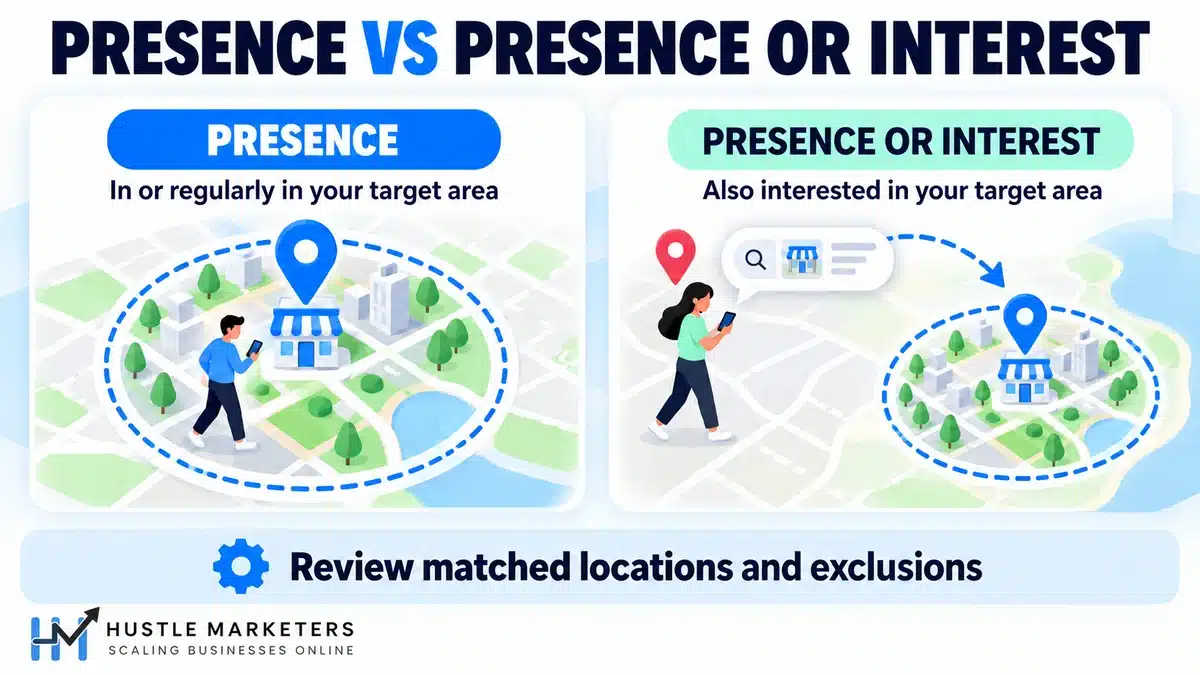
“Presence or interest” reaches people in, regularly in, or who have shown interest in your locations, and it is Google’s default. “Presence” reaches only people in or regularly in your locations. Choose Presence when you can only serve people who are actually there, which covers many local service and lead generation campaigns. Keep the default when out-of-area researchers become customers.
Google’s advanced location options article calls Presence or interest the “default and recommended option”: a Paris bakery can reach people in Paris or people interested in Paris bakeries. It also warns that “Most campaigns will notice a decrease in impressions when switching away from the default targeting option.”
| Option | Who it reaches | Available in | Recommended use | Watch out for |
|---|---|---|---|---|
| Presence or interest (target, default) | People in, regularly in, or who showed interest in your locations | Search, Display, Shopping, Performance Max; Demand Gen default | Travel, real estate and education (the verticals in Google’s 2022 data) | Clicks and calls from people far outside your service area |
| Presence (target) | People in or regularly in your locations | Search, Display, Shopping, Performance Max; the only option for Hotel campaigns | Local services, clinics, law firms, lead gen with a fixed service area, sensitive verticals | Lower impressions; commuters and frequent visitors still qualify as “regularly in” |
| Presence (exclusion, the only exclusion option) | Blocks people likely located in excluded areas | Search, Display, Shopping, Performance Max | Removing areas you cannot serve inside a bigger target | People outside the excluded area can still see ads |
| Search interest (removed) | People searching for your locations | No longer settable for Search, Display or Shopping since April 2023 | Not applicable | Still described in older guides |
| Locations of interest (AI Max, ad group level) | Users searching for or interested in specific areas | AI Max for Search campaigns only | Destination or city-intent ad groups inside one campaign | Users must meet both campaign and ad group location criteria |
When does Presence or interest make sense?
It fits businesses whose customers plan from somewhere else: a Miami hotel’s Search campaign wants Chicago travelers, a university wants out-of-state applicants, a realtor wants people relocating. Google’s data point supports this: advertisers in Travel, Real Estate and Education who switched from Presence to Presence or interest found “+5% more conversions on Search campaigns” (Google internal data, May 21 to June 1, 2022). Google limits that claim to those three verticals.
When should you switch to Presence?
Switch when a lead from outside your area is worthless, as it is for many plumbers, clinics and law firms. In the accounts we audit, it is one of the first settings we check. Google’s advanced options article suggests Presence for sensitive verticals and when “You only want to target users in specific locations.” Google’s Performance Max lead generation best practices go further: if you are receiving leads from outside your targeted areas, Google says to change your location targeting from “Presence or interest” to “Presence: People in or regularly in your included locations.”
What happened to the “Search interest” option?
Google removed it. The Ads Developer Blog announced on February 27, 2023 that from April 14, 2023, Search, Shopping and Display campaigns could no longer be set to SEARCH_INTEREST, and exclusions could no longer use “Presence or interest” in Search, Shopping, Display and Performance Max. Automatic migration began April 24, 2023, and you cannot opt out.
How do location exclusions work in Google Ads?
Location exclusions stop ads from showing to people likely located in the excluded area. Exclusions use Presence in Search, Display, Shopping and Performance Max, so they do not block people elsewhere interested in that area. If a place is both targeted and excluded, the exclusion wins. You can exclude countries, regions, cities and postal codes, but not a radius.
Google’s exclusions article notes that “Google Ads location targeting doesn’t determine geographic borders.” Its example: a brokerage with no Maui office targets Hawaii and excludes Maui. You can paste up to 1,000 exclusions at once.
Does an exclusion override a targeted location?
Yes. Google states that “exclusion takes priority.” If you exclude California but target Los Angeles, Los Angeles gets no traffic because it sits inside California.
Can you exclude a radius in Google Ads?
No. The Google Ads API location targeting guide says you can exclude LocationInfo “but not ProximityInfo”, and a Google Ads API team reply on the API forum confirmed “it is not possible to exclude these fields for proximity targeting.” To carve a hole in a radius, exclude the postal codes or cities inside it instead.
Do you need to exclude places you never targeted?
Usually not. Google says “we won’t show your ads in places unless you explicitly target them.” Google names the exception itself: with Presence or interest targeting, people outside your area can match through interest, and exclusions only remove people likely located in the excluded place. If you see clicks from a specific foreign country, switching to Presence removes interest-based matching, and a country exclusion covers people physically there.
How do you set up location targeting in Google Ads?
Open the campaign’s Settings, expand Locations, then search for and target the places you serve, or choose a radius around an address. Add exclusions for areas you cannot serve, choose Presence or Presence or interest in the location options, and save. Then check the matched locations report after a week of data.
- Go to Campaigns, select the campaign and open Settings.
- Open the Locations panel and enter the countries, regions, cities or postal codes you serve.
- Click Target for each place you serve, or Exclude for areas you do not serve.
- Use the Radius option to target a distance around an address, or check “Add locations in bulk” to paste a list.
- In the location options, pick “Presence” or “Presence or interest”. Exclusions use Presence automatically.
- Check the map to confirm the area, then click Save.
How do you set up Google Ads radius targeting?
In the location settings, select the Radius option, enter the address at the center, set the distance and choose the unit, then check the map before saving. Google requires “a radius of at least 1 km around any given location” and warns that “selecting a small radius could mean that your ads might only show intermittently or not at all.” Hotel Ads campaigns cannot use radius targeting.
As WordStream’s Mark Irvine notes in his location targeting mistakes article, a 10-mile radius covers four times the area of a 5-mile radius, not twice. Before widening a circle, check the budget with our Google Ads budget calculator.
How do you add multiple locations in bulk?
Check the box next to “Add locations in bulk” and paste up to 1,000 locations, one per line, from one country at a time. Click Search, review the matches and target them. Google warns that the gray “x” in the review panel also removes your existing targets or exclusions, so keep a copy of your list first.
What are the limits for Google Ads location targeting?
Each campaign can hold 10,500 location targets, including exclusions: up to 10,000 individual locations and 500 radius targets. Bulk pastes take 1,000 locations at a time. The minimum radius is 1 km. Campaigns targeting all countries can exclude at most 122 countries, and location bid adjustments range from -90% to +900%.
Google’s account limits page states the core rule as “10,500 location targets (up to 10,000 individual and 500 proximity targets) per campaign, which include targeted and excluded locations.” A brand wanting a radius around more than 500 stores in one campaign will hit that ceiling. US brands can also target a radius around location assets, though Google does not say how those count toward the limit.
Reports also only show location types inside the country you target.
Why are my Google Ads showing outside my target location?
Ads show outside a target area for several documented reasons: the Presence or interest option, people who are “regularly in” your area but elsewhere today, IP or carrier signals that misplace users, related nearby areas added for low-data locations, and reports that count locations of interest. Check matched locations first, then switch to Presence and add exclusions.
It is a recurring theme in the Google Ads Community, with thread titles like “Calls radius issue” and “U made me pay to send add to India!”. The table maps each symptom to causes Google documents.
| Symptom | Likely cause | How to check | Fix |
|---|---|---|---|
| Clicks or calls from other countries | Presence or interest; location of interest is not limited to the user’s country | Matched locations report; API user_location_view with targeting_location false | Switch to Presence; add country exclusions for persistent sources |
| Clicks just outside a city or radius | Related areas, IP address mapping | Matched locations, “Most specific location” column | Exclude the postal codes or cities where the clicks land |
| Leads from people who live elsewhere but work nearby | “Regularly in” is part of Presence | Lead form addresses vs matched locations | Qualify service area on the form or call; tighten targets to where you dispatch |
| Excluded area still shows clicks | Exclusions use Presence only; interest traffic from elsewhere is not blocked | Matched locations for the excluded area | Set targeting to Presence as well; check that the click location is really inside the exclusion |
| Distance report shows clicks beyond your radius | Report measures from a location of interest to the store shown in the ad | Distance report vs matched locations | Usually a reporting artifact; confirm with matched locations before changing targets |
| Display traffic from unrelated regions | Page content signals interest in a location | Placements report plus matched locations | Use Presence where available; exclude poor placements |
| Performance Max serving everywhere | No location added; campaigns with no location default to all regions | Campaign settings, Locations | Add target locations and set Presence for lead gen |
If you test your own ads, avoid repeated live searches. Google’s Ad preview and diagnosis tool “avoids accumulating ad impressions and impacting your performance statistics.” Location is one section of a full review; our Google Ads audit checklist covers the rest.
Which Google Ads location report should you use?
Use the targeted locations view to judge the places you chose, and the matched locations view to see where ads actually matched, whether by physical location or interest. Use the distance report to tune a radius around location assets. In the API, user_location_view reports physical location and geographic_view separates presence from interest, both at country level.
Google’s geographic performance article describes both views. Find them under Insights and reports, “When and where your ads showed”, per Google’s matched locations and distance reports guide.
| Report or view | What it shows | Where to find it | Use it for |
|---|---|---|---|
| Targeted locations | Performance by the locations you targeted | Insights and reports, When and where your ads showed | Budget splits, manual bid adjustments, which targets to keep |
| Matched locations | Performance by locations where ads appeared, either physical locations or locations of interest | Same page, Matched locations tab | Finding out-of-area traffic, new exclusions, postal code level waste |
| Distance report | Performance by distance between the user’s location, or location of interest, and the business location shown in the ad | Report editor, Predefined reports, Locations, Distance (Search and Shopping with location assets) | Choosing a radius for store or clinic traffic |
| API user_location_view | Metrics at the user’s actual physical location, split by targeted or not targeted, one row per country | Google Ads API | Measuring spend from countries you never targeted |
| API geographic_view | Country level rows split by AREA_OF_INTEREST or LOCATION_OF_PRESENCE | Google Ads API | Measuring the share of traffic matched by interest |
| API matched_location_interest_view | Locations of interest that matched ad group location interest targeting | Google Ads API; AI Max campaigns only | Checking AI Max locations of interest |
What is the difference between targeted locations and matched locations?
Targeted locations answer “how did Texas, the target I set, perform?” Matched locations answer “where were the people who triggered my ads?” If you target the United States, location reports can drill down to postal code, university, airport or congressional district. A long tail of matched locations outside a city target is your leakage.
What is the difference between user location and location of interest?
User location is where the person physically was; location of interest is where their search or behavior pointed. In the API, user_location_view “reports metrics at the actual physical location of the user by targeted or not targeted location,” while geographic_view labels rows as area of interest or location of presence.
Why does the distance report show clicks beyond my radius?
Google explains that the distance report measures from a location the user is interested in, which may not be their physical location, to the store location shown in the ad. A user inside your 5-mile radius of one store can see an ad for a store further away, and that longer distance is what gets reported.
Do location bid adjustments work with Smart Bidding?
Mostly no. Target CPA, Target ROAS, Maximize conversions and Maximize conversion value do not use location bid adjustments, and Performance Max does not support bid adjustments at all. Location adjustments of -90% to +900% work with manual CPC and Maximize clicks. Google says Smart Bidding can already optimize bids by each user’s location, down to the city.
Google’s bid adjustments article lists Maximize clicks as the only automated strategy supporting location adjustments. The Target CPA article says “Non-device bid adjustments are ignored on the Search and Display Network.” The Target ROAS and Maximize conversions articles both say “your existing bid adjustments aren’t used,” with the single exception of -100% device adjustments.
| Bid strategy | Location bid adjustments used? | What Google says |
|---|---|---|
| Manual CPC | Yes, -90% to +900% | Most specific location wins; adjustments for overlapping places are not combined; different adjustment types multiply |
| Maximize clicks | Yes | Listed as supporting location adjustments |
| Target CPA | No | Non-device adjustments ignored on Search and Display; device adjustments change the CPA target |
| Target ROAS | No | Existing adjustments not used; -100% device allowed |
| Maximize conversions | No | Existing adjustments not used; -100% device allowed |
| Maximize conversion value | No | Not listed as supporting location adjustments |
| Performance Max (any goal) | No | Manual bid adjustments are not available for Performance Max |
Overlapping location adjustments do not stack. Google’s example: set +50% for France and +100% for Paris, and users in Paris get only the Paris adjustment, “the most specific location.” Different adjustment types multiply instead: Google’s example of +20% for California and -50% on Saturday turns a $1.00 bid into $0.60, and combined adjustments stay within -90% and +900%.
What should you do instead under Smart Bidding?
Google’s Smart Bidding article says it “can optimize bids based on the specific location (down to the city) someone is located in, even if the advertiser’s implemented location targeting isn’t as specific,” and also uses location intent. So your levers are targeting and structure, not adjustments.
- Exclude areas you cannot serve or that never close. Google notes Smart Bidding “will still consider targeting and exclusions.”
- Split areas into separate campaigns when they have different value, such as a high-margin metro and a low-margin rural zone, each with its own CPA or ROAS target and budget.
- Feed better conversion data, such as qualified leads, so bidding learns which places produce revenue.
- Consider Presence for lead gen so bidding is not optimizing toward interest traffic you cannot serve.
How does location targeting work in Performance Max, Demand Gen and AI Max?
Performance Max targets locations at the campaign level, uses the same Presence options, and has no bid adjustments. Demand Gen lets you set location and language at the campaign or ad group level. AI Max for Search adds optional ad group “locations of interest”, and users must meet both the campaign and ad group locations.
The Performance Max API criteria guide warns that “a campaign with no specified location or location groups defaults to including all regions.” Google’s Demand Gen help article says location targeting is “available at the campaign and ad group level.” Google’s AI Max article describes locations of interest as available “Exclusively in AI Max for Search campaigns.”
| Campaign type | Location level | Location options | Radius | Location bid adjustments | Notes |
|---|---|---|---|---|---|
| Search | Campaign; ad group only through AI Max locations of interest | Presence or interest, Presence | Yes | Manual CPC and Maximize clicks only | Campaign language setting being removed, starting late September 2026 |
| AI Max for Search | Campaign plus optional ad group locations of interest | Campaign options apply; the ad group adds a locations of interest filter | Yes (campaign) | As Search | User must meet both levels; matched_location_interest_view reports it |
| Display | Campaign | Presence or interest, Presence | Yes | Yes | Page content can signal location interest |
| Shopping | Campaign | Presence or interest, Presence | Yes | Yes | Distance report available with location assets |
| Performance Max | Campaign | Presence or interest, Presence (Presence advised for lead gen with out-of-area leads) | API guide lists location and location groups; check your settings screen | No | No location means all regions; language still applies to non-Search channels |
| Demand Gen | Campaign or ad group | Presence plus interest is the default | Yes (proximity listed) | Listed as supported in Google’s bid adjustments table | Google suggests ad group location for tailored messaging |
| Hotel | Campaign | Presence only | No | Yes | No radius targeting |
If you are still choosing a format, our overview of Google Ads campaign types explains where each one serves. And if a Performance Max campaign is generating leads from the wrong places, start with the location option, then work through our guide to Performance Max campaigns that are not performing.
How should local service businesses set up location targeting?
Local service businesses should target the postal codes or radius they actually serve, set the location option to Presence, exclude pockets they cannot reach or that never close, and connect location assets from their Business Profile. Start broad enough to get data, then use matched locations and lead addresses to trim. Separate campaigns only where value differs.
The right unit depends on how you deliver: dispatch zones for businesses that drive to customers, travel time for businesses customers drive to, and legal boundaries for licensed professionals.
| Business type | Targeting unit | Location option | Exclusions | Structure tip |
|---|---|---|---|---|
| Plumbers, electricians, garage door, emergency trades | Postal codes or cities you dispatch to | Presence | Pockets inside your targets with poor close rates in your CRM | Separate emergency campaign with call assets and tight hours |
| HVAC and roofing | Postal codes or a radius matching the service area | Presence | Far suburbs where travel time kills margin | Separate replacement from repair if value differs |
| Doctors, dentists, orthodontists, clinics | Radius around each clinic, or cities patients travel from | Presence | Cities inside a clinic’s radius that another clinic serves | One campaign per clinic when budgets or services differ; location assets from each Business Profile |
| Law firms | States or counties where you can take cases | Presence for most practices | Counties or cities inside your targets that you do not cover | Split by practice area first, then geography only where value differs |
| Multi-location retail and franchises | Radius around location assets (US), or per-store radius | Presence for store visits; test Presence or interest for destination stores | Overlap between stores handled by campaign structure | Group stores by market; watch the 500 radius target cap |
| Hotels, tourism, colleges, real estate | Destination city or region | Presence or interest in Search (Hotel campaigns allow Presence only) | Countries you cannot sell to | Separate feeder-market campaigns if a few origin countries dominate |
| Local B2B services (signage, cleaning, IT) | Metro counties or cities | Presence | Residential-only pockets if you sell to businesses | Exclude job and DIY searches with negatives, not locations |
We go deeper on each trade in our guides to Google Ads for plumbers, HVAC PPC marketing, Google Ads for doctors, orthodontist Google Ads management and PPC for law firms. For a real local example, see our local signage company Google Ads case study.
Should you use a radius or ZIP codes?
Use ZIP codes or cities when your service area has hard edges, such as a river, a county line or a dispatch map. Use a radius when customers travel to you and distance is the main factor. Postal codes are also easier to trim, because radius targets cannot be excluded.
How do you exclude far areas and low-value zones?
Pull 30 to 90 days of matched locations at postal code level, join it to lead or job data, and exclude areas that spend without producing work you can take. Also connect location assets through a well-maintained Google Business Profile, since Google says location asset data is sourced from Google Maps and Business Profile.
Local Services Ads have their own setup, covered in our Local Services Ads guide. If you run both, keep service areas consistent.
How should multi-location brands structure location targeting?
Multi-location brands should group locations into campaigns by market or value, not one campaign per store by default. Give each campaign non-overlapping targets, use exclusions so neighboring campaigns do not compete for the same postal codes, add location assets, and split out a location only when its budget, services or targets genuinely differ.
- Map every location’s real service or catchment area before building anything.
- Group locations into markets that share pricing, services and conversion value. A city like Houston, where we also offer Google Ads management, may justify its own campaign, while small towns can share one.
- Target each market with postal codes, cities or a radius, and exclude areas that belong to a neighboring market. Remember exclusion beats inclusion.
- Add location assets and use location-specific landing pages, which Google recommends.
- Keep radius targets under the 500 per campaign cap, or, if every location is in the US, consider targeting a radius around location assets.
Google’s refine your location targeting article supports this approach: “If your campaign is performing better in certain areas, you may want to run separate campaigns targeted only to the more successful areas.” Under Smart Bidding, that is how a strong area gets its own budget and target.
How do location and language targeting interact in international campaigns?
Location targeting decides the countries or regions, and language decides which users an ad is relevant to. From late September 2026, Search campaigns are moving off the campaign language setting and onto the language of the ads themselves. So international accounts should separate markets with location targets and write ads and landing pages in each market’s language.
Before the change, Google’s language targeting article describes Search as using search term language and the user’s language settings, and Display as using the language of pages or apps people visit. For international setups, run one campaign per country or group of similar countries so budgets and legal requirements stay separate, and use Presence unless you want to reach researchers abroad.
What changed with language targeting in September 2026?
Google states: “Starting in September 2026, the way language targeting works is changing for Search campaigns and the Search Network portion of Performance Max campaigns.” Google says the campaign-level language setting will be removed for Search, and “Search ads will automatically match based on the language of your ads.” It also says that in Performance Max, the campaign language setting will no longer apply to ads on the Google Search Network but will continue to apply to YouTube, Display, Discover and Gmail. Google says no action is required.
For developers, the Ads Developer Blog post on the language targeting change (August 13, 2026) says the change takes effect in late September 2026 and also covers AI Max for Search, that edits to Search campaign language criteria fail with ContextError.OPERATION_NOT_PERMITTED_FOR_CONTEXT, and that existing criteria stay queryable but inactive.
In practice, bilingual markets such as Canada need ads and landing pages clearly written in each language.
How is Microsoft Ads location targeting different?
Microsoft Advertising offers a similar pair of options, “people in” or “people in, searching for, or viewing pages about” your locations, but lets you set locations at the ad group level, where they replace campaign locations. Its radius runs from 1 to 500 miles or 1 to 800 km, and like Google it cannot exclude a radius.
| Setting | Google Ads | Microsoft Advertising |
|---|---|---|
| Default option | Presence or interest | People in, searching for, or viewing pages about your targeted location |
| Strict option | Presence (in or regularly in) | People in your targeted location |
| Removed option | Search interest, removed for Search, Display and Shopping in April 2023 | PeopleSearchingForOrViewingPages, deprecated April 2024 |
| Ad group level locations | AI Max locations of interest (must meet both levels); Demand Gen ad groups | Yes; ad group geo targets override campaign geo targets |
| Radius size | Minimum 1 km | 1 to 500 miles or 1 to 800 km |
| Radius count | Up to 500 per campaign | Up to 2,000 per campaign or ad group |
| Location count | 10,500 per campaign including exclusions | 10,000 location and negative location targets per campaign or ad group |
| Exclude a radius | No | No |
| Unsupported postal codes | Types vary by country | Converted into a radius target |
Sources: Microsoft Learn pages for location intent, radius criteria, location criteria and targeting. The override rule matters when importing Google campaigns: a Microsoft ad group with any geo target inherits none of the campaign’s. Our guide to advertising on Bing covers the rest of the setup.
What has changed in Google Ads location targeting since 2023?
The main changes are the April 2023 removal of Search interest targeting and interest-based exclusions, the March 2024 cap of 122 country exclusions, household income moving to demographics, ad group level locations in Demand Gen and AI Max, and the removal of campaign language targeting for Search starting in late September 2026. Check any older setup guide against these dates before you follow it.
- April 14, 2023: SEARCH_INTEREST can no longer be set for Search, Display or Shopping, and Presence or interest exclusions end for Search, Display, Shopping and Performance Max. Auto-migration began April 24, 2023.
- March 31, 2024: campaigns targeting all countries and territories are limited to 122 country exclusions.
- April 2024 (Microsoft): the “searching for or viewing pages” only option is deprecated.
- Household income: migrated from location targeting to demographic targeting.
- Demand Gen: location and language available at the ad group level.
- AI Max for Search: optional ad group locations of interest, with a dedicated API report view.
- Late September 2026: campaign-level language targeting removed from Search and AI Max for Search; Performance Max language settings stop applying on Google Search.
Developers can confirm the 2023 exclusion migration with one of the two queries Google publishes on its advanced location options page. It should return zero rows:
SELECT campaign.id, campaign.advertising_channel_type, campaign.geo_target_type_setting.negative_geo_target_type FROM campaign WHERE campaign.geo_target_type_setting.negative_geo_target_type = 'PRESENCE_OR_INTEREST' AND campaign.advertising_channel_type IN ('DISPLAY', 'PERFORMANCE_MAX', 'SEARCH', 'SHOPPING') LIMIT 1What do several guides get wrong about location targeting?
Several guides still describe removed options, say location targeting only works at the campaign level, or recommend layered location bid adjustments without mentioning that most Smart Bidding strategies ignore them. Google’s own documentation also pulls in two directions on Presence or interest. Here is what we found when comparing popular guides with Google’s help pages.
- Removed options still listed. WordStream’s geotargeting tips article (updated November 2023) describes a “Search interest” choice that Google stopped allowing in April 2023, and says geotargeting “is only available at the campaign level,” which no longer fits Demand Gen or AI Max.
- Stacked bid modifiers. A 2026 PPC Hero article on Google Ads for local businesses recommends a “nested geo-bid modifier stack” with +25%, +15% and -30% layers, without saying which bid strategies it works with. Google says multiple adjustments that apply to the same location are not combined (only the most specific is used), and Target CPA, Target ROAS, Maximize conversions and Maximize conversion value do not use location adjustments at all.
- “Presence fixes everything.” Presence still includes people “regularly in” your area, IP-based locations can be off, and related areas can be added. Google says 100% accuracy is not guaranteed.
- Exclusions as a firewall. Exclusions only remove people likely located in the excluded area. They do not remove interest-based traffic from elsewhere.
- Google’s mixed signals. The advanced options page recommends Presence or interest using 2022 data from travel, real estate and education. The Performance Max lead gen page tells advertisers getting leads from outside their targeted areas to switch to Presence. Each fits a different situation, and neither applies to every account.
Frequently asked questions
These are location targeting questions advertisers commonly ask, including issues that come up repeatedly in the Google Ads Community and the Google Ads API forum. Each answer stands on its own and reflects Google and Microsoft documentation checked on September 16, 2026, so you can act on it without reading the full guide.
How does location based targeting work?
Location based targeting, which Google Ads calls location targeting, works in two steps. First, you choose the countries, regions, cities, postal codes or radius where a campaign can show ads, plus any areas to exclude. Google then estimates where each person is from physical signals, such as IP address and device location, and from location of interest signals, such as location terms in searches, and your location option decides whether presence alone or presence plus interest qualifies. Because these signals vary, Google says 100% accuracy is not guaranteed.
How do I target people based on their location?
In Google Ads, open the campaign’s Settings, expand Locations and target the places you serve, or set a radius of at least 1 km around an address. To reach only people in or regularly in those places, choose the Presence location option; the default, Presence or interest, also reaches people who show interest in them. To target people at certain locations, use target types such as postal codes, airports or universities where your country supports them, or a radius around the address.
What is the default location option in Google Ads?
The default is “Presence or interest”, which reaches people in, regularly in, or who have shown interest in your targeted locations. Google calls it the recommended option. You can switch to “Presence” in the campaign’s location options at any time.
Does the Presence option stop all clicks from outside my area?
No. Presence still includes people who are regularly in your area, and physical location relies on IP and device signals that can be wrong. Google may also show ads in nearby related areas. It does remove interest-based matching, the part you control.
What is the minimum radius for Google Ads radius targeting?
Google requires a radius of at least 1 km around any location. Very small radii may mean ads show intermittently or not at all. Hotel Ads campaigns cannot use radius targeting.
Can I exclude a radius in Google Ads?
No. Radius (proximity) targets can only be targeted, not excluded. To exclude part of an area, exclude the postal codes, cities or regions inside it.
How many locations can one Google Ads campaign target?
Up to 10,500 location targets per campaign, counting targets and exclusions: up to 10,000 individual locations and 500 radius targets. Bulk pastes take 1,000 locations at a time.
Do location bid adjustments work with Target CPA?
No. Google says non-device bid adjustments are ignored on the Search and Display Network with Target CPA. Use exclusions or separate campaigns with their own CPA targets to treat areas differently.
Does Performance Max support location bid adjustments?
No. Performance Max does not support manual bid adjustments. You control geography through location targets, exclusions and the location option.
Can I target locations at the ad group level in Google Ads?
In standard Search campaigns, locations are set at the campaign level. AI Max for Search adds optional ad group locations of interest, and users must meet both levels. Demand Gen campaigns allow location targeting at the campaign or ad group level.
What does “Unspecified” mean in the Google Ads location report?
Google could not determine a location from the IP address and the search named no recognized place, or the search was on Google Maps over an area covering several cities or regions.
Can I still target by household income with locations?
No. Google has moved household income targeting from location targeting into demographic targeting. You now set it under Audiences, Demographics, Household income.
Does language targeting still matter for Search campaigns?
Less than before. From late September 2026, Google is removing campaign-level language targeting from Search campaigns, which match on the language of your ads instead. For Performance Max, Google says the language setting stops applying on Google Search but still applies on YouTube, Display, Discover and Gmail.
Is Microsoft Ads location intent the same as Google’s?
It is similar but not identical. Microsoft offers “people in” or “people in, searching for, or viewing pages about” your locations, with the broader option as the default. Microsoft ad group locations replace campaign locations, while Google’s AI Max requires users to meet both levels.
Why don’t metrics below country level add up to my campaign totals?
Some impressions only match at the country level, so they do not appear in state, city or postal code rows. Use country rows or campaign totals when you need complete numbers.
Want a second opinion on your location settings?
If your leads come from places you cannot serve, or a local campaign spends fast without calls, an outside review can find the setting behind it. Our Google Ads audit reviews your location options, exclusions, radius and postal code targets, matched location spend, campaign structure by market and how Smart Bidding is handling each area.
Hustle Marketers is a Google Partner agency. Work with our Google Ads agency team or choose PPC management services at a flat $600 to $1,200+ a month, month to month with no lock-in, where you always own your accounts. Request a Google Ads audit.
About the author: Ishant Sharma is a Google Ads, Microsoft Ads and SEO specialist who has worked in digital marketing since 2013, and the founder of Hustle Marketers, a Google Partner agency. Over that time he has worked with local service businesses, multi-location brands and lead generation companies, and his agency has worked with more than 2,500 brands. He sets up location targeting, radius and exclusion strategies for Google Ads accounts.
Summarise this article with: