Google Ads Enhanced Matching: Customer Match Settings Explained

Ishant
Published : October 6, 2026 at 2:30 pm
Updated : October 28, 2026 at 3:06 pm
Ishant
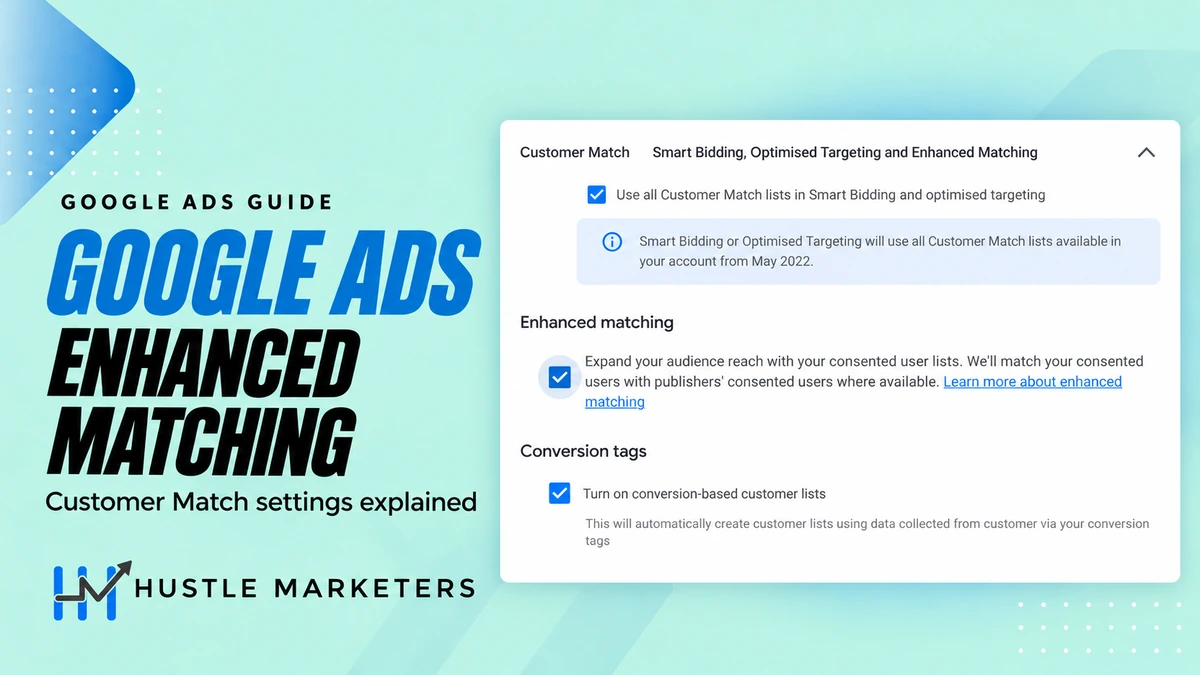
Google Ads enhanced matching is designed to extend audience reach using consented customer and publisher data where available, according to the description shown in the account settings screen. It appears alongside two other choices: using Customer Match lists in Smart Bidding and optimized targeting, and creating conversion-based customer lists.
For a business owner, the useful question is whether those settings can help acquire valuable customers, bring buyers back, or improve the information used to manage advertising. The answer depends on your customer data, business category, measurement, and campaign goals.
This guide explains the three settings, the businesses we would consider them for, and lessons from Hustle Marketers’ published client results. Those case studies document broader advertising work. They do not isolate a ROAS increase caused by enhanced matching.
What do the three Customer Match settings do?
In Google Ads account settings, the Customer Match section shows three options. They serve different purposes, so review each separately.
| Setting | Purpose | Practical check |
|---|---|---|
| Use all Customer Match lists in Smart Bidding and optimized targeting | Allows eligible customer lists to inform Google’s bidding and targeting systems. | Confirm that the lists still describe customers you want the campaign to learn from. |
| Enhanced matching | The account description says it expands reach by matching consented users with publishers’ consented users where available. | Read the account’s current eligibility and data-use information before enabling it. |
| Turn on conversion-based customer lists | Builds customer lists from eligible user-provided conversion data. | Check which conversion goals generate the lists and whether the underlying events are accurate. |
Google says automatic Customer Match use in bidding and targeting does not change your campaign’s targeting settings. A campaign does not become a customers-only remarketing campaign simply because this account setting is enabled. Automatic Smart Bidding use does not apply to campaigns using manual bidding. See Google’s Customer Match overview.
Also, the automatic-use setting is established functionality: Google’s Customer Match guide dates its initial introduction to 2022. Avoid treating all three checkboxes as a single newly launched feature.
Enhanced matching vs. enhanced conversions
The names are similar, but the decisions they support differ.
Enhanced matching concerns audience reach, according to its in-account description. Enhanced conversions concerns conversion measurement. Google explains that enhanced conversions for web uses hashed first-party details, such as an email address provided during a conversion, to help associate that conversion with an eligible ad interaction. Read Google’s enhanced conversions for web documentation.
For example, a store may want to measure an order more accurately and also reach eligible previous buyers. Those are two separate objectives. Better measurement can change the number of sales attributed to advertising without proving that advertising caused additional sales.
Conversion-based customer lists connect these areas. Google’s setup documentation describes automatically building lists from eligible enhanced-conversion data, with lists associated with conversion goals. Check the supported source for your implementation. The page still describes tag-based requirements and specific GA4 user-provided-data conditions.
A list built from a lead-submission goal should be evaluated as a list of leads. It should not automatically be treated as a list of paying customers.
Benefits of Customer Match and enhanced matching
These settings address different parts of customer-data use. Their value depends on which operational or commercial problem your business is trying to solve.
- More usable customer signals: eligible customer lists give automated campaigns additional context from your existing customer relationships. Google’s Customer Match documentation explains how its systems apply useful lists to campaign goals.
- Less manual list maintenance: supported conversion-based lists can reduce the work of repeatedly preparing customer exports. Google’s conversion-based list guide describes this automation.
- Additional matching opportunities: the in-account description of enhanced matching refers to consented publisher matching where available. The potential benefit is making more of an eligible customer list addressable.
- A clearer customer strategy: for eligible campaigns, customer history can support decisions about acquisition, complementary products, replenishment, or retention. Choose the appropriate lifecycle controls and measure the resulting customer mix.
For example, a retailer could spend less staff time maintaining lists while evaluating a relevant repeat-purchase offer. Those are two benefits to assess separately: operational efficiency and the contribution generated by subsequent orders.
Why would your business need these settings?
Consider them when customer information is available but is not yet being used in a useful, permitted advertising workflow. Start with these questions:
- Does the team repeatedly export the same eligible customer information by hand?
- Does the acquisition plan need a more reliable distinction between new and returning buyers?
- Do completed purchases reveal a sensible opportunity for replenishment or complementary products?
- Does the sales team know which leads became customers, while advertising reports still treat every inquiry equally?
Each answer points to a different next step. Manual maintenance may justify reviewing conversion-based lists. A repeat-purchase opportunity calls for a suitable offer and timing. A lead-quality problem calls for better conversion definitions and sales-outcome reporting before expanding audience use.
The business needs a customer-data plan when it can explain how that data will improve a specific decision. These settings are optional tools within that plan. A business without eligible data or reliable outcomes should first improve its measurement and acquisition fundamentals.
What happens after you implement these settings?
First, check the operational result. With the relevant supported setup and incoming data, conversion-based audience segments become available in Audience Manager. Automatic list use gives eligible campaigns access to the customer signals. Neither change establishes that additional profitable sales have occurred.
Next, review list population, diagnostics, campaign eligibility, and the customer outcomes chosen before setup. Record actual implementation dates so later changes can be interpreted alongside promotions, budgets, and the normal sales cycle.
The client examples below describe documented campaign and feed work alongside reported outcomes. They do not provide an isolated before-and-after test of enhanced matching. We therefore identify proposed customer-data tests separately from work recorded in those case studies.
To establish what happened for your own business, compare orders or won jobs, original sales value, qualified acquisition cost, customer mix, and contribution over a suitable evaluation period. Where feasible, use a controlled comparison. Continue, adjust, or stop the test based on those outcomes.
Which businesses should consider Customer Match?
Our recommendation is to start with a business question that customer history can answer. Examples include which products people buy together, when customers reorder, and which inquiries become profitable jobs.
| Business | Useful starting data | Test to consider | Outcome to measure |
|---|---|---|---|
| Replenishable hair care | Consented purchase history and actual reorder intervals | A relevant replenishment or complementary-product offer | Repeat orders and contribution after acquisition costs |
| Pet accessories | Product categories purchased and order profitability | A complementary product rather than the item just purchased | Profitable repeat purchases and new-customer acquisition cost |
| Local signage and B2B printing | Qualified accounts, won jobs, and repeat-order history | Separate repeat commercial buyers from low-quality inquiries | Cost per won job and job contribution |
| General retail with substantial customer history | Reliable buyer records and new-versus-returning status | Align acquisition or retention activity with the business goal | Customer mix, revenue quality, and total contribution |
| A new store with little usable data | A small or incomplete customer database | Prioritize measurement, product pages, and a viable acquisition offer | Reliable purchases and a sustainable acquisition cost |
These are proposed applications, not a claim that every business in a category is eligible. In particular, check restrictions before using audiences associated with sensitive products or services. For example, Customer Match is restricted for alcohol ads, as our alcohol marketing agency guide explains.
What we did for clients, and what the results can teach us
The following examples come from our published case studies. They describe documented account work for the stated periods, not controlled tests of enhanced matching. Different businesses, date ranges, and conversion definitions make direct ranking unhelpful.
1. UK curly hair brand: product data before audience expansion
Our UK curly hair brand case study documents our Google Ads work from January through May 2026.
What we did: the documented work included rewriting product-feed titles with relevant product attributes, separating products through margin and category labels, building campaigns around hero products and routines, and filtering irrelevant service searches.
Business lesson: product relevance and spending priorities deserve attention before audience expansion. Sending more traffic to a poorly described or low-margin product can increase activity without improving the business.
What we would test next: use eligible, consented purchase history to evaluate replenishment and complementary routines, with timing based on actual reorder behavior. Measure repeat-order contribution separately from first-order acquisition cost. This is a proposed application, not a documented enhanced-matching result from the case.
2. Australian pet accessories brand: different economics by product
Our pet accessories PPC case study documents our Google Ads and Meta Ads work from January through April 2026.
What we did: the case describes a product-feed rebuild, margin-based product labels, and more deliberate campaign grouping across categories, seasonal activity, and new-product tests.
Business lesson: a premium harness and a low-priced accessory have different economics. Product selection, bids, and offers should reflect those differences.
What we would test next: evaluate complementary-product demand among eligible past purchasers, while measuring new and returning buyers separately. Keep Google and Meta attribution separate unless the reporting method deduplicates orders across channels.
3. Local signage company: which inquiries become jobs
Our local signage company case study documents our Google Ads work from May 1 through June 30, 2026.
What we did: documented work included reviewing search queries, organizing campaigns around services, improving landing-page alignment, and reviewing meaningful leads and purchases instead of relying on shallow website activity.
Business lesson: a signage business needs to know which inquiries turn into jobs. When conversion reporting includes assigned lead values, the reported ratio is not automatically collected sales revenue.
What we would test next: connect advertising analysis to CRM outcomes and actual job value. Evaluate repeat commercial accounts separately from one-time inquiries. The relevant benefit would be better qualified demand and profitable work, not simply more forms.
4. 1800Eichlers: an important targeting restriction
Our 1800Eichlers ecommerce case study covers June 5 through October 2, 2026, and describes product-feed work and concentrating budget around relevant product demand.
1800Eichlers sells Judaica products. Google’s religious-beliefs advertising policy restricts advertiser-curated audiences, including Customer Match, for advertising in this sensitive category.
Business lesson: strong advertising performance does not imply that a particular audience feature is suitable. For a business promoting religious products, review category restrictions and build an eligible campaign approach around product demand and accurate measurement. We would not present this case as a Customer Match recommendation.
What to check before enabling the settings
1. Confirm that the data is yours to use
Google’s Customer Match policy requires eligible first-party data, appropriate privacy disclosures, and consent where required. A purchased contact database is not equivalent to customer information collected through your own customer relationships. Hashing personal information does not replace these requirements.
Review account eligibility as well. The policy distinguishes access to observation and exclusions from targeting and manual bid adjustments; the latter currently includes a 90-day account history and more than US$50,000 in lifetime spending, alongside compliance requirements. The spending threshold is not a universal requirement for every Customer Match use.
2. Define the conversion before building the audience
For ecommerce, review transaction IDs, order values, currencies, refunds, and duplicate events. For a service business, distinguish a raw inquiry from a qualified opportunity and a won sale.
Then write down what each list represents. “People who submitted a quote form” is a clearer operational definition than “high-value customers” when no sales outcome has been recorded.
3. Check list freshness, matching, and serving eligibility
Google’s Customer Match rules cap membership duration at 540 days and require at least 100 members added or refreshed within that period. There is also a separate serving threshold: Google’s segment compatibility documentation specifies at least 100 active users in the previous 30 days for the relevant networks. The 100-user customer-list threshold applies to lists uploaded or refreshed after February 1, 2024; older unrefreshed lists retain the previous 1,000-user requirement.
These are different checks. A spreadsheet containing 100 rows does not establish that the account has 100 matched, active, eligible users. Consult Google’s Customer Match troubleshooting guide if list sizes or serving status look wrong.
4. Check the country and inventory
Google’s Customer Match overview states that activation on Google Partner Inventory and third-party exchanges is unavailable in the EEA, UK, and Switzerland, while use on Google’s own properties continues. Do not assume the enhanced-matching checkbox overrides those regional restrictions.
That distinction matters for a UK business such as the hair care example. Review where an eligible audience can actually be used before projecting additional reach.
5. Choose the customer outcome
Are you prioritizing first-time buyers, retaining customers, or reactivating lapsed buyers? Google’s customer lifecycle goals offer different options, with requirements that vary by campaign and bidding setup.
Choose the intended outcome before selecting a mode. A business trying to acquire new customers should examine the new-customer share and acquisition cost, even when total ROAS looks attractive.
Where to find the settings in Google Ads
For the Customer Match panel, the route is Admin → Account settings → Customer Match. Review the automatic-use and enhanced-matching options available in that account.
Google’s updated enhanced-conversions instructions also provide this route for conversion-based lists:
- Open Goals → Settings.
- Expand Customer data use.
- Review the enhanced-conversions and conversion-based customer-list choices.
- Complete the applicable data-term steps and save your selection.
Google documents a unified enhanced-conversions setting beginning in June 2026, which helps explain why your current interface may differ from older screenshots. After setup, inspect Audience Manager and conversion diagnostics. An enabled checkbox alone does not confirm that useful data is arriving.
For enhanced matching specifically, we did not find a Google help article when we checked on October 7, 2026, so this guide relies on the setting’s in-account wording, reported by Search Engine Roundtable on August 20, 2026. Check the current in-account help for rollout and inventory details. We are not assuming universal availability or a particular percentage increase in reach.
How to measure whether it helps the business
Record a baseline before making changes: spend, purchases or qualified outcomes, original sales value, new-customer share, returns, and margin. Keep a dated change log so an audience adjustment is not confused with a promotion, budget increase, or tracking repair.
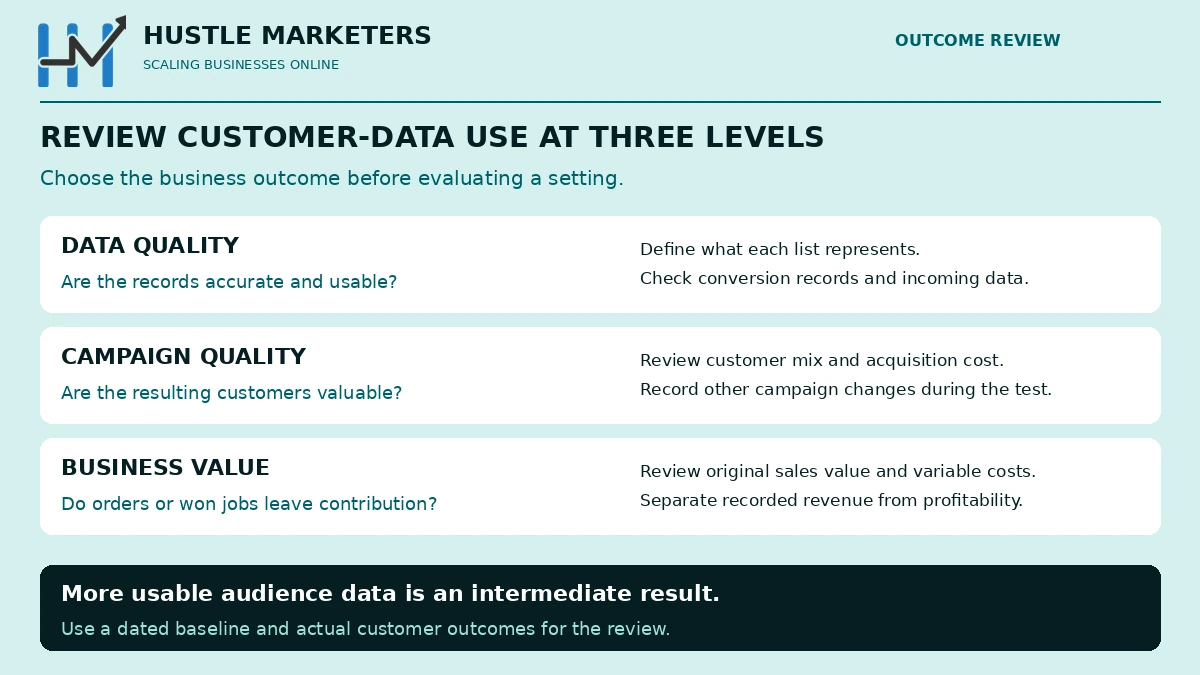
A useful review has three layers:
- Data quality: are conversions and customer records accurate and arriving as expected?
- Campaign performance: are eligible campaigns reaching valuable customers at an acceptable acquisition cost?
- Business performance: do orders or won jobs leave more contribution after advertising and variable costs?
One reporting detail deserves attention. Google’s lifecycle measurement guide distinguishes original conversion value from values adjusted for lifecycle goals or value rules. Use the original purchase value when evaluating sales ROAS. A configured new-customer value adjustment is not extra money collected at checkout.
Sales ROAS = attributed sales value ÷ advertising spend. Always state the channel, period, and conversion definition. If Google, Meta, and GA4 disagree, use a consistent reconciliation method such as the one explained in our guide to ROAS reporting discrepancies.
Hypothetical example: $10,000 in sales attributed to $2,000 of advertising produces 5x ROAS. At a 40% contribution margin before advertising, those sales leave $4,000 before ad costs and $2,000 afterward, before fixed overhead. At a 15% margin, they leave $1,500 before advertising and a $500 shortfall afterward. The same ROAS can have very different business implications.
Our break-even ROAS guide explains how to connect the target to your economics. Use your actual variable costs and returns instead of borrowing another brand’s target.
Where supported and feasible, use a properly designed holdout or lift study to assess incremental impact. A before-and-after comparison can guide decisions, but seasonality, promotions, and attribution changes can affect it. Google does not offer a direct built-in incrementality test for every lifecycle-goal configuration.
A practical first-month plan
This is our suggested operating sequence, not a Google-prescribed testing period or a promise of conclusive results within 30 days.
- Week 1: audit customer-data permissions, category eligibility, conversion definitions, and the business’s break-even economics.
- Week 2: configure the applicable settings, validate incoming data, and document the lists and campaign objectives.
- Week 3: monitor matching and serving, investigate errors, and avoid unnecessary simultaneous campaign changes.
- Week 4: review sales quality, customer mix, and contribution. Extend the evaluation when the sales cycle, reporting delay, or sample size requires it.
The next action should follow the evidence. A list-population problem calls for a data investigation. Unprofitable orders call for a review of margin, offer, product selection, and acquisition costs.
Frequently asked questions
Should every business turn on all three settings?
No. Review the data source, business category, geographic restrictions, and campaign goal first. A suitable option for a general retailer may be restricted or unhelpful for another advertiser.
Does Customer Match limit advertising to existing customers?
The automatic-use checkbox does not create that restriction. Google also explains that optimized targeting can expand beyond manually selected audience segments. Inspect the actual campaign controls when you need a defined audience strategy.
Why is a conversion-based list empty or smaller than expected?
Check the eligible data source, enhanced-conversion diagnostics, available identifiers, matching, and processing status. Website conversions, uploaded rows, and active audience members are different counts. Correct data formatting and maintained records are covered in Google’s Customer Match best practices.
Does a better match rate mean better ROAS?
It can increase the usable portion of a list, but it does not establish purchase intent, profitability, or incremental sales. Evaluate the resulting customer outcomes against the baseline.
Can we expect the same results as these case studies?
The published results are examples, not forecasts. Product margins, brand demand, competition, customer retention, attribution settings, and the sales cycle all affect the outcome. Establish a target your business can sustain.
Build the customer-data plan around profitable growth
Start with reliable measurement and a clear commercial goal. Then select eligible audiences, suitable settings, and an evaluation method that can show whether customer quality and contribution improved.
Hustle Marketers’ ecommerce PPC management brings product feeds, campaign structure, and performance analysis into the same discussion. Request a Customer Match and measurement review to identify which changes fit your business and how their results should be assessed.
Research checked October 6, 2026. Google Ads interfaces and eligibility can change. Case-study details are documented in the linked publications; recommendations are identified separately.