Category Page vs Product Page SEO: Which One Should Target Your Keyword

Ishant
Published : October 12, 2026 at 9:30 am
Updated : October 7, 2026 at 1:16 pm
Ishant

Key Observations
- The question is usually asked as a choice and it is not one. It is a mapping problem, and there are three page types in play, not two.
- Almost nobody publishes the method for deciding. In the forty community threads we read, not one person suggested opening the search results for the keyword and looking at what Google is already ranking. That takes two minutes and it settles most of these arguments.
- Google’s documentation settles one half of it outright. Product rich results only support pages that focus on a single product, or multiple variants of the same product, and Product is not one of the four supported carousel types. A collection page cannot get either.
- Google documents the category page’s role in discovery and internal linking, and says it generally does not look at URL structure to work out site structure at all.
- Gary Illyes told stores in 2023 not to add content to category pages because search might require it. The advice circulating in store owner communities in September 2026 is still a specific word count above and below the grid, with no source.
- The statistics on this topic contradict each other. One page we read gives 72 percent and 78 percent for effectively the same claim, both credited to an analysis it does not link to.
Table of Contents
- Does collection SEO or product page SEO matter more?
- How do you decide which page should target a keyword?
- What can a category page actually do that a product page cannot?
- What can a product page do that a category page cannot?
- What about the blog, the third page type nobody maps?
- Which queries should you not target with either?
- Can the same keyword be used on two pages?
- Should a product with variants be one page or several?
- How much content does a category page need?
- Why are only some of my collection pages indexed?
- What do you do about faceted navigation and pagination?
- Should your paid traffic go to the same page type?
- What about AI shopping surfaces?
- Why do the statistics on this topic contradict each other?
- What should you fix first?
- How we approach this on a real store
- What the top ranking pages on this get wrong
- Why work with Hustle Marketers on ecommerce page structure
- Category page vs product page SEO FAQs
Two things happen on nearly every ecommerce site. The collection pages rank and the product pages do not, or the product pages rank and the collections are invisible. Either way somebody asks which one to put the effort into.
It is the wrong question, and the arguments that follow are unwinnable because nobody has agreed on how to decide. In the forty community threads we read, the page type decision is always made from internal logic. Category equals head term, product equals long tail, because that is the shape of the site. Nobody in those threads looks at what Google is currently doing with the query.
This page gives you the method, the documentation that settles the parts Google has actually published, and honest labels on the parts it has not.
Does collection SEO or product page SEO matter more?
Neither, and the framing hides the real problem.
A keyword does not belong to a page type. It belongs to an intent, and your job is to work out which page on your site is the best answer to that intent, then make sure only one page is trying. On most stores the failure is not that the wrong page type was chosen. It is that two pages were pointed at the same query and neither won.
Here is the honest version of the rule of thumb everyone repeats, with the part that is usually left off.
| Query shape | Usually best served by | The exception that breaks it |
|---|---|---|
| A product category, for example running socks | A category page | If the category has three products, the search results will be full of retailers with forty, and you will not win it |
| A specific model or part number | A product page | If you sell one variant of a product people buy in sets, the set page may be the better answer |
| A brand plus a category, for example Nike running socks | A filtered category page, if it is crawlable and worth indexing | If the filter combination is thin or empty, this should not be a page at all |
| A question, a comparison or best of | Usually neither. See below | A store with genuine testing data can win these, but it is a content job, not a template job |
| A use case, for example socks for marathon training | A guide that links to the category | If your category page already answers the use case properly, one page is better than two |
The exceptions are where the money is, and the seven pages we read all state the rule without them.
How do you decide which page should target a keyword?
Open the search results and look. This is the method, it takes two minutes per keyword, and in the forty community threads we read nobody suggested it once.
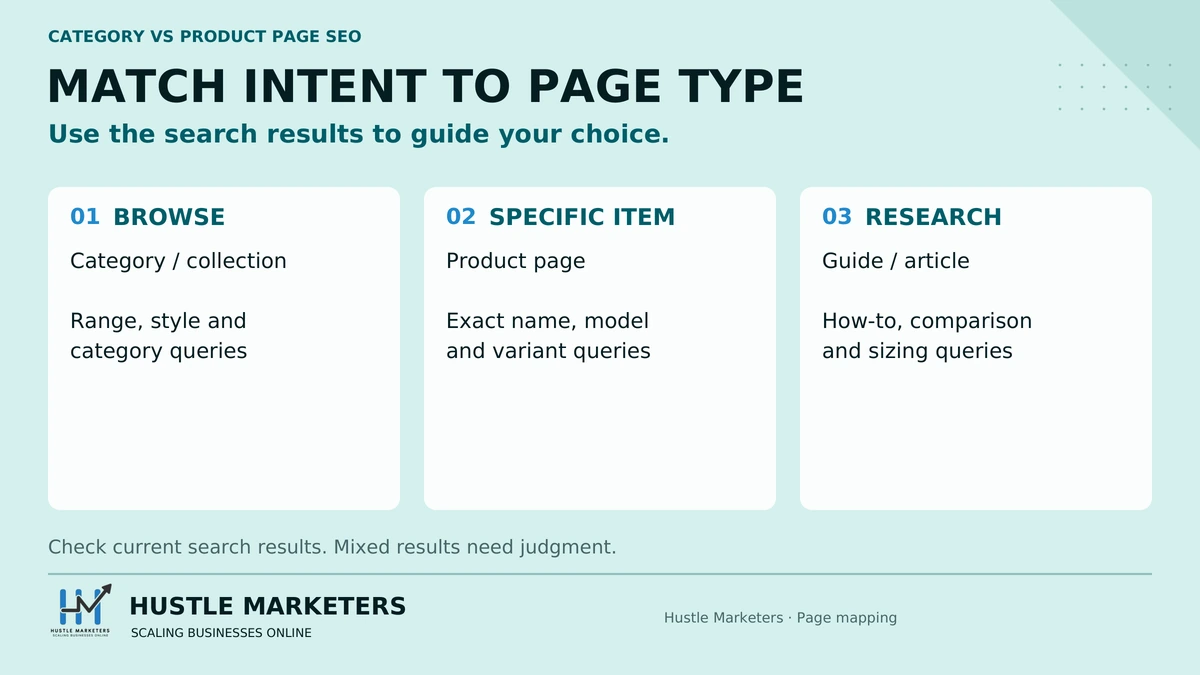
The two minute version
- Search the exact keyword, in the country you sell in, in a private window.
- Ignore the ads and the shopping carousel for now. Look at the ten organic results.
- Classify each one. Is it a category or collection page, a single product page, an article or guide, a marketplace listing, or a third party review site?
- Count. Whichever type holds the majority is the type Google has decided answers this query.
- Build that type. If the top ten is seven guides and three marketplaces, the answer is that you should not be building either a category or a product page for this term.
That is the whole method. Everything else on this page is refinement.
What the counts usually tell you
| What you see in the top ten | What it means | What to do |
|---|---|---|
| Mostly category and collection pages | Google reads this as a browse query | Build or strengthen the category. Do not point a product page at it |
| Mostly single product pages | Google reads this as a specific product query | Point the product page at it and let the category target the parent term |
| A mix of both, roughly even | The intent is genuinely split, and both can rank | Pick the one you can make better, and make the other one clearly different |
| Mostly guides, listicles and review sites | This is a research query | A store page will struggle. Either write the guide or leave it |
| Mostly marketplaces such as Amazon and eBay | Retail intent that favours breadth | Check whether you have enough range to compete before investing |
Why nobody does this
Because the rules of thumb are easier, and because the tools do not prompt it. Every one of the seven competitor pages we read for this post asserts a rule rather than deriving it. Asserted rules are portable, which is why they spread, and they are wrong often enough to be expensive.
There is a second reason worth naming. Looking at the search results tells you when the honest answer is that you cannot win the term, and that is an uncomfortable thing to put in a strategy deck.
What can a category page actually do that a product page cannot?
Google documents the category page’s job, and it is not what most SEO content says it is.
From Google’s ecommerce site structure guidance, last updated December 10, 2025:
add links from menus to category pages, from category pages to sub-category pages, and finally from sub-category pages to all product pages
If category pages don’t include direct links to all products in a category, Googlebot might not find all of your products by crawling alone.
As a general rule, the more links a page has to it within a site, the higher the relative importance of the page to other pages on your site.
So the role Google documents is discovery and internal linking. Your category pages are how Google finds your products and how importance is distributed across your catalogue. That is a bigger job than ranking for a head term, and it is the reason a category page with no products is worse than no category page at all.
The same page carries a detail that contradicts a lot of received wisdom:
Google generally doesn’t look at the structure of URLs to work out the structure of a site
It relies on link analysis instead. If you have been planning a URL restructure to communicate hierarchy, that is not what communicates hierarchy.
What Google says to do with an empty category
From the ecommerce URL structure guidance, also last updated December 10, 2025:
If a category has no items, use a
noindexrobotsmetatag. If your site detects that a category has become empty and automatically removes the category from on-site search and browse, consider returning a404 (not found)HTTP status code for the page.
That is a direct, current instruction and it is the answer to a question people ask constantly about seasonal and out of stock collections.
What can a product page do that a category page cannot?
Get rich results. This is the part Google has settled, and it settles it flatly.
From the product snippet documentation, last updated September 8, 2026:
Currently, product rich results only support pages that focus on a single product (or multiple variants of the same product).
And the worked example on the same page, which is unusually blunt:
For example, ‘shoes in our shop’ is not a specific product.
The merchant listing documentation adds the purchase condition:
Only pages where a shopper can purchase a product are eligible for merchant listing experiences, not pages with links to other sites that sell the product.
The loophole, and why it is closed
The usual next idea is to mark the collection page up as a list of products and get a carousel instead. Google’s carousel documentation, last updated September 8, 2026, lists the structured data features that can be combined with ItemList for a carousel: Course list, Movie, Recipe and Restaurant.
Product is not among them.
So a collection page cannot get Product rich results and cannot get a Product carousel either. What it can legitimately carry, on our reading, is BreadcrumbList, one of the six entries in Google’s list of structured data relevant to ecommerce, alongside LocalBusiness, Organization, Product and ProductGroup, Review and VideoObject. Google does not document which of the six belongs on which page type.
The reason this is not just an eligibility question
Google’s structured data general policies, last updated July 10, 2026, put it this way:
Don’t mark up content that is not visible to readers of the page.
Your structured data must be a true representation of the page content.
A collection page’s visible content is not a single product. Marking it up as one is not a clever workaround that fails quietly. It is a structured data policy violation, and Google documents that a structured data issue can result in a manual action. Note what that manual action does and does not do: Google says it means the page loses eligibility for appearance as a rich result, and that it does not affect how the page ranks in web search.
The page type comparison, with the parts Google has documented marked as such
| Capability | Category or collection page | Product page | Source |
|---|---|---|---|
| Product rich results | Not eligible | Eligible | Documented, product snippet page |
| Merchant listing experiences | Not eligible | Eligible if purchasable on the page | Documented, merchant listing page |
| Product carousel from ItemList | Not supported | Not applicable | Documented, carousel page |
| BreadcrumbList | Yes | Yes | Named by Google as ecommerce relevant, though Google does not document which page type it belongs on |
| Product identifiers, GTIN, MPN, SKU | No equivalent | Yes, and Google asks for GTINs where they exist | Documented, 2021 product information post |
| Discovery of your catalogue by crawling | Documented as how Googlebot finds your products | Not applicable | Documented, site structure page |
| Distribution of internal importance | Yes, by link count | Receives it | Documented, site structure page |
| Ranking for a broad browse query | Usually the better candidate | Usually not | Our judgement, not documented by Google |
| Ranking for a specific model query | Usually not | Usually the better candidate | Our judgement, not documented by Google |
The last two rows are the ones every competitor page states as fact. We could not find them documented anywhere by Google, and we are labelling them as our view rather than pretending otherwise.
What about the blog, the third page type nobody maps?
Every one of the seven pages we read frames this as a binary. Category or product. That leaves out the page type that wins a large share of commercial demand.
A store has three page types that can hold a keyword, not two.
| Page type | Wins | Loses | Typical share of a store’s keyword universe |
|---|---|---|---|
| Category or collection | Browse and category queries, brand plus category, filter combinations with real demand | Anything requiring explanation, comparison or a recommendation | The smallest set by count, the largest by volume per page |
| Product | Model numbers, part numbers, exact product names, variant names with demand | Anything broader than the product itself | The largest set by count, the smallest by volume per page |
| Guide, article or blog | Questions, how to, comparisons, use cases, buying advice, sizing and fitment | Transactional queries where Google wants a shop, not an explanation | Usually untouched on the stores we audit |
Google’s own list of content types worth having on an ecommerce site, on the page about where ecommerce data can appear, includes company stories, merchant and customer reviews, category descriptions and catalogs, educational workshops or events, live streams, and clear return and shipping policies. It is not a list of two page types either.
Should you use a page or a blog post?
This comes up constantly and the answer is boring. We have never seen it matter which template your platform calls it, and the only advice we found on it was a Shopify moderator saying the same thing, so treat that as a working assumption rather than documentation. What matters is that it is linked from somewhere that gets crawled and that it links onward to the category or product it is supposed to feed.
The one thing we would not do is split it onto a subdomain. We cannot point you at Google documentation for that. It is a preference from client work, and Google has said subdomains and subdirectories can both work.
Which queries should you not target with either?
The ones where a store is not what Google is ranking. This is missing from all seven pages we read, and it is where most wasted effort goes.
Run the SERP check above on these shapes and, in our experience, you will usually find few or no store pages in the top ten:
- best [product type]
- [product] vs [product]
- [brand] alternatives
- is [product] worth it
- [product] reviews
On those, in the results we usually see, the top ten is publishers, review sites and forums. You can win them, but not with a category page and not with a product page. You win them with a page that does the comparison honestly, including the cases where your product is not the right choice, and that is a different piece of work with a different cost.
The decision to make is whether the term is worth that work. Often it is not, and the useful answer is to skip it and spend the money on the browse queries you can win.
Can the same keyword be used on two pages?
It can. It usually should not, and the diagnosis is simpler than the advice usually given.
You do not have a cannibalisation problem because two pages mention the same phrase. You have one when Google keeps changing its mind about which of your pages to show for a query, or when it shows the one you did not want.
How to tell
- In Search Console, open the Performance report and filter to the query.
- Add the Pages dimension and look at how many of your URLs have impressions for it.
- If one page takes nearly all the impressions, there is nothing to fix.
- If two pages trade positions over time, or split impressions roughly evenly, that is the real thing.
How to resolve it
Decide which page you want to win, then make the other one clearly about something else. That means changing the title, the H1 and the first paragraph, not just removing a keyword. If the two pages are genuinely about the same thing, the honest fix is to merge them and redirect one.
A canonical between them is the wrong tool here unless the pages really are duplicates. Canonicals tell Google two URLs are the same page. Two different pages competing for one query are not the same page, and Google may well ignore the hint.
Should a product with variants be one page or several?
This is the sharpest version of the page type question and it comes up in three forms: paint colours, t-shirt prints, and sizes.
Ask the demand question first. Do people search for the variant by name? If people search for the specific colour or the specific print, that variant can justify its own page. If people search for the parent product and then choose, it should be one page with options.
What it costs you either way
| Consequence | Separate pages per variant | One page with variants |
|---|---|---|
| Query targeting | Each variant can own a query, if there is demand for it | You target the parent term |
| Content effort | Multiplied by the variant count, which is how thin content gets made | Written once |
| Near duplicate risk | High, and see the note below this table | Low |
| Shopper experience | Fragmented. Someone lands on the blue one and cannot see the red one | Everything in one place |
| Structured data | Handled with ProductGroup and hasVariant across URLs | Handled with ProductGroup on one URL |
One note on that third row. Asked in an August 2024 Office Hours why rich results were showing the wrong currency, John Mueller answered that this is often a side effect of Google’s systems seeing the page as being mostly duplicate, and his worked example was almost identical pages for Germany and Switzerland rather than colour variants. Colour split variant pages are the same shape of problem, but that application is our inference and not his example.
Google documents both patterns. The product variant documentation, last updated September 8, 2026, says:
To help Google better understand which products are variations of the same parent product, use the
ProductGroupclass with associated propertiesvariesBy,hasVariant, andproductGroupIDto group such variants together, in addition toProductstructured data.
The same page adds:
Adding this markup also makes your products eligible for display with variant information in merchant listing experiences.
It covers a single page implementation, with variants on one URL, and a multi page implementation with variants across URLs. So neither approach is penalised. The choice is a demand and merchandising choice, not a compliance one.
The thing that is not allowed
One store asked Google, in a June 2024 Office Hours, whether it could list all product variants to Googlebot on a category page while showing a reduced set to shoppers. John Mueller’s answer was that this would technically be considered cloaking and would be considered in violation of the web spam policies, and that one way to achieve something similar is to use Merchant Center to submit the product variants instead.
It sounds harmless when a developer proposes it. It is not.
How much content does a category page need?
Less than you have been told, and Google has been direct about this since 2023.
Asked in a September 2023 SEO Office Hours whether content on an ecommerce category page is valuable for rankings, Gary Illyes answered:
You can add whatever content you like to your pages, they are your pages after all. But please don’t do those auto-generated low-quality repeated, blurbs of text over and over again on all your category pages. It just looks silly, even for the average person. If you need content on your pages add content that people will actually find useful, don’t add content because search might require it or so you think.
Read the last clause again. Do not add content because search might require it.
Three years later, in a Shopify Community thread in September 2026, one person recommended 60 to 100 words above the product grid and 250 to 500 words below it. Four minutes earlier in the same thread somebody else recommended a 100 to 150 word intro with two or three subheads, and said nothing about a block below the grid. Neither cited anything. Across the pages we read for this post, two more gave word count rules and those two also disagreed with each other, at 150 to 300 and 200 to 300.
Five ranges, four sources, no agreement, no citation between them.
What to write instead
Write a category description when a shopper needs something before they can choose between the products on the page. That is a real test and it produces short copy on most categories and longer copy on a few.
Things that pass the test:
- The sizing convention, when yours differs from the obvious one
- What actually separates the sub types, when the names do not make it clear
- Which option suits which use, when the choice is not obvious from the images
- Anything customers ask before buying from this category, taken from your support inbox
Things that fail it:
- A paragraph restating the category name in different words
- A block of text below the grid that exists because a template has a field for it
- The same three sentences with the category name swapped, across forty categories
Above the grid or below it?
Above, if it is genuinely needed to choose. Below, if it is context rather than help. The real answer for most stores is that the choice does not matter because the copy should not exist at all.
Store owners raise this constantly as a usability worry, and they are right to. If you need 500 words before somebody can see a product, the problem is not where the words go.
Why are only some of my collection pages indexed?
Four common causes, in the order we usually find them.
| Cause | How to confirm | Fix |
|---|---|---|
| The category is empty or nearly empty | Open it. Count the products | Google’s documented answer: noindex an empty category, or return a 404 if your site removes it automatically |
| It is a filter combination, not a real category | Look at the URL for parameters | Handle it as faceted navigation, below |
| Nothing links to it | Search your own site for internal links to the URL | Link it from a parent category or the navigation. Google says that as a general rule, the more internal links a page has, the higher its relative importance |
| It duplicates another collection | Compare the product sets. If two collections hold nearly the same products, Google will pick one | Merge them, or make the sets genuinely different |
What do you do about faceted navigation and pagination?
Google’s documented order here is the opposite of what most advice recommends, which makes it worth quoting.
Faceted navigation
From Google’s faceted navigation guidance, last updated December 18, 2025, the prevention methods are given in this order:
- Use robots.txt to disallow crawling of faceted navigation URLs
- Use URL fragments to specify filters, which Google does not crawl
- Canonical or nofollow, which the page describes as generally less effective in the long term than the previous two
Most competitor content leads with canonical. Google lists it last and calls it generally less effective in the long term. If you have been told canonicals are the best way to handle facets, that is not what the documentation says.
Google also describes the cost. It says there is oftentimes no good reason to allow crawling of filtered items, as it consumes server resources for no or negligible benefit, and names potentially slower discovery of new URLs on your site as a consequence.
If your faceted URLs must stay crawlable, Google asks for standard parameter separators, consistent filter order, and:
Return an HTTP 404 status code when a filter combination doesn’t return results.
Pagination
Two things to correct here, both currently wrong on pages that rank for this topic.
From Google’s ecommerce pagination guidance, last updated December 10, 2025:
In the past, Google used
<link rel="next" href="...">and<link rel="prev" href="...">to identify next page and previous page relationships. Google no longer uses these tags, although these links may still be used by other search engines.
And on canonicals, which is the more expensive mistake:
Don’t use the first page of a paginated sequence as the canonical page. Instead, give each page its own canonical URL.
Pointing every paginated page at page one is still standard practice on a lot of stores, and Google’s documentation tells you not to do it. Each page in the sequence gets its own canonical and its own unique URL, with Google recommending a page parameter such as ?page=n.
On page titles for paginated pages, a store asked Google, in a December 2022 Office Hours, whether including the page number helps. Alan Kent’s answer was that there is a good chance including the page number will have little effect, that you should include it if you think it will help users understand the context of a page, and that you should not include it on the assumption it will help with ranking or with getting the page indexed.
Should your paid traffic go to the same page type?
Often not, and this is where running both channels changes the answer.
Organic and paid are optimising for different things on the same catalogue. Organic wants the page that best answers the query. Paid wants the page that converts the click you just bought. Those are frequently different pages.
| Query type | Best organic target | Best paid landing page | Why they differ |
|---|---|---|---|
| Broad category term | Category page | Category page, usually | The visitor needs to choose, so the grid is the right destination either way |
| Specific model | Product page | Product page | Same answer, and the closest thing to a rule in this table |
| Brand plus category | Filtered category, if it is worth indexing | A dedicated landing page or the filtered view | Organic has to worry about index bloat. Paid does not |
| Comparison or best of | A guide | Usually not worth bidding on at all | High cost, low intent, and the click often leaves to compare |
| Use case or problem | A guide | The category, not the guide | Paid traffic sent to an article usually does not convert, and the guide is there to earn organic visibility |
The practical value is not the table. It is that the Google Ads search terms report is the only place you can see the exact phrasings people used and whether they bought. That is better page type evidence than any keyword tool estimate, and most stores already have it and never use it for SEO. If you run ecommerce PPC, the data for this decision is already in the account.
What about AI shopping surfaces?
The same page type logic mostly holds, with one adjustment, and we are going to be careful about how far we take this because the public evidence is thin.
We are not going to make a claim about how these systems retrieve, because we could not source one. What we will say is the practical part. The page type decision you make for organic search is the one we would carry over, because we have no evidence that a different page type wins on these surfaces. The detail of which crawler fetches what, and what blocking each one actually does, is set out in our post on AI SEO for ecommerce.
The adjustment worth making is that comparison and shortlist queries are exactly the ones these surfaces are used for, and those are the queries where neither a category nor a product page wins. If you have been ignoring the third page type, that is the gap the assistants will answer with somebody else’s content.
Why do the statistics on this topic contradict each other?
Because most of them are not sourced, and it is worth showing the working rather than just complaining about it.
Across the pages we read for this post, here is what is being asserted about the same question:
| Claim | Where we read it | Sourced? |
|---|---|---|
| Category style pages dominate the top results for 72 percent of broad product searches | One competitor page | Credited to an unlinked analysis |
| Category style pages dominate the top 5 results for 78 percent of commercial product keywords | The same page, for effectively the same claim | Credited to an unlinked analysis |
| Well optimized category pages typically generate 3 to 5 times more organic revenue than individual product pages | A different competitor page | No source given |
| Parent and child category keywords drive 413 percent more traffic than keywords for product pages alone | A third page | Research based, but the study is not linked |
| Category pages with 150 to 300 words of unique descriptive content rank 2.7 times higher | The same page as the 3 to 5 times claim | No source given |
The first two are on the same page, answering the same question, six points apart. Whatever process produced them was not measurement.
We are not going to replace them with a number of our own. The honest position is that the split between category and product performance depends on your catalogue, your category depth and your competitors, and the way to find out is the SERP check at the top of this page run across your actual keyword set.
What should you fix first?
| Priority | Action | Why it comes here |
|---|---|---|
| High | Find any page with Product markup that is not a single product page, and remove it | It is not eligible for rich results, it violates the structured data policies, and the manual action it risks removes rich result eligibility |
| Critical | Check whether paginated pages canonicalise to page one, and stop it if they do | Google documents the opposite, and it hides most of your catalogue |
| High | Run the SERP check on your top twenty commercial keywords and record the page type that actually ranks | This is the whole decision, and it costs an afternoon |
| High | Find queries where two of your pages split impressions in Search Console, and pick a winner for each | Real cannibalisation, measured rather than assumed |
| High | Noindex or 404 your empty categories | Google documents this directly, and it is usually a quick template change |
| Medium | Check that every category page links to every product in the category | Google says Googlebot might not find all your products by crawling alone if they do not |
| Medium | Decide your faceted navigation policy and apply it in Google’s documented order, robots.txt first | Crawl budget, and canonicals are the less effective option |
| Medium | Identify the queries where neither page type can win, and decide whether to build guides for them | Usually the largest untouched block of demand on a store |
| Low | Remove category blurbs that were added to hit a word count | They were never helping and Google asked stores to stop |
How we approach this on a real store
Nut Cravings sells nuts, seeds, dried fruit, snack boxes and gift baskets, with an organic sub brand called Crop by Pop. It is a useful example here because its catalogue contains both kinds of query in an obvious way. Somebody searching for a specific nut by type is a product query. Somebody searching for a gift basket is a browse query, and the page that should answer it holds a range.
The engagement is Google Shopping feed, Merchant Center and Google Ads work, and in September 2026 the client asked for the same supplemental feed approach we had built for another account, with rewritten descriptions and AI attributes drawn from the site and from the Google Ads search terms report.
Two honest notes about using this as an example.
The first is that this is a paid media engagement, not a page type SEO project. What it demonstrates is the input, not the outcome. The search terms report on that account shows the exact phrasings that convert, split between specific product language and gift and occasion language, and that split is the page type answer for the organic side without needing a keyword tool to guess at it.
The second is that we have not published ranking figures for this account and we are not going to imply any. The method is the point.
What the top ranking pages on this get wrong
We read the pages returned for this topic in September 2026. Seven pages read, two could not be reached and are excluded from every count below. A caveat that matters: these were the results a search tool returned, and we separately checked the live search results in a browser, where seven of the nine results are small agency sites with a Reddit thread at position five. Treat the counts below as a sample of pages written about this topic, not an audit of what currently ranks.
| What we found | Count | Why it matters |
|---|---|---|
| Framed the decision as a binary, category or product, with no third page type | 7 of 7 | It leaves out the page type that wins comparison and research demand |
| Gave a method for deciding page type from the live search results | 0 of 7 | Every rule in all seven is asserted rather than derived |
| Addressed cannibalisation between a category and a product page | 0 of 7 | It is the actual failure mode on most stores |
| Addressed the queries where neither page type can win | 0 of 7 | A large share of commercial demand |
| Addressed which page type should receive paid traffic | 0 of 7 | Relevant to any store running both channels |
| Stated a precise statistic with no resolvable citation | 4 of 7 | Including two contradictory figures on one page |
| Gave an unsourced word count rule for category pages | 2 of 7 | Two different ranges, and Google has published a direct denial that it has a preferred word count |
| Still recommended rel next and prev | 1 of 7, on a page dated August 2026 | Google’s documentation says it no longer uses these tags |
| Named a client case study with numbers | 0 of 7 | |
| Contained original research | 1 of 7 |
Why work with Hustle Marketers on ecommerce page structure
Ishant Sharma has worked in digital marketing since 2013 as a Google Ads, Microsoft Ads and SEO specialist, and Hustle Marketers works with ecommerce, local service, SaaS and white label agency clients. Three reasons this particular job suits us.
We have the search terms data, because we run the ads. The page type decision on this page is a demand question, and the only place you can see real demand with money attached is a search terms report. An agency doing SEO alone is estimating. We are reading.
We work across the platforms where the answers differ. Collection logic on Shopify is not category logic on Magento, and neither behaves like BigCommerce or a WooCommerce install. The platform specific differences are set out in our comparison of ecommerce SEO by platform.
We will tell you when a keyword is not winnable. The SERP check produces that answer regularly, and it is the most valuable thing on this page, because the alternative is a year of effort aimed at a result Google is not going to give a store. If the problem underneath this is that your product pages are not being indexed at all, start with thin content on an ecommerce site instead. If you would rather hand the whole problem over, that is what our ecommerce SEO agency service covers.
Category page vs product page SEO FAQs
Should I optimize category pages or product pages first?
Neither by default. Decide per keyword by looking at what Google is already ranking for that keyword, because that is Google telling you which page type it considers the right answer. As a starting point, category pages usually suit browse queries and product pages usually suit specific model queries, but those are our observations rather than anything Google documents, and the search results will contradict them often enough that checking is worth the two minutes.
Can I put Product schema on my category page?
No, not for rich results. Google’s documentation says product rich results only support pages that focus on a single product or multiple variants of the same product, and gives the example that shoes in our shop is not a specific product. Product is also not one of the four structured data types Google supports for an ItemList carousel. Beyond eligibility, the structured data policies say your markup must be a true representation of the page content, so marking a collection page up as a product can attract a structured data manual action, which costs you rich result eligibility rather than rankings.
Why do my collection pages rank but my product pages do not?
Usually because the demand is on the browse term and your product pages are targeting terms nobody searches, or because the product pages are too similar to each other for Google to pick one. Check Search Console for whether the product URLs get impressions at all. No impressions means an indexing or demand problem. Impressions without clicks means the page is being seen and not chosen, which is a title, price and content problem rather than a page type one.
How many words should a category page have?
There is no number. Google’s own self assessment asks whether you are writing to a particular word count because you heard Google has a preferred one, and answers it with no, we do not. Gary Illyes specifically asked stores not to add repeated low quality blurbs to category pages or to add content because search might require it. Write a description when a shopper needs something before they can choose between the products. If there is nothing like that to say, the product grid is the content.
Should product variants be separate pages or one page with options?
Decide on search demand. If people search for the specific colour, size or print by name, that variant can justify a page. If they search for the parent product and then choose, use one page with options. Google supports structured data for both patterns, single page with query parameters and multiple pages across URLs, so neither is penalised. Splitting variants multiplies your content workload and creates near duplicate pages. John Mueller has said that when rich results show the wrong currency, it is often because Google’s systems see the pages as mostly duplicate. His example was near identical country pages rather than variants, but on our reading it is the same mechanism.
Can the same keyword be on both a category page and a product page?
It can appear on both. The problem is only real when Google keeps switching which of your pages it shows for the query, or shows the one you did not want. Check the Performance report in Search Console, filter to the query and add the Pages dimension. If one page takes nearly all the impressions, there is nothing to fix. If two split them, choose a winner and make the other page clearly about something else, or merge them.
Do I need rel next and rel prev on paginated category pages?
No. Google’s ecommerce pagination documentation says it no longer uses those tags, though other search engines may. The more important instruction on that page is not to canonicalise a paginated sequence to the first page. Give each page in the sequence its own canonical URL and its own unique URL, using a page parameter.
What is the best way to handle faceted navigation?
Google lists robots.txt first, URL fragments second, and canonical or nofollow last, describing the last option as generally less effective in the long term. That is the reverse of the order most SEO content recommends. If faceted URLs have to stay crawlable, Google asks for standard parameter separators, a consistent filter order, and a 404 status code when a filter combination returns no results.
Should I create a category page for every keyword?
No. Creating near duplicate category pages to cover similar queries is the shape of what Google’s spam policies call doorway abuse: sites or pages created to rank for specific, similar search queries, which lead users to intermediate pages that are not as useful as the final destination. If two proposed categories would hold nearly the same products, they should be one category.
What should I do with empty categories?
Google documents the answer. Use a noindex robots meta tag on a category with no items, and if your site removes empty categories from navigation and search automatically, consider returning a 404. Leaving them indexed gives you pages with nothing on them, which is the clearest version of a thin page.
Should my blog target keywords that my category pages cannot?
Yes, and that is the page type most stores never use. Questions, comparisons, best of queries, sizing and fitment, and use case searches are usually answered in the results by guides and publishers rather than by shop pages. Run the check on those terms and, in our experience, you will usually see few or no store pages in the top ten. We would keep the content on the same domain as the store rather than on a subdomain, which is a preference from client work rather than something Google documents, and link it to the category or product it supports.
Does URL structure tell Google my site hierarchy?
Not really. Google’s ecommerce documentation says it generally does not look at the structure of URLs to work out the structure of a site, and relies on link analysis instead. Internal links are what communicate hierarchy, which is why the number of internal links to a page is described as what makes it relatively important. A URL restructure done purely to signal hierarchy is not going to do what you want.
Sources and verification
Everything in this post was checked in September 2026. Eligibility rules, structured data requirements, faceted navigation guidance, pagination guidance and URL structure instructions come from Google’s own documentation, and the page and its last updated date are named in the text where the page shows one. Quotations from Google staff come from the published SEO Office Hours transcripts on developers.google.com, read at their own URLs rather than through third party reports of what was said.
Some things are deliberately absent. There is no statistic here for the share of ecommerce traffic that goes to category pages, because no primary source for such a figure exists and the figures in circulation contradict each other. There is no word count recommendation. There is no claim that Google documents which page type should answer which query type, because it does not. The nearest thing in Google’s documentation is an example about result formats, images against local results, which is not the same question, and the Quality Rater Guidelines sections that would bear on it could not be read in full. Where this page states that category pages suit browse queries and product pages suit model queries, that is our judgement from client work and it is labelled as such in the text.
The competitor observations come from seven pages read in full in September 2026, drawn from the results returned for the head term. Two further pages could not be read, one because of a connection timeout and one because of a robots restriction, and both are excluded from every count. The live search results were separately checked in a browser and differ from the set the search tool returned, which is why the counts in this post are described as pages we read rather than pages that rank.
The community observations come from forty threads on Shopify Community, the WordPress.org support forums and the WooCommerce GitHub issue tracker. Four of those returned partial content and are excluded from any claim about what their replies said. Everything taken from a forum is an individual’s unverified report and is described that way where it appears. Reddit and Quora were not attempted. The BigCommerce community, the Adobe Experience League community, the Stack Exchange network, YouTube and Indie Hackers could not be reached or produced nothing usable, and contributed nothing.
If you are fixing this as part of a wider organic push, our ecommerce SEO guide covers where it sits against category pages, internal linking and product data.