GA4 Cross-Domain Tracking: A Simple Guide for Businesses

Ishant
Published : October 18, 2026 at 6:39 pm
Updated : October 7, 2026 at 8:56 am
Ishant

Suppose a customer finds your business on Google. They visit your website, read about your service, and click Book now. Another website opens to take the booking and payment.
You know it is the same customer. But does your analytics report know that?
That is the problem cross-domain tracking helps address. The customer sees one business and one purchase. Your reports may see disconnected activity because different website addresses handled different parts of it.
GA4 cross-domain tracking helps connect a customer’s activity across different domains. It becomes useful when the business needs to understand one journey that moves between sites. It does not, by itself, prove that payment happened or tell GA4 how much the customer spent.
You might have one website, three websites, an outside checkout, or an embedded booking form. Start with what the customer does, then choose the tracking that fits that journey.
Key Observations
- Consider cross-domain tracking when one customer journey crosses different root domains and the participating pages support your measurement setup.
- Three websites do not automatically need to be connected. Decide whether you need shared customer reporting or separate business reporting.
- A third-party platform must support your tags or a suitable integration. Adding its domain in GA4 cannot create access to it.
- Receipt subdomains, outside checkout domains, and embedded booking widgets are different situations.
- Check three things separately: the connected visit, a confirmed purchase, and the correct order data.
What is GA4 cross-domain tracking in plain English?
Think of a customer carrying a numbered ticket between departments in a business. The ticket helps each department recognize that this is the same visit.
Across separate website domains, GA4 needs a way to pass its measurement identifiers along. Google’s linker can add a parameter called _gl to a qualifying navigation, allowing the destination tag to continue the measurement.
It connects browser activity; it does not reveal a visitor’s real identity. Consent, compatible tags, and the way the customer moves between the pages still matter. Google describes the mechanism in its cross-domain measurement documentation.
What if you have two or three websites?
Let’s say your business has three websites for different locations, and all three use the same outside booking platform. A customer might visit only one location website before paying. Another might compare two locations first.
You want to answer a simple question: which website and marketing activity helped bring that booking?
The number of websites is not the deciding factor. What matters is whether the customer crosses different domains during a journey you need to measure, and whether those pages support your tracking.
Write down the entry page, the booking destination, and the final confirmation address. Do this for each meaningful route. Do not assume every customer visits every website or that all three businesses should share their reports.
Should your websites share one GA4 property?
When the sites serve one connected business journey
If people move between your brands or regional websites and you want to understand that activity together, a shared measurement design may make sense. Google’s standard cross-domain setup uses the same G- measurement ID from one web data stream on the participating pages.
Plan how reports will distinguish the schools, such as by hostname and a consistently implemented school identifier. A shared report should still let the team identify which school received the booking.
When each business needs separate reporting
If the sites have independent teams, customers, access requirements, or advertising accounts, separate properties may be appropriate. A common booking vendor does not automatically justify combining their data.
The provider must send each business’s booking data to the correct destination. Do not place all three businesses’ tags on every customer’s confirmation page without a deliberate design. Follow Google’s account-structure guidance and choose the reporting boundary first.
Why does a business need this?
Suppose you spend money advertising a course. People click the ad, read your website, and finish the purchase elsewhere. If the purchase cannot be connected to the earlier visit, you have a weaker basis for judging that advertising.
Better measurement helps you ask practical questions:
- Which campaigns bring completed bookings, rather than people who only click a button?
- Which school or course page helps customers reach checkout?
- Are bookings missing from analytics, or are customers genuinely leaving before they pay?
- Does a low-cost lead campaign also bring valuable customers?
These questions inform budgets, page improvements, and the work your team should prioritize. They are also relevant when assessing your PPC campaign performance.
Cross-domain tracking improves the evidence available for those decisions. It does not automatically increase sales or make every attribution report identical.
Which businesses should check their setup?
| Business | Example journey | First question to ask |
|---|---|---|
| Driving schools and course providers | Course website to enrollment platform | Can we measure a paid registration? |
| Hotels, tours, and activity businesses | Main website to booking engine | Does the engine support our GA4 setup? |
| Online stores | Storefront to a separate checkout domain | Can the checkout continue the visit and send a purchase? |
| Event organizers | Event website to ticketing platform | Can we associate the ticket order with the earlier visit? |
| Software companies | Marketing website to signup or application domain | Which steps belong to one signup journey? |
You may not need additional cross-domain configuration if the entire measurable journey stays on one root domain with compatible cookies and tags. An ordinary outbound link to an unrelated website is also not a reason to combine that website with yours.
A subdomain is different from a separate root domain
receipt.north-school.example is a subdomain of north-school.example. By contrast, booking-provider.example belongs to a different root domain.
With the normal shared cookie scope and compatible GA4 tags, same-root subdomains can usually maintain continuity without extra cross-domain linking. Check customized cookie settings before assuming the normal arrangement applies.
A provider’s logo on a page does not tell you which domain you are visiting. Read the browser address. Google’s tagging guidance explains the default cookie scope.
How this applies to Central Mass Safety and CMSC
centralmasafety.com and cmscdrivingschool.com are different root domains. However, receipt.centralmasafety.com belongs to the first root, while receipt.cmscdrivingschool.com belongs to the second.
For a driving-school setup like this, map each school’s website, provider pages, and receipt separately. Do not assume a customer moves from Central Mass Safety to CMSC Driving School simply because both are part of the discussion.
This address comparison explains the distinction. It is not a claim that the current live configuration has been tested.
What if the booking platform belongs to another company?
The provider’s capabilities determine what you can measure. Your GA4 settings cannot install tracking on a website you do not control.
| Provider situation | Practical approach | What still needs verification |
|---|---|---|
| It supports your GA4 tag on the booking journey | Use the intended measurement ID and configure the relevant domain handoffs. | The tag actually fires, identifiers transfer, and the correct booking event arrives. |
| It returns customers to a receipt you can measure | Record the confirmed outcome on that receipt using trustworthy order data. | Payment really succeeded, order data is available, and the return keeps usable context. |
| It offers a documented server or webhook integration | Use its supported integration to send confirmed bookings with suitable context. | Event mapping, identifiers, consent handling, and duplicate prevention. |
| It offers no usable tracking or integration access | Measure what you can, such as outbound booking clicks, and compare provider reports. | Label these as clicks or leads. Do not report them as paid purchases. |
A receipt-based solution can help you measure the outcome even when you cannot see every checkout step. It does not make the untagged provider’s internal pages visible.
Server-side collection is an implementation project, not an automatic repair button. Google’s Measurement Protocol reference documents the identifiers and event data that such integrations need.
What if the booking form is embedded in your website?
An embedded widget can look like part of your page while running inside a separate browser frame from the provider’s domain. Your normal page tag cannot simply inspect a cross-origin frame’s contents.
Ask whether the widget provides an analytics integration or a documented event interface. When both sides cooperate, a developer may use a supported message mechanism, with checks on the sender and the event. The browser’s postMessage API is one such mechanism, not a ready-made booking tracker.
Adding the provider to a GA4 domain list alone does not expose the widget’s button clicks, payment status, or order value.
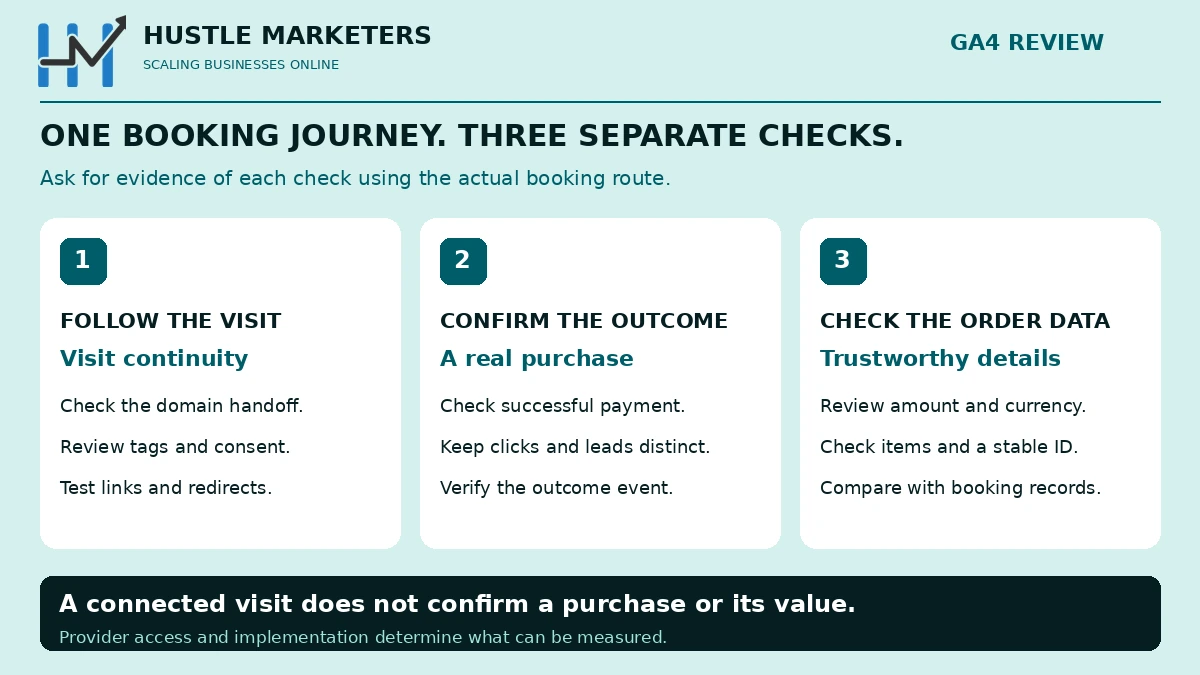
Three separate things your tracking needs to do
1. Follow the visit
Connect the relevant domains so the measurement can follow the customer’s navigation. Check consent and the actual links, forms, and redirects involved.
2. Confirm the business outcome
A course selection, a booking-button click, a submitted inquiry, and a paid enrollment are different actions. Give them distinct events and meanings. Use a confirmed purchase event for a real purchase, not just because someone reached a page named “thank you.” Google publishes recommended events for common actions.
3. Send trustworthy order data
For purchase reporting, send the appropriate amount, currency, transaction ID, and item details. Google’s ecommerce guidance specifies the purchase structure, including how to handle item values, tax, and shipping.
For an illustrative $450 course with no additional tax or fees, a test order might have value: 450, currency: USD, and transaction_id: DEMO-1042. These are example values, not CMSC results or production code.
Why must the order ID stay the same?
If a customer refreshes a receipt, the order has not changed. Its ID should not change either.
Use a stable identifier tied to the real order, unique to that transaction and free of personal information. If several schools share a report and reuse order numbers, plan an unambiguous identifier, such as a stable school prefix plus the actual order number.
Generating a fresh timestamp on every page load makes the same order look different each time. Sending one fixed ID for every customer creates the opposite problem. Google explains how transaction IDs help deduplicate web purchases.
If the provider does not expose a reliable ID, ask for a supported way to obtain one before claiming that duplicate purchase tracking is solved.
How to set up GA4 cross-domain tracking
Complete the journey and provider checks before changing settings. For Google’s standard setup:
- Choose the reporting destination. Decide which sites belong in the shared journey and who should be able to access the data.
- Verify the tags. Participating pages need the same measurement ID from the same web stream. A GTM container being present does not prove the right GA4 tag fires.
- Open the domain settings. In GA4, go to Admin, Data streams, your web stream, Configure tag settings, then Configure your domains.
- Add deliberate conditions. Match the intended domains or hostnames and save. Choose the condition that fits the actual addresses; “Contains” is not a universal requirement.
- Check overrides and navigation. Review any code-level linker configuration, which can override the Admin domain list. Test forms and scripted buttons as well as normal links.
Use Google’s current setup instructions and linker reference. Do not paste a sample configuration into production without checking the provider and the existing tags.
How can a business owner check that it works?
Ask for a demonstrated booking test, not only a screenshot of a saved settings screen. Use a sandbox or test order if the platform supports it.
- Start where a customer starts. Record the landing page and the test traffic source.
- Follow the full route. Include the real buttons, redirects, payment step, and final confirmation.
- Inspect the handoff. Check linker behavior and the destination tag. Seeing
_glis a clue; identifier continuity needs checking too. - Confirm the outcome event. Verify that purchase is tied to successful payment, with the expected amount, currency, items, and order ID.
- Revisit the receipt. Confirm the ID remains stable and the implementation handles repeat loads without adding another sale.
- Repeat meaningful variations. Test the other school entry points, mobile navigation, and relevant consent choices.
GA4 DebugView and Tag Assistant help inspect the events. Ask the specialist to explain the evidence in ordinary language and record any conditions they could not test.
Finally, reconcile analytics with actual booking records for a matching period. Align time zones, currency, tax treatment, refunds, cancellations, and test orders. A report total alone is not proof that every order is correct.
Common problems and what to check first
| What you notice | What to investigate | What not to assume |
|---|---|---|
| No activity from the booking pages | Provider support, tag firing, correct measurement ID, and consent state. | A domain-list entry installs a tag. |
The link has _gl, but the journey still breaks | Whether redirects retain it and the destination tag accepts it. | The parameter alone proves the whole setup works. |
| Clicks are tracked but purchases are missing | The provider’s confirmed-payment event or usable receipt integration. | A Book now click means a sale. |
| Too many purchases | Repeat receipt loads, duplicate tags, and inconsistent order IDs. | A fresh timestamp prevents duplicates. |
| Revenue looks wrong | Amount source, currency, items, fees, refunds, and event mapping. | Any number visible on the page is the paid order amount. |
| One school appears in another school’s reports | Tag destinations and provider rules for assigning bookings. | A shared vendor automatically separates your data correctly. |
Consent also affects which signals are available. Test the relevant states using Google’s consent-mode verification guidance; never promise complete observation of every visitor.
Six questions to send your booking provider
- Which exact domains and receipt addresses does our customer use?
- Can our GA4 measurement ID run on the relevant pages?
- Do you preserve incoming tracking parameters through redirects?
- How do you expose a confirmed payment, order ID, amount, currency, and items?
- How do you assign each booking to the correct school or business?
- What happens if customers refresh the receipt, leave without returning, cancel, or receive a refund?
The answers determine whether you need browser tagging, a receipt integration, a supported server integration, or a reporting workaround.
Frequently asked questions
Is cross-domain tracking the same as excluding referrals?
No. Unwanted-referral settings affect how a returning source is treated. A payment provider can be a valid case for that setting, but excluding it does not collect its checkout events or connect identifiers by itself. Use Google’s unwanted-referrals guidance for that separate decision.
Do I need to connect three websites if customers never move between them?
Not simply because you own them. Decide whether you need a unified journey or separate measurement. Each site may still need an appropriate handoff to its own booking flow.
Can a third-party checkout be tracked without installing our tag there?
Possibly, through a supported provider integration or a trustworthy receipt setup. What you can observe depends on that implementation. Without suitable access, you cannot assume you can measure the provider’s internal steps.
Does this also finish Google Ads conversion tracking?
No. Review the Google Ads conversion action, value, attribution requirements, and tag design separately. Google’s current Conversion Linker guidance also says a separate Conversion Linker tag is unnecessary when the container loads a Google tag on every page.
Will this combine old data from separate GA4 properties?
Changing the domain configuration does not retroactively stitch old journeys or merge property histories. Plan how to compare periods before and after a change without treating them as identical measurement conditions.
Does more tracked revenue mean the business made more money?
Not necessarily. Suppose the booking system recorded ten paid enrollments while analytics recorded six. Recording all ten after a repair improves visibility by four orders. It does not establish that four new customers were created. This is an illustrative example, not a client result.
Will one customer always stay in one session?
No. Cross-domain continuity does not remove session timeouts, consent effects, device changes, or other limits. Someone returning another day can still have a new session even when the setup works.
How often should we check it?
Recheck after changes to your booking provider, checkout, consent banner, website navigation, or tagging. Agree on a regular comparison against booking records so the team notices gaps before using the numbers for budget decisions.
Start with your customer’s booking journey
Write down the websites involved, the business outcome you need to measure, and the provider access you have. Then ask your specialist to demonstrate continuity, a confirmed outcome, and accurate order data.
Ask Hustle Marketers to review your booking journey. Share the public website addresses and provider name. We can identify what needs investigation and the evidence your team should request.