Crawl Budget SEO: How Crawling Query Strings Wastes It

Ishant
Published : October 29, 2026 at 5:56 am
Updated : October 29, 2026 at 6:22 pm
Ishant

Summarize this article with:
By Ishant Sharma | Published: October 29, 2026 | 20 min read
Google does not have unlimited resources to crawl every URL on the web. It has to decide which URLs to crawl, how often to crawl them, and how much crawling a site’s infrastructure can handle.
That is where crawl budget comes in.
For most small websites, crawl budget is not something you need to actively manage.
Google’s own crawl budget docs say advanced optimization mainly applies to very large sites and rapidly changing sites. It also applies to sites with many URLs that Google has found but not yet indexed.
For large ecommerce stores, marketplaces, publishers, and other sites with many URLs, crawl efficiency can become a real technical SEO issue.
This guide covers what crawl budget means, how Google manages crawling, and what commonly wastes crawl resources. It also explains how to diagnose problems and build a cleaner, more efficient site.
One frequent cause is crawling query strings: the parameter URLs created by filters, sorting, and tracking tags. This guide shows how that waste happens and how to fix it.
Quick Answer
Crawling query strings wastes crawl budget. Each set of filters, sorts, or tracking tags turns one page into dozens of near-duplicate URLs that Google must fetch separately. Each extra URL competes with your real pages for crawl capacity and crawl demand. The fix is to control which parameter URLs stay crawlable using robots.txt, canonical tags, and cleaner internal links.
Table of Contents
- What Is Crawl Budget in SEO?
- Crawl Capacity vs. Crawl Demand
- Does Crawl Budget Actually Matter?
- How Googlebot Crawls a Website
- Crawl Budget vs. Indexing
- What Wastes Crawl Budget?
- Noindex vs. Robots.txt
- Noindex, Nofollow, Canonical or 301
- How to Check Crawl Activity
- Crawl Budget by Googlebot Type
- How to Calculate Crawl Budget
- How to Optimize Crawl Budget
- Advanced Tactic: Fresh Content Sitemap
- Crawl Budget and Ecommerce Sites
- Crawl Budget and JavaScript
- Crawl Budget by Platform
- AI Crawlers and Crawl Budget
- Crawl Budget and AI Search
- How to Diagnose a Crawl Problem
- Server Log File Analysis
- What Should You Fix First?
- Common Crawl Budget Myths
- Frequently Asked Questions
2 Factors
Crawl capacity + crawl demand = crawl budget
1M+
Pages where Google says advanced optimization becomes relevant
2 MB
Google’s per-URL fetch limit (excluding PDFs)
50,000
Max URLs per XML sitemap file
Crawl capacity (how much crawling your server can handle) and crawl demand (how much Google wants to crawl your URLs) combine to set your site’s crawl budget, which determines which URLs Google actually crawls.
What Is Crawl Budget in SEO?
Crawl budget is Google’s practical allocation of crawling resources to a website. It is not a fixed monthly quota. Instead, Google continuously determines how much crawling makes sense based on the site’s infrastructure and the value of its URLs.
Crawl Capacity
Crawl capacity is related to how much crawling your infrastructure can handle. If your server responds quickly and reliably, Google can usually crawl more efficiently.
If your server becomes slow or starts returning errors or rate-limiting responses, Google may reduce crawling. Google’s crawl budget docs list server latency, Time to First Byte (TTFB), 5xx errors, and 429 responses as factors that affect crawl capacity.
Crawl Demand
Crawl demand is Google’s assessment of how much it wants to crawl your site’s URLs. Factors include popularity, content changes, content uniqueness, overall user value, links, and site structure.
Practitioner Insight: Gary Illyes on Crawl Speed
On Google’s Search Off the Record podcast in 2025, Gary Illyes said that slow, expensive database queries can hurt crawling of large sites more than raw page count.
Sites that generate pages from slow database queries cause Googlebot to wait. That wait reduces how much crawling Google is willing to do.
This is why backend performance matters, not just CDN or frontend speed. It is a real lever for large ecommerce and publisher sites with many dynamically generated pages.
The important takeaway: a technically fast website does not automatically cause Google to crawl every URL more often. Crawl capacity and crawl demand work together, and demand is ultimately driven by how much value Google assigns to your URLs.
Crawl Capacity vs. Crawl Demand
| Factor | What It Means | What Can Affect It |
|---|---|---|
| Crawl capacity | How much crawling your infrastructure can handle | Server latency, TTFB, errors, rate limiting, database speed |
| Crawl demand | How much Google wants to crawl | Popularity, freshness, uniqueness, user value |
| Crawl budget | The practical crawling available to your site | Combination of capacity and demand |
An Ecommerce Example
Imagine an ecommerce site with 500,000 URLs. But 400,000 of them are filter combinations, sort variations, tracking URLs, duplicate product URLs, empty search results, and low-value parameter combinations.
The problem is not simply that Google has “too little crawl budget.” The deeper problem is that the website is exposing too many URLs that do not deserve crawling. That is why URL inventory management is one of the most important parts of crawl optimization.
Does Crawl Budget Actually Matter for SEO?
It depends on the website. This is one of the most important points to understand. Google says that websites without very large numbers of pages or rapid content changes usually do not need advanced crawl-budget optimization.
Google gives rough examples of when crawl-budget management can become relevant:
- Sites with 1 million or more unique pages with moderate content changes
- Sites with 10,000 or more unique pages that change very frequently
- Sites with substantial numbers of URLs classified as “Discovered – currently not indexed”
These are not hard thresholds. They are indicators that more careful URL inventory management is worth investigating.
| Site Type | Crawl Budget Priority | Focus Area |
|---|---|---|
| Small business site (hundreds of pages) | Low | Normal technical SEO, accurate sitemap |
| Mid-size site (thousands of pages) | Medium | Monitor GSC, fix redirect chains, clean sitemap |
| Large ecommerce (100k+ URLs) | High | Faceted navigation, parameters, server performance |
| Enterprise / publisher (1M+ URLs) | Critical | Full crawl audit, server logs, URL architecture |
How Googlebot Crawls a Website
Crawling and indexing are not the same thing. At a simplified level, Google discovers URLs and crawls the ones it can access. It then processes the content, evaluates the page and its signals, and decides whether and how to index it.
A URL being crawled does not guarantee that it will be indexed. Google clearly distinguishes crawling from indexing. This distinction is critical when diagnosing indexing problems.
Important Diagnostic Point
“Google discovered my page but hasn’t indexed it” does not automatically mean “I ran out of crawl budget.” It could also be related to content quality, duplication, canonicalization, internal linking, rendering, or other indexing signals.
Always investigate the actual reason before assuming crawl budget is the cause.
Crawl Budget vs. Indexing: What’s the Difference
What is a crawl budget, in the simplest terms? It is the crawling Google is willing to spend on your site in a given period.
Crawling and indexing are two separate steps. Crawling means Googlebot fetches a URL and downloads its content. Indexing means Google stores that content and makes it eligible to rank.
A page can be crawled and still never indexed. Search Console tracks two statuses that confuse most site owners.
Crawled – currently not indexed means Googlebot visited the page but chose not to index it. This usually happens because the content looks thin, duplicate, or low value.
Discovered – currently not indexed means Google knows the URL exists but has not crawled it yet. This often happens because of crawl prioritization, not a technical block.
Understanding how query string URLs affect crawl budget starts with this distinction. A filtered URL can sit in either state for weeks. Neither state is automatically a crawl-budget problem on its own.
| Status | What It Means | Likely Cause |
|---|---|---|
| Crawled – currently not indexed | Googlebot fetched the page but did not index it | Thin, duplicate, or low-value content |
| Discovered – currently not indexed | Google knows the URL but has not crawled it | Crawl prioritization, low perceived value |
What Wastes Crawl Budget?
The biggest crawl-efficiency problems usually come from exposing too many needless URLs. Here are the most common sources.
1. Faceted Navigation
Faceted navigation is one of the most common crawl problems on large ecommerce websites. A relatively small number of filters can generate an enormous number of URL combinations.
/products/shoes/
/products/shoes/?color=red
/products/shoes/?color=red&size=10
/products/shoes/?color=red&size=10&brand=nike
/products/shoes/?color=red&size=10&brand=nike&sort=price
Google specifically identifies faceted navigation as a crawling challenge because filter combinations can create very large or effectively infinite URL spaces.
First determine whether filtered URLs have genuine independent search value. If they do not, prevent your technical setup from creating a needlessly large crawlable URL universe.
Possible approaches include robots.txt blocking of parameter patterns, controlled URL generation, and appropriate 404 responses for invalid combinations. You can also use canonicalization where appropriate, and remove needless internal links to low-value combinations. The right solution depends on the site’s architecture.
2. URL Parameters (Query Strings)
A query string is the part of a URL after the question mark, such as ?sort=price. Crawling query strings is one of the most common ways sites waste crawl budget, since each parameter combination creates a new, crawlable URL.
/products/shoes/?sort=price
/products/shoes/?sort=newest
/products/shoes/?utm_source=email
Not every parameter URL is a problem. The important question is: does this URL represent a page Google really needs to crawl and potentially index? If not, control how those URLs are generated, linked, and crawled./products/shoes/?color=red?sort=price?utm_source=emailEach query string is a separate URLGooglebot must fetch and evaluateFilters, sorting, and tracking tags each add a new query string, turning one page into many crawlable URLs.
3. Duplicate URLs
Multiple URLs serving substantially similar content create needless crawling and processing.
/product/
/product/?ref=homepage
/product/?utm_source=email
Where appropriate, establish a preferred canonical URL. However, canonical tags are not a reliable crawl-budget blocker. Google can still crawl alternate URLs.
If your website is generating millions of needless URLs, fix the underlying URL-generation and linking system rather than relying entirely on canonical tags.
4. Redirect Chains
Avoid chains like this:
URL A → URL B → URL C → URL D
Prefer direct redirects:
URL A → URL D
Long redirect chains make crawling less efficient and create needless requests. After changing URLs, update internal links so they point directly to the final destination.
5. Broken Internal Links
Broken internal links create needless requests and a poor user experience. Audit for 404, 410, 5xx, and redirecting internal links. Where possible, restore useful content, update the link, redirect a permanently moved page, or remove obsolete links.
6. Soft 404 Pages
A soft 404 is a page that technically returns a successful 200 response but effectively behaves like a nonexistent page. For example: an HTTP 200 with a title of “Product Not Found” and content saying “This product no longer exists.”
If a page is really unavailable, return the appropriate HTTP response code rather than serving an empty or misleading page. Google recommends fixing soft 404 problems.
7. Low-Value Automatically Generated Pages
Large websites can accidentally generate thousands of low-value pages. Examples include empty category pages, internal search results, thin tag pages, low-value archive pages, empty location pages, and filter combinations. Auto-generated pages with little unique content are common too.
If these pages provide no meaningful standalone value, they should not become a huge crawlable URL inventory.
8. Orphan Pages
An orphan page has no meaningful internal links pointing to it. An important distinction: an orphan page does not automatically waste crawl budget. Google can discover an orphan URL through XML sitemaps, external links, or other discovery mechanisms.
The bigger problem is that orphan pages have weak internal discovery and contextual signals. Important pages should be connected naturally to the site’s architecture.
Noindex vs. Robots.txt
These two controls are often confused. They solve different problems.
A noindex directive tells Google: “Do not include this page in search results.” But Google has to crawl the page to see the noindex instruction.
Google clearly states that a noindex directive must be accessible to Googlebot. If the URL is blocked by robots.txt, Google cannot see the noindex directive.
| Situation | Appropriate Control |
|---|---|
| Prevent crawling of a large class of needless URLs | robots.txt |
| Prevent an accessible page from appearing in search | noindex |
| Important page you want indexed | Neither |
| Page blocked by robots.txt with a noindex tag | Google may not see the noindex |
| Permanently removed content | Usually 404 or 410 |
Does Robots.txt Save Crawl Budget?
It can. If Google keeps crawling query strings that add no value, such as sort or tracking parameters, blocking those patterns can reduce needless crawling.
But do not block important product pages, service pages, articles, or pages that need to be crawled to understand their noindex directive.
Critical Note
Robots.txt controls crawling. It does not guarantee removal from Google’s index. If Google discovers a blocked URL through external links, it may still know the URL exists even though it cannot fetch the page content.
To remove a page from Google’s index, use noindex (while allowing crawling) or the URL Removal Tool in Search Console.
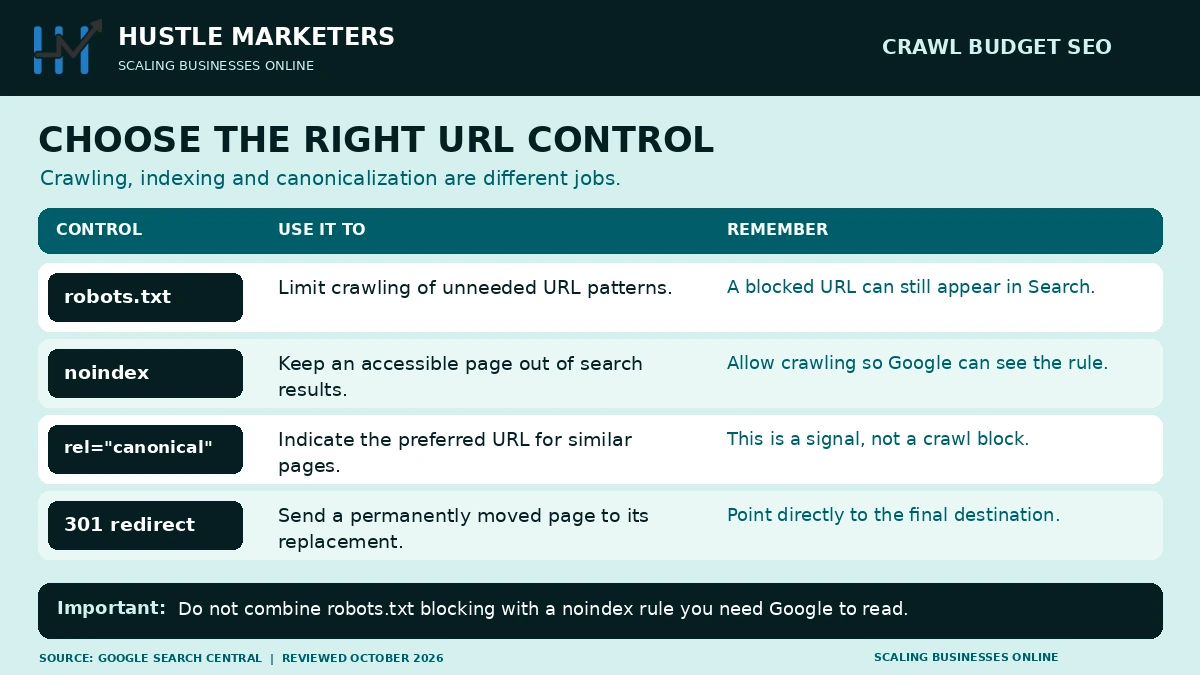
Noindex, Nofollow, Canonical or 301: The Full Decision Framework
Choosing the Right SEO Crawl Control Method
Good SEO crawl control means picking the right tool for each situation. Robots.txt, noindex, nofollow, canonical, and 301 redirects all solve different problems, and mixing them up wastes crawl budget instead of saving it.
Ask three questions for each URL. Should Google crawl it? Should Google index it? Should link equity pass through it?
| Method | Crawlable | Indexable | Passes Link Equity | Best Use Case |
|---|---|---|---|---|
| Robots.txt Disallow | No | Usually no | No | Large classes of needless URLs (sort, filter, tracking) |
| Link-level nofollow | Yes, if linked elsewhere | Yes, if linked elsewhere | No, for that link | Untrusted or low-value outbound links |
| Noindex, follow | Yes | No | Yes | Thin pages you still want to pass links through |
| Noindex, nofollow | Yes | No | No | Low-value pages with no useful outbound links |
| Canonical tag | Yes | No, consolidates to target | Yes, to canonical target | Near-duplicate or parameter variants |
| 301 redirect | Not applicable | No, target is indexed instead | Yes, to destination | Permanently moved or merged pages |
Robots.txt is the strongest crawl-budget tool, since a blocked URL is never fetched at all. Noindex still costs a crawl request, because Google must fetch the page to see the tag.
Canonical tags are a hint, not a block. Google can still crawl the non-canonical version occasionally to confirm it still points to the same target.
How to Check Crawl Activity in Google Search Console
Google Search Console is the primary tool for understanding how Googlebot interacts with your website.
Go to: Google Search Console → Settings → Crawl Stats
The Crawl Stats report shows total crawl requests, requests by response code and file type, and average response time. It also shows overall Google crawler activity. Look for patterns rather than arbitrary “good” or “bad” numbers.
Also review Indexing → Pages for:
- Discovered – currently not indexed
- Crawled – currently not indexed
- Server errors and soft 404s
- Redirect problems
- Duplicate / canonical issues
Interpreting Crawl Stats
Do not use total crawl count as your main KPI. A high crawl count is not automatically a success if Googlebot is spending most of its time requesting filter URLs, redirects, 404s, and tracking parameters.
A better objective is to increase the proportion of useful crawling on pages that actually have search value.
Crawl Budget by Googlebot Type
Google crawling budget is not one single bot. Googlebot Smartphone, Googlebot Desktop, Googlebot Image, Googlebot Video, Googlebot News, and AdsBot each request URLs for a different purpose.
Every Googlebot variant draws from the same host-level crawl capacity. A spike in requests from one type can slow the others down.
The Crawl Stats report in Search Console breaks requests down “by Googlebot type.” This view matters most for image-heavy or video-heavy sites, where the wrong bot mix can signal a discovery problem.
| Googlebot Type | What It Crawls | Matters Most For |
|---|---|---|
| Googlebot Smartphone | Primary crawler for mobile-first indexing | Nearly every site |
| Googlebot Desktop | Secondary crawler, smaller share of requests | Desktop-specific content differences |
| Googlebot Image | Image files for Google Images | Photography, ecommerce, visual content sites |
| Googlebot Video | Video files and embeds | Publishers and video platforms |
| Googlebot News | Fast recrawl of news content | News and publishing sites |
| AdsBot | Landing pages for Google Ads quality checks | Sites running Google Ads |
If Googlebot Image barely visits an ecommerce catalog, product photos may load too slowly or sit behind JavaScript the crawler cannot reach easily.
How to Calculate Your Site’s Crawl Budget
Crawl budgets are not published numbers, but Search Console gives you enough data to build a useful estimate.
Is My Website Crawlable? A Quick Checklist
Before calculating anything, confirm the basics. Answer these questions first.
- Does robots.txt block important sections by mistake?
- Do your key pages return a
200status code? - Does your XML sitemap list your real, current URLs?
- Can Googlebot reach your pages without logging in or completing a form?
If the answer to any of these is no, fix that first. A crawl budget estimate built on broken basics will not help.
How to Improve Crawl Rate After You Calculate It
Open Google Search Console → Settings → Crawl Stats and note the total crawl requests for the last 90 days. Divide that number by 90 for a rough daily average.
For example, 180,000 total requests over 90 days works out to roughly 2,000 crawl requests per day. Treat this as a directional estimate, not a fixed allowance from Google.
Google Search Central crawl budget pages don’t list an exact figure, so any number you calculate is your own estimate, not an official ceiling. Once you know your rough daily rate, compare it against your total URL count to see how long a full recrawl would take.
How to Optimize Crawl Budget
Crawl-budget optimization is a combination of URL management, site architecture, internal linking, server performance, sitemap management, redirect hygiene, duplicate control, and faceted-navigation management.
1. Audit Your URL Inventory
Before changing robots.txt or canonical tags, understand what URLs actually exist. Look for parameters, filters, sort URLs, search URLs, session IDs, duplicate paths, calendar archives, tags, internal search, infinite-scroll systems, and API-generated URLs.
Classify them into two groups: pages that really deserve to be crawled and indexed, and pages that provide no standalone search value.
2. Fix Redirect Chains
Every internal link should point directly to the canonical destination. Instead of /blog-old → /blog-new → /blog-newest, use /blog-old → /blog-newest, then update all internal links to point directly to the final URL.
3. Fix Broken Internal Links
Run a crawler and identify 404, 410, 5xx, and redirecting internal links. Restore useful content, update links, redirect permanently moved content, or remove obsolete links. See our advanced SEO techniques guide for a broader technical audit framework.
4. Use Canonical Tags Correctly
<link rel="canonical"
  href="https://example.com/category/shoes/" />
Canonical tags help Google understand the preferred URL among similar URL versions. But canonicalization should not be your only solution to URL proliferation. If the platform creates millions of needless filter URLs, address the underlying architecture as well.
5. Keep XML Sitemaps Clean
Your XML sitemap should contain only URLs you want Google to discover and consider indexing. A clean sitemap usually avoids 404 URLs, 410 URLs, redirected URLs, non-canonical URLs, URLs blocked from crawling, and URLs you do not want indexed.
For large sites, use sitemap indexes and split files. Google currently allows up to 50,000 URLs or 50 MB uncompressed per sitemap file. Remember: a sitemap is a discovery hint, not a guarantee of crawling or indexing.
6. Use Accurate lastmod Dates
If your XML sitemap contains lastmod, ensure it represents a meaningful content update. Do not update every URL simply because your sitemap was regenerated. Google recommends using lastmod only when it accurately reflects a substantial content update.
7. Improve Server Response Time
Google’s crawl-budget docs list server latency, TTFB, 5xx errors, and 429 responses as factors that can affect crawl capacity. Focus on database optimization, server-side caching, CDN configuration, efficient queries, and application performance.
Gary Illyes said in 2025 that expensive database calls can hurt crawling more than page count on large sites with dynamically generated pages.
Avoid chasing arbitrary TTFB thresholds. Instead, improve response time, consistency, and server stability, particularly on high-volume URL systems and important pages.
8. Use HTTP Caching
Where appropriate, support efficient HTTP caching and 304 Not Modified responses. If a resource has not changed since Google last fetched it, a 304 response reduces needless data transfer and can improve crawling efficiency.
9. Strengthen Internal Linking
Internal links help Google discover pages and understand relationships. Important pages should not be isolated. A logical architecture for ecommerce might look like: Homepage → Category → Subcategory → Product.
For content: SEO Pillar Page → Supporting Guide → Specific Technical Article → Relevant Commercial Page.
The goal is not to add hundreds of links to every page. The goal is to create logical, contextual discovery paths. For a broader framework, see our SEO strategies guide.
10. Consolidate Overlapping Content
If you have multiple weak articles targeting essentially the same search intent, determine whether they should become one stronger resource. The correct question is: does each URL satisfy a distinct user need?
If yes, separate pages may be appropriate. If no, consolidation may improve the overall content architecture.
Advanced Tactic: Use a Dedicated Sitemap for Fresh Content
Experienced practitioners use one more sitemap trick beyond basic cleanup. Maintain a small, separate XML sitemap that lists only recently added or updated URLs.
Googlebot tends to revisit sitemaps that change often more frequently than static ones. A dedicated fresh-content sitemap effectively points Google’s attention at your newest work.
Most CMS platforms can generate this automatically by querying content updated within a set window. WordPress sites can usually do this with a custom sitemap template or an SEO plugin filter.
/sitemap-index.xml
/sitemap-products.xml
/sitemap-fresh-content.xml   ← updated URLs from the last 7 days
Keep this sitemap small, ideally under a few hundred URLs, and remove entries once they age out of the “fresh” window. Do not duplicate every URL from your main sitemap here.
Pair this sitemap with accurate lastmod dates, since a fresh sitemap with stale timestamps sends a mixed signal. This tactic will not force crawling on its own, but it makes genuinely new, high-priority content easier for Google to notice quickly.
Crawl Budget and Ecommerce Sites
Ecommerce websites can face some of the most complicated crawl-efficiency challenges. Their architecture naturally creates large numbers of URLs: products, product variants, categories, subcategories, filters, sort parameters, search pages, pagination, and tracking parameters.
Ecommerce Crawl Budget: Practitioner Insight
Technical SEO practitioners working on large ecommerce sites consistently identify faceted navigation as the single biggest crawl-budget waster. A site with 50,000 products and 20 filter attributes can mathematically generate billions of parameter URL combinations.
The solution is not to “block everything.” Instead, make deliberate decisions about which filter combinations represent genuine search landing pages worth indexing. Make sure the rest stay uncrawlable through URL controls and internal linking discipline.
Ecommerce Crawl-Budget Checklist
Product Pages
Important products should be internally linked, included in relevant sitemaps, correctly canonicalized, accessible to Googlebot, returning 200, and substantively useful with unique content.
Category Pages
Important categories should have a clear hierarchy, unique value, internal links, relevant products, and clean canonical URLs.
Filters
Ask: does this filter combination deserve to exist as a search landing page? If not, do not let your implementation create an effectively infinite crawlable URL system. Google’s faceted-navigation guidance discusses preventing needless facet combinations from becoming crawlable URL spaces.
Pagination
Do not automatically assume pagination is bad. Pagination can be necessary for discovering products and articles that are not linked elsewhere. The important question is whether Google can efficiently discover the content behind the pagination.
Avoid outdated recommendations based on treating rel="next" and rel="prev" as current Google indexing requirements.
For ecommerce-specific SEO and PPC strategy, see our ecommerce PPC management services and advanced SEO techniques guide.
Need a Technical SEO Audit?
Hustle Marketers helps ecommerce and enterprise websites identify and fix crawl, indexation, and architecture problems that limit organic growth.SEO Services Ecommerce PPC
Crawl Budget and JavaScript
Modern websites increasingly depend on JavaScript. Google can render JavaScript, but important SEO content and links should not depend on needlessly complicated client-side execution.
Check that important content is accessible and important links can be discovered. Confirm canonicals are set up correctly, metadata is available, and critical content does not depend on unreliable requests.
Google’s current crawler documentation also notes a 2 MB fetch limit for an individual URL (excluding PDFs). Content beyond that limit is not fetched or rendered.
For most websites this will not be a problem. But very bloated HTML with large amounts of inline CSS, JavaScript, menus, or embedded assets can make it relevant.
Crawl Budget by Platform: WordPress, Shopify and Headless/JS Sites
Crawl budget optimization for ecommerce and content platforms looks different depending on the underlying system. Each platform tends to waste crawl budget in its own predictable way.
WordPress
WordPress can generate duplicate archive URLs from tag pages, category pages, author pages, and date-based archives. Plugins often add their own query-string parameters on top of that.
- Audit tag and category archives for near-duplicate content, and noindex the ones with no unique value
- Check plugin-generated query strings, such as filter or tracking parameters, in your crawl export
- Confirm attachment pages (individual image pages) are not being crawled and indexed separately
- Keep the XML sitemap plugin’s output limited to real, canonical content URLs
Shopify
Single-page apps (SPAs) and Shopify-style storefronts suffer from a similar root issue: JavaScript-heavy filtering that generates crawlable URLs the platform does not fully control.
- Review collection sort and filter parameters, such as
?sort_by=and?filter.v.price - Check internal search result pages for accidental indexability
- Use canonical tags on filtered collection views that point back to the base collection
- Watch for duplicate content between collections and products belonging to multiple collections
Headless and JavaScript-Heavy Sites
Query string URLs cost even more crawl effort on JavaScript sites, since Google must fetch, queue, and render each variant before deciding whether it deserves indexing.
Headless and JavaScript-heavy sites add a second bottleneck: render budget. Google needs extra resources to execute JavaScript and see the final content, on top of the initial crawl request.
- Confirm important content is present in the server-rendered HTML, not only after client-side rendering
- Check that internal links are real
<a href>tags Google can follow, not JavaScript-only click handlers - Watch for two-wave indexing delays, where content is crawled quickly but rendered and indexed much later
How AI Crawlers (GPTBot, ClaudeBot, PerplexityBot) Affect Your Crawl Budget
AI crawlers are not a future problem. GPTBot, ClaudeBot, and PerplexityBot already send real, measurable request volume to most public websites in 2026.
In July 2026, the Google crawl budget Search Central documentation was rewritten, now officially titled “Optimize your crawl budget.” The update confirms something important: the crawl capacity limit is shared across all of Google’s crawlers, so heavy demand from one Google crawler can reduce what is left for the others.
The Google crawl budget documentation now states every site starts with the same conservative capacity limit. Google raises that limit automatically as demand grows and the server stays healthy.
Heavy AI bot traffic will not directly reduce Googlebot’s own budget, since these are separate companies with separate systems. But it can slow your server down, and a slow server triggers the same automatic crawl reduction Google applies to any overloaded host.
Not every AI crawler serves the same purpose. Training bots collect content to build models. Search and citation bots fetch pages to answer live user questions, closer to how Googlebot works.
| Bot Name | Operator | Purpose | Block or Allow |
|---|---|---|---|
| GPTBot | OpenAI | Trains AI models on site content | Block if you don’t want content used for training |
| OAI-SearchBot | OpenAI | Powers live ChatGPT search results | Allow to stay visible in AI answers |
| ClaudeBot | Anthropic | Trains AI models on site content | Block if you don’t want content used for training |
| Claude-SearchBot | Anthropic | Fetches pages for live Claude answers | Allow to stay visible in AI answers |
| PerplexityBot | Perplexity | Fetches and cites pages in AI answers | Allow to stay visible in AI answers |
| Google-Extended | Controls use of content for Gemini training and grounding; does not affect inclusion or ranking in Google Search | Decide independently of your Googlebot settings |
Blocking a training bot in robots.txt does not free up crawler budget for search bots, since each operator manages its own crawling separately. Total request volume across all bots still matters for your server’s health.
Many sites now allow citation-focused bots like PerplexityBot and OAI-SearchBot while blocking pure training bots like GPTBot and ClaudeBot. This preserves AI-answer visibility without giving away training rights by default.
Crawl Budget and AI Search
It is tempting to claim “more crawling means more AI citations.” That is too simplistic. AI search visibility depends on many factors, including discoverability, indexation, content quality, relevance, and authority.
Factual clarity, entity understanding, search intent, citability, and the particular AI search system matter too. Crawl frequency alone does not guarantee inclusion in AI-generated answers.
What Crawl Efficiency Does Help With
A technically healthy site makes it easier for search systems to work. They can discover new content quickly, process updates, understand site relationships, access important pages, and keep information current.
Crawl optimization is foundational search infrastructure, not a direct guarantee of AI visibility. For broader AI-search and SEO strategy, see our SEO strategies guide.
How to Diagnose a Crawl Problem
- Understand the site’s URL size. Determine how many URLs actually exist. Compare XML sitemap URLs, internal URLs, indexed URLs, crawled URLs, parameter URLs, and server-log URLs. Do not rely solely on the number of pages shown in your CMS.
- Check Google Search Console. Review Settings → Crawl Stats and Indexing → Pages. Look for “Discovered – currently not indexed,” server errors, soft 404s, redirect problems, and duplicate/canonical issues. Do not automatically label every excluded URL a crawl-budget problem.
- Crawl the website. Use a crawler (Screaming Frog, Sitebulb, Ahrefs, or similar). Analyze status codes, redirect chains, canonicals, internal links, orphan URLs, parameters, pagination, sitemap URLs, and crawl depth.
- Analyze server logs. For large websites, server-log analysis provides the clearest evidence of how Googlebot is actually spending its time. Look for Googlebot requests, URL patterns, response codes, response times, parameter URLs, crawl frequency, and whether important URLs are receiving little crawling.
Crawl-Budget Audit Framework
| Area | What to Check | Priority |
|---|---|---|
| Faceted navigation | Parameter explosion, filter URL crawlability | High |
| Server performance | Latency, TTFB, 5xx, 429, database speed | High |
| Redirect chains | Multi-hop redirects and loops | High |
| Internal links | Broken and redirecting links | High |
| XML sitemap | Only canonical, indexable, live URLs | High |
| Duplicate URLs | URL consolidation and canonicalization | High |
| Internal search URLs | Search crawlability controls | Medium/High |
| Orphan pages | Important pages without internal links | Medium |
| JavaScript | Important content and links accessible | Medium |
| Content consolidation | Overlapping content with weak signals | Medium |
How to Analyze Server Log Files for Crawl Budget Issues
No crawl budget optimization guide is complete without server log analysis. Log files show exactly what Googlebot requested, unlike Search Console’s sampled and delayed data.
A raw server log records every request that hit your server, including the user agent, URL, response code, and timestamp. That makes it the most accurate source for real crawl behavior.
Basic Log Analysis Workflow
- Export raw access logs from your server or hosting provider, ideally covering at least 30 days
- Filter requests by user agent to isolate Googlebot and other crawlers you care about
- Verify requests are really from Google, since anyone can spoof a “Googlebot” user agent string
- Group requests by URL pattern to see which sections receive the most crawl activity
- Check the response code split: how many requests return 200, 301, 404, or 500
- Compare crawl frequency for important pages against low-value or parameter URLs
To verify a real Googlebot request, run a reverse DNS lookup on the IP address, then a forward lookup to confirm it resolves back to a googlebot.com or google.com domain.
| Tool | Best For |
|---|---|
| Screaming Frog Log File Analyser | Desktop tool, good for one-off audits and smaller log files |
| Semrush Log File Analyzer | Cloud-based, integrates with existing Semrush projects |
| JetOctopus | Combines log data with crawl data for large sites |
| Botify | Enterprise-scale log analysis with crawl budget dashboards |
| OnCrawl | Log monitoring alongside technical SEO audits |
Look for a mismatch between which pages get crawled often and which pages actually matter for search. If Googlebot spends most of its time on filter URLs while ignoring new products, that mismatch is your priority fix.
What Should You Fix First?
If you are auditing a large website, do not change everything simultaneously. Use this priority order.
Priority 1: URL Explosion
- Faceted navigation
- Parameter URL generation
- Infinite URL systems
- Duplicate URL structures
Priority 2: Server Health
- Slow responses / TTFB
- 5xx errors
- 429 rate-limit responses
- Database bottlenecks
Priority 3: Crawl Waste
- Redirect chains
- Broken internal links
- Soft 404s
- Unnecessary crawlable URLs
Priority 4: Discovery
- XML sitemap quality
- Internal linking
- Site architecture
- Important page accessibility
Common Crawl Budget Myths
Myth 1
Every website has a crawl-budget problem.
False
Most small websites do not need advanced crawl-budget optimization. Google positions this guidance toward very large, rapidly changing websites and sites with substantial discovery or indexing issues.
Myth 2
More crawling means better rankings.
False
Crawling is necessary for discovery and processing, but more frequent crawling does not automatically improve rankings. Ranking is a separate evaluation.
Myth 3
Every noindex page is destroying crawl budget.
False
A noindex page must usually be crawled for Google to see the directive. Having noindex pages does not automatically mean a crawl-budget problem. The issue becomes significant only when very large sites expose huge numbers of needless URLs repeatedly.
Myth 4
Canonicals stop crawling.
False
Canonical tags help Google consolidate duplicate or alternate URLs, but they do not guarantee that alternate URLs will never be crawled.
Myth 5
Robots.txt removes URLs from Google.
False
Robots.txt controls crawling. It is not a guaranteed index-removal mechanism. Google may still know a blocked URL exists if it was discovered through external links.
Myth 6
A faster website gets unlimited crawling.
False
Better infrastructure can improve crawl capacity, but Google’s crawl demand still determines how much it wants to crawl. Demand is driven by the value of your URLs, not only by server speed.
Ishant Sharma
Founder, Hustle Marketers
Ishant Sharma is the Founder of Hustle Marketers, a digital marketing agency focused on SEO, paid advertising, and ecommerce growth. His work includes technical SEO, crawlability, internal linking, site architecture, and ecommerce SEO for clients across multiple industries. Learn more about Ishant Sharma.
Frequently Asked Questions
What is crawl budget in SEO?
Crawl budget is the set of URLs Google can and wants to crawl on a website. Crawl capacity (how much your server can handle) and crawl demand (how much Google wants to crawl) both shape it.
Google weighs demand using popularity, freshness, and content value. Google’s advanced guidance mainly applies to very large or frequently changing websites.
Does crawl budget matter for small websites?
Usually not as a major concern. Google says websites without very large URL inventories or rapid content changes usually do not need advanced crawl-budget optimization. Focus on normal technical SEO, accurate sitemaps, and resolving genuine crawl or indexing issues.
What wastes crawl budget?
Crawling query strings is one of the biggest sources of waste. Filters, sorting, and tracking parameters can multiply one page into thousands of near-duplicate URLs.
Other common causes include redirect chains, soft 404s, broken internal links, and other low-value URL patterns that add crawlable URLs with little search value.
How do I check crawl budget in Google Search Console?
Open your verified Google Search Console property and go to Settings → Crawl Stats. Review crawl requests, response codes, and response-time trends.
Also review Indexing → Pages for “Discovered – currently not indexed” and other potential discovery and indexing issues.
Does robots.txt save crawl budget?
Blocking needless URL patterns, such as crawling query strings that only sort or filter, can reduce crawling of those URLs. However, robots.txt blocks crawling rather than guaranteeing index removal.
If Google needs to see a noindex directive, the URL must stay crawlable.
Do noindex pages waste crawl budget?
A noindex page must usually be crawled for Google to see the directive. However, noindex pages are not automatically a crawl-budget problem.
The issue grows when very large websites expose huge numbers of needless URLs that Google repeatedly has to process.
How does server speed affect crawl budget?
Server performance affects Google’s crawl capacity. Slow response times, latency, server errors, rate limiting, and slow database queries can cause Google to reduce crawling.
Google’s Gary Illyes said in 2025 that expensive database calls can hurt crawling more than page count on large sites with dynamically generated pages.
Should I submit an XML sitemap to improve crawl budget?
An accurate XML sitemap helps Google discover URLs you want crawled and indexed. However, a sitemap is a hint rather than a guarantee of crawling or indexing.
Keep it limited to the URLs that should appear in search, and keep it updated as content changes.
Does internal linking affect crawlability?
Yes. Internal links provide pathways for Google to discover pages and help establish relationships between URLs. Important pages should be connected through a logical site architecture rather than left isolated as orphan pages.
Does crawl budget affect AI search visibility?
Indirectly. Technical accessibility and efficient discovery help search systems access and process content. But crawl frequency alone does not guarantee AI citations or inclusion in AI-generated answers.
Content quality, relevance, authority, factual clarity, and the particular search system also matter significantly.
What is the difference between crawl budget and crawling?
Crawling is Googlebot visiting a single URL. Crawl budget is the total crawling Google can do across your whole site in a given period.
A page can be crawled without being indexed. A page can also be discovered before Google crawls it. That is why Search Console tracks both states separately.
Does crawl-delay in robots.txt actually slow down Google?
No. Google does not support the crawl-delay directive in robots.txt. Bing and some other search engines do support it.
To slow Googlebot down, fix server errors and slow response times instead. Google also applies automatic slowdowns when a host shows signs of strain.
How does AI crawler traffic affect my crawl budget?
Google’s crawl capacity limit is shared across all of Google’s own crawlers. Heavy traffic from GPTBot or ClaudeBot does not directly reduce Googlebot’s own budget, since these are separate companies.
But it can slow your server down. A slow server triggers the same automatic slowdown Google applies to any overloaded host.
Should I block GPTBot, ClaudeBot or PerplexityBot in robots.txt?
It depends on your goals. Blocking training bots like GPTBot and ClaudeBot stops your content from training AI models. This does not affect Google rankings.
Blocking citation bots like PerplexityBot can reduce your visibility inside AI answers. Many sites now allow citation bots while blocking training-only bots.
What does “Crawled, currently not indexed” mean in Search Console?
It means Googlebot visited the page but chose not to add it to the index. This usually happens when content looks thin, duplicate, or low value next to similar pages.
It differs from Discovered – currently not indexed. That status means Google has not crawled the URL yet, often due to crawl prioritization.
Can I calculate my exact crawl budget?
Not exactly, since Google does not publish a fixed number. You can estimate it using the Crawl Stats report in Search Console, under Settings. It shows total crawl requests over the last 90 days.
Divide that number by 90 for a rough daily average. For deeper detail, read the crawl budget Google Search Central page directly.
Does PageRank affect how much Google crawls my site?
Yes, indirectly. Google has long said that pages with more links pointing to them tend to be crawled more often (Matt Cutts described crawling as roughly proportional to PageRank back in 2010). Pages with more internal and external links tend to get crawled more often.
This is why strengthening internal links to important pages, and earning backlinks, tends to increase how often Google revisits them.
What is the difference between crawl budget and render budget?
Crawl budget covers how many URLs Google requests. Render budget covers the separate resources Google spends executing JavaScript to see a page’s final content.
Rendering happens in a second wave after the initial HTML crawl. A JavaScript-heavy site can stay within its crawl budget but still face indexing delays from render budget limits.
What is llms.txt and does it replace robots.txt?
llms.txt is a proposed file format that lists key pages for AI models to reference. It works something like a sitemap.
It does not replace robots.txt, which crawlers still check before fetching pages. As of 2026, llms.txt adoption stays optional, and no major AI crawler has confirmed using it.
Why would Google crawl a page but never index it?
This usually happens when content closely resembles another page on the site or offers little unique value. It can also happen when a page is new and still being evaluated against similar candidates.
Either way, it is typically a quality signal, not a technical crawl budget problem.
Final Takeaway
Crawl budget SEO is not about forcing Google to crawl more pages. It is about making sure Google can efficiently discover and process the pages that actually deserve attention.
For most websites, the fundamentals are enough. Keep your XML sitemap accurate, fix broken internal links, and avoid needless redirects. Keep important pages internally linked, control duplicate URLs, maintain healthy server performance, and prevent needless URL generation.
For large ecommerce, publishing, and enterprise websites, go further. Analyze server logs, control faceted navigation, and manage URL parameters. Consolidate duplicate URL systems, optimize crawl paths, and monitor Crawl Stats in Google Search Console.
And remember the most important distinction: crawlability is not indexability, and indexability is not ranking. A page first needs to be discoverable and accessible. Google then decides whether and how to process and index it. Ranking is a separate evaluation.
The best crawl-budget strategy is straightforward. Build fewer needless URLs, make important URLs easy to discover, keep your infrastructure healthy, and give Google a clean site to understand.