Why GA4 Shows More Purchases Than Your Store

Ishant
Published : October 6, 2026 at 5:56 am
Updated : October 29, 2026 at 1:50 am
Ishant
Summarize this article with:
Key Observations: If GA4 shows more purchases than your store, first compare the same dates, time zone, order status, and metric. Then inspect individual order IDs. Duplicate tags, confirmation-page reloads, repeated events, and overlapping browser/server implementations can send the same purchase more than once. Fix the source and use a stable, unique transaction_id for each real order.
Your store has 100 completed orders. GA4 appears to have 140 purchases. Before you celebrate an unusually good month, ask a simpler question: which 40 orders are we talking about?
That question turns a confusing dashboard disagreement into something you can investigate. You need to connect the reported purchase to a real order and understand how the event was sent.
First check whether you are comparing the same thing
More purchase events than purchasers does not prove duplicate tracking. One customer can buy more than once. Items purchased also differs from orders: one order can contain three products.
| Check | Why it matters |
|---|---|
| Dates and time zone | A late-night order can fall on different reporting days. |
| Order status | Created, paid, fulfilled, canceled, and refunded orders are different sets. |
| Metric | Purchase events, purchasers, orders, and item quantities are not interchangeable. |
| Property and stream | You might be looking at several stores or environments together. |
| Revenue definition | Taxes, shipping, refunds, discounts, and currency handling can explain a value difference. |
| Processing time | A live store and a processed analytics report may not update together. |
Write down the comparison. For example: “Paid, non-test orders created October 1 to 3, store reporting time zone, compared with purchase transaction IDs in the intended GA4 web stream.” The correct definition depends on when your business records a purchase.
Use one order to understand the problem
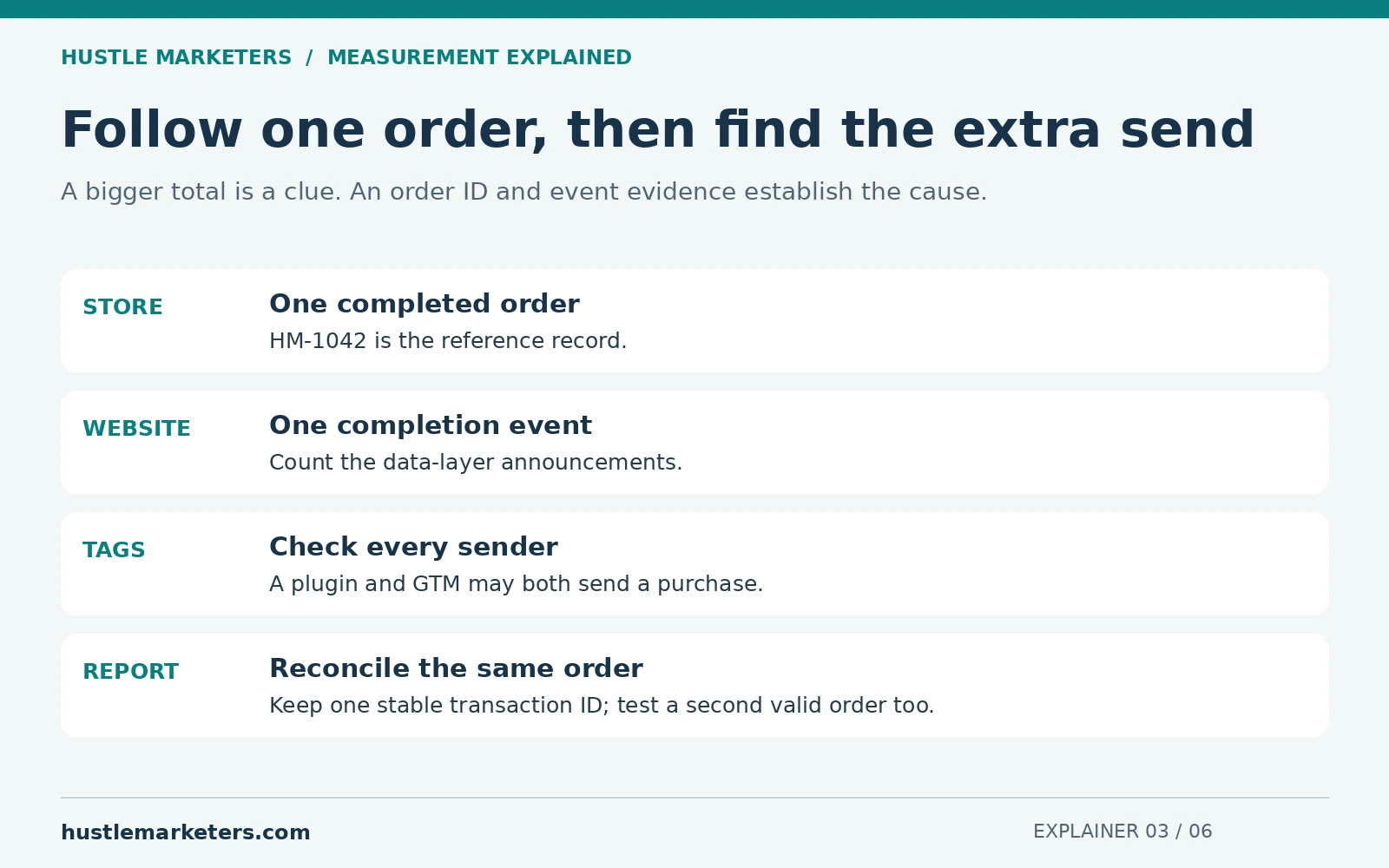
Suppose order HM-1042 contains $120 of products. The following is an illustrative diagnostic record.
| Evidence | What you find | What to investigate |
|---|---|---|
| Store record | One completed order, HM-1042 | Your reference record |
| Website data layer | One purchase event | The site may be announcing completion once. |
| GTM Preview | Two GA4 purchase tags fire | Two tags may be sending the same announcement. |
| Requests sent | One uses HM-1042; another uses a new timestamp | The same order has inconsistent identifiers. |
You have a specific failure to fix. By contrast, the total “140” alone does not tell you which tag to remove. Raw events, processed reports, and exported data can also behave differently, so record where you observed the duplication.
Five common paths that send a purchase twice
1. Two installations track the same checkout
A store integration, plugin, theme snippet, GTM container, or another app may already send purchases. Adding a new tag can create another sender. Inventory the routes before disabling anything. The goal is one intentional collection design, with each sender’s responsibility documented.
2. The confirmation page sends a purchase whenever it loads
A customer reloads a receipt or returns to the page from an email. If every page load means “new purchase” in your setup, the same order may be announced again. Tie purchase tracking to confirmed order completion and use protection that understands the order, not just the current page view.
3. The website announces the same event repeatedly
A checkout script can push the same purchase more than once. A single-page application can redraw the confirmation component and repeat its tracking code. Count the underlying data-layer events as well as the tags responding to them.
4. Browser and server integrations overlap
Sending data from a server can improve control over collection, but it does not automatically remove duplicates. Inspect both routes and their identifiers. Do not copy a deduplication rule from another advertising platform and assume GA4 uses the same rule. For a restaurant example, our Thanx guide shows how to deduplicate Thanx purchase webhooks on the purchase id before they reach GA4.
5. An event rule turns another action into a purchase
A broad event-creation rule, thank-you URL rule, or copied trigger can label an event as a purchase even when there is no new order. Check the rule itself and test visits that should not produce a sale.
What should the transaction ID look like?
Use the stable identifier for the actual order, such as the order confirmation number. The same order should retain the same ID. Different orders should have different IDs.
Do not generate a fresh timestamp or random number every time the receipt loads. That tells the receiving system it is seeing different transactions. Do not send one hardcoded ID for all customers or an empty string.
Google documents purchase deduplication with transaction IDs for web streams, not app streams. Its guidance also warns that reusing IDs can undercount purchases and that IDs must not contain personal information. See Google’s transaction ID guidance.
Still inspect the collection paths. An order ID is a safeguard, not a substitute for understanding why two systems sent the same event, especially when user identifiers or consent states differ.
Does “once per page” solve the problem?
It can limit a particular GTM tag within one page load. It does not remember that an order was already recorded yesterday, stop a second plugin, or necessarily protect a new page load.
Likewise, setting a purchase key event to count once per session can hide legitimate repeat purchases. That changes the counting rule instead of establishing which orders are real. Fix the order-level cause.
A practical test sequence for your developer
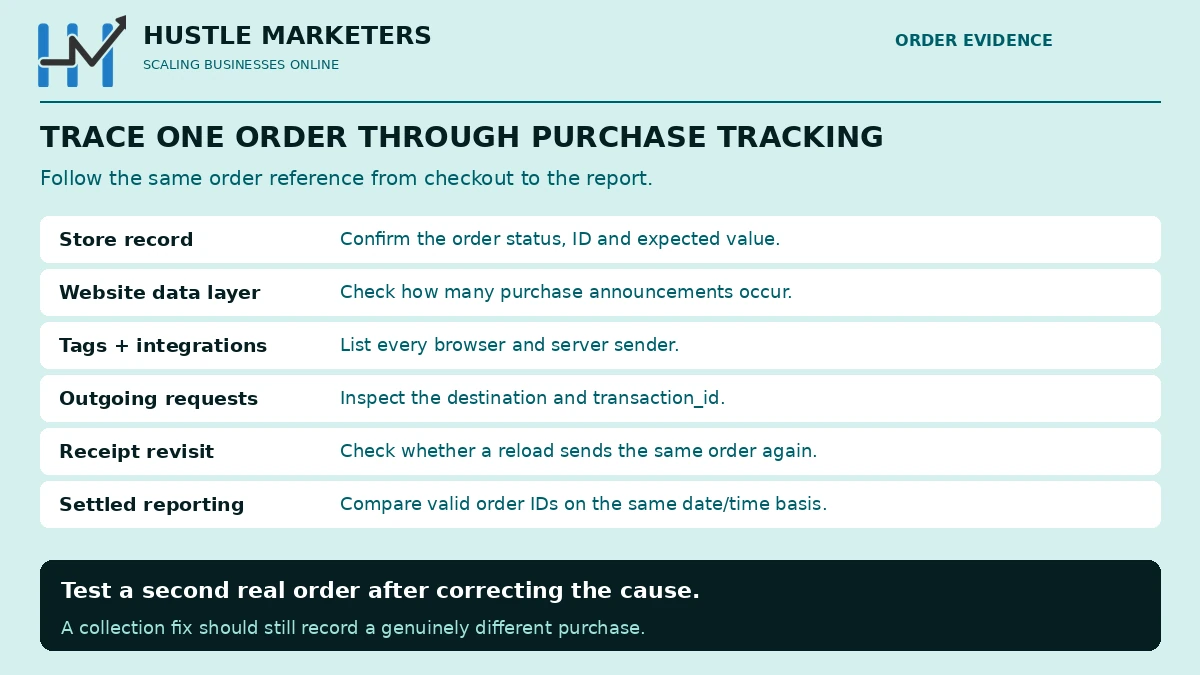
- Inventory senders. List the native store integration, plugins, GTM tags, hardcoded snippets, server routes, and event-creation rules.
- Create a controlled order. Use an approved test flow or a permitted test purchase. Keep its order ID and expected value.
- Inspect each layer. Check the order record, data layer, GTM Preview, requests, and GA4 DebugView. Confirm the correct destination and consent state.
- Inspect parameters. Check
transaction_id, numericvalue,currency, and the items. Google’s purchase-event reference excludes shipping and tax fromvalue; align the store comparison accordingly. - Try a receipt reload and revisit. Verify that the design does not create another real purchase for the same order.
- Create a second valid order. Confirm the fix still records a genuinely different order. A rule that blocks all purchases is not a successful deduplication fix.
- Reconcile after processing. Compare the controlled order IDs, then examine a broader settled period. Document remaining unmatched records.
Use Google’s ecommerce validation guide and purchase event specification for the implementation details.
What happens to the old inflated data?
A collection fix changes future behavior. Do not assume it rewrites the historical reports. Record the fix date, affected streams, known collection paths, and the period that needs caution.
For business reporting, build a reconciled view from unique valid orders on an explicit basis. Keep that correction separate from the original analytics history. Do not simply subtract a guessed percentage from every channel.
Why can this make ROAS look better than the business feels?
If a purchase value reaches an ad platform twice through counted actions, reported conversion value can be overstated. But a GA4 duplicate does not automatically prove that every Ads conversion is doubled. Check the actual Ads conversion sources and goals. Conversion tracking is also the first category in our Google Ads account audit, because every bid depends on it.
Even accurate revenue does not establish profit. Once tracking is trustworthy, compare revenue and ad spend with your break-even ROAS. Our guide to ROAS differences across platforms explains why reporting systems can also disagree for reasons other than duplicates.
Frequently asked questions
Does GA4 revenue above store revenue always mean duplicates?
No. Check dates, currency, value definitions, refunds, test orders, and collection scope first. Prove duplicate orders using identifiers and event evidence.
Should I compare purchase events with unique users?
That is not a reliable duplicate test. A person can legitimately place multiple orders. Compare order identifiers and investigate repeated event paths.
Will server-side tracking fix this automatically?
No. An additional server path can create overlap if its responsibilities and identifiers are not coordinated with the browser setup.
Can I use a timestamp when no order ID is available?
A fresh timestamp on every send does not identify the same order. Ask the booking or checkout provider for a stable transaction reference or design a persistent order identifier in the system that creates the order.
If the numbers still disagree, request an ecommerce tracking review. Bring redacted order examples and the collection map so the investigation can follow evidence from checkout to report.