How to Optimize Google Business Profile: A Complete 2026 Guide

Ishant
Published : August 1, 2026 at 3:27 pm
Updated : September 11, 2026 at 7:29 am
Ishant
Summarize this blog post with:
Close to half of all Google searches carry local intent, and your Google Business Profile is usually what people see first, before your website even loads. A profile that’s only claimed and forgotten won’t do much for you. A profile that’s actually optimized can push you into the map pack and bring in calls without spending a rupee on ads. That means the right category, a complete description, fresh photos, and a steady flow of reviews. This guide walks through every field that actually moves the needle, plus a few technical details most guides skip, like why your business name field and your description field follow completely different rules.
What Is a Google Business Profile and Why Does It Matter for Local SEO?
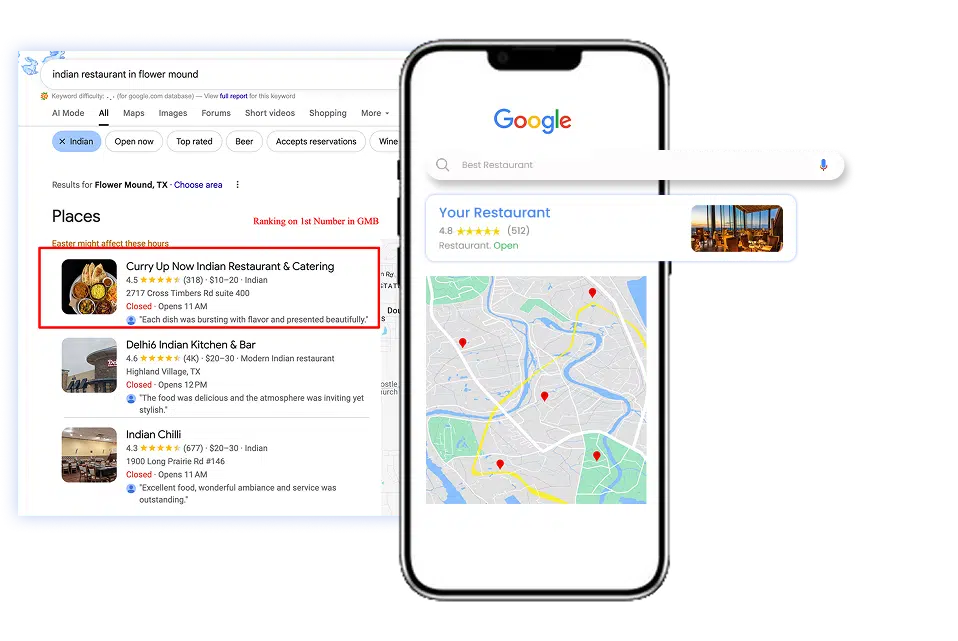
A Google Business Profile, GBP for short, is the free listing that shows up on Google Search and Google Maps when someone searches for your business or for what you sell nearby. It’s what powers the map pack, that block of three local results with a map, star ratings, and a “Directions” button that sits above the regular organic listings.
For any business with a physical location or a defined service area, this is often the first impression a customer gets. Someone searching “plumber near me” or “bridal boutique Houston” rarely scrolls straight to organic results. They look at the map pack, compare ratings, and call or visit the business that looks most complete and most trusted.
What Are Google’s Local Ranking Factors?
Google has said for years that local rankings come down to three factors: relevance, distance, and prominence. Relevance is how well your profile matches what someone searched for, which is where category and description do their work. Distance is how close you are to the searcher or the area they specified. Prominence is how well known and well reviewed your business is, both online and off.
You can’t do much about distance, a customer three towns over will always see a business closer to them first. Relevance and prominence, though, are exactly what the rest of this guide is built to improve.
How Do You Claim and Verify a Google Business Profile?
Before touching any settings, check what Google already has on file.
- Search your business name plus city on Google. If a listing already exists, click “Own this business?” to start the claim process.
- If nothing comes up, create a new profile at google.com/business and enter your name, address, category, and contact details exactly as they appear in real life.
- Choose a verification method. Most businesses get phone or email verification, which is instant. Some categories only qualify for postcard verification, which arrives by mail in one to two weeks.
- If a competitor, a former employee, or an old franchise listing already claims your business, use Google’s ownership request process rather than creating a second listing. Duplicate profiles cause more problems than they solve, more on that below.
What Business Name Should You Use on Google Business Profile?
This is the field business owners get wrong most often. Google’s rule is simple: your business name field has to match what’s actually on your signage, your storefront, and your paperwork in real life. No taglines, no city names, no keywords bolted on.
“Sharma Dental Clinic” is fine. “Sharma Dental Clinic Best Dentist Zirakpur” is not, and it’s one of the fastest ways to get a profile suspended after Google’s next quality review. If you operate under a DBA or a shortened brand name that differs from your legal entity, use the DBA, since that’s what customers actually see and search for.
How Do You Choose the Right Google Business Profile Category?
Your primary category is one of the strongest relevance signals Google uses to decide which searches your profile should show up for, arguably stronger than anything you write in the description.
Google maintains thousands of categories, many of them far more specific than business owners expect. A general “Store” or “Restaurant” category is rarely the best fit once you dig into the list. A bakery that specializes in wedding cakes has a dedicated category. A store that only sells religious goods has one too. Search the category picker for your exact niche before settling for something broad, then add two or three accurate secondary categories to cover related services without diluting relevance.
How Long Should a Google Business Profile Description Be?
Google gives you 750 characters for your business description, but only the first 250 show before a “Read more” link appears. Write those first 250 characters as a complete, standalone pitch: what you do, who you serve, and where.
A few rules Google enforces strictly here:
- No links or URLs of any kind, even written out as plain text
- No pricing, discounts, or time-limited offers
- No phone numbers, since that information belongs in the phone field
- No ALL CAPS or excessive punctuation
Use the remaining space to mention your specific services, your service area, and what makes you different, in plain, natural language rather than a stacked list of keywords.
How Do You Add and Edit Products on Google Business Profile?
Products and Services live in two separate sections of your dashboard, and Google treats them differently, so don’t try to force one into the other.
Products are physical or digital items you sell. Open your profile, go to Edit Profile, then Products, and add a name, category, price (optional but recommended), a short description, and a photo. Group similar items into collections so browsing feels organized instead of like a random pile of listings.
Whether you get access to the Products section at all depends on your primary category, which is one more reason category selection matters so much. If a competitor shows Products and you don’t, compare primary categories to see if that explains the gap.
For retailers with a large catalog, there’s a faster route. Connect Google Merchant Center to your profile and upload a Local Inventory Feed, a CSV listing your store code, product ID, name, description, price, and image for each item. Worth setting up if you already run Shopping campaigns, since the feed structure is nearly identical.
How Do You Add and Edit Services on Google Business Profile?
Services describe what your business does rather than what it sells: haircuts, HVAC repair, tax filing, personal training. Open Edit Profile, then Services, and add each one with a name (80 characters or less), an optional price or price range, and a short description (300 characters or less).
Google often pre-populates suggested services based on your category. Add those first. Some evidence suggests only Google-suggested services currently influence local rankings, while fully custom service names may not carry the same weight. Add custom ones anyway if they describe something specific you offer, since they still help customers understand you even when their ranking impact is smaller.
If your category falls under food and beverage, you’ll see a Menu section in place of Services, built the same way with items, prices, and descriptions.
How Do You Keep NAP Consistent Across the Web?
NAP means Name, Address, and Phone number, and it needs to match exactly across your Google Business Profile, your website, and every directory that lists you, including Yelp, industry directories, and local chambers of commerce.
Inconsistent NAP is more common than most business owners realize, especially after a rebrand, a domain change, or a move. An old citation pointing to a retired website, or a directory still listing a previous business name, actively works against the profile you’re trying to build today. Run your business name through Google Maps every few months and check for old listings, duplicate pins, or directories still showing outdated details. Update or request removal for anything that doesn’t match.
How Do You Set Hours on Google Business Profile?
Regular hours are simple to set and only need updating when they actually change. Special hours matter more than most business owners think. Holidays, early closures, and one-off events all need their own entry, otherwise a customer shows up to a locked door and leaves an unhappy review.
Set special hours as far in advance as you can, especially before major holidays when “open now” searches spike. If you’re closing for renovation or an emergency, mark the listing as temporarily closed instead of leaving the wrong hours live. An honest “temporarily closed” builds more trust than an inaccurate “open” ever will.
How Many Photos Should a Google Business Profile Have?
Photos do more work than most business owners give them credit for. Google’s systems now analyze photo content directly to understand what a business actually offers, on top of the trust signal photos send to human searchers.
Profiles with regular, recent photos consistently see more direction requests, more calls, and more website clicks than listings that go months without an update. Add real photos of your storefront, your team, and your products or work in progress, not stock images. A weekly upload habit, even a single photo, signals an active, managed business to Google’s algorithm.
How Do You Get More Google Reviews?
Review count and star rating sit alongside category relevance and proximity as one of the strongest local pack ranking signals, and they’re also the first thing most customers actually read before choosing between two similar businesses.
The businesses that generate steady reviews usually do three things well:
- Ask at the right moment, right after a purchase, a completed job, or a positive interaction, not weeks later
- Make it effortless with a direct review link customers can tap from a text or email
- Respond to every review, positive or negative, with a specific, human reply rather than a copy-pasted template
How Do You Reply to Google Reviews?
A reply matters almost as much as the review itself. Future customers read replies to judge how a business handles both praise and problems, and Google credits profiles that respond consistently rather than sporadically.
For positive reviews, skip the generic “thank you.” Mention something specific from what they wrote, their name if they gave one, or the service they used. A short reply that references their actual visit reads as genuine. A copy-pasted one reads as automated, even when it isn’t.
For negative reviews, this structure works well:
- Acknowledge the specific issue without getting defensive
- Keep the tone calm and factual, even if the review isn’t
- Move details to a phone call or email instead of arguing in public
- Avoid admitting fault in specific legal or safety terms, especially in regulated industries, stick to acknowledging their experience
Reply within a few days. A consistent pattern of replies, especially to negative reviews, tells both customers and Google that someone is actually managing the profile.
What Should You Post on Google Business Profile and How Often?
Google Posts show up directly in your listing and function like a small, built-in news feed. They don’t need to be polished. A completed project, a seasonal reminder, a new product, or a quick tip all work.
Posting weekly is a reasonable minimum. Businesses with a genuine seasonal calendar, retail, restaurants, and service businesses tied to holidays or events, get even more value from posting ahead of those dates rather than after.
How Do You Create and Manage Events on Google Business Profile?
Events show up as their own section on your profile and give you a way to promote something time-bound: a sale, a workshop, a launch, a holiday event.
Create one from the Posts section by choosing “Add Event” instead of a standard update. You’ll need a title (58 characters or less), a description, a start and end date and time, and optionally a call-to-action button like “Book,” “Learn More,” or “Get Offer.” Use a photo that represents the actual event rather than a generic stock image.
Events stay visible on your profile through their listed dates, then drop off automatically, so each one needs to be recreated rather than left running indefinitely.
What Other Google Business Profile Features Are Worth Setting Up?
A handful of smaller features get ignored, and each one takes only a few minutes to set up.
- Q&A: Anyone can ask or answer a question on your listing, including people who don’t actually know the correct answer. Seed it yourself with 5 to 6 real questions and check it weekly for new ones.
- Attributes: Checkboxes like wheelchair accessible, women-owned, outdoor seating, or online appointments. These feed Google’s filter options, so a searcher filtering by “wheelchair accessible” only sees you if the box is checked.
- Messaging: Lets customers message you directly from your listing. Turn it on only if you can actually respond quickly, since Google displays your typical response time.
- Service area: For businesses that travel to customers rather than the other way round, define a radius or list of areas instead of showing a public address.
- Booking link: Add a direct link to your booking or appointment system so the “Book” button on your profile actually goes somewhere.
- Insights: Your dashboard’s built-in analytics: calls, direction requests, website clicks, and how customers found you. Check monthly to see what’s actually working.
How Does Google Business Profile Affect AI Overviews and AI Search?
This is the part most older guides don’t cover yet. Google’s AI Overviews and AI-powered local results pull directly from Business Profile data to decide what to summarize and which businesses to feature. That includes your category, your description, your reviews, your products and services, and your Q&A answers.
A profile with gaps or inconsistent details is easy for Google’s systems to skip in favor of a competitor with a complete one. This is where the earlier sections connect. Accurate categories, a clear description, a filled-out Products or Services section, and consistent NAP aren’t just ranking factors anymore. They’re the raw material AI systems use to decide whether your business is trustworthy enough to mention.
Want Your Google Business Profile Optimized by a Local SEO Team?
Everything above takes real time to do properly, and it needs to stay maintained, not just set up once. Hustle Marketers is a Google Partner agency that handles Google Business Profile optimization as part of full local SEO management. That covers everything from category and description work to review reply systems and the technical schema markup that supports AI visibility.
We’ve helped clients rank inside Google’s AI Overview and grow local visibility across the US, UK, UAE, and Australia. For a multi-location restaurant group, that work meant location pages, catering pages, and a blog content cluster, built alongside a full conversion tracking rebuild. That’s the kind of foundation that earns Google Maps visibility instead of just claiming it.
See the multi-location restaurant marketing case study for the full breakdown. If you’d rather hand this off, get a free audit worth $500 or see what our SEO & Local SEO services cover.
Google Business Profile Optimization Checklist
Save this list and work through it top to bottom.
- [ ] Claim and verify your profile if you haven’t already
- [ ] Set your business name to match your real-world signage exactly, no keywords added
- [ ] Choose the most specific primary category available, plus 2 to 3 accurate secondary categories
- [ ] Write a full 750-character description with the strongest pitch in the first 250 characters
- [ ] Add your products with real photos and prices, or connect Google Merchant Center for larger catalogs
- [ ] Add your services with Google’s suggested list first, then any accurate custom ones
- [ ] Check Google Maps for duplicate or outdated listings under old names or addresses
- [ ] Match your NAP exactly across your website and every directory that lists you
- [ ] Confirm regular hours are correct and set special hours ahead of every holiday
- [ ] Upload new, real photos on a weekly basis
- [ ] Set up a simple system to request reviews after every completed job or sale
- [ ] Reply to every review within a few days, positive and negative
- [ ] Post a weekly update, tip, or seasonal reminder
- [ ] Create an event post for any upcoming sale, workshop, or launch
- [ ] Seed 5 to 6 questions in your Q&A section before customers ask them
- [ ] Set every attribute that genuinely applies to your business
- [ ] Turn on messaging only if you can respond quickly
- [ ] Add your Google Business Profile link to your website’s schema markup
Frequently Asked Questions
Is Google Business Profile free? Yes, creating and managing a Google Business Profile costs nothing. Google earns from ads that can appear near your listing, not from the profile itself.
How long does verification take? Phone and email verification are usually instant. Postcard verification by mail can take one to two weeks depending on your location.
Can a business have two Google Business Profiles? No, one listing per physical location is the rule. Duplicate listings split your reviews and ranking signals, and both can get suspended.
Does posting on Google Business Profile help SEO? Yes, regular posts signal an active, managed profile. They support local rankings alongside reviews, photos, and a complete business description.
What is the difference between GBP and Google Maps? Google Business Profile is the dashboard you use to manage your listing. Google Maps is one of the places that listing shows up.
What is the difference between Products and Services on Google Business Profile? Products are physical or digital items you sell, shown with photos and prices. Services describe what you do, like repairs or consultations, without photos.
Do Google Business Profile events expire? Yes, events disappear from your profile once the end date passes. Create a new event for each upcoming sale, workshop, or promotion.
Should I also set up Bing Places for Business? Yes, if you want visibility beyond Google. Bing Places feeds Microsoft Copilot and Windows Search, with far less competition. See our Bing Places for Business guide for setup steps.
Final Thoughts
Google Business Profile rewards businesses that treat it as a living asset, not a form you fill out once. Get the name, category, and description right first, since those feed every other ranking factor. Then build the habit: photos and posts on a regular schedule, products and services kept current, and a review request and reply after every job well done. NAP consistency across the web ties all of it together, and in 2026 that same consistency decides whether AI Overviews trust your listing enough to feature it. Fix the biggest gaps first, then build the weekly habits, and map pack visibility follows on its own.