
Performance Max Not Performing? Diagnose the Feed, Tracking, Bids and Assets

Ishant
Published : August 10, 2026 at 7:32 am
Updated : September 11, 2026 at 7:29 am
Ishant
Summarize this blog post with:
Performance Max not performing usually means one or more of its inputs are inaccurate, restrictive or commercially weak. For ecommerce campaigns, diagnose the problem in this order: conversion measurement, Merchant Center eligibility, channel and search-term reporting, bidding targets, product economics, feed quality, assets and landing pages. A weak feed is a common cause, but the symptom alone does not prove the feed is responsible.
We have taken over ecommerce accounts where the owner was ready to abandon Performance Max, only to find that Google was optimizing toward the wrong conversion, half the catalog had limited eligibility, or a target ROAS was preventing valuable products from entering enough auctions. We have also found accounts where the campaign was structured sensibly and the feed underneath it was the real constraint.
This guide shows you how to separate those situations before changing a budget, bid target or asset group.
The real account screenshots in this guide show why one headline metric cannot diagnose PMax. In one seven-day comparison, the campaign still reported 607.56% ROAS while conversion value fell 56.92% and conversions fell 41.28%. A channel report showed Search receiving 92.89% of cost, while search-category insights showed brand-led ArmorPoxy demand producing more conversion value than the broader “garage floor epoxy” category. Together, these views point to three separate questions: is performance moving in the right direction, where is the budget being used and which types of demand are creating the reported value?
How can you quickly diagnose why Performance Max is not performing?
Start with the symptom, open the report most likely to explain it and avoid making changes until you have identified the failing layer. This table gives you the fastest starting point.
| What you are seeing | Check first | Likely causes | First action |
|---|---|---|---|
| PMax is not spending | Campaign status, Merchant Center eligibility, budget and tROAS | Account or policy issue, ineligible products, restrictive target, limited inventory | Resolve eligibility and goal restrictions before adding budget |
| PMax spends but produces no sales | Primary conversions, search terms, channel report and landing pages | Wrong goal, broken tracking, irrelevant traffic, weak offer, low conversion rate | Validate purchases and transaction values before judging ROAS |
| ROAS suddenly dropped | Change history, product availability, prices, conversion reporting and seasonality | Feed change, stock loss, tracking issue, stronger competition, promotion ending | Compare the decline with the exact date of account and catalog changes |
| Only a few products receive spend | Product report and Merchant Center issue details | Demand, price, conversion history, feed gaps, stock, listing exclusions or bidding | Compare high-spend and ignored products across every factor, not titles alone |
| Shopping receives little traffic | Channel report status and product eligibility | Feed errors, limited eligibility, weak product relevance, Ad Rank or price competitiveness | Clear Merchant Center issues and inspect product-level impressions |
| Platform ROAS looks good but profit is weak | Contribution margin, new-customer performance and brand traffic | Low-margin products, returns, shipping, discounts or existing demand | Evaluate profit and incremental customers instead of blended dashboard ROAS |
Real example: why a high ROAS does not always mean PMax is improving
In the account view below, the selected period is 3–9 August 2026 compared with 27 July–2 August 2026. Cost increased 4.06% to $713, while conversion value declined 56.92% to 4,333.55 and conversions declined 41.28% to 7.55. The campaign still displayed 607.56% ROAS, approximately 6.08 times return on ad spend.
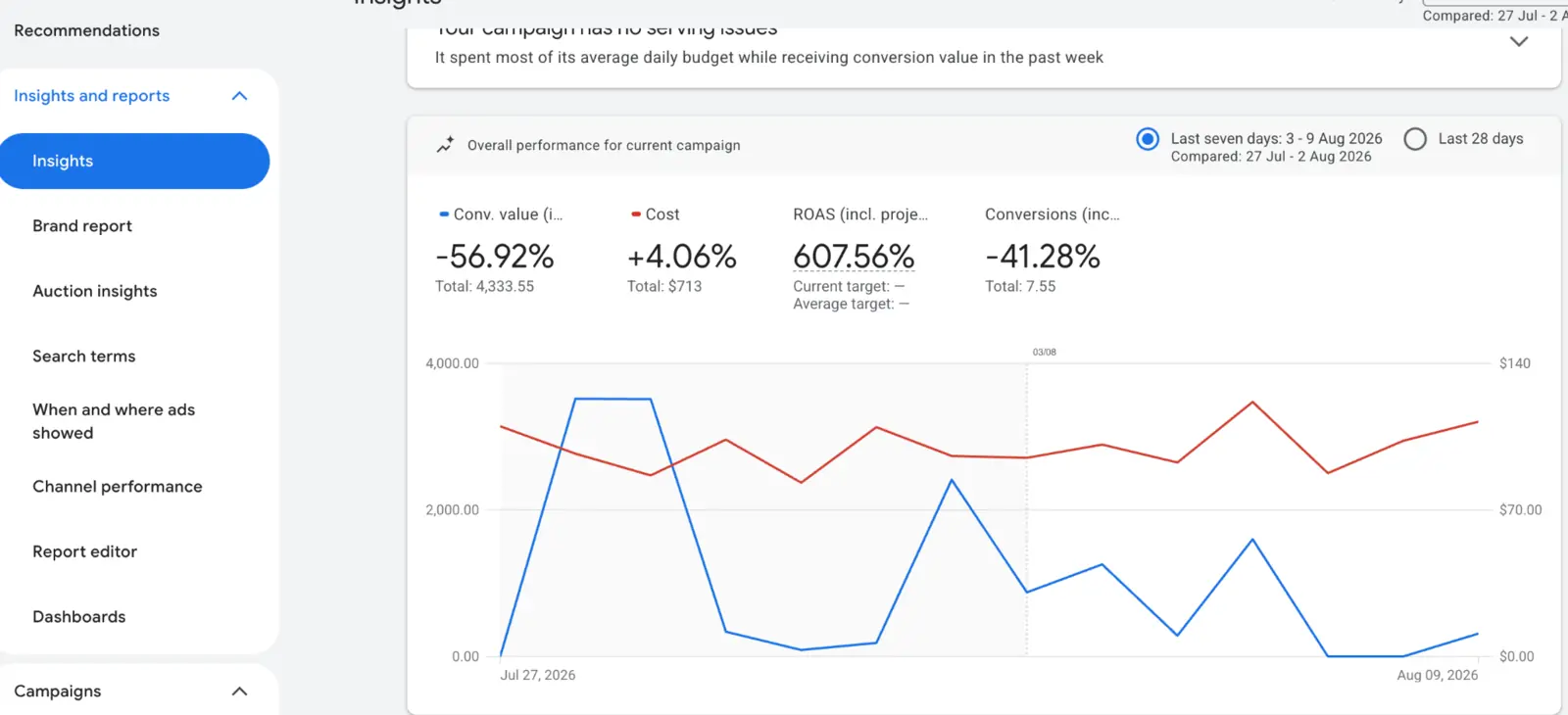
What this means: the account may still be efficient relative to spend, but it is producing less total conversion value. Before changing bids, identify whether the decline came from fewer conversions, lower average order value, stock or pricing changes, attribution lag, branded demand, or a shift in the products and channels receiving spend.
What are the 12 most common reasons Performance Max underperforms?
An underperforming PMax campaign is usually the result of several connected problems rather than one broken setting. Work through these twelve issues in order.
1. Performance Max is optimizing toward the wrong conversion
Performance Max optimizes toward the conversion actions marked as primary for the campaign. If add-to-cart events, page views, phone clicks or low-quality form fills are treated like purchases or qualified leads, Google can report more conversions while the business receives less value.
Open your conversion settings and ask one practical question about every primary action: if this happened 100 times tomorrow, would it create real revenue or a credible sales opportunity? If the answer is no, it probably should not steer the campaign.
For ecommerce, verify that the purchase action records the correct transaction value, currency and transaction ID. Duplicate purchase events can make ROAS look stronger than it is, while missing values can make valuable products look equal to low-value orders.
Real example: channel allocation and conversion-result mix
The channel report below shows Google Search receiving 92.89% of cost, compared with 2.91% for Gmail and 2.85% for the Google Display Network in the visible portion of the report. The results panel also contains purchases, phone-call leads, page views and other results.
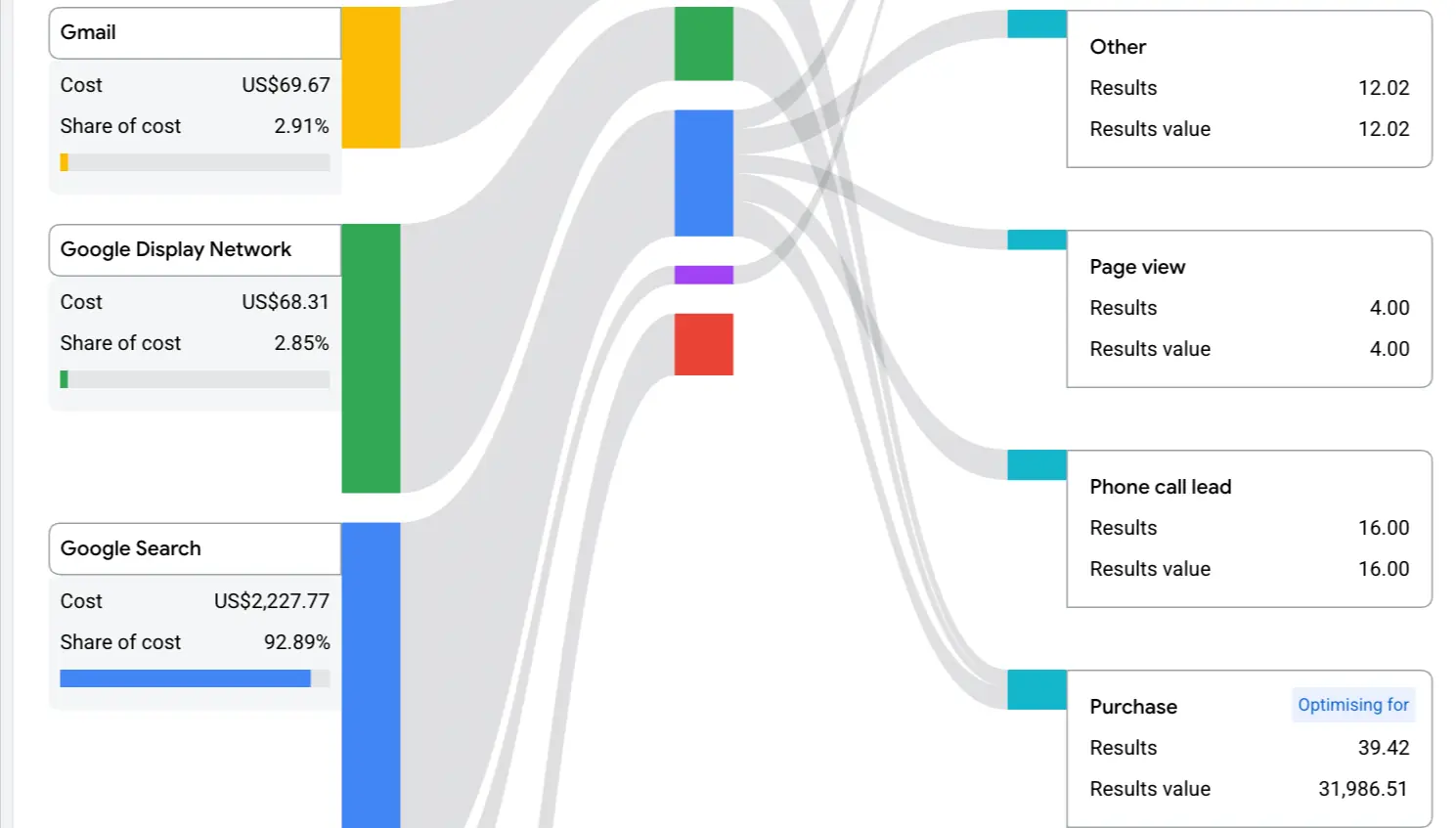
A large Search share does not prove that PMax allocated the budget incorrectly. Channel mix can reflect available demand, bidding, assets, audience signals and inventory. Likewise, the presence of page views or phone calls in the report does not prove that they are primary bidding goals. Use the screenshot as an audit prompt: confirm which actions are primary, which are secondary or reporting-only, whether purchases carry accurate values and whether the campaign is optimizing for the result the business actually needs.
2. Conversion tracking is incomplete or inaccurate
PMax depends on reliable conversion feedback. Browser restrictions, consent choices, cross-device journeys and technical implementation problems can leave Smart Bidding with an incomplete view of sales.
Enhanced Conversions supplements existing tags with privacy-safe, hashed first-party data and can improve measurement accuracy. Our Enhanced Conversions implementation guide explains the setup and validation process.
Do not assume tracking works because revenue appears in Google Ads. Compare Google Ads purchases and value with your ecommerce platform for the same order dates. Investigate duplicates, missing transaction IDs, incorrect currency conversion and reporting lag.
Google’s own documentation describes Enhanced Conversions as a way to improve conversion measurement and provide stronger bidding data. See Google’s Enhanced Conversions guidance.
3. Merchant Center products are disapproved or have limited eligibility
A campaign cannot scale Shopping inventory that is not eligible to serve. Open Merchant Center issue details and check account-level issues, item disapprovals and warnings that limit performance.
Common causes include:
- Price or availability mismatches between the feed and landing page
- Missing or incorrect GTIN values
- Broken product or image URLs
- Unsupported promotional text in images
- Missing variant attributes such as size, colour or item group ID
- Shipping or return information that conflicts with the website
- Policy violations or account-level Merchant Center problems
Google warns that incomplete or inaccurate catalog data may prevent products from serving correctly or restrict their Merchant Center eligibility. Use the official Merchant Center product data specification as the technical baseline.
If identifiers are the problem, follow our guide to correcting GTIN errors in Google Shopping instead of inventing or guessing identifier values.
4. The product feed is accurate but too thin to match demand well
Approval is only the minimum standard. A product can be approved and still be difficult for Google to understand or match accurately.
Compare an ignored product with a high-performing product from the same category. Look at the title, description, product type, category, brand, identifiers, variant data, images and product-page content. The weaker product may be missing the attributes shoppers use to narrow their search.
A useful title identifies the product clearly and includes the attributes that distinguish it. The correct sequence depends on the category. A fashion product may need brand, gender, product type, colour, material and size. An industrial product may need brand, model, product type, dimensions, compatibility and application.
Do not add keywords that are inaccurate or repeat the same phrase to fill space. Google uses product data to match offers to relevant queries, so accuracy and specificity matter more than keyword density.
For deeper implementation, see how Performance Max and feed optimization work together, then use our AI feed optimization guide and the newer guide to Google Merchant Center AI attributes for advanced enrichment.
5. Your budget or target ROAS is restricting delivery
A target ROAS that sits far above recent account performance can restrict the auctions PMax is willing to enter. Increasing the target demands greater efficiency. It does not instruct Google to produce more revenue at the same volume.
Review:
- Historical ROAS before the current target was applied
- Whether the target changed shortly before spend declined
- Whether the daily budget can support the desired sales volume
- Whether low-margin and high-margin products share one target
- Whether seasonal demand has changed
Do not increase the budget simply because the campaign is not spending its current budget. First determine whether eligibility, demand or the bid target is limiting delivery.
6. PMax is concentrating spend on a small group of products
Heavy product concentration is a signal to investigate, not proof that the feed is broken. Google may favour a small group of products because they have stronger demand, better prices, more conversion history, higher availability or a greater predicted conversion value.
Pull a product-level report and compare the top-spend products with products receiving few or no clicks. Check:
- Eligibility and Merchant Center warnings
- Search demand and category seasonality
- Price and shipping competitiveness
- Stock depth
- Conversion rate and historical sales
- Title and attribute completeness
- Listing-group inclusion or exclusion
- Contribution margin
When the business case supports segmentation, use margin-tier custom labels to group products by profitability, bestseller status, seasonality or another real commercial variable. Avoid splitting campaigns so aggressively that each one lacks useful conversion data.
7. Irrelevant search terms are consuming budget
PMax search performance is no longer as hidden as many older guides suggest. Google added fuller search-term reporting, channel reporting and richer asset metrics, giving advertisers more evidence for diagnosis.
Review search terms for:
- Informational queries with little purchase intent
- Jobs, support, manuals or free-download searches
- Products or materials you do not sell
- Competitor terms that spend without converting
- Locations you cannot serve
- Branded queries that distort acquisition performance
Use campaign-level negative keywords or negative keyword lists carefully. Block clearly irrelevant demand without excluding useful variations that PMax could convert. Our PMax negative keyword strategy covers the decision framework.
For current reporting capabilities, review Google Ads’ PMax reporting and control updates.
8. Branded traffic is making the campaign look healthier than it is
A high PMax ROAS can include customers who already intended to search for the brand. That revenue is real, but it does not always represent incremental acquisition.
Real example: brand-led categories versus generic demand
In the ArmorGarage search-category view below, the branded “armorpoxy” category shows 837.23 in conversion value and “armorpoxy polyaspartic floor coating kit” shows 733.77. The broader non-brand category “garage floor epoxy” shows 284.91. Another branded category, “armorpoxy polyaspartic,” shows zero conversion value for the displayed period.
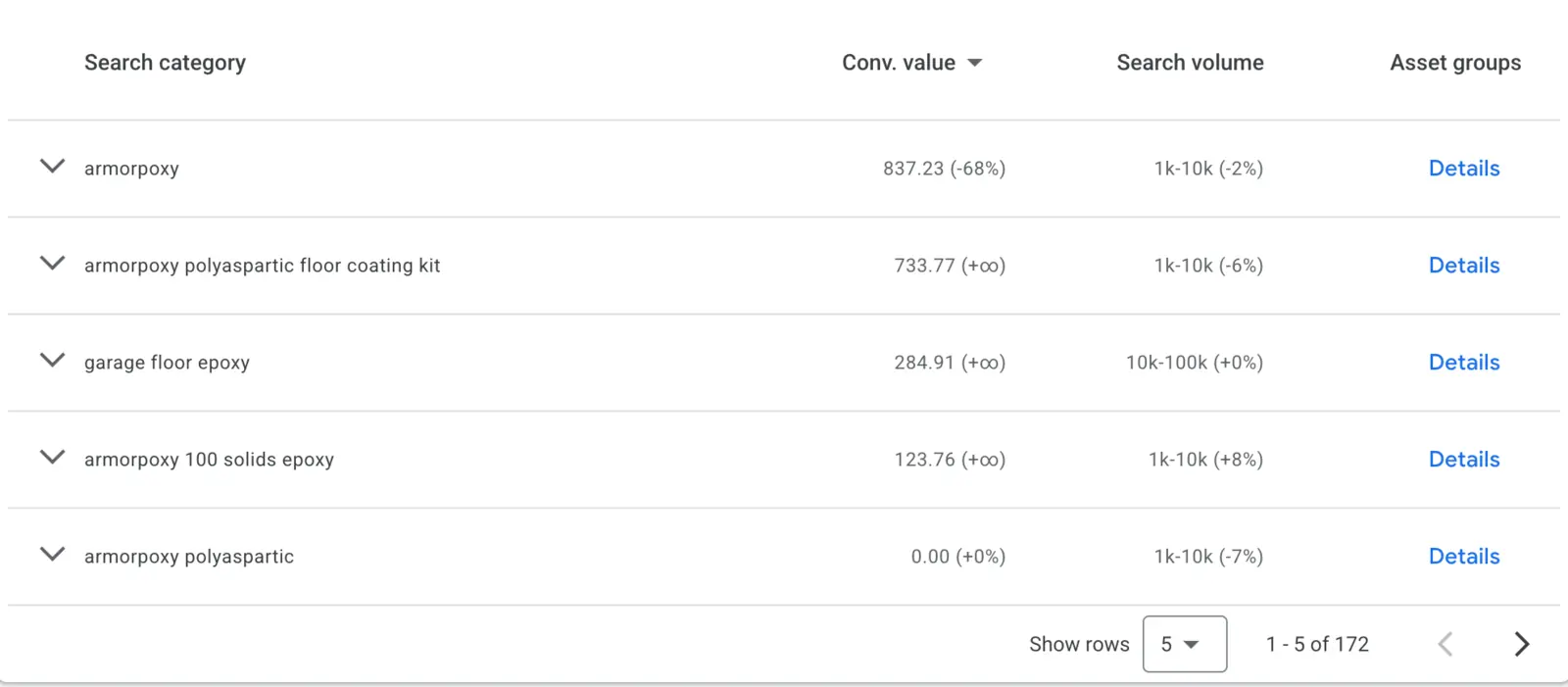
This does not mean branded traffic is bad or that it should automatically be excluded. It means the blended campaign result cannot answer the acquisition question by itself. Compare branded and non-branded categories, new-customer performance and incremental revenue before deciding whether PMax is creating new demand or mainly capturing customers already close to purchasing.
Review the share of conversions coming from branded queries and compare new-customer performance with blended results. If the objective is acquisition, use appropriate brand controls and measure new-customer cost separately.
Brand exclusions are not the same as negative keywords. Exclusions can account for related brand names and URLs, while negative keywords control specific query matching. Our guide to Performance Max brand exclusions explains when each control is appropriate.
9. Asset groups mix unrelated products, audiences and messages
An asset group should give Google a coherent product and creative context. If one group combines unrelated categories, generic headlines, inconsistent images and broad audience signals, it becomes difficult to understand which message supports which products.
Organise asset groups around a genuine shared theme such as a product category, use case, audience need or promotion. Keep the landing pages, listing groups, headlines, images and video aligned with that theme.
Do not create a separate asset group for every minor product variation. Structure should create useful control without fragmenting conversion data. See our guide to ecommerce PMax asset group structure for the full framework.
10. The product page, price or offer cannot convert the traffic
PMax can find a relevant shopper and still fail if the offer is weak. Feed optimization improves product understanding and eligibility. It does not repair a slow page, unclear delivery promise, expensive price, weak reviews or difficult checkout.
Compare low-ROAS products with stronger products across:
- Mobile page speed and usability
- Product imagery and video
- Price versus comparable offers
- Shipping cost and delivery time
- Returns and warranty
- Review quantity and quality
- Product information and compatibility
- Checkout friction
If clicks are relevant but conversion rate remains weak, the next intervention may belong on the website rather than in Google Ads. Our conversion-rate optimization services connect campaign data with product-page and checkout improvements.
11. Campaign overlap is being diagnosed using an outdated rule
You can run Standard Shopping and Performance Max in the same account, including campaigns that are eligible for the same products. PMax is no longer automatically prioritised simply because both campaign types target the same item.
When eligible campaigns could serve for the same impression, Ad Rank determines which one serves. Google also states that campaigns in the same account do not compete against each other to raise your bids.
That does not mean overlap is always strategically useful. Use separate product sets, goals or controlled experiments when you need clean interpretation. Do not claim that two campaigns are “fighting each other” without reviewing eligibility, Ad Rank, product targeting and reporting.
Read Google’s current guidance on how PMax interacts with other campaigns.
12. Recent changes, seasonality or learning are being mistaken for failure
A sudden performance change should be matched against the campaign change history before anyone rebuilds the account. Check whether the decline followed a new bid target, budget adjustment, conversion-goal change, feed update, product-ID change, promotion ending or stock loss.
Also compare the same products and market period. A week with weaker seasonal demand is not a valid test of whether a title rewrite worked. Attribution lag can also make recent days look worse before conversion reporting catches up.
A full reset should be the last option. Rebuild only when the campaign’s objective, conversion foundation, product segmentation or account structure is fundamentally wrong. Controlled corrections usually preserve more useful learning than starting over.
How can you tell whether the feed or the PMax campaign is the real problem?
The feed is the likely constraint when products are disapproved, have limited eligibility, contain inaccurate data or consistently lack relevant impressions despite confirmed demand and reasonable campaign settings.
The campaign or measurement is more likely to be the constraint when products are eligible and well described but the account uses the wrong conversions, an unrealistic target, irrelevant queries, mixed asset groups or misleading branded performance.
| Evidence | More likely feed-related | More likely campaign or business-related |
|---|---|---|
| Merchant Center status | Disapproved, limited or mismatched products | Products fully eligible |
| Product impressions | Relevant products get little visibility despite proven demand | Products get clicks but fail to convert |
| Search terms | Queries reveal unclear product understanding | Queries are relevant but unprofitable |
| Conversion data | Tracking is validated | Purchases, values or primary goals are inaccurate |
| Bid target | Target is realistic | Target became restrictive before delivery fell |
| Product page | Page converts well from other qualified traffic | Relevant traffic reaches a weak offer or checkout |
Do not make a feed-only campaign your first diagnostic shortcut. Turning off Final URL Expansion or text customization does not automatically create a scientifically clean feed test. Use the reports above to isolate the likely constraint, then design a controlled test with stable products, goals, budget and comparison periods.
Which feed fixes have the greatest impact on PMax?
Fix feed problems in three layers: eligibility, product understanding and business control.
| Priority layer | Attributes and checks | Why it matters |
|---|---|---|
| 1. Eligibility and accuracy | ID, title, description, link, image, price, availability, condition, brand, GTIN or MPN, shipping and return consistency | Prevents disapprovals, mismatches and limited eligibility |
| 2. Product understanding | Google product category, product type, colour, size, material, pattern, gender, age group, item group ID, product details and highlights | Helps Google classify products and match them to more specific intent |
| 3. Business control | Margin, bestseller, seasonality, stock depth, price band and promotion custom labels | Lets campaign structure reflect profit and inventory priorities |
For large catalogs, do not manually overwrite the primary source every time you need strategic fields. A supplemental feed can add or update titles, labels and other supported attributes while preserving the main catalog connection.
Keep products in Merchant Center when they remain valid for free listings or other programs. If a product should not receive paid PMax spend, exclude it through the campaign’s listing groups where appropriate instead of deleting a legitimate offer from the entire feed.
Should you optimize toward ROAS or product-level profit?
ROAS inside Google Ads does not show the complete profit picture. It does not subtract cost of goods, shipping, payment fees, discounts or returns. A low-margin product can hit the campaign’s ROAS target and still contribute less profit than a product with a lower headline ROAS.
Before separating products or excluding them, calculate their real unit economics. Our guide to contribution margin instead of dashboard ROAS explains how to set a break-even floor and a commercially realistic target.
This is also why one blended tROAS target can work against a mixed-margin catalog. Custom labels can make margin visible to campaign structure, but segmentation should only be added when it creates a real decision and leaves enough data for bidding.
What do real Hustle Marketers cases show?
The evidence does not support the idea that every PMax problem is a feed problem. It supports a more useful conclusion: eligibility, product data, campaign structure and measurement work as one system.
Silicon Lightworks: the Merchant Center foundation came first
Silicon Lightworks had no Google Shopping visibility before its Merchant Center setup was approved. The immediate constraint was not bidding or creative. The products were not eligible to participate in Shopping placements. The Silicon Lightworks Merchant Center case study shows why eligibility must be checked before campaign optimization.
ArmorGarage: the result required more than a title rewrite
ArmorGarage reached 1500% ROAS through a broader PMax rebuild that included campaign restructuring, Shopping feed optimization and audience-signal configuration. The ArmorGarage PMax case study demonstrates why feed depth matters most when it is aligned with campaign structure and reliable inputs.
The account screenshots above add three layers of first-party evidence to this case: the direction of conversion value and volume, the channels receiving the budget and the branded versus generic categories producing value. They are not presented as a staged before-and-after comparison because each screenshot answers a different diagnostic question.
What should you check before changing a Performance Max campaign?
- Confirm the account, campaign and Merchant Center are eligible.
- Validate primary conversions, purchase values, currency and transaction IDs.
- Compare Google Ads sales with the ecommerce platform.
- Open Merchant Center issue details and resolve product-level problems.
- Review the PMax channel report and its status indicators.
- Review search terms for irrelevant and branded demand.
- Compare product spend, impressions, clicks, sales and margin.
- Check budget, tROAS and recent change history.
- Review asset-group alignment and asset-level metrics.
- Assess price, shipping, reviews and product-page conversion.
- Change one connected layer at a time.
- Document the test period and allow for attribution lag.
For recurring account reviews, save our complete PMax checklist. This sequence is also close to how our ecommerce PPC management process approaches an account: validate profit, feed and tracking first, then refine campaigns, search terms, creative and landing pages.
When should you ask a PMax specialist to review the account?
An external review is useful when the account has enough traffic to produce evidence but the cause remains unclear across Google Ads, Merchant Center, analytics and the ecommerce platform.
Consider a specialist review when:
- ROAS has remained below break-even after tracking and eligibility were validated
- A large catalog receives spend on only a small product set
- Merchant Center warnings keep returning
- Google Ads and store revenue do not reconcile
- Brand sales are masking weak acquisition performance
- The team is making frequent changes without a controlled test plan
Hustle Marketers is a Google Partner ecommerce PPC agency led by Ishant Sharma. Our audits cover conversion tracking, Merchant Center, search terms, product profitability, PMax structure, creative and landing pages as one connected system.
Request a free ecommerce PPC audit and we will tell you whether the main constraint is the feed, the campaign, measurement or the offer underneath it.
Frequently asked questions about underperforming PMax campaigns
Why is my Performance Max campaign not spending?
Check account and campaign status, Merchant Center eligibility, listing-group inclusion, budget and tROAS. A restrictive bid target, ineligible products or limited demand can prevent spend. Do not raise the budget until you know which restriction is responsible.
Why is PMax spending but not getting conversions?
Validate the primary conversion action and tracking first. Then review search terms, channel performance, product pages, price and shipping. If traffic is relevant but does not buy, the offer or website may be the constraint.
Why does PMax spend on only a few products?
PMax may favour products with stronger demand, price, availability, conversion history or predicted value. Compare ignored and high-spend products across eligibility, attributes, impressions, price, stock, conversion rate, margin and listing-group settings.
How many conversions does Performance Max need?
There is no single universal ecommerce threshold that makes every PMax campaign work. More reliable conversion volume generally gives Smart Bidding more evidence, but the required volume depends on the goal, value distribution, budget and sales cycle. Avoid creating more campaigns than the available data can support.
Should I run Standard Shopping and PMax at the same time?
Yes, when the campaigns serve a defined business purpose or controlled test. If both are eligible for the same impression, Ad Rank determines which campaign serves. Separate product sets or goals when you need clearer budget and performance interpretation.
Should I remove low-performing products from Merchant Center?
Not automatically. A valid product may still deserve free-listing visibility or future advertising. Use custom labels and listing-group exclusions to control paid campaign participation where appropriate. Remove a product from Merchant Center only when the offer itself should no longer be active.
Is a feed-only PMax campaign the best test of feed quality?
Not by itself. A new feed-only campaign introduces bidding, learning and auction differences. Diagnose Merchant Center eligibility, product reporting and channel performance first, then design a controlled experiment if the evidence remains unclear.
When should I reset a Performance Max campaign?
Reset only when the conversion goal, measurement foundation, product segmentation or overall structure is fundamentally wrong. If the issue is a feed error, bid target, negative keyword or asset problem, a controlled correction usually preserves more useful learning.
The bottom line
When Performance Max is not performing, do not blame the campaign or the feed without evidence. Start with measurement and eligibility, use the current channel, search-term and product reports, then evaluate bids, economics, feed depth, assets and the landing page.
A strong feed gives Google accurate product information. A sound campaign gives that information the right goal, budget and structure. A competitive offer turns the resulting traffic into profit. PMax needs all three.
Written by Ishant Sharma, Founder and CEO of Hustle Marketers. Ishant has worked in Google Ads, ecommerce PPC, Merchant Center and digital growth since 2013. Hustle Marketers is a Google Partner, Meta Business Partner and Microsoft Advertising Partner with $780M+ in trackable client revenue.










