AI Product Titles for Google Shopping: The Disclosure Rule That Gets Them Ignored (2026)

Ishant
Published : October 9, 2026 at 9:30 am
Updated : October 16, 2026 at 12:13 pm
Ishant

Written by Ishant Sharma, Google Ads, Microsoft Ads and SEO specialist since 2013 | Published October 9, 2026 | Facts checked September 18, 2026
If you have used ChatGPT, Gemini, Claude or a feed tool to write product titles for Google Shopping, there is a good chance Google is ignoring them and still showing your old titles, with no error to tell you.
Not because the titles are bad. Because of a single line in Google’s own title documentation that is easy to miss.
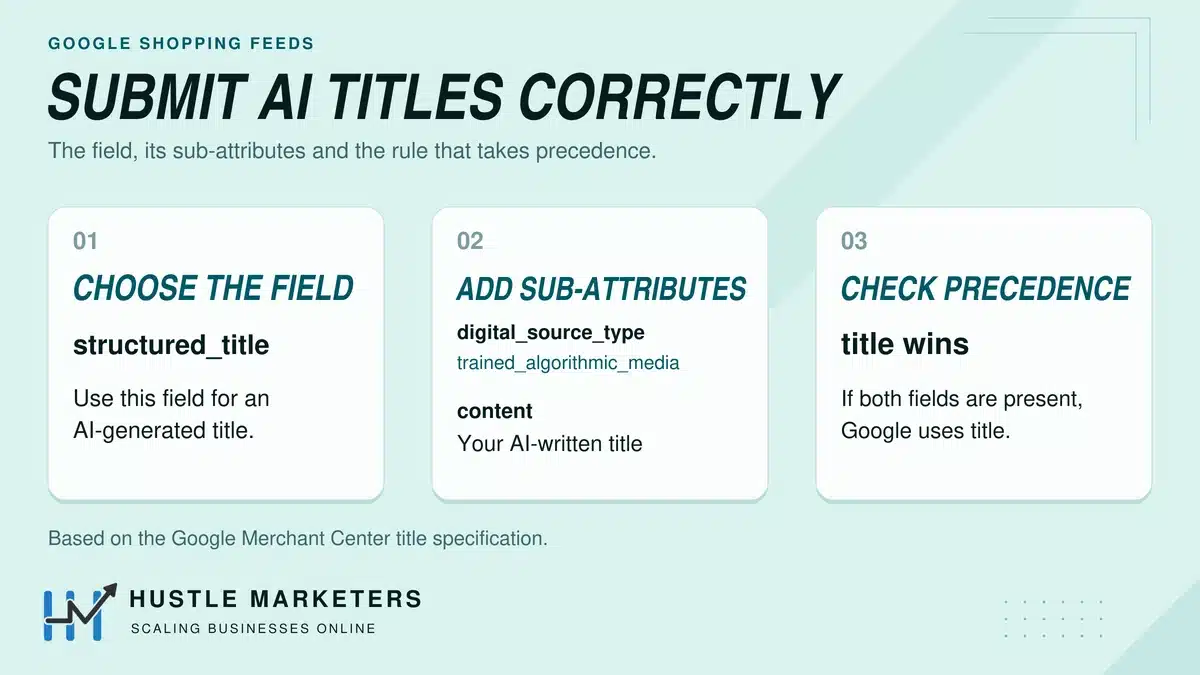
Google accepts AI-written titles, but it asks you to submit them in the structured_title attribute, and it ignores that attribute whenever your feed also sends a regular title.
This guide covers the disclosure requirement, the override rule that can turn your AI titles into a no-op, what Google’s own AI tools actually produce, and whether AI-written titles beat manual ones once you look at real test data instead of vendor claims.
Table of Contents
- Do I have to tell Google my product titles were written by AI?
- Why are my AI product titles being ignored by Google?
- How do I submit an AI-generated title correctly?
- Can Google write my product titles and descriptions for me?
- Does Google’s own AI tool satisfy Google’s own disclosure rule?
- Do AI-generated product titles actually perform better than manual ones?
- Is Google rewriting my product titles without telling me?
- How do I check if my products are showing up in AI search at all?
- Which AI feed optimization claims should you actually believe?
- What else changed in Merchant Center that breaks older advice?
- What should you change in your feed this quarter?
- AI Product Title FAQs
Do I have to tell Google my product titles were written by AI?
Yes. This is not optional and it is not a best practice. It is a requirement.
Google’s AI-generated content policy for product data states that it “now require[s] some types of product data to be identified as being AI-generated.” Two fields are covered: titles and descriptions.
If a title came out of a generative model, it must be submitted through the `structured_title` attribute with the digital source type set to `trained_algorithmic_media`. If a description came out of a generative model, the same applies through `structured_description`.
This catches far more merchants than people realize. It is not just the ones running a dedicated AI feed tool. It covers:
- Titles you generated in ChatGPT or Gemini and pasted into a spreadsheet feed
- Descriptions your Shopify or WooCommerce app wrote with a built-in AI feature
- Bulk rewrites produced by a feed management platform’s AI module
- Titles generated by your PIM’s AI enrichment feature
- Anything a copywriter produced with an AI assistant and did not materially rewrite
The practical test is simple. If a model wrote the string and a human did not substantially author it, it is AI-generated content and it needs to be declared.
What is the structured_title attribute?
`structured_title` is not a different title. It is the same title carried in a container that tells Google where the text came from.
It has two sub-attributes, documented here:
| Sub-attribute | Required | Accepted values | Limits |
|---|---|---|---|
| `digital_source_type` | Optional (defaults to `default`) | `default` (not AI-written), `trained_algorithmic_media` (AI-written) | n/a |
| `content` | Required | The actual title text | 1 to 150 characters |
`structured_description` works the same way, with `content` carrying the description text.
Note the default. If you submit `structured_title` and leave `digital_source_type` off, Google treats the title as human-written. So an incomplete implementation is not a partial pass, it is a failed declaration.
What happens if you do not declare AI-generated titles?
Google does not publish a specific penalty schedule for this, and I am not going to invent one. What the documentation establishes is that the requirement is mandatory rather than advisory.
Emmanuel Flossie, a Google Ads Diamond Product Expert who runs FeedArmy and was one of the first people to document this requirement, warns that non-compliance may result in warnings or product disapprovals.
The honest read: this sits in the same category as other product data policy requirements. Google may not action it today, may action it at scale later, and you have no way to appeal a disapproval for a rule you could have followed. The fix costs one feed column. There is no scenario where ignoring it is the smart play.
Why are my AI product titles being ignored by Google?
Here is the line that can quietly cancel out the rule above. From Google’s own title documentation, verbatim:
“If you provide both the structured title [structured_title] and title [title] attributes, we’ll only use the title [title] attribute.”
Read that again, because the consequence is not obvious until you map it to how feeds actually work.
`title` is a required attribute for almost every product. Your feed has always sent it. Your platform sends it by default. Your feed tool sends it by default. Now you add `structured_title` with your shiny AI-written titles, you validate the feed, Merchant Center accepts it with no errors and no warnings, and you sit back.
And Google uses the old `title` the entire time.
Your AI titles were accepted, stored, and ignored. There is no error. There is no warning. There is nothing in the diagnostics tab. The only signal is that performance did not change, which everyone attributes to the titles not being very good.
How do I check whether my feed is sending both?
Three ways, quickest first.
In Merchant Center. Open Products, click into an individual product, and look at the attributes list. If both `title` and `structured_title` appear with values, you have the conflict. Check several products, not one, because rules often apply to a subset.
In your source file. Open the actual feed file or Sheet your data source points at. If you see both a `title` column and a `structured_title` column populated on the same row, that is the problem in its rawest form.
Via the Merchant API. Pull a product with the `products.get` method and inspect the returned attributes. This is the most reliable check because it shows you what Google stored, not what you think you sent.
The uncomfortable version of this check: if you have been running AI titles for months and your performance is flat, run this test before you conclude that AI titles do not work for your catalog. You may never have tested them.
How do I fix it?
You have to stop sending `title` on the products where you want the AI title used. Depending on your setup:
Attribute rules in Merchant Center. Create a rule that clears the `title` attribute for the affected products, or that conditionally sets `title` only where `structured_title` is absent. Attribute rules live under the data source settings and are deterministic, so the outcome is predictable.
Supplemental data source. Submit `structured_title` in a supplemental source and remove `title` from the primary for those items. This is cleaner for staged rollouts because you can scope it to a subset.
At the platform level. If your Shopify app, WooCommerce plugin or feed tool builds the file, check whether it exposes a setting for which title field it populates. Many now do, but the default is almost always to send both.
Whichever route you take, verify after the next feed fetch rather than assuming. This is the single highest-value hour of feed work available to most merchants running AI copy right now.
How do I submit an AI-generated title correctly?
Here is the full shape, for the three common feed formats.
XML (RSS 2.0)
<item>
  <g:id>SKU-4471</g:id>
  <g:structured_title>
    <g:digital_source_type>trained_algorithmic_media</g:digital_source_type>
    <g:content>Rowan Merino Wool Crew Neck Sweater Charcoal Mens Medium</g:content>
  </g:structured_title>
  <g:structured_description>
    <g:digital_source_type>trained_algorithmic_media</g:digital_source_type>
    <g:content>Midweight 100% merino wool crew neck in charcoal. Machine washable on wool cycle, ribbed cuffs and hem, regular fit through the body.</g:content>
  </g:structured_description>
  <g:link>https://example.com/products/rowan-merino-crew</g:link>
  <g:price>129.00 USD</g:price>
  <g:availability>in_stock</g:availability>
  <g:brand>Rowan</g:brand>
  <g:gtin>5060123456789</g:gtin>
  <g:condition>new</g:condition>
</item>
Note what is not in that block: there is no `<g:title>` element. That omission is the whole point.
Tab-delimited or Google Sheets
Use colon-separated sub-attribute columns:
| id | structured_title:digital_source_type | structured_title:content | price | availability |
|---|---|---|---|---|
| SKU-4471 | trained_algorithmic_media | Rowan Merino Wool Crew Neck Sweater Charcoal Mens Medium | 129.00 USD | in_stock |
Again, no `title` column for these rows, or Google uses that column and ignores your AI titles.
Merchant API
Submit `structuredTitle` as a nested object in the product resource, with `digitalSourceType` and `content`. Do not populate `title` on the same product.
Does the 150-character limit apply to structured_title?
Yes. The `content` sub-attribute is capped at 150 characters, exactly like `title`. Anything longer is rejected.
In practice, front-loading matters more than the ceiling. Shopping surfaces truncate long before 150 characters, and AI answer surfaces lift the first clause disproportionately. Put brand and product type in the first 50 characters, then the attributes that a buyer would filter on, then everything else.
Can Google write my product titles and descriptions for me?
Yes, in two places, and most merchants do not know the second one exists.
What is Product Studio and what can it actually generate?
Product Studio is the AI creative toolset inside Merchant Center. Most of what it does is visual: change background, remove background, increase resolution, animate an image, create an image from scratch, and generate video.
Two availability limits worth knowing before you plan around it:
- Product Studio is available to Merchant Center users everywhere except Russia and France
- Generate Video is limited to Australia, Canada, India, Japan, the UK and the US
There are also content restrictions that bite specific verticals. Google does not permit generation involving hands, wall art or light fixtures, and it blocks regulated categories outright: alcohol, drugs, pharmaceuticals, gambling, weapons, tobacco, fireworks, and health or medical devices. Google also says it does not work well with images of people or animals using your products.
You will see a widely quoted statistic that 80% of Product Studio users report efficiency gains. That number comes from Google’s own user survey. It measures how people feel about the tool, not what it did to their revenue. Treat it as a satisfaction figure and nothing more.
What is the Product Studio Text API?
Google has a generative API that writes your titles and descriptions for you, from your own product data.
The method is `GenerateProductTextSuggestions`, part of Product Studio in the Merchant API. It takes your product attributes as JSON, optionally a product image URI, and returns generated text.
What it supports:
- Three workflows: `title` (titles only), `description` (descriptions only), and `tide` (both at once)
- Five tones: default, playful, formal, persuasive and conversational, plus custom brand tones derived from your existing copy samples
- Control over attribute separator, attribute ordering and target language
One important caveat: it is on v1alpha. That is Google’s earliest release stage. The surface can change, break, or be withdrawn without the notice periods that apply to stable APIs. Build around it with that in mind, and do not put it in a workflow you cannot replace in a week.
Does Google’s own AI tool satisfy Google’s own disclosure rule?
No, and this is the sharpest edge in the whole topic.
I read the response schema for `GenerateProductTextSuggestions` directly. It returns:
- `title`, an object containing a `text` property with the generated title
- `description`, an object containing a `text` property with the generated description
- `metadata`, containing the attributes used during generation
What it does not return is `structured_title`, `structured_description`, or `digital_source_type`. It hands you plain strings.
So the sequence goes like this. You call Google’s generative API. Google’s model writes your title. Google returns it as an ordinary title. If you take that string and write it into your `title` attribute, which is the obvious thing to do and what most of the example code implies, you have just submitted AI-generated content undeclared, in breach of Google’s own requirement, using Google’s own tool.
The disclosure obligation sits entirely with you. Google does not flag it, does not wrap it, and does not do it on your behalf.
This is not a gotcha aimed at Google. The API is an alpha text-generation service and the disclosure is a product data policy, and the two teams have not joined up yet. But if you are wiring this into production, you need to add one transformation step in the middle: take the returned `text`, write it to `structured_title.content`, set `digital_source_type` to `trained_algorithmic_media`, and do not populate `title`.
That is three lines of code and it is the difference between compliant and not.
What about FeedGen?
FeedGen is a free, open-source tool from Google Marketing Solutions that uses generative AI to optimize feed titles, descriptions and attributes in a Google Sheet.
Two things to weigh before adopting it. First, it is explicitly not an officially supported Google product, which means no SLA and no support path. Second, check the repository’s recent commit activity before you build a process around it, because open-source marketing solutions tools have a history of going quiet. Whatever it generates, the same disclosure obligation applies.
Do AI-generated product titles actually perform better than manual ones?
Here is what the published test data says, including the parts that do not support the AI case.
The only A/B test of structured_title versus title
VersaFeed ran a controlled test comparing AI-generated titles submitted through `structured_title` against titles submitted through the traditional `title` field. Their finding: both groups delivered identical results across impressions, clicks and CPC.
This is more useful than it first appears. It means there is no performance penalty for compliance. The most common objection to declaring AI content, which is a quiet fear that flagged content gets demoted, does not hold up. You can comply without giving anything away.
Caveat: sample size and duration were not published, so treat it as directional rather than definitive.
A vendor test showing a large lift
ProductHero published results from an A/B test on Dutch fashion brand Aaiko, executed with agency Elevate Digital, running December 1 to January 10. The split was near even at 49.4% test and 50.6% control, balanced across clicks, impressions, CTR, pricing and seasonal sale exposure.
Results: 66% more clicks, 45% more impressions, 14% higher CTR.
The methodology is better than most of what circulates in this space. It is also a vendor publishing results for its own tool, and exact product counts were not disclosed. Weigh it accordingly.
What independent data says about trusting AI automation in retail
This is where the picture gets less flattering.
Smarter Ecommerce, led by Mike Ryan, ran the largest independent analysis of Google’s AI Max in retail: 250 or more retail campaigns across 600 or more accounts. Their findings were that AI Max conversions came at roughly 35% lower ROAS than other match types, with a median 13% revenue increase against a 16% CPA increase, and individual account ROAS outcomes ranging from 42% better to 35% worse.
Ryan’s conclusion: “Our (retail) data certainly contradicts Google’s claims that AI Max delivers additional volume at similar efficiency.”
Independent practitioner Xavier Mantica ran a four-month test and recorded cost per conversion of $100.37 on AI Max against $43.97 on phrase match and $52.69 on exact. Ezra Sackett, Director of Paid Search at Monks, examined roughly 30,000 search terms in August 2025 and found that 99% of impressions from the examined AI Max terms generated zero conversions.
None of this is about titles specifically. It is about a broader pattern worth holding in mind: Google’s AI features in retail have consistently underperformed their marketing, and independent testing has consistently found it before the case studies did.
So what is the honest answer?
Three things, in order of confidence.
- Compliance costs you nothing. The one controlled test on this exact question found no performance difference. Declare your AI content.
- AI titles can help, mostly by fixing bad titles. Every documented lift comes from catalogs where titles were thin, inconsistent or missing key attributes. AI is very good at turning “Blue Top” into “Aaiko Blue Cotton Short Sleeve Blouse Womens Size 38”. It is not doing something magical. It is doing at scale what a careful human would do.
- If your titles are already well structured, expect much less. Nobody has published a test showing AI beating a well-built rule-based title formula. Not one. If your feed already puts brand, product type, and two or three differentiating attributes in the first 70 characters, your upside from AI rewriting is small.
The best use of AI in a feed is not replacing a good title formula. It is filling the attribute gaps that make a good formula possible, and handling the long tail of products nobody was ever going to write by hand. Our product feed optimization guide covers the formula side.
Is Google rewriting my product titles without telling me?
It can, if AI Max for Shopping is switched on for your Shopping campaigns.
AI Max for Shopping includes a feature called text customization. It dynamically rewrites your product titles for ad serving using AI grounded in your feed data. Google describes using Merchant Center details like fabric softness, material durability and fit to generate ad copy that speaks to conversational queries, and frames the feed as “a deep product database rather than a static list.”
The timeline matters. AI Max for Shopping is a beta that advertisers switch on, according to Google Ads Help, so check whether it is active in your account. On the Search side, Google began upgrading campaigns that use campaign-level broad match or automatically created assets to AI Max from September 1, 2026, as announced on the Google Ads Developer Blog on August 12, 2026.
Two consequences for how you build feeds:
Attribute depth now feeds ad copy, not just matching. Fields you filled in for completeness are now raw material Google’s models draw on to write your ads. A feed with rich `product_detail`, `material`, `size`, `color` and `product_highlight` values gives the rewriter something to work with. A thin feed gives it nothing, and it will still rewrite your title.
You have less control over the rendered title than you did. Structuring the feed well is now the main lever you have, because the final string a shopper sees may not be the one you wrote.
Google claims AI Max activation delivers around 5% more conversions or conversion value at similar CPA or ROAS. Set that against the independent retail data above and test it in your own account rather than taking either side on faith.
How do I check if my products are showing up in AI search at all?
Merchant Center has a report for this, but Google is still rolling it out, so it may not be in your account yet.
AI performance insights tracks how your products are discovered on AI Mode, AI Overviews in Search and the Gemini app. Google’s help page says it will reach the US, Canada, Australia, India and New Zealand “in the coming months”.
What it shows:
- Share of voice against competitors on AI surfaces
- Funnel stage breakdown across discovery, evaluation and purchase
- Product term insights: popular terms shoppers search for, with your share of voice on each
- Product attributes insights: the specifications shoppers search for, such as color, style and material
Open the product attributes insights first. If shoppers keep searching for a material or style your feed leaves blank, that is the gap to fill before you rewrite a single title.
One Google data point worth having, published September 16, 2026: in testing with lululemon, conversational attributes were incorporated in 50% of relevant product recommendations in AI Mode. That is Google’s own field result, and it is the strongest evidence available that the newer attribute set is genuinely used rather than merely accepted.
If you have not implemented the 2026 conversational attributes yet, our Google Merchant Center AI attributes guide covers all six with specs, limits and worked examples.
Which AI feed optimization claims should you actually believe?
This cluster has a data hygiene problem, and you should know which numbers to discard.
“AI feeds deliver 3 to 4 times higher visibility in AI recommendations.” It circulates without a source, and I could not trace it to any primary source. It is a marketing figure that has been laundered into an apparent fact by repetition.
“40 to 60% higher conversion rates”, “300 to 600% ROI in the first quarter”, “25% lower CPA”. All from a single vendor’s own blog, with no methodology, sample size or timeframe.
“Over 700% improvement in CTR.” Hedged with “in certain instances”, no sample, no control, no date.
“80% of Product Studio users.” Real and from Google, but it is a survey asking users whether they feel more efficient. It is not a performance metric.
“Shopping ads drive 76% of retail search ad spend.” Round, unsourced, and repeated across several pages.
A working rule when a feed vendor quotes you a percentage: ask for the sample size, the date range, the control group, and whether the test was run by the vendor. If any of the four is missing, treat the number as a brochure claim. The tests worth citing in this piece all survive those four questions, and there are only about five of them in the entire category.
What else changed in Merchant Center that breaks older advice?
Three corrections, because a lot of what is published on this topic is running on stale documentation.
Automatic item updates do not touch your titles. This is widely implied and it is wrong. Automatic item updates only update `price`, `sale_price`, `availability` and `condition`. It reads structured data markup on your pages and, where that is missing, uses machine learning extractors to pull the values. It does not rewrite titles.
Feed rules are now attribute rules. Google renamed them. The operations are unchanged and still deterministic: Set to, Extract, Prepend, Append, Find and Replace, Calculate. Current vocabulary is data sources (primary and supplemental), attribute rules, and modifications. If a guide still says “feed rules”, check what else in it is out of date.
The Content API for Shopping is dead, not dying. It was sunset on August 18, 2026, and requests began experiencing progressive errors from September 1, 2026. That is not a future deadline, it is a live failure mode. The Merchant API replaces `datafeeds` with data sources. If your feed tool has not migrated you, that is an emergency, not a roadmap item. We have a Content API shutdown checklist covering the migration.
What should you change in your feed this quarter?
In priority order, with rough effort.
1. Run the structured_title audit. One hour. If you use AI-generated copy anywhere in your feed, check whether you are sending both `title` and `structured_title`. If you are, Google has been using your old titles and ignoring every AI title you sent. Fix this before you do anything else on this list.
2. Declare your AI content. Half a day. Add `digital_source_type: trained_algorithmic_media` to the titles and descriptions a model wrote. There is no measured performance cost and there is a policy risk to not doing it.
3. Fill the attribute gaps AI Max draws on. One to two days. `material`, `color`, `size`, `product_detail`, `product_highlight`. These now feed ad copy generation, not just matching.
4. Check AI performance insights. Thirty minutes, monthly. Once the report reaches your account, start with the product attributes insights, which show the specifications shoppers search for.
5. Confirm your Merchant API migration. One hour. If anything still hits Content API endpoints, it is already failing intermittently.
6. Only then, consider AI title rewriting. And test it against your existing formula on a subset rather than rewriting the catalog.
We built this sequence out of live account work. On one Merchant Center account for a US audio manufacturer, the fix was attribute completeness and feed structure rather than anything generative, and the full breakdown is here. For a toy brand, structuring the feed around margin and product type is what made the difference, as the toy brand case study sets out. Neither needed AI-written titles to work.
If you want a second pair of eyes on your feed before you commit to an AI rewrite, our ecommerce PPC management and Google Ads teams audit Merchant Center accounts against this list.
AI Product Title FAQs
Do I have to tell Google if my product titles are AI-generated?
Yes. Google requires AI-generated titles to be submitted through the `structured_title` attribute with `digital_source_type` set to `trained_algorithmic_media`, and AI-generated descriptions through `structured_description` with the same flag. This applies whether the text came from ChatGPT, Gemini, a feed tool’s AI module, or Google’s own Product Studio Text API. A title generated by a model and submitted in the plain `title` attribute is undeclared AI content.
What happens if I submit both title and structured_title?
Google uses `title` and ignores `structured_title` completely. Google’s documentation states it directly: if you provide both, only the title attribute is used. There is no error, no warning and no diagnostic. Your AI titles are accepted, stored and never served. If an AI title rollout produced no measurable change, check this first, because the feed still validates cleanly.
Can I use ChatGPT to write my Google Shopping product titles?
Yes, there is no restriction on which model you use. The obligation is about disclosure, not tooling. Write them wherever you like, then submit them through `structured_title` with `digital_source_type` set to `trained_algorithmic_media`, and make sure the plain `title` attribute is not also populated for those products or Google will use the old title instead.
Will AI-generated product descriptions get my products disapproved?
Undeclared ones carry policy risk. Google requires generative AI descriptions to be submitted through `structured_description` with the AI source type flag, and practitioners who have tracked this closely report that non-compliance may lead to warnings or disapprovals. Properly declared AI descriptions are permitted. The content quality rules still apply on top: accuracy, no misleading claims, and no keyword stuffing.
Does Google penalize AI-generated product content?
There is no evidence of a performance penalty for declared AI content. The one controlled A/B test on this question, run by VersaFeed, compared AI titles submitted through `structured_title` against titles submitted through the standard `title` field and found identical results across impressions, clicks and CPC. The risk is in not declaring it, not in using it.
Does Google Merchant Center rewrite my product titles automatically?
Automatic item updates do not. That feature only changes price, sale price, availability and condition, and it reads those values from your pages, using structured data or machine learning extractors, rather than writing new text. AI Max for Shopping is different: its text customization feature does rewrite titles for ad serving using AI grounded in your feed data. AI Max for Shopping is an opt-in beta, and Google began upgrading Search campaigns that use campaign-level broad match to AI Max from September 1, 2026.
Can Google write my product titles for me?
Yes, through the Product Studio Text API, using the `GenerateProductTextSuggestions` method in the Merchant API. It generates titles, descriptions or both from your product attributes and optionally a product image, with five tone options and support for custom brand tones. It is on v1alpha, so treat it as unstable. Note that it returns plain title and description text rather than the structured attributes, so you still have to add the AI disclosure yourself.
Do AI-generated product titles actually perform better?
It depends entirely on what you are replacing. Where titles were thin, inconsistent or missing key attributes, documented tests show real lifts, including one vendor-run test measuring 66% more clicks and 14% higher CTR on a fashion catalog. Where titles already follow a solid brand plus product type plus attributes formula, no published test shows AI beating it. The gains come from fixing bad titles at scale, not from the model being cleverer than a good formula.
How long should a Google Shopping product title be?
The hard limit is 150 characters, and the same limit applies to the `content` sub-attribute of `structured_title`. Practical advice differs from the limit: Shopping surfaces truncate well before 150 characters and AI answer surfaces weight the opening clause heavily, so put brand and product type in the first 50 characters and the attributes a buyer would filter on immediately after.
What replaced the Content API for Shopping?
The Merchant API. The Content API for Shopping was sunset on August 18, 2026, and requests began experiencing progressive errors from September 1, 2026. The Merchant API replaces the old `datafeeds` concept with data sources, covering primary, supplemental product, local inventory, regional inventory, promotion, product review and merchant review sources. If any part of your stack still calls Content API endpoints, it is already failing intermittently.
How do I check whether my products appear in AI Mode or AI Overviews?
Use AI performance insights in Merchant Center. Google says it is rolling out to the US, Canada, Australia, India and New Zealand in the coming months, so it may not be in your account yet. It reports share of voice against similar brands across AI Mode, AI Overviews and the Gemini app, breaks performance down by funnel stage, and shows the product terms and specifications shoppers search for. The attribute insights are the most actionable part because they show which specifications your feed should carry.
Sources:
- Google Merchant Center Help, AI-generated content in product data
- Google Merchant Center Help, title and structured title attributes
- Google Merchant Center Help, Product Studio
- Google Merchant API, GenerateProductTextSuggestions
- Google Merchant Center Help, automatic item updates
- Google Merchant Center Help, attribute rules
- Google Merchant API, Content API for Shopping compatibility and sunset
- Google Merchant Center Help, AI performance insights
- Google Ads Help, AI Max for Shopping
- VersaFeed, structured_title versus title A/B test
- FeedArmy, AI content title and description requirements
- FeedGen, Google Marketing Solutions
About the author: Ishant Sharma has worked in digital marketing since 2013 as a Google Ads, Microsoft Ads and SEO specialist, across ecommerce, local service, SaaS and white label agency accounts in the US, UK, UAE and Australia. He leads ecommerce PPC management and Google Ads at Hustle Marketers. He founded Hustle Marketers, a Google Partner and Meta Business Partner agency, and one of the best digital marketing agency options for ecommerce and local service brands. Trackable client sales across his work have passed $780M, and he is Top Rated Plus on Upwork. More about Ishant.
Free listings and organic results are fed by the same titles, attributes and page content. Our guide to ecommerce SEO covers how to get that content right once and use it in both places.