Fashion SEO: The Technical Decisions That Decide Whether Apparel Pages Rank

Ishant
Published : October 5, 2026 at 9:30 am
Updated : October 16, 2026 at 12:14 pm
Ishant
Written by Ishant Sharma, Google Ads, Microsoft Ads and SEO specialist since 2013 | Published October 5, 2026 | Facts checked September 23, 2026
We read the twenty pages currently ranking across the fashion SEO keyword set before writing this one.
Twelve of the twenty cannot be cited. Not because we disagree with them, but because they have no named author, no sources, invented benchmarks, or a refresh date bolted onto old copy. One page carries eleven statistics and links none of them. Another states crawl and refresh-rate thresholds as if they were industry standards, using metrics that have no published threshold anywhere. We are not linking to either, because the point is the pattern rather than the pillory.
The page that appears in every single one of those searches, and is the best technical guide in the set, was published on October 13, 2022 and has never been updated. It predates AI Overviews entirely.
Two pages dated 2026 still recommend rel="next" and rel="prev" for pagination. Google’s own documentation, last updated December 10, 2025, says it no longer uses them.
So this guide is the technical half, checked against the source. Which filtered URLs to let Google index and which to block, and why the usual advice cancels itself out. What to do with color and size variants. What happens to a collection at the end of a season. How to handle a product that is out of stock for three weeks versus one that is never coming back. Which structured data actually earns anything on a collection page, which earns nothing, and which was deleted from Google’s documentation in June 2026.
Every rule here was read on the source’s own page and quoted so you can check it. Where the honest answer is that Google publishes no guidance, this page says so rather than dressing up an industry convention as an official rule.
If you are trying to decide who should do this work rather than how to do it, we have a separate guide to choosing a fashion SEO agency covering costs, the apparel feed rules and what to ask before you sign.
Key Observations
- Build one product with color variants. Give a color its own page only where that color has its own search demand and its own content.
- Google’s documented default for filtered collection URLs is to block them. If a filter has real search demand, build it as a proper collection with its own handle and copy.
- Keep out of stock product pages live and marked out of stock. Remove a product from your Merchant Center data source only when it is permanently discontinued.
- A 410 does not beat a 404: Google treats all 4xx errors except 429 the same. Google also no longer uses rel=next and rel=prev for pagination.
- FAQ rich results stopped showing in Google Search on May 7, 2026. BreadcrumbList is the collection page markup that still earns something.
Table of Contents
- What makes fashion SEO different from other ecommerce SEO?
- Which filtered collection URLs should Google index?
- How should color and size variants be handled?
- What should happen to a collection at the end of the season?
- How do you handle out of stock and discontinued products?
- What structured data actually earns anything on a collection page?
- How should paginated collections be set up?
- Does crawl budget actually matter for your catalog?
- What if your catalog is small?
- How do you get Core Web Vitals right on an apparel template?
- How should you link between collections?
- Why size, fit and care content is worth more than it looks
- How do apparel pages show up in AI search?
- What about international apparel sites?
- Your technical fashion SEO checklist
- How Hustle Marketers helps fashion and apparel brands
- Why choose Hustle Marketers or Ishant Sharma for fashion SEO?
- Fashion SEO FAQs
What makes fashion SEO different from other ecommerce SEO?
Three structural things, and none of them is that fashion is visual.
A single dress in eight sizes and five colors is forty purchasable combinations. Depending on your platform that becomes forty feed items, some number of URLs, and a set of near-identical pages that can compete with each other. No other retail category multiplies this way at this scale.
Collections turn over every season. An electronics retailer’s category pages are stable for years. Yours are replaced twice a year, sometimes four times, and each one carries accumulated ranking equity that is usually thrown away when the season ends.
And catalog size cuts both ways. Most fashion SEO advice assumes thousands of SKUs and tells you to prune, block and consolidate. An independent label with forty products has the opposite problem and needs the opposite advice. Eighteen of the twenty pages we read assume the large catalog.
Which filtered collection URLs should Google index?
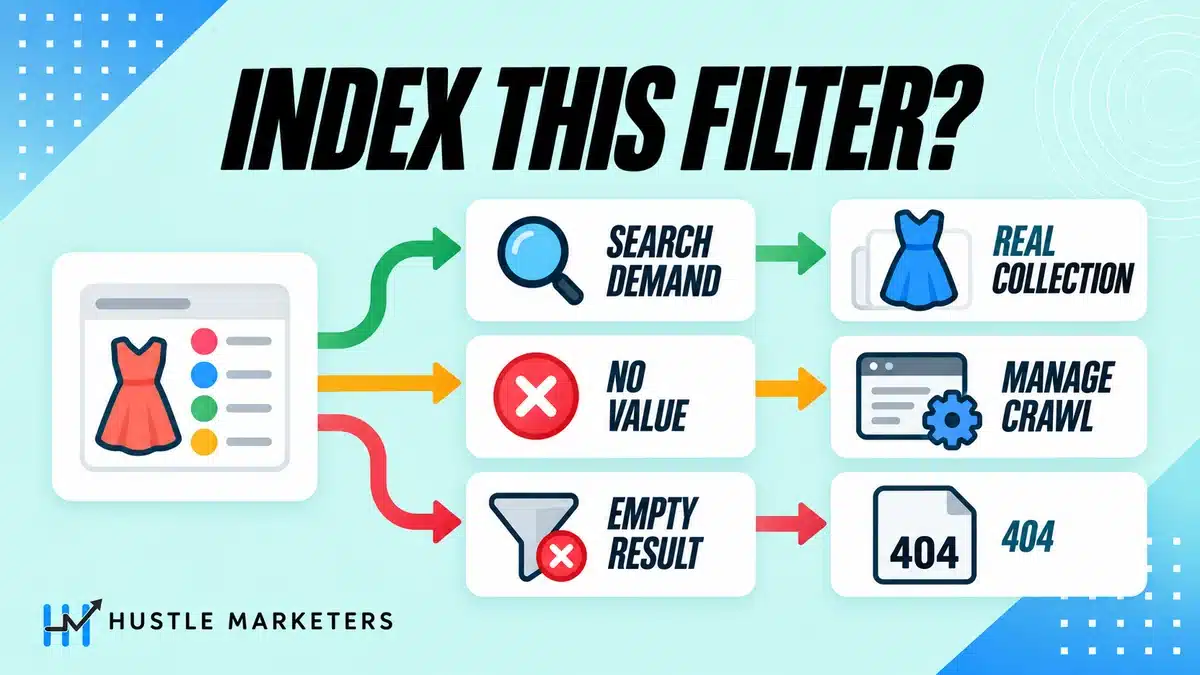
This is the decision that separates an apparel site that works from one that quietly wastes its crawl allowance, and it is the one where the gap between industry advice and Google’s actual documentation is widest.
What Google actually says
Google’s guidance on faceted navigation leads with blocking:
Oftentimes there’s no good reason to allow crawling of filtered items, as it consumes server resources for no or negligible benefit
The documented robots.txt example uses exactly the parameters an apparel site generates:
disallow: /?*products= disallow: /?color= disallow: /?size= allow: /?products=all$
Note the last line. Google’s own example is a mixed pattern, not a blanket block.
If you do decide to let some filtered URLs be crawled, Google documents two requirements that almost nobody implements. Use the standard `&` separator, because characters like commas, semicolons and brackets are, in Google’s words, “hard for crawlers to detect as parameter separators”. And:
Return an HTTP 404 status code when a filter combination doesn’t return results.
That second one matters enormously in apparel, where size and color combinations produce empty results constantly. A size 6 in a color you never stocked should return 404, not an empty grid with a template around it.
The rule Google does not publish
Here is where we part company with most of this category, and we would rather say it plainly than pretend.
You will read that you should index color and size facets because they have search demand, and block price and sort facets because they do not. That is reasonable judgment and it is what we do. It is not Google guidance. We looked for it specifically. Google publishes no framework for which filter values are worth indexing, no list of useful facets, and no worth-indexing taxonomy. The closest it comes is the “no good reason” line above.
So treat the rule as a commercial judgment you are making, not a standard you are complying with. The judgment itself is straightforward: “black dresses” and “plus size jeans” are real queries people type. `dresses?size=8&color=black&price=50-100` is not. The demand test decides it, not the filter type.
When a filter should become a real collection instead
The most useful answer to this problem did not come from any of the twenty ranking pages. It came from a Shopify merchant who had the exact problem and could not solve it.
I’ve updated my `robots.txt` to allow indexing of facet/filtered collection pages (e.g., `/collections/shirts?filter=color_red`), but these URLs are still treated as non-canonical to the main collection page
That is from a public Shopify Community thread on indexing facet pages. Shopify canonicalizes filtered collection URLs back to the parent collection by default, so the merchant could not get them indexed however they configured robots.txt. The reply that actually resolves it:
Reasonable, but I believe you’d be better off creating a new collection with keyword in title, or a new Page
That is the right answer and no ranking page gives it. If a filter combination has genuine search demand, it should not be a filtered URL at all. It should be a real collection with its own handle, its own title tag, its own description and its own internal links. `/collections/black-dresses`, not `/collections/dresses?filter=color_black`.
Shopify does not document anything about the crawlability or canonicalization of filtered collection URLs. We checked both the storefront filtering documentation and the merchant help page. Neither mentions indexing, canonicals or SEO at all. Overriding the canonical in `theme.liquid` is mechanically possible but is an unsupported theme modification, not a feature.
Why noindex plus disallow cancels itself out
This one is worth checking on your own site today, because it is common and it silently does nothing.
If you disallow a URL pattern in robots.txt and also put `noindex` on those pages, the noindex is never seen. Google’s robots meta tag documentation is explicit:
If a page is disallowed from crawling through the robots.txt file, then any information about indexing or serving rules will not be found and will therefore be ignored.
If indexing or serving rules must be followed, the URLs containing those rules cannot be disallowed from crawling.
And disallowing does not keep a page out of the index anyway. Google’s robots.txt introduction says it “is not a mechanism for keeping a web page out of Google”, and that a disallowed page “can still be indexed if linked to from other sites”.
| Method | Saves crawl budget | Removes from index | Consolidates signals |
|---|---|---|---|
| robots.txt disallow | Yes | No | No |
| noindex | No, page is still crawled | Yes | No |
| rel canonical | Only “may, over time” | No, it is a hint | Yes |
Pick one per URL pattern and know what it does. Stacking disallow and noindex gets you the weaker of the two.
How should color and size variants be handled?
Google documents two acceptable URL patterns, and one common approach that is not a pattern at all.
The two documented patterns
Google’s ecommerce URL structure guidance states that “each variant can be identified by a separate URL”, either as a path segment such as `/t-shirt/green` or as a query parameter such as `/t-shirt?color=green`. Either is fine. What Google asks for is restraint on the total:
Minimize the number of alternative URLs that return the same content to avoid Google making more requests to your site than needed.
The approach that does not work is the fragment identifier. Google’s documentation states that `/product/t-shirt#black` and `/product/t-shirt#white` “are considered to be the same page by Google”. If your theme switches color with a hash, you have one page and not five, whatever the address bar says.
One more line from the same page that saves arguments later: “If you use optional query parameters to identify variants, use the URL with the query parameter omitted as the canonical URL.”
The mistake that produces eight pages for one garment
The most common apparel variant error is not a markup problem. It is a merchandising decision made before anyone thought about search. From a Shopify Community thread on product page duplication:
I’m facing an issue with duplicate content across product pages on my Shopify store. I have a product available in 8 different colors, and instead of using variants, I’ve created 8 separate product pages.
Not one of the twenty pages ranking for fashion SEO addresses this, and it is the single most frequent variant problem merchants actually have. Eight product pages for one garment splits the signals eight ways, multiplies the feed items, and puts eight near-identical descriptions in your index.
The fix is to build it as one product with color variants, and to give a color its own page only where that color has its own demand and its own content. A brand known for one signature colourway can justify a page for it. A generic black version of a dress cannot.
What “Google chose a different canonical” actually means
Apparel sites see this Search Console status more than most, because near-identical color pages are exactly the case that triggers it. A merchant describing it:
Google will for example only index the red shirt, and not all five different colors. For me, I don’t really mind, if the red shirt is in the search results or the purple one.
That instinct is broadly right, and Google’s documentation for the status confirms what it means:
This page is marked as canonical for a set of pages, but Google thinks another URL makes a better canonical.
Two things to understand before you try to fix it. First, a canonical is a request, not an instruction. Google’s canonicalization documentation says plainly that “indicating a canonical preference is a hint, not a rule”, and its guide to consolidating duplicate URLs goes further: “While we encourage you to use these methods, none of them are required; your site will likely do just fine without specifying a canonical preference.”
Second, the neighboring status that looks similar is usually not a problem. “Alternate page with proper canonical tag” is documented as “there is nothing you need to do”, though read the full definition before relaxing: Google describes it specifically as an AMP page with a desktop canonical, or a mobile and desktop pair. Seeing it on Shopify collection-path product URLs is observed behavior rather than the case the documentation describes, because Shopify serves products at both `/products/handle` and `/collections/collection/products/handle` and canonicalizes the second to the first.
That dual path is real and documented. Shopify’s `within` filter “generates a product URL within the context of the provided collection”, producing URLs like `/collections/sale-potions/products/draught-of-immortality`. That page also carries a caution worth repeating to anyone building product cards: “Because a standard product page and a product page in the context of a collection have the same content on separate URLs, you should consider the SEO implications of using the `within` filter.” What Shopify does not document anywhere is what value `canonical_url` actually resolves to on those URLs. The behavior is consistent and you can confirm it in thirty seconds by viewing source on any collection-path product URL in your own store, but treat it as observable platform behavior rather than documented policy.
What should happen to a collection at the end of the season?
Keep the URL, change what is in it. This is one of the few places where working merchants have converged on an answer and the ranking pages have not.
A Shopify Community thread from November 2025 asks it directly: evergreen `/collections/autumn` updated each year, or a new `/collections/autumn-25` annually. Five separate responders say the same thing. Three of them:
Keep a single evergreen collection (e.g. `/collections/autumn`) and simply update the products each year. Using the same URL preserves all the backlinks and authority your collection builds over time.
stick with a single collection per season (/collection/autumn) and don’t include the year in the URL. Just update the title tag, meta description, and the collection content itself each year.
There is only 1 correct way to do this from an SEO perspective: Keep the URL evergreen.
Nine of the twenty ranking pages mention seasonality. Two give a URL rule. The other seven treat seasonality as a content calendar topic, which is a different subject entirely.
| Collection type | URL | At end of season |
|---|---|---|
| Recurring season | /collections/autumn, no year | Repopulate, rewrite title and copy, keep live |
| Recurring occasion | /collections/wedding-guest | Leave live all year, it has year-round demand |
| One-off drop or collab | /collections/designer-x-collab | Keep live if it earned links, otherwise 301 to the parent collection |
| Genuinely dead line | /collections/discontinued-range | 301 to the nearest live equivalent |
The year in the URL is the trap. `/collections/autumn-25` is worthless by March and you start from zero every year.
How do you handle out of stock and discontinued products?
Three different situations that most guides treat as one, and where the organic answer and the shopping feed answer point in opposite directions.
Google says keep the page live
For a product that is temporarily unavailable, Google’s guidance for pausing an online business is direct:
It’s better to still allow that page, and mark it out of stock. That way people can still understand what’s going on, even if they can’t purchase the item.
If you remove the product from Search, people don’t know why it’s gone.
The 410 myth
You will be told to serve 410 rather than 404 for discontinued products because it deindexes faster. Google’s HTTP status code documentation says:
All `4xx` errors, except `429`, are treated the same: Google crawlers inform the next processing system that the content doesn’t exist.
To be fair to the other side, John Mueller has said on the record that “a 410 will sometimes fall out a little bit faster than a 404”, while adding that “usually, we’re talking on the order of a couple days or so”. A couple of days is the entire prize. It is not worth building a different status code path in your platform for, and the documentation treats them identically.
Redirects are the ones with a documented difference. A 301 is “a strong signal that the redirect target should be processed”. A 302 is “a weak signal”.
The feed rule that contradicts the organic rule
This is the nuance that catches people running both organic and Shopping. Google Merchant Center has no discontinued availability value. Its availability attribute documentation lists `in_stock`, `out_of_stock`, `preorder` and `backorder`, plus `build_to_order` for vehicle ads, and then says:
For permanently discontinued products, delete them entirely from your data source rather than setting them to out of stock to avoid account disapprovals.
So for a permanently discontinued line, the correct action is to remove it from the feed while the decision about the page is separate and organic. Those two systems are not in conflict, they are answering different questions, but a lot of merchants apply the feed rule to the website and delete pages that were ranking.
Merchant Center also requires availability to match across “the landing page, structured data (if available), checkout page, and your data source” or the product is disapproved. If your page says in stock and your feed says out of stock, that is a disapproval waiting to happen.
| Situation | Page | Feed |
|---|---|---|
| Size 8 sold out, restocking | Keep live, mark that size unavailable | Keep, availability in_stock while any variant is buyable |
| Whole product out for a few weeks | Keep live, marked out of stock | out_of_stock |
| Season over, returning next year | Keep live, keep internal links | Remove or out_of_stock |
| Permanently discontinued | Keep live with alternatives, or 301 if it has no traffic or links | Delete from the data source |
The collection path multiplier
Here is the problem no ranking page mentions at all, raised by a merchant in January 2026:
A product exists in multiple collections (e.g 5-6 collections). The product is later discontinued / Archived. Google has already indexed URLs like: `/collections/collection-a/products/product-handle`… Once the product is removed, each of these URLs returns a 404.
And the practical objection from another merchant in the same thread on discontinued products and collection URLs:
our client discontinued almost every week one product and if product is in 6 collections then they need to create 7 redirects which is not ideal.
At apparel churn rates this compounds fast. The thread resolves into two contradictory answers, which is a fair reflection of the state of the advice.
Our position: redirect the canonical `/products/handle` URL and let the collection-path variants 404. They were never the canonical, they should never have been the indexed version, and Google’s own framing is that a 404 is a signal rather than an error. Creating six extra redirects per discontinued product builds a redirect table that becomes its own maintenance problem within a year.
What structured data actually earns anything on a collection page?
Less than you have been told, and one of the things you have been told was deleted from Google’s documentation in June.
BreadcrumbList is the one that works
Google’s breadcrumb documentation states that “Google Search uses breadcrumb markup in the body of a web page to categorize the information from the page in search results”. Required properties are `itemListElement` on the list, and `item`, `name` and `position` on each entry, with `item` not required on the final crumb.
The apparel-specific feature worth knowing:
If there are multiple ways to navigate to a page on your site, you can specify multiple breadcrumb trails for a single page.
A dress that lives in Dresses, New In and Wedding Guest can carry all three trails as separate BreadcrumbList objects in one script tag. This is the one structured data type in this section that reliably earns a visible feature for apparel.
ItemList on collections depends entirely on where you sell
This one has two answers and almost every guide gives only the first.
Google’s carousel documentation lists the features ItemList can be combined with for a host carousel: Course list, Movie, Recipe and Restaurant. No ecommerce, no product, no category. If that were the whole story, ItemList on a collection page would earn nothing.
It is not the whole story. A sibling page, structured data carousels (beta), documents a different rich result that does support products:
To be eligible for this beta rich result, add `ItemList` structured data in combination with at least one one of the following supported structured data items: `LocalBusiness` and its subtypes, for example: `Restaurant`, `Hotel`, `VacationRental`, `Product`, `Event`
And the page type it wants is precisely an apparel collection page:
The markup must be on a summary or category page, which is a list-like page that contains information about at least three entities and then links out to other pages on your site for more information on those entities.
The requirement is at least three `itemListElement.item` entries.
Now the catch, which decides whether this is worth your development time:
This feature is in beta and you may see changes in requirements or guidelines, as we develop this feature. This feature is also only available in European Economic Area (EEA) countries, Türkiye, and South Africa, on both desktop and mobile devices.
So if you sell into the EU, ItemList plus Product on your collection pages is a documented rich result path and worth implementing. If your market is the US, or the UK, which is not in the EEA, it currently earns you nothing in Search. It is still valid schema that describes the page accurately, which has some value for machine readers, but do not let anyone sell it to you as a US rich result.
Separately, Google steers Product markup away from listing pages. Its product snippet documentation says product rich results “only support pages that focus on a single product (or multiple variants of the same product)” and recommends “focusing on adding markup to product pages instead of pages that list products or a category of products”. Those two things are not in conflict. Product markup describing the page belongs on product pages; ItemList describing a list of products is what the beta carousel wants on a category page.
FAQ rich results no longer exist
Not restricted. Removed. From Google’s Search Central changelog, the FAQ rich result feature “will no longer appear in Google Search starting May 7, 2026”, and the documentation for it was removed in June 2026.
Any guide published in 2026 that recommends FAQ schema for rich results on an ecommerce site is wrong twice over. Ecommerce lost eligibility in the 2023 restriction, and the feature itself is now gone for everyone.
FAQ markup is still valid schema and still describes your content accurately, which has some value for machine readers. It earns nothing in Google Search. We use it on this page for the former reason and would not claim the latter.
How should paginated collections be set up?
Two pieces of standard advice here are contradicted by Google’s current documentation, and both appear on pages ranking in 2026.
Google’s pagination guidance, last updated December 10, 2025:
In the past, Google used `<link rel=”next” href=”…”>` and `<link rel=”prev” href=”…”>` to identify next page and previous page relationships. Google no longer uses these tags, although these links may still be used by other search engines.
That is current documentation, not an old announcement. Two of the twenty pages we read recommend these tags, one of them in copy dated 2026.
The second correction is the bigger one in practice:
Don’t use the first page of a paginated sequence as the canonical page. Instead, give each page its own canonical URL.
Canonicalizing page 2 and beyond back to page 1 is extremely common and Google explicitly contradicts it. If you do it, the products that only appear on page 3 have no canonical route into the index.
What Google does document: link each page to the next with real `<a href>` anchors, give every page a unique URL such as `?page=n`, do not use fragment identifiers for page numbers, and consider a sitemap or a Merchant Center feed to help Google find products that sit deep in the pagination.
Does crawl budget actually matter for your catalog?
Probably less than you have been told, and Google is clearer about this than the industry is.
Google’s crawl budget guide names its audience as large sites with over a million unique pages, or medium sites over ten thousand pages with content changing daily. It then gives a plain test:
If your site doesn’t have a large number of pages that change rapidly, or if your pages seem to be crawled the same day that they are published, you don’t need to read this guide.
Note what that is and is not. It is an audience definition and a behavioral test. It is not a documented threshold below which crawl budget does not exist, and we could not find one. If someone tells you “under 10,000 URLs crawl budget is irrelevant” they are paraphrasing the audience definition, reasonably, but not quoting a rule.
What Google does document about waste:
If many of these URLs are duplicates, or you don’t want them crawled for some other reason (removed, unimportant, and so on), this wastes a lot of Google crawling time on your site.
The apparel multiplier is what turns a modest catalog into a crawl problem. Five hundred garments, six colors, seven sizes, reachable through four collection paths, with filter parameters on top, is not five hundred URLs. Merchants experience this as a Search Console report rather than as theory:
I’ve noticed a significant increase in the “Crawled – currently not indexed” section of my Google Search Console, with a tenfold increase in the number of pages over the past two months.
That is from a thread on filtered URLs and crawl budget, and the diagnosis is usually the same: filter URLs being crawled that were never worth crawling.
What if your catalog is small?
Then most of this article’s advice is aimed at someone else, and following it will make things worse.
Eighteen of the twenty pages we read assume a large catalog. They tell you to block facets, prune thin collections, consolidate and control crawl. A forty-product independent label needs the opposite of all four. It does not have a crawl problem. It has an indexable-surface problem.
What actually works at that size:
Build collections around demand, not around inventory convenience. If you have three or more products that share a real search term, that is a collection. Linen shirts, wide leg, petite, occasion.
Create editorial surface area that can rank without more products. Fit guides, fabric guides, care guides, styling content, the story of a specific make. A small brand can write those more credibly than a large one can.
Do not block your facets by reflex. With forty products, filtered views are not generating meaningful crawl waste, and the two or three filter combinations with real demand should become proper collections rather than being disallowed.
Accept that head terms are not available to you yet. In Semrush’s US database in September 2026, “dresses for women” is 90,500 searches a month at keyword difficulty 55 and “plus size clothing” is 74,000 at KD 86. The second-tier terms are where a small brand competes: “women’s black dress” at 3,600 and KD 30, “women’s casual dresses” at 2,900 and KD 36. Those are the pages that need clean color and size data to exist at all, which is where the variant work earlier in this guide starts paying.
How do you get Core Web Vitals right on an apparel template?
Current thresholds first, because one of the three metrics people quote has not been a Core Web Vital since March 2024.
| Metric | Good | Needs improvement | Poor |
|---|---|---|---|
| LCP | 2.5s or less | 2.5 to 4.0s | Over 4.0s |
| INP | 200ms or less | 200 to 500ms | Over 500ms |
| CLS | 0.1 or less | 0.1 to 0.25 | Over 0.25 |
Interaction to Next Paint replaced First Input Delay on March 12, 2024, with FID fully retired from Google’s tooling on September 9, 2024. Any guide still listing FID is more than two years out of date. All three are assessed at the 75th percentile of page loads, mobile and desktop reported separately.
Color swatches and CLS, honestly
We expected to write that color swatch image swapping is a CLS liability, because it looks like one. Google’s CLS documentation says otherwise:
if a new element is added to the DOM or an existing element changes size, it doesn’t count as a layout shift, as long as the change doesn’t cause other visible elements to change their start position.
So swapping the main image when someone clicks a color is not inherently a problem. It becomes one only if the replacement image has different intrinsic dimensions and the container has no reserved space, pushing everything below it.
There is a second mechanism people lean on here that we would not rely on. Layout shifts within 500 milliseconds of a user input get a `hadRecentInput` flag set “so they can be excluded from calculations”, and that flag applies to “discrete input events, such as tap, click, or keypress”, which a swatch click is. But if the replacement image is fetched over the network, the shift frequently lands outside that 500 millisecond window, and then it counts. Do not treat the input exclusion as your protection.
The protection is reserved space, and it is cheap: lock the container with `aspect-ratio`, or put explicit `width` and `height` on the image. Google’s documented causes of CLS include “images or videos with unknown dimensions, fonts that render larger or smaller than its initial fallback, or third-party ads or widgets that dynamically resize themselves”, and the underlying mechanism it names is content shifting “when resources load asynchronously or DOM elements are dynamically added to the page before existing content”.
The hero image and the collection grid
Two apparel-specific LCP patterns are worth checking today.
The lookbook hero. Google’s LCP guidance is unambiguous: “Never lazy-load your LCP image, as that will always lead to unnecessary resource load delay”. A full-bleed hero with `loading=”lazy”` applied by a blanket theme rule is a very common self-inflicted LCP problem.
The collection grid. Sixty product images above and below the fold need prioritizing, and `loading=”lazy”` alone does not do it. Google’s Fetch Priority documentation explains why, using a carousel example that maps exactly onto a product grid:
While images 2-4 will be outside of the viewport, they may be considered ‘close enough’ to boost them to `high` and also load even if a `load=lazy` attribute is added. Therefore `fetchpriority=”low”` is the correct solution for this.
That is the line most people miss. Lazy loading alone will not hold back the images just below the fold. You want `fetchpriority=”high”` on your LCP image and `fetchpriority=”low”` on the grid images competing with it. Our own rule is to give exactly one image high priority, though that is judgment rather than something Google documents.
How should you link between collections?
Cross-collection linking is covered by none of the twenty pages we read, and it is where apparel sites cannibalise themselves.
The problem is structural. Linen shirts, summer shirts and men’s shirts overlap in inventory and in intent. Left alone they compete for the same queries and split their signals. The fix is to decide a primary for each query family and link accordingly, rather than letting every collection link to every other one.
Pick the collection that best matches the dominant query for a product group and make it the destination. Link the narrower collections up to it and let it link down to them. Keep the anchor text specific to the target, not generic.
Editorial content should link down into products and collections with real anchors. The one useful version of this in the ranking set was a suggestion to link from blog posts to the products they mention, for example “Shop our Lily Dress”. That is right and it is underused.
And keep internal links pointing at seasonal products even out of season. A merchant put the consequence well:
Removing all links to your out of season products WILL hurt your SEO. Google still need to find internal links to them.
That is from a thread on handling out of stock items. Seasonal collections are the natural place to keep those links alive year round.
Why size, fit and care content is worth more than it looks
It reads like low value informational traffic. It is margin.
Apparel return rates make this the highest leverage content on the site. The NRF and Happy Returns 2025 Retail Returns Landscape, published October 15, 2025, estimated 19.3 percent of online sales would be returned in 2025. That figure is across all online retail and NRF publishes no apparel-specific rate, so treat the apparel numbers you see attributed to NRF with suspicion.
The point stands regardless. Size guides, model measurements, “model is wearing size”, fabric weight, care instructions and honest fit notes reduce returns and are indexable content at the same time. There is a whole query class here that most brands never target: “what size am I in [brand]”, “[brand] fit true to size”, “how to wash merino wool”, “uk 12 in us size”.
Those pages also make your product pages more useful to machine readers, which matters for the next section.
How do apparel pages show up in AI search?
Google says less about this than the industry does, and the statistics everyone quotes do not hold up.
Google’s guidance on AI features is short and worth quoting because it contradicts a lot of what is being sold:
There are no additional requirements to appear in AI Overviews or AI Mode, nor other special optimizations necessary.
You don’t need to create new machine readable files, AI text files, or markup to appear in these features.
There’s also no special schema.org structured data that you need to add.
On measurement, the position changed in June 2026 and a lot of writing has not caught up in either direction. Google’s AI features page, last updated December 2025, says sites appearing in AI features “are included in the overall search traffic in Search Console”, reported within the Web search type. That part is still true: there is no AI search type and you cannot filter AI traffic out of the main Performance report.
What is new is a separate generative AI performance report, announced in June 2026, which “shows data about how your site performs in generative AI features on Google Search” and lets you see “what pages are getting the highest (or lowest) impressions in generative AI features”. It covers AI Overviews and AI Mode and segments by page, country, device and date.
Read the limitation carefully before you build reporting on it. It shows impressions. Not clicks, not position. Access is still rolling out. So you can now see which of your pages are being surfaced in AI features, which is genuinely useful, and you still cannot measure what that traffic is worth.
The three statistics you keep seeing
One page in this SERP cites three figures about AI Overviews and ecommerce, correctly sourced as far as it goes, and they are repeated constantly: that 16 percent of ecommerce queries produce an AI Overview, that 80 percent of cited sources do not rank organically for the query, and that ranking in the top three gives only an 8 percent chance of being cited.
We went looking for the underlying research. All three come from a single analysis of 25,000 ecommerce queries by Bartosz Goralewicz, published through social posts and written up by Search Engine Journal on May 27, 2024. They are one dataset presented as three findings, from days after AI Overviews launched in the US.
The same research program has since published figures that contradict two of them. ZipTie, Goralewicz’s own product, reports that “in ecommerce, only 1.3% of queries generate AI Overviews”, and separately that “websites ranking #1 in Google have a 25% chance of being used as a source in AI Overviews”, against the original 8 percent.
The honest reading is not that the numbers were wrong. It is that they were a snapshot from one dataset in the first week of a feature, they are being cited as three independent sources when they are one, and the researcher’s own later work points the other way. The practical conclusion, that rankings still matter a great deal for AI citation, is the opposite of what the 8 percent figure is usually used to argue.
What actually seems to help an apparel page get cited is the same thing that helps a human: specific, checkable facts. Fibre composition, measurements, care requirements, provenance, fit notes. Vague brand language gives a machine nothing to lift.
What about international apparel sites?
One piece of advice here is not just wrong but actively harmful on the platform most apparel brands use.
If you run Shopify Markets, do not stack your own hreflang tags on top of Shopify’s. Shopify’s Markets SEO documentation says hreflang tags “are generated automatically based on your market and language configuration”, with an `x-default` pointing at the primary domain. Shopify’s theme hreflang documentation adds that they are inserted “through the `content_for_header` object”, and carries the warning:
Adding your own tags on top of the automatic ones can produce duplicate or conflicting annotations, which can hurt your store’s search ranking.
The precise rule is about stacking, not about ever writing your own. Automatic tags are on by default, and Shopify does contemplate turning them off: “If you turn off automatic hreflang tags, then you need to add your own hreflang tags to your theme”, with the caution that doing so “can negatively affect your store’s SEO. Turn off this setting only if you have an alternative hreflang tag implementation in place.” The failure mode is a developer adding tags while the automatic ones are still running.
Canonicals are handled too: where multiple market versions exist, “each version has a self-referencing canonical URL and hreflang tags that connect all versions together”.
On the general hreflang rules, the failure that breaks most implementations is reciprocity. Google’s localized versions documentation states:
If two pages don’t both point to each other, the tags will be ignored.
And on near-identical English pages for different markets, which is the situation every UK brand selling into the US ends up in, Google does not tell you to noindex one. Its multi-regional guidance says to “pick a preferred version and use the `rel=”canonical”` element and `hreflang` tags to make sure that the correct language or regional URL is served”.
Because canonical is only a hint, near-identical en-GB and en-US pages routinely produce “Duplicate, Google chose different canonical than user” anyway. The real remedy is genuine localization rather than markup: local currency, local sizing conventions, local spelling, local shipping and stock. A merchant in a Shopify thread described exactly this failure on localized collections, noting that “other than a different language, all content must be the same” and watching those pages sit in “Crawled – currently not indexed”.
Your technical fashion SEO checklist
In the order we would work through it on a new account.
| Priority | Check | What good looks like |
|---|---|---|
| Critical | Variant handling | One product, variants grouped, not eight color pages |
| Critical | Faceted URLs | One method per pattern, not disallow plus noindex |
| Critical | Pagination canonicals | Each page self-canonical, not pointing at page 1 |
| Critical | LCP image | Never lazy loaded, fetchpriority high on exactly one |
| High | Empty filter results | Returns 404, not an empty styled grid |
| High | Out of stock pages | Live and marked, not deleted |
| High | Feed and page availability | Match exactly, or expect disapprovals |
| High | Seasonal collection URLs | No year in the handle |
| Medium | BreadcrumbList | Present, multiple trails where a product sits in several collections |
| Medium | Cross-collection links | A decided primary per query family |
| Medium | Image dimensions | width and height or aspect-ratio on every product image |
| Medium | hreflang on Shopify | Automatic only, no hand-rolled tags |
| Low, or High in the EEA | ItemList on collections | Product plus ItemList, three items minimum, for the beta carousel |
| Low | FAQ markup | Valid schema, no rich result since May 7, 2026 |
How Hustle Marketers helps fashion and apparel brands
We work on the layer above, and we implement it rather than hand it over.
Technical apparel SEO. Variant URL strategy, canonical policy, faceted navigation decisions, collection lifecycle, pagination and crawl control, implemented in the theme rather than written into a recommendations document you then have to resource.
Feed and free listings. Merchant Center feeds with the apparel attributes complete and variants grouped correctly, which carries free Shopping listings as well as ads. Our product feed optimization guide covers the mechanics, and our Merchant Center work for Silicon Lightworks is a published example.
Core Web Vitals on real apparel templates, where the problems are hero images, product grids and third-party apps rather than anything abstract.
AI search visibility, treated as its own channel. Our AI SEO work and our write-up on citations versus mentions cover how we approach it.
Apparel experience, stated plainly. Estelle Bridal, a Houston bridal boutique, recorded a video testimonial about working with Ishant Sharma. That case study publishes no traffic or revenue figures because the client did not state any. Our published ecommerce case studies are in adjacent categories: a curly hair brand on Shopify and a building block toy brand. We would rather tell you that than imply apparel figures we do not have.
Adjacent guides if you sell in related categories: jewelry SEO, beauty marketing and pet marketing.
Why choose Hustle Marketers or Ishant Sharma for fashion SEO?
Ishant Sharma has run SEO, Google Ads and Microsoft Ads since 2013, across ecommerce feeds, Merchant Center, Shopping and technical SEO. The feed and variant work on this page is done in house.
We implement. The bottleneck in apparel SEO is almost always development capacity, so an agency that delivers a document and waits is selling you a delay. Our SEO agency and ecommerce SEO engagements include the implementation.
We publish our sources and we correct ourselves in public. Three things on this page contradict what we expected to write before we checked the source. ItemList on collection pages turned out to have a documented rich result path we had written off, in a beta we found on a sibling page of the one we first read. The 500 millisecond input exclusion that makes color swatches look safe does not reliably cover a network-fetched image, so reserved space is the real fix. And the AI Overview statistics everyone cites are one dataset whose own author has since published numbers pointing the other way. You can check all three.
Agencies who want apparel technical capability under their own brand can use our white-label SEO service.
If you want a second opinion on your current setup, ask for a fashion technical review. We will tell you what is broken whether or not you hire us.
Fashion SEO FAQs
What is fashion SEO?
Ecommerce SEO plus the apparel-specific layer: size and color variant handling, faceted navigation decisions, seasonal collection lifecycle, and the feed attributes Google requires for clothing. The core work is the same as any online store; three structural problems are not.
Should clothing brands create separate pages for each color variant?
Usually no. Build one product with color variants. Give a color its own page only where that color has its own search demand and its own content. Creating eight product pages for one garment in eight colors splits your signals eight ways and is the most common apparel variant mistake.
Should I let Google index my filtered collection pages?
Google’s documented default is to block them, and it publishes no framework for which filters are worth indexing. Our judgment: if a filter combination has real search demand, build it as a proper collection with its own handle and copy rather than trying to get a filtered URL indexed.
Should seasonal collection URLs include the year?
No. Use /collections/autumn rather than /collections/autumn-25 and repopulate it each year. A URL with the year in it is worthless by March and starts from zero annually.
What should I do with a product that is out of stock?
Keep the page live and mark it out of stock. Google states this directly. Delete it from your Merchant Center data source only when it is permanently discontinued, because Merchant Center has no discontinued availability value and disapproves products left as out of stock indefinitely.
Is 410 better than 404 for discontinued products?
No. Google documents all 4xx errors except 429 as treated the same. The idea that 410 deindexes faster has no support in Google’s documentation.
Should I still use rel=next and rel=prev for pagination?
No. Google’s current documentation states it no longer uses them. Give each paginated page its own self-referencing canonical rather than canonicalizing back to page one, which Google explicitly advises against.
Does FAQ schema still get rich results?
No. Google removed the FAQ rich result from Search on May 7, 2026 and deleted the documentation in June 2026. The markup remains valid and describes your content, but it earns nothing in Google Search.
Does ItemList schema give my collection pages a carousel?
It depends where you sell. Google’s main carousel feature supports only Course list, Movie, Recipe and Restaurant. But a separate beta carousel does support `Product` on summary and category pages with at least three items, and that beta is available only in European Economic Area countries, Türkiye and South Africa. If you sell into the EU it is worth implementing. If your market is the US or the UK, which is not in the EEA, it currently earns nothing in Search.
Do color swatches hurt Core Web Vitals?
Usually not. A swap that does not move surrounding content is not a layout shift, and shifts within 500 milliseconds of user input are excluded from CLS. Lock the image container with aspect-ratio or explicit width and height and it is a non-issue.
How much crawl budget do I need to worry about?
Google aims its crawl budget guide at sites over a million pages, or over ten thousand pages changing daily, and says that if your pages are crawled the same day they are published you do not need the guide. There is no documented threshold below which it stops mattering, so use the behavioral test rather than a page count.
Should I add hreflang tags to my Shopify store?
Not if you use Shopify Markets. Shopify generates them automatically and warns that adding your own on top “can produce duplicate or conflicting annotations, which can hurt your store’s search ranking”.