AI Max for Shopping: Google’s +5% Claim and What Search Tests Found (2026)

Ishant
Published : October 16, 2026 at 9:30 am
Updated : October 22, 2026 at 2:57 am
Ishant
Written by Ishant Sharma, Google Ads, Microsoft Ads and SEO specialist since 2013 | Published October 16, 2026 | Facts checked September 18, 2026
Google says advertisers who turn on AI Max for Shopping “will typically see +5% more conversions / conversion value at a similar CPA/ROAS.”
Three independent tests point the other way, but read them carefully: they measured AI Max for Search, the match-type version, and ran before AI Max for Shopping launched. One analysis of more than 250 retail campaigns found return on ad spend roughly 35% lower than traditional match types. Another measured cost per conversion at $100.37 against $43.97 on phrase match. A third examined 30,000 search terms and found 99% of impressions produced no conversions at all.
Both of those things are on the record. This guide is about what sits between them, what AI Max actually does to your Shopping campaigns once it is switched on, and how to test it in your own account instead of picking a side.
Key Observations
- AI Max for Shopping is an opt-in beta. Google announced it on April 30, 2026, and existing Shopping campaigns upgrade in one click.
- Text customization rewrites product titles from your feed attributes. Final URL expansion needs text customization on and only works with Target ROAS.
- Google says advertisers typically see about 5% more conversions or conversion value at a similar CPA or ROAS.
- The independent tests that found worse results measured AI Max for Search, before the Shopping version launched. Treat them as a warning, not a verdict.
- Test it on one campaign against a saved baseline, set exclusions on day one, and judge it on profit.
Table of Contents
- What is AI Max for Shopping, and did I opt into it?
- What does AI Max actually change in a Shopping campaign?
- Does AI Max for Shopping actually work?
- How do I test AI Max without burning budget?
- What does AI Max mean for how I build my feed?
- How does AI Max compare to Performance Max?
- AI Max for Shopping FAQs
What is AI Max for Shopping, and did I opt into it?
AI Max for Shopping is a feature suite that lets Google’s models rewrite your Shopping ads and expand where they serve. It is currently in beta.
The thing most advertisers miss is the timeline, because Google handled the two halves very differently.
AI Max for Shopping was announced on April 30, 2026 as a beta that existing Shopping campaigns can switch on with a one-click upgrade.
The Search side upgrade started in September 2026, moving automatically created assets and campaign-level broad match settings into AI Max. Google announced it on its Ads blog on April 15, 2026.
Separately, Dynamic Search Ads are being retired into AI Max entirely, with the upgrade moved to February 2027 in Google’s June 11, 2026 update. If you have been running DSAs as a catch-all for long-tail product queries, that inventory is moving whether you plan for it or not.
So the honest answer to “did I opt in” is: on Shopping, only if someone in your account switched it on. On Search, possibly without knowing, if your campaigns used automatically created assets or campaign-level broad match.
What does AI Max actually change in a Shopping campaign?
Three features, and the first one is the consequential one.
Text customization rewrites your product titles
This is the part that should change how you think about your feed.
Google’s own description: “When you enable text customization, Google AI can dynamically update your product titles to align with shopper search queries and intent.”
It pulls attributes out of your Merchant Center feed and builds query-matched titles from them. Google’s examples of the kind of attribute it draws on are things like “waterproof” and “stability-focused.” Elsewhere Google describes using details such as fabric softness, material durability and fit to generate ad copy that speaks to conversational queries, and frames your feed as “a deep product database rather than a static list.”
Read that last phrase again, because it is the whole strategic shift. Your feed used to be a list of things you sell. It is now raw material an AI writes ad copy from.
Four operational details worth knowing:
- Google applies quality guardrails so generated titles stay “strictly accurate and grounded in your actual product offerings”
- Customized titles are only served when predicted to outperform the original
- It is currently limited to English feeds
- You get term exclusions (up to 25 per campaign) and messaging restrictions (up to 40 per campaign) as controls
That “only when predicted to outperform” clause matters for how you interpret results. You are not running a clean A/B test against your own titles. You are letting a model pick when to override you, which makes the measured lift a selected sample rather than an average effect.
Final URL expansion sends traffic to pages you did not nominate
Google crawls your site, identifies commercial URLs such as category pages, new arrivals and editorial content, and routes queries to whichever page it judges most relevant.
Two hard constraints that are easy to miss:
- It requires text customization to be enabled. You cannot have one without the other.
- It works exclusively with Target ROAS bid strategies.
If you run Maximize Conversion Value without a target, or Manual CPC, final URL expansion is simply unavailable to you.
Optimal format selection
Google picks the ad format it thinks will perform best for a given query and surface. Less consequential than the other two, and less controversial.
Does AI Max for Shopping actually work?
Here is where the published evidence and Google’s marketing part company, and you should see both.
What Google claims
“On average, advertisers that activate AI Max for Shopping will typically see +5% more conversions / conversion value at a similar CPA/ROAS.”
Note how narrow that is. Not a ROAS improvement. Not a CPA improvement. More volume at similar efficiency. Even taken at face value, the claim is that you get a bit more of the same, not that the economics improve.
Google’s AI Max for Search figure, 7% more conversions or conversion value at a similar CPA/ROAS with the full feature suite, carries a footnote limiting it to non-Retail advertisers.
What independent testing found
PPC Land published a round-up of independent tests on November 8, 2025. Three separate practitioners, three different methodologies, one direction of travel. All three looked at AI Max for Search campaigns, not Shopping campaigns.
Smarter Ecommerce, led by Mike Ryan. More than 250 retail campaigns, drawn from 600-plus accounts with active Search campaigns. Their finding was return on ad spend roughly 35% lower than traditional targeting.
Ryan’s summary: “I looked at over 250 campaigns and found it’s also the worst match type by the numbers.”
The adoption data in that study is as telling as the performance data. AI Max represented 0.57% of account-level spend, 5% of spend within campaigns where it was activated, and was active in only 12% of the 600-plus accounts. About six months after the Search launch, the people with the most accounts to test it in were barely using it.
Xavier Mantica ran a four-month direct comparison:
| Match type | Cost per conversion |
|---|---|
| AI Max | $100.37 |
| Phrase match close variants | $97.67 |
| Exact match close variants | $61.65 |
| Exact match | $52.69 |
| Phrase match | $43.97 |
His conclusion: “I’m done with AI Max. After 4 months of testing, the data is brutal.”
Ezra Sackett, Director of Paid Search at Monks, examined roughly 30,000 search terms and found that 99% of impressions generated zero conversions, and that fewer than half of the search terms showed actual keyword matching. The rest functioned as keywordless advertising.
So who is right?
Probably both, and the reconciliation matters more than the scoreboard.
Google’s +5% is an average across all advertisers who activated the feature. Averages hide distribution. A +5% average is entirely compatible with a substantial share of retail advertisers losing money on it, and the Search results above show how far individual accounts can fall below an average.
Three things predict which side of that distribution you land on.
Feed depth. Text customization writes titles from your attributes. A feed with rich `material`, `color`, `size`, `product_detail` and `product_highlight` values gives the model something true and specific to work with. A thin feed gives it nothing, and it will still rewrite your titles.
Catalog breadth. Final URL expansion helps when you have genuinely relevant category and editorial pages to send unusual queries to. On a narrow catalog it mostly finds worse matches than your existing structure already had.
Brand term leakage. Several of the worst independent results involve AI Max absorbing queries that were already converting cheaply elsewhere, then taking credit for them at a higher cost. Exclusions exist precisely because this happens.
How do I test AI Max without burning budget?
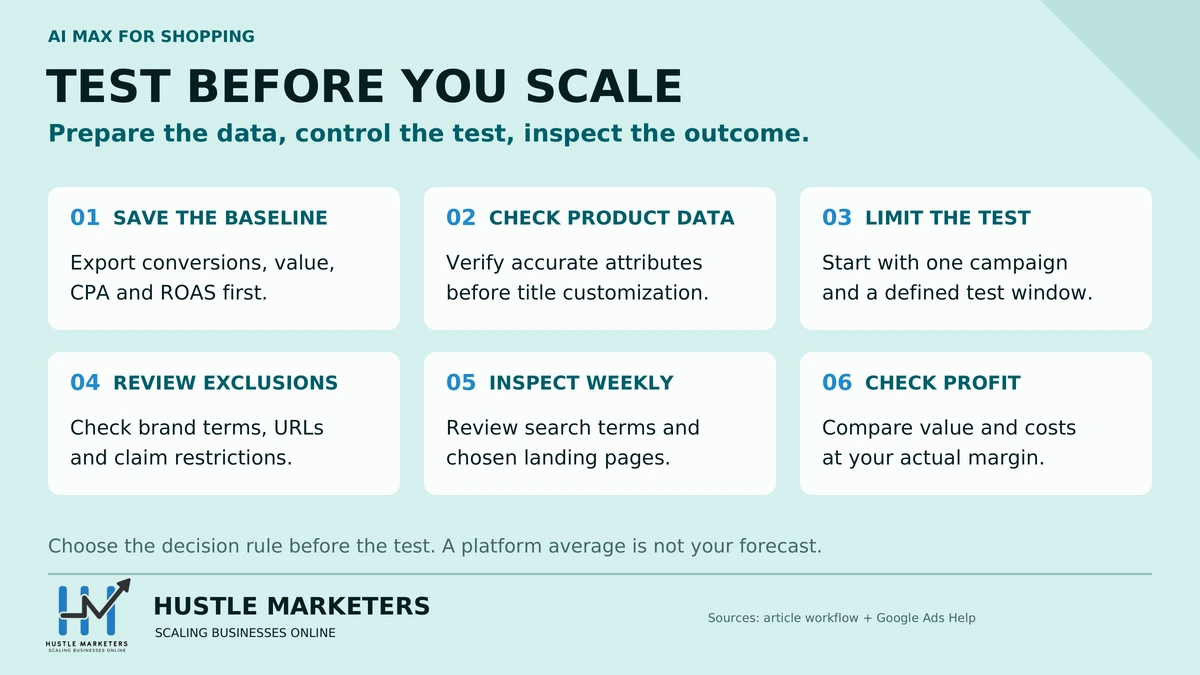
Six steps. This is the sequence we use on client accounts rather than switching it on across the board.
1. Export your baseline first. Thirty to ninety days of conversions, conversion value, CPA and ROAS by campaign, before you change anything. Without this you cannot tell a seasonal move from an AI Max move, and you will end up arguing from vibes.
2. Fix your feed before you enable text customization. Fill `material`, `color`, `size`, `product_detail` and `product_highlight`. The model is going to write copy from these fields either way. Giving it accurate, specific attributes is the single highest-leverage thing you can do here, and it improves your organic Shopping and AI surface performance regardless of what you decide about AI Max. Our product feed optimization guide covers the attribute work.
3. Test on one campaign, not the account. Pick a campaign with enough volume to reach significance in four weeks and enough margin that a bad month is survivable. Never your brand campaign. Avoid overlapping the test with peak trading as well. A four-week window that runs through Black Friday tells you about seasonality, not about AI Max, and our Black Friday advertising guide explains why that period wants settled campaigns rather than live experiments.
4. Set your exclusions on day one. Twenty-five term exclusions and forty messaging restrictions per campaign. Use them for your brand terms, your competitor terms, and any claim you cannot substantiate. This is also where category compliance lives: if you sell anything in a regulated space, restrict the language before the model finds it.
5. Check the search terms weekly, not monthly. The Monks finding, 99% of impressions producing nothing, is exactly the failure mode that hides inside an acceptable-looking account average for several weeks.
6. Judge it on profit, not conversions. Google’s own claim is more volume at similar efficiency. If your ROAS holds and volume rises, that is a win only if the incremental volume is profitable at your margin. Run it at gross margin, not revenue.
If after four weeks your CPA is up more than your revenue, you have your answer, and the independent data suggests that is the more common outcome in retail.
What does AI Max mean for how I build my feed?
This is the part that outlives whatever you decide about the feature itself, and it is why I would not treat AI Max as a pure PPC question.
Your feed is now ad copy. Attributes you filled in for completeness are being read by a model that writes the headline a shopper sees. Thin, generic or inconsistent attributes now produce thin, generic ad copy, not just weak matching.
You control the inputs, not the output. You cannot write the served title any more. What you can do is make sure every attribute the model might reach for is accurate and specific. That is a feed hygiene job, not a campaign settings job.
The same work pays off on AI surfaces. The attributes that make text customization produce decent copy are broadly the ones that make your products legible to AI Mode, AI Overviews and Gemini. Google reported that in its testing with lululemon, conversational attributes were incorporated in 50% of relevant product recommendations in AI Mode. Our Merchant Center AI attributes guide covers those six attributes in full.
If you write titles with AI, declare them. Separate rule, easy to trip over. Google requires generative AI titles to be submitted through `structured_title` with `digital_source_type` set to `trained_algorithmic_media`, and it silently ignores `structured_title` if you also send `title`. We cover that in AI product titles for Google Shopping.
Most of this is foundational rather than clever. When Silicon Lightworks came to us, the blocker was not bid strategy or campaign type, it was a Merchant Center and feed setup that stopped the products serving at all. Fixing the data came before any optimization was worth running, and the work is written up in our Google Shopping and Merchant Center case study.
The through-line: whether or not you run AI Max, the winning move is the same. Deepen the feed. It is the one input that improves paid performance, organic Shopping and AI citation visibility at the same time.
How does AI Max compare to Performance Max?
They get conflated constantly and they are not the same thing.
| AI Max for Shopping | Performance Max | |
|---|---|---|
| What it is | A feature set layered onto Shopping campaigns | A campaign type |
| Inventory | Shopping surfaces, expanded by query matching | All Google inventory: Search, Shopping, YouTube, Display, Discover, Gmail, Maps |
| What you keep | Your Shopping campaign structure and product groups | Asset groups and listing groups, a different model |
| Title control | Google may rewrite titles from your feed | Feed titles used as-is for Shopping inventory |
| Reporting | Shopping reporting plus AI Max additions | Historically limited, improving |
The practical distinction: AI Max changes how your existing Shopping campaigns behave. Performance Max replaces them with something structurally different.
If you are wrestling with PMax rather than AI Max, we have separate guides on Performance Max asset group structure for ecommerce and what to do when Performance Max is not performing.
For what a PMax account can do once the feed underneath it is sound, our Armorgarage Performance Max case study documents the structure and the feed work behind the result.
Our Black Friday advertising guide explains why we keep AI Max tests out of sale week.
AI Max for Shopping FAQs
What is AI Max for Shopping?
It is a beta feature suite for Google Shopping campaigns with three components: text customization, which lets Google’s AI rewrite your product titles using attributes from your Merchant Center feed; final URL expansion, which crawls your site and routes queries to whichever commercial page it judges most relevant; and optimal format selection. Google announced it on April 30, 2026 as an opt-in, one-click upgrade for existing Shopping campaigns.
Does AI Max rewrite my product titles?
Yes, if text customization is enabled. Google states that it “can dynamically update your product titles to align with shopper search queries and intent,” building them from attributes in your feed. Google says generated titles stay grounded in your actual product data and are only served when predicted to outperform your original. It is currently limited to English feeds.
Can I turn off text customization but keep final URL expansion?
No. Final URL expansion requires text customization to be enabled, and it only works with Target ROAS bid strategies. If you are on Manual CPC or Maximize Conversion Value without a target, final URL expansion is not available to you at all.
Does AI Max actually improve performance?
It depends heavily on your account, and the published evidence points in two directions. Google reports advertisers who activate it typically see about 5% more conversions or conversion value at a similar CPA or ROAS. Independent tests of AI Max for Search pointed the other way: Smarter Ecommerce looked at more than 250 retail campaigns and measured roughly 35% lower ROAS than traditional targeting. Those tests ran before AI Max for Shopping launched, so treat them as a warning, not a verdict. Test it on one campaign against a documented baseline rather than assuming either number applies to you.
Why is my AI Max cost per conversion so high?
The most common causes are brand term absorption, where AI Max picks up queries that were already converting cheaply on exact match and reprices them, and broad query matching with no conversion. In one four-month test, AI Max recorded $100.37 per conversion against $43.97 on phrase match. A separate analysis of about 30,000 search terms found 99% of impressions generated zero conversions. Check your search terms report weekly and use your 25 term exclusions aggressively.
How many exclusions can I set on an AI Max Shopping campaign?
Up to 25 term exclusions and up to 40 messaging restrictions per campaign, plus brand and URL exclusions. Set them before you enable the feature rather than after, especially on brand terms and any regulated claim language.
Is AI Max the same as Performance Max?
No. Performance Max is a campaign type that replaces your structure and serves across all Google inventory including YouTube, Display and Discover. AI Max is a feature set layered onto your existing Shopping campaigns, keeping your product groups while changing how titles are written and which pages queries land on.
Did Google enable AI Max without telling me?
Partly. AI Max for Shopping was announced on April 30, 2026 as an opt-in, one-click upgrade for existing Shopping campaigns. For Search, Google announced on April 15, 2026 that automatically created assets and campaign-level broad match settings would start upgrading to AI Max in September 2026. Dynamic Search Ads are also being retired into AI Max. Check your campaign settings rather than assuming your current configuration is what you last chose.
What feed attributes matter most for AI Max?
The descriptive ones text customization can build copy from: `material`, `color`, `size`, `pattern`, `product_detail` and `product_highlight`. These now feed ad copy generation rather than just matching. The same attributes improve visibility on AI Mode and AI Overviews, so this work pays off whether or not you keep AI Max enabled.
Sources:
- Google Ads Help, AI Max for Shopping campaigns
- Google Ads Help, AI Max for Search campaigns
- Google Ads Help, text customization
- Google blog, AI Max for Shopping
- Google blog, DSA upgrade to AI Max
- PPC Land, independent tests show AI Max underperforms traditional match types
About the author: Ishant Sharma has worked in digital marketing since 2013 as a Google Ads, Microsoft Ads and SEO specialist, across ecommerce, local service, SaaS and white label agency accounts in the US, UK, UAE and Australia. He leads ecommerce PPC management and Google Ads at Hustle Marketers. He founded Hustle Marketers, a Google Partner and Meta Business Partner agency, and one of the best digital marketing agency options for ecommerce and local service brands. Trackable client sales across his work have passed $780M, and he is Top Rated Plus on Upwork. More about Ishant.