Google Ads Bidding Strategies in 2026: What Changed and What Every Guide Gets Wrong

Ishant
Published : September 29, 2026 at 11:30 am
Updated : October 16, 2026 at 12:14 pm
Ishant

In June 2026 Google changed the names of its Search bidding strategies back. Target CPA and Target ROAS are standalone strategies again. You no longer pick “Maximize conversion value” and then add a ROAS target inside it. You pick Target ROAS. Note the scope: Google’s announcement covers Search campaigns, and Performance Max still nests its targets, which we come back to later.
We read 31 pages currently ranking for bidding strategies. One of them mentions it. Every guide that dutifully updated to the nested naming between 2021 and 2026 is now the stale one, which is an unusually funny way for a whole category to go wrong at once.
That is the smallest of the corrections on this page. The bigger ones: Enhanced CPC has been dead since March 2025 and several ranking pages still recommend it. The “30 conversions in 30 days” rule for Target CPA is not a Google requirement and never was. Changing your target does not restart the learning period, despite two ranking pages telling you it does. And on 17 August 2026 Google changed how target-based bidding behaves on budget-limited campaigns, which means a lot of accounts got quietly worse-looking without anyone touching a setting.
Everything below is sourced to Google documentation with the article ID, so you can check it. Where Google does not document something that the industry repeats as fact, we say so rather than repeat it.
Last verified: 13 September 2026.
What changed in Google Ads bidding in 2025 and 2026?
Seven material changes in eighteen months. None of the pages we read carries them in one place, which is why so many guides are wrong in so many different directions.
Bidding changelog, with sources
| Date | What changed | Why it matters |
|---|---|---|
| Week of 31 March 2025 | Enhanced CPC removed for Search and Display | Google: campaigns “not proactively migrated to another bid strategy prior to deprecation are now effectively using Manual CPC.” It showed in the UI until May, which is why stale guides still describe it (Help 2464964) |
| April 2025 to April 2026 | Video Action Campaigns migrated to Demand Gen | New VAC creation removed April 2025, auto-upgrades from July 2025, final campaigns upgraded by April 2026 (Help 15110871) |
| 26 May 2026 | Display campaigns begin moving into Demand Gen | Announced on Google’s blog, with the transition “expected to complete by 2027” (blog.google, 26 May 2026). The migration tool opened June 2026 (Help 15890515) |
| June 2026 | Target CPA and Target ROAS relabelled as standalone strategies | The change you are probably looking at in your account right now. See the next section |
| July 2026 | Bid Target Adjustment Tool released | Google Help states only that the tool “is now live and available in Google Ads”. The 6 July date comes from trade reporting, not from Google, so we give the month |
| 17 August 2026 | Target-based bidding changed on budget-limited campaigns | The most consequential change on this list, and the least covered. See its own section |
| 1 to 30 September 2026 | AI Max auto-upgrades for Search campaigns using campaign-level broad match or standalone automatically created assets | Per Google’s migration timeline as reported by Search Engine Land. Changes what your bid strategy is optimising across |
Is Target ROAS a setting inside Maximize conversion value, or its own strategy?
Its own strategy. This is the question that sends people looking for a setting that is no longer where it was.
Google’s wording: “Target CPA and Target ROAS will show as standalone bidding strategy options, separating them from the ‘Maximize conversions’ and ‘Maximize conversion value’ strategies” (Google Ads Help 10353027).
What the labels used to be, and what they are now
| Old label (2021 to 2026) | Current label |
|---|---|
| Maximize conversions with a Target CPA | Target CPA |
| Maximize conversion value with a Target ROAS | Target ROAS |
| Maximize conversions | Maximize conversions |
| Maximize conversion value | Maximize conversion value |
Two things to hold onto.
Nothing about the bidding behaviour changed. Google is explicit: “whether a strategy is labeled as ‘Maximize conversions with a Target CPA’ or simply ‘Target CPA,’ they function in the exact same way. This is purely a visual change to the labels that won’t change how your bid strategies work.” The Google Ads API blog confirms the same, noting that the standalone TARGET_CPA and TARGET_ROAS concepts “are being prioritized over bundled Maximize strategies” (Google Ads Developer Blog, 16 June 2026).
You will see both names for a while. Google says “As we roll this out, you may see a mix of naming conventions” across the interface, the API, Editor and the mobile app. If your account shows one label and a colleague’s shows the other, neither of you is wrong.
The practical read, and this is the bit that matters if you are reading any other guide this week: the rename ran in both directions. Around 2021 Google folded these into the Maximize strategies, and in June 2026 it pulled them back out. So a guide written in 2019 that says “Target ROAS is its own strategy” is accidentally correct today, and a guide written in 2023 that carefully explains you must go through Maximize conversion value is now describing an interface that no longer exists. Check the date on anything you read, including this page.
Which Google Ads bid strategies exist right now?
Google’s own one-line descriptions, so you are not reading our paraphrase.
The current strategy set
| Strategy | Google’s description | Use it when |
|---|---|---|
| Maximize conversions | “To get as many conversions as possible within a fixed budget” | You want volume and you do not yet have a CPA you trust |
| Target CPA | “To get as many conversions as possible within a target cost-per-action goal” | You know what an acquisition is worth and need efficiency |
| Maximize conversion value | “To get as much conversion value as possible within a fixed budget” | Your conversions have different values and you want revenue, not count |
| Target ROAS | “To get as much conversion value as possible within a target return on ad spend goal” | You have a return target and enough value data to hold it |
| Maximize clicks | “To get the most clicks from your budget” | Traffic goals, or a genuinely new account with no conversion data |
| Target impression share | “To show your ad on the absolute top of the page, on the top of the page, or anywhere on the page of Google search results” | Brand defence, competitor conquesting, visibility mandates |
| Manual CPC | “You can set a maximum price on the cost of someone clicking on your ads” | Small budgets, unusual accounts, or when you need control more than optimisation |
| Viewable CPM | “You bid on 1,000 viewable impressions and you pay for impressions that are measured as viewable” | Display awareness. Not available for Search Network only campaigns |
| Target CPM | “How much on average you’re willing to pay every thousand times your ad is shown” | Video campaigns |
| CPV | Charged when someone watches 30 seconds, or the full ad if shorter, or interacts. Shorts counts at 10 seconds | Video views |
Sources: Help 10969287, 2979071, 2464960, 3499086, 9158634, 2472735.
Which bid strategies no longer exist?
Enhanced CPC is gone. Google: “Effective the week of March 31, 2025 Enhanced CPC (ECPC) is no longer available for Search and Display campaigns” (Help 2464964).
Two details that matter and that almost nobody reports correctly:
- Unmigrated campaigns fell back to Manual CPC, not to a Smart Bidding strategy. Google’s wording: campaigns “not proactively migrated to another bid strategy prior to deprecation are now effectively using Manual CPC.” If you inherited an account that has quietly been on Manual CPC since spring 2025 with nobody managing bids, that is why.
- It stayed visible in the interface until May 2025. Google: “ECPC will reflect in the user interface until May while we complete the update.” That two-month tail is probably why several pages updated in 2026 still list it as a live option.
Manual CPC, by contrast, is very much alive. Google’s page on it carries no deprecation notice of any kind (Help 2464960), and it became the fallback destination for unmigrated ECPC campaigns, which is not how Google treats something it is about to remove. We found no announcement of a Manual CPC sunset.
Campaign types that have gone, which changes which strategies you can even reach:
- Smart Shopping and Local campaigns were auto-upgraded to Performance Max, starting July and August 2022 respectively.
- Video Action Campaigns were migrated to Demand Gen, with the final campaigns upgraded by April 2026.
- Discovery campaigns are now Demand Gen.
- Dynamic Search Ads are being retired into AI Max, with creation removed January 2027 and automigration beginning February 2027.
If a guide you are reading still discusses bidding for Smart Shopping or Video Action Campaigns, it is describing campaign types that no longer exist.
Do you really need 30 conversions to run Target CPA?
No. That rule is not in Google’s documentation and never has been. It is the most repeated claim in this category and it is folklore.
Google’s Target CPA page says the opposite: “Advertisers can start using Target CPA with no conversion history, and Target CPA is effective for campaigns of all sizes” (Google Ads Help 6268632). That page carries no eligibility threshold at all. Its only stated prerequisite is that conversion tracking is set up.
The only “30” on it is about measurement: “For evaluation, we recommend you measure performance for the last 30 days, including at least 30 conversions.” That is a sentence about how to judge results. The industry turned it into an entry requirement.
Target ROAS does have documented requirements, and the number for Search is 15, not 50.
Target ROAS eligibility, by campaign type
| Campaign type | Google’s stated requirement |
|---|---|
| Search and Shopping | “At least 15 conversions in the past 30 days at the conversion tracking level” |
| Display | “At least 15 conversions (with valid conversion values) in the past 30 days across all of your campaigns combined” |
| Demand Gen | “At least 50 conversions in the past 35 days (10 of these conversions must have occurred in the past 7 days) in the campaign, or 100 conversions in the past 35 days” |
| Video Action Campaigns | “At least 30 conversions in the past 30 days” |
| Hotel | “At least 50 conversions per week at a campaign level” |
| Travel | “At least 50 conversions in the past 7 days at a campaign level” |
| App | “At least 10 conversions every day (or 300 conversions in 30 days)” |
Source: Google Ads Help 6268637.
So the widely quoted “50 conversions for Target ROAS” is not wrong everywhere. It is wrong for Search and Shopping, which is where most people are asking. Fifty belongs to Demand Gen, Hotel and Travel.
Maximize conversions has exactly one stated prerequisite: “You must set up conversion tracking to use this strategy” (Help 7381968).
What to do with this. The absence of a minimum is not permission to ignore volume. A Target CPA on three conversions a month will be noisy and will chase individual outcomes. But the honest framing is that low volume makes a strategy unreliable, not ineligible, and the practical answer is to watch your conversion cycle rather than count to thirty. If conversion tracking is the constraint rather than volume, start with the conversion tracking guide.
How long is the learning period, really?
Google publishes no number of days. Every “give it 7 days” or “wait two weeks” you have read is someone’s rule of thumb presented as documentation.
What Google actually says: “It can take up to around 50 conversion events or 3 conversion cycles for the bid strategy to calibrate to the new objective” (Google Ads Help 13020501).
Both units are about your account, not the calendar. A conversion cycle is defined as “the amount of time it takes for a click to result in a conversion”, including reporting delay if you import conversions (Help 10970825).
So the real answer to “how long should I wait” is: find your own conversion cycle first. A DTC store with a two-day click-to-purchase window and a B2B account with a 40-day sales cycle are being told the same thing by Google and it means two wildly different numbers of days.
And the advice about what to do during it is the opposite of what most guides say. Google: “Continue using your account as usual, but be mindful that key metrics may vary during this time, so you may not want to measure performance until the learning period is over” (Help 6263057). The caution is about measuring, not about touching. “Freeze the account for two weeks” is not Google’s position.
What actually resets the learning period?
Four things, and one very common action that is not on that list.
Learning triggers, from Google
| Trigger | Google’s wording |
|---|---|
| New strategy | “The bid strategy was recently created or reactivated” |
| Setting change | “A setting for the bid strategy was changed” |
| Composition change | “Campaigns, ad groups, or keywords have been added to or removed from the bid strategy” |
| Ad group target change | “In some cases, ad group target changes may trigger a ‘Learning’ status on Shopping campaigns” |
Source: Google Ads Help 13020501.
Changing your campaign-level CPA or ROAS target is not one of them. Note the scope carefully, because it is the one place this rule has an exception: the fourth row above is about ad group targets on Shopping campaigns, where Google says a change may trigger Learning status. Campaign-level target changes on Search are a different thing, and Google is unusually direct about them. “You should feel comfortable changing CPA and ROAS targets as frequently as you would like, and by as large a magnitude as you would like.” And on the mechanism: changing a target “won’t trigger a [‘learning’ status], and won’t reset anything Smart Bidding has already learned about your account” (Help 10970825).
Two of the pages ranking for this topic teach the opposite. If you have been nudging a target by five percent at a time and then waiting a fortnight because you were told each change restarts learning, you have been slowing yourself down for no reason.
The genuine constraint is measurement, not learning. Google’s guidance is to “Allow enough time (at least one conversion cycle) to pass before evaluating performance”, and to allow one to two cycles where conversion delay is significant (Help 10970825). You can change the number freely. You cannot judge the result quickly.
What happened on 17 August 2026 to budget-limited campaigns?
The most consequential bidding change of the last two years, covered by one of the 31 pages we read.
Google: “On August 17, 2026, changes to target-based bid strategies rolled out globally across your campaigns that are ‘Limited by budget.'” And the substance: “With this update, your bids are optimized more consistently to your target when your campaign has a limited budget” (Google Ads Help 17125145, the FAQ page. The announcement itself is Help 17061251).
Scope, in Google’s words: the change “applies to Target CPA and Target ROAS across most campaign types, and specifically Target CPC for Demand Gen campaigns.” The eligibility table names Search, Shopping, Display, Performance Max, Demand Gen, Hotel and Travel. Target CPC is Demand Gen only, not a general change.
Here is what that means in a report, and it is not obvious. Before this change, a budget-limited campaign with a $10 Target CPA often delivered well under target, because the budget cap was doing the constraining rather than the target. After it, that campaign bids more consistently to the target it was given. Google’s own example describes a campaign that “now delivers more closely to a $10 actual CPA.”
So a campaign that had been quietly delivering $5 CPA against a $10 target can now deliver closer to $10, with nobody having changed a setting. Google documents the mechanism rather than the typical outcome, but the direction to expect is more volume at a cost per conversion closer to the target you set. If your August or September numbers moved and you have been hunting for the cause, check whether the campaign is budget-limited and whether the target was set loosely years ago and never revisited.
Two things Google says explicitly:
- “Google does not automatically adjust your bidding targets or budgets.” The correction is yours to make.
- Google recommends waiting one to two conversion cycles before evaluating actual performance in the bid strategy report.
Google released a Bid Target Adjustment Tool ahead of the change, which is worth looking at before you start hand-tuning targets.
The practical audit: list every campaign showing “Limited by budget”, check its target against its actual CPA or ROAS in the six weeks before 17 August, and decide deliberately whether you want the old efficiency at the old volume, which now means tightening the target, or the new volume. Doing nothing is also a decision, just an unexamined one. Record whichever you choose in your change log, because this will come up in a client conversation. The reporting method for that is in our PPC reporting guide.
How do you set a Target CPA or Target ROAS number?
None of the pages we read answers this properly, which is odd given it is the only input the strategy actually takes.
For Target ROAS, start from margin, not from a benchmark. Your break-even ROAS is 1 divided by your contribution margin, so a 40 percent margin product breaks even at 2.5x and a 25 percent margin product at 4x. A target below break-even is an instruction to lose money efficiently. The full treatment of the three different ROAS numbers and how they relate is in ROAS vs break-even ROAS vs target ROAS.
For Target CPA, start from what a customer is worth and work backwards. Take the value of a closed customer, multiply by the rate at which leads become customers, and that is your ceiling. A $3,000 customer value at a 20 percent close rate gives a $600 ceiling per lead, and your target sits below it by whatever margin the business needs.
Three rules that matter more than the formula:
- Set the first target at your recent actual, not your ambition. If you have been getting $80 CPA, start at $80. A target far below current performance restricts eligibility and the campaign simply stops spending, which is one of the most common complaints in Google’s own support forum.
- Move it in real steps, not five percent nudges. Since changing a target does not reset learning, small timid changes cost you time for no safety benefit.
- Make sure the conversion you are targeting is the one you care about. A Target CPA optimising toward a newsletter signup will hit the target beautifully and sell nothing.
Is Manual CPC still worth using?
Sometimes. The query “manual cpc vs smart bidding” is held mostly by small sites and forum threads, which tells you how thinly this gets discussed.
The honest case for each:
Manual CPC vs Smart Bidding
| Manual CPC | Smart Bidding | |
|---|---|---|
| What it optimises | Nothing. You set the maximum click price | Auction-time signals Google will not show you in full |
| Needs conversion tracking | No | Yes, and it needs to be correct |
| Behaviour at low volume | Predictable | Noisy. It will chase individual conversions |
| Behaviour at scale | You cannot match auction-time signals by hand | This is where it wins, decisively |
| Transparency | Total | Partial. The bid strategy report is the only window |
| Where it still makes sense | Very small budgets, brand campaigns you want pinned, accounts with broken or untrusted conversion data, and diagnosing whether a problem is bidding or something else | Almost everything else |
The under-discussed case for Manual CPC is diagnostic. If conversion tracking is wrong, Smart Bidding optimises confidently toward the wrong thing and the account gets worse in a way that looks like a bidding problem. Manual CPC does not have opinions, so it is a useful control while you fix the measurement underneath.
What Manual CPC is not: a way to save money at scale. Above a small budget, hand-set click prices are not going to beat auction-time signals you cannot see.
Portfolio or standard bid strategy?
A portfolio strategy is “an AI-powered, goal-driven bid strategy that groups together multiple campaigns, ad groups, and keywords” (Google Ads Help 6263072).
What supports it: Maximize conversions, Maximize conversion value, Target CPA, Target ROAS, Maximize clicks and Target impression share. Portfolio strategies are not available for Performance Max campaigns.
When it genuinely helps:
- Pooling low-volume campaigns. Five campaigns at eight conversions a month each behave very differently as one strategy at forty.
- A single efficiency target across a group where you care about the blended result rather than each campaign individually.
- Fewer learning events. One strategy calibrating beats five calibrating separately.
When it hurts: when the campaigns have genuinely different economics. A portfolio target averages across them, so your best campaign subsidises your worst and neither is managed properly.
One reporting caveat worth knowing before you commit: the account-wide view of the bid strategy report does not yet support portfolio strategies, so you lose a diagnostic surface. Google documents no numerical cap on how many campaigns a portfolio can hold, so if you read a specific number somewhere, treat it as unsourced.
How do you read the bid strategy report?
The single most useful diagnostic in Google Ads bidding, and one of the 31 pages we read covers it.
Google: “The bid strategy report is an important tool to understand how your Smart Bidding strategies are performing” (Google Ads Help 7074566). It is available for Target CPA, Target ROAS, Target impression share, Maximize clicks, Maximize conversions and Maximize conversion value.
What is in it, and what each part tells you
| Section | What it answers |
|---|---|
| Bid strategy status | Is it learning, limited, or running normally. Read this before you diagnose anything else |
| Top signals | Which dimensions the strategy is actually optimising on: device, location, day of week, time of day, queries, remarketing lists, Customer Match audiences. This is the closest Google gets to showing its working |
| Scorecard | Target versus actual over the period |
| Conversion delay | How long your clicks take to convert. This is the number that tells you how long to wait before judging anything |
| Performance chart | Movement over time against the target |
| Simulators | Estimated outcomes at different targets |
Google’s description of top signals: “For select conversion-based strategies (Target CPA, Maximize conversions, Target ROAS, and Maximize conversion value) this feature highlights some of the dimensions where the bid strategy is optimizing your bids for visitors who are more or less likely to convert.” Availability varies by channel, conversion volume and how much signal there is to report.
The conversion delay section is the one to use first. It converts every vague piece of timing advice on the internet into a number for your account. If your delay is eleven days, then judging a change after four is meaningless, and you now have evidence rather than an opinion when a client asks why you are not reacting faster.
How do bid simulators work, and when do they not?
None of the ten strongest pages we read covers simulators.
Simulators estimate “cost, impressions, clicks, and conversion volume” at different bids, budgets or targets, using “data from the last 7 days” (Google Ads Help 9634060). They cover Search, Display, Shopping, Hotel, App, Demand Gen and Performance Max, and are not supported in Travel campaigns.
The part none of the pages we read publishes is when they go missing, which is when people assume something is broken. The most common causes:
- Not enough data
- The campaign uses a shared budget
- The campaign “reached or nearly reached its average daily budget”
- An experiment is running or ended within the last eight days
Google lists further Shopping-specific causes too, so treat that as the common set rather than the complete one. The shared budget and budget-cap points together explain most missing simulators. If you are budget-limited, the simulator disappears exactly when you most want to know what a different target would do. Given the 17 August 2026 change, that is worth knowing.
Seasonality adjustments or data exclusions?
Two tools that sound similar and do opposite things. One of the ten strongest pages we read covers either of them.
Which one you need
| Seasonality adjustment | Data exclusion | |
|---|---|---|
| Points at | The future | The past |
| Use it for | An expected conversion rate change: a sale, a promotion, a product launch | A conversion tracking outage: broken tag, site down, duplicate conversions |
| Google’s framing | “Inform Smart Bidding of expected changes in conversion rates for future events like promotions or sales” | “Help you reduce the impact of conversion tracking issues in Smart Bidding” |
| Duration | Google describes them as ideal for short events of one to seven days, and warns they “may not work as well if you use them for extended periods (more than 14 days at a time)” | Google: “You shouldn’t use data exclusions frequently or for prolonged periods” |
| After applying | Google: if a week or more of clicks are affected, “performance fluctuations may continue for 1-2 conversion cycles” |
Sources: Help 10369906 and Help 10370710.
Google’s own advice is to use seasonality adjustments sparingly: “Use seasonality adjustments only if you expect major changes to conversion rates, because Smart Bidding already manages seasonal events.” Black Friday for an established ecommerce account does not need one. A first-ever 50 percent off weekend does.
The most common misuse is reaching for a seasonality adjustment after a tracking break, which tells the system to expect a future change when what you actually need is to have the bad past data ignored.
Conversion value rules and value-based bidding
Barely covered on any page we read, and it is the bridge between “I have a ROAS target” and “my ROAS target reflects what things are actually worth to me”.
Google: “Conversion value rules let you adjust your conversion value reporting and Smart Bidding optimization” (Google Ads Help 10518330). They work with Target ROAS and Maximize conversion value, and support conditions on audiences, geographic locations, device, and in some cases no condition at all.
The use case that makes it click: if a lead from one city is worth twice a lead from another because you service it directly, a flat conversion value tells Smart Bidding they are identical and it will happily buy the cheaper, worse one. A value rule fixes that without you rebuilding your tracking.
Related, and not covered on any page we read: Smart Bidding Exploration uses “Google AI to identify and bid on potentially high-performing search queries” and “requires broad targeting as a prerequisite (in addition to tROAS and unconstrained budgets)” (Help 16294223). Google states that once it is active the effective ROAS performance target sits around 10 percent below your initial campaign goal, giving the example of a 200 percent target becoming an effective 180 percent. That is worth knowing before you turn it on and then panic at your ROAS.
How does bidding interact with match types and negative keywords?
None of the 31 pages we read covers this. It is also the thing practitioners actually argue about, so here is the mechanical version.
Under Manual CPC, your keyword and its match type decided which auctions you entered and your bid decided how hard you competed. Under Smart Bidding, the match type still decides eligibility but the bid is set per auction using signals you never see. That changes three things:
- Broad match behaves differently under Smart Bidding than under Manual CPC. Broad plus manual bidding is genuinely reckless, because every expanded query gets the same bid. Broad plus Smart Bidding means the expanded queries that look unlikely to convert get bid down automatically. This is why the advice “never use broad” and “broad is fine now” are both defensible and why the argument never resolves: they are describing different bidding setups.
- Aggressive negative lists remove exploration data. Smart Bidding learns from what happens in auctions it enters. Blocking a whole theme means it never learns whether that theme could work, and you can no longer revisit the decision because there is no data to revisit it with.
- Negatives are still the right tool for relevance, not for performance. Block queries that are not your business at all. Let bidding handle queries that are your business but convert weakly. Doing it the other way round means hiding a landing page or offer problem behind a keyword exclusion.
The practical line we use: negate on relevance, bid on performance. The full treatment of negatives, match types, limits and the AI Max effect is in the Google Ads negative keywords guide, and the case against over-structuring around keywords is in why keyword obsession is killing performance.
What does the AI Max upgrade do to your bid strategy?
Auto-upgrades of Search campaigns using campaign-level broad match or standalone automatically created assets began in September 2026 and are rolling out through the month. Two of the 31 pages we read mention AI Max at all, and neither connects it to bidding.
What we can say from documentation, and what we cannot:
AI Max is not a bid strategy. Google describes it as “a comprehensive suite of targeting and creative enhancements, including improved search term matching, better text customization of your headlines and descriptions, and final URL expansion” (Google Ads Help 15910366). It is a targeting and creative layer on a Search campaign. Your bid strategy is whatever it was.
Google’s AI Max page itself states no required bid strategy. If you read elsewhere that AI Max as a whole “requires Smart Bidding”, we could not find that on Google’s AI Max pages. One related feature does carry a requirement: Smart Bidding Exploration needs broad targeting, Target ROAS and unconstrained budgets. That is a prerequisite for that feature, not for AI Max.
What does change is what your strategy is optimising across. AI Max widens query matching, including keywordless matching. Your Target CPA is now being pursued over a broader and differently-composed set of queries than it was in August. The target did not change. The population did.
Three practical steps for the weeks after an upgrade:
- Check the campaign type column in the account and note the upgrade date. Performance before and after that date is not directly comparable, and you will need that date in a report.
- Do not immediately retune the target. You have a composition change and a measurement window that has not closed. Use the conversion delay figure in your bid strategy report to decide when to look.
- Watch the two changes together. If the campaign is also budget-limited, the 17 August change and the AI Max upgrade are both moving your numbers in the same month. Separating them is difficult and the honest answer in a client report is to say so.
Which bid strategy works in which campaign type?
Scattered across Google’s documentation in prose. We did not find this tabulated on any of the pages we read.
Bid strategy availability by campaign type
| Campaign type | Available strategies |
|---|---|
| Search | Maximize conversions, Target CPA, Maximize conversion value, Target ROAS, Maximize clicks, Target impression share, Manual CPC |
| Shopping | Maximize clicks, Maximize conversion value, Target ROAS, plus Manual CPC on standard Shopping campaigns |
| Performance Max | Maximize conversions, Target CPA, Maximize conversion value, Target ROAS. Portfolio strategies are not available. Google recommends Maximize conversion values “if you’re tracking values with your conversions” |
| Demand Gen | Maximize clicks, Maximize conversions, Target CPA, conversion value bidding, and uniquely Target CPC (Help 16262529) |
| Display | Smart Bidding strategies plus Viewable CPM. Moving into Demand Gen through 2027 |
| Video | Target CPM, CPV, and conversion strategies depending on subtype |
| App | Framed by Google as Installs (tCPI), Actions (tCPA) and Value (tROAS) |
Sources: Help 10724817 and 15864743 for Performance Max, 13695777 for Demand Gen, 9266532 for App, 6309029 for Shopping.
One irony worth noticing. Performance Max still assigns Target ROAS and Target CPA as optional targets inside the Maximize strategies, which is exactly the architecture Search just renamed away from. So as of September 2026 the two campaign types describe the same mechanic differently in the same interface. If PMax performance rather than naming is your problem, the diagnostic order is in Performance Max not performing.
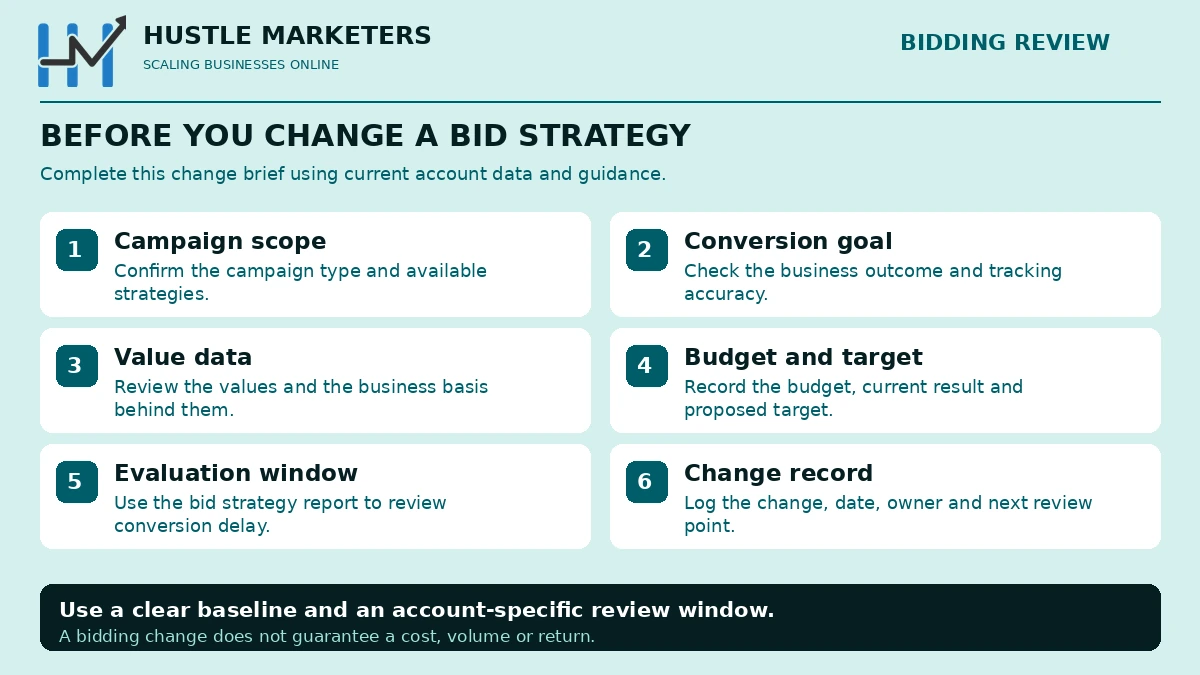
How do you switch bid strategy without tanking performance?
Several of the pages we read gesture at this. None grounds it in what Google documents, which is a shame because the documentation is unusually clear.
- Fix conversion tracking first. Smart Bidding optimises confidently toward whatever you tell it a conversion is. If that is wrong, switching strategy makes the problem worse and faster.
- Find your conversion cycle in the bid strategy report before you change anything. That number sets your entire timeline.
- Set the first target at recent actual performance, not at your goal. A target far below current performance restricts eligibility and the campaign stops spending.
- Change one thing. Strategy changes, setting changes and composition changes all trigger learning. Doing three at once means you cannot attribute the result.
- Use experiments where the account can afford it. Google’s own recommendation: “Use campaign drafts and experiments to test changes and understand their impact before committing” (Help 10970825).
- Wait at least one conversion cycle, ideally two, before judging. Not seven days. Your cycle.
- Then move the target properly. It does not reset learning, so meaningful steps beat timid ones.
- Log the date. Every strategy change goes in the change log with a date, or you will be explaining an unexplainable step change in three months.
A note on sequencing that follows from the learning triggers: if you need to both restructure a campaign and change its bid strategy, do the restructure first and let it settle, because adding or removing ad groups and keywords is itself a learning trigger. Doing it after the strategy change resets the thing you just started.
What other guides get wrong
Every row here is a claim we found on pages currently ranking, with the Google document that contradicts it. We have not named the pages, because the point is the correction rather than the pile-on, and because several will presumably fix them.
Corrections table
| Common claim | What Google documents |
|---|---|
| “Enhanced CPC is a good middle ground between manual and automated” | ECPC has not existed for Search or Display since the week of 31 March 2025. Unmigrated campaigns fell back to Manual CPC (2464964) |
| “You need 30 conversions in 30 days for Target CPA” | “Advertisers can start using Target CPA with no conversion history” (6268632). The 30 figure is an evaluation recommendation |
| “You need 50 conversions for Target ROAS” | Search and Shopping need “at least 15 conversions in the past 30 days” (6268637). 50 applies to Demand Gen, Hotel and Travel |
| “Changing your target restarts the learning period” | “Changing a target won’t trigger a [‘learning’ status], and won’t reset anything Smart Bidding has already learned” (10970825) |
| “The learning period is about 7 days” | Google publishes no day count. “Up to around 50 conversion events or 3 conversion cycles” (13020501) |
| “Freeze the account during learning” | “Continue using your account as usual” (6263057). The caution is about measuring |
| “Target ROAS is a setting inside Maximize conversion value” | Standalone since June 2026 (10353027) |
| “Use seasonality adjustments for your busy season” | Ideal for events of one to seven days, and Google warns against periods over 14 days (10369906) |
One reason this error persists. Google’s own bidding FAQ hub still carries a descriptive passage explaining Enhanced CPC as “an optional feature you can use with Manual CPC bidding”, alongside the deprecation notice at the top of the same page. The notice governs, but a writer skimming that page for a strategy list can easily come away with ECPC still in it. If you are checking our work and find ECPC described on a Google page, look for the deprecation banner before concluding it is live.
Do bid adjustments still work under Smart Bidding?
A recurring question in Google’s support forum, and poorly covered on the pages we read.
The short version: most manual bid adjustments do not do what they did under Manual CPC, because the whole point of auction-time bidding is that Google is already adjusting for device, location, time of day and audience using far more signal than a percentage modifier carries. You can see which of those dimensions it is using in the top signals section of your bid strategy report.
The exception nobody mentions is device under Target CPA. Google documents that device bid adjustments there do not modify bids at all: they “allow you to modify the value of your CPA target, rather than the bids themselves” (Google Ads Help 2732132). That is a genuinely different mechanic from what the same control does elsewhere, and it means a device adjustment under Target CPA is a target change, not a bid change.
The general rule that follows: if you want to be out of a segment entirely, exclude it, because that is a targeting decision. If you want to be in it less, let bidding decide, because it has more signal than you do.
Which strategy should you use?
The honest answer is that it depends on four things, and no static table can hold them all, which is why we built a tool instead. The logic in short:
Bid strategy decision logic
| Situation | Strategy | Why |
|---|---|---|
| No conversion tracking yet | Maximize clicks, or Manual CPC | Nothing else is eligible or sensible. Fix tracking first |
| Conversion tracking live, no reliable CPA yet | Maximize conversions | Let it find the shape of the account before you constrain it |
| You know your CPA ceiling and need efficiency | Target CPA | Set it at recent actual, then move it |
| Conversions have different values, no target yet | Maximize conversion value | Revenue rather than count |
| You have a return target and 15+ conversions in 30 days on Search | Target ROAS | The documented eligibility bar |
| Brand defence or a visibility mandate | Target impression share | The only strategy that optimises for position rather than outcome |
| Broken or untrusted conversion data | Manual CPC, temporarily | A control while you fix measurement |
| Several small campaigns with shared economics | Any Smart strategy as a portfolio | Pool the volume |
Two conditions change the answer and appeared on none of the pages we read. Budget-limited changes what a target does to you since 17 August 2026. And your conversion delay determines whether you will be able to tell if any of this worked before someone asks you.
The bid strategy picker
Every decision asset we found is a static comparison table. Across those 31 pages we found no interactive tool of any kind, which is odd, because choosing a bid strategy depends on four things a table cannot hold at once: your campaign type, whether you track values, your actual conversion volume against Google’s documented thresholds, and your own conversion delay.
So we built one. It is on this page, ungated, no email.
What it does that a table cannot
| Tells you what you are not eligible for, and why | Not just what to pick. “Target ROAS needs 15 conversions in the past 30 days, you have 9” is more useful than a grid |
| Uses Google’s real thresholds | 15 for Search and Shopping, 50 for Demand Gen, 300 for App. Not the “30 in 30” folklore |
| Computes your timeline from your conversion delay | Not a generic seven days. If your cycle is 11 days it tells you 22 |
| Estimates calibration from your own volume | Google says up to 50 conversion events or 3 conversion cycles. At your conversion rate, that is a number of days |
| Flags the 17 August 2026 change | If you are budget-limited and on a target strategy, it says so |
| Gives you a switching sequence | In order, with what does and does not reset learning |
| Links the Google doc for every answer | So you can check us |
It opens on a worked example so you can see what it does before you type anything. Change the inputs to your account.
Common bidding mistakes
- Setting the first target at the goal instead of at recent actual. The campaign restricts eligibility and stops spending. One of the most common complaints in Google’s own forum.
- Nudging targets by five percent and waiting a fortnight. Changing a target does not reset learning. You are paying a time cost for a safety benefit that does not exist.
- Judging a switch after a few days. Judge it after a conversion cycle, and read the conversion delay section to find out what yours is.
- Changing strategy, structure and budget at once. All three trigger learning and you lose attribution.
- Optimising toward a conversion that is not the business outcome. A Target CPA will hit a newsletter signup target beautifully and sell nothing.
- Using a seasonality adjustment for a whole season. Google describes them as ideal for events of one to seven days.
- Using a seasonality adjustment to fix a tracking outage. That is what data exclusions are for.
- Leaving a loose target on a budget-limited campaign after 17 August 2026 and being surprised that efficiency changed.
- Assuming a missing simulator means something is broken. Shared budgets and budget-capped campaigns do not get one.
- Pooling campaigns with different economics into one portfolio. The good campaign subsidises the bad one.
Frequently asked questions
Is Target ROAS a separate bid strategy or a setting inside Maximize conversion value?
A separate strategy, since June 2026. Google’s wording: “Target CPA and Target ROAS will show as standalone bidding strategy options, separating them from the ‘Maximize conversions’ and ‘Maximize conversion value’ strategies.” The bidding behaviour is unchanged; only the labels moved. You may see both names across the interface, the API, Editor and the mobile app during the rollout.
How many conversions do you need for Target CPA?
Google documents no minimum and states that “Advertisers can start using Target CPA with no conversion history.” The widely repeated “30 conversions in 30 days” comes from Google’s guidance on how to evaluate performance, not from an eligibility requirement.
How many conversions do you need for Target ROAS?
On Search and Shopping, “at least 15 conversions in the past 30 days at the conversion tracking level.” The “50 conversions” figure people quote applies to Demand Gen, Hotel and Travel campaigns, not to Search.
How long is the Google Ads learning period?
Google publishes no number of days. It says “It can take up to around 50 conversion events or 3 conversion cycles for the bid strategy to calibrate to the new objective.” A conversion cycle is the time it takes for a click to result in a conversion, so the answer is different for every account.
Does changing my Target CPA or Target ROAS restart the learning period?
No. Google: “You should feel comfortable changing CPA and ROAS targets as frequently as you would like, and by as large a magnitude as you would like.” Changing a target “won’t trigger a [‘learning’ status], and won’t reset anything Smart Bidding has already learned about your account.” What does trigger learning is a new or reactivated strategy, a setting change, or campaigns, ad groups or keywords being added or removed.
Should I pause the account during the learning period?
No. Google says “Continue using your account as usual, but be mindful that key metrics may vary during this time, so you may not want to measure performance until the learning period is over.” The caution is about measuring, not about touching.
Is Enhanced CPC still available?
No. “Effective the week of March 31, 2025 Enhanced CPC (ECPC) is no longer available for Search and Display campaigns.” Campaigns that were not migrated are “now effectively using Manual CPC.” Note that one Google Help page still lists ECPC as a Smart Bidding option, which is why several guides repeat it.
Is Manual CPC being deprecated?
We found no such announcement. Google’s Manual CPC page carries no deprecation notice, and Manual CPC became the fallback for unmigrated Enhanced CPC campaigns.
Why is my Target CPA campaign not spending?
Usually because the target is set below what the account can currently achieve, which restricts the auctions you are eligible for. Set the target at recent actual CPA and move it from there. Check also whether conversion tracking is reporting correctly, since a strategy optimising toward an undercounted conversion will bid conservatively.
Why did my performance change on 17 August 2026 without me touching anything?
Google changed how target-based bid strategies behave on campaigns marked “Limited by budget”, so that “your bids are optimized more consistently to your target when your campaign has a limited budget.” A campaign that had been quietly beating a loose target may now deliver closer to it. Google does not adjust your targets or budgets automatically, so the correction is yours to make.
Do bid adjustments still work with Smart Bidding?
Most are ignored, because Smart Bidding already adjusts for device, location, time and audience using more signal than a percentage modifier carries. The exception is a minus 100 percent adjustment, which excludes a segment entirely and is a targeting decision rather than a bidding one.
Does AI Max require a particular bid strategy?
Google’s AI Max documentation states no bid strategy requirement, and AI Max is described as a targeting and creative layer rather than a bid strategy. What changes after an upgrade is the set of queries your existing strategy is optimising across, not the strategy itself.
Are portfolio bid strategies available for Performance Max?
No. Google states portfolio strategies “are not available for Performance Max campaigns.”
How we checked this
We read 31 pages currently ranking across eight bidding queries in full, not their meta descriptions, and recorded what each covers and omits. Where we refer to “the ten strongest pages”, that is the subset we assessed in depth by length, coverage and factual accuracy. Every count on this page refers to that reading on 13 September 2026, not to the whole internet. Every strategy description, limit, date and quotation in this article was verified against Google’s own documentation, and the Help article ID is given in each case so you can check it yourself.
Where the industry repeats something Google does not document, we have said so rather than repeat it. Specifically:
- No day count exists for the learning period. Any guide giving you one, including a reasonable-sounding one, is giving you an opinion.
- Google documents no numerical cap on how many campaigns a portfolio bid strategy can contain.
- Google’s AI Max pages state no bid strategy requirement.
- Enhanced CPC’s status in Hotel and Shopping campaigns is not explicitly stated either way after the Search and Display sunset, so we have not asserted it.
Community questions were sourced from the Google Ads Community forum, Quora, YouTube and LinkedIn, and reflect what people actually ask rather than invented FAQ filler.
Last verified: 13 September 2026. Google changed bidding materially seven times in the eighteen months before that date, so check the linked sources before quoting anything here in a client document. We re-verify this page quarterly and the changelog near the top records what moved.
Want someone to check the targets?
The two most common findings when we audit bidding are a target that was set once from a hopeful number and never revisited, and a budget-limited campaign nobody re-examined after 17 August 2026. Neither shows up as an error. Both cost money quietly.
Ask us to review your bid strategies, or work through the account yourself with the 120-point Google Ads audit checklist.
If you would rather someone owned the bidding tests than ran them yourself, our Google Ads specialist page covers how we set a test up and what we watch while it runs, and PPC management covers the ongoing work after it.