Google Ads Negative Keywords: The 2026 Guide and Real Limits

Ishant
Published : October 5, 2026 at 2:43 pm
Updated : October 29, 2026 at 8:46 am
Ishant

Negative keywords tell Google which searches should not trigger your ads. You choose the word or phrase, a match type and a level (ad group, campaign, shared list or account), and Google blocks matching searches at that level. The matching is literal, and since September 1, 2026 negatives have more to do, because Google began upgrading many Search campaigns to AI Max.
Summarize this article with:
Key Observations
- Negative broad blocks a search that contains all your negative terms in any order. Phrase needs them in the same order. Exact blocks only that search, with no extra words.
- For a one-word negative, broad and phrase are the same. A bare
freealso blocks free shipping, so use multi-word forms like “free download”.- Negatives handle casing and misspellings for you, but not plurals, synonyms or stemmings. Add every variant yourself.
- Account-level negatives are capped at 1,000 and reach search and shopping inventory in Search, Performance Max, App, Shopping, Smart and Local campaigns.
- If a search runs past 16 words and your negative comes after the 16th word, the ad can still show.
If your Search campaigns use campaign-level broad match or standalone automatically created assets, Google started upgrading them to AI Max on September 1, 2026, with the rollout running through September. Your negatives still apply. What changed is how much of your traffic they can reach.
Here is the idea to keep in mind. A negative keyword is a string-matching tool, and it is now being asked to constrain a system that matches on inferred meaning rather than literal query text. Everything below follows from that.
The rest of this page is reference material: the real limits with Google’s own citations, the 16-word rule that lets queries through, how negatives treat plurals and misspellings, the Performance Max impact estimator, and a worked example that gives each term a match type, a level and a risk flag.
What changed for negative keywords on September 1, 2026?
Two separate migrations are involved, and they are easy to mix up.
The two AI Max migrations, and what each one covers
| Migration | What it covers | When | Source |
|---|---|---|---|
| Broad match and ACA upgrade | Search campaigns using campaign-level broad match or standalone automatically created assets | September 2026, rolling out through the month | Search Engine Land, Aug 14, 2026 |
| Dynamic Search Ads sunset | DSA campaigns | Creation removed January 2027, automigration begins February 2027 | Google Ads Developer Blog, 11 Jun 2026 |
The DSA date moved. It was originally announced for September 2026 and was postponed to February 2027 in June. Any guide written before June 2026 says September for DSA and is now wrong.
The good news first. Google is explicit that your negatives survive the upgrade. From Google’s AI Max FAQ, answering whether negative keywords still work: “Yes. Negative keywords will be respected even with AI Max turned on” (Google Ads Help 15913066). Existing brand inclusions and exclusions carry over automatically as well, per Google’s migration notice as reported by Search Engine Land.
The harder part is what “respected” means in practice. AI Max matches using broad match plus what Google calls keywordless technology, learning from your keywords, creatives and landing page URLs to decide which searches are relevant (Google Ads Help 15910187). A negative keyword blocks a literal string. A keywordless match is not reached through a string you can predict.
So your negatives are not ignored. They are simply a narrower instrument than they used to be, because the surface they are policing got wider. Three practical consequences:
- Add the Source column to your search terms report. Google’s AI Max reporting guidance tells you to add the Source column and to filter the Match type column for AI Max (Google Ads Help 16470459). Google does not publish the full set of values that column takes, so treat it as the place to look rather than a documented taxonomy. Without it you cannot see which matches your negatives are even capable of reaching.
- Brand controls do work that negatives cannot. A brand exclusion operates on Google’s entity understanding of a brand, not on a string. For competitor blocking under AI Max, that is the correct tool. There is a decision table further down this page.
- Check whether your campaigns were upgraded at all. Campaign type, in the account, not in your dashboard. Note the date. Performance before and after that date is not directly comparable.
One more change landed in the same month, and it affects negatives too. Google announced on August 13, 2026 that campaign-level language targeting would be removed for Search and AI Max from late September 2026. Google: “the campaign-level language targeting setting will be removed. Search ads will automatically match based on the language of your ads” (Google Ads Developer Blog, 13 Aug 2026). If you use language targeting to keep a multi-language account clean, that lever is going away and the work moves to your negatives.
What is a negative keyword, and what it is not
A negative keyword stops your ad showing on searches that contain that term. It does not lower your bid, it does not tell Google what you dislike, and it does not teach the algorithm anything. It is a filter, and it is absolute for the traffic it reaches.
Three things people expect it to do that it does not:
- It is not a Quality Score lever. Removing bad traffic can improve CTR, which is a Quality Score input, but the negative itself does nothing to Quality Score.
- It does not reduce spend on its own. It redistributes budget to whatever else is eligible. If the rest of your account is also inefficient, blocking one bad query moves the money rather than saving it.
- It does not work retroactively. The search terms report will still show the blocked term for historic dates, which is the source of a very common support question.
How do negative broad, phrase and exact actually work?
This is where most guides get it backwards, and the error is worth naming because it is the opposite of what the same words mean on the positive side.
Negative match types, with Google’s own wording
| Type | Syntax | Google’s rule | Blocks “cheap running shoes”? | Blocks “shoes running”? |
|---|---|---|---|---|
| Negative broad (default) | running shoes | “your ad won’t show if the search contains all your negative keyword terms, even if the terms are in a different order” | Yes | Yes |
| Negative phrase | "running shoes" | “your ad won’t show if the search contains the exact keyword terms in the same order” and “may include additional words” | Yes | No |
| Negative exact | [running shoes] | “your ad won’t show if the search contains the exact keyword terms, in the same order, without extra words“ | No | No |
All quotations from Google Ads Help 2453972.
The correction that matters. On the positive side, broad match is the widest net: it expands to related meanings. On the negative side, broad is the narrowest filter in one important sense, because it requires every one of your terms to be present before it blocks anything. A negative broad of cheap shoes does nothing to a search for cheap on its own.
Guides that describe negative broad as “the widest net, use it carefully” have inverted the mechanic. The thing to be careful with is a single-word negative, because one word being present is a low bar. free will block “free shipping”, “toll free number” and “gluten free”. That is the real over-blocking risk, and it comes from the word count, not from the match type.
And here is the part that trips people up. For a one-word negative, broad and phrase are the same thing. Both block any search containing that word. There is no middle setting. Negative exact is not a middle setting either: [free] blocks only the search “free” on its own, which is close to useless.
So the practical rule is not about match type at all. Do not use a bare common word as a negative. Use multi-word phrases instead: “free download”, “for free”, “free version”, “free trial” if you do not offer one. Each is specific enough to be safe as broad, and together they block the intent without taking your free shipping page down with them.
Reserve single-word negatives for words that are wrong for you in every context. torrent, xxx and paralegal qualify. free, cheap, used and review do not.
Do negative keywords match plurals, misspellings and close variants?
Partly. This is the single most misunderstood rule in Google Ads, it is the mechanical cause of almost every “my negatives are not working” thread, and Google states it across two sentences that read like a contradiction if you skim them.
Both of these are current Google text:
“Negative keywords automatically account for casing and misspellings, so you don’t need to add those separately.” (Google Ads Help 2453972)
“Negative keywords don’t match to close variants, so your ad might still show on searches or pages that contain close variations of your negative keyword terms.” (same article)
They are not contradictory. They describe a split, and the split is what you need.
What negatives catch automatically, and what you must add yourself
| Variant | Handled automatically? | What to do |
|---|---|---|
| Casing (Free, FREE, free) | Yes | Nothing |
| Misspellings (shoez, runnning) | Yes | Nothing |
| Plurals and singulars (shoe, shoes) | No | Add both |
| Synonyms (cheap, inexpensive, budget) | No | Add each |
| Stemmings (floor, flooring) | No | Add each |
| Abbreviations (HVAC, heating ventilation) | No | Add each |
| Accents (cafe, café) | No | Add both |
| Reordered words, on phrase and exact | No | Use broad, or add the order |
Google’s own summary of the difference from positive keywords: “The main difference is that you’ll need to add synonyms and singular or plural versions if you want to exclude them.” Google names synonyms, plurals and accents explicitly, and treats accented and unaccented forms as two different negative keywords. Stemmings and abbreviations are our reading of the same close-variant rule rather than a Google enumeration, so treat those two rows as cautious rather than quoted.
A cross-property discrepancy worth knowing. Search Ads 360’s documentation tells you to add misspellings yourself (Search Ads 360 Help 9322690), while Google Ads Help says misspellings are automatic. If you work in SA360, follow the SA360 doc and add them. If you only work in Google Ads, you do not need to.
Downloaded lists leak the same way when they carry singular terms only. Before you import any list, add the plural of every term that has one.
Why do my negative keywords not work?
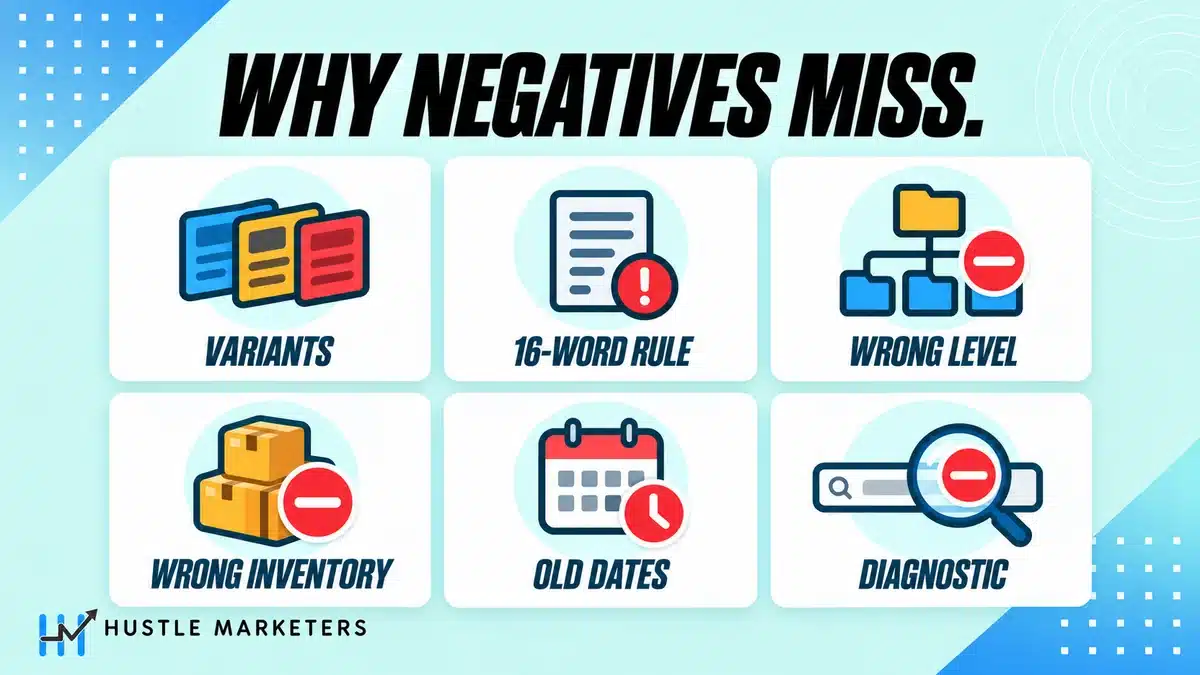
Multiple threads in Google’s own support community carry titles like “Negative keywords not working”, “Negative keywords still getting clicks” and “I added negative keyword to campaign but it still show in search term”. There are six real causes, and the plural rule above is only the first.
The six reasons a negative is not blocking
| Cause | What is happening | Fix |
|---|---|---|
| Plural or variant not covered | The rule above. Your negative is singular, the query is plural | Add every variant. Check plurals before you import any list |
| The 16-word rule | Google: “Your ad might still show when someone searches for a phrase that’s longer than 16 words, and your negative keyword follows that 16th word” | Nothing blocks this. Know it exists so you stop hunting for a bug |
| Wrong level | Added at ad group level, traffic is coming through another ad group or campaign | Move it up a level, or to a shared list |
| Wrong inventory | Account-level negatives reach search and shopping inventory only. PMax negatives also reach search and shopping inventory only | Use placement or content exclusions for Display and Video |
| Historic data | The search terms report still shows the term for dates before you added it | Change the date range to after the change |
| Keyword Diagnostic false positive | The tool “tests a search for the exact match version of a keyword, even if the keyword is phrase or broad match” | Do not trust it as proof. Test with the date range instead |
The 16-word rule and the Keyword Diagnostic caveat are both from Google Ads Help 9701952. Neither appeared on any of the 41 pages we read on September 13, 2026. Between them they explain a meaningful share of the “my negatives are broken” traffic in Google’s own forum.
Where should negative keywords live?
Four places, and the choice is not cosmetic. Each level reaches different inventory and carries a different limit. Ad group negatives work best when keywords are grouped by intent into tightly themed ad groups.
The four levels
| Level | Reaches | Limit | Use it for |
|---|---|---|---|
| Account | Search and shopping inventory across Search, Performance Max, App, Shopping, Smart and Local campaigns | 1,000 | Terms that must never run anywhere. Your most valuable 1,000 slots in the account |
| Shared list | Whichever campaigns you apply it to | 5,000 per list, 20 lists per manager account and 20 per child account | Reusable themes: jobs, DIY, free, competitor names |
| Campaign | That campaign only | 10,000 | Campaign-specific exclusions, including brand or non-brand separation |
| Ad group | That ad group only | No published figure. Governed by the 20,000 ad group targeting items cap | Cross-negation between tightly themed ad groups |
Account-level negatives are documented at Google Ads Help 11396330: “Account-level negative keywords enable you to exclude search terms from campaigns serving on search and shopping inventory” and “A limit of 1,000 negative keywords can be excluded for each account.”
Read that scope carefully. It says search and shopping inventory, not campaign types. A Performance Max campaign is on the list, but only its search and shopping inventory is covered. The Display and YouTube inventory inside that same campaign is not.
That 1,000-slot account tier is the most consequential decision in negative keyword management and no published list helps you make it, because it is the only lever that reaches Performance Max automatically. Spend it on terms that are wrong for your business in every context, not on terms that are merely wrong for one campaign.
What are the real negative keyword limits?
These are scattered across three Google pages and no competing article assembles them. Every figure below is quoted from Google.
Negative keyword limits, verified September 2026
| Limit | Value | Source |
|---|---|---|
| Negative keywords per campaign | 10,000 | Help 6372658 |
| Keywords per negative keyword list | 5,000 | Help 6372658 |
| Negative keyword lists per account | 20 per manager account, and 20 per child account | Help 6372658 |
| Account-level negative keywords | 1,000 | Help 11396330 |
| Negatives considered on Display and Video | 1,000 | Help 6372658 |
| Campaign targeting items per account | 1,000,000, including campaign-level negatives | Help 6372658 |
| Ad group targeting items per ad group | 20,000 | Help 6372658 |
| Characters in one negative keyword | 80 | Google Ads API system limits |
| Performance Max negatives per campaign | 10,000, raised from 100 in March 2025 | Search Engine Land, 11 Mar 2025 |
Three things follow from this table:
- A downloaded list of more than 5,000 terms cannot be imported as a single negative keyword list. Split it into blocks of 5,000 or fewer before you import, and remember you only get 20 list slots to put them in.
- The 20-list cap applies separately to the manager account and to each child account. That is the entire basis of a workable agency architecture, and it is covered further down.
- Display and Video only consider 1,000 negatives whatever you upload. Google documents the cap on what is considered; it does not document what happens to the excess, so do not assume you will get a warning.
Two more limits that belong in this table and are almost never stated together. A keyword can be up to 80 characters, and Google separately documents that “You can add up to 10 words in a keyword” (Google Ads Help 7476658). A long negative phrase can hit the word limit before it hits the character limit.
One widely quoted limit we could not verify from any Google source: the number of shared negative keyword lists applicable to a single campaign, commonly stated as 20. Google documents 5,000 keywords per list and 20 lists per account and names no per-campaign cap. We have left it out rather than repeat it.
Which symbols and characters work in a negative keyword?
Google documents this in full, and one detail will quietly break a list you paste in from an old account.
Symbol rules
| Symbols | Behavior |
|---|---|
& ampersand, accent marks, * asterisk | Recognized. Google: “You can use 3 symbols in your negative keywords: ampersands (&), accent marks (á), and asterisks (*)” |
. period | Ignored. “Fifth Ave.” and “Fifth Ave” are the same negative keyword |
+ plus sign | Usually ignored, with one exception. Google: pluses “will usually be ignored (for example blue+car). However, in some cases if a + is at the end of a word (for example C++) it won’t be ignored” |
site: | Stripped |
OR | Ignored |
Leading - hyphen | Causes the rest of the term to be ignored |
Commas, !, @, %, ^, (), =, {}, ;, ~, the grave accent `, <>, ?, \ and the vertical bar | | Rejected. “You’ll get an error message if you add negative keywords that contain certain symbols” |
Source: Google Ads Help 2453972.
The plus sign is the trap. It was the broad match modifier operator, retired in 2021. If you inherit an account with an old list full of +free +shipping entries and paste them into negatives, the leading plus signs are ignored and you get a plain negative broad requiring both words present. That is not what the original author meant and it is not what you think you added. The exception matters if you advertise developer tools: a trailing plus, as in C++, is not ignored.
On broad match modifier itself, for anyone still seeing it in guides: “In February 2021, Google Ads began to incorporate behaviors of broad match modifier (BMM) into phrase match” and “As of July 2021, both phrase and broad match modifier keywords have the same updated phrase matching behavior for all languages” (Google Ads Help 10286719). It has been gone for five years. Several pages ranking today still describe it as a live option.
Which campaign types support negative keywords?
Not all of them, and the differences are not cosmetic.
Negative keyword support by campaign type
| Campaign type | Negative keywords? | The detail that matters |
|---|---|---|
| Search | Yes, all levels | Full support, all three match types |
| Shopping | Yes, all levels | Same as Search |
| Performance Max | Yes, campaign level, up to 10,000 | Google: “Performance Max negative keywords are applicable to Search and Shopping inventory only.” Display and YouTube inventory inside PMax is not covered |
| Display | Yes, but two things change | Match type: Google, “For Display and Video campaigns, all negative keywords will be considered broad matches.” Matching basis: Google separately notes that for Display “a set of negative keywords will be excluded as an exact topic”, so you are excluding content topics rather than queries. Only 1,000 considered |
| Video and YouTube | Yes, forced broad and capped | Same broad-match rule, maximum 1,000 negatives considered |
| App | Account-level negatives cover its search and shopping inventory | For lists, Google says to “contact your Google representative” |
| Demand Gen | No | It has excluded content keywords under Content Suitability at account level. That is a brand safety control, not query-level negation |
Sources: Help 7102995 for the Display and Video broad-match rule, Help 15726455 for Performance Max, Help 7449003 for App, Help 13695777 for Demand Gen.
Demand Gen is the exception. Google’s own “add negative keywords to campaigns” page does not list it among the supported campaign types either. The honest position, as of September 13, 2026: Demand Gen does not have negative keywords. It has account-level excluded content keywords for brand safety. If someone tells you to add negatives to a Demand Gen campaign, they are describing a control that does not exist.
Some widely read pages state the Display rule backwards, saying Display negatives are exact match. Google’s documentation says all of them are considered broad matches. If you built a Display exclusion strategy on the exact-match assumption, it is blocking considerably more than you intended.
The full Performance Max workflow, including which search terms to block and how to audit them, is in our Performance Max negative keywords strategy guide.
Negative keyword, brand exclusion or unbranded only?
A negative keyword is only one of the tools for controlling branded traffic, and it is usually the wrong one. Picking the wrong one is expensive, because brand traffic is where the money leaks.
Which control to reach for
| You want to | Use | Why |
|---|---|---|
| Stop showing on a specific competitor’s name | Brand exclusion | It works on Google’s entity understanding of that brand, so it catches variants and misspellings of the brand that a keyword list will not |
| Stop showing on a specific phrase regardless of brand | Negative keyword | String matching is exactly right here |
| Only show on your own brand | Brand inclusion | Search campaigns only, at campaign and ad group level |
| Separate brand and non-brand reporting | Campaign structure plus negatives | A control setting does not give you clean reporting. Campaign separation does |
Google on the difference: brand inclusions mean “Your campaign will only serve for queries associated with the brands you select”, brand exclusions mean “Your campaign won’t serve for queries associated with a brand that you want to avoid” (Google Ads Help 13721847). Exclusions apply to “Search, Shopping, and YouTube search inventory” and began upgrading into AI Max from May 27, 2025 (Google Ads Help 14505308).
Google’s own reasoning for preferring brand controls, from its Performance Max search targeting documentation, is blunter than anything in the SERP: negative keywords are “a highly restrictive control that can harm performance by preventing the AI from finding valuable traffic” (Google Ads Help 16668865). Take that as vendor framing rather than neutral advice, but the mechanical point underneath it is sound.
The rule of thumb. If the thing you are blocking is a brand, use a brand control. If it is a behavior, like “jobs” or “how to”, use a negative keyword. Trying to block a brand with a keyword list means chasing every misspelling of that brand forever, and brand lists catch those automatically: Google’s stated benefit is “not having to enter misspellings, variants, or versions in multiple languages”.
Setup for the exclusion side is in Performance Max brand exclusions setup, and why brand and non-brand belong in separate campaigns is in branded vs non-branded search.
How do you know a negative will not cost you conversions?
Over-blocking is the risk everyone warns about, and Google has shipped a partial way to check it before you commit.
Performance Max has a negative keyword impact estimator. Google: it lets you “preview the potential impact of adding specific negative keywords to your campaigns in Google Ads”, and “Predicted impact is shown as a percentage and includes the projected impact to conversions or conversions value, depending on your bid strategy.” Google’s own worked example: a minus 10 percent estimate on a campaign running 100 conversions a day implies roughly 90 (Google Ads Help 16973204).
The constraint: “For now, you can predict impact for up to 10 keywords at a time.”
Ten at a time is slow for a 500-term list. Use it the way it is actually useful: on the ten terms you are least sure about. Every list has a handful of terms that could go either way, and those are the ones worth ten seconds of checking rather than a month of lost conversions.
For Search campaigns there is no equivalent estimator. The substitute is the method in the measurement section further down.
How do you find what to block?
The search terms report, and the workflow matters more than the report.
- Set the date range to a period with enough volume to judge. Thirty days on a small account, seven on a large one. Judging a term on three clicks is how over-blocking starts.
- Add the columns that make the decision for you: cost, conversions, cost per conversion, and for AI Max campaigns the Match type and Source columns. Source tells you whether the match came from broad match expansion or keywordless matching.
- Sort by cost descending, not by impressions. You are looking for money, not volume.
- Read down until the spend per term stops mattering. On most accounts that is the first 50 to 150 rows.
- Decide in three buckets: block it, keep it, or move it to its own ad group because it is good traffic landing in the wrong place.
- Choose the level and match type deliberately using the tables above, rather than defaulting to campaign-level broad.
Two limits on what you can see. Google only reports “search terms that were used by a significant number of people”, and low-volume terms are omitted for privacy (Google Ads Help 2472708). Your search terms will never sum to your campaign totals. That is not a tracking fault, and you cannot negate what you cannot see, which is a real argument for pattern-based negation rather than term-by-term.
For Performance Max, search terms data is available from March 2023 onwards and covers search and shopping inventory as well as display and video, segmentable by ad format (Google Ads Help 16327396).
How do you negate at scale with n-gram analysis?
Term-by-term negation does not scale past a few hundred rows, and the privacy threshold means the long tail is invisible anyway. N-gram analysis solves both.
The idea: instead of judging whole search terms, break every term into its component words and word pairs, then aggregate performance by fragment. A term you have never seen before still contains words you have.
The workflow:
- Export 90 days of search terms with cost, clicks and conversions.
- Split each term into single words (1-grams) and adjacent word pairs (2-grams).
- Aggregate cost and conversions by fragment across every term it appears in.
- Sort fragments by cost with zero conversions.
- Apply a volume floor. A fragment appearing in three terms is noise. A fragment appearing in forty with no conversions and real spend is a negative.
- Add the winning fragments as negatives, choosing the match type by word count using the rule above.
This is where the 10,000-per-campaign allowance finally earns its keep. Pattern-based negation generates far more terms than manual review, and until March 2025 the Performance Max cap of 100 made it pointless there. It is not pointless now.
One caution the technique invites: a fragment with no conversions is not automatically bad. Check whether the fragment appears in terms that are assisting conversions elsewhere before blocking it, and check the fragment is not part of a phrase you want. The word “free” scores terribly in aggregate for most advertisers and is essential for anyone running a free trial.
How many negative keywords is too many?
Almost every page in this category preaches “add more”. The honest answer is that over-negation is a real and common failure, and it is harder to detect than the waste it was meant to fix, because the traffic you lost never appears in a report.
Five signs you have gone too far:
- Impression share lost to rank rising while your bids and Quality Score are unchanged. You are eligible for fewer auctions, not losing the ones you enter.
- Conversion volume falling faster than cost. If CPA improves but conversions drop meaningfully, you removed converting traffic along with the waste.
- Your search terms report getting shorter every month. A healthy account discovers new terms. An over-negated one stops.
- Smart Bidding losing volume after a large negative upload. More on this next.
- Nobody can say why a specific negative is on the list. If there is no provenance, it was probably inherited from a generic list.
The terms that most commonly over-block, and who they hurt:
High-risk negatives, and who should not use them
| Term | Looks harmless | Blocks |
|---|---|---|
free | Everyone adds it | Free shipping, free consultation, free trial, toll free, gluten free. Wrong for freemium SaaS and for any service offering a free consult |
cheap | Classic waste term | Genuine value shoppers. Wrong for discount retail |
jobs | Always safe, surely | Not for recruiters, staffing firms, or anyone selling job boards |
used | Filters second-hand shoppers | Kills resale marketplaces and anyone selling refurbished |
review / reviews | Research intent | Removes comparison-stage buyers, who convert well for considered purchases |
near me | Sometimes waste | Frequently the highest-intent local query there is |
DIY / how to | Pure research | Not for anyone selling tools, materials or courses |
| City or state names | Geographic clean-up | Destroys a national advertiser’s reach in one upload |
Flag these terms in any list you import, and check each one against your converting search terms before it goes live.
How do negatives interact with Smart Bidding?
This is barely covered anywhere and it changes how aggressive you should be.
Smart Bidding is already learning which queries perform. When a query converts badly, the system bids less on the signals associated with it. That is a gradual, probabilistic filter that keeps some traffic flowing and keeps learning from it.
A negative keyword is absolute and removes the signal entirely. Three consequences:
- Aggressive negation during a learning period slows learning. If you have just switched bid strategies or launched, give the system data before you cut its data. Our guide to what resets the Google Ads learning period lists what does and does not trigger it.
- Negating a whole theme removes the evidence that it was bad. You will not be able to revisit the decision later, because there will be no data on it.
- Blocking clearly wrong traffic is still correct. Job seekers are not a bidding signal worth preserving. The distinction is between wrong audience, which you block, and weak performance, which you let bidding handle.
Practical line: negate on relevance, not on performance. If a term is genuinely not your business, block it regardless of numbers. If a term is your business but converts poorly, that is a bidding, landing page or offer problem, and blocking it hides the problem rather than solving it.
How do you find negative keyword conflicts?
The failure mode that is easy to miss: an inherited account-level list silently blocks a keyword you are actively bidding on and paying to maintain. Google reports it as low volume or no impressions and the cause is invisible.
A repeatable audit, once a quarter:
- Export all active keywords across the account.
- Export every negative from all four levels, including every applied shared list.
- For each negative, test it against your keyword list using the match rules above. Negative broad blocks any keyword containing all its terms. Negative phrase blocks any containing the terms in order. Negative exact blocks only the exact string.
- Flag every match.
- For each flag, decide which one is wrong. Usually the negative was added for one campaign and applied everywhere.
Google Ads will warn you about some conflicts in the Recommendations tab, but it will not catch conflicts created by a shared list applied after the keyword was added, which is the common case in an agency account.
Do not use the Keyword Diagnostic tool as your check. As quoted earlier, it tests the exact match version of a keyword regardless of the keyword’s actual match type, so it reports conflicts that are not real and misses ones that are.
How should an agency manage negatives across many accounts?
The published limits make the architecture for you, and this is the one place the exact wording of the cap matters.
Google: “Each Google Ads manager account can have a maximum of 20 lists, and each child account can have up to 20 lists of its own” (Google Ads Help 6372658).
Twenty at the manager account, plus twenty in each child account. That is the basis of a two-tier system.
A two-tier negative architecture
| Tier | Where | What goes in it | Who can change it |
|---|---|---|---|
| Universal | Manager account lists, pushed down | Jobs, education, DIY, piracy, adult, and the waste patterns true for every client you serve | One named owner. Change control, because a bad edit hits every account |
| Vertical | Manager account lists, applied selectively | One list per vertical you serve: home services, legal, SaaS, ecommerce | Vertical lead |
| Client | Child account lists | Competitor names, products not carried, service areas not covered, client-specific exclusions | Account manager |
| Campaign | Campaign level | Brand and non-brand separation, campaign-specific exclusions | Account manager |
Four rules that prevent the usual mess:
- Name every list with a version and a date. “HM Universal Jobs v3 2026-09” beats “Negatives 2”.
- Never edit a universal list to solve one client’s problem. That is what the client tier is for.
- Keep the source of truth outside Google Ads, in a sheet, so a list can be rebuilt and diffed.
- Reserve the 1,000 account-level slots deliberately per client, because that is the only tier that reaches Performance Max automatically.
How do you automate negative keywords with scripts?
None of the ten strongest pages we assessed covers scripts, despite Google publishing official, current code for exactly this.
Google’s negative keywords script example was last updated August 20, 2025 and includes functions to add negative keywords to both campaigns and ad groups, plus retrieval functions and error handling (Google Ads Scripts documentation).
Three jobs worth automating, in order of value:
- A weekly search terms alert that emails you any term above a spend threshold with zero conversions. This is the highest-value script and the simplest. It does not add anything automatically, it just makes sure nothing expensive goes unnoticed for a month.
- A conflict checker that runs the audit above and emails the flags. Once a week, five minutes of reading.
- Bulk addition from a sheet, so the source of truth stays outside Google Ads and pushes in.
What we would not automate: automatic negation without review. An account that blocks terms on its own will eventually block something that mattered, and nobody will know why performance changed.
How do you measure whether your negatives worked?
Use a method you can repeat. An outcome claim you cannot reproduce is not evidence.
The problem is structural: a negative that removes spend also removes the impressions your before-and-after comparison is built on. Cost falls and CTR usually rises, and both movements are largely produced by the removal itself rather than by any improvement.
Four things that actually tell you:
- Cost per conversion on matched date ranges, same day count, same day of week alignment, compared to the equivalent period a year earlier as well as the previous period, so seasonality is visible.
- Conversion volume, held flat or up. This is the guard rail. A CPA improvement with a conversion drop is not a win, it is a smaller account.
- Impression share lost to rank versus budget. If lost-to-rank climbs after a negative upload, you removed eligibility rather than waste.
- The share of spend on terms you would defend to the client. Pull the search terms report before and after, classify each term as defensible or not, and compare the percentage of spend in each bucket. This is the only measure that survives the impressions problem.
Record the date of every bulk negative upload in a change log. Without it, you will spend a future month trying to explain a step change in performance with no idea what caused it. The full reporting method is in our guide to PPC reporting.
How often should you review negative keywords?
Review cadence by spend
| Spend | Search terms review | Full negative audit |
|---|---|---|
| Under $2k a month | Monthly | Quarterly |
| $2k to $10k a month | Every two weeks | Quarterly |
| $10k to $50k a month | Weekly | Monthly |
| Above $50k a month | Weekly, plus an automated spend alert | Monthly, with a conflict audit |
| Any account in its first 90 days | Weekly regardless of spend | Monthly |
Two additional triggers regardless of spend: after any campaign type change, including an AI Max upgrade, and after any change to match types or bid strategy. Both change what you are eligible for, which changes what needs blocking.
What should a negative keyword list include?
A column of words is not enough to import safely. Each term needs a few decisions attached before it goes into an account, whether the list came from a download, an old account or your own search terms report. Check it against these points first.
| Add to every term | Why it matters |
|---|---|
| Match type | A bare free blocks free shipping whatever match type you pick, because for a one-word negative broad and phrase are identical. Decide which terms are safe alone and which need a multi-word form |
| Level | The 1,000-slot account tier is the only one that reaches Performance Max automatically. Deciding what goes in it is the most consequential choice you make |
| Plural variants | Negatives do not match plurals. Add the plural of every term that has one |
| Risk flag | Terms like free, cheap, used and review can block buyers. Check them against your converting search terms before you add them |
| Size checks | Anything over 5,000 terms cannot go into one negative keyword list, and you have 20 list slots. Split the file before you import it |
| A Display and Video version | Those negatives are forced to broad match and capped at 1,000. Do not reuse a Search list there |
| Where it came from | Note the source of each term, such as the search terms report or an n-gram review, so the next person can tell why it is there |
What does a classified negative keyword look like?
Here are five terms most accounts deal with, with the decisions made. Use the same columns for your own list.
| Term | Match type | Level | Risk | Note |
|---|---|---|---|---|
jobs | Broad | Shared list (jobs theme) | Low, unless you recruit through ads | Add job and careers too. Plurals and synonyms are not matched |
"free download" | Phrase | Shared list or campaign | Low | Blocks the intent without touching free shipping searches |
free | Do not add alone | None | High | Use multi-word forms such as “for free”, “free version” or “free trial” if you do not offer one |
"how to" | Phrase | Campaign | Medium | Safe for most service businesses. Check first if you sell products people install themselves |
| A competitor’s brand name | Use a brand exclusion instead | Campaign | Medium | Brand exclusions work on Google’s understanding of the brand, so they catch misspellings a keyword misses |
If you inherit a long list, start with the risk column. One bare word like free or used can block more buyers than a hundred harmless extras.
Negative keywords by industry
Three patterns that are easy to miss.
Home services: the biggest waste is manufacturer brand names. Someone searching “Trane” or “Moen” or “GAF” wants a unit, a faucet or a shingle. They are not looking for an installer. Every trade has a set of these and almost nobody blocks them, because they look relevant. In the trade accounts we have audited, this is consistently one of the largest recoverable spend categories. The detail for HVAC specifically is in our HVAC PPC guide.
Legal: pop culture is genuinely expensive. Legal CPCs are among the highest in Google Ads. “Better Call Saul”, “Suits”, “Making a Murderer” and “true crime” produce clicks at criminal-defense prices from people watching television. Our list of the best Google Ads agencies for lawyers covers the other settings that waste legal budgets.
SaaS and B2B: competitor navigational queries are the quiet killer. If you bid on a competitor’s brand, you are also catching their existing customers searching “[competitor] login”, “[competitor] support” and “[competitor] status”. Those people have an account already. They rarely convert, and you are paying competitor-term CPCs for them. Add login, sign in, support, status and downtime to every competitor campaign on day one.
For ecommerce specifically, the homonym problem is worth a manual pass that no list can do for you. A furniture retailer catches console searches for gaming consoles. A phone charger seller catches Dodge Chargers. A carpentry firm catches Sabrina Carpenter. These only surface by reading your own search terms report, which is why the list is a starting point and not a strategy. The ecommerce side is covered further in our ecommerce PPC playbook.
Common negative keyword mistakes
- Adding a bare
freeat all. For a one-word negative, broad and phrase behave identically, so both block free shipping, free consultation and toll free. Exact blocks only the search “free” on its own, which is useless. Use multi-word phrases instead. - Assuming negatives catch plurals. They catch misspellings and casing. They do not catch plurals, synonyms, stemmings, abbreviations or accents.
- Treating negative broad as the widest net. It requires every term to be present, so multi-word negatives are the safe ones and single words are the dangerous ones.
- Pasting a legacy list with plus signs. The
+is ignored, so+free +shippingbecomes a negative broad requiring both words. Not what you meant. - Spending the 1,000 account-level slots on campaign-specific terms. That tier is the only automatic route into Performance Max.
- Reusing a Search list on Display or Video. Those negatives are forced to broad and only 1,000 are considered.
- Blocking on performance rather than relevance. A term that is your business but converts badly is a bidding or landing page problem. Blocking it hides the problem.
- Trusting the Keyword Diagnostic tool. It tests the exact match version regardless of the keyword’s real match type.
- Never auditing for conflicts. An inherited shared list will eventually block something you are actively bidding on.
- Adding a batch of negatives with no change log entry. You will not be able to explain the step change in performance three months later.
Frequently asked questions
Do negative keywords match misspellings and plurals?
Misspellings and casing, yes, automatically. Plurals, synonyms, stemmings, abbreviations and accents, no. Google: “Negative keywords automatically account for casing and misspellings” and separately “Negative keywords don’t match to close variants.” Both sentences are current and they describe a split, not a contradiction. You must add plurals yourself.
Why are my negative keywords not working?
Six common causes: the plural or variant is not covered; the search was longer than 16 words and your negative fell after the 16th word; the negative is at the wrong level; the traffic is on inventory the negative does not reach; you are looking at historic data from before you added it; or you are trusting the Keyword Diagnostic tool, which tests the exact match version of a keyword regardless of its actual match type.
What is the 16-word rule?
Google: “Your ad might still show when someone searches for a phrase that’s longer than 16 words, and your negative keyword follows that 16th word.” There is no fix. It is worth knowing so you stop looking for a bug that is not there.
How many negative keywords can I add?
10,000 per campaign, 5,000 per negative keyword list, 20 lists per manager account plus 20 per child account, 1,000 at account level, and 1,000 considered on Display and Video. One negative keyword can be up to 80 characters.
Can you add negative keywords to Performance Max?
Yes. Campaign-level negatives are live and the limit rose from 100 to 10,000 in March 2025. The important caveat: Google states they are “applicable to Search and Shopping inventory only”, so they do not police the Display and YouTube inventory inside the same campaign.
Do negative keywords still work with AI Max?
Yes. Google’s FAQ is explicit: “Negative keywords will be respected even with AI Max turned on.” What changes is reach, not respect. AI Max also matches using keywordless technology, which is not driven by a string you can predict, so brand controls do work that a keyword list cannot.
What is the difference between a negative keyword and a brand exclusion?
A negative keyword blocks a literal string. A brand exclusion works on Google’s entity understanding of a brand, so it catches variants and misspellings of that brand automatically. If you are blocking a brand, use a brand exclusion. If you are blocking a behavior, use a negative keyword.
Can you have too many negative keywords?
Yes, and it is harder to detect than the waste it was meant to fix, because the traffic you lost never appears in a report. Watch impression share lost to rank, conversion volume, and whether your search terms report is getting shorter each month.
Do negative keywords improve Quality Score?
Not directly. Removing irrelevant traffic can improve CTR, which is a Quality Score input, but the negative itself is not a Quality Score lever.
Do Demand Gen campaigns support negative keywords?
No. Demand Gen has account-level excluded content keywords under Content Suitability, which is a brand safety control rather than query-level negation. As of September 2026, Google does not document negative keywords for Demand Gen.
How do I know a negative will not cost me conversions?
In Performance Max, use Google’s negative keyword impact estimator, which predicts the effect on conversions or conversion value for up to ten keywords at a time. There is no equivalent for Search campaigns, so use matched date ranges and watch conversion volume as the guard rail.
How often should I review negative keywords?
Search terms weekly above $10k a month, every two weeks between $2k and $10k, monthly below that. A full negative audit monthly above $10k and quarterly below it. Review immediately after any campaign type change, including an AI Max upgrade.
How we checked this
We read 41 ranking pages in full across eight target queries. Every limit, date and quotation in this article was verified against a Google primary source: Google Ads Help, the Google Ads API documentation, Google Ads Scripts documentation, the Google Ads Developer Blog and blog.google. Article IDs are given so you can check each one yourself.
One figure that circulates widely is not in this article because we could not verify it from a Google source: the number of shared negative keyword lists applicable to a single campaign, commonly quoted as 20. Google documents 5,000 keywords per list and 20 lists per account, and names no per-campaign cap.
Community questions were sourced from the Google Ads Community forum, Quora, YouTube and LinkedIn, and are reproduced as the questions people actually ask rather than rewritten into marketing language.
Verified as of September 13, 2026. Google changes match and reporting behavior frequently, so check the linked sources before quoting a limit in a client document.
Want the wasted spend found for you?
Wasted spend is rarely one dramatic term. It is forty small ones nobody has read, a Display list where only 1,000 of your negatives are being considered, and an inherited shared list quietly blocking a keyword the account is still paying to maintain.
Ask us to find it, or run the account yourself against the 120-point Google Ads audit checklist.
Search term review and negative keyword hygiene is one of the first things we do on any account we take on. Our Google Ads agency page sets out what that audit covers, and PPC management covers who keeps the list clean every month.