Google Ads Conversion Tracking: Setup, Settings and Troubleshooting Guide

Ishant
Published : September 23, 2026 at 5:30 pm
Updated : October 22, 2026 at 8:39 am
Ishant
Google Ads conversion tracking records the valuable actions people take after interacting with your ads, such as purchases, form leads, phone calls, app installs and offline sales. You create conversion actions under Goals, send data with the Google tag, Google Tag Manager, GA4 key events, call tracking or offline imports, then confirm each action shows Active.
Getting a tag to fire is the easy part. The settings around it decide what Smart Bidding learns: which actions are primary, how you count, which attribution model you use, how you remove duplicates and how consent changes what Google can see.
This hub shows how to set up conversion tracking in Google Ads, then covers settings, calls, offline imports, testing and troubleshooting, with facts linked to Google sources checked on 16 Sep 2026.
Key takeaways
- Track each action through one primary source, and keep GA4 imports secondary when the Google tag tracks the same action.
- Count One for leads and Every for sales. The click-through window defaults to 30 days.
- Data-driven attribution is the default for most conversion actions, and last click is the only alternative left.
- From 15 Jun 2026, offline conversion and enhanced conversions for leads uploads are blocked in the Google Ads API without legacy access, so new integrations use the Data Manager API.
- Consent mode modeling has a threshold of 700 ad clicks over a 7 day period, per country and domain grouping.
- Google’s current status labels are Active, Needs attention, Misconfigured, Awaiting conversions and Removed.
- Tag-based conversion data refreshes within 3 to 15 hours (GA4 imports 12 to 24), and conversion lag makes recent days look incomplete.
What is Google Ads conversion tracking and how does it work?
Conversion tracking connects an ad interaction to a later action you value. After someone clicks your ad, Google stores click information, usually the GCLID, in first-party cookies on your site. When that person completes the action, the Google tag or an import matches it back to the click and records a conversion in your account.
Phone calls use a Google forwarding number instead, per Google’s About conversion measurement page. The auto-tagging page says auto-tagging, which adds the GCLID to landing URLs, is now on by default for new accounts.
What counts as a conversion in Google Ads?
Anything you define as valuable. Google’s conversion categories page groups actions into Sales (such as purchase, add to cart and subscribe), Leads (such as submit lead form, book appointment, request quote and qualified lead) and Other (page view, other). Call actions use the Phone call lead category.
Why does Smart Bidding depend on accurate conversions?
Target CPA, Target ROAS, Maximize conversions and Maximize conversion value optimize toward the primary actions in your goals. If those actions count junk form fills or duplicates, bidding chases them. Google’s conversion goals page says secondary actions are “excluded from the ‘Conversions’ column used for bidding”.
What is new in Google Ads conversion tracking in 2025 and 2026?
- 9 Dec 2025: the Data Manager API became generally available.
- 2 Feb 2026: the Google Ads API stopped accepting new adopters of session attributes or IP address data in conversion imports, per the Google Ads Developer Blog.
- April 2026: Google Ads accepts user-provided data from tags, Data Manager and the API at the same time.
- 15 Jun 2026: offline conversion import and enhanced conversions for leads uploads were migrated to the Data Manager API and blocked in the Google Ads API, except for developer tokens with legacy access.
- 10 Sep 2026: Google announced that “The Data Manager API is now universal” and added a Data Strength Uplift metric in Google Ads.
- Undated help pages: multi-source conversions (beta) and AI-qualified call leads.
What conversion sources and tracking methods can you use?
Google Ads can track website actions, phone calls, app installs and in-app actions, offline conversions imported from files or APIs, and local actions recorded automatically. For websites, you choose between the Google tag, Google Tag Manager and GA4 key event imports. Enhanced conversions, call tracking and offline imports add outcomes the browser alone misses.
| Method | Best for | How data arrives | Main requirement | Watch-out |
|---|---|---|---|---|
| Google tag (direct) | Sites you can edit | Tag on every page plus event snippet or URL rule | Auto-tagging on | Double-tagging with CMS plugins |
| Google Tag Manager | Sites already on GTM, event-based actions | Google tag plus Google Ads Conversion Tracking tag | Correct conversion ID, label and trigger | Nothing changes until you publish |
| GA4 key event import | GA4 as source of truth | Linked GA4 property | Event marked as a key event | Starts secondary, no view-through |
| Enhanced conversions for web | Matching more online conversions | Hashed customer data sent with tag conversions | Consented data on the conversion page | Settings being merged with leads |
| Enhanced conversions for leads | Qualified and converted leads | Hashed email, phone or address | Customer data terms accepted | Google’s recommended start for offline |
| GCLID offline import | CRMs that store the GCLID | Data Manager, Data Manager API or file | GCLIDs within 90 days | New API integrations need Data Manager API |
| Calls from ads and website | Call assets, call-only ads, site calls | Google forwarding numbers | Call reporting for ads, eligible country | Length or AI qualification decides counting |
| Imported calls | CRM-qualified calls | Caller number and call start time | Google forwarding numbers | Add an extra day per import |
| App conversions | Installs and in-app actions | Firebase, third-party analytics, Google Play | SDK or platform link | Installs count One by default |
Track each real action through one primary source, and pass a transaction ID wherever the same sale could arrive twice. Google’s web conversions setup guide warns that double-tagging, such as a CMS plugin plus a manual tag, “can cause duplicate conversion reporting”.
How do you set up conversion tracking in Google Ads?
To track conversions, go to Goals, then Summary, and select + Create conversion action. Add conversions on a website as a data source, enter your domain and scan it, choose a category and tracking method, and configure value, count, windows and attribution. Then install the tag, test it with Tag Assistant and wait for the status to read Active.
Google’s Set up your conversions flow has three stages: describe your business and where conversions happen, add a data source, then create conversion actions. Before you start, confirm auto-tagging is on, you have admin access, and no plugin or old snippet already sends the same conversion.
- Open Goals, then Summary, and select + Create conversion action.
- Edit data sources for Conversions on a website, enter your domain and select Scan. Google detects an existing Google tag or linked GA4 property.
- Pick the category that matches the action, such as Purchase or Submit lead form.
- Choose automatically without code, manually using code, or Google Tag Manager.
- Configure action optimization, name, value, count, the three conversion windows, attribution model and enhanced conversions.
- Install the Google tag on every page, plus the event snippet or GTM tag.
- Test in Tag Assistant, then check the status after up to 48 hours.
Should you use a codeless URL rule or an event snippet?
The codeless option counts a page load or form submission when the URL is, contains or starts with a value you enter, such as /thank-you/. It does not support the GTM integration button. Use the event snippet for button clicks, custom parameters or any action without a unique URL.
How do you pass conversion values and transaction IDs?
Send the order value, currency and a unique transaction ID with each purchase. Google’s transaction ID guide says that when two conversions for the same action share a transaction ID, the second is treated as a duplicate and not counted.
gtag('event', 'conversion', {
  'send_to': 'AW-123456789/AbCdEfGhIjK',
  'value': 129.99,
  'currency': 'USD',
  'transaction_id': 'ORDER-10452'
});
Fill in your own ID, label and order data. In GTM, push transaction_id to the dataLayer and map it in the conversion tag. Our Google Ads audit checklist puts conversion setup alongside the rest of an account review.
Should you track conversions with the Google tag, Google Tag Manager or GA4 import?
Use the Google tag or Google Tag Manager for actions that drive bidding, because native Google Ads tracking supports view-through reporting, multi-source conversions and faster data freshness. Import GA4 key events when GA4 is already your source of truth or you cannot edit the site, and accept that imports start as secondary and exclude view-through conversions.
How do you set up the Google Ads conversion tag in Google Tag Manager?
- Add a Google tag with your AW- tag ID that fires on all pages.
- Create a Google Ads Conversion Tracking tag with the conversion ID and label from the action.
- Map value, currency and transaction ID to dataLayer variables.
- Use a trigger that fires only on real completion, such as a purchase or form success event.
- Test in Preview mode, then publish the container.
Google’s Conversion Linker help page says: “If a container loads a Google tag on every page, it does not also need a conversion linker tag.” Otherwise, add one on All Pages so click data is stored in first-party cookies such as _gcl_aw.
What do you lose when you import GA4 key events?
Google’s GA4 key events import page lists the trade-offs. You “won’t see view-through conversions” from Analytics imports, cross-device credit needs Google signals, and new property links since June 2023 default channel credit to Google paid channels. Our guide to using GA4 for marketing covers the GA4 side.
Can you use the Google tag and GA4 import together without double counting?
Yes, if only one is primary for each action. Google marks imported GA4 conversions as secondary to prevent counting the same event twice for bidding. Keep the tag-based action primary and use GA4 for comparison. If GA4 is the only source, make the GA4 action primary instead.
Where do server-side tagging and Google tag gateway fit?
Google tag gateway for advertisers deploys the Google tag through first-party infrastructure on your own domain, via a CDN, load balancer, web server or server-side tagging. Google’s 10 Sep 2026 announcement reported an average 14% conversion uplift for gateway users. For hosting, see our server-side GTM hosting comparison or our Shopify server-side tracking guide for Shopify stores.
Which Google Ads conversion settings matter, and what are the defaults?
The settings that shape your data are action optimization, category, value, count, the three conversion windows, attribution model and enhanced conversions. Key defaults: Every for website conversions, One for call ads and website calls, a 30 day click-through window, a 3 day engaged-view window, a 1 day view-through window and data-driven attribution for most actions.
| Setting | What it controls | Default | Options or range | What we recommend |
|---|---|---|---|---|
| Action optimization | Primary (bidding) or secondary (reporting) | You choose; GA4 imports start secondary | Primary, Secondary | Primary only for outcomes bids should chase |
| Category | Goal grouping | Chosen at setup | Sales, Leads, Other; Phone call lead | Match the business outcome |
| Value | Worth per conversion | Chosen at setup | Static or transaction-specific | Real order values, proxy values for leads |
| Count | One or every conversion per interaction | Every for website, in-app and imports; One for call ads, website calls, app installs | One, Every | One for leads, Every for sales |
| Click-through window | Days after a click | 30 days | 1 to 90 days by source | At least 7, based on Days to conversion |
| Engaged-view window | Days after an engaged view | 3 days | 1 to 30 days | Default unless video data says otherwise |
| View-through window | Days after an impression | 1 day | 1 to 30 days | Reporting only for most campaigns |
| Attribution model | Credit across ad interactions | Data-driven for most actions | Data-driven, Last click | Data-driven unless you have a clear reason |
| Enhanced conversions | Hashed first-party data matching | Check the action | On, Off | On once consented data capture works |
Edits apply going forward only. Google’s pages on count, conversion windows and attribution models each say so, so log the date of every change.
How long should your conversion windows be?
Base the click-through window on how long customers actually take. Run the Days to conversion segment on a date range that ended at least 30 days ago, as Google’s time to convert guide describes. View-through conversions stay reporting only, except for Performance Max with store goals, App and Demand Gen, per Google’s view-through page.
How do conversion values and value rules work?
Give every action a value, even leads. Conversion value rules adjust values by audience, location or device, for example multiplying all conversions from California by 2, and work with Target ROAS and Maximize conversion value. Value edits apply to future conversions only, per the conversion value page.
Check targets with our ROAS calculator and break-even ROAS calculator.
What is the difference between primary and secondary conversion actions?
Primary actions appear in the Conversions column and can be used for bidding when a campaign optimizes toward their goal. Secondary actions are reported in All conversions and excluded from the Conversions column used for bidding. Mark the outcomes you want bids to chase as primary, and keep supporting or duplicate signals secondary.
Account-default goals are what every campaign bids toward unless it uses campaign-specific goals. Custom goals can mix both types, and Google’s primary and secondary actions page notes that secondary actions inside a custom goal are used for bidding. That exception is easy to miss.
Why are my conversions only showing in All conversions?
Usually the action is secondary, or the campaign bids on a goal that does not include it. Google’s conversion columns guide defines Conversions as primary actions, while All conversions adds secondary actions and sources such as view-through conversions.
Why does performance dip after you change goals?
Google says Smart Bidding needs a 7 to 14 day learning phase, and frequent goal changes reset it, so batch your changes. If a campaign still underdelivers once goals are right, our guide to Performance Max campaigns that are not performing covers other causes to rule out.
Which attribution model should you use in Google Ads?
Use data-driven attribution unless you have a specific reason not to. It is the default for most conversion actions, and last click is the only alternative left. Google retired first click, linear, time decay and position-based models and upgraded actions that used them to data-driven attribution. Changing the model only affects data going forward.
Does data-driven attribution need a minimum number of conversions?
Not to be eligible. Google’s data-driven attribution page says: “All conversion actions are eligible for data-driven attribution (DDA), regardless of conversion or interaction volume.” It still recommends “at least 200 conversions and 2,000 ad interactions in supported networks within a 30-day period.”
The page lists website, store visit and Google Analytics conversions from Search, YouTube, Display and Demand Gen. It does not spell out calls, imports or Performance Max.
What happened to first click, linear, time decay and position-based?
Google’s deprecation notice says selection was removed in June 2023 and remaining actions switched to data-driven attribution in September 2023, noting that “less than 3% of Google Ads web conversions” used those models. GA4 removed them from reporting in November 2023, per Analytics Help.
How do you track phone call conversions from Google Ads?
Create a call conversion action under Goals, then choose calls from ads, calls from website visits or calls via uploads. Calls count through Google’s AI analysis of the recording or a minimum length you set. All three need Google forwarding numbers, available only in listed countries, and uploads need a category other than Phone call lead.
Google’s call conversion types page lists five options:
- Calls from ads: call-only ads and call or location assets, with call reporting on.
- Calls from your website: a dynamic forwarding number replaces your number, and setup can take up to an hour, per the website call tracking page.
- Clicks on a number on your mobile site: clicks, not actual calls.
- Clicks on call ads and assets without a Google forwarding number: a click counts based on Google’s estimate of whether a meaningful call followed.
- Imported call conversions from a CRM or call system.
What are AI-qualified call leads?
Google’s AI evaluates call recordings for intent signals such as asking about services, scheduling or readiness to buy. Per the AI-qualified call leads page, call recording is on by default except for accounts that turned it off or operate in healthcare or financial services, and “Call recording is currently only available when both the dialing and receiving phone numbers are located in the United States or Canada”. Without recording, Google falls back to call duration.
Why do call assets get clicks but zero call conversions?
A Community thread titled “PMax Call Assets: 310 clicks but 0 conversions recorded despite Call Reporting enabled” asks exactly this. Check that a calls-from-ads action exists and is primary in the campaign’s goals, that forwarding numbers work in your country, and whether calls fell below your minimum length.
How do you import qualified calls from a CRM?
Upload the caller’s phone number, call start time and exact conversion name. Google’s call import guide says conversions within one day of the click may not be recorded yet, so upload an extra day of data with each import.
How do you import offline conversions into Google Ads in 2026?
Capture an identifier when the lead arrives, then send the closed outcome back to Google Ads. Use enhanced conversions for leads, which matches hashed email, phone or address data, or GCLID-based offline conversion import. Since 15 Jun 2026, both uploads are blocked in the Google Ads API without legacy access, so new integrations use the Data Manager API.
Should you use GCLID import or enhanced conversions for leads?
Google’s offline conversion import page says: “If you have not already adopted offline conversion import, we recommend starting with enhanced conversions for leads instead.” GCLID imports still work, but Google’s measurement hub says GCLIDs “must be within 90 days”.
Per the enhanced conversions for leads setup page, you need conversion name, time, goal and at least one of email, phone or address, plus accepted customer data terms. For the wider lead gen setup, see our Google Ads for lead generation guide.
| Method | Best for | Identifier | How to send | Key limit |
|---|---|---|---|---|
| Enhanced conversions for leads | New offline setups | Hashed email, phone or address | Tag, GTM, Data Manager, Data Manager API, Zapier | Customer data terms; import window varies by source |
| GCLID offline import | CRMs that already store the GCLID | GCLID, or GBRAID or WBRAID via API | Data Manager, Data Manager API or file | GCLIDs within 90 days |
| Call conversion import | CRM-qualified calls | Caller number plus call start time | File, scheduled imports, API | Needs Google forwarding numbers |
| Multi-source conversions (beta) | Tag conversions plus backend orders | Transaction ID plus one identifier | Data Manager, its API or the action’s settings | Upload ideally within 24 hours; 14-day trial |
| Conversion adjustments | Refunds and changed values | Order ID, or GCLID plus conversion time | Data Manager or template upload | Within 54 days; 7 days for automated bidding |
What changed for offline conversion import on June 15, 2026?
Google’s help page on the change states: “Starting June 15, 2026, offline conversions import and enhanced conversions for leads uploads will be migrated to the Data Manager API and blocked in the Google Ads API.” Developer tokens that sent no request between January and June 2026 are not allowlisted for legacy access.
The offline upload API documentation is narrower: UploadClickConversion requests fail if the token “hasn’t previously sent requests” for these uploads. Our reading: every new integration must use the Data Manager API or Data Manager (Tools, then Data manager), and existing ones should plan the move.
How far back do enhanced conversions for leads imports look?
Google Cloud Storage, Amazon S3, HTTP, SFTP and Sheets import 90 days on every run. Salesforce and HubSpot import 14 days on the first run, then changes since the last run. BigQuery, Redshift, Snowflake, MySQL and PostgreSQL import 14 days every run.
How do you retract or restate conversions?
RESTATE changes a conversion’s value, and RETRACT removes it. Google’s adjustments guide says adjustments can be made within 54 days, but only up to 7 days after first recording if they should affect automated bidding. Upload them at least 24 hours after the original conversion.
What are multi-source conversions in Google Ads?
They let one manually created Google tag or GTM website action also receive a backend source, such as a CRM or order database. Matching transaction IDs update the value and fill missing user data, with deduplication inside that one action. The feature is in beta, and Google’s multi-source conversions page warns it “may not be available to you yet”.
- Records need a transaction ID, conversion date and time, and at least one identifier such as GCLID, GBRAID, WBRAID, hashed email or phone.
- New connections run a 14-day trial used for reporting and diagnostics only, then become biddable. Upload ideally within 24 hours.
- Codeless URL actions, imported GA conversions and non-website conversions are excluded, per the multi-source FAQ.
- An alert, “Your conversions may be overcounted”, appears when fewer than 10% of transaction IDs match over 2 days, per the diagnostics page.
Where do enhanced conversions fit into conversion tracking?
Enhanced conversions add hashed first-party data, such as an email address or phone number, to your conversion data so Google can match more conversions to ad interactions. They are a layer on top of the Google tag or offline imports, not a replacement. Turn them on in the conversion action settings once consent and data capture are ready.
Google’s enhanced conversions for web page says web and leads “are now combined into a single on/off setting”, but its settings update page still says “will soon be combined”, so check your account.
Google’s 10 Sep 2026 announcement reported an average 11% increase in Search conversions with enhanced conversions compared with standard conversion imports, a Google figure rather than an independent test. For setup and hashing, read our enhanced conversions and Meta CAPI setup guide.
How does consent mode affect Google Ads conversion tracking?
Consent mode tells Google tags what each visitor agreed to. When ad_storage or ad_user_data is denied, tags cannot use ad cookies or send click-keyed data normally, so Google observes fewer conversions. In advanced mode, cookieless pings let Google model missing conversions once you pass its ad click threshold, and modeled conversions appear in the Conversions column.
Google’s consent mode page for Google Ads, written for Google tag users receiving EEA user data, defines four signals:
- ad_storage: advertising cookies. When denied, ad cookies are not read or written and IP addresses are truncated.
- analytics_storage: analytics cookies.
- ad_user_data: sending user data related to advertising to Google. Without it, conversion pings become cookieless.
- ad_personalization: personalized advertising.
What is the difference between basic and advanced consent mode?
In basic mode, tags stay blocked until the visitor interacts with the banner and Google uses general modeling. In advanced mode, tags load with denied defaults and send cookieless pings, which supports advertiser-specific modeling, per Google’s basic and advanced consent mode page.
When does Google model conversions for unconsented users?
Google’s consent mode modeling page says: “You have a daily ad click threshold of 700 ad clicks over a 7 day period, per country and domain grouping.” It adds that consented users are typically 2 to 5 times more likely to convert than unconsented users.
gtag('consent', 'default', {
  'ad_storage': 'denied',
  'ad_user_data': 'denied',
  'ad_personalization': 'denied',
  'analytics_storage': 'denied'
});
gtag('set', 'url_passthrough', true);
gtag('set', 'ads_data_redaction', true);
Per Google’s developer consent guide, url_passthrough passes ad click and session information in URL parameters when cookies are denied, and ads_data_redaction removes ad click identifiers from Google Ads and Floodlight requests when ad_storage is denied. Our consent mode guide covers implementation.
How long do Google Ads conversions take to show up?
Google lists data freshness for Google Ads conversion tracking as 3 hours for last click and 15 hours for other attribution models. Imported Google Analytics conversions take 12 and 24 hours. Customers also take time to convert, and conversions can report up to 90 days after the click, so the latest days in any report are incomplete.
Those figures come from Google’s data freshness page. Because Google Ads credits conversions to the ad interaction date, yesterday’s clicks keep collecting conversions for days or weeks. The conversion delay page warns this can make “your cost per action (CPA) seem higher and your return on ad spend (ROAS) seem lower than they actually are.”
How do you measure your own conversion lag?
- Segment by Conversions, then Days to conversion, on a date range that ended at least 30 days ago.
- Hover over bid strategy reports to see average conversion delay. Conversion lag reporting covers Search, Performance Max and App campaigns.
- Use Conversions (by conv. time) columns to line up with tools that report on conversion date.
- Recalculate CPA for a mature date range with our CPA calculator before cutting a campaign.
How do you test Google Ads conversion tracking?
Confirm auto-tagging is on, check that a test GCLID survives to your landing page, then use Tag Assistant to complete the conversion and watch the tag fire with the right ID, label, value and transaction ID. Check consent state, review Tag coverage for untagged pages, and confirm the status reads Active after real conversions arrive.
- Confirm auto-tagging is on under Admin > Account settings.
- Append gclid=TeSter-123 to your landing page URL and confirm it survives every redirect unchanged, including capitals. Google’s auto-tagging check lists redirects, servers rejecting the parameter and lowercase rewrites as failures.
- In Tag Assistant, add your domain and select Connect.
- Complete the action and confirm the conversion fires once with the right values, then check consent state if you use a banner.
- Open Tools, then Data manager, select Manage on your Google tag, then Admin, then Tag coverage, and look for pages marked Not tagged.
- After up to 48 hours, check the status. Only a conversion from a real ad click proves attribution works.
What does each Google Ads conversion status mean?
Google’s troubleshooting conversion tracking status page is the current reference, with a call exception from the call setup guide.
| Status | What Google says it means | Common causes | What to do |
|---|---|---|---|
| Active | “Everything is working as intended” | Tag and data flowing | Retest after site or consent changes |
| Needs attention | Action items to address, recording not stopped entirely | Warnings in the status details | Hover the status, fix each item |
| Misconfigured | “Conversions have stopped recording entirely due to a setup error or a broken tag” | Removed tag, broken trigger, site rebuild | Fix setup, retest in Tag Assistant |
| Awaiting conversions | “No conversions have been recorded in the last 7 days” | Under 48 hours old, paused campaigns, low traffic | Wait, then test from a real ad click |
| Removed | Manually deleted or archived | Deliberate cleanup | Confirm no goal still relies on it |
| Unverified or Inactive (new call actions) | Normal until the first real conversion or a successful test event | New call action | Wait for a first call or run a test event |
| No recent conversions, Recording conversions, Tag inactive | Labels in several third-party guides, not on Google’s current troubleshooting page | Older interface wording | Trust the wording in your account |
Per Google’s Tag coverage page, Tagged means a page loaded the Google tag in the last 30 days, No recent activity means it did before but not recently, and Not tagged means it never has.
Google Ads shows conversions, but I have no leads. What should I check?
Key Observations: Find the conversion action being counted before changing your ads. A button click, page visit, form attempt, accepted form, phone call, and qualified inquiry are different events. Test one complete journey and check where the record stops: the website, inbox, CRM, or Ads report.
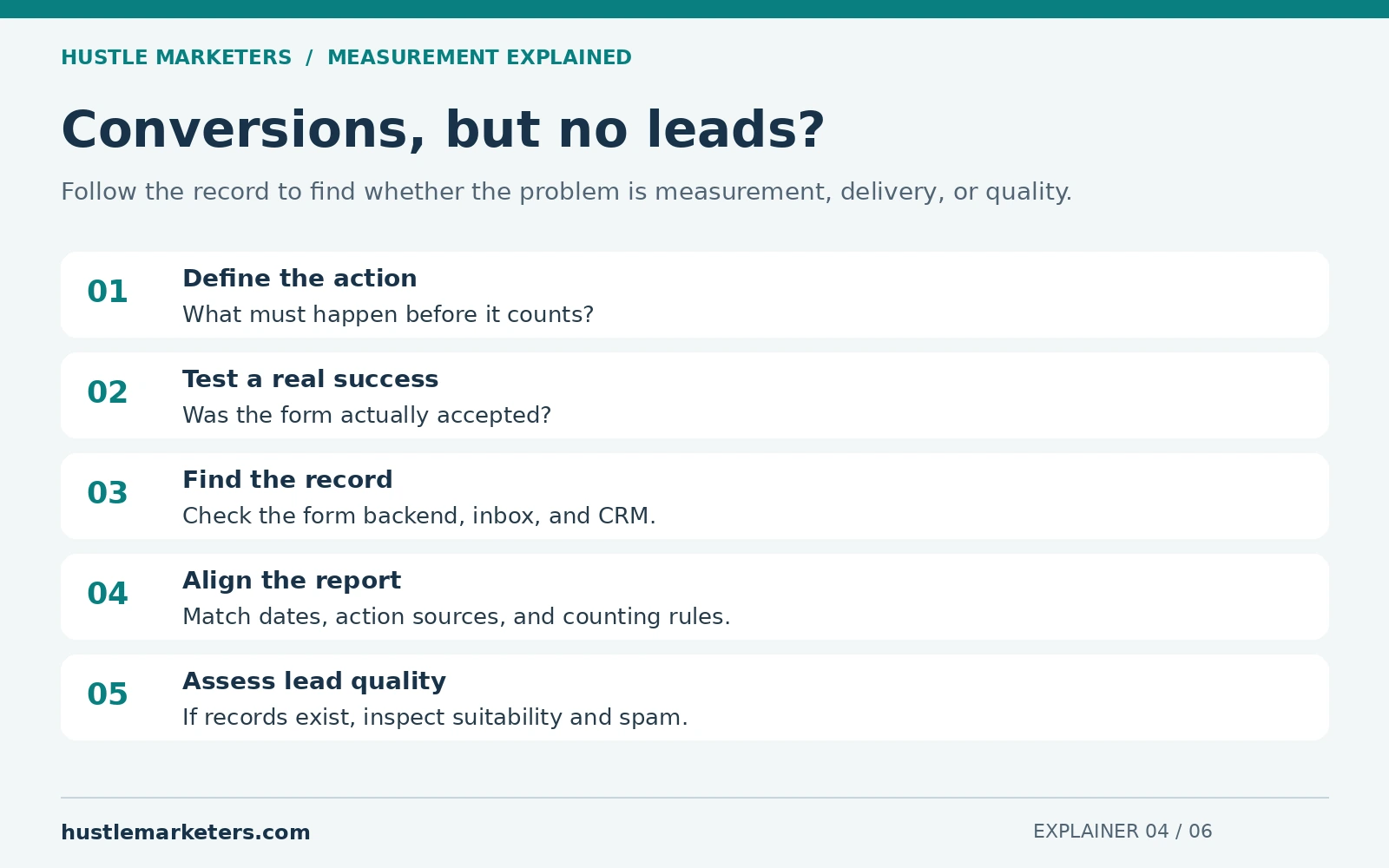
Suppose Google Ads reports 12 conversions this week, but your sales team says nobody contacted them. Start with this question: “What exactly had to happen for each of those 12 conversions to count?”
A conversion name such as “Lead” is only a label. The trigger underneath may be a click on the submit button, even if the form fails validation. Or it may count a WhatsApp tap that never became a message.
1. Break the total down by conversion action
Inspect the conversion actions behind the report. Record the source, trigger, counting setting, value, and campaigns using each goal. Compare the “Conversions” and “All conversions” columns on their own definitions.
Google generally uses primary actions in the relevant selected goals for bidding. Secondary actions normally remain observation metrics, but custom goals are an exception. Verify the campaign’s actual configuration rather than relying on the action name.
2. Match each action to a business record
| The action being counted | What to look for | What it does not prove |
|---|---|---|
| Contact button click | Click event and destination | A completed inquiry |
| Form submission | Accepted submission in the form backend | Email delivery or lead quality |
| WhatsApp click | Click event, then a separate received message | A conversation or sale |
| Phone action | The configured click or call record and qualification rule | A suitable customer or completed sale |
| Google-hosted lead form | Lead records in the asset’s supported download or CRM delivery route | A submission in your website form inbox |
| Imported qualified lead | CRM stage and import record | That every other inquiry was qualified |
3. Test one complete inquiry
Use a clearly labeled test record. Submit the form successfully, then check the form backend, email delivery, CRM entry, and tracking event. Also try an invalid submission. It should not produce the same success event.
If the backend has the inquiry but email does not arrive, investigate delivery, routing, spam filtering, or a disconnected integration. If the event fires before the form is accepted, investigate the tracking trigger. These are different problems.
On a third-party booking system, confirm which completion evidence the provider exposes. A visit to a booking page does not establish that someone booked. A receipt page that anyone can reload also needs a reliable completion rule.
4. Look for two routes counting the same result
A form can be tracked through both a direct Google Ads tag and an imported GA4 action. Check whether both are counted toward the same business objective. Also inspect duplicate containers, plugins, success callbacks, and thank-you-page rules.
Do not delete an action just because its name looks similar. Establish what it measures, where it is used, and whether another action covers the same outcome.
5. Align the dates before declaring a mismatch
The CRM may group leads by when the inquiry arrived. An Ads report may attribute a conversion to an earlier ad interaction. Review the conversion-time reporting options, time zones, processing delay, and import timing. Compare a settled period using compatible definitions.
6. Separate missing leads from poor-quality leads
If the records exist but contain spam, wrong locations, or irrelevant requests, tracking may be working while lead quality is poor. Review the actual inquiries, search terms where available, location settings, offer, form protections, and sales follow-up.
Use our spam lead troubleshooting guide for that branch. Do not assume a bidding change will fix broken form delivery, and do not assume a new tracking tag will fix an unsuitable offer.
What information should you collect before asking for help?
Share the conversion action’s name and source, the affected dates, what the business actually received, and one redacted test journey. Include whether the problem affects forms, calls, messages, or bookings. Keep customer details and account access information private.
Does an “active” tracking status prove my leads are correct?
No. It indicates something about the tracking action’s technical activity. You still need to verify that the event represents the intended business outcome and reaches the team responsible for follow-up.
Should I pause the campaign immediately?
First establish the cause and exposure. If the campaign is spending against a confirmed false success signal, take a controlled corrective action. If the issue is reporting delay or email routing, the response will be different. Avoid changing several unrelated settings before preserving the evidence.
For current platform rules, see primary and secondary conversions and offline conversion import FAQs. For help tracing the full journey, request a conversion tracking review.
For the next step, use our WhatsApp click-to-sale guide, CRM lead-to-customer tracking guide, or GA4 duplicate-purchase checks, depending on the action you are investigating.
Why is Google Ads conversion tracking not working?
In the accounts we audit, broken tracking usually traces back to a short list: auto-tagging off, a GCLID stripped by a redirect, a wrong or unpublished tag, a secondary action, consent blocking measurement, a checkout on another domain, or simply not enough time. Match your symptom in the table below, confirm the cause, then apply the fix.
| Symptom | Likely cause | How to confirm | Fix |
|---|---|---|---|
| Awaiting conversions after setup | Action under 48 hours old, paused campaigns, low traffic | Creation date, campaign status | Wait, then test from an ad click |
| Tag fires in Tag Assistant, nothing in Google Ads | Test did not start from an ad click, or GCLID lost | Check the landing URL for gclid | Test from a real ad click |
| GCLID missing on landing page | Redirect strips it, server rejects it, value lowercased | Load the page with gclid=TeSter-123 | Preserve query strings through redirects |
| No conversions on any action | Auto-tagging off | Admin > Account settings | Turn auto-tagging on |
| Conversions only in All conversions | Action secondary or goal not in campaign | Goals summary, campaign goals | Set primary or add the goal |
| Duplicate or inflated conversions | Tag and GA4 import both primary, plugin plus manual tag | Compare actions for the same event | One primary source, add transaction_id |
| Lost when checkout is on another domain | No cross-domain setup, or linker expired | Look for _gl on the destination URL | Configure cross-domain measurement |
| Drop after adding a cookie banner | ad_storage or ad_user_data denied, basic mode | Consent state in Tag Assistant | Fix consent mode, consider advanced |
| GA4 key event missing from import list | Not marked as key event, link missing, not propagated | GA4 admin, link status | Mark it, allow 24 to 48 hours |
| GTM changes not live | Container unpublished, wrong ID or label | GTM versions and Preview | Publish, recopy ID and label |
| Offline upload succeeds, nothing appears | Action inactive with no data source, or too soon | Action status, data source | Configure source, allow time |
| API uploads rejected since 15 Jun 2026 | Developer token without legacy access | API error responses | Move to the Data Manager API |
| Call conversions stuck at zero | Call reporting off, no forwarding numbers, calls too short | Call settings and call details | Enable reporting, review length rules |
| Recent CPA looks too high | Conversion lag | Days to conversion | Judge mature date ranges |
| “Your conversions may be overcounted” | Under 10% of transaction IDs matched | Multi-source diagnostics | Align transaction IDs |
The offline row reflects a Google Ads API forum thread, “conversion not showing after uploadclickconversions success“, where the advisor found the action Inactive with no data source. The cross-domain row follows Google’s cross-domain guide, which says “Linker parameters expire after two minutes”.
Still stuck? We next check for tags firing after a redirect, content security policies blocking Google, forms inside iframes and lost thank-you pages. Our scored Google Ads audit checklist helps with a wider review.
Why don’t Google Ads and GA4 conversions match?
Google Ads and GA4 measure the same actions with different rules. Google Ads credits the date of the ad interaction and only Google ad interactions, while GA4 uses the date the event happened and can credit every channel. Counting methods, view-through, cross-device credit, modeling and data freshness also differ, so exact matches are rare.
| Factor | Google Ads | GA4 or GA4 imports |
|---|---|---|
| Date credited | Ad interaction date | Date the event happened |
| Attribution | Data-driven or last click | Data-driven, paid and organic last click, Google paid channels last click |
| Channel credit | Google ad interactions only | Can credit all channels; imports default to Google paid channels for links since June 2023 |
| View-through | Reported for native tracking | Not in GA4 imports |
| Cross-device | Cross-device conversions included | Imports need Google signals |
| Counting | One or Every per action | Once per event (default) or once per session (legacy) |
| Freshness in Google Ads | 3 hours last click, 15 hours other models | 12 hours last click, 24 hours other models |
| Bidding status | Primary actions in Conversions | Imports start secondary |
Credit dates come from Google’s GA4 events import page and counting from the GA4 counting method page. Google’s data discrepancies page adds removed invalid conversions and modeled cross-device conversions as reasons.
How do you compare Google Ads and GA4 fairly?
- Use Conversions (by conv. time) in Google Ads to match GA4 event dates.
- Match date ranges and allow 24 to 48 hours before comparing, as Google advises.
- Compare a GA4 key event with its own imported action, not a separate tag-based action.
- Leave view-through conversions out of the Google Ads side.
Our Reporting Integrity Standard explains how we report numbers to clients.
Where do Google’s own docs disagree on conversion tracking?
Google’s help pages were written at different times, so several disagree on status labels, waiting times, the June 2026 offline import cutoff, the combined enhanced conversions switch, GA4 import permissions, adjustment windows, credit dates and menu names. Where they conflict, the table below shows both sides and the wording this guide follows.
| Topic | One Google source | Another Google source | This guide follows |
|---|---|---|---|
| Status labels | Troubleshooting page: five statuses from Active to Removed | Call setup page: new call actions show Unverified or Inactive | Troubleshooting page, call exception noted |
| Waiting time | Troubleshooting page: “created under 48 hours ago” | GA4 events import page: up to 24 hours for imported data | Allow up to 48 hours |
| Data freshness | Freshness page: 3 and 15 hours | API forum advisor: up to 24 hours | The freshness page |
| Offline cutoff | Help page: uploads “blocked in the Google Ads API” | API docs: fails only for tokens with no prior uploads | New integrations use Data Manager API |
| Combined enhanced conversions switch | Enhanced conversions for web page: “are now combined” | Settings update page: June 2026, still “will soon be combined” | Check your account; not assumed live everywhere |
| GA4 import access | Measurement hub: Edit access | GA4 events import page: at least Marketer; key events page: administrator or editor | Edit-level access, confirmed in the link flow |
| Adjustment window | Adjustments guide: 54 days | Multi-source FAQ: 55 days for value adjustments | 54 days; 55 only for multi-source |
| Credit date | GA4 events import page: “the date and time of the click” | Discrepancies page: “ad impression date” | Ad interaction date |
| Menu path | Most pages: Goals > Summary | Goals overview: Goals > Conversions > Summary | Goals, then Summary |
| DDA scope | Attribution page: default for “most conversion actions” | DDA page: lists website, store visit and GA conversions | No claim for calls, imports or PMax |
Several third-party guides add errors of their own: status labels that differ from Google’s current troubleshooting page, last click shown as the default, the model removal dated July 2023 instead of June 2023, and GA import steps written for Universal Analytics.
Frequently asked questions
These answers cover questions advertisers raise in the Google Ads Community, the Google Ads API forum and our own audits of conversion setups. Each answer stands alone, so you can jump to the one you need, and each draws on Google sources linked earlier.
When will my Google Ads conversion action be marked Active?
Once it records conversions. Google lists actions “created under 48 hours ago”, paused campaigns and low traffic as reasons for Awaiting conversions. New call actions can show Unverified or Inactive until the first real conversion or a successful test event.
How do I check if conversion tracking is working in Google Ads?
Start with each conversion action’s status: Active means everything is working as intended, Needs attention and Misconfigured flag setup problems, and Awaiting conversions means nothing was recorded in the last 7 days. Then complete a test conversion in Tag Assistant to confirm the tag fires once with the right ID, label, value and transaction ID, and review Tag coverage for pages marked Not tagged. Only a conversion from a real ad click proves attribution works, so allow up to 48 hours after that click before judging.
Can I run Google Ads without conversion tracking?
Yes, campaigns can run without it, but you give up most of what makes bidding and reporting useful. Target CPA, Target ROAS, Maximize conversions and Maximize conversion value optimize toward the primary conversion actions in your goals, so without tracking they have no real results to learn from. You also cannot see which keywords, ads or campaigns produce leads or sales. Even one well-defined lead or purchase action is far better than none.
Do I still need a Conversion Linker in Google Tag Manager?
Not if a Google tag loads on every page of the container, according to Google’s Tag Manager help. If no Google tag fires site-wide, add a Conversion Linker with the All Pages trigger.
How do I stop Google Ads from counting duplicate conversions?
Send a unique transaction ID with each conversion and keep one primary source per action. In a Google Ads API forum thread on deduplication, the advisor said a GTM transaction_id and an uploaded order ID are the same key, so matching IDs count once.
How do I track conversions across multiple domains or landing pages?
Set up cross-domain measurement so the _gl linker parameter carries click data between domains. Google confirms this works for Google Ads conversion measurement. Several landing pages on one domain only need the Google tag on every page.
How do I track Google Ads conversions in Google Analytics?
Link your Google Ads account to your GA4 property, keep auto-tagging on (in GA4 it takes precedence over manual UTM tags), and mark the actions you care about as key events. GA4 then credits those key events on the date they happened and can credit every channel, not only Google Ads. To see them inside Google Ads too, import the key events, which start as secondary actions, and allow 24 to 48 hours for new links and key events to appear.
Is it possible to track call conversions by simply clicking the ad’s phone number?
Google lists clicks on call ads and assets without a forwarding number as a conversion type, counted from Google’s estimate of whether a meaningful call followed the click. For real call data, such as call length or AI qualification, you need call reporting and Google forwarding numbers.
What conversion window should I use?
Start from your Days to conversion report. The click-through default is 30 days, the range is 1 to 90 days by source, and Google recommends at least 7 days.
Do offline conversion uploads still work through the Google Ads API after June 15, 2026?
Only for developer tokens with legacy access. Tokens that sent no request between January and June 2026 are not allowlisted, and UploadClickConversion requests fail for tokens without prior uploads. Google points everyone to the Data Manager API, so build new integrations there.
What is Data Manager in Google Ads?
Data Manager is where you connect first-party data, such as CRM records, cloud storage or Sheets, to Google Ads, under Tools, then Data manager. Its API became generally available on 9 Dec 2025 and is now the route for new offline conversion integrations.
Does consent mode reduce my reported conversions?
Denied consent reduces observed conversions. Advanced consent mode sends cookieless pings, and once you meet Google’s threshold of 700 ad clicks over a 7 day period per country and domain grouping, modeled conversions fill part of the gap in the Conversions column.
Why am I paying for fake conversions on my ads?
That question, from a Google Ads Community thread, often points to a primary action bots can trigger easily. Google removes some invalid conversions it detects; retract other confirmed junk within 54 days and bid on qualified leads from your CRM.
Can I see conversion tracking status through the Google Ads API?
Not according to a Google Ads API forum thread, where the advisor said statuses are viewable in the interface only. Google stopped answering new posts there on 28 Jan 2026 and keeps it as a read-only archive, per the Google Ads Developer Blog.
Want a second pair of eyes on your conversion tracking?
If your conversions look too low, too high or out of step with GA4, an outside review is often the fastest way to find the cause. We set up and audit Google Ads conversion tracking in the accounts we manage, from tags and goals to consent mode, calls, offline imports and duplicate counting.
Our Google Ads agency team runs full account management. Our PPC management services cost $600 to $800 per platform per month depending on ad spend, run month to month, and you always own your ad accounts. For a lead generation example, see how a commercial cleaning equipment brand got 5.3x more leads at 73% lower cost per lead.
Get Free Audit Worth $500. Our audit reviews your conversion actions, goals, tags, consent signals and duplicate counting, and we look for the tracking gaps that hold Smart Bidding back.
About the author: Ishant Sharma is a Google Ads, Microsoft Ads and SEO specialist who has worked in digital marketing since 2013, and the founder of Hustle Marketers, a Google Partner agency. Over that time he has worked with ecommerce brands, lead generation businesses and agency partners on Google Ads, GA4 and Google Tag Manager, and his agency has worked with more than 2,500 brands. He sets up and audits conversion tracking before any bidding decision is made.