SEO Report: What to Include in a Monthly Client SEO Report

Ishant
Published : September 25, 2026 at 5:30 pm
Updated : October 16, 2026 at 12:14 pm
Ishant

SEO reporting is the practice of sending a recurring SEO report that shows whether organic search produced business results, why the numbers moved and what happens next. A good monthly SEO report leads with non-branded clicks, organic leads or revenue, and rankings for money keywords, then covers AI search visibility, technical health, work completed and the next month’s plan.
SEO reporting got harder in 2025 and 2026. Search Console added a branded queries filter and a Generative AI report, GA4 added an AI Assistant channel, and almost a year of Search Console impressions was over-reported. A report that ignores these changes can show growth or decline that never happened.
Below you will find a section-by-section monthly SEO report template, a vanity metrics table, the data source behind every number, a reporting cadence and a drop checklist, with Google’s own documentation linked wherever it exists.
Key takeaways
- Make non-branded organic clicks and organic leads or revenue the headline KPIs.
- Search Console blends AI Overviews and AI Mode clicks into the Performance report. The Generative AI report shows impressions only.
- GA4 counts AI Overviews and AI Mode as Organic Search. ChatGPT, Gemini and similar tools sit in the AI Assistant channel, added 13 May 2026.
- Impressions were over-reported from 13 May 2025 to 27 April 2026, and num=100 shifted impressions and position in September 2025. Use clicks for year-over-year comparisons.
- Report monthly, add weekly checks only for launches, migrations and updates, and review strategy quarterly.
- Explain drops with a fixed checklist that rules out data and tracking problems first.
- In white label SEO, the client should stay the verified Search Console owner.
What is SEO reporting?
SEO reporting turns organic search data into an SEO report, a periodic document or dashboard that connects search activity to business outcomes. It answers three questions: did SEO work this period, why did the numbers change, and what will we do next. Unlike a raw dashboard, it adds interpretation, context about data problems and a prioritized plan the client can approve.
A one-time SEO audit report is a different document from a monthly SEO report: the audit diagnoses a site once, while the monthly report tracks results and next steps over time. Audits are usually priced as a project, which our guide to SEO audit cost covers. A dashboard is live data with no interpretation. The monthly report sits between them, recurring and written for a decision maker.
Getting it right affects retention. In AgencyAnalytics’ 2026 benchmark survey of 494 agency professionals (a vendor survey), 55% said clients regularly ask them to connect marketing performance to revenue, 48% called tracking AI-driven discovery their hardest attribution problem, and 10% of agency leaders cited attribution or ROI clarity as a reason clients leave.
What should a client SEO report include?
A client SEO report should include a cover with the period and data caveats, a short executive summary, KPIs against targets, business outcomes, branded and non-branded search performance, money keyword rankings, AI search visibility, technical health, authority, work completed, what did not work, and next month’s plan. Keep diagnostics short and outcomes first.
Monthly SEO report template: sections, data sources and why each matters
| Section | What to show | Data source | Why it matters |
|---|---|---|---|
| 1. Cover and scope | Property, period, comparison period, known data breaks | Data anomalies page, change log | Stops comparisons of broken data |
| 2. Executive summary | Five lines: outcome, non-branded clicks, leads or revenue, biggest win, biggest risk and action | Search Console, GA4, CRM | Most stakeholders read only this |
| 3. KPIs vs goals | Each KPI vs target, last period and last year | All sources | Measures what was agreed |
| 4. Business outcomes | Organic key events, leads and revenue by landing page type | GA4, CRM or store backend | Ties SEO to money |
| 5. Search performance | Branded and non-branded clicks, impressions, CTR, top gaining and losing pages | Search Console with branded filter | Separates SEO-won demand from brand demand |
| 6. Rankings and share of voice | Fixed money keyword set, top 3 and top 10 counts, share of voice vs named competitors | Rank tracker | Tracks queries that make money |
| 7. AI search visibility | Generative AI impressions, AI Assistant sessions and key events, prompt-set citations | Search Console, GA4, prompt tracking | Shows AI exposure with honest limits |
| 8. Technical health | Indexing of priority templates, Core Web Vitals Good URLs, manual actions, security | Search Console | Flags risks before they cost traffic |
| 9. Authority | Relevant new referring domains, lost links worth recovering | Backlink tool, Links report | Shows link work without vanity scores |
| 10. Work completed | Content published and fixes shipped, with dates | Project log, annotations | Connects actions to results |
| 11. What did not work | Failed tests, delays, blockers | Project log | Builds trust |
| 12. Next period plan | 3 to 5 prioritized actions, owner, expected impact | Strategy notes | Turns the report into decisions |
How do you write the SEO report executive summary?
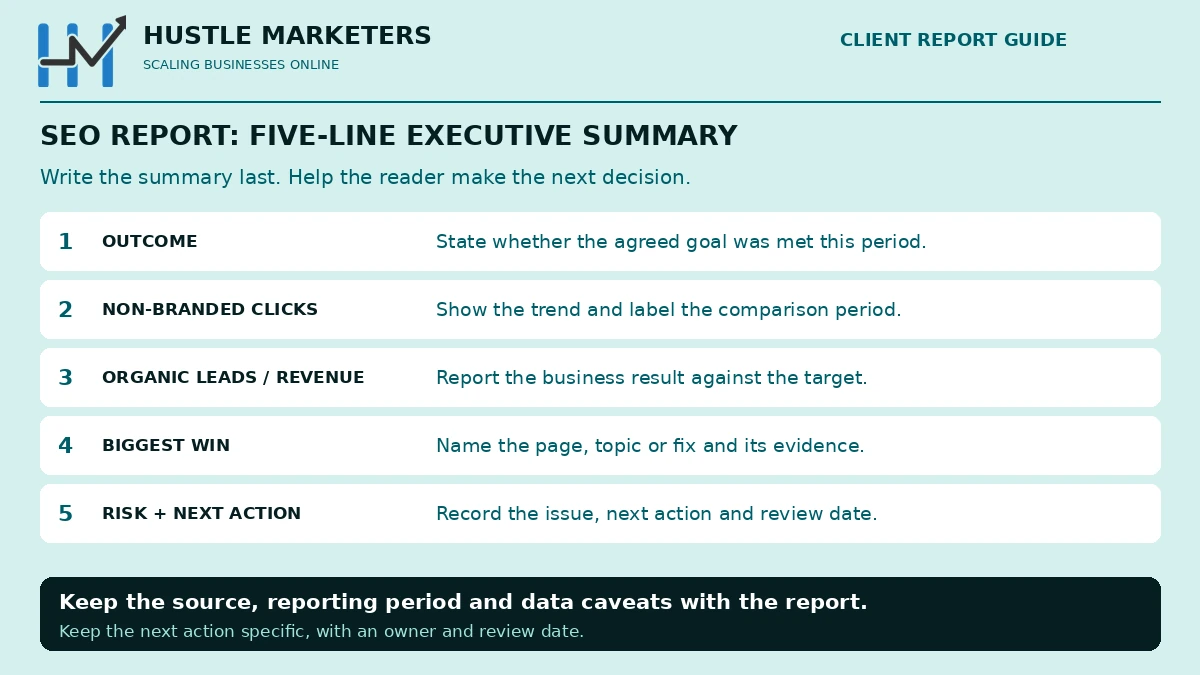
Write it last, in five lines, with one chart of non-branded clicks. Copy this structure:
Outcome: [one sentence on whether SEO hit its goal this month]
Non-branded clicks: [number], [change] month over month and year over year
Organic leads or revenue: [number], [change] vs target
Biggest win: [page, topic or fix and its effect]
Biggest risk and next action: [issue], [action], [date]
Should an SEO report include what did not work?
Yes. Some guides advise ending on a positive note, which invites spin. End with the plan instead and give failed tests their own section. Our reporting integrity standard explains how we handle this for clients.
Which SEO metrics matter, and which are vanity metrics?
The SEO metrics that matter are the ones tied to revenue or to demand SEO actually won: organic leads and revenue, non-branded clicks, rankings for a fixed set of money keywords, share of voice, relevant new referring domains and Core Web Vitals field data. Vanity metrics look impressive but move without any change in business results.
| Report this | Instead of this | Why the vanity metric misleads |
|---|---|---|
| Non-branded organic clicks | Total organic traffic | Brand demand from ads, PR or TV inflates it |
| Organic key events, leads and revenue | Sessions or users alone | Traffic can grow while leads fall |
| Top 3 and top 10 counts for a fixed keyword set | Total keywords ranked | Moves with tool databases and shifted after num=100 |
| Share of voice vs named competitors | Site-wide average position | Averages thousands of queries; distorted by num=100 and the impressions bug |
| Relevant new referring domains | Domain Authority, Authority Score, Domain Rating, Trust Flow | Third-party estimates without Google’s ranking data |
| Share of Good URLs in Core Web Vitals | Lighthouse score or “page load time” | Lab tests, not real users |
| Indexing of priority templates | Crawler “site health score” | Mixes trivial and critical issues |
| GA4 engagement rate on organic landing pages | Bounce rate alone, time on page, dwell time | Universal Analytics habits or not measurable |
| Generative AI impressions and a frozen prompt set | “AI visibility score” with an undisclosed prompt set | Cannot be audited or compared |
| Clicks year over year | Impressions, CTR and position year over year | Cross the 2025 to 2026 data breaks |
Our own SEO case studies report clicks for the same reason: the Rec Hall SEO case study shows organic clicks up 117%, and the Australian pet ecommerce SEO case study shows 56% more organic clicks.
Why do authority scores and bounce rate stay out of the KPI table?
Authority scores are vendor estimates. Google’s guidance on third-party SEO tools says: “Third-party tools don’t have access to our internal ranking data.” Use them for link prospecting, not as a client goal. Bounce rate on its own, time on page and pages per visit are habits from the Universal Analytics era; report GA4 engagement rate and key events instead.
Impressions and average position still work as leading indicators for specific topics or new pages, compared within clean periods after 27 April 2026. For backlinks, report relevant new referring domains and lost links worth recovering, not total backlink counts.
Where does each SEO metric come from?
Each SEO metric needs one source of truth. Search Console owns clicks, impressions, CTR, position, branded splits, indexing and Core Web Vitals. GA4 owns sessions, engagement and key events. Your CRM or store backend owns leads and revenue. Rank trackers own share of voice, and backlink tools own referring domains. Label the source on every chart.
| Metric | Source of truth | Known limits |
|---|---|---|
| Clicks, impressions, CTR, position | Search Console Performance report, Web | 16 months; 1,000 table rows; rare and sensitive queries hidden; impressions over-reported 13 May 2025 to 27 April 2026 |
| Branded vs non-branded | Search Console branded queries filter | Top-level properties with sufficient volume; AI classification can be wrong |
| AI Overviews and AI Mode impressions | Search Console Generative AI performance report | Impressions only |
| AI Overviews and AI Mode clicks | Search Console Performance report | Blended into Web totals; cannot be isolated |
| Organic sessions, engagement, key events | GA4 Organic Search channel | Includes AI Overviews and AI Mode; depends on tagging and consent |
| AI assistant traffic | GA4 AI Assistant channel | Recognized referrers only; since 13 May 2026 |
| Leads, pipeline, revenue | CRM or ecommerce backend | Attribution model changes credit |
| Money keyword rankings, share of voice | Rank tracker | Location and device settings; collection changed after num=100 |
| Referring domains | Backlink tool plus Search Console Links report | Each tool’s index differs |
| Indexing | Search Console Page indexing report | Reported delays in 2026 |
| Core Web Vitals | Search Console Core Web Vitals report | 28 days of real-user data |
| AI mentions and citations outside Google | Frozen prompt set, manual or tool | No Google data behind it |
Why don’t Google Analytics and Search Console numbers match?
Google’s Search Console and Analytics guide says clicks and sessions “are calculated differently”. Search Console uses Pacific Time and reports only the canonical URL, while GA4 needs its tag to fire, which consent choices can block; see our Google Consent Mode guide. If GA4 organic sessions fall while clicks hold steady, suspect tracking before rankings.
The integration has limits too. Per GA4 help, a web data stream links to only one Search Console property, data arrives 48 hours after collection, and Search Console metrics combine only with Search Console dimensions plus Landing page, Device and Country. Report clicks from Search Console, conversions from GA4, and footnote the gap.
How far back does Search Console data go?
Sixteen months, so export monthly for longer trends. Interface tables show up to 1,000 rows, the Search Analytics API returns up to 50,000 rows per day per search type, and the bulk export to BigQuery includes all performance data except anonymized queries, starting from the day you set it up.
How do you split branded and non-branded traffic in Search Console?
Use the branded queries filter in the Search Console Performance report. It classifies queries that include your brand name, its misspellings and your brand products, so you can view branded and non-branded clicks separately. It works only on top-level properties with enough query volume, and its AI classification can be wrong, so spot-check it before reporting.
- Open Performance, Search results, in a top-level property.
- Add a query filter and choose branded or non-branded.
- Compare clicks, not impressions, with the previous period and year.
- Log non-branded clicks and the branded share in your KPI sheet monthly.
According to Search Engine Land’s launch coverage, branded queries cover names like “Google”, misspellings like “Gogle” and products like “Gmail”, across web, image, video and news. An Insights card also shows branded vs non-branded clicks.
Why is the branded queries filter not visible for all owners?
Usually it is eligibility, not a bug. The filter appears only in top-level properties, not URL-path properties like example.com/path or subdomain properties, and the site needs a “sufficient volume of queries and impressions”. Google has not published that threshold. For ineligible properties, export the Queries table, tag brand terms in a spreadsheet and label the result a manual split.
Are “GreenTop” and “Green Top” considered branded queries?
They should be, because Google’s system is built to catch variations and misspellings. But when the filter reached all eligible sites in March 2026, Google noted that classification is AI-assisted and some queries may be misclassified. Spot-check your top 50 queries each quarter, especially if your brand is also a common word. The filter has no ranking effect.
Why don’t branded and non-branded clicks match total clicks?
Search Console withholds queries made a very small number of times and those with personal or sensitive information. A split built from visible query rows cannot classify those hidden queries, so the parts can fall short of the total. Show any gap as “unclassified”.
What do branded and non-branded trends tell you?
Branded clicks mostly reflect demand from your brand, ads and PR; non-branded clicks show what SEO earned. A Search Engine Land analysis found blended data hid non-branded impression losses after num=100, and suggested validating brand demand with Keyword Planner and Google Trends. Amsive’s study of 700,000 keywords found non-branded CTR fell 19.98% on keywords that triggered AI Overviews, while CTR rose 18.68% on the small share of branded keywords that triggered one. For paid brand campaigns, see branded vs non-branded search.
Brand searches often surface social profiles too. Search Console platform properties for Instagram, TikTok, X and YouTube have been globally available since July 2026, so you can report how that content performs in Google Search alongside the website.
How do you report organic leads, key events and revenue in GA4?
Mark your real conversions as key events in GA4, then report them from the Organic Search channel by landing page. Remember that GA4’s Organic Search channel includes Google’s AI Overviews and AI Mode. Reconcile GA4 leads and revenue with your CRM or store backend each month, and state which attribution model the numbers use.
Key events. Track purchases, qualified form submits, call clicks and booked demos. GA4 allows up to 30 key events on standard properties and 50 on Analytics 360. Our guide on how to use GA4 for marketing covers setup.
Channel labels. Google’s channel definitions put “non-ad links in organic-search results, including Google’s AI Overviews and AI Mode” in Organic Search. Label the row “Organic Search (includes Google AI features)”.
Attribution and CRM. Data-driven and last click remain after Google removed four other models in October 2023. Pick one and keep it fixed. Report qualified leads and closed revenue from the CRM, and turn them into a return figure with our SEO ROI calculator.
How should an SEO report show keyword rankings and share of voice?
Track rankings for a fixed set of money keywords grouped by intent and page type, and report top 3 and top 10 counts rather than every keyword a tool finds. Add share of voice against three to five named competitors on the same set. Keep location, device and keyword list frozen so month-over-month changes are real.
Build the set from non-branded queries that already drive clicks or key events, add targets for pages you are improving, group them by intent and page type, and change the list only at quarterly reviews.
How do you calculate share of voice?
Share of voice is a tool method, not a Google metric. The simplest version divides the keywords you rank top 10 for by the total in your set, then does the same for each competitor. Some trackers weight it by search volume and estimated CTR. Keep one tool, because figures from different tools are not comparable.
What did the num=100 change do to rankings data?
In September 2025 Google’s num=100 results-per-page parameter stopped working. Search Engine Land reported that rank trackers now pay about 10 times as much to collect the same data, and Brodie Clark reported that Search Console showed a significant decline in desktop impressions and a sharp increase in average position. Tyler Gargula of LOCOMOTIVE Agency analyzed 319 properties and, as reported by Search Engine Land, found 87.7% of sites lost impressions and 77.6% lost unique ranking terms. A drop in “keywords ranked” from that month may reflect this change rather than lost rankings.
Can Search Console query groups replace a keyword set?
Not as a fixed KPI. Query groups are AI-grouped topics in Search Console Insights, shown only for properties with a large volume of queries. Google says groups “may evolve and change over time”, which makes them good for spotting topic trends but unreliable as a frozen comparison set.
How do you report AI Overviews and AI Mode in Search Console?
Search Console counts AI Overviews and AI Mode inside the Performance report’s Web totals, with no filter to isolate them. The Generative AI performance report shows impressions only, by page, country, date and device, and rolled out worldwide on 31 August 2026 for sites with enough AI impressions. Report AI impressions alongside blended clicks and state what is missing.
Is an AI Overview result considered an impression in GSC?
Yes. Google’s AI features documentation says these appearances are included in overall search traffic within the Web search type. Its metric definitions add that a click on an external link in an AI Overview counts as a click, and an AI Overview occupies one position that every link inside it shares. AI Mode follows standard click, impression and position rules.
What does the Generative AI performance report show?
According to Google’s Generative AI performance report help page:
- It covers AI Overviews and AI Mode on Google Search, using Web search type data.
- The only metric is impressions: how many times links to your site were shown in a generative AI feature.
- Dimensions are pages, countries, dates (Pacific Time) and devices, with an export button.
- Sites need sufficient impressions and must not be excluded from generative AI features.
- Google says it rolled the report out to all websites worldwide as of 31 August 2026.
At launch Google said “we’ll introduce additional metrics over time”, so recheck before quarterly reviews. Keep Discover separate: the data anomalies page lists Generative AI in Discover apart from the Search report.
Why don’t we have the Generative AI report in Search Console?
Usually too few AI impressions, or an opt-out. Google launched a control that lets sites opt out of generative AI Search features, and opted-out sites “will not receive traffic or impressions” from them. If a client opted out, say so on the cover page.
How do you build an honest AI Overview impact slide?
Export pages with Generative AI impressions, pull their organic clicks from the Performance report split by branded and non-branded, and plot clicks, not CTR, against the rest of the site. Then add labeled industry context:
- Ahrefs: AI Overviews correlate with a 58% lower average CTR for the top-ranking page (desktop, 300,000 keywords, December 2025 vs December 2023).
- Seer Interactive: organic CTR on AI Overview queries fell from 1.76% to 0.61% between June 2024 and September 2025 (42 organizations). A separate 2026 dataset of 53 brands showed it rising from about 1.3% to 2.4% between December 2025 and February 2026. On 2025 informational queries, cited brands averaged 2.07% CTR vs 0.94% when not cited.
- Pew Research Center: users clicked a traditional result in 8% of visits with an AI summary vs 15% without.
- Google (first-party, no data published): total organic click volume has been “relatively stable year-over-year”.
Seer’s 2026 advice is a sound rule: look at your own data before aggregate benchmarks, and track clicks and impressions separately rather than reading CTR alone.
How do you report ChatGPT, Gemini and other AI assistant traffic?
Report AI assistant traffic from GA4’s AI Assistant channel, added on 13 May 2026, which groups visits from tools such as ChatGPT, Gemini, Claude and Copilot. Report mentions and citations separately from a frozen prompt set checked monthly. Keep both apart from Google’s AI Overviews and AI Mode, which GA4 counts as Organic Search.
GA4: how do you properly isolate AI referrals from ChatGPT or Copilot?
Use the built-in channel. The GA4 release note of 13 May 2026 added an “ai-assistant” medium, an AI Assistant channel and an “(ai-assistant)” campaign name when referrers match recognized assistants such as ChatGPT, Gemini and Claude; the channel definitions also name Deepseek, Copilot and Grok. Report sessions, key events and landing pages. If older reports used a custom segment, note the method change at that date.
How do you report AI mentions and citations?
Freeze a prompt set by buying stage and topic, fix the engine (ChatGPT, Perplexity, Gemini or Copilot) and location, and check it monthly. Report mention rate and citation rate separately, as our explainer on AI visibility citations vs mentions explains. The full method and tools are in our guide to tracking brand visibility in AI search, and our AI SEO services focus on AI Overviews and ChatGPT visibility.
Never promise placement. Google’s generative AI guide says “No third-party tool has access to our internal ranking or AI systems”, and its third-party tools page warns about services “Promising improvements for AI experiences and search formats”.
AI search visibility reporting table
| Signal | Source | What it tells you | What it cannot tell you | Cadence |
|---|---|---|---|---|
| AI Overviews and AI Mode impressions | Search Console Generative AI report | Which pages and countries appear in Google AI features | Clicks, CTR or queries | Monthly |
| AI Overviews and AI Mode clicks | Search Console Performance report | Included in total organic clicks | The AI-only share | Monthly, blended |
| Google organic sessions and key events | GA4 Organic Search | Conversions from all Google organic, including AI features | Classic vs AI feature split | Monthly |
| AI assistant sessions and key events | GA4 AI Assistant channel | Visits and conversions from recognized assistants | Visibility when nobody clicks | Monthly |
| Mentions and citations | Frozen prompt set | How often assistants name or cite you | Total AI exposure; answers vary by run | Monthly |
| AI-exposed pages vs click trend | Generative AI plus Performance reports | Whether AI-exposed pages gain or lose clicks | Cause and effect | Quarterly |
What technical SEO health belongs in a monthly SEO report?
A monthly SEO report needs only the technical signals that threaten traffic: page indexing changes for priority templates, the share of URLs rated Good in the Core Web Vitals report on mobile and desktop, manual actions, security issues and crawl anomalies. Everything else belongs in the audit backlog, not the client report.
Indexing. Show indexed vs not indexed counts for product, category or service templates, not total indexed pages. Search Engine Land reported Page indexing report delays in June 2026, so confirm sudden changes before escalating.
Core Web Vitals. Report the share of Good URLs from the Search Console Core Web Vitals report, which uses 28 days of real-user data, mobile and desktop separately. Good means LCP of 2.5 seconds or less, INP of 200 milliseconds or less and CLS of 0.1 or less. A URL group takes its slowest metric’s status. INP replaced FID in March 2024; our Core Web Vitals and INP guide covers fixes.
Everything else. Manual actions and security issues get one line each. Redirect chains, schema warnings and minor crawl errors belong in the backlog; our technical SEO checklist lists what to run between reports.
Why are year-over-year Search Console comparisons unreliable right now?
Year-over-year Search Console comparisons made in 2026 cross two data breaks. A logging error over-reported impressions from 13 May 2025 to 27 April 2026, and Google corrected it only going forward. The num=100 change in September 2025 also cut impressions and moved average position. Clicks are the safest year-over-year metric.
Google confirmed the logging error caused over-reporting of impressions, with clicks unaffected. Google’s John Mueller then said the fix applies only going forward and the old data will not be fixed, so past impressions, and the CTR and average position derived from them, stay uncorrected.
| Date | What happened | Metrics affected | How to report it |
|---|---|---|---|
| 13 May 2025 to 27 Apr 2026 | Impressions over-reported; not corrected | Impressions, CTR, average position | Use clicks year over year; caveat the rest |
| Sep 2025 | num=100 stopped working | Desktop impressions down, average position shifted sharply | Annotate; avoid year-over-year position |
| 28 Feb and 1 Mar 2026 | Bulk data exports missing for some properties, not recoverable | BigQuery tables | Flag the gap in warehouse dashboards |
| 7 May 2026 | FAQ rich results stopped appearing | FAQ search appearance | Explain as a SERP change |
| 13 to 17 Aug 2026 | Generative AI impressions dropped, restored by 21 Aug | Generative AI report | Annotate those days |
- Use clicks as the year-over-year headline.
- Show impressions, CTR or position year over year only with a caveat beside the chart.
- Prefer baselines starting after 27 April 2026 for those metrics.
- Check the data anomalies page before every report.
- Add custom annotations for releases and breaks. They hold 120 characters, up to 200 per property, and are deleted after 500 days, so keep your own change log too.
How do you explain a ranking or traffic drop to a client?
Explain a drop by ruling out causes in a fixed order: data anomalies and tracking changes first, then Google update windows, seasonality, branded versus non-branded demand, page-level concentration, indexing, manual actions and SERP changes. Show the evidence for each check, say what you are doing about it, and give a date when you will know more.
This checklist draws on Google’s guide to debugging traffic drops, which lists updates, technical and security issues, spam violations, seasonality, site moves and a “reporting glitch” category, and recommends a 16-month date range.
Explaining ranking or traffic drops: the checklist
| Step | Check | Where to look | If yes |
|---|---|---|---|
| 1 | Known data anomaly? | Search Console data anomalies page | Annotate; do not change the site |
| 2 | Tracking change (GA4 tag, consent banner, release)? | GA4 sessions vs Search Console clicks | Fix tracking and restate numbers |
| 3 | Google update running or just finished? | Search Status Dashboard | Wait at least a full week after completion, then compare |
| 4 | Seasonality or demand shift? | Clicks year over year; Google Trends | Explain as demand, not performance |
| 5 | Branded or non-branded? | Branded queries filter | Brand drops point to PR, ads or offline; non-brand to SEO |
| 6 | Site-wide or specific templates? | Performance report Pages table | Investigate those templates first |
| 7 | Indexing, robots, noindex, canonical or migration change? | Page indexing, URL Inspection, Crawl stats | Fix and monitor recovery |
| 8 | Manual action or security issue? | Manual actions, Security issues | Fix and request a review |
| 9 | SERP change (AI Overview, FAQ rich results gone, new competitor)? | Live results, Search appearance, Generative AI report | Report as a SERP change |
| 10 | How big is the position drop? | Queries table | Position 2 to 4 is normal fluctuation; top 10 to position 29 calls for self-assessment |
Sudden sitewide ranking drop with no manual action: was it a Google update?
Match the date against the Search Status Dashboard history. Recent entries include core updates starting 11 December 2025, 27 March 2026 and 21 May 2026, and spam updates starting 18 August 2026 and 24 September 2026. Check the dashboard rather than this list, because a completed update carries a duration on that page and a running one does not. As of 1 October 2026 the September 2026 spam update has no end date listed, and Google said at announcement that the rollout may take up to two weeks, so treat anything inside that window as unfinished. Google’s core updates guidance says to wait “at least a full week after a core update completes”, avoid quick fixes, and notes that recovery can take several months. It also mentions smaller, unannounced core updates, so rule out steps 1, 2 and 7 first.
How should you word a drop explanation for a client?
What happened: Non-branded clicks fell [x]% between [date] and [date].
Evidence: [pages or query groups], [branded vs non-branded], [device or country].
Ruled out: data anomalies, tracking, manual actions, indexing errors.
Likely cause: [update window / SERP change / technical issue / seasonal demand].
What we are doing: [actions], starting [date].
When we will know: [date].
How often should you send SEO reports?
Send a full SEO report monthly, because Search Console data lags two to three days and many ranking changes take weeks to settle. Add weekly check-ins only during launches, migrations or Google updates, and hold a quarterly review for strategy, competitors and budget. Use Search Console email alerts for indexing, security and manual action problems.
| Cadence | Audience | What to include | Data notes |
|---|---|---|---|
| Weekly (launches, migrations, updates only) | Marketing manager | Clicks by page group, indexing of new URLs, rankings for changed pages | 2 to 3 day lag; no conclusions mid-update |
| Monthly | Client or marketing lead | Full template and five-line summary | Clicks month over month and year over year; annotate breaks |
| Quarterly | Executives, owner | Outcomes vs goals, share of voice, AI visibility trend, roadmap, budget | Smooths seasonality and update cycles |
| Annual | Leadership | Year-over-year outcomes, strategy reset | Export data; Search Console keeps 16 months |
Google added weekly and monthly views to Performance reports in December 2025, which can smooth day-of-week swings in trend charts.
Monthly vs quarterly: how do you report on SEO to the C-suite?
Report to the C-suite in the quarterly review: the monthly report tracks progress, while the quarterly review makes decisions. Give owners organic revenue or pipeline against target, marketing leads non-branded trends, share of voice and AI visibility, and finance cost per organic lead or SEO return. Close with roadmap changes and any budget ask. Translate jargon: “clicks from people who did not search our name” beats “non-branded clicks”.
What is the difference between a manual and automated SEO report?
Automated SEO reports pull data on a schedule; manual reports add the story. Automate the data and write the summary, drop explanations and plan yourself, because no connector knows your release dates or a client’s offline campaign. Share a PDF or slide deck with executives and a live dashboard link with day-to-day users.
How do you generate a free monthly SEO report in Looker Studio?
Start with Google’s free Looker Studio template for Search Console and GA4, which shows sessions, engagement rate, returning users, clicks and CTR filtered to google organic traffic. Connect Search Console using the URL Impression table, then GA4. Add your own pages for key events, branded splits and rankings, and watch GA4 API quotas on multi-client dashboards.
- Open Google’s Search Console and GA4 template.
- Choose “Use my own data”.
- Connect Search Console with the URL Impression table, then your GA4 property.
- Add pages for key events by landing page, a brand split and rankings.
Site Impression or URL Impression: which table should you use?
Google’s connector documentation says one data source can use only one table. URL Impression covers web, image, video, news, Discover and Google News; Site Impression covers web, image, video and news. Use URL Impression for page-level reports. Blank query rows are privacy omissions, so label them. The documentation does not mention the branded filter, so build a labeled manual brand field instead.
How do you generate SEO reports for enterprise clients without quota errors?
Plan enterprise reports around data limits first. The GA4 Data API has quotas for standard properties of 200,000 core tokens per property per day, 40,000 per property per hour and 10 concurrent requests, and large multi-client dashboards can hit them quickly. Use fewer charts per page, split clients into separate reports, or move data into BigQuery, where the Search Console bulk export holds all performance data except anonymized queries. For sites at that scale, see our enterprise SEO agency services.
For quick checks inside Search Console, AI-powered configuration turns a plain-language request into filters and comparisons in the Performance report for Search results. As an AI tool it may not be fully accurate, so verify the applied filters before you screenshot anything.
What changes for white label SEO reporting?
White label SEO reporting keeps the reselling agency’s brand and narrative on every page, while the fulfillment partner stays invisible. The access rules matter more than the logo: the client should stay the verified Search Console owner, partners should get Full or Restricted user access, and GA4 roles limit what each person can change or see.
What access should each party get?
Google’s Search Console permissions define an owner with “full control”, a Full user who “has view rights to all data and can take some actions”, and a Restricted user with “simple view rights on most data”, with up to 100 non-owner users per property. In GA4, Viewer or Analyst roles cover reporting, Marketer can edit events and key events, and “No Cost Metrics” or “No Revenue Metrics” restrictions hide sensitive data.
How do you offboard a partner safely?
- Remove their Search Console user access.
- Remove any of their unused ownership tokens, because removing an owner does not revoke verification tokens.
- Remove their GA4 access.
- Keep the change log with the agency.
Our white label SEO services deliver reports under your brand, and our list of white label SEO companies compares options. For paid search, see what white label PPC reports should show clients.
What popular SEO report guides get wrong
Several popular SEO report guides still treat third-party authority scores as KPIs, use Universal Analytics-era engagement metrics, and describe AI visibility only through vendor tools. Few warn about the 2025 to 2026 Search Console data breaks, state that Google’s Generative AI report shows impressions only, or explain drops with Google’s own troubleshooting process.
- Authority scores as KPIs. Several vendor guides list Domain Authority, Authority Score or Trust Flow as key metrics. Google’s June 2026 guidance says third-party tools lack its internal ranking data.
- “Page load time”, “pages per visit”, “dwell time”. Use Core Web Vitals field data and GA4 engagement rate.
- “Google Data Studio”. The product is Looker Studio; follow its current connector documentation.
- The AI report “shows performance” or is “rolling out”. It shows impressions only and has been worldwide since 31 August 2026.
- Unsourced AI Overview prevalence stats. Use your own Generative AI report data or a named, dated study.
- “End on a positive note.” End with the plan and report failed tests.
- One “AI traffic” number. Google AI features sit in Organic Search; ChatGPT and similar tools sit in AI Assistant. Adding them mixes two things.
- Ignoring data breaks. A 2026 year-over-year impressions chart without a caveat can show false growth or decline.
One real disagreement remains: Google said in August 2025 that total organic click volume was relatively stable year over year, while Ahrefs, Seer and Pew show lower click-through where AI summaries appear. Present both and let the client’s own clicks decide.
Frequently asked questions
These answers cover the SEO reporting questions clients, account managers and in-house teams ask most often, from what to include in a monthly SEO report to branded filters, AI Overviews data, GA4 and Search Console mismatches, and how to handle year-over-year comparisons in 2026. Each answer stands on its own.
What should a monthly SEO report include?
Include an executive summary, KPIs against goals, organic leads or revenue, branded and non-branded clicks, money keyword rankings, AI search visibility, technical health, work completed, what did not work and next month’s plan. Put outcomes first and diagnostics last.
How do you report on SEO?
Agree on a few KPIs first, led by non-branded clicks and organic leads or revenue, then take each metric from one source of truth: Search Console for clicks, GA4 for key events and your CRM for revenue. Check Search Console’s data anomalies page, fill in the monthly template and write the five-line executive summary last. Send the full report monthly and hold a quarterly strategy review.
How do you create actionable SEO reports for clients?
Tie every section to a decision. Lead with outcomes against agreed targets, explain changes with evidence, give failed tests their own section, and end with three to five prioritized actions, each with an owner and expected impact. To improve SEO reporting for clients, replace vanity metrics such as authority scores with non-branded clicks and organic leads, and label the source on every chart.
How do you read a monthly SEO report?
Start with the cover’s data caveats and the five-line executive summary, then check each KPI against its target, the last period and last year. Give non-branded clicks and organic leads or revenue more weight than total traffic, impressions or authority scores. Finish with what did not work and next month’s plan, and question any number without a labeled source.
What is the most important metric in an SEO report?
Organic leads or revenue, because they tie SEO to money. On the search side, non-branded organic clicks matter most, since they measure demand SEO won rather than demand your brand already had.
How do I see non-branded traffic in Google Search Console?
In a top-level property, open the Performance report, add a query filter and choose non-branded. If the property is not eligible, export the Queries table and tag brand terms manually.
Why can’t I see the branded queries filter?
It works only for top-level properties, not URL-path or subdomain properties, and needs sufficient query and impression volume. Google has not published the threshold.
Is there any way to identify traffic coming from AI Mode or AI Overview?
Only partly. The Generative AI performance report shows impressions by page, country, date and device, but AI Overview and AI Mode clicks are blended into Performance report totals. GA4 counts those visits as Organic Search.
Does the Search Console Generative AI report show clicks?
No. As of September 2026 it shows impressions only. Google says it will add metrics over time.
How do I track ChatGPT traffic in GA4?
Use the AI Assistant channel in the Default Channel Group, added 13 May 2026. It covers recognized assistants such as ChatGPT, Gemini, Claude and Copilot, and excludes AI Overviews and AI Mode.
How do SEO consultants report AI-driven results to clients?
SEO consultants should report three AI signals separately: Generative AI impressions from Search Console, AI Assistant channel sessions and key events from GA4, and mention and citation rates from a frozen prompt set checked monthly. Clicks from AI Overviews and AI Mode cannot be isolated, so they stay inside organic totals with a note. Never promise AI placement, because Google says no third-party tool has access to its internal ranking or AI systems.
How often should you report SEO progress to stakeholders?
Send the full report monthly and hold a quarterly strategy review for executives and owners. Weekly updates make sense only during launches, migrations or Google updates.
How do you check SEO progress?
Check non-branded clicks in the Search Console Performance report, where weekly and monthly views smooth day-of-week swings, and organic key events in GA4. Track top 3 and top 10 counts for a fixed set of money keywords, and allow for Search Console’s two to three day data lag. Set up Search Console email alerts so indexing, security and manual action problems reach you between reports.
How do you send an SEO report to a client?
Share a PDF or slide deck with executives and a live dashboard link, such as a Looker Studio report, with day-to-day users. Put the five-line executive summary first so the outcome is clear before any chart. If a partner prepares the report, keep the client as the verified Search Console owner and give the partner Full or Restricted user access.
Is Domain Authority a good KPI for SEO reports?
No. It is a third-party estimate, and Google says third-party tools lack access to its internal ranking data. Report relevant new referring domains and organic outcomes instead.
How far back does Search Console data go?
Sixteen months. For longer history, export monthly or set up the bulk data export to BigQuery, which stores data from the day you turn it on.
How should I explain a traffic drop after a core update?
Rule out data anomalies and tracking first. Wait at least a full week after the update completes, compare by page and brand split, and avoid quick fixes, since recovery can take several months.
Can I compare Search Console impressions year over year in 2026?
Only with a caveat. Impressions were over-reported from 13 May 2025 to 27 April 2026 and not corrected, and num=100 shifted them in September 2025. Use clicks instead.
What should a white label SEO report hide from the end client?
Only the fulfillment partner’s name, branding and internal notes. Data, work completed and failed tests stay visible, and the client should remain the verified Search Console owner.
Need an SEO report your clients can trust?
If your current SEO report leads with traffic totals, authority scores or year-over-year impressions, it may be telling the wrong story. Hustle Marketers builds SEO reporting around non-branded clicks, organic leads and revenue, honest AI visibility data and a clear plan, so every number can be traced back to its source.
We are a Google Partner agency founded in 2020 and have worked with 2,500+ brands, serving clients in the US, UK, Australia and beyond. Our SEO agency runs organic and AI search programs for ecommerce and B2B brands.
Start with our free $500 audit. It reviews your Search Console, GA4 tracking and current reporting, and we look for tracking gaps, misleading metrics and the pages with the most room to grow. Get Free Audit Worth $500.
About the author: Ishant Sharma is a Google Ads, Microsoft Ads and SEO specialist who has worked in digital marketing since 2013, and the founder of Hustle Marketers, a Google Partner agency. Over that time he has worked with ecommerce stores, local businesses, B2B companies and white label agency partners, and his agency has worked with more than 2,500 brands. He works with Search Console, GA4 and client reporting every week.