Google Shopping Score: All 10 Scorecard Metrics Explained

Ishant
Published : September 25, 2026 at 11:30 am
Updated : October 7, 2026 at 8:38 am
Ishant

Almost every article about the Google shopping score is describing a version of the programme that no longer exists.
They tell you there are four metrics and three rating levels. Google’s own documentation now lists four metric categories containing ten individual metrics, plus store rating, scored on five rating levels. Two of those categories have nothing to do with shipping or returns at all. One of them is scored directly off your product feed, which means your shopping score is being affected by things most merchants have never connected to it.
This guide works from the current documentation. It untangles the naming, lists every metric that is actually scored, explains what moves each one, and tells you where the badge is even available.
Short answer: Your shopping score is the Shopping experience scorecard in Merchant Center, which produces an overall store quality score. Google rates you across four categories, Shipping experience, Return experience, Browsing experience and Purchase experience, plus your store rating, on a five-level scale of Low, Fair, Good, Great and Exceptional. You need Exceptional overall to get the Top Quality Store badge, and the badge is only available in seven countries. Metrics are impression-weighted, recalculated daily, and policy changes can take up to 30 days to show.
The naming, untangled
Most of the confusion in the forums is people talking about different layers of the same system and assuming they mean the same thing.
| Term you will hear | What it actually refers to | Where it lives |
|---|---|---|
| Shopping score | Informal shorthand merchants use. Not an official Google term, but it is how people search | Nowhere officially |
| Shopping experience scorecard | The report itself, showing your performance per metric against other merchants | Merchant Center |
| Store quality / overall quality score | The single overall rating the metrics roll up into. This is what the badge is granted on | Merchant Center |
| Store rating | A separate input. Your rating calibrated by Google from multiple review sources | Merchant Center |
| Seller rating | How that rating appears as stars on your ads. Same underlying data | On your ads |
| Top Quality Store badge | The visible reward for an Exceptional overall score, in seven countries | On your listings |
| Trusted Store badge | The old name for the same badge. It was replaced, which is why both names still circulate | Retired branding |
| Store widget | An embeddable widget for your own site, in three tiers depending on your standing | Your website |
The practical takeaway: the scorecard is no longer just about shipping and returns. Two of the four categories are about your images, your site speed, your promotions and your payment methods. If you have been treating your shopping score as a logistics problem, you have been working on half of it.
Is there an actual number?
Yes and no, and this is worth clearing up because it comes up constantly in the Google Ads and Merchant Center community threads.
What Google documents is the five-level scale. What merchants report seeing in the interface, and what they post screenshots of in the community forums, is a numerical score expressed out of 10. Threads describe scores dropping from 7 or 6 out of 10 to 1 out of 10 with no change on the merchant’s side. So there is a number in the product, but Google does not publish what it is calculated from or what it takes to reach any given value. Treat the number as a movement indicator and the five-level rating as the thing that actually gates the badge.
Every metric Google actually scores
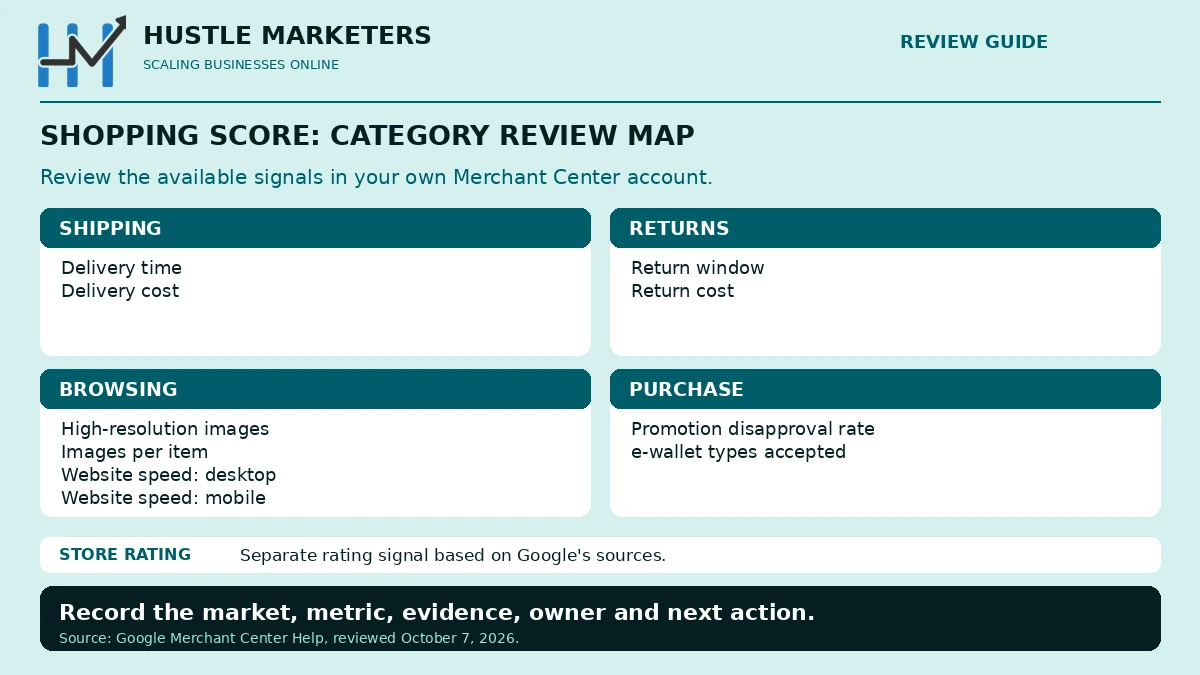
Here is the full list from Google’s store quality documentation. Four categories, ten metrics, plus store rating as a separate input.
| Category | Metric | What it measures | What you change to move it |
|---|---|---|---|
| Shipping experience | Delivery time | Days for customers to receive orders | Handling time, transit time settings, [handling_cutoff_time] |
| Delivery cost | Shipping cost excluding item cost | Shipping settings, [shipping], free shipping threshold | |
| Return experience | Return window | Days customers are allowed to return | Return policy in Merchant Center, [return_policy_label] |
| Return cost | What a return costs the customer | Same return policy settings | |
| Browsing experience | High resolution images | Share of images over 1048 pixels | Your product feed. [image_link] and [additional_image_link] |
| Images per item | Average number of images per product | [additional_image_link], up to 10 per product | |
| Website speed desktop | How fast your site loads on desktop | Core Web Vitals work on your storefront | |
| Website speed mobile | How fast your site loads on mobile | Same, and mobile is usually the weaker one | |
| Purchase experience | Promotion disapproval rate | Share of your promotions that get disapproved | Promotion feed hygiene and policy compliance |
| E-wallet types accepted | Which digital wallets you accept | Your checkout. PayPal, Google Wallet, Apple Pay, Amazon Pay | |
| Store rating | Store rating | A rating Google calibrates from multiple sources | Review volume and quality across programmes |
Read that Browsing experience block again, because it is the finding that changes how you work on this. Two of the ten scored metrics are read straight out of your product feed. Image resolution over 1048 pixels and the number of images per item are feed attributes. They are not a shipping decision or a policy decision. They are a job for whoever maintains your feed, and most merchants have never been told they affect store quality.
If your images are sitting at the old 250 by 250 minimum, or you are sending one image per product when you have five on the product page, you are losing points on a scorecard you thought was about delivery. Our guide to the Google product data specification covers the current image requirements in full.
The five rating levels
| Rating | What it means | What to do |
|---|---|---|
| Low | Well behind other merchants on this metric | Fix first. This is what is capping your overall score |
| Fair | Behind, but not badly | Fix second |
| Good | Broadly in line with other merchants | Improve if it is cheap. Not urgent |
| Great | Ahead of most merchants | Protect it |
| Exceptional | Top tier. Required overall for the badge | Protect it carefully. A quiet policy change can cost it |
If you have read elsewhere that the levels are Opportunity, Comparable and Excellent, that was the earlier labelling. Google’s current documentation uses the five levels above. Some accounts and some older screenshots still show the three-word version, so do not be thrown if the wording in your interface differs from an article you read last year. The five-level scale is what the current documentation describes.
Because every level is benchmarked against other merchants rather than against a fixed target, your rating can fall without you changing anything. If competitors move to free returns and you do not, you drift down while your own policy stands still. Merchants read that as a bug. It is the benchmark moving.
Where the badge is actually available
This is the single most useful fact in this article for anyone outside a short list of markets, and no competing article mentions it.
The Top Quality Store badge is available in seven countries only:
- Australia
- Canada
- India
- Japan
- New Zealand
- United Kingdom
- United States
If you sell into Germany, France, Spain, Italy, the Netherlands or anywhere else outside that list, there is no badge to earn in that market. The scorecard still gives you useful benchmarking data, and the underlying improvements still help conversion, but stop chasing a badge that is not offered where you sell.
To qualify you must rank Exceptional in overall quality score. Google’s wording is that you must perform well relative to other merchants across all the required metrics. Being Exceptional on shipping and Low on browsing does not get you there.
How the numbers are calculated
| Mechanic | What it means for you |
|---|---|
| Impression-weighted averages | Your high-traffic products count far more than your long tail. Fix images and speed on your best sellers first |
| Calculated daily | The data refreshes every day, so you are never looking at a stale quarter |
| Fixed lookback period | Today’s fix is diluted by the historical window. Nothing moves instantly |
| Up to 30 days for policy changes | Extend your return window today and expect to wait up to a month to see it scored |
| Benchmarked against all merchants | Relative, not absolute. Standing still is losing ground |
| Automatic enrolment | You are in it as soon as your account has approved products. You did not opt in |
| Opt out by contacting support | Possible, and almost never a good idea. You lose the benchmarking data too |
The impression-weighting point deserves emphasis. If you have 20,000 SKUs and 200 of them drive most of your impressions, fixing image resolution across those 200 will move Browsing experience far more than a catalogue-wide project. Sort by impressions, then fix.
How to move each category
This is the part competitors leave out. They list the metrics. Here is what to actually change.
Shipping experience
- Check your handling time is honest, not padded. Plenty of stores set a conservative handling time years ago and never revisited it. If you dispatch same day, say so.
- Set
[handling_cutoff_time]. Added to the product data specification in April 2026, it tells Google the daily deadline for same-day processing, which sharpens your delivery estimate instead of padding it. - Configure transit times per region rather than one national average that is wrong everywhere.
- Model a free shipping threshold against your average order value. It moves delivery cost more than anything else you can do.
- Make sure rate tables match reality. A table overstating cost scores you down for money you never charge.
Return experience
- Publish the window you actually honour. Many stores accept returns well past their stated window but never update the policy, and get scored on the stated one.
- Extending from 14 to 30 days is the most common single improvement, and for most categories the extra return volume is smaller than merchants fear.
- Free returns is the strongest move on return cost and the most expensive. Model it per category rather than across the whole catalogue.
- If free returns is not viable, a flat clearly stated fee scores better than a vague or variable one.
- Link policies to products with
[return_policy_label]where different product groups genuinely have different terms. - Remember the 30 day lag. Do not change the policy twice in a month because you saw no movement in week two.
Browsing experience
The category nobody writes about, and the one a feed specialist can move fastest.
- Audit image resolution against the 1048 pixel line. That is the threshold the metric uses, and it is well above the old feed minimums. Export your feed, check the source images, and re-render anything below it.
- Stop sending one image per product.
[additional_image_link]supports up to 10 additional images. If your product pages have five images and your feed sends one, you are choosing a lower score. - Prioritise by impressions, not by SKU count, because the averages are impression-weighted.
- Fix mobile speed before desktop. Both are scored separately and mobile is almost always the weaker of the two.
- Treat Core Web Vitals as a feed problem too. Oversized images that help the resolution metric can hurt the speed metric if they are served unoptimised. Serve high resolution to Google and responsive sizes to shoppers.
- Check your app is not the bottleneck. If your feed is generated by a plugin, see our comparison of shopping feed apps for which ones handle additional images properly.
Purchase experience
- Check your promotion disapproval rate. Most merchants never look at it. Every disapproved promotion is scored against you, so clearing a backlog of rejected promotions is free points.
- Fix the promotion causes, not just the symptoms. Common ones are missing or mismatched promotion IDs, dates that have expired, and terms on the landing page that do not match the feed.
- Add e-wallet payment methods. Google names PayPal, Google Wallet, Apple Pay and Amazon Pay. Adding a wallet is usually a checkout setting, not a development project, and it lifts conversion independently of the score.
- If you run no promotions at all, you have nothing to disapprove, which is a clean position rather than a problem.
Store rating
- Turn on Google Customer Reviews if it is off. It is free and it is the fastest path to the review minimum.
- Place the survey opt-in at order confirmation rather than burying it.
- Keep collecting. The rating runs on a rolling window, so stopping means decay.
- Collect per country if you sell internationally, because ratings are calculated per country.
- Do not confuse store reviews with product reviews. Our guide to seller ratings versus product ratings covers the difference, and syncing Judge.me reviews covers one common setup.
The store rating thresholds
Google does not publish numerical thresholds for the scorecard metrics themselves. It does publish them for store ratings, in its store ratings documentation:
- At least 100 eligible, unique reviews before Google will calculate a store rating at all.
- For paid text and Shopping ads, an average composite score of at least 3.5 out of 5.
- Reviews assessed on a rolling 24 month window, so old reviews stop counting.
- Geo-segmented, calculated separately for each country rather than aggregated globally.
That last point catches multi-country sellers out constantly. A strong rating at home does nothing for a market where you have fewer than 100 reviews. Five countries means review volume in five countries.
Where your reviews come from
| Source | Cost | Notes |
|---|---|---|
| Google Customer Reviews | Free | Google’s own post-purchase opt-in survey. Fastest route to 100 reviews for most stores |
| Third-party review partners | Varies | More than 30 supported, including Trustpilot, Yotpo, Feefo and Reviews.io |
| Google-led shopping research | Not applicable | Data Google collects itself. You cannot influence it directly |
If you are under 100 reviews and have no rating, turning on Google Customer Reviews is the highest-leverage free action available to you.
Two details from Google’s own documentation that decide where the score even appears. The Store Quality Score is calculated at domain level, not per account, so if you run several Merchant Center accounts in a CSS programme country the score shows only in the account used for free listings that had active organic offers in the past 30 days, and not across the others. Separately, if your Merchant Center account is linked to a Search Console property, you can manage shipping and return signals from Store Quality inside Search Console rather than only in Merchant Center.
Why you might have no score at all
| Symptom | Likely cause |
|---|---|
| No scorecard visible anywhere | Not enough data volume for Google to benchmark you reliably |
| Scorecard present, no store rating | Under 100 eligible reviews, or none in that country |
| Score in one country, not another | Everything here is calculated per country |
| Metrics showing as unavailable | Shipping or returns settings incomplete, so there is nothing to measure |
| Browsing metrics missing | Products not serving enough impressions for an impression-weighted average |
| Score dropped with no change on your side | The benchmark moved, or a policy change reset the 30 day window |
| Badge never appears despite good metrics | You may be selling outside the seven badge countries, or not Exceptional overall |
| Everything disappeared at once | Check account status first. A suspension removes eligibility entirely |
That last row matters more than it looks. If your listings have stopped showing altogether, store quality is not your problem. Start with Merchant Center suspension recovery or our guide to products showing Active but getting no free listing impressions.
The three store widgets
Separately from the badge on your listings, Google offers an embeddable widget for your own site, and since September 2025 it comes in three tiers based on your standing in Merchant Center.
| Tier | Who gets it |
|---|---|
| Top Quality Store widget | Merchants who have earned the badge |
| Store rating widget | Merchants with an established store rating but not the badge |
| Store quality widget | Merchants still building, so everyone can display something |
Installation is a snippet on your page template, similar to adding analytics or a chat tool. It is responsive and it updates automatically from your Merchant Center data, so it does not need maintaining. Because all merchants can participate regardless of rating status, there is no reason to wait for the badge before adding one. It is a trust element on your own site that you did not have to build.
Does it affect rankings?
This is where most articles hedge, so here is the honest position.
When Google rolled the programme out, its own communication to merchants said that those providing an excellent customer experience would see a boost in rankings, a badge and other benefits within the Shopping tab. That is Google’s own framing, not a third-party inference.
The current documentation is more conservative, listing the badge and early access to Google’s new features as the benefits. Both things can be true. What is not in dispute is that the inputs themselves, faster delivery, cheaper shipping, longer return windows, better images, a faster site and more payment options, all lift conversion whether or not there is a direct ranking effect. That is the case for doing the work.
Is the badge worth chasing?
If you sell outside the seven badge countries, no. There is nothing to win. Use the scorecard as free competitive benchmarking instead.
If you sell inside them, the badge itself is a small trust signal next to your listing. It will not transform your revenue and nobody should rebuild a returns policy purely to win it. What makes the work worth doing is that the badge is a by-product. The scorecard’s real value is that it tells you, benchmarked against your actual competitors rather than against generic best practice, which part of your offer is weakest. That is a genuinely useful piece of competitive intelligence and you are not paying for it.
Treat it as a diagnostic, not a trophy.
A 30 day plan to move your shopping score
| Week | Action | Effort |
|---|---|---|
| Week 1 | Open the scorecard. Record every metric in all four categories plus store rating, per country. Screenshot it for a baseline | An hour |
| Week 1 | Check whether the badge is even available in your markets before planning anything | Ten minutes |
| Week 1 | Turn on Google Customer Reviews if it is off | An hour |
| Week 1 | Clear your promotion disapprovals. Quick, and nobody does it | An hour |
| Week 2 | Export your feed. Flag every image under 1048 pixels and every product sending fewer than three images, sorted by impressions | Half a day |
| Week 2 | Audit handling and transit times against reality. Add [handling_cutoff_time] | Half a day |
| Week 3 | Re-render and re-upload images for your top impression products. Add additional images where the product page already has them | One to three days |
| Week 3 | Run mobile and desktop speed tests on your top landing pages and brief the fixes | Half a day |
| Week 3 | Decide on the return window and the free shipping threshold. Both are decisions, not tasks | A decision |
| Week 4 | Add an e-wallet if you accept none. Re-check the scorecard against your Week 1 baseline | Half a day |
Expect feed-driven metrics to move within weeks. Expect policy changes to take up to 30 days. Expect store rating to take months, because it is built on review volume that accumulates.
Frequently asked questions
What is a shopping score in Google Merchant Center?
Shopping score is the informal name merchants use for the Shopping experience scorecard and the overall store quality score it produces. Google rates you across Shipping experience, Return experience, Browsing experience and Purchase experience, plus your store rating, on a scale of Low, Fair, Good, Great and Exceptional, benchmarked against other merchants.
What are the Shopping experience scorecard rating levels?
Five levels: Low, Fair, Good, Great and Exceptional. Older articles and older interface screenshots use an earlier three-level labelling of Opportunity, Comparable and Excellent. The five-level scale is what Google’s current documentation describes, and you need Exceptional overall to earn the Top Quality Store badge.
Which countries have the Top Quality Store badge?
Seven: Australia, Canada, India, Japan, New Zealand, the United Kingdom and the United States. If you sell elsewhere, the scorecard still works as benchmarking but there is no badge available in that market.
How do I get the Top Quality Store badge?
There is no application. Enrolment is automatic once your account has approved products, and Google assesses you continuously. To qualify you must rank Exceptional in overall quality score, which means performing well relative to other merchants across all the required metrics rather than excelling in one category.
What am I missing to be a Top Quality Store?
Start with anything rated Low or Fair. In most accounts the weak spots are return cost, delivery cost, and the two Browsing experience image metrics that merchants do not realise are scored. Then check you have a store rating at all, which needs at least 100 eligible reviews in that country.
Do my product images affect my shopping score?
Yes. Two of the ten scored metrics are image-related. Google measures the share of your images over 1048 pixels and the average number of images per item, both read from your product feed. Sending one low resolution image per product costs you points in the Browsing experience category.
Why did my store quality drop when I changed nothing?
Usually the benchmark moved. Ratings are relative to other merchants, so if competitors improve and you stay the same, you fall. The other common cause is a recent policy change of your own resetting the lookback window, since it can take up to 30 days for a policy change to reflect.
How long does it take to improve store quality?
Metrics are calculated daily on an impression-weighted average over a fixed lookback period, so improvements show gradually rather than overnight. Policy changes such as returns can take up to 30 days. Plan on a few weeks before a genuine improvement is visible in the rating.
Can I opt out of the Shopping experience scorecard?
Yes, by contacting Merchant Center support. Enrolment is automatic and there is rarely a good reason to leave, since opting out also removes the competitive benchmarking data without improving anything.
Does the Shopping experience scorecard affect rankings?
Google’s original merchant communication said an excellent customer experience would bring a boost in rankings, a badge and other benefits in the Shopping tab. The current documentation lists the badge and early access to new features. Either way, the underlying improvements lift conversion on their own.
What is the difference between store ratings and product ratings?
Store ratings are about your business and produce the seller rating shown on ads. Product ratings are about individual products and put stars on product listings. They are separate programmes with separate setup, and running one does not give you the other.
How many reviews do I need for a Google seller rating?
At least 100 eligible, unique reviews before Google will calculate a rating, assessed on a rolling 24 month window. For paid text and Shopping ads you also need an average composite score of at least 3.5 out of 5.
Next steps
Open the scorecard today and write down every metric across all four categories, not just shipping and returns. Then check whether the badge exists in your markets at all. Those two steps take twenty minutes and they tell you whether this is a project worth running.
If you would like the feed, shipping, returns and site speed work behind your shopping score handled properly, that is work we do for ecommerce clients every week. See our Google Shopping ads agency page, or start with our Merchant Center audit template.
Related reading: the Google product data specification 2026, Shopping annotations and badges, free listings in Merchant Center, Merchant Center requirements, Shopify Merchant Center data sources, and the best apps for your shopping feed.