Free SEO Audit Report Template (Excel + Google Sheets)

Ishant
Published : October 21, 2026 at 10:49 am
Updated : October 16, 2026 at 12:13 pm
Ishant

Written by Ishant Sharma, Founder, Hustle Marketers | Published October 21, 2026
Most free SEO audit templates have a catch. Either you hand over your email to get them, or you sign up for a project management tool you never asked for, or you download a Word doc with twelve rows and no instructions. We got tired of recommending them to clients, so we built our own. This is the same SEO audit template we use for paid audits at Hustle Marketers, cleaned up and shared as a Google Sheet you can copy in one click. No signup, no email gate, no trial.
This page gives you the template, a filled-in sample audit so you can see what “done” looks like, and a step-by-step walkthrough of how to complete it, score your findings, and present them to a client or your boss.
Key Observations
- Free SEO audit report template in Excel, ready to upload to Google Sheets. No email required.
- Sixteen tabs: ReadMe, Summary Dashboard, seven audit areas (Technical, On-Page, Content, Backlinks, Local, Core Web Vitals, AI Visibility), five diagnostic tabs (Content Decay, Query Opportunities, Position Bands, Logs, Rendering), an Implementation Schedule and a filled-in Sample Audit.
- Every check includes a “where to find this data” column, so you know exactly which report in GSC, GA4 or your crawler to open.
- Built-in priority scoring: Impact x Effort gives each issue a P1 to P4 rating.
- Includes a fully filled-in sample audit from an anonymized client, which none of the five free templates we compared below offers.
- Updated for 2026: INP thresholds, AI Overviews visibility and LLM citation checks are in the template.
- Works for ecommerce, local, SaaS and content sites. Free tools are enough to complete it.
Table of Contents
- Download the Template
- What Is an SEO Audit Template?
- What a Complete SEO Audit Covers in 2026
- How to Use the Template Step by Step
- How to Audit Content That Is Losing Traffic
- Example: A Filled-In SEO Audit
- How to Present the Audit to a Client
- SEO Audit Template Comparison: Ours vs Popular Free Options
- What Competing Templates Still Miss
- FAQs
- Sources and Verification
Download the Template
Here is the template, plus the walkthrough deck if you want the method explained step by step.
Free download, no email required
Get the workbook and the walkthrough
Two files, both ungated. Start with the spreadsheet. The deck is there if you want the method explained slide by slide.
The SEO audit template
Sixteen tabs, a Summary Dashboard, built-in P1 to P4 priority scoring and a filled-in sample audit.
Open the Google Sheets versionThe 18-slide walkthrough
How to run the audit, score each issue and present the findings to a client or your boss.
Download the PDF deckNo signup, no email gate, no trial. Both files are free to use on client work.
What Is Inside
The template has sixteen tabs:
- ReadMe. How to use the template, the priority rule, and the free tool stack that completes every check.
- Content Decay. For a page that is losing traffic: separate a genuine ranking loss from an answer above you taking the click, then decide whether to update, rewrite, remove or review it.
- Query Opportunities. Queries where a page earns impressions but zero or close to zero clicks, pulled from the Queries tab of the Search Console Performance report.
- Position Bands. Those queries grouped by ranking position, which is how the diagnosis tables in the content decay section below read them.
- Logs. Which named crawlers hit the server, whether important pages get any bot traffic, and whether a bot that fetched your HTML also fetched the JavaScript the page depends on.
- Rendering. A view-source check that your headline, price and main answer are in the HTML the server sends, plus Agent Readability rows for buttons and links that need a role and an accessible name.
- Summary Dashboard. Overall health score, pass/warn/fail counts per area, a top five issues list, and a traffic snapshot. This is the tab you show a client first.
- Technical. Crawlability, indexation, robots.txt, XML sitemap, canonical tags, redirect chains, 404s and status codes.
- On-Page. Title tags, meta descriptions, heading structure, internal linking, duplicate content.
- Content. Content quality, search intent match, thin pages, decay, E-E-A-T signals.
- Backlinks. Referring domains, anchor text distribution, toxic backlink flags.
- Local. Google Business Profile, citations, NAP consistency. Skip this tab if local does not apply.
- Core Web Vitals. INP, LCP and CLS against current thresholds, mobile and desktop.
- AI Visibility. AI Overviews presence, ChatGPT and Perplexity citation checks, brand mention tracking.
- Implementation Schedule. Every issue, its owner, its priority and a due date.
- Sample Audit. A filled-in example from an anonymized ecommerce client, so you can see exactly what “done” looks like before you start.
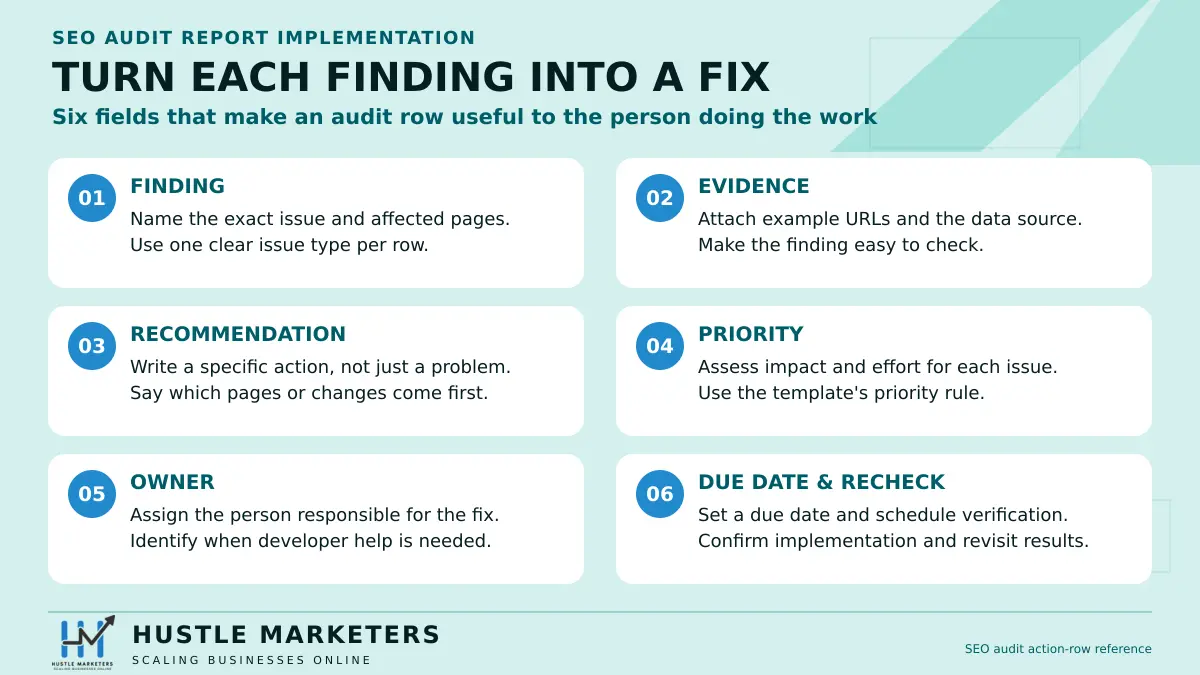
Each check row has the same columns: Check, Status, Rating, Evidence/URL, Why it matters, Recommendation, Impact (1-3), Effort (1-3), an auto-calculated Priority, Owner and Due date. Score Impact and Effort and the P1 to P4 label fills itself. Plus the column people tell us they love most: Where to find this data, which names the exact GSC report, Screaming Frog tab or PageSpeed Insights field for that check. You never have to guess where a number comes from.
What Is an SEO Audit Template?
An SEO audit template is a structured audit checklist that walks you through every area of a website that affects organic search performance, records what you found, and turns those findings into a prioritized action plan. It is the difference between “we looked at the site and it has some issues” and a document a developer can actually work from.
A good template does three jobs. It makes sure you do not skip anything, it standardizes how you rate problems, and it produces a client-ready deliverable at the end. In the audits we run at Hustle Marketers, the client deliverable matters as much as the findings. An audit that never gets implemented is a wasted week, and audits get implemented when the recommendations are specific, prioritized and assigned to someone.
If you are wondering whether to do this yourself or pay someone, we wrote an honest breakdown of what an SEO audit costs and when the paid route makes sense.
What a Complete SEO Audit Covers in 2026
Most templates floating around were built for 2019. Here is what a complete audit actually needs to cover now.
Technical SEO
Can Google crawl and index the site efficiently? The technical SEO audit section checks robots.txt rules, XML sitemap health, canonical tags, redirect chains, 404 errors, status codes, indexability and index coverage in Google Search Console. On larger sites, crawl budget and site architecture come into play. This is where most quick wins hide. In our experience, fixing indexation problems alone has moved traffic on sites where nothing else changed for months.
On-Page SEO
Title tags, meta descriptions, heading hierarchy, internal links and content quality on a page-by-page basis. The template flags duplicates, missing elements and pages targeting the same keyword. Internal linking gets its own rows because it is the most under-audited item we see. If you run an online store, pair this section with our ecommerce SEO checklist, which goes deeper on category and product pages.
Off-Page SEO
Off-page SEO here means your backlink profile: how many referring domains you have, how fast you are earning them, what the anchor text looks like, and whether any toxic backlinks or manipulative patterns show up. You do not need an expensive tool for a first-pass backlink analysis. GSC’s Links report plus one free-tier backlink checker covers the template’s checks.
To fill in the backlink section faster, our free dofollow link checker verifies up to 10 linking pages at once and flags any that are nofollow or missing.
Core Web Vitals
INP, LCP and CLS, measured with field data at the 75th percentile. INP replaced First Input Delay back in 2024, and plenty of templates still have not caught up. Ours uses the current thresholds and tells you where to read them in Search Console. For the full explanation of what these metrics mean and how much they actually move rankings, read our Core Web Vitals and INP guide. For fixes, our website speed tips post covers the common culprits.
Local SEO
Google Business Profile completeness, category selection, reviews, citations and NAP consistency. Only relevant if the business serves a physical area, which is why it lives on its own tab you can delete.
AI Search Visibility
This tab covers what a classic audit misses. In 2026, an audit that ignores AI Overviews and LLM citations is incomplete, which is why LLM visibility gets its own tab rather than a footnote. The tab checks whether AI Overviews appear for your money keywords, whether your brand gets cited by ChatGPT and Perplexity for the questions your customers ask, and whether your content is structured in a way answer engines can lift. If this area is new to you, our guide to generative engine optimization explains the landscape, and our guide to tracking brand visibility in AI search covers measurement in depth.
Server Logs and AI Crawler Behavior
Search Console reports on Google. Nothing else. So server logs are currently the only reliable way to see which AI crawlers reach your site, how often, and whether they can actually read what they fetched.
The Logs tab checks three things. Which named agents hit the server, whether important pages get any bot traffic at all, and whether a bot that fetched your HTML also fetched the JavaScript that page depends on. That last comparison is what finds rendering blind spots.
One honest caveat belongs in every AI audit. Many AI citations happen without a visit, because the system reads a snippet from a search index rather than fetching your page. So a quiet log file is not proof that your AI visibility work failed. Measure citations separately from crawls.
Rendering and Agent Readability
Googlebot renders JavaScript. Most AI crawlers do not, or they give up much sooner. So a page that looks complete in a browser can arrive at an AI system as an empty shell.
The template checks this with view-source rather than inspect element, because view-source shows what the server actually sent. If your headline, your price or your main answer only appears after JavaScript runs, that content is invisible to a large share of AI crawlers.
The Agent Readability rows go one step further. AI agents are starting to complete tasks rather than just summarize pages, and they read your site through the accessibility tree. A styled div that looks exactly like a button has no role and no accessible name, so an agent cannot act on it. You can check this in Chrome DevTools in about five minutes, and it is the difference between an agent completing a purchase and failing silently. Our technical SEO checklist walks through both tests.
How to Use the Template Step by Step
Here is the exact workflow we follow. Budget a focused day for a small site, two to three days for a larger one.
Step 1: Crawl the Site and Fill the Technical Tab
Run a crawl with Screaming Frog (the free version handles up to 500 URLs) or any crawler you like. Export the issues: broken links, redirect chains, missing canonicals, duplicate titles. Paste your findings into the Technical tab, one row per issue type, with example URLs in the Evidence column. The “where to find this data” column tells you which crawler tab each check maps to.
Step 2: Pull GSC and GA4 Data
Open Google Search Console. You want the Indexing report for coverage issues, the Core Web Vitals report for field data, and the Performance report for your top queries and pages. From GA4, pull engagement rate and conversions for organic sessions. This data feeds the Summary Dashboard and tells you which sections of the site deserve the most attention. A page with heavy traffic and a technical problem outranks a perfect fix on a page nobody visits.
Step 3: Score Each Issue (Impact x Effort)
This is the part most templates skip and the reason audits stall. For each issue, score Impact from 1 to 3 (how much this affects rankings, traffic or conversions) and Effort from 1 to 3 (how hard it is to fix). The template combines them into a priority:
- P1 (Critical): high impact, low effort. Do these first, always.
- P2 (High): high impact, high effort. Plan and resource these.
- P3 (Medium): low impact, low effort. Batch them.
- P4 (Low): low impact, high effort. Usually not worth it. Say so.
A blunt P4 label is a feature, not a failure. Telling a client “do not spend money on this” builds more trust than a 60-item list of equal-weight tasks.
Step 4: Write Recommendations Clients Understand
For each P1 and P2 issue, the Recommendation column should say what to do, not just what is wrong. “Meta descriptions missing on 40 pages” is a finding. “Write meta descriptions for the 12 highest-traffic pages first, list attached” is a recommendation. Write for the least technical person who will read the report. If a fix needs a developer, say so in the Owner column.
Step 5: Build the Implementation Schedule
Move every P1 and P2 item to the Implementation Schedule tab with an owner and a due date. Group by month. This tab is what turns an audit from a document into a project, and it is the tab we review in every follow-up call with clients.
How to Audit Content That Is Losing Traffic
The most common reason someone opens an audit template is not a new site. It is an old post that used to work. Traffic has slid for a few months, nobody is sure why, and the instinct is to rewrite the whole thing.
Usually that is the wrong move. Here is the diagnostic we run instead, and it takes about twenty minutes per page.
First, Separate the Two Kinds of Decline
Open Search Console, filter to the single URL, and set the longest date range the report offers. Then plot clicks against impressions and read the shape before you touch anything.
| Pattern | What it actually means | Is the page broken? | First action |
|---|---|---|---|
| Impressions down, clicks down | Genuine ranking loss | Yes | Run the position and intent checks below |
| Impressions flat or up, clicks down | An AI answer or SERP feature is satisfying the query above you | No | Do not rewrite. Change what you measure and shift effort to commercial intent |
| Impressions up, clicks up, position falling | You are gaining reach on more queries | No | Expand coverage on the new queries |
| Impressions flat, clicks down, position flat | A click-through problem, usually the title | Partly | Rewrite the title and the snippet-facing copy |
That second row is the one people get wrong most often. A page can hold its ranking perfectly while clicks fall, because the answer is now being given above the result. Rewriting a page for a problem it does not have wastes a day and changes nothing.
Second, Mine the Queries With Impressions and No Clicks
This is the highest-value ten minutes in any content audit, and it is the step almost every template skips.
In Search Console, go to Performance, filter to the single page, then open the Queries tab. Turn on Clicks, Impressions, CTR and Position. Now sort by impressions, highest first, and look for rows where clicks are zero or close to it.
Those queries are free information. Google already believes your page is relevant enough to show for them. It just is not winning the click, and the reason depends entirely on the position.
| Impressions | Clicks | Position | Diagnosis | What to do |
|---|---|---|---|---|
| High | Zero | 1 to 10 | You rank but the snippet is not earning the click, or the answer sits above you | Rewrite the title around that exact query. Put the direct answer in the first sentence under the matching heading |
| High | Zero | 11 to 20 | Recognized for the query, not competitive on it | Add a dedicated H2 or H3 using the query phrasing, then answer it properly |
| High | Zero | 21 to 50 | The page touches the topic but does not cover it | Add a full section, or build a supporting page and link it here |
| High | Zero | 51+ | Wrong page for this query | Map the query to a different page, or build a new one |
| Low | Zero | Any | Not enough demand to act on yet | Log it, revisit next quarter |
Export that list. Every query in the first three rows becomes either a new heading on the existing page or a section rewrite. This is how a one-year-old post gets refreshed without a blank page and a guess.
Third, Check Whether the Intent Moved
If impressions genuinely fell, search the target keyword yourself and look at what ranks now.
Page types change. A query that returned blog posts eighteen months ago might return product pages, comparison tables or a video carousel today. When that happens, your page did not get worse. It stopped matching the format Google is rewarding.
| What ranks now | What you have | Verdict |
|---|---|---|
| Same page type as yours | Matching type | Not an intent problem. Look at depth, freshness and links |
| Listicles and comparisons | A single how-to guide | Format mismatch. Restructure or build the comparison separately |
| Product or service pages | A blog post | Intent mismatch. The post cannot win this. Build the commercial page |
| Tools and calculators | Text only | Format mismatch. Add the interactive element or accept the ceiling |
Fourth, Decide: Update, Rewrite, Remove or Review
Only now do you decide what happens to the page. Score it against twelve months of data from both Search Console and GA4, then drop it into one of four buckets.
| Bucket | Signal pattern | Action | Effort |
|---|---|---|---|
| Update | Impressions healthy, clicks weak, position 5 to 20 | Refresh data, rewrite the title, add the mined queries as headings, add internal links | 2 to 4 hours |
| Rewrite | Impressions present, position 20 to 60, engagement poor | Rebuild against the current SERP intent. Keep the URL | 1 day |
| Remove | Near-zero impressions and near-zero engagement across 12 months | Delete and 301 to the closest relevant page, or serve 410 | Minutes |
| Review | Low traffic but flagged as commercially important | Human decision. Never automate this one | One conversation |
Set the Remove threshold explicitly before you start, otherwise it becomes negotiable halfway through. On a mid-sized site we use fewer than 100 impressions and fewer than 20 sessions across twelve months.
Never Delete on Traffic Data Alone
Some pages survive a cull regardless of what the numbers say. Check every Remove candidate against this list before anything goes.
- Pages that earn backlinks, even with no organic traffic of their own
- Pages the sales team sends to prospects
- Legal, policy, compliance and accessibility pages
- Pages that convert rarely but at high value
- Pages already being cited by AI assistants, which you will only know if you check
We learned that last one the hard way. On an early cleanup we removed a thin comparison page with fourteen sessions in a year. It turned out the sales team linked to it in every proposal, because nobody there thought of it as content.
One Thing Not to Do
Do not noindex thin pages as a permanent solution. Noindex removes the page from results, but the page still exists, still gets crawled, and still counts toward how search engines judge the site as a whole. It solves the symptom you can see and leaves the cause you cannot. Remove the page or improve it.
Finally, Set the Recheck Date
Put the URL in the Implementation Schedule tab with a validation date four to six weeks out. Validation is the same Search Console view you started with. If impressions recover and clicks follow, it worked. If impressions recover and clicks do not, you are back in row two of the first table, and the answer is a title rewrite rather than more content.
Example: A Filled-In SEO Audit
The Excel workbook includes a complete sample audit for an anonymized ecommerce client, filled in row by row. You can see how we phrase findings, what evidence we attach, how the scoring plays out, and what a finished Summary Dashboard looks like. We added this because the number one question we get about templates is “what does a good one look like when it is done?” Now you can just look. If you came here searching for an SEO audit report example, this sample is exactly that: real structure, real wording, only the client details changed.
The sample is drawn from the kind of work behind our Magento SEO case study, where a structured audit and implementation plan supported a store that recorded $8.05M in sales from 2023 to 2025, a figure that also reflects pricing, promotions and repeat customers, not SEO alone. The audit did not do that alone. The implementation did. That is the point of the schedule tab.
How to Present the Audit to a Client
Do not open the Technical tab in the meeting. Open the Summary Dashboard, and lead with three things: the biggest opportunity, the biggest risk, and what you recommend doing in the next 30 days. Then walk through P1 items only. Offer the full workbook as the leave-behind for their developers.
A summary paragraph we use as a starting point: “The site is fundamentally healthy, but three issues are holding back meaningful traffic: [issue one], [issue two], [issue three]. Fixing these is roughly [X days] of developer time, and they affect pages that currently receive [Y]% of organic traffic. Everything else in this report is secondary until these are done.”
Short, specific, prioritized. Clients remember three things, not sixty.
SEO Audit Template Comparison: Ours vs Popular Free Options
| Template | Format | Gated | Sample audit | Priority scoring | Content decay playbook | Query mining (impressions, no clicks) | Log and AI crawler tab | Rendering and agent readability |
|---|---|---|---|---|---|---|---|---|
| Hustle Marketers | Excel + Sheets | No | Yes | Impact x Effort | Yes | Yes | Yes | Yes |
| Backlinko | Word, PDF, Doc | No | No | No | No | No | No | No |
| HubSpot | Excel, Sheets | Yes, email | No | No | No | No | No | No |
| Asana | Asana board | Yes, signup | No | No | No | No | No | No |
| Aleyda Solis | Docs, Sheets | No | Partial | Priority column | No | No | No | No |
| Semrush | Tool report | Yes, account | Auto | Auto | No | No | No | No |
The others are fine starting points. Aleyda’s structure in particular shaped how the industry writes audit reports. But none of them combine an ungated spreadsheet, a filled-in example, a scoring model and current-year checks on one page, which is why we built this.
What Competing Templates Still Miss
A checklist is not an audit until it records evidence, translates the finding into a specific recommendation, scores impact and effort, assigns an owner and creates a due date. The included workbook does all of those jobs and gives AI visibility its own tab instead of hiding it in a miscellaneous section.
The Excel workbook included with this article can be uploaded to Google Sheets for collaboration. Keep the live Sheet only if its sharing settings have been tested in a logged-out browser. Use PDF only as an exported presentation snapshot after the audit is complete; the workbook remains the source of truth.
The audit finds the work; implementation creates the result. Learn how our SEO agency approaches the work, then compare the method with the evidence in our Magento ecommerce growth case study.
FAQs
What should an SEO audit template include?
At minimum: technical SEO, on-page SEO, content quality, backlinks and Core Web Vitals, each with a status, evidence and a recommendation. A good template also includes priority scoring and an implementation schedule so findings turn into action. In 2026 we would add AI search visibility checks, since a growing share of discovery now happens in AI Overviews and chat interfaces.
Which format is best: Google Sheets or Excel?
Google Sheets, for most people. It is collaborative, free, and easy to hand to a client or developer with a share link. Use Excel when your company prefers a controlled local file. Export a PDF only as a presentation snapshot, since a PDF cannot be updated as fixes ship.
How do I run an SEO audit step by step?
Crawl the site, pull Search Console and GA4 data, work through each template tab recording findings with evidence, score every issue on impact and effort, then build an implementation schedule with owners and dates. The five-step walkthrough above covers each stage in detail. The order matters less than finishing with a prioritized plan rather than a raw issue list.
How long does an SEO audit take?
For a small site under a few hundred pages, one focused day using this template and free tools. Larger or ecommerce sites typically take two to five days because crawls are bigger and there are more page templates to review. Enterprise audits can run for weeks, which is one reason audit pricing varies so much.
How do I prioritize issues found in an audit?
Score each issue on impact (effect on rankings, traffic or conversions) and effort (time and cost to fix), then work high-impact, low-effort items first. The template automates this into P1 to P4 labels. Resist the urge to fix easy cosmetic items first; a P3 that takes five minutes still matters less than a P1 that takes a week.
How often should you audit a website?
A full audit once or twice a year, plus a lighter quarterly check of Search Console for new coverage errors, Core Web Vitals regressions and lost rankings. Audit immediately after a redesign, a migration or a visible traffic drop. Sites that publish or change pages daily need the quarterly cadence more than static sites do.
Can I use one template for ecommerce, local, and SaaS sites?
Yes. The tabs are modular: delete the Local tab for a SaaS company, lean harder on the Technical and On-Page tabs for ecommerce, and add rows where your situation demands it. The scoring model and report structure stay the same across site types.
How do I create an SEO audit report for a client?
Complete the workbook, then present from the Summary Dashboard: biggest opportunity, biggest risk, 30-day plan. Keep the full detail as an appendix for their technical team. Clients buy clarity and prioritization, not page counts, so a tight summary with three P1 items beats a 40-page PDF every time.
Are free SEO audit templates as good as paid ones?
For the checklist itself, yes: this free template contains the same checks we use in paid engagements. The template is rarely what you pay for; the expertise applying it is. What a paid audit adds is experienced judgment on ambiguous findings, custom analysis for your niche, and accountability for the outcome, which is why agencies still charge for audits despite free templates existing.
What tools do I need to complete the template?
A completely free stack works: Google Search Console, GA4, PageSpeed Insights and Screaming Frog’s free tier for crawling up to 500 URLs. Paid tools like Semrush or Ahrefs speed up the backlink and keyword sections and remove the crawl limit, but they are optional. Every check in the template notes which tool and report to use.
What should I check first in an SEO audit for a small business website?
Start with indexation: open Google Search Console and confirm your important pages are actually indexed. For a small business site, the next checks are Google Business Profile accuracy, title tags on your main service pages, and mobile speed. Most small-site problems live in those four areas, and every one of them is free to check.
Can I do an SEO audit myself without paying an agency?
Yes, most site owners can complete a solid first audit themselves using this template and free tools. Give yourself a focused day, follow the five steps above, and be honest with the scoring. An agency earns its fee when the site is large or the findings are ambiguous, not because the checks themselves are secret.
Why did my traffic drop even though my SEO audit came back clean?
A clean audit means the site has no obvious technical or on-page problems, not that rankings are guaranteed. Drops often come from algorithm updates, stronger competitors, shifting search demand or AI Overviews absorbing clicks, and none of those show up as red rows in a checklist. Compare your drop date against known Google updates, and check whether impressions fell along with clicks or only clicks did.
Do I need Screaming Frog or can I audit a site with just free Google tools?
You can complete most of this audit with Google Search Console, GA4 and PageSpeed Insights alone, but a crawler catches issues Google’s tools will not surface, like redirect chains and orphan pages. Screaming Frog’s free version handles up to 500 URLs, which covers most small business sites at zero cost. So the honest answer is: Google tools get you 80% of the way, and a free crawl closes the gap.
How do I know if my website has toxic backlinks?
Look at your anchor text distribution and referring domains in GSC’s Links report or a free backlink checker: exact-match commercial anchors from irrelevant, low-quality sites are the classic warning sign. Toxic backlinks are rarer than the disavow-tool industry suggests. Google’s own disavow help page says that in most cases it can assess which links to trust without extra guidance, so most sites never need the tool. Only act if you see a large, sudden pattern or the site has a history of paid link building.
Should an SEO audit include AI search visibility in 2026?
Yes, we treat it as a required section now, not an optional extra. A growing share of discovery happens in AI Overviews, ChatGPT and Perplexity, so the audit should check whether those systems cite your brand for the questions your customers ask. That is exactly what the AI Visibility tab in this template covers.
Want us to run the audit for you?
If you would rather have experienced eyes on your site, our SEO agency team runs the full audit, presents the findings, and can implement the fixes too. It is the same process behind our Tanzania safari operator case study. Either way, take the template. It is yours.
Sources and Verification
Facts that can change were checked on October 7, 2026 against these primary sources: