Google Ads Remarketing 2026: The Threshold Changed

Ishant
Published : October 12, 2026 at 10:46 am
Updated : October 16, 2026 at 12:13 pm
Ishant

Most guides to Google Ads remarketing are teaching a threshold Google changed, a campaign type Google is retiring, and a privacy deadline that never happened.
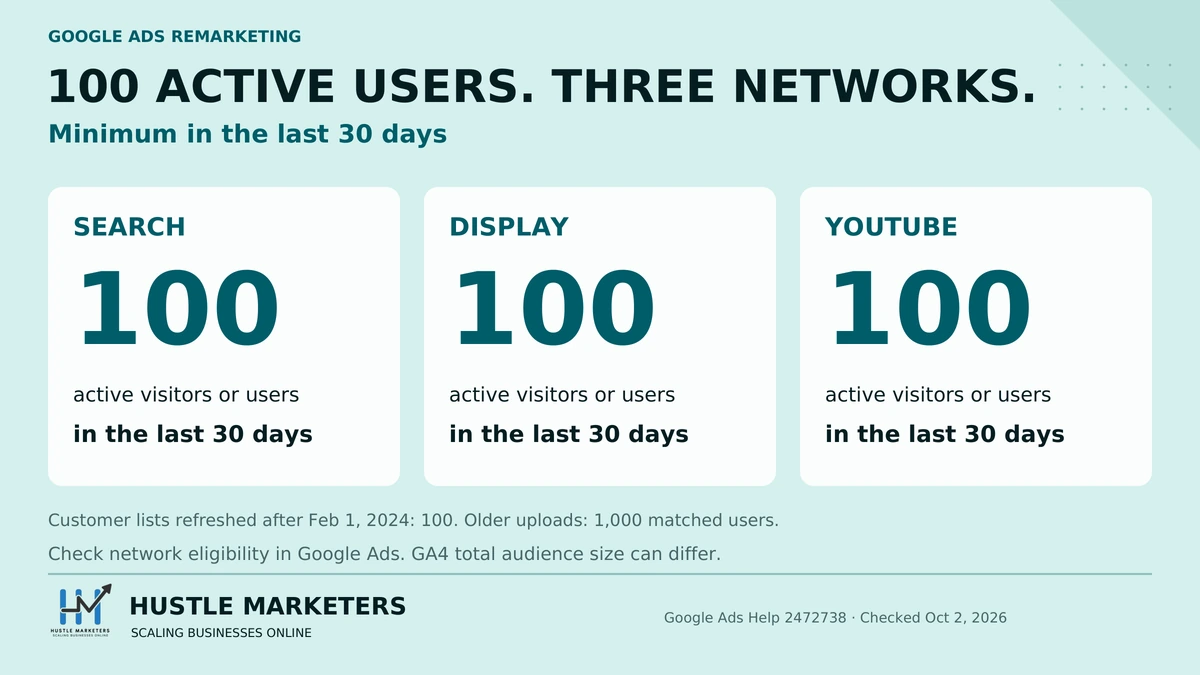
Start with the number, because it is the one that stops accounts working. Google’s documentation states that a data segment for the Google Search Network “must have a minimum of 100 active visitors or users within the last 30 days”, and repeats the identical sentence for the Display Network and for YouTube (Google Ads Help 2472738). One hundred, on all three networks.
We read 31 pages ranking for remarketing queries. Most still tell you that Search needs 1,000 users. Two of them carry 2026 in the title. That number was right once and it is the reason a lot of advertisers have decided remarketing is not viable at their traffic level when it plainly is.
The second thing the category has wrong is bigger. Guides are still telling you to prepare for the end of third-party cookies. Google abandoned that. On 22 April 2025 it confirmed it had “made the decision to maintain our current approach to offering users third-party cookie choice in Chrome, and will not be rolling out a new standalone prompt for third-party cookies” (privacysandbox.google.com, 22 April 2025). On 17 October 2025 Google announced it is retiring the Privacy Sandbox APIs that were supposed to replace them, Topics and Protected Audience included, and its own status page still lists them as scheduled for phase-out rather than already gone. Your lists are not shrinking because of cookies. They are shrinking for reasons this guide covers, and the fix is different.
This page is written by Ishant Sharma, who runs Google Ads for ecommerce, local service and SaaS accounts at Hustle Marketers. It includes the audience-building method we actually use in client accounts, which is not the one Google’s own setup flow walks you through. Every claim is sourced to a Help article ID so you can check it.
Last verified: 14 September 2026.
What is Google Ads remarketing?
Remarketing shows ads to people who have already interacted with your business: visited your site, used your app, watched your videos, or appeared on a customer list you uploaded. You build a group of those people, then target or exclude that group in a campaign.
Two vocabulary notes, because they cause real confusion when you are following an older guide against the current interface.
- Google now says “data segment”, not “remarketing list”. The section of the interface is Audience Manager, and inside it your remarketing lists live under “Your data segments”. Same thing, renamed.
- Google now says “Google tag”, not “global site tag” or “remarketing tag”. One tag does conversion tracking and audience building together.
What is the difference between remarketing and retargeting?
Nothing. They are the same practice. Google’s products say remarketing, most of the rest of the industry says retargeting, and some people draw a distinction where remarketing means email and retargeting means ads. That distinction is not one Google makes and it is not worth your time.
Why did my audience stop being called a remarketing list?
Because Google consolidated everything that describes a group of people into “audience segments”, of which your own first-party lists are one type. The others are Google’s own segments: in-market, affinity, detailed demographics and life events. When a guide says “remarketing list” and your screen says “data segment”, you are in the right place.
Should you build remarketing audiences in Google Ads or GA4?
This is the section that changes how the rest of the guide works, and none of the 31 pages we read covers it as a decision. Build them in GA4. Here is the actual reason, which is not the one usually given.
The Google tag fires on every visitor, whatever brought them. So it is not true that a Google Ads audience only captures people who arrived from Google Ads. Everyone lands in the pool.
The problem is what you can then slice, and it is more subtle than most people assume. Google Ads data segment rules are built from page URL, referrer URL and parameters you send through the tag. You can genuinely build a referrer rule: Google’s own example is that “to create a segment of visitors who accessed your website from Google’s search results, you can create an action with the action rule ‘Referrer URL contains www.google.com'” (Google Ads Help 6297497).
So it is not that you cannot do it. It is that you are reading a raw header instead of an attribution model. A referrer rule sees the URL immediately before one page view. It has no concept of a session, a channel or a campaign. And Google notes the limitation itself: referrer URLs only exist when someone arrives by clicking a link, so anyone typing your address or arriving from an app produces nothing to match.
GA4 reads the attributed session source instead. Its audience builder lets you “segment by dimensions, metrics, and events to include practically any subset of users” (GA4 audiences), and Source, Medium, Source / medium, Campaign and Default channel group are all standard GA4 dimensions (GA4 dimensions reference). That difference is the whole argument.
What can you build in GA4 that you cannot build in Google Ads?
| Audience you want | Google Ads | GA4 |
|---|---|---|
| Visited a pricing page in the last 30 days | Yes | Yes |
| Visited from Meta in the last 30 days | Referrer rule only, and Meta’s in-app browser defeats it often | Source / medium condition |
| Arrived from organic search, not paid | No. Both arrive as google.com and a referrer rule cannot tell them apart | Default channel group condition |
| Came from a specific email campaign | Only if the UTM is still in the landing page URL | Campaign condition |
| Viewed 3+ products but did not add to cart | Not really | Event count condition |
| Did X, then later did Y, in that order | Not possible | Sequence condition |
| Scrolled 90% of a blog post | No | Event condition |
The practical consequence for anyone running paid social alongside Google Ads. You can build an audience in GA4 of people who arrived on your site from Meta, import it, and retarget them on Search, YouTube and Demand Gen through Google Ads. You are buying a second impression against traffic you already paid Meta for, on a different auction, and you can exclude them from prospecting at the same time.
You can approximate that in Google Ads with a referrer rule. It will miss a large share of the traffic it is aimed at, because Meta traffic is overwhelmingly in-app and in-app browsers frequently send a redirector domain or no referrer at all. The row that decides it for us is the organic one: a referrer rule cannot separate your paid Google traffic from your organic Google traffic, because both arrive as google.com. GA4 can, because it is reading channel, not a header.
How we set these up at Hustle Marketers
This is the standing setup we use on client accounts, and it takes about fifteen minutes once GA4 and Google Ads are linked.
- Link GA4 to Google Ads and turn on personalized advertising in the link. The link alone is not enough. If personalised advertising is off, your audiences build in GA4 and then either never import into Google Ads at all or import and never populate, and nothing tells you why.
- Build page-view audiences at 30 and 60 days. Two durations, not seven. The 30-day list carries recent intent and is where most of the return sits. The 60-day list gives you reach when the 30-day list is too small to serve. Longer than that, for most businesses, you are paying to reach people who have forgotten you.
- Build a channel audience for every paid channel you run. Meta visitors, organic visitors, email visitors, as separate segments, using Source / medium or Default channel group.
- Build a converter audience and use it as an exclusion everywhere. This is the single most common thing missing from accounts we audit.
- Wait. Then check the size in Audience Manager, not in GA4. The two numbers will not match and the Google Ads number is the one that decides whether your ads serve.
Why 30 and 60 rather than the default 30 only: a single list means a single reach ceiling. Two gives you a lever. When the 30-day list falls under the threshold in a quiet month, the 60-day list keeps the campaign serving instead of the campaign silently stopping. The rest of this guide explains that threshold, because it is the thing most people get wrong.
One honest caveat on this method. GA4 audiences are not automatically better. They depend on GA4 collecting cleanly, on Google Signals, which is the setting that lets GA4 use data from signed-in Google users, and on consent. If your GA4 is misconfigured, GA4 audiences will be worse than Google Ads ones. The section on lists that will not grow covers how to tell which you have.
What is the minimum remarketing list size in Google Ads?
100 active visitors or users within the last 30 days. Search, Display and YouTube, all the same.
Google states it three times on one page, once per network: a segment “must have a minimum of 100 active visitors or users within the last 30 days” (Google Ads Help 2472738).
Is the minimum 1,000 users or 100 users?
It is 100. The 1,000 figure was the old Search and YouTube requirement and it was standardised down without a product announcement, which is why so much published content still carries the old number. The only date Google documents nearby is 1 February 2024, the cutoff after which uploaded customer lists moved to the 100-user rule.
| Network or segment type | Published in most guides | Current, per Google | Notes |
|---|---|---|---|
| Display Network | 100 | 100 | Unchanged |
| Search Network / RLSA (remarketing lists for search ads) | 1,000 | 100 | The change most guides missed |
| YouTube | 1,000 | 100 | The change most guides missed |
| Gmail | 1,000 | Reached through Demand Gen now, see below | Standalone Gmail ads went read-only in July 2021 and stopped running on 28 June 2022 |
| Customer Match | Varies | 100 matched users, for lists uploaded or refreshed after 1 February 2024 | Lists uploaded before that date still need 1,000 matched users. Upload well above 100 records, because match rate decides how many count |
Why this matters more than it sounds. A site with 2,000 monthly visitors was, under the old number, locked out of Search remarketing entirely. Under the current number it is comfortably eligible. If you or a client concluded years ago that the account was too small for RLSA, that conclusion was based on a number that no longer applies. Recheck it.
Why does my list say it has 5,000 users but still will not serve?
Because list size and active list size are different numbers. The threshold is 100 active users in the last 30 days, not 100 people who have ever been on the list. A 540-day list can show a large total and still fail to serve, because the recent thirty days are thin.
Check the network eligibility column in Audience Manager rather than the total size. A segment can read “Eligible” for Display and “Too small” for Search at the same time, from the same underlying list.
Why is my remarketing list not growing?
The most searched problem in this topic, and the published answers are either “wait and see” or a list of strategy tips. Here is the actual diagnostic order. Work down it and stop at the first thing that is wrong.
| # | Check | What wrong looks like | Where |
|---|---|---|---|
| 1 | Is the Google tag firing at all? | No hits recorded against the tag | Audience Manager, Your data sources |
| 2 | Is GA4 linked to Google Ads? | Audience exists in GA4, absent in Google Ads | GA4 Admin, Google Ads links |
| 3 | Is personalised advertising enabled on the link? | Audience imports and sits at zero | GA4 Admin, the Ads link itself |
| 4 | Is Google Signals or user-provided data collection on? | GA4 audience builds, Google Ads size stays low. Google requires one or the other | GA4 Admin, Data collection |
| 5 | Is Google Signals excluded for your region? | Works in one market, not another | Same panel, region settings sub-panel |
| 6 | Is consent resolving to granted? | EEA traffic invisible, other markets fine | Consent Mode implementation |
| 7 | Are events flagged as non-personalised? | Specific events never reach the audience | GA4 Admin, custom definitions |
| 8 | Is the rule too narrow? | Size stays at a handful | The segment rule itself |
| 9 | Has enough time passed? | Under 48 hours since creation | Wait |
| 10 | Is the membership duration too short? | Size plateaus and then falls | Segment settings |
Numbers 3 and 5 are the two that waste the most time, because neither produces an error. The audience appears, imports, and reports zero. Nothing in the Google Ads interface tells you that a toggle in a different product is the reason.
Why is my remarketing audience size 0?
If it is a GA4 audience, work the list above starting at 3. If it is a Google Ads segment built from the tag, start at 1.
One case worth naming because it comes up repeatedly and looks like a bug: a YouTube viewer segment showing zero for Display while the videos have tens of thousands of views. Views are not viewers you may target. The segment counts signed-in users Google can match, in the last 30 days, on the network you are checking. A video with 45,000 lifetime views can produce a segment too small to serve, and that is the system working as documented rather than failing.
Why are my retargeting audiences shrinking every month?
Not third-party cookies. That is the answer most published content gives and it is wrong, as covered at the top of this guide.
The real causes, in the order we find them:
- Consent. In the EEA, the European Economic Area, a denied consent state means the user is not added. If a meaningful share of your traffic declines, your list growth is a fraction of your traffic and always will be.
- Traffic mix moved. More app traffic, more in-platform browsing, more traffic from environments where matching is weaker.
- Membership duration doing its job. A 30-day list is supposed to shed people. If your traffic is flat, the list is flat. That is not decay.
- Signals or personalised advertising toggled off during an unrelated privacy review, which happens more often than anyone admits.
Does optimized targeting override your remarketing list?
Yes, and this is the most damaging default in the topic. Of the 31 pages we read, almost none treats it as a remarketing problem at all.
Optimized targeting lets Google go beyond the audience you selected and find people it believes will convert. Google states that it “is always turned on for App campaigns, Performance Max campaigns, and brand campaigns use audience expansion”, and it is toggled per ad group for the campaign types where you do get a choice (Google Ads Help 10538014). In practice that choice now means Demand Gen and Display, because Video action campaigns stopped being creatable in April 2025 and the last of them were folded into Demand Gen during 2026.
The effect on a remarketing campaign is that you build a careful list, target it, and Google serves to people who are not on it.
The consequence is not subtle. A campaign you set up as remarketing, and report as remarketing, can be spending most of its budget on prospecting. Your cost per conversion looks like prospecting because it is prospecting.
What to do:
- If the campaign is genuinely remarketing, turn optimized targeting off. It is a checkbox at ad group level and it is ticked before you touch it.
- If you want the expansion, keep it, but stop calling the campaign remarketing and stop reporting it as remarketing. Report it as what it is.
- In Performance Max you do not get this choice, which is the subject of the next section.
Check this before you conclude that remarketing does not work for your account. We have found accounts where every “remarketing” line in the client report was substantially prospecting spend, for months.
Does Performance Max actually do remarketing?
No, and the difference is the most misrepresented thing in 2026 remarketing content.
What Performance Max takes is an audience signal. A signal is an input to the model, telling it where to start looking. It is not a targeting constraint. Google is free to serve outside it, and routinely does, because its first obligation is the conversion goal and the budget, not your list. Google says so directly: audience signals “are not a hard targeting criteria and don’t exclusively target only users within a certain audience segment” (Google Ads Help 14587068).
So if you add your customer list as an audience signal and expect Performance Max to show ads to your customers, that is not what you have configured. You have suggested a starting point.
| Real remarketing | Performance Max audience signal | |
|---|---|---|
| What it does | Restricts who can see the ad | Suggests where to look first |
| Can Google serve outside it? | No | Yes, routinely |
| Use it to exclude? | Yes | Not through signals |
| Reportable as remarketing? | Yes | No |
| Campaign types | Search, Display, YouTube, Demand Gen | Performance Max |
If you need a genuine “do not show these people” rule in Performance Max, audience signals are the wrong tool. The control is a campaign setting called “Your Data Exclusions”, which excludes advertiser-provided remarketing lists, Customer Match and Analytics lists included, from being targeted (Google Ads Help 15864837). Signals will never get you there, however you configure them.
The practical upshot for reporting: if your Performance Max campaign has a remarketing signal on it, you cannot claim its conversions as remarketing conversions in a client report. The wider campaign type picture is in Google Ads campaign types in 2026.
Should you still build Display remarketing campaigns?
A question none of the 31 pages we read asks, while nearly all of them tell you to build a Display remarketing campaign.
Google is migrating Display campaigns into Demand Gen. The phased rollout of the migration tool began in June 2026. Two further steps are listed only as “Coming later”, with no date attached: new Display campaigns becoming creatable only within Demand Gen, and remaining eligible campaigns being migrated automatically without any action from you (Google Ads Help 17051545). Google’s reassurance is that “your ability to serve ads on the Google Display Network remains the same”.
Your audiences carry over. Several things do not. Google’s own list of what becomes unavailable includes Manual CPC, viewable impressions bidding, pay for conversions, Brand Lift and Search Lift, combined audiences, ad group bid modifiers, the observation setting for non-demographics, product filters, lead form assets and click-to-call assets.
Read that list as a remarketing practitioner and three entries should stop you.
- Combined audiences. If your remarketing architecture depends on combining segments, that architecture does not survive the migration.
- Ad group bid modifiers. If you bid differently on a 7-day list than a 90-day list using modifiers, that lever goes.
- The observation setting for non-demographics. This is the one almost nobody is flagging. Applying an audience in observation, which is the default this guide recommends everywhere else, is not supported in Demand Gen. Google’s instruction is to define the audience in Audience builder instead, which is a targeting decision rather than an observation one.
What to do now: do not build a new remarketing architecture that depends on combined audiences or ad group bid modifiers, because you are building on something with an end date. Build the audiences, which carry over. Be cautious about the campaign scaffolding around them.
What is RLSA and does it still work?
RLSA, remarketing lists for search ads, means applying an audience to a Search campaign: either to target only those people, or to observe and bid differently on them. It still works and it is still documented. Three things about it have changed and almost nothing published says so.
Should you use targeting or observation for RLSA?
| Setting | What it does | When to use it |
|---|---|---|
| Observation | Ad still shows to everyone; you see the audience’s performance separately | The default answer. Almost always where to start |
| Targeting | Ad shows only to people on the list | Bidding on broad or expensive terms you would not otherwise buy |
The classic RLSA play is the targeting one, and it is still the best use of the feature: bid on head terms that are far too expensive to buy cold, but perfectly rational to buy against someone who has already been on your site. “crm software” at a cold CPC may be indefensible. The same click from someone who read your pricing page last week is a different purchase.
Why can I not set a bid adjustment on my audience?
Because you are on a Smart Bidding strategy. Audience bid adjustments are a manual bidding lever. Under Target CPA, Target ROAS, Maximize conversions or Maximize conversion value, the system sets bids per auction and your adjustment has nowhere to go. Google puts it plainly: “If you make a manual bid adjustment to your automated Smart Bidding strategy, it won’t be supported” (Google Ads Help 2732132).
This confuses a lot of people who learned RLSA in the manual bidding era, and it changes the advice: under Smart Bidding, the audience is a signal the bidding already uses, and your job is to feed it a clean list rather than to modify bids on it. If you genuinely need different economics for a remarketing audience, separate it into its own campaign with its own target. Which strategy does what is covered in our Google Ads bidding strategies guide.
Who can use Customer Match, and what does the $50,000 rule actually gate?
Customer Match lets you upload a list of customer emails, phone numbers or addresses, hashed, and match them to signed-in Google users. Most guides state the eligibility rule wrongly, in a way that stops people using it who are entitled to.
Google’s position, verbatim: “All policy compliant accounts can use Customer Match and similar audiences for Customer Match to observe performance and exclude audiences from your campaigns.”
With 90 days of policy-compliant history and more than $50,000 lifetime spend, you additionally get to “reach and engage with audiences” and “change the bids for your audiences” (Google Ads Help 11129174).
| What you want to do | New or small account | 90 days + $50,000 lifetime |
|---|---|---|
| Upload a customer list | Yes | Yes |
| Exclude existing customers | Yes | Yes |
| Observe how they perform | Yes | Yes |
| Target them directly | No | Yes |
| Adjust bids on them | No | Yes |
So the most valuable use of Customer Match is available to everyone from day one. Excluding your existing customers from prospecting campaigns costs nothing, needs no spend history, and stops you paying to acquire people you already have. If you have been told your account is not eligible for Customer Match, you were told the targeting rule and it was presented as the access rule.
Why is my Customer Match match rate so low?
Match rate is never 100 percent, and a clean multi-identifier list will substantially outperform an email-only one. If you are seeing single digits, the cause is usually one of these, and none of them produces an error message.
- Hashing or normalisation is wrong. The data has to be normalised before hashing: lowercase, whitespace trimmed, in Google’s expected format. Get this wrong and the hashes simply do not match anything. We have seen the same list match well through a CSV upload and almost not at all through an API integration, purely because the API path normalised differently.
- One identifier only. An email-only list matches worse than one carrying email plus phone plus mailing address. Adding identifiers is the single biggest lever on match rate.
- Consent values in the wrong format. Where a consent field is required, it expects specific literal values. A boolean where a string is expected will fail quietly.
- The list is old. Email addresses people no longer use do not match a signed-in user.
If you upload through an API or a CRM connector and the rate looks wrong, upload the same file as a CSV as a control. If the CSV matches well and the integration does not, the problem is in your pipeline, not your data.
What happened to similar audiences and lookalikes?
A question worth answering cleanly because several of the 31 still recommend a feature that no longer exists.
- Similar audiences were removed in 2023. If a guide tells you to create one to scale your remarketing, that guide has not been revised in three years, which tells you what else on it may be stale.
- Optimized targeting took over the job in Display, Demand Gen and Video, which is why the section above on it matters so much.
- Lookalike segments exist in Demand Gen and Video, seeded from your own list.
The part that is genuinely new: lookalike segments used to be a hard targeting boundary at a chosen similarity tier. Google is changing that. Its wording is that “while the default behavior for Lookalike segments in Demand Gen campaigns will evolve towards a suggestion mode, you can retain the original Lookalike segments behavior as a Targeting Constraint by opting-out” (Google Ads Help 16902001).
So the fence is now a suggestion by default, and keeping it as a fence is something you have to ask for. That is the pattern across every audience control in this guide: things that used to be boundaries are becoming suggestions.
How do you set up dynamic remarketing?
Dynamic remarketing shows people the specific products or services they looked at, rather than a generic ad. It needs three things that all have to agree with each other: a feed, a tag that sends IDs, and IDs that match between them.
What parameters does dynamic remarketing need?
The single most common cause of failure is following a guide written for the old parameter names. Several of the 31 still tell you to send ecomm_prodid, ecomm_pagetype and ecomm_totalvalue. Those are legacy AdWords parameters.
The current implementation sends an items array containing an id, together with a google_business_vertical that tells Google which kind of feed you are matching against (Google Ads Help 7305793). The verticals include retail, education, flights, hotel_rental, jobs, local, real_estate, travel and custom.
The ID has to match your feed exactly. Not approximately, not after a transformation. This is where most implementations break, and it breaks in a specific way on specific platforms:
- Shopify distinguishes product ID from variant ID. If your Merchant Center feed uses one and your tag sends the other, nothing matches and the error message will not tell you that is why.
- Prefixes. Some feed tools prepend a channel or country code. The tag then sends the bare ID.
- Type coercion. An ID that is a string in the feed and a number in the data layer will not match.
How to test it properly: do not act on the mismatch warning alone. Download the mismatch report. If the file is empty, you do not have a mismatch regardless of what the warning says. If it has rows, those rows tell you exactly which IDs failed.
Can you do dynamic remarketing without Merchant Center?
Yes. Merchant Center is the retail path. For everything else you upload a business data feed matching the vertical you declared, so a training provider uses the education vertical with course IDs, and a hotel uses hotel_rental with property IDs. The mechanism is identical; only the feed source and the attribute names change.
Which campaign types can you remarket with?
| Campaign type | Remarketing available? | Notes |
|---|---|---|
| Search | Yes, as RLSA | Targeting or observation |
| Display | Yes | Being migrated into Demand Gen, see above |
| YouTube / Video | Yes | Video action campaigns were folded into Demand Gen. Watch optimized targeting |
| Demand Gen | Yes | Where Display and Discovery are consolidating |
| Shopping | Yes, as RLSA-style audiences | Standard Shopping |
| Performance Max | No, signals only | See the section above |
| Discovery | Does not exist | Replaced by Demand Gen |
| Gmail | Not as a campaign type | Standalone Gmail ads went read-only in July 2021 and stopped running on 28 June 2022; inventory is reached through Demand Gen |
Two of those rows are worth saying plainly, because guides still list both as live options. Discovery campaigns no longer exist. Gmail campaigns no longer exist. If you are following a tutorial that has you creating either, it predates the change.
What membership duration should you use?
The maximum is 540 days. The default is 30. Most accounts should not use either without thinking about it.
| Duration | Use it for | Risk |
|---|---|---|
| 7 days | Cart abandonment, high-urgency offers | Too small to serve in most accounts |
| 30 days | The workhorse. Recent intent | Can dip below threshold in quiet months |
| 60 days | Reach backstop, considered purchases | Intent is weaker, so bid accordingly |
| 180 days | Long B2B cycles, annual renewals | Mostly people who have forgotten you |
| 540 days | Win-back and seasonal campaigns | Serving ads to strangers at your expense. Customer Match lists have their own eligibility window and are not governed by this setting |
The mistake to avoid is running 7, 14, 30, 60 and 90 day lists at once without mutual exclusions. The same person sits on all five. You then bid against yourself, and your reporting double counts the same human across five lines. Two durations, cleanly separated, beat five overlapping ones in almost every account we have audited. That is why the setup earlier in this guide uses 30 and 60 and stops.
Can you remarket in healthcare, finance or other sensitive categories?
Often not, and finding out after you have built the lists is a bad way to learn it. Only a handful of the 31 touch it, and it disqualifies entire industries.
Google’s personalised advertising policy restricts targeting based on sensitive categories. The named list includes health, negative financial status, sexual orientation, race and ethnicity, religious beliefs, political affiliation, trade union membership, gambling, alcohol, abuse and trauma, relationship hardships, and restricted drug terms, among others (Google Ads policy 143465).
Where your business falls into one, remarketing, Customer Match, custom segments and lookalikes may all be unavailable, and the audience will show as limited rather than throwing a clear error. What remains is Google’s own in-market, affinity, demographic and life-event segments, plus keyword and placement targeting.
Check the policy before you build. An account in a restricted category needs a different plan, not a remarketing plan with the audiences greyed out.
Is Google Ads remarketing worth it?
Usually yes, and the honest version of the answer is more useful than the usual one.
The uncomfortable part is that remarketing reports well by construction. You are advertising to people who already visited your site and were already more likely to come back. Some share of the conversions you attribute to remarketing would have happened anyway. That does not make remarketing worthless, but it does mean its reported ROAS is the most flattering number in your account and the least trustworthy.
How do you know if your remarketing is incremental?
Run a holdout. It is the only method that answers the question.
- Split your remarketing audience. Hold back a portion who will see no remarketing at all.
- Run for long enough to clear your sales cycle, and decide the duration before you start.
- Compare conversion rate between the groups, not the conversions Google attributes.
- The difference is your incrementality. If the holdout converts nearly as well, you are paying for conversions you were getting free.
Two practical notes. Geography is usually the easiest split to administer. And be careful with view-through conversions: a long view-through window on a display remarketing campaign will credit itself for a great deal of behaviour it did not cause, so if you report on view-throughs at all, report them separately from clicks rather than adding them in.
Is remarketing worth it on a small budget?
Yes, and more so than prospecting. It is the cheapest audience you will ever buy because you already paid to acquire them once. On a small budget the order we would run things is: exclude your converters everywhere first, because it is free; then a 30-day list on Search as RLSA, which needs only 100 active users; then Display or Demand Gen once there is budget to spare.
Do you need consent to run remarketing?
In the EEA and UK, yes, and the way it fails is the reason lists stop growing.
Consent Mode v2 carries two advertising signals alongside the storage ones: ad_user_data and ad_personalization. Without a granted state for those, a visitor is not added to your audiences. There is no error, no warning and no flag in the interface. The list simply grows slower than your traffic and nothing tells you why. Google’s consent mode reference is explicit: when ad_personalization is denied, “Personalized advertising is disabled, the following features won’t receive data: Remarketing in Google Ads, Display & Video 360, Search Ads 360” (Google Ads Help 13802165).
| Mode | What happens before consent | Effect on your lists |
|---|---|---|
| Basic | Tags do not fire at all | Non-consenting users are invisible. Nothing is recovered |
| Advanced | Tags fire, sending cookieless pings | Conversions can be modelled, but non-consenting users still do not join audiences |
Advanced consent mode helps your conversion measurement. It does not rescue your audience lists, because audience membership needs the advertising consent that was declined. This is a distinction worth understanding before you spend a week reimplementing tags expecting your lists to recover.
The practical consequence for EEA advertisers: if a large share of your visitors decline, your remarketing reach is a fraction of your traffic permanently, and you should plan budgets on the list size you can actually build rather than on your sessions. Where consent rates are low, Customer Match on data you collected with consent is often a better route than tag-built audiences.
Are third-party cookies going away?
No. This needs saying plainly because a large amount of published remarketing advice is still built on the assumption that they are.
Google announced the deprecation, delayed it repeatedly, and then dropped it. On 22 April 2025 it confirmed it had “made the decision to maintain our current approach to offering users third-party cookie choice in Chrome, and will not be rolling out a new standalone prompt for third-party cookies”, adding that users “can continue to choose the best option for themselves in Chrome’s Privacy and Security Settings” (privacysandbox.google.com). Google then announced, on 17 October 2025, that it is retiring the Privacy Sandbox APIs built as replacements. Its status page lists Topics, Protected Audience and Attribution Reporting as scheduled for phase-out.
What this means for your remarketing:
- Stop treating a cookie deadline as the reason for anything. There is no deadline.
- Do not build a migration plan around Topics API or Protected Audience. Google announced in October 2025 that it is retiring both, and its own status page lists them as scheduled for phase-out.
- Everything that actually shrank your lists is still true: consent, browser tracking prevention that was already there, app and in-platform traffic, and your own configuration.
- First-party data is still the right investment, just not for the reason the industry spent three years giving. It is better because it is yours, it works across platforms, and it does not depend on anyone’s browser policy.
What do we check first in a client account?
The order we work in when a remarketing setup is underperforming, and it is rarely the ads.
| # | Check | Why it is first |
|---|---|---|
| 1 | Are converters excluded from prospecting? | Free, instant, and missing in most accounts |
| 2 | Is optimized targeting off on remarketing campaigns? | Decides whether it is remarketing at all |
| 3 | Is personalised advertising on in the GA4 link? | Silent cause of zero-size audiences |
| 4 | Are audiences built in GA4 or Google Ads? | Decides what you can segment |
| 5 | Is the active size above 100 for the network in use? | Decides whether ads serve |
| 6 | Are durations overlapping without exclusions? | Causes self-competition and double counting |
| 7 | Is any Performance Max campaign being reported as remarketing? | It is not remarketing |
| 8 | Do dynamic remarketing IDs match the feed? | Whole feature silently dead if not |
| 9 | Is view-through inflating the reported result? | Decides whether the numbers mean anything |
| 10 | Has a holdout ever been run? | Decides whether any of it is incremental |
The full account-level version of this is in the 120-point Google Ads audit checklist.
What are the most common remarketing mistakes?
- Using the 1,000-user threshold. It is 100 active users in the last 30 days on Search, Display and YouTube. The one exception is a customer list uploaded before 1 February 2024, which still needs 1,000 matched users.
- Leaving optimized targeting on a remarketing campaign. Google serves outside your list and you report it as remarketing.
- Calling Performance Max remarketing. Audience signals are suggestions, not targeting.
- Blaming third-party cookies. The deprecation was abandoned in 2025.
- Building audiences in Google Ads instead of GA4. You are left approximating channel with a raw referrer header instead of using attributed source, medium and channel group.
- Never excluding converters. Free, and the highest-return thing on this list.
- Running five overlapping durations. You bid against yourself and double count.
- Using
ecomm_prodid. Current dynamic remarketing usesitemswithidandgoogle_business_vertical. - Assuming Customer Match needs $50,000 of spend. That gates targeting; exclusion and observation are open to everyone.
- Building on similar audiences. Removed in 2023.
- Reporting view-through conversions inside your headline number. Report them separately or not at all.
- Never testing incrementality. Remarketing flatters itself by construction.
Frequently asked questions
What is the minimum remarketing list size in Google Ads?
100 active visitors or users within the last 30 days, and Google states the same figure for the Search Network, the Display Network and YouTube. The widely published 1,000-user requirement for Search and YouTube is out of date. The threshold counts active users in the last 30 days, not everyone who has ever joined the list, which is why a large list can still fail to serve. One exception survives: a customer list uploaded before 1 February 2024 still has to meet the old 1,000 matched-user requirement.
What is the difference between remarketing and retargeting?
They are the same thing. Google’s products use remarketing, much of the industry uses retargeting. Some people claim remarketing means email, but that is not a distinction Google makes.
Should I build remarketing audiences in GA4 or Google Ads?
GA4, and the reason is precision rather than possibility. A Google Ads data segment is built from page URL, referrer URL and tag parameters, so you can write a referrer rule, but it reads a raw header on a single page view with no concept of session, channel or campaign. It also cannot tell paid Google traffic from organic Google traffic, because both arrive as google.com. GA4 reads the attributed session source and accepts Source, Medium, Source / medium, Campaign and Default channel group, plus event and sequence conditions. The Google tag does capture every visitor regardless of channel; the limitation is how finely you can segment them.
Can I retarget my Meta visitors through Google Ads?
Yes. Build an audience in GA4 using a Source / medium or Default channel group condition that isolates the Meta traffic, import it into Google Ads, and target it on Search, YouTube or Demand Gen. You can approximate the same segment inside Google Ads with a “Referrer URL contains” rule, but it will miss much of the traffic, because Meta traffic is mostly in-app and in-app browsers often send a redirector domain or no referrer at all.
Why is my remarketing audience showing zero?
For a GA4 audience, the two most common causes are that personalised advertising is not enabled on the Google Ads link, or that Google Signals is off or excluded for the user’s region. Neither produces an error. For a Google Ads segment, check the tag is recording hits first. Allow 48 hours before concluding anything.
Does optimized targeting override my remarketing list?
Yes. It lets Google serve beyond the audience you selected, and Google turns it on automatically. Where you get a choice, which now means Display and Demand Gen, it is an ad group checkbox. If the campaign is genuinely remarketing, turn it off at ad group level. In Performance Max you cannot turn it off, which is one reason Performance Max is not remarketing.
Does Performance Max do remarketing?
No. Performance Max takes audience signals, which are inputs to the model rather than targeting constraints, and Google may serve outside them. If you need a hard exclusion in Performance Max, look for campaign-level exclusions rather than signals. Do not report Performance Max conversions as remarketing conversions.
Do I need $50,000 of spend to use Customer Match?
No. Google states that all policy-compliant accounts can use Customer Match to observe performance and exclude audiences. The 90 days of history plus $50,000 lifetime spend requirement unlocks targeting and bid adjustments only. Excluding your existing customers, which is the highest-return use, is available to everyone.
Why is my Customer Match match rate so low?
Usually normalisation before hashing, or an email-only list. Data has to be lowercased, trimmed and formatted to Google’s spec before hashing, and a mismatch fails silently with no error. Adding phone numbers and mailing addresses to an email list is the biggest single lever. If an API upload underperforms, upload the same file as a CSV as a control.
What membership duration should I use?
The maximum is 540 days and the default is 30. For most accounts, 30 days and 60 days, with mutual exclusions, beats five overlapping lists. Longer durations suit customer lists, win-back and long B2B cycles.
Does RLSA still work?
Yes. Observation is the sensible default; targeting is for bidding on head terms you could not justify buying cold. The change most guides miss is that audience bid adjustments are a manual bidding lever and do not apply under Smart Bidding, so under Target CPA or Target ROAS you feed the audience as a signal rather than modifying bids on it.
Should I still build Display remarketing campaigns?
Build the audiences, be careful with the scaffolding. Google is migrating Display campaigns into Demand Gen, with the migration tool rolling out from June 2026. Audiences carry over, but combined audiences, ad group bid modifiers, Manual CPC and pay for conversions become unavailable, so do not build an architecture that depends on them.
Are third-party cookies going away in Chrome?
No. Google confirmed on 22 April 2025 that it is maintaining third-party cookie choice in Chrome and will not roll out a standalone prompt, and in October 2025 it announced it is retiring the Privacy Sandbox replacement APIs. If your lists are shrinking, the cause is consent, configuration or traffic mix, not cookies.
Can I run remarketing for healthcare, finance or legal services?
Often not. Google’s personalised advertising policy restricts targeting on sensitive categories including health, negative financial status and several others, and where it applies remarketing, Customer Match, custom segments and lookalikes may all be unavailable. Check the policy before building lists rather than after.
What replaced similar audiences?
Similar audiences were removed in 2023. Optimized targeting took over the expansion role in Display, Demand Gen and Video, and lookalike segments exist in Demand Gen and Video seeded from your own lists. Lookalikes have also moved toward being a signal rather than a hard boundary, so verify current behaviour before relying on the similarity tier.
Is remarketing worth it?
Usually, but its reported return is the most flattering number in your account because you are advertising to people who were already likely to return. The only way to know your true return is a holdout test: hold back part of the audience, run past your sales cycle, and compare conversion rates rather than attributed conversions.
How we checked this
We read 31 pages ranking across seven remarketing queries in full and recorded what each covers, omits and gets wrong. Every quotation from Google was verified against the Help article or policy page cited, and the article ID is given so you can check it.
We also went outside the search results. The strongest technical detail in this topic sits in the Google Ads API forum, where practitioners and Google engineers work through real failures with real numbers, and in video walkthroughs that show interface state a written guide can only describe. Where a practitioner source and Google’s documentation disagreed, we used the documentation and said so.
Three honest notes:
- We have not published remarketing benchmark figures. Your benchmark is your own account, and industry averages assembled from someone’s client base will mislead you about your own economics.
- We have not quoted forum threads. Several of the platforms where practitioners discuss this are not reliably readable by automated tools, and we would rather say that than attribute a quote to a thread we could not open.
- Audience controls are changing quickly. Lookalikes, optimized targeting and the Display migration have all moved in 2026. Check the linked sources before quoting a setting in a client document.
Last verified: 14 September 2026. We re-verify this page quarterly.
Audience work is usually where remarketing accounts gain or lose their margin. The P-REX Hobby case study shows the same pattern: the gains came from rebuilding demographic and purchase-intent targeting, rather than from raising bids on the existing lists.
How Hustle Marketers runs remarketing
Most remarketing accounts we inherit are spending on people who were going to convert anyway. The lists are too broad, the windows are too long, and the reporting claims credit for purchases the campaign did not cause. Fixing that usually cuts spend before it grows revenue, which is an awkward first conversation and the right one.
The gains come from audience construction rather than bid pressure. On the P-REX Hobby account, the work was rebuilding demographic and purchase intent targeting, not raising bids on the existing lists. For ecommerce specifically, the product feed does a lot of the work here, since dynamic remarketing is only as good as the catalogue behind it.
Ishant Sharma has worked as a Google Ads, Microsoft Ads and SEO specialist since 2013. Remarketing sits under our PPC management, with the catalogue side under ecommerce PPC management. We report incremental effect where the data allows it, rather than counting every assisted conversion as a win.
Want your remarketing audited?
The two findings we make most often are a remarketing campaign that is substantially prospecting because optimized targeting was left on, and an account that never excluded its own customers from its prospecting.
Ask us to audit your remarketing setup, or work through the account yourself with the 120-point Google Ads audit checklist. If your landing pages are the next thing on the list, our PPC landing page guide covers what Google now decides for you there. For online stores, the structure we use is in ecommerce PPC management.
Related guides
These pick up where this guide stops.
- Demand Gen campaigns, where Display remarketing is moving
- Enhanced matching and Customer Match, for first-party lists that do not depend on cookies
- Google Ads bidding strategies, since under Smart Bidding your audiences work as signals