Bing Ads Click Fraud: How to Spot Bot Clicks in Microsoft Ads, Block Them and Claim Credits

Ishant
Published : September 25, 2026 at 5:38 am
Updated : October 11, 2026 at 6:56 pm
Ishant

Bing Ads click fraud is real, but most of the wasted spend we find in Microsoft Ads accounts is not a criminal click farm. It is bot-like search queries, syndicated partner sites, audience placements and mobile traffic that the account settings allowed in. Microsoft filters a lot of invalid clicks before you pay for them, and it tells you how many in columns most advertisers never add. This guide shows where those numbers live, how to spot the traffic Microsoft did not catch, which settings block it and what their limits are, how to stop fake leads, and how to claim credits before the 60-day window closes.
Add Microsoft’s low-quality click columns, reconcile clicks against UET and GA4 sessions every month, close the doors that let junk in, and file credit requests with evidence within 60 days.
- Microsoft classes every click as standard quality, low quality or invalid, and says you are only billed for standard-quality clicks.
- The Low-quality clicks columns, split into general and sophisticated, show what Microsoft filtered without charging you.
- Syndicated partners, audience placements, loose matching and mobile traffic are where most suspicious clicks come from.
- IP exclusions are capped at 100 per campaign, IPv4 only, with wildcards only in the last block.
- Fake leads are best stopped on the form and by importing only qualified leads as offline conversions.
- The Microsoft Advertising Agreement gives you 60 days from the date a charge posts to dispute it.
What is click fraud in Microsoft Ads?
Click fraud is any click made with no genuine interest in your ad, whether by a script, a bot, a click farm, a publisher inflating its own earnings or a competitor draining your budget. The industry splits invalid traffic into general invalid traffic, such as known crawlers and data centre traffic that simple rules catch, and sophisticated invalid traffic that imitates real users.
Microsoft uses its own labels, which matter when you read reports or talk to support:
| Microsoft label | What it covers | Do you pay? |
|---|---|---|
| Standard-quality clicks | Clicks Microsoft considers genuine | Yes |
| Low-quality clicks, general | Clicks caught by filters such as deny lists and activity-based detection | No |
| Low-quality clicks, sophisticated | Invalid clicks that use sophisticated means to look valid | No |
| Clicks credited after investigation | Clicks refunded later | Credited on your invoice, but still listed as standard quality in reports |
Microsoft’s invalid clicks help page says low-quality and invalid clicks “often originate from spiders, robots, questionable sources, or test servers.”
Is click fraud illegal?
Deliberately clicking ads to drain a budget or inflate publisher earnings can breach platform terms and fraud laws in many countries, but for most advertisers the practical route is prevention and credits, not legal action. If you suspect a specific competitor or publisher, keep your evidence and take legal advice locally. This guide is not legal advice.
Does Microsoft Ads charge you for invalid clicks?
Not knowingly. Microsoft says suspected robot and automated clicks are credited automatically and you are only billed for standard-quality clicks. Its own Traffic quality center also admits it cannot guarantee every instance of low-quality or fraudulent activity will be caught. That gap is why you still need to monitor traffic yourself.
According to Microsoft’s credits and refunds page, a credit covers the invalid clicks plus associated taxes, appears as a line item per campaign on your monthly statement or invoice, and can take up to a month to appear after an investigation starts. Microsoft does not credit poor performance or low return on ad spend.
How do you detect click fraud in Microsoft Ads?
Start with what Microsoft already caught, then look for what it missed.
Which columns show low-quality clicks?
In the Campaigns grid, open Columns and add the low-quality metrics. The reporting API reference lists them:
- Low-quality clicks (not charged) and Low-quality click rate.
- Low-quality clicks, general (not charged).
- Low-quality clicks, sophisticated (not charged).
- Low-quality impressions and Low-quality impression rate.
- Low-quality conversions, which shows conversions Microsoft attributed to filtered clicks.
A rising low-quality rate is a warning, even though you did not pay for those clicks. It tells you which campaigns attract automated traffic, and the charged clicks around them deserve a closer look. Microsoft support has pointed advertisers to these columns and the traffic sources report in community threads.
Which reports expose bad placements and bad searches?
- Website URL (publisher) report: every partner site and audience placement, with clicks, spend and conversions. Our guide to the Microsoft Audience Network shows how to build it.
- Search terms report: the actual queries. Bot traffic often shows up as strange, repetitive phrasing.
- Network segment: splits Microsoft sites, syndicated partners and audience.
- Device and time segments: clusters of clicks at odd hours or on one device type.
- Geographic report: clicks from places you do not serve.
What are the warning signs of bot traffic?
No single sign proves fraud. Two or three together deserve action:
- Paid clicks far above sessions in GA4 or UET for the same campaign and dates.
- Very high click-through rates on long-tail searches with no conversions.
- Search terms that read like a machine stitched keywords together.
- Traffic from one device type only, at prices well below what the keyword normally costs.
- One partner site with an unusually high “conversion rate” made of junk form fills.
- Sessions under two seconds, identical paths, or clicks on footer and privacy links.
- Clicks from countries or regions you do not target.
Why does Microsoft Ads show more clicks than GA4 sessions?
A gap is normal. A large gap needs explaining. Microsoft staff made the point in an August 2026 thread where an advertiser was billed for 150 clicks and saw 4 visits: clicks and visits are different events, and a claim needs server logs and MSCLKID evidence. Work through this list before you call it fraud:
- Consent: visitors who decline cookies may not appear in GA4.
- Page speed: people who leave before the tag loads never become sessions.
- Redirects: a redirect that drops parameters turns paid sessions into referral or direct traffic. Our guide to Microsoft Ads tracking templates covers this.
- Bot filtering: GA4 excludes known bots automatically, so bot clicks can exist in Microsoft data with no GA4 session.
- Server logs: if your server logs show requests carrying MSCLKID values that GA4 never recorded, the gap is real traffic, human or not.
What did bot-like traffic look like in our own account?
We audited our agency’s own Microsoft Ads account in September 2026, and some of what we found was our own doing. Over the account’s lifetime, ₹26,908, almost 16% of all spend, went to searches such as “ppc adwords provider service”, “companies for ppc” and “adword specialists provider”, with zero conversions. In our main ecommerce PPC campaign, those patterns took around 70% of search term spend. The same campaign received zero desktop clicks in 90 days: every click came from smartphones and tablets at around ₹20, far below the real price of agency keywords.
We cannot prove every one of those clicks was a bot. We can say the settings let them in: one phrase-match keyword, no negative keywords, conversion-based bidding with no conversions to learn from, and no device limits.
Most “click fraud” we find is an open door, not a break-in. Close the doors first, then chase the clicks that still get through.
Ishant Sharma, Founder and CEO, Hustle Marketers
On 25 September 2026 we added 96 negative keywords, cut smartphone bids by 70% and tablet bids by 100%, moved bidding to Enhanced CPC and attached a 428-domain exclusion list to every search campaign. We will publish the before and after numbers once 30 days of data are in.
How do you block click fraud in Microsoft Ads?
These are the controls that matter, with the limits Microsoft documents:
| Setting | What it blocks | Limit or detail | Where |
|---|---|---|---|
| Ad distribution: Microsoft sites and select traffic | Syndicated search partner sites | Ad group setting; does not remove audience ads | Ad group settings, Advanced |
| Website exclusions and lists | Specific partner sites, audience placements and app IDs | 2,500 URLs per campaign or ad group; lists hold more | Campaign settings and Website control lists |
| IP exclusions | Known bad IP addresses | 100 per campaign, IPv4 only, wildcard only in the last block, campaign level only | Campaign settings, Exclusions |
| Device bid adjustments | Junk traffic on one device type | -100% to +900%; -100% excludes the device | Campaign settings, Devices |
| Location options | Clicks from people outside your area | Choose “People in your targeted locations” | Campaign settings, Locations |
| Negative keywords | Bot-like and irrelevant query patterns | Exact and phrase negatives do not expand to close variants | Keywords, Negative keywords |
| Ad schedule | Clicks at hours you cannot serve | Bid adjustments by day and hour | Campaign settings |
Sources: Microsoft’s help on ad distribution, adding exclusions and targeting and bid adjustments.
Three notes from the accounts we manage:
- Partners first. Switching to Microsoft sites and select traffic is the single biggest reduction in suspicious clicks we see. Our syndicated partners guide walks through it.
- IP exclusions are a scalpel, not a shield. One hundred addresses per campaign cannot stop a botnet. Use them for a known competitor office or a repeat offender you can see in server logs.
- Device limits need predictable bidding. Under automated strategies Microsoft treats device adjustments as a reference point, so check the Devices view after a change. Our guide to Bing Ads bidding strategies explains why Enhanced CPC respects them better.
Why am I getting fake leads from Bing Ads, and how do I stop them?
Fake leads come from bots that submit forms, from low-quality partner and audience traffic, and from people filling forms for incentives. Microsoft staff recommended adding a CAPTCHA in a 2024 lead quality thread. We go further:
- Add a honeypot field: a hidden input real people never fill. Reject any submission that completes it.
- Verify CAPTCHA tokens on the server: a client-side widget alone can be bypassed.
- Validate on the server: reject impossible phone numbers, disposable email domains and submissions that arrive faster than a person could type.
- Capture the MSCLKID in a hidden field so every lead can be traced to a click, campaign and keyword.
- Import only qualified leads as offline conversions. Microsoft’s offline conversions help allows uploads within 90 days of the click. Bidding then learns from real enquiries instead of junk.
- Watch recordings: Microsoft Clarity can be enabled from the UET tag and lets you filter bot sessions. See our Microsoft Clarity guide.
If you also run Google Ads, the same principles apply there; our Google Ads spam leads guide covers Google’s side.
How do you report invalid clicks to Microsoft Advertising?
Contact Microsoft Advertising support and ask for a traffic quality investigation. Be precise and quick: the Microsoft Advertising Agreement says you must dispute charges within 60 days of the date the charge was posted.
What evidence does Microsoft need?
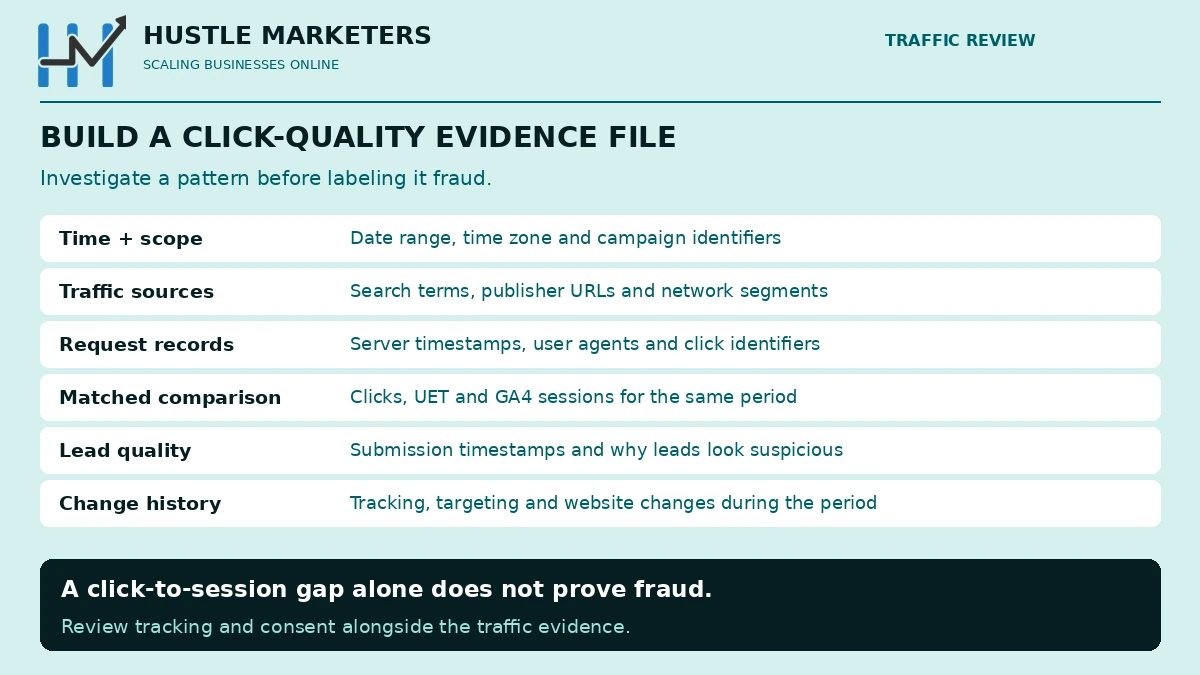
Send a single, organised file rather than a series of emails:
| Evidence | Why it matters |
|---|---|
| Date and time range, with your account time zone | Lets the traffic team pull the right logs |
| Account, campaign, ad group and keyword IDs | Scopes the investigation |
| Search terms and publisher URLs involved | Shows the pattern |
| Server log lines with IP addresses, user agents, timestamps and MSCLKID values | The strongest proof you can provide |
| Clicks versus UET and GA4 sessions for the same period | Quantifies the gap |
| Form submissions with timestamps and why they are fake | Links clicks to fake leads |
| Changes you made during the period | Rules out self-inflicted causes |
How long does a credit take, and what if Microsoft says no?
Microsoft says credits can take up to a month to appear after an investigation starts, and they arrive as a line item on your statement rather than a separate payment. If a claim is declined, ask which evidence was insufficient, add server logs if you did not include them, and escalate through your account manager if you have one. Either way, fix the settings that let the traffic in, because a credit does not stop the next click.
Do you need a click-fraud tool for Microsoft Ads?
Sometimes. A detection tool can block IPs automatically, fingerprint repeat visitors and assemble evidence, which helps accounts with large budgets in heavily targeted industries. But the 100-address IP limit caps what any tool can block inside Microsoft Ads, and most of the waste we find is fixed by distribution settings, exclusions, negatives, device limits and form hardening, which cost nothing. Do those first, measure for 30 days, and buy a tool only if the numbers still do not add up. Clean traffic is what makes results like the 10.8x ROAS in our epoxy flooring Microsoft Ads case study possible, because bidding can only learn from clicks that are real.
How often should you audit Microsoft Ads traffic quality?
Monthly, and weekly for the first two months of any new campaign. Our routine:
- Check the low-quality click rate by campaign and note changes.
- Compare clicks with UET and GA4 sessions by campaign.
- Review the publisher report and add new junk domains and app IDs to your list.
- Review search terms and add negatives for bot-like patterns.
- Check device, hour and location splits for sudden clusters.
- Review lead quality with sales and import only qualified leads.
- File disputes for anything suspicious inside the 60-day window.
Why choose Hustle Marketers as your Bing Ads experts against click fraud?
Click fraud is easy to complain about and hard to prove. Microsoft credits the invalid clicks its filters catch and reviews the rest when you bring evidence, yet most advertisers never assemble it. When we audited our own account, ₹26,908 had gone to bot-like searches with zero conversions, and our own settings had let them in. That is the process we now run for clients.
Hustle Marketers is a Microsoft Advertising Partner and Google Partner agency led by founder Ishant Sharma, who has managed paid search since 2013. The team holds six 2026 Clutch awards and a 4.9 out of 5 rating from 591 verified client reviews, and has helped 2,500+ brands generate $780M+ in trackable revenue.
What does our Bing Ads expert team do about suspicious clicks?
- Add low-quality click columns and reconcile clicks with UET and GA4 sessions for every campaign
- Separate genuine fraud from our own leaks: partners, audience placements, loose keywords and mobile traffic
- Build negative keyword lists and IP exclusions from search term and server log patterns
- Prepare the evidence pack Microsoft asks for and file credit requests inside the 60-day window
- Recheck traffic quality every month so the same pattern does not return
Agency or consultant: which is right for a click fraud problem?
If fraud is a one-off spike, a Bing Ads consultant review can diagnose it, close the gaps and prepare your credit request. If your account is targeted repeatedly, our Bing Ads agency team monitors traffic quality as part of month-to-month management.
Bing Ads click fraud questions, answered
Frequently asked questions
Does Microsoft Ads refund invalid clicks?
Yes, as credits. Clicks Microsoft identifies as invalid are not charged or are credited later, and investigated credits appear as a line item per campaign on your statement.
How do I see invalid clicks in Microsoft Ads?
Add the Low-quality clicks columns to your Campaigns grid or reports. They include general and sophisticated low-quality clicks, which Microsoft did not charge you for.
How many IP addresses can I exclude in Microsoft Ads?
100 per campaign. Only IPv4 addresses are supported, and wildcards are allowed only in the last block.
Should I turn off syndicated search partners?
For most lead generation accounts, yes. Set ad distribution to Microsoft sites and select traffic, then review partner performance before adding any back.
Why am I getting fake leads from Bing Ads?
Usually bots or low-quality placements submitting your forms. Harden the form with a honeypot and server-side checks, and import only qualified leads as conversions.
How long do I have to dispute Bing Ads charges?
60 days from the date the charge was posted, according to the Microsoft Advertising Agreement.
Why don’t my Microsoft Ads clicks match GA4 sessions?
Consent, slow pages, redirects and bot filtering all create gaps. Compare against server logs and UET before concluding the clicks were fraudulent.
Is click fraud worse on Bing than on Google?
We have not seen reliable data that proves it either way. What differs is exposure: Microsoft’s partner and audience inventory reaches search campaigns by default, so settings matter more.
Where to go from here
Add the low-quality columns today and compare last month’s clicks with sessions for every campaign. Then close the obvious doors: partners, audience placements, loose keywords and unlimited mobile traffic. Keep an evidence file running so any dispute goes in well inside 60 days. If you want help, our PPC management team audits Microsoft traffic quality every month, and you can book a Free ROI Audit to find out how much of your Bing budget is reaching real buyers.
About the author: Ishant Sharma is the founder of Hustle Marketers, a Microsoft Advertising Partner and Google Partner agency, and has managed Google Ads and Microsoft Ads accounts since 2013. His team has worked with more than 2,500 brands, and he investigates traffic quality, fake leads and wasted spend in Microsoft Advertising and Google Ads accounts.