Microsoft Ads Tracking Template, UTM Tags and MSCLKID: The Setup That Keeps GA4 Accurate

Ishant
Published : September 25, 2026 at 5:38 am
Updated : October 11, 2026 at 8:17 pm
Ishant
Bing Ads traffic that lands in GA4 as “bing / organic”, campaign names that belong to a different account, UTMs that appear twice in the same URL: almost every Microsoft Ads account we audit has at least one of these, and most of them trace back to URL tracking settings nobody has looked at since the Google import. We found all three in our own account in September 2026. This guide explains how Microsoft’s tracking template, final URL suffix, custom parameters, UTM auto-tagging and MSCLKID fit together, which parameters actually exist, and gives copy-paste setups that keep GA4 reporting clean.
Pick one source of UTMs, either Microsoft’s auto-tagging or your own final URL suffix, keep MSCLKID on for conversions, and test every level, because the lowest-level template always wins.
- A tracking template controls the click URL; the final URL suffix adds parameters to the landing page; custom parameters fill placeholders in both.
- The lowest level wins. A keyword or ad group template silently overrides your campaign template.
- Microsoft’s UTM auto-tagging writes utm_source=bing, utm_medium=cpc, the campaign name, the ad group name as utm_content, and the keyword as utm_term.
- {Campaign} and {AdGroup} are real Microsoft parameters. {CampaignName}, {creative} and {placement} are not.
- MSCLKID powers Microsoft conversion tracking, but GA4 does not use it to set source and medium, so you still need UTMs.
- Microsoft’s built-in Test button shows which level each URL came from before you spend a click.
What is a Microsoft Ads tracking template, and how is it different from a final URL suffix?
A tracking template is the URL Microsoft calls when someone clicks your ad, usually to add tracking parameters or pass through a redirect before the landing page. A final URL suffix is a string of parameters Microsoft appends to the landing page itself. Custom parameters are named placeholders you define once and reuse inside either.
| Setting | What it does | Levels where you can set it | Key rules |
|---|---|---|---|
| Tracking template | Builds the click URL around your final URL | Account, campaign, ad group, ad, keyword, sitelink | Must include {lpurl} or a variant; up to 2,048 characters |
| Final URL suffix | Appends parameters to the landing page | Account, campaign, ad group, keyword, ad, sitelink, product group | Cannot start with ?, & or #; cannot contain {lpurl} |
| Custom parameters | Named values such as {_campaignname} | Campaign, ad group, ad, keyword, sitelink (not account) | Up to 8 per entity |
| UTM auto-tagging | Adds five UTM tags for you | Account only | Checks only the tracking template for existing UTMs |
| MSCLKID auto-tagging | Adds a unique click ID | Account only | On by default; needed for offline conversions |
Sources: Microsoft’s help pages on tracking templates, the final URL suffix and the URL tracking API guide.
For most advertisers who only need GA4 attribution, the final URL suffix is the cleaner place for UTMs. Microsoft adds the right separator for you, so you do not have to worry about whether a final URL already contains a question mark. Tracking templates are for redirects and third-party click trackers.
Which Microsoft Ads tracking template wins when levels conflict?
The lowest level always wins. Microsoft’s URL tracking FAQ lists the order from highest to lowest as account, campaign, ad group, ad, keyword and sitelink. A template on one keyword beats the ad group template, which beats the campaign template, which beats the account template.
Final URL suffixes follow the same rule and are not combined. If an ad group has its own suffix, the campaign suffix is ignored for that ad group rather than merged with it.
This is where most broken reporting comes from. Someone fixes the campaign template, but an old template on ad groups or keywords, often brought in by a Google import, keeps sending the wrong values. Always check every level before you trust a change.
What UTM tags does Microsoft Ads auto-tagging add?
Microsoft’s UTM auto-tagging lives under Campaigns, then Settings, then Account level options, then Auto-tagging of UTM. According to Microsoft’s auto-tagging help, it adds:
| UTM | Value Microsoft writes |
|---|---|
| utm_source | bing |
| utm_medium | cpc |
| utm_campaign | Campaign name |
| utm_content | Ad group name (not the ad) |
| utm_term | Keyword, or the product group ID for Shopping |
Two details trip people up. First, utm_content is the ad group, so reports built on the assumption that it identifies the ad are wrong. Second, Microsoft adds the tags in the order above until the URL reaches its maximum length, so on long URLs utm_term is the first to be cut.
Should you replace or keep your existing UTMs?
Auto-tagging offers two modes: replace all existing UTM tags, or keep yours and add only the missing ones. Microsoft’s help warns that the feature only checks the tracking template for existing UTMs. If you have hard-coded UTMs in final URLs or the final URL suffix, you can end up with duplicates. Choose one system:
- Auto-tagging with replace: simplest, consistent naming, no manual work.
- Your own suffix with auto-tagging off: full control over values such as utm_id and custom dimensions.
Mixing both is how URLs end up with two utm_source values and GA4 picks whichever it reads first.
What changed in auto-tagged UTM values in September 2026?
Trade press, including Search Engine Roundtable, reported a Microsoft email saying that from 2 September 2026 auto-tagged values would differ by campaign type: bing / cpc for Search, msads / cpm for Audience, msads / cpc with a shopping suffix for Shopping, and msads with a cross-network value and campaign suffix for Performance Max. Reports differ on the exact strings, and Microsoft’s help page still lists only bing / cpc.
The likely reason is GA4’s default channel group rules: a medium of cpm lands in Display, a campaign name containing “cross-network” lands in Cross-network, and a campaign name containing “shopping” with a paid medium lands in Paid Shopping. Do not rely on anyone’s summary. Click one ad of each type, check the landing URL, and look at session source and medium in GA4 Realtime. If you filter reports or cost imports on “bing / cpc”, update the filters and add a GA4 annotation for 2 September.
What is MSCLKID, and does GA4 use it?
MSCLKID is Microsoft’s click ID, a 32-character value added to your landing page URL when auto-tagging of the Microsoft Click ID is on, which Microsoft’s MSCLKID help page says is enabled by default. Your UET tag stores it in a first-party cookie so conversions can be matched back to the click, and you need it for offline conversion imports.
Do you still need UTMs if MSCLKID is on?
Yes. GA4 does not read MSCLKID to set source and medium the way it reads Google’s own click ID for linked Google Ads accounts. Without UTMs, Bing Ads clicks often appear as bing / organic or as referrals. We see Microsoft support suggest turning MSCLKID on as the fix for this in community threads, but it does not change GA4 attribution. UTMs do.
Can MSCLKID break landing pages or caching?
It can. Watch for three problems:
- Cache misses: a unique value on every click can bypass page caching and slow landing pages. Configure your cache or CDN to ignore msclkid and UTM parameters.
- Errors on strict sites: some platforms return errors for unknown query parameters. Microsoft notes your site must accept arbitrary parameters.
- Redirects that drop parameters: an HTTP to HTTPS or trailing-slash redirect that strips the query string loses both UTMs and MSCLKID. Microsoft also has no simple cross-domain option, so multi-domain funnels need their own handling.
Which Bing Ads URL parameters can you use?
Microsoft publishes the full list on its URL parameters page. These are the ones we use most:
| Parameter | Returns | Notes |
|---|---|---|
| {lpurl} | Your final URL, escaped | Tracking template only; must come first |
| {Campaign} | Campaign name | Use this instead of a custom campaign parameter |
| {CampaignId} | Campaign ID | Good for utm_id and cost data joins |
| {AdGroup} | Ad group name | |
| {AdGroupId} | Ad group ID | |
| {AdId} | Ad ID | Microsoft’s equivalent of Google’s {creative} |
| {keyword:default} | Keyword that matched, or your default | |
| {MatchType} | e, p or b | Exact, phrase or broad |
| {Network} | o, s or a | Owned and operated, syndicated partners, audience |
| {Device} | m, t or c | Mobile, tablet or computer |
| {QueryString} | The search query | Handle with care for privacy |
| {msclkid} | Microsoft click ID | |
| {IfMobile:x} / {IfNotMobile:x} | Your value by device | Conditional |
Microsoft’s FAQ says capitalization does not matter for these tags, except for variations of {Keyword}. Spaces break them.
Which Google Ads parameters do not work in Microsoft Ads?
Google imports often carry ValueTrack parameters that Microsoft does not list:
| Google parameter | Microsoft equivalent |
|---|---|
| {gclid} | {msclkid} |
| {creative} | {AdId} |
| {placement} | No direct equivalent; use {Network} and the publisher report |
| {network} (g, s, d, ytv, x) | {Network} returns o, s or a |
| {campaignid} | Works, because tags are not case sensitive |
| {CampaignName} (invented by some guides) | {Campaign} |
Microsoft documents that undefined custom parameters stay in the URL as literal text. It does not document what happens to an unsupported Google tag, so assume the worst and remove them.
How do custom parameters work in Microsoft Ads?
Custom parameters let you set a value once and reuse it. You write {_name} in the template and define name and value on the campaign, ad group, ad, keyword or sitelink. Limits from Microsoft’s API documentation:
- Up to 8 custom parameters per campaign, ad group, keyword or ad.
- Keys up to 16 bytes, written with a leading underscore in the template.
- Values up to 250 bytes, or 200 on extensions such as sitelinks.
- No account-level custom parameters.
The risk is maintenance. A custom {_campaignname} is only as accurate as the person who typed it. Since {Campaign} returns the real name automatically, we now use custom parameters only for values Microsoft cannot supply, such as an internal offer code.
What went wrong in our own Microsoft Ads tracking template?
This was our own mistake, not a client’s. When we audited our agency’s Microsoft Ads account in September 2026, the live campaign template read:
{lpurl}?utm_source=bing&utm_campaign={_campaignname}&utm_agid={adgroupid}&utm_term={keyword}&creative={creative}&device={device}&placement={placement}Three problems sat in one line. There was no utm_medium, so GA4 could not classify the traffic as paid search. {creative} and {placement} are Google parameters with no Microsoft definition. And the custom {_campaignname} values had been copied across campaigns, so our ecommerce campaign reported as “TOF_Search_competitors” and our Magento campaign as “Google_Ads_Specialist”. For months, GA4 labelled our Bing traffic with campaign names that did not match the Microsoft campaigns sending it.
Tracking templates fail silently. Ads keep serving and clicks keep arriving, so nobody notices until the monthly report makes no sense.
Ishant Sharma, Founder and CEO, Hustle Marketers
We replaced it with utm_medium=cpc, {AdGroupId}, {AdId}, {Device} and {Network}, corrected the campaign values, and confirmed the result with the Test button and a live click.
What is the best Microsoft Ads tracking template for GA4?
Choose the option that matches how you work. Each one is copy-paste ready.
Option A: auto-tagging only (simplest)
Turn on Auto-tagging of UTM with “replace all existing tags”, keep MSCLKID on, and remove every manual UTM from final URLs, suffixes and templates at all levels.
Option B: your own final URL suffix (most control)
Turn UTM auto-tagging off, keep MSCLKID on, and set this as the account-level final URL suffix:
utm_source=bing&utm_medium=cpc&utm_campaign={Campaign}&utm_content={AdGroup}&utm_term={keyword:default}&utm_id={CampaignId}&ms_network={Network}&ms_device={Device}&ms_match={MatchType}&ms_ad={AdId}In GA4, register ms_network, ms_device, ms_match and ms_ad as event-scoped custom dimensions if you want to split sessions by audience versus search, device and match type.
Option C: tracking template for a redirect or click tracker
Only if you use a third-party click tracker, put it in the tracking template and keep UTMs in the suffix:
https://tracker.example.com/click?id={msclkid}&url={lpurl}Make sure {lpurl} is present, because Microsoft requires it and parallel tracking depends on it.
Does importing from Google Ads break Microsoft tracking templates?
It can. Microsoft’s import documentation says tracking templates, custom parameters and final URL suffixes are imported and updated on later imports, and that utm_source values such as google are rewritten to bing. It does not say that Google ValueTrack tags are converted.
Before a scheduled import, turn off the URL options in the import settings if you manage tracking in Microsoft, or use the import’s find and replace to swap {gclid} and {creative}. Our Google Ads to Microsoft Ads import guide covers the other settings that change on import.
Why is Bing Ads traffic showing as organic or referral in GA4?
Use this table to match the symptom to the cause.
| What you see in GA4 | Likely cause | Fix |
|---|---|---|
| bing / organic for ad clicks | No UTMs on the landing URL | Turn on UTM auto-tagging or add a final URL suffix |
| Referral from bing.com | Redirect drops the query string | Fix redirects so parameters survive, then test a live click |
| bing / ppc or an old campaign name | A leftover template at ad group or keyword level | Check and clear lower-level templates |
| Two utm_source values in one URL | Auto-tagging plus manual UTMs | Use one system only |
| Literal {_param} in the URL | Custom parameter not defined at that level | Define it, or remove it from the template |
| Clicks far above GA4 sessions | Consent banner, slow pages, dropped parameters or invalid clicks | Compare with UET data; see our guide to Bing Ads click fraud |
| Paid traffic in Display or Paid Other | New campaign-type UTM values | Check the September 2026 values and update channel groups |
How do you test Microsoft Ads tracking before launch?
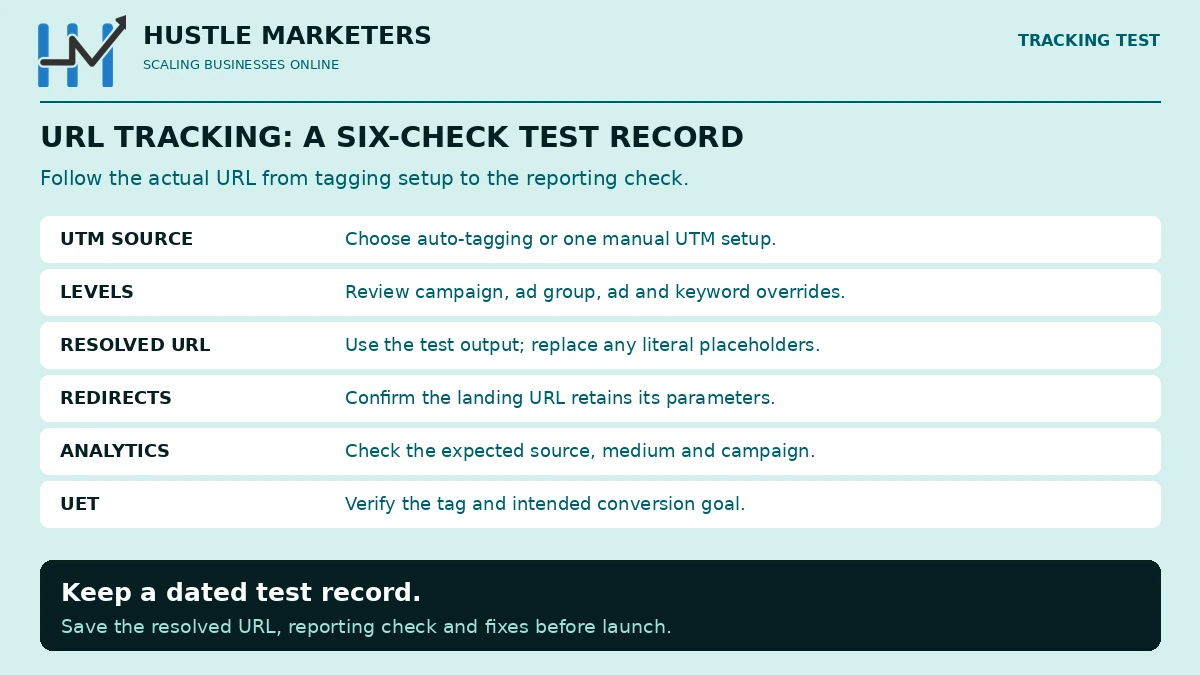
Use Microsoft’s Test button, which its test tool help places in account level options, campaign URL options, ad group settings, responsive search ads, keywords with their own final URL, and sitelinks. It shows the click URL, which level the template came from, the final URL and the parameters, and returns messages such as Landing page found, Page not found, URL mismatch or Page unreachable.
Then do one live check:
- Search for your own brand term on Bing and click the ad once.
- Copy the landing page URL and confirm each parameter has a real value, not a placeholder.
- Open GA4 Realtime or DebugView and confirm the session shows the expected source, medium and campaign.
- Confirm your UET tag fires, using the checks in our Microsoft UET tag setup guide.
Why hire Ishant Sharma as your Microsoft Ads consultant for tracking?
Broken tracking rarely throws an error. It shows up months later as “bing / organic” sessions in GA4, campaign names from the wrong account and UTMs repeated in the same URL. We found all three in our own account in September 2026, so we know how easily they slip past a busy team.
Ishant Sharma has worked in paid search since 2013 and leads Hustle Marketers, a Microsoft Advertising Partner and Google Partner agency. The team holds six 2026 Clutch awards and a 4.9 out of 5 rating from 591 verified client reviews, and has helped 2,500+ brands generate $780M+ in trackable revenue.
What does our Microsoft Ads tracking audit cover?
| Check | What we fix |
|---|---|
| Auto-tagging and final URL suffix | Duplicate UTMs, conflicting sources and wrong parameter names |
| Tracking templates at every level | Unsupported parameters, failed Test results and hidden lower-level overrides |
| MSCLKID pass-through | Redirects, forms and CRMs that drop the click ID before an offline import |
| GA4 channel grouping | Bing traffic landing in organic, referral or unassigned |
| UET goals and enhanced conversions | Goals that never fire, double counting and missing email or phone values |
Do you need a consultant or a full-time Bing Ads specialist?
If you only need tracking fixed and documented, book our Microsoft Ads consultant service for a one-off audit and handover. If you want tracking kept clean while campaigns change every week, our Bing Ads specialist team manages both together.
Microsoft Ads tracking questions, answered
Frequently asked questions
What is a tracking template in Microsoft Ads?
It is the URL Microsoft uses when someone clicks your ad, built around your final URL with the {lpurl} parameter. It is mainly for click trackers and redirects; UTMs usually belong in the final URL suffix.
What UTM parameters should I use for Bing Ads?
At minimum utm_source=bing, utm_medium=cpc and a campaign value. Add utm_term, utm_content and utm_id if you report on keywords, ad groups or cost data in GA4.
Should utm_source be bing or microsoft?
Use bing for Search campaigns. GA4 recognizes bing as a search source, so bing with a paid medium lands in Paid Search.
Is there a campaign name parameter in Microsoft Ads?
Yes, {Campaign}. {CampaignName} is not a Microsoft parameter, even though some guides use it.
What is MSCLKID in my URL?
It is Microsoft’s click ID, added by auto-tagging so conversions can be matched to ad clicks. It is safe to leave on, as long as your site and cache ignore unknown parameters.
Does Microsoft Ads auto-tagging overwrite my UTMs?
Only if you choose “replace all existing tags”. The keep option adds missing tags, but it only checks the tracking template, so UTMs in final URLs or suffixes can be duplicated.
Why does my Bing Ads traffic show as organic in GA4?
Usually because the landing URL has no UTMs. MSCLKID alone does not set source and medium in GA4.
Do Google ValueTrack parameters work in Microsoft Ads?
Some do and some do not. {keyword} and {campaignid} work, while {gclid}, {creative} and {placement} have no Microsoft definition.
Where to go from here
Open account level options, decide between auto-tagging and your own suffix, then press Test at every level where a template exists. Five minutes of checking saves months of misattributed leads. Accurate attribution is also what lets you prove results like the 10.8x ROAS in our epoxy flooring Microsoft Ads case study. Once clicks are labelled correctly, make sure conversions are too with our UET tag guide. If you want a second pair of eyes, our Bing Ads consultant team checks URL tracking in every audit, and you can book a Free ROI Audit to see how clean your Microsoft data really is.
About the author: Ishant Sharma is the founder of Hustle Marketers, a Microsoft Advertising Partner and Google Partner agency, and has managed Google Ads and Microsoft Ads accounts since 2013. His team has worked with more than 2,500 brands, and he builds tracking and attribution setups that tie Microsoft Advertising clicks to real leads and revenue.