Microsoft Audience Network in Search Campaigns: How to See It, Exclude It and Decide If It Stays

Ishant
Published : September 25, 2026 at 5:38 am
Updated : October 11, 2026 at 8:17 pm
Ishant

If your Bing search campaign is spending money on MSN, Outlook and mobile games, you are not imagining it. Every Microsoft Advertising Search campaign can also serve on the Microsoft Audience Network, and there is no simple off switch. We found this the hard way in our own lead generation account, where one search campaign put almost all of its budget into audience placements and produced zero leads. This guide shows how to see exactly where your ads ran, how to exclude MSN, Outlook and app placements, where Microsoft’s own documentation contradicts itself, and how to decide what, if anything, should stay.
You cannot switch the Microsoft Audience Network off inside a Search campaign, but you can find every placement in the Website URL (publisher) report, block most of it with website exclusion lists and app IDs, and then prove the result with a Network segment.
- Microsoft removed the old -100% audience ads bid adjustment in February 2023, so bid modifiers no longer stop audience delivery.
- “Microsoft sites and select traffic” removes syndicated search partners, not audience ads. Microsoft’s help page says all ad distribution options include search and Audience ads.
- The Website URL (publisher) report with the Network, Mobile app name and Mobile bundle columns shows every site and app your search ads reached.
- Website exclusions and exclusion lists block audience placements for Search campaigns. They cannot block Bing, Yahoo or AOL search results.
- Mobile apps such as Outlook and Solitaire are excluded by app ID, not by domain.
- In our account, audience placements took 27.5% of lifetime spend and delivered zero conversions.
What is the Microsoft Audience Network, and why is it inside your Search campaign?
The Microsoft Audience Network is Microsoft’s native and display inventory: MSN, Microsoft Start, the Microsoft Edge new tab page, Outlook.com, Microsoft Casual Games and a set of publisher partners and apps. Audience campaigns are built for it. Search campaigns reach it too, because Microsoft extends search ads into native placements using your headlines, descriptions, final URLs and image extensions.
That design is deliberate. Microsoft’s February 2023 announcement said advertisers would no longer see the audience ad bid modifier and should instead define goals and let Microsoft optimize across channels, using website exclusions to control performance.
Where do audience ads from a Search campaign actually show?
In the accounts we manage, the biggest audience placements are almost always the same handful:
- outlook.live.com and outlook.com: ads inside the Outlook web inbox.
- msn.com and ntp.msn.com: MSN articles and the Edge new tab feed.
- microsoftcasualgames.com: Solitaire, Mahjong and other casual games.
- Outlook, Solitaire and Mahjong mobile apps: reported with an app bundle ID instead of a URL.
- A long tail of news, gaming, quiz and parked-looking sites that each take a few impressions.
A searcher on Bing typed a query with intent. A reader scrolling an Outlook inbox did not. For lead generation that difference is usually the whole story.
Can you turn off the Microsoft Audience Network in a Search campaign?
No. There is no toggle, no bid modifier and no ad distribution setting that removes audience delivery from a Search campaign. What you can do is exclude the placements, one site or app at a time and in bulk with lists.
What happened to the -100% audience ads bid adjustment?
Until 2022 you could set audience ads to -100% and most delivery stopped. Microsoft retired the modifier in February 2023, which is why older guides that still recommend it no longer work. Advertisers who had used it saw their campaigns become eligible for audience placements again.
Does “Microsoft sites and select traffic” stop audience ads?
No, and this is the most repeated mistake in Bing Ads advice. The ad group setting has two options: “The entire Microsoft Advertising Network” and “Microsoft sites and select traffic”. Microsoft’s ad distribution help page states plainly that all options include search and Audience ads. Choosing Microsoft sites and select traffic drops syndicated search partners. It does not drop MSN or Outlook.
We still recommend that setting for most search campaigns, for partner quality reasons covered in our guide to removing Microsoft syndicated search partners. Just do not expect it to solve the audience problem.
How do you see where your Microsoft Ads actually ran?
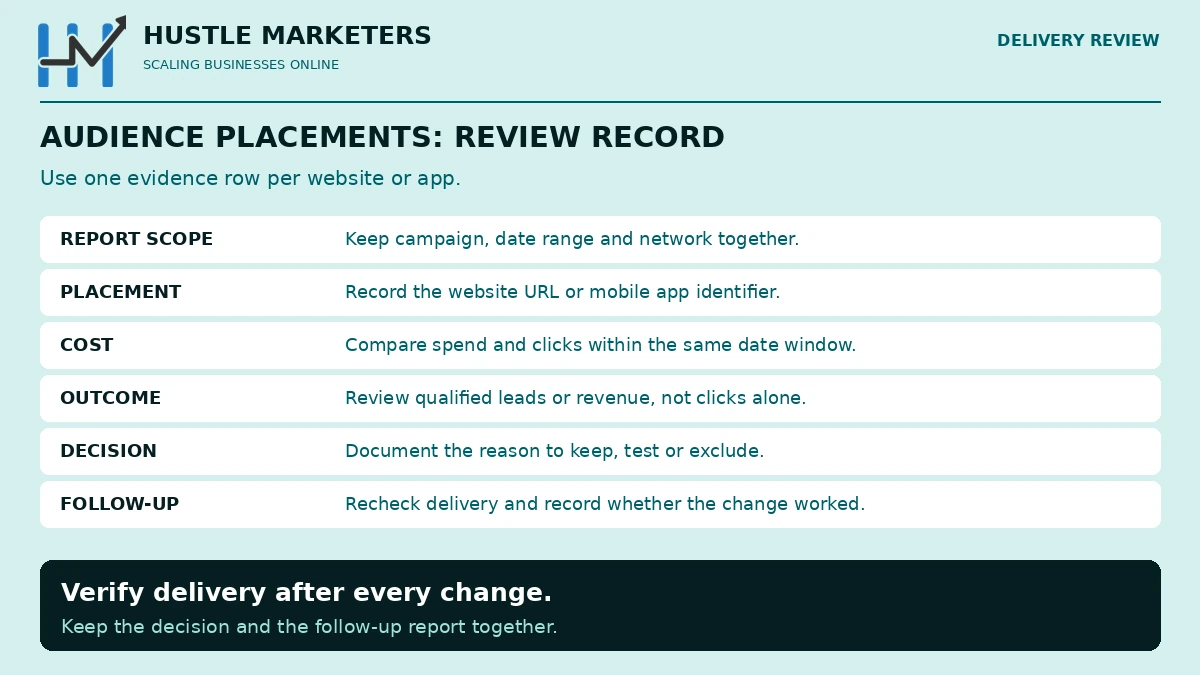
You need two views: a report that lists every placement, and a campaign segment that splits search from audience delivery.
How do you build the Website URL (publisher) report?
- Go to Reports and create a new report from the Website URL (publisher) template, as described in Microsoft’s report creation guide.
- Add the columns Campaign, Ad group, Ad distribution, Network, Website URL, Mobile app name, Mobile bundle, Impressions, Clicks, Spend and Conversions.
- Set the date range to All time or at least the last 90 days.
- Filter Network to Audience.
- Sort by Spend and download the full list, not just the first page.
One trap: the report collapses rows with zero spend into “Other URLs”. Those rows still matter, because a domain with 200 impressions and no clicks today can take budget next month. Expand them before you build your exclusion list.
How do you separate Search clicks from Audience clicks?
On the Campaigns tab, use Segment and choose Network. You will see rows for Microsoft sites and select traffic, Syndicated search partners and Audience. Compare cost per conversion by row. If you pass the {Network} parameter in your tracking template, audience clicks also arrive with the value “a”, which lets you split them in analytics. Our guide to Microsoft Ads tracking templates and UTM tags shows the exact template.
What did we find when we checked our own Microsoft Ads account?
Here is the mistake we made ourselves. We ran a Magento SEO search campaign at ₹200 a day with Max Conversions bidding and no conversion history. Its ad groups were already on Microsoft sites and select traffic, so we assumed it was search only. It was not. Over its life the campaign earned 10 search impressions and more than 110,000 audience impressions, spent ₹38,865 and generated zero leads.
When we pulled the full publisher report across the account in September 2026, the pattern was clear:
| Placement type | Impressions | Clicks | Spend (INR) | Conversions |
|---|---|---|---|---|
| outlook.live.com | 13,127 | 239 | 17,810 | 0 |
| msn.com | 104,079 | 211 | 17,436 | 0 |
| Outlook mobile apps (iOS and Android) | 7,067 | 145 | 8,875 | 0 |
| microsoftcasualgames.com | 7,263 | 11 | 895 | 0 |
| Every other audience site and app (445) | 4,839 | 55 | 1,350 | 0 |
| Total Audience Network | 136,375 | 661 | 46,366 | 0 |
Audience placements took 27.5% of lifetime spend, and 54% of spend in the most recent 30 days. Not one of those 661 clicks became a lead, while the same account’s search clicks did produce enquiries in earlier months.
A search campaign that spends mostly on inbox and news placements is not a search campaign any more. Check the Network segment before you judge a keyword, a bid or a landing page.
Ishant Sharma, Founder and CEO, Hustle Marketers
We paused the campaign, built an exclusion list from every audience domain in the report and attached it to all eight Search campaigns in the account. We will update this section with the before and after delivery numbers once 30 days of data are in.
How do you exclude MSN, Outlook and other audience placements?
Work from the report, not from a generic list you found online. Your placements are specific to your keywords and budget.
Step by step: build and attach a website exclusion list
- Export the Website URL (publisher) report with Network filtered to Audience, including the collapsed zero-spend rows.
- Clean the domains. Remove “www.” so one entry covers the root, which Microsoft’s website control lists page recommends. Keep genuine subdomains such as outlook.live.com as they are.
- Decide what to keep. We left linkedin.com off our list because LinkedIn placements can suit B2B, and we did not add bing.com because Bing search results cannot be blocked anyway.
- Go to Tools, then Content suitability, then Website control lists, and open the Campaign exclusions tab.
- Create a list, paste one URL per line and save. When we did this in September 2026 the form accepted up to 5,000 URLs per list.
- Read the validation screen. Microsoft rejected two of our 430 entries, mail.yahoo.com and news.yahoo.com, because Yahoo properties cannot be excluded.
- Select the list, choose Associate campaigns and attach it to every Search campaign, including paused ones you might restart.
- Leave Audience campaigns off the list unless you want to strip their core inventory.
Can you exclude msn.com and outlook.com, or does Microsoft block that?
Microsoft’s documentation disagrees with itself, so here is what each source says:
| Source | Date | What it says |
|---|---|---|
| Add website exclusions help | Updated June 2026 | Search campaigns cannot block Bing, AOL or Yahoo search, but can block audience traffic including MSN, Microsoft Edge and Outlook.com |
| Website control lists page and in-app note | June 2026 | “Microsoft sites such as MSN.com cannot be excluded” |
| Microsoft Q&A moderator reply | July 2026 | No universal opt-out, and adding Microsoft domains may not stop delivery on them |
Our reading: the “cannot be excluded” note describes Audience campaigns, which always serve on Microsoft sites, while the step-by-step help describes Search campaigns. Microsoft accepted msn.com, outlook.com and outlook.live.com into our Search campaign list without error. Add them, then verify in the publisher report after seven to fourteen days rather than trusting either page.
How do you exclude apps like Outlook mobile and Solitaire?
Apps do not have domains, so a domain list misses them. In the publisher report, add the Mobile app name and Mobile bundle columns. Copy each app ID, for example a numeric store ID or a bundle such as com.microsoft.office.outlook, and add it to your website exclusion list. Microsoft’s add exclusions help documents this method. In our account apps took ₹9,170 on their own, almost a fifth of all audience spend.
How many websites can you exclude in Microsoft Advertising?
The limits depend on where the exclusion lives, and Microsoft’s pages quote different figures. These are the numbers we rely on:
| Where | Limit | Source |
|---|---|---|
| Campaign or ad group, added manually | 2,500 URLs, and ad group exclusions override campaign exclusions | Add website exclusions help and the entity limits guide |
| Campaign exclusion list created in the account | 5,000 URLs per list in the September 2026 interface | Our own list build |
| Account exclusion lists | Only creatable from a manager account; 10,000 sites per list | Website control lists page and entity limits guide |
| URL format | Domain plus limited subdomains and directories; no wildcards | Add website exclusions help |
Should you use campaign exclusions or a shared website exclusion list?
Use a shared list for anything that applies to every search campaign, such as Microsoft properties and junk domains, so one edit updates everything. Use campaign or ad group exclusions for placements that only hurt one campaign. If you run several accounts, create account-level lists from your manager account. We could not, because our own account has no manager account above it, so we used a campaign-level list attached to all eight campaigns instead. Our Bing Ads management guide covers where these lists fit in a full account build.
Can Microsoft support opt your account out of audience ads?
Maybe, but do not plan around it. Some advertisers report that support removed audience delivery after a data-backed request. Microsoft staff have said in community replies since 2024 that no full opt-out exists, and a July 2026 moderator reply repeated that there is no universally available opt-out. Microsoft staff have also advised running at least 30 days before judging audience delivery, in a September 2024 answer.
If you ask, make the request specific:
- The campaign names and IDs.
- Audience spend, clicks and conversions for at least 30 days, compared with search in the same campaigns.
- A clear statement that the campaigns are lead generation and the audience clicks do not convert.
- The exclusion lists you have already applied.
That gives support a business case rather than a complaint, and it keeps your account in good standing either way.
Why do audience impressions keep coming back after you exclude sites?
Exclusions reduce audience delivery sharply, but in our experience they rarely take it to zero. Four reasons explain most of what remains:
- New domains. Microsoft adds publishers continuously, so last month’s list does not cover next month’s sites. Re-run the publisher report every two weeks for the first two months, then monthly.
- Apps. App placements need app IDs. A domain-only list leaves them running.
- Unexcludable inventory. Some Microsoft-owned inventory may still serve, as the conflicting documentation suggests.
- Budget and bidding pressure. Our worst campaign combined a small budget with conversion-based bidding and no conversion data, the exact setup Microsoft flags with a “Not enough conversion data” status. Our guide to Bing Ads bidding strategies covers what to switch to.
Also check the account-level view-through setting. By default Microsoft includes view-through conversions from Audience placements in your All conv. columns, per its view-through conversions page. We unticked it so audience impressions could not make the numbers look better than they were.
Is the Microsoft Audience Network ever worth keeping?
Sometimes. Audience placements can help ecommerce brands with strong visuals, broad consumer products and remarketing lists. They are rarely worth it for B2B or local lead generation that depends on search intent. Use this decision table after at least 30 days of clean data:
| Situation | What to do |
|---|---|
| Zero conversions from audience rows after 30 days | Exclude everything in the audience report |
| Audience cost per conversion under 1.5 times search, and leads are qualified | Keep, but exclude the worst domains and all games and apps |
| Ecommerce with product images and a proven remarketing list | Consider a separate Audience campaign with its own budget instead of leakage from search |
| Conversions come from view-through only | Treat as zero and exclude |
| New account with no conversion history | Exclude from day one and revisit later |
Judge audience delivery on qualified leads or revenue, not clicks. Cheap clicks from an inbox are only cheap if someone buys. When audience targeting is deliberate rather than leakage, it can work: in our epoxy flooring Microsoft Ads case study, a separate campaign aimed at commercial buyers was profitable from its first tracked period, within an account that reached 10.8x ROAS.
Why choose Hustle Marketers as your Bing Ads agency for network control?
Many Microsoft Ads accounts are imported from Google, left on default distribution and never checked at placement level. That is exactly how audience spend hides. We found ₹46,366 of zero-conversion audience spend in our own account, cut it with one shared list, and now run the same check on every account before we change a single bid.
Hustle Marketers is a Microsoft Advertising Partner and Google Partner agency led by founder Ishant Sharma, who has managed paid search since 2013. The team holds six 2026 Clutch awards and a 4.9 out of 5 rating from 591 verified client reviews, and has helped 2,500+ brands generate $780M+ in trackable revenue.
What does our Bing Ads agency check in the first week?
- The network split for every campaign, so search, partner and audience cost sit side by side
- The publisher report by site and app, sorted by spend with zero conversions
- One shared website exclusion list, attached to every Search campaign and rechecked two weeks later
- Device, schedule and location settings where audience clicks cluster
- Conversion goals, so every exclusion is judged on leads or revenue rather than clicks
Should you hire a Bing Ads agency or a consultant?
If you want the whole account run month to month, our Bing Ads agency service covers strategy, bids, exclusions and reporting. If your team runs the account and only needs an expert review of network settings, a Bing Ads consultant engagement is the lighter option. Either way, you work with people who have already fixed this problem in a live account.
Microsoft Audience Network questions, answered
Frequently asked questions
What is the Microsoft Audience Network?
It is Microsoft’s native and display ad inventory across MSN, Outlook.com, the Microsoft Edge new tab page, Microsoft Casual Games and partner sites and apps. Audience campaigns target it directly, and Search campaigns can extend into it automatically.
How do I turn off audience ads in Bing Ads?
You cannot turn them off with a setting. Exclude the placements with website exclusion lists and app IDs, check the Network segment for leftover delivery, and ask support only after you have 30 days of data.
Will excluding msn.com or outlook.com stop my ads on Bing search?
No. Website exclusions in Search campaigns cannot block Bing, AOL or Yahoo search results. They only affect audience placements and syndicated partner sites.
Does “Microsoft sites and select traffic” remove audience ads?
No. It removes syndicated search partners. Microsoft’s help page says every ad distribution option includes search and Audience ads.
How do I see which websites my Microsoft Ads showed on?
Run the Website URL (publisher) report. Add the Network, Mobile app name and Mobile bundle columns, filter Network to Audience and sort by spend.
How many websites can I exclude in Microsoft Ads?
2,500 per campaign or ad group when added manually. Lists hold more, up to 5,000 URLs per campaign list in the current interface and 10,000 per account list created from a manager account.
Can I exclude apps from Microsoft Ads?
Yes, by app ID. Copy the value from the Mobile bundle column of the publisher report and add it to your website exclusion list.
Why are my Bing ads showing on Outlook?
Because Search campaigns extend into the Microsoft Audience Network, which includes the Outlook.com inbox and Outlook apps. Exclude outlook.com, outlook.live.com and the Outlook app IDs, then verify in the publisher report.
Where to go from here
Run the publisher report today, filter to Audience and total the spend. If it is more than a few percent of a lead generation budget, build the list, attach it to every Search campaign and check again in two weeks. For the rest of your settings, work through our Bing Ads optimization checklist. If you would rather have a specialist do it, our Bing Ads agency team reviews network leakage in every account, and you can book a Free ROI Audit to see what your audience placements really cost.
About the author: Ishant Sharma is the founder of Hustle Marketers, a Microsoft Advertising Partner and Google Partner agency, and has managed Google Ads and Microsoft Ads accounts since 2013. His team has worked with more than 2,500 brands, and he audits Microsoft Advertising network settings, exclusions and conversion tracking for B2B, ecommerce and lead generation advertisers.