LinkedIn Profile Targeting in Microsoft Ads: The B2B Setup Guide

Ishant
Published : September 24, 2026 at 5:30 pm
Updated : October 16, 2026 at 12:15 pm
Ishant
LinkedIn profile targeting in Microsoft Ads lets you raise or lower bids for people based on the company, industry, job function and, as of August 2026, job seniority on their LinkedIn profiles. In Search, Shopping and Dynamic Search Ads it is bid only, so it does not narrow reach. Only Audience campaigns can restrict delivery to those segments.
That one distinction decides whether the feature saves a B2B budget or quietly wastes it. Microsoft’s LinkedIn profile targeting help page says it is the only ad platform other than LinkedIn that lets you target by LinkedIn profile information, which makes “Bing Ads LinkedIn targeting” worth understanding for any Microsoft Advertising B2B account.
Below: where each option works, how bids stack, company lists, job seniority, Performance Max, LinkedIn Sponsored Content, reporting, partner-site hygiene and B2B blueprints. In the accounts we manage, LinkedIn data is a bid layer on top of keyword intent, never a replacement for it.
Key takeaways
- In Search, Shopping and DSA, LinkedIn profile targeting is bid only. Everyone matching your keywords can still see your ads.
- Target and bid for company, industry and job function works only in Audience campaigns.
- Profile bid adjustments multiply (+10% and +20% equals +32%). Audience list adjustments do not combine; the highest wins.
- Job seniority, with 10 levels from CXO to Volunteer, was announced as generally available for Search and Audience ads in Microsoft’s August 31, 2026 product news.
- You can add 1,000 companies per campaign or ad group, and Search company lists hold up to 10,000 each.
- Performance Max uses LinkedIn data only as audience signals.
- The Professional demographics and Website URL reports show who and where you are really paying for.
What is LinkedIn profile targeting in Microsoft Ads?
LinkedIn profile targeting is a Microsoft Advertising feature that uses LinkedIn member profile data to adjust bids, or in Audience campaigns restrict delivery, by company, industry, job function and job seniority. It matches people on where they most recently worked and the job they most recently held, according to their LinkedIn profiles.
A searcher types “endpoint security software” on Bing, and you can pay more for that click when the person works in IT at a company on your target list. Microsoft says no ad platform other than LinkedIn offers that LinkedIn layer, which is a big reason B2B teams consider adding Microsoft to a Google-first plan.
Which LinkedIn profile dimensions can you use?
- Company: the member’s employer. Microsoft’s examples include Microsoft, Alibaba.com and KLM Royal Dutch Air Lines, and company search shows approximate employee counts.
- Industry: for example finance, broadcast media or law enforcement.
- Job function: for example sales, accounting or purchasing.
- Job seniority: 10 levels, announced as generally available for Search and Audience ads on August 31, 2026.
- Company lists: up to 10,000 pasted company names per list for Search; Microsoft’s June 2026 help says not everyone has them yet.
- Job title: offered in LinkedIn Sponsored Content campaigns built inside Microsoft Advertising.
Microsoft notes that not every company, industry and job function is available yet and the lists keep expanding.
Is Bing Ads LinkedIn targeting the same feature?
Yes. Bing Ads is the old name for Microsoft Advertising, so “LinkedIn targeting Bing Ads” and “Microsoft Ads LinkedIn targeting” describe the same feature. Older Bing Ads guides often miss job seniority, company lists and Performance Max, so check dates. For a platform primer, read our ultimate guide to advertising on Bing.
Is Microsoft really the only platform that uses LinkedIn data?
Microsoft’s help page says so, but read it narrowly. In May 2026, LinkedIn announced expanded programmatic CTV buying using job title, industry and seniority data through Amazon DSP, with inventory via Microsoft Monetize and US targeting. For search ads, we found no other platform that pairs LinkedIn data with keyword intent.
Which Microsoft Ads campaign types support LinkedIn targeting?
Microsoft’s LinkedIn targeting help page, updated July 27, 2026, lists Search, Dynamic Search Ads, Microsoft Shopping, Audience and Performance Max campaigns. Behavior differs by type: bid only in Search, DSA and Shopping, target and bid available in Audience campaigns, and audience signals only in Performance Max, where the rollout is still incomplete.
“Not documented” below means we found no Microsoft page confirming support, so test in your own UI.
| Option | Search | DSA | Shopping | Audience campaigns | Performance Max | LinkedIn campaigns | Limit |
|---|---|---|---|---|---|---|---|
| Company | Bid only | Bid only | Bid only | Target and bid or bid only | Signal (rolling out) | Yes | 1,000 per campaign or ad group |
| Industry | Bid only | Bid only | Bid only | Target and bid or bid only | Signal (rolling out) | Yes | Available values only |
| Job function | Bid only | Bid only | Bid only | Target and bid or bid only | Signal (rolling out) | Yes | Available values only |
| Job seniority | Yes (GA announced Aug 31, 2026) | Not documented | Not documented | Yes (GA announced Aug 31, 2026) | Not documented | Yes | API value still Reserved |
| Company lists | Yes (not everyone yet) | Not listed | Not listed | Not listed | Not listed | Not applicable | 10,000 per list |
| Job title | Not documented | Not documented | Not documented | Not documented | Not documented | Yes | Not published |
| Profile targeting expansion | Account-level API property (ProfileExpansionEnabled) | Not applicable | On or off | ||||
Sources: the LinkedIn targeting help page, the ProfileCriterion reference, the API audience targeting guide and Microsoft’s August 2026 product news. The audience options help page lists a different set (Search, Audience, Shopping and Lodging), covered in the docs conflict section below.
Audience campaigns are Display, Native and Online Video ads on MSN, Microsoft Start, Microsoft Edge, Outlook.com and publisher partners, per the Audience ads help page. Apart from LinkedIn campaigns themselves, they are the only type where LinkedIn data can act as a true filter.
Does LinkedIn targeting work in Smart mode?
No. The demographic targeting help page says company, industry, job function and time-of-day targeting are not available in Smart mode. Switch to Expert mode first.
Which countries support LinkedIn profile targeting?
We could not verify a current list, so we will not print one. Older Microsoft Q&A support replies contradict each other, and one still references retired Expanded Text Ads. Check Microsoft’s “Market availability for Microsoft Advertising and its features” help page and confirm the options appear in your UI for your target locations.
Does LinkedIn profile targeting narrow your audience? Bid only vs target and bid
Not in Search, Shopping or DSA. Microsoft tells advertisers to think of LinkedIn profile targeting there as bid only: targeting a company does not exclude people who work elsewhere. Only Audience campaigns support target and bid for company, industry and job function, which limits delivery to people who match at least one selected criterion.
The TargetSettingDetail reference says target and bid for Age, CompanyName, Gender, Industry and JobFunction works only with the Audience campaign type, and the default is bid only. Microsoft’s profile criteria code example builds exactly that. In an April 2025 thread, “Can I use ‘Target & Bid’ for LinkedIn demographic targeting instead of Audiences in search ads?“, support confirmed Search does not support it.
Why can audience lists use target and bid in Search when LinkedIn data cannot?
They are different objects. Remarketing, in-market and Customer Match lists can use target and bid in Search, which support confirmed for in-market audiences. Per the audience association help page, bid only shows ads to everyone and adjusts bids for members, while target and bid limits ads to the selected audiences. One setting covers all lists in an ad group or campaign.
What does bid only mean for a B2B budget?
Your keywords do the filtering, and LinkedIn data only changes the price. Students and job seekers who search your terms still see your ads, so negative keywords matter more once you add profile targeting. It may also explain reports like the thread “industry targeting showing less clicks“, where a display campaign had roughly 170 clicks but only 8 from the targeted industry.
When should you use target and bid?
Use it in Audience campaigns for closed audiences, such as account-based awareness or senior-buyer retargeting. Keep the audience broad enough to deliver: in a 2024 support thread, industry targets would not save, and support pointed, among other checks, to the audience meter, which blocks saving when targeting is too narrow.
How do bid adjustments work for company, industry and job function?
Profile bid adjustments multiply. Microsoft’s own example: Industry set to Financial services at +10% and Job function set to Consulting at +20% gives +32%, not +30%. Adjustments range from -90% to +900% in 1% steps, unknown profile data gets no adjustment, and final bids are rounded down to the nearest cent.
The rules below come from Microsoft’s bid adjustments help page, the audience options page and the bulk company criterion reference:
- Profile matches multiply. A person matching several LinkedIn segments gets every matching adjustment, compounded.
- Audience lists do not combine. You are charged once, and only the highest list adjustment applies.
- Unknown data means no adjustment for that dimension.
- Automated bidding treats your adjustments as signals.
- Campaign and ad group criteria form a union. If the same profile ID is set at both levels, the ad group criterion wins.
Bid adjustment math examples
All examples use a $4.00 keyword bid on an Enhanced CPC Search campaign (Manual CPC is no longer offered for Search) and apply only the stacking rules Microsoft documents for profile segments and audience lists. Preview final bids in your account when other adjustment types, such as device or location, also apply.
| Scenario | Adjustments | Calculation | Final bid |
|---|---|---|---|
| One industry match | Industry +10% | 4.00 x 1.10 | $4.40 |
| Microsoft’s example | Industry +10%, job function +20% | 4.00 x 1.10 x 1.20 | $5.28 (+32%) |
| Target account, right function | Company +50%, industry +10%, job function +20% | 4.00 x 1.50 x 1.10 x 1.20 | $7.92 (+98%) |
| Two aggressive bid-ups | Company +100%, job function +100% | 4.00 x 2.00 x 2.00 | $16.00 (+300%) |
| Non-ICP industry, right function | Industry -90%, job function +20% | 4.00 x 0.10 x 1.20 | $0.48 |
| Industry unknown | Job function +20% only | 4.00 x 1.20 | $4.80 |
| In two audience lists | Remarketing +30%, Customer Match +50% | Highest only: 4.00 x 1.50 | $6.00, not $7.80 |
| Rounding down | $1.37 base, +15% | 1.37 x 1.15 = 1.5755 | $1.57 |
The fourth row burns budgets. Two +100% bid-ups feel moderate alone, but together they quadruple the click price. Work out the most you can pay per lead with our CPA calculator, then keep the combined multiplier under that ceiling.
What is the default bid adjustment?
The help page says new targeting associations get 15% by default in the UI, while the bulk file references say the adjustment defaults to 0 if omitted. Always type the adjustment you want.
How do profile adjustments behave with automated bidding?
They act as signals. Also note the August 2026 product news: from October 1, 2026, Max CPC is no longer available when creating new non-portfolio campaigns using Maximize Conversions with target CPA, Maximize Conversion Value with target ROAS, or Maximize Clicks. Existing campaigns and portfolio strategies keep it. Without that cap, check average CPC by segment weekly during the first month.
How do you set up LinkedIn profile targeting in Microsoft Ads?
Microsoft documents three routes: add targeting while creating an ad group, edit targeting in existing campaign or ad group settings, or set it from the Demographics page. In each case you pick company, industry, job function or job seniority, set a bid adjustment between -90% and +900%, and save. The account must be in Expert mode.
Menu labels shift between UI updates, so treat these as signposts:
- Confirm Expert mode. Smart mode hides these options.
- Pick the level. Campaign level suits account-wide rules, such as bidding down non-ICP industries. Ad group level suits segment-specific bids.
- Open targeting. Use the ad group target and bids section for a new ad group, the targeting settings of an existing campaign or ad group, or the Demographics page.
- Add the dimension. Choose Company, Industry, Job function or, where shown, Job seniority. Search companies by name and use employee counts to pick the right entity.
- Set the adjustment. Enter a value from -90% to +900% rather than accepting a default.
- Save and review. Confirm the criteria on the Demographics page and check stacked bids against the math table above.
Should you set LinkedIn targeting at campaign or ad group level?
Search, DSA and Shopping accept both, applied as a union, with the ad group version overriding a duplicate campaign criterion. Audience campaigns only accept profile criteria at ad group level. Our rule: set bid-downs once at campaign level, and set bid-ups at ad group level where the ad message matches the segment.
How do you target a list of specific companies in Microsoft Ads?
You have two tools. Company targeting criteria take up to 1,000 companies per campaign or ad group. Company lists, built under Tools, Audiences, Company lists, hold up to 10,000 companies per list pasted one per line, and you associate them with Search campaigns or ad groups. Microsoft’s June 2026 help says not everyone has company lists yet.
The two limits belong to different objects. The Search campaign creation help page and Microsoft’s June 2026 demographic targeting help describe company lists as Search-only and not yet available to everyone.
How do you create a company list for Search?
- Go to Tools > Audiences > Company lists and select Create.
- Paste target accounts, one company per line, up to 10,000. Use LinkedIn-style company names and remove duplicates first.
- Associate the list with the right Search campaigns or ad groups.
- Set the adjustment under Bid adjustments > Company lists.
How can I bulk add companies without company lists?
In a February 2025 support answer, Microsoft described an Editor workflow: Keywords and Targeting, Companies, add up to 1,000 companies, export to see Profile IDs, then apply them with Multiple changes. Some users said the option was missing in their Editor, so check you are on the latest version or ask support.
Company Profile IDs are not published, a June 2026 moderator reply confirmed. The SearchCompanies API needs at least three characters and returns names and ProfileIds, and industry and job function IDs come from profile data files. For a 600-company list, support offered back-end help.
What are LinkedIn segments and ReachTooSmall?
LinkedIn segments appear to be the API side of company lists, since the CompanyList type is a kind of LinkedInSegment. The API release notes show Add, Update and Delete LinkedInSegments in March 2026, then GetLinkedInSegments and CustomLinkedInCriterion in August 2026. A segment has a Reach and a status of Building, ReachTooSmall or Ready. The CompanyList type adds Matched and Total fields, still marked Reserved, which look designed to show how many pasted companies matched.
Is there a minimum audience size?
We found no published number for LinkedIn targeting. The closest signals are the ReachTooSmall status and the audience meter in Audience campaigns. Other audience types do have published floors:
| Audience type | Published minimum | Source |
|---|---|---|
| LinkedIn profile targeting and company lists | None; segments can show ReachTooSmall | LinkedInSegmentStatus reference |
| Microsoft remarketing lists | 300 users | Remarketing FAQ |
| Microsoft Customer Match | 300 active email users | Customer Match help |
| Microsoft combined lists | 300 members | Combined lists help |
| LinkedIn Ads audiences | 300 members before serving | PPC Land |
To size a segment before launch, use the Audience planner, which estimates monthly audience and impressions by company, industry and job function. Microsoft calls these estimates directional, and the GetAudienceFullEstimation API returns rounded sizes.
What is job seniority targeting in Microsoft Ads?
Job seniority targeting uses how senior a person is on LinkedIn to adjust bids or reach audiences. Microsoft’s August 31, 2026 product news announced it as generally available for Audience ads and Search campaigns, with 10 levels: CXO, VP, Director, Manager, Senior, Entry, Owner, Partner, Training and Volunteer. Job function tells you the department; seniority suggests buying power.
Before this, you could bid up Engineering but not separate a VP of Engineering from an intern. Microsoft’s multiplication example uses industry and job function, so confirm in your bid preview that seniority stacks the same way. The AdGroupCriterionType reference still marks JobSeniority as Reserved, so test bulk and API workflows. We found no documentation of Shopping, DSA or Performance Max support.
- High-ticket SaaS: bid up Director, VP and CXO in buyer functions; bid down Entry, Training and Volunteer.
- Professional services: bid up Owner, Partner and CXO, the people who sign engagements in smaller firms.
- Procurement-led sales: bid up Manager and Senior within purchasing, who often build the vendor shortlist.
- Practitioner tools: keep Senior and Manager near neutral, since hands-on users often start evaluations.
Microsoft Ads LinkedIn targeting vs LinkedIn Ads: which should B2B use?
They do different jobs. Microsoft Ads starts from search intent and uses LinkedIn data to pay more or less for people who fit your ideal customer profile. LinkedIn Ads starts from professional identity and shows ads to a defined audience that is not searching. Teams with budget for both often use search to capture demand and LinkedIn to create it.
| Factor | Microsoft Ads LinkedIn profile targeting | LinkedIn Ads |
|---|---|---|
| Starting signal | Search intent, with LinkedIn data as a bid layer | Professional identity, no search query |
| Does LinkedIn data restrict delivery? | No in Search, Shopping and DSA; yes in Audience campaigns with target and bid | Yes, the audience is the targeting |
| Dimensions | Company, industry, job function, job seniority; company lists in Search | Campaigns built inside Microsoft Advertising list location, profile language, company, industry, job function, job title, job seniority, gender and age |
| Company limits | 1,000 per campaign or ad group; 10,000 per company list | Check Campaign Manager |
| Minimum audience | Not published (ReachTooSmall status) | 300 members |
| Inventory | Search traffic including Bing, AOL and Yahoo; Audience ads on MSN, Microsoft Start, Edge, Outlook.com and partners | LinkedIn placements such as Sponsored Content |
| Published cost benchmark | None found for LinkedIn-targeted clicks | Dreamdata 2026: CPC EUR 5.98, CPM EUR 34.33 |
| Best job | Capturing buyers already searching | Reaching buying committees before they search |
| Segment reporting | Professional demographics report | Campaign Manager reporting |
Is Microsoft Ads LinkedIn targeting cheaper than LinkedIn Ads?
No clean public comparison exists. We found no Microsoft benchmark for LinkedIn-targeted clicks. The Dreamdata LinkedIn Ads Benchmarks Report 2026, reported by PPC Land, found an average LinkedIn CPC of EUR 5.98 across 66 million B2B sessions from August 2024 to July 2025, LinkedIn ROAS of 121% against 67% for Google Search, and 272-day average journeys. Dreamdata is a LinkedIn Marketing Partner, so weigh the source.
For Microsoft click prices, see our Bing Ads vs Google Ads cost comparison built on first-party data from 16 accounts. Then compare channels on acquisition cost with our CAC calculator, using pipeline and revenue, not form fills. We recommend sharing one ICP and one target account list across both platforms, so LinkedIn warms senior buyers and Microsoft bids up the same companies when they search.
Can you create LinkedIn Sponsored Content campaigns inside Microsoft Advertising?
Yes, if your account has it. Microsoft’s help page, updated June 26, 2026, describes building LinkedIn Sponsored Content campaigns from the Microsoft Advertising UI with a brand awareness or lead generation goal. Targeting includes company, industry, job function, job title and job seniority. You need paid media admin approval on the LinkedIn Page, and not everyone has access yet.
These are real LinkedIn campaigns, not Search campaigns with LinkedIn data. Key details from the LinkedIn campaigns help page:
- Goals: Build brand awareness or Generate leads.
- Targeting: location, profile language, company, industry, job function, job title, job seniority, gender and age.
- Bid strategies: Maximize reach or Maximize impressions for awareness; Maximize clicks for leads.
- Terms: the LinkedIn Ads Agreement governs these campaigns.
- One Page per account: once connected to a company Page, the account cannot connect to a different company.
- Ad copy: intro text under 150 characters.
The one-Page rule matters for agencies and multi-brand companies, so connect the right Page first or use separate accounts. If you need LinkedIn options not listed on that page, use LinkedIn Campaign Manager.
Does LinkedIn profile targeting work with Performance Max?
Only as audience signals. You can add company, industry and job function from LinkedIn profiles to a Performance Max audience signal, but Microsoft says ads may serve beyond the signal, so it does not restrict delivery. Microsoft’s June and July 2026 help pages say not everyone can use LinkedIn signals in Performance Max yet.
The audience signals help page treats these inputs as hints. Performance Max runs across the entire Microsoft Advertising Network, per the Performance Max overview, so B2B campaigns can reach consumers; assets, landing pages and conversion goals are your main levers for steering them.
After a DSA to Performance Max upgrade, recheck targeting. The upgrade help page lists budget, bid target, locations, language, URL rules, page feed exclusions, account negatives and extensions as carried over, but does not mention audiences or profile bid adjustments. Microsoft’s August 2026 news scheduled age and gender exclusions for general availability by September 8, 2026, with no mention of LinkedIn exclusions. If results still drift, see our guide to fixing Performance Max campaigns that are not performing.
What is the best Microsoft Advertising B2B strategy with LinkedIn data?
Structure by intent and bid by identity. Let keywords decide which searches you enter, then use company, industry, job function and seniority adjustments to pay more for buyers and less for everyone else. Add Customer Match and remarketing, keep network settings tight, and feed qualified pipeline back as conversions so bidding learns from sales, not form fills.
Build campaigns around category, problem, competitor and brand intent first, as covered in our Bing Ads management guide. Profile targeting then decides how hard you push on each click.
How do you exclude industries or job functions?
Microsoft’s docs disagree, so check your UI. The ProfileCriterion API supports negative profile criteria only at ad group level in Audience campaigns, yet the Search help pages show Target or Exclude choices. If Exclude is not offered, set -90% on non-ICP industries and functions. That cuts the bid to 10% of base, making those clicks much less likely without blocking them.
How do you combine LinkedIn targeting with Customer Match?
Associate both with the same ad group, because LinkedIn profile targeting is not eligible for combined lists. Customer Match needs 300 active email users, accepts up to 4 million entries per upload, becomes usable about 48 hours after upload and uses SHA-256 hashing. Not every account has it. Use it to exclude current customers from acquisition campaigns or bid up expansion accounts.
Should you turn on profile targeting expansion?
The AccountProperty reference includes ProfileExpansionEnabled, added in October 2019, which extends LinkedIn targeting to Bing users without a confirmed LinkedIn account who share a segment’s characteristics. We could not confirm its default or UI visibility, so ask your Microsoft rep. Our view: keep it on for broad industry bid-ups, and test it off for strict ABM.
How should B2B advertisers track conversions?
Use UET goals for demos, trials and forms, then import sales-qualified leads and closed deals as offline conversions. Profile bid-ups only pay off when the account sees which segments become pipeline. The lead-quality principles in our Google Ads for lead generation guide apply on Microsoft too.
Which privacy and policy rules limit LinkedIn profile targeting?
- Restricted categories: advertisers in financial, insurance, education, career and employment, or housing services cannot use individuals’ demographics for personalizing ads, segmenting or profiling.
- Minors and opt-outs: the Microsoft privacy statement says Microsoft does not deliver personalized ads to people whose account birthdate shows under 18, that Microsoft Advertising does not use US state-law sensitive data for personalized ads, and that users can opt out.
- No downloads: audience lists cannot be downloaded from the Audience Library.
- LinkedIn differs: LinkedIn stopped EU group-based targeting for campaigns launched after June 7, 2024, per PPC Land. That is a LinkedIn Ads change, not a Microsoft one.
How do you keep B2B search ads off low-quality partner sites?
Start with distribution. “Microsoft sites and select traffic” drops syndicated search partners, but Microsoft’s ad distribution help page says every option still includes Audience ads, so pair it with website exclusions. Then run the Website URL report, exclude weak sites (up to 2,500 URLs), noting you can block audience traffic such as MSN, Edge and Outlook.com but not Bing, AOL or Yahoo search traffic.
Profile bid-ups raise the price of every matched click wherever it happens. In a July 2025 thread, “Microsoft Advertising – Microsoft Audience Network (Rampant Click Fraud)“, an advertiser said LinkedIn-targeted Search campaigns had budgets drained in under 30 minutes by low-quality sites. Support said partners are vetted and that Audience Network ads can show on Microsoft Casual Games.
- Test on “Microsoft sites and select traffic”. The ad distribution help page offers it alongside “The entire Microsoft Advertising Network (recommended)”. A 2024 support answer claims it removes search ads from Audience Network components, but the help page says all options include Audience ads, and one of our own search campaigns on this setting still logged more than 110,000 audience impressions. Our Microsoft Audience Network guide shows how to exclude those placements.
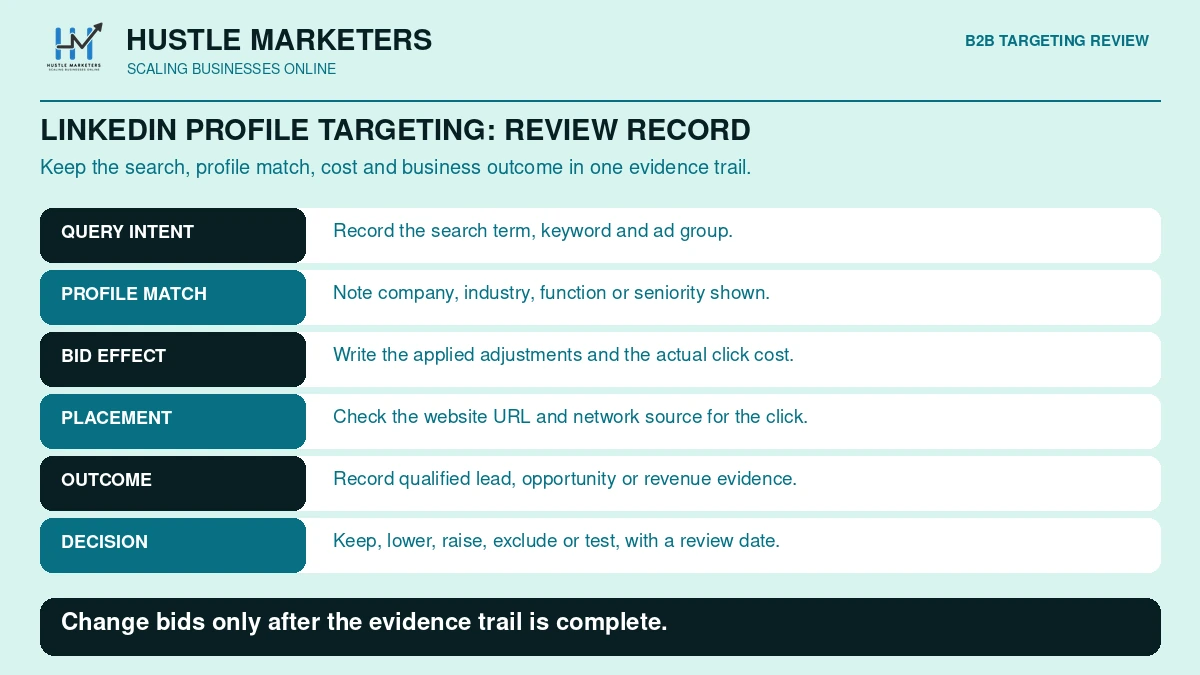
- Run the Website URL report weekly alongside the Professional demographics report.
- Add website exclusions. The exclusions help page allows 2,500 URLs.
- Review syndicated partners. Our guide to excluding Microsoft syndicated search partners covers the options.
- Cap daily budgets at launch until placement data builds.
- Watch unexcludable placements. In a 2024 thread, a US-only advertiser saw localized LinkedIn subdomains they could not exclude.
- Judge placements on qualified conversions, and add these checks to your routine with our Bing Ads optimization checklist.
How should SaaS, professional services, B2B ecommerce and manufacturing set it up?
The principles stay the same, but the layers change. SaaS leans on job function, seniority and company lists. Professional services lean on industry and Owner or Partner seniority. B2B ecommerce works inside bid-only Shopping with purchasing roles. Manufacturing pairs engineering and purchasing functions with named OEM accounts. The table is our recommended starting blueprint, not Microsoft guidance.
| Business type | Campaign mix | Keyword layer | LinkedIn layer | Audience layer | Hygiene and measurement |
|---|---|---|---|---|---|
| B2B SaaS | Search (brand, competitor, category, problem); Audience retargeting | “[category] software”, “[competitor] alternative” | Bid up buyer functions (for example Engineering) and Director, VP, CXO; company list of target accounts; -90% on non-ICP industries | Customer Match to exclude customers or bid up expansion; remarketing on pricing and demo pages | Microsoft sites and select traffic; demo and trial goals; offline SQL import |
| Professional services | Search, plus DSA or Performance Max for content-rich sites | Service plus industry, such as “manufacturing ERP consultant” | Bid up served industries and Owner, Partner, CXO; company targeting for named prospects | Customer Match of past clients; remarketing | Check restricted-category rules; call and form goals; import qualified consultations |
| B2B ecommerce | Shopping plus Search; Performance Max with LinkedIn signals when available | Product terms plus bulk, wholesale and trade modifiers | Bid up purchasing functions and buyer industries; bid down consumer-heavy segments | Customer Match for repeat buyers; remarketing | Trade terms in feed titles; UET revenue values; revenue by segment in the API report |
| Manufacturing | Search for capability and part terms; Audience campaigns with target and bid for OEM accounts | “CNC machining services”, “custom injection molding”, part numbers | Bid up Engineering and purchasing; Manager and Director; Search company list of target OEMs | Customer Match of distributors and accounts | RFQ goals; offline import of quotes won; judge on pipeline, not 30-day CPA |
Confirm exact industry and job function labels in the UI or profile data files. Engineering appears in Microsoft’s API code sample, and sales, accounting and purchasing appear in its help examples. SaaS teams choosing a partner can compare our guides to the best Google Ads agency for SaaS and what to look for in a SaaS PPC agency. B2B ecommerce brands should fix the catalog first with our Bing Shopping feed guide.
How do you report on LinkedIn profile targeting performance?
Use the Professional demographics report under Reports, Targeting. It shows impressions, clicks, spend and average CPC by company, industry and job function for each ad group. The API version adds conversions and revenue when the UET tag is in place. Microsoft keeps daily data for this report for 36 months, which covers most B2B sales cycles.
| Report or view | What it shows | Best use |
|---|---|---|
| Professional demographics report (Reports > Targeting) | Impressions, clicks, spend and average CPC per ad group by company, industry and job function | See which ICP segments get clicks and what they cost |
| Professional Demographics Audience report (API) | Company, industry and job function names plus conversions and revenue; conversions need UET; view-through only for Audience network ads | Compare conversion rate and revenue by segment |
| Website URL (publisher) report | Sites where ads appeared | Find placements to exclude |
| Audience planner | Directional audience and impression estimates | Size ABM segments before launch |
| GetLinkedInSegments API (not everyone yet) | Reach, status and matched vs total companies (fields still Reserved) | Check company list match rates |
| Data retention | 36 months for daily and longer periods; 6 months for hourly | Export hourly data if you analyze dayparts |
Sources: the create a report help page, the report column reference and the data retention guide. The column reference describes company, industry and job function columns but still marks JobSeniorityName as Reserved, so check whether job seniority appears in your report builder.
Read bid-only data carefully. Segment rows cover only matched people, and reports drop entities with zero impressions, so a company missing from the report likely had no impressions from matched profiles. Compare cost per qualified lead by segment and bid down segments that spend without pipeline before you bid anything up.
What are the most common LinkedIn profile targeting mistakes?
The costliest mistakes come from misreading how the feature works: assuming Search targeting restricts reach, stacking bid-ups without doing the math, treating Performance Max signals as targeting and leaving LinkedIn-targeted Search campaigns exposed to weak placements. The table lists each mistake, why it hurts and the fix we apply in the accounts we audit.
| Mistake | Why it hurts | Fix |
|---|---|---|
| Assuming Search profile targeting limits who sees ads | Non-ICP searchers still click at base bid | Tighten keywords and negatives; bid down non-ICP segments |
| Stacking large bid-ups | Adjustments multiply; two +100% bid-ups quadruple the bid | Model combined multipliers against your CPA ceiling |
| Trusting default adjustments | UI and bulk defaults differ (15% vs 0) | Enter every adjustment explicitly |
| Putting LinkedIn segments in a combined list | LinkedIn profile targeting is not eligible | Associate lists and criteria at ad group level |
| Treating Performance Max signals as targeting | Ads can serve well beyond the signal | Use Search or Audience campaigns for strict control |
| Skipping placement checks | Bid-ups inflate spend on weak sites | Test on Microsoft sites and select traffic; review Website URL reports |
| Over-narrow target and bid Audience campaigns | Targeting may not save; small audiences deliver little | Widen seniority or industry; watch the audience meter |
| Optimizing to raw form fills | Bidding rewards segments that never buy | Import SQLs and closed deals as offline conversions |
| Following pre-2026 Bing Ads guides | They often miss seniority, company lists and Performance Max | Check dates and confirm options in the live UI |
Where do Microsoft’s own docs disagree about LinkedIn targeting?
Several Microsoft pages conflict on supported campaign types, importing company lists, exclusions in Search, the default bid adjustment, job seniority availability and markets. Pages update on different schedules, and features roll out account by account. When sources disagree, trust what your live UI offers for that campaign, and date-stamp your notes.
We are not picking sides. Each row reflects the sources as of September 16, 2026.
| Topic | One source says | Another source says | What to do |
|---|---|---|---|
| Campaign types | LinkedIn targeting help (Jul 2026): Search, DSA, Shopping, Audience, Performance Max | Audience options help (Jun 2026): Search, Audience, Shopping, Lodging. ProfileCriterion API: DSA, Search, Shopping, Audience | Check targeting options in each campaign type |
| Importing company lists | LinkedIn targeting help and a June 2026 moderator: add manually; importing not supported | Search campaign help (Jun 2026): company lists of up to 10,000 pasted companies; API CompanyList segments | Look for Tools > Audiences > Company lists; otherwise use Editor or support |
| Exclusions in Search | API: negative profile criteria only in Audience campaigns | Search help: Target or Exclude choices | Use Exclude if offered; otherwise bid down -90% |
| Target and bid | Help and support: bid only | API and code sample: target and bid in Audience campaigns | Confirm which setting your campaign type shows |
| Default adjustment | Bid adjustments help: 15% | Bulk references: 0 if omitted | Type every adjustment |
| Job seniority | Demographic targeting help (Jun 2026): Search only, not everyone | August 2026 blog: GA for Search and Audience ads; API values still Reserved | Check each campaign type’s UI; test API workflows |
| Markets | A November 2024 support answer describes one set of availability limits | A March 2024 support answer describes a different set | Check the market availability page and your UI |
| Audience Network exposure | Support (Sep 2024): Search is auto-enabled on the Audience Network; Microsoft sites and select traffic removes it | Ad distribution help says all options include search and Audience ads | Confirm placements in the Website URL report |
What changed for Microsoft Ads LinkedIn targeting in 2026?
- January 2: CompanyList and LinkedInSegmentStatus API reference pages dated.
- March: Add, Update and Delete LinkedInSegments listed in the API release notes.
- May 7: LinkedIn announced expanded CTV buying through Amazon DSP, with inventory via Microsoft Monetize.
- June: company lists and job seniority documented for Search as rolling out; LinkedIn campaigns help page updated.
- July 27: LinkedIn targeting help page updated; it lists Performance Max, not yet for everyone.
- August: GetLinkedInSegments and CustomLinkedInCriterion added.
- August 31: Microsoft’s product news announced job seniority and AI Max for Search as generally available.
- September 8: Performance Max age and gender exclusions scheduled for general availability.
- October 1: Max CPC removed when creating new non-portfolio campaigns using Maximize Conversions with target CPA, Maximize Conversion Value with target ROAS, or Maximize Clicks.
We have not found documentation on how AI Max for Search interacts with profile bid adjustments, and we will update this guide as Microsoft publishes more.
Frequently asked questions
These questions come from real advertiser threads in Microsoft Q&A and common searches about Microsoft Ads LinkedIn targeting. Each answer stands on its own and reflects Microsoft’s documentation as of September 2026. Where Microsoft’s pages disagree, the answer says so and tells you what to check in your account.
Is LinkedIn audience targeting still an option within Bing, and how do I set it up?
Yes. Microsoft calls it LinkedIn profile targeting, and it covers company, industry, job function and job seniority. In Expert mode, open campaign or ad group targeting or the Demographics page, add the dimension and set a bid adjustment.
Can I use “Target & Bid” for LinkedIn demographic targeting in search ads?
Microsoft support said no in April 2025, and the API documents target and bid for company, industry and job function only in Audience campaigns. In Search, profile targeting adjusts bids without restricting delivery.
How can I bulk add companies to target in my Microsoft Ads?
If your account has company lists, paste up to 10,000 companies under Tools, Audiences, Company lists. Otherwise, support has described an Editor workflow with up to 1,000 companies at a time, and developers can use the SearchCompanies and LinkedIn segment APIs.
How do I get the Profile ID for companies in the Ad Editor?
Company Profile IDs are not published. Add companies by name in Editor and export to see their IDs, or call SearchCompanies with at least three characters. For large lists, Microsoft support has offered back-end help.
Why is industry targeting showing fewer clicks than my campaign total?
If the campaign uses bid only, people outside the industry still click, and the segment report covers only matched profiles. People whose industry Microsoft cannot identify likely fall outside the segment too. Check the Professional demographics and Website URL reports together.
Why won’t my Industry targeting save on a display ad?
Microsoft support pointed to the audience meter, which can block saving targeting that is too narrow in Audience campaigns, plus basic browser troubleshooting. Add related industries or remove extra layers, and confirm the options are available for your target locations.
How do I stop Audience Network sites draining a LinkedIn-targeted search budget?
Use website exclusions, not the distribution setting alone. “Microsoft sites and select traffic” removes syndicated partners, but Microsoft’s help page says every distribution option still includes Audience ads. Review the Website URL report, add the MSN, Outlook and app placements that spend without converting to a website exclusion list, and cap daily budgets while data builds. Our Microsoft Audience Network guide covers the full process.
Does “target & bid” work with in-market audiences in search campaigns?
Yes, support confirmed it. The setting applies to every audience association in that ad group or campaign, and your latest choice overrides the previous one.
How many companies can I target in Microsoft Ads?
Up to 1,000 companies per campaign or ad group as individual criteria. Search campaigns with the company lists feature can use lists of up to 10,000 companies, though Microsoft’s June 2026 help says not every account has the feature yet.
Can I combine LinkedIn profile targeting and Customer Match in one list?
No. LinkedIn profile targeting is not eligible for combined lists. Associate your Customer Match list and LinkedIn criteria with the same ad group instead.
Can I exclude industries or job functions in a Search campaign?
Microsoft’s pages disagree. The API supports negative profile criteria only in Audience campaigns, while Search help pages show an Exclude option. Use Exclude if your UI offers it; otherwise set -90% on non-ICP segments.
Is Microsoft Ads LinkedIn targeting cheaper than LinkedIn Ads?
No published benchmark compares them directly. Dreamdata’s 2026 report, from a LinkedIn Marketing Partner, put LinkedIn’s average CPC at EUR 5.98, and we found no Microsoft equivalent. Compare both on cost per qualified opportunity, not CPC.
Why choose Hustle Marketers and Ishant Sharma for Microsoft Ads B2B targeting?
If your Microsoft Advertising B2B account spends on the wrong companies, or you are unsure how bid-only data and stacked adjustments affect cost per lead, an expert review can save months of guesswork. We build and audit LinkedIn profile targeting, company lists and partner-site settings in the Microsoft Ads accounts we manage.
We run Microsoft Ads for our own agency, which is a B2B service, so we deal with the same problem every B2B advertiser has. Real buyers search alongside job seekers, students and bots, and in our September 2026 audit bot-like searches had taken almost 16% of lifetime spend. Profile targeting only pays off once that noise is filtered out.
Ishant Sharma has worked in paid search since 2013 and leads Hustle Marketers, a Microsoft Advertising Partner and Google Partner agency. The team holds six 2026 Clutch awards and a 4.9 out of 5 rating from 591 verified client reviews, and has helped 2,500+ brands generate $780M+ in trackable revenue.
What does our B2B Microsoft Ads setup include?
- LinkedIn profile bid adjustments by company, industry and job function, tested against a control
- Negative keyword lists for jobs, training, courses, free and DIY searches
- Website exclusions that keep B2B search budgets off low-quality audience placements
- Offline imports of qualified leads and SQLs, so bidding learns from pipeline
- Reporting on cost per qualified lead, not cost per click
Should you hire an agency or a consultant for B2B Microsoft Ads?
Our Bing Ads agency team runs full account management, a Bing Ads specialist can own daily optimization, and our Bing Ads consultant service suits in-house teams. Comparing partners? See what defines the best B2B paid search agency. Our PPC management services run month to month and you own your accounts, and our B2B SEO agency team builds organic demand alongside.
Our Microsoft Advertising work includes 10.8x ROAS for an epoxy flooring brand, which is not a LinkedIn targeting case study. Get Free Audit Worth $500: our audit reviews profile bid adjustments, company targeting, distribution settings, placements and conversion tracking, and we look for segments that spend without producing pipeline.
About the author: Ishant Sharma is a Google Ads, Microsoft Ads and SEO specialist who has worked in digital marketing since 2013, and the founder of Hustle Marketers, a Google Partner agency. Over that time he has worked with B2B companies, SaaS brands and professional services firms running paid search, and his agency has worked with more than 2,500 brands. He builds Microsoft Ads audience layering for B2B advertisers who need fewer, better leads.