Microsoft UET Tag Setup: Install, Conversion Goals, Consent Mode and Fixes

Ishant
Published : September 23, 2026 at 9:00 am
Updated : October 12, 2026 at 2:34 am
Ishant

A UET tag (Universal Event Tracking tag) is the tracking code from Microsoft Advertising that you place on every page of your website so Microsoft Ads can record conversions, build remarketing audiences and feed automated bidding. You create one tag per website, install it directly or through Google Tag Manager, then build conversion goals on top of it.
Installing the code takes minutes. Getting Microsoft Ads conversion tracking right takes longer, because the tag now works alongside consent mode, enhanced conversions, offline imports, the Conversions API and auto-created goals.
This guide covers all of it, with code, settings, a troubleshooting table and the places where Microsoft’s documentation contradicts itself. Facts link to Microsoft sources checked in September 2026.
Key takeaways
- Use one UET tag per website, installed on every page.
- Tag verification takes up to 24 hours, but UET conversions report within 2 hours, so you can test goals in Tag Helper the same day.
- Consent signals have been enforced for visitors in the EEA, UK and Switzerland since 5 May 2025. Only ad_storage is enforced.
- Variable revenue needs a goal set to “Conversion action value may vary” plus revenue_value and an uppercase currency code.
- AutoEvent goals from simplified setup cannot carry variable revenue, so check them before they feed bidding.
- Keep MSCLKID auto-tagging on and keep query strings through redirects, or offline import breaks.
- Google Ads import only brings over online, tag-based, destination URL goals.
What is a UET tag in Microsoft Ads?
The UET tag is Microsoft Advertising’s site-wide tracking code. It loads a script called bat.js from bat.bing.com into a queue named uetq, records page views and events, and sends them to your account. Conversion goals, remarketing lists and conversion-based bid strategies such as Target CPA all depend on that data.
The Bing UET tag, the Microsoft UET tag and the Microsoft Ads pixel are the same code. It records page views, custom events such as leads and purchases, revenue, the Microsoft Click ID (MSCLKID) and, if you send them, consent state and enhanced conversion data. If you are new to the platform, start with our guide to advertising on Bing.
The Microsoft UET FAQ says UET data is kept for 390 days and the first-party _uetmsclkid cookie lasts 90 days. Supported tag managers include GTM, Tealium and Adobe Experience Platform, and platforms include Shopify, BigCommerce, WordPress.com and Wix.
UET vs GTM vs Conversions API vs offline import: which do you need?
These are layers, not rivals. UET is the base, GTM deploys it, and the other two fill gaps the browser misses.
| Method | How data reaches Microsoft | Best for | Watch out for |
|---|---|---|---|
| UET tag, hard-coded | Browser script on every page | Simple sites with developer access | Double counting if GTM also fires a UET tag |
| UET tag through GTM | Browser script managed in a GTM container | Sites already on GTM, teams without developer time | Direct integration can copy GA4 events you did not plan to track |
| Conversions API | Your server posts events to capi.uet.microsoft.com | Server-confirmed events such as paid orders | 7-day event age limit, 1,000 events per batch, needs deduplication |
| Offline conversion import | File upload or API, matched on MSCLKID or hashed email or phone | Leads that close in a CRM or by phone | 2-hour wait after goal creation, 90-day limit, UTC times |
How does UET power remarketing audiences?
The remarketing FAQ says visitors join remarketing lists within minutes, size shows in reporting after about a day, and the minimum is 300. Membership lasts 1 to 180 days, default 30, per the RemarketingList reference. Create lists on day one.
How do I create a UET tag in Microsoft Advertising?
Sign in to Microsoft Advertising, open Conversions, then UET tag, and select Create. Give the tag a name, choose an industry category, decide whether to enable Microsoft Clarity and save. Microsoft then shows the tracking code containing your numeric Tag ID, which you can copy, download or email to your developer.
What should you check before creating a tag?
- An existing tag. Microsoft’s multiple tags guidance recommends one tag per website (the account limit is 1,200). If several accounts advertise one site, share a single tag.
- Auto-tagging. MSCLKID auto-tagging is on by default, and turning it off prevents offline conversion import.
- Redirects. A redirect that drops ?msclkid= loses the click ID.
- European traffic. Plan consent mode before launch.
- Go to Conversions, then UET tag, then Create.
- Name the tag after the domain and add an optional description.
- Choose an industry category and the Clarity setting.
- Choose whether to share with manager accounts, then save and copy the code.
These fields come from Microsoft’s create a UET tag page, which lists 19 industry categories. Take care with HealthWellness: Microsoft warns events from those tags may not be eligible for audience targeting and suggests separate tags.
Should you tick Enable Microsoft Clarity?
Clarity adds session recordings and heatmaps that show why paid traffic is not converting, and our Microsoft Clarity guide covers what you get. Microsoft’s UET and Clarity page says new tags do not capture Clarity data by default. Clarity also has separate consent rules: Clarity consent enforcement began on 31 October 2025, a different date from UET.
Where do you find your UET Tag ID?
The Tag ID is the number shown against the tag in the UET tag list, and it appears in the tracking code as the ti value. You need it for the GTM template, the Conversions API endpoint and Tag Helper checks.
How do I install the UET tag directly on my website?
Paste the base UET code into the head or body of every page, ideally in a shared header template so no page is missed. One tag covers the whole website. After you publish, Microsoft can take up to 24 hours to verify the tag, and its status then moves from Unverified to Active.
The current base code on Microsoft’s add a UET tag page looks like this. Copy your own version from the account, since it contains your Tag ID.
<script>(function(w,d,t,r,u){var f,n,i;w[u]=w[u]||[],f=function(){var o={ti:"YOUR_TAG_ID", enableAutoSpaTracking: true};o.q=w[u],w[u]=new UET(o),w[u].push("pageLoad")},n=d.createElement(t),n.src=r,n.async=1,n.onload=n.onreadystatechange=function(){var s=this.readyState;s&&s!=="loaded"&&s!=="complete"||(f(),n.onload=n.onreadystatechange=null)},i=d.getElementsByTagName(t)[0],i.parentNode.insertBefore(n,i)})(window,document,"script","//bat.bing.com/bat.js","uetq");</script>Microsoft accepts the head or the body. We place it high in the head, after any consent default code, so it loads early. Do not load it inside an iframe, which Tag Helper reports as an error.
How does UET handle single-page apps?
The current code includes enableAutoSpaTracking: true, which turns on automatic single-page app tracking. Older installs may lack it. For manual control, a Microsoft support answer in a Q&A thread on SPA tracking recommends a page_view event with a page_path starting with “/”, optionally with disableAutoPageView: true. Mixing both can record a route twice, so test first.
window.uetq = window.uetq || [];
window.uetq.push('event', 'page_view', { 'page_path': '/checkout/shipping' });
What about Shopify, WordPress, Wix and BigCommerce?
Each platform can host the tag through its integration or theme settings. Confirm checkout and thank-you pages carry it, since hosted checkouts often sit outside the theme. For stores losing browser events, our Shopify server-side tracking guide covers the server route. You can disable UET first-party cookies with storeConvTrackCookies: false, but that removes the _uetmsclkid click ID cookie, so we rarely advise it.
How do I set up the Microsoft UET tag in Google Tag Manager?
There are two routes. Direct integration connects Microsoft Advertising to your GTM container and creates the base tag for you, optionally copying Universal Analytics and GA4 event tags. The manual route uses the Microsoft Advertising Universal Event Tracking tag template with the page view track type, fired on All Pages, then published.
Option 1: How does GTM direct integration work?
On Microsoft’s GTM direct integration page, you choose to add the tag through Google Tag Manager, sign in with Google and pick the account and container. Microsoft adds a base UET tag and can copy Universal Analytics, UA enhanced ecommerce and GA4 event tags into UET tags.
Conversion goals are not created for you. This may explain a Microsoft Q&A report of form and phone click events appearing in UET that nobody added.
Option 2: How do you install the UET template in GTM?
- Remove any hard-coded UET tag from the site.
- In GTM, go to Tags, then New, then Tag Configuration.
- Search for “Microsoft Advertising Universal Event Tracking”.
- Choose the track type “UET config/page view (required)”.
- Enter your UET Tag ID and leave the UETQ variable as uetq.
- Set the trigger to All Pages.
- Test in Preview, then submit and publish.
These steps follow Microsoft’s UET with Google Tag Manager guide. Template labels change between versions, so match on meaning if your screen differs.
How do you avoid duplicate UET tags?
- Do not run a hard-coded tag and a GTM tag with the same Tag ID, which can send events twice.
- If two different tags must share a page, give each its own queue name, such as uetq1 and uetq2. Otherwise Tag Helper reports “Multiple UET tags on this webpage use the same event name”.
- Publish the container, or Tag Helper finds nothing.
How do I create conversion goals in Microsoft Ads?
Open Conversions, then Conversion goals, and create a goal for each action that matters. Microsoft lists nine goal types, including destination URL, event, product, offline and in-store transactions. Choose the type, set the revenue option, conversion window and count setting, link the goal to your UET tag and save.
A tag without goals reports zero conversions. It is the first thing we check when someone says Microsoft Ads “is not tracking”.
| Goal type | What it records | Needs the UET tag? | Typical use |
|---|---|---|---|
| Destination URL | Visits to a page matching your URL rule | Yes | Thank-you and order confirmation pages |
| Event (custom event) | Events matched on action, category, label or value | Yes | Form submits, clicks, purchases with revenue |
| Duration | Visits longer than a set time | Yes | Content engagement |
| Pages viewed per visit | Visits that pass a set number of pages | Yes | Content engagement |
| Product | A product purchased via an ad click | Yes | Ecommerce product sales |
| Mobile app install | Installs of your mobile app | No, you enter the app ID | App promotion |
| Offline conversions | Conversions you upload after the click | No, but you need the MSCLKID or hashed contact data | CRM sales and qualified leads |
| Store visits | Store visits after an ad | No | Retailers with physical locations |
| In-store transactions | Transactions in your store | No | Retailers with physical locations |
The types come from Microsoft’s conversion goal types page; store visits and in-store transactions are not in every account yet. The create a conversion goal page confirms goal matching is case-insensitive.
Should you use simplified or manual goal setup?
Simplified conversion goal setup detects events such as purchases and button clicks and suggests goals, given a working UET tag on every page and a supported site language. It is fast but limited: no variable revenue, no app or offline goals, and you cannot edit the type or details of auto-created goals later. Use manual setup for anything that drives bidding, especially purchases, because only manual goals take a variable order value.
Which goal settings matter most?
| Setting | Options and limits | How we usually set it |
|---|---|---|
| Conversion window | 1 minute to 90 days, default 30 days | Match your real sales cycle |
| View-through window | Up to 30 days | Keep it short so it does not inflate results |
| Count | All (default) or Unique | Unique for leads, All for purchases |
| Attribution | Last ad click by default, data-driven available | Align with your other platforms where possible |
| Revenue | Same value, or “Conversion action value may vary” (URL and event goals only) | Variable for ecommerce, fixed estimate for leads |
| Include in “Conversions” | Yes or No | Yes only for goals bidding should optimize toward |
Window, count and attribution rules come from Microsoft’s how conversion tracking works page, and the view-through limit from the EventGoal reference, which also caps custom event expressions at 100 characters. Once goals record, use our CPA calculator to set a Target CPA your margins can support.
Conversion value rules can later add to or multiply values by location, device or audience. Add them only once base values track correctly.
How do I track form submissions and button clicks with UET?
Push a custom event to the uetq queue when the action happens, then create a custom event goal whose action, category or label matches what you send. The current syntax is window.uetq.push(‘event’, action, parameters). Choose “Track event on inline action” for clicks and submits that do not load a new page. For tel: link clicks and call extensions, follow our Bing Ads call tracking guide.
Microsoft’s custom events page lists predefined actions including generate_lead, sign_up, add_to_cart, begin_checkout, purchase and page_view. A lead form example:
window.uetq = window.uetq || [];
window.uetq.push('event', 'generate_lead', {
  'event_category': 'lead_form',
  'event_label': 'contact_page',
  'event_value': 1
});- Fire the push from the form’s success handler, so failed submissions do not count.
- Create a Custom event goal with Action equals generate_lead.
- Choose “Track event on inline action” if no new page loads, otherwise “Track event on page load”.
- Save, submit a test form and confirm the event in Tag Helper.
event_value accepts 0 to 9,999,999 with up to three decimals; keep money in revenue_value. In GTM, use the UET template’s custom event track type and fire it on a form submission, click or dataLayer trigger.
What changed between the old and new UET syntax?
Many older tutorials from the Bing Ads era still show short parameter names, such as window.uetq.push({‘ec’: ‘lead_form’, ‘ea’: ‘submit’}). Microsoft’s syntax update page maps them to current names.
| Old parameter | New parameter | What it holds |
|---|---|---|
| ea | event (the action argument) | Action name, such as purchase |
| ec | event_category | Grouping, such as lead_form |
| el | event_label | Detail, such as the form name |
| ev | event_value | Numeric event value |
| gv | revenue_value | Variable revenue |
| gc | currency | Three-letter currency code |
How do I pass purchase revenue to Microsoft Ads?
Set the goal’s revenue option to “Conversion action value may vary”, then send revenue_value and currency with the conversion on your order confirmation page. Use a three-letter currency code in capital letters and a period as the decimal point. Without both pieces, Microsoft records the purchase but not the order value.
window.uetq = window.uetq || [];
window.uetq.push('event', 'purchase', {
  'revenue_value': 129.99,
  'currency': 'USD'
});
That example suits a custom event purchase goal. For a destination URL goal, Microsoft’s variable revenue page shows the same push with an empty action (‘event’, ”) on the confirmation page.
How do you send purchase revenue through GTM?
- Push the order to the dataLayer on the confirmation page (example below).
- Create Data Layer Variables for ecommerce.value and ecommerce.currency, and a Custom Event trigger for purchase.
- Add a UET custom event tag with action purchase and revenue and currency mapped to those variables.
- Test an order in Preview, then publish.
window.dataLayer = window.dataLayer || [];
window.dataLayer.push({
  'event': 'purchase',
  'ecommerce': { 'transaction_id': 'T12345', 'value': 129.99, 'currency': 'USD' }
});
What format rules does revenue have to follow?
- Currency in capitals: ‘USD’, not ‘usd’. Tag Helper reports an incorrect currency code.
- A period decimal and a plain number: 1299.00, not “1,299.00” or “$1299”.
- Between 0 and 9,999,999, with no more than three decimals.
- Once per order. Microsoft has no built-in removal of duplicate conversions, so stop the event refiring on a thank-you page reload.
Results like the 10.8x ROAS our epoxy flooring client reached on Microsoft Advertising only mean something when order values are passed correctly, and you can sanity-check reported figures with our ROAS calculator.
What are AutoEvent conversions in Microsoft Ads?
AutoEvent conversions are goals such as AutoEvent_add_to_cart, AutoEvent_begin_checkout and AutoEvent_purchase that Microsoft creates through simplified conversion goal setup, with no custom code. You cannot change their goal type or details after creation, and simplified goals do not support variable revenue, so review them before bidding relies on them.
Add the Creation Method column to your goals list to see how each goal was made. These goals are not always expected. In a Microsoft Q&A thread on disabling Auto-Events, an advertiser in February 2026 found AutoEvent_add_to_cart, AutoEvent_purchase and other AutoEvent goals in the UET dashboard and could not trace them to GTM. A March 2026 follow-up said they still fired on new properties set up manually.
Should you keep AutoEvent goals?
- No other tracking: better than nothing, but no order values.
- Manual purchase goal already live: if both count in Conversions, orders can be counted twice and Target CPA or Maximize conversions learns from inflated data.
- Value bidding: let a manual purchase goal with variable revenue drive bidding.
Microsoft lets you change an auto-created goal’s category but not its type or details. Check what your account allows for excluding or pausing a duplicate, and if you cannot switch it off, raise it with Microsoft support.
How do I set up enhanced conversions for Microsoft Ads?
Enhanced conversions add a customer’s email address or phone number to a UET conversion to improve the accuracy of conversion tracking. Send them in a pid object with em and ph keys, using a set command or on the conversion event. SHA-256 hashing is optional online but mandatory for offline uploads.
Microsoft’s February 2024 product update, dated 6 February 2024, said enhanced conversions was in beta for advertisers in the Americas and Europe and rolling out to all markets. Current rules are on the enhanced conversions help page. Turn it on for a goal first; the API setting is IsEnhancedConversionsEnabled=true.
window.uetq = window.uetq || [];
window.uetq.push('set', { 'pid': {
  'em': 'janedoe@example.com',
  'ph': '+14255550123'
} });
Use real variables in place of the samples. Microsoft’s enhanced conversions FAQ says tag order does not matter. In GTM, tick “Send enhanced conversion values” on the base UET tag and map an email or phone variable.
How should email and phone data be normalized?
Normalize before hashing, or hashes will not match. Online, Microsoft formats unhashed emails, but phone numbers must be E.164.
| Rule | Email address (em) | Phone number (ph) |
|---|---|---|
| Whitespace | Trim leading and trailing spaces | Remove spaces and formatting |
| Case | Lowercase | Not applicable |
| Aliases and dots | Remove any +alias and periods before the @ | Not applicable |
| Format | name@domain.com | E.164 with + and country code, such as +14255550123 |
| Hashing online | SHA-256 optional | SHA-256 optional; format it yourself |
| Hashing offline | SHA-256 mandatory, unhashed uploads rejected | SHA-256 mandatory, unhashed uploads rejected |
| Retention | Hashed data kept 30 days | Hashed data kept 30 days |
For offline uploads, hashed email or phone can stand in for the MSCLKID, but only on goals with enhanced conversions enabled; otherwise rows without an MSCLKID are rejected. Our enhanced conversions and Meta CAPI guide shows how to reuse the same dataLayer values on Google and Meta. Microsoft’s documentation lists email and phone as the only identifiers.
Is UET consent mode required, and how do you set it up?
Yes, if any visitors come from the EEA, the UK or Switzerland. Since 5 May 2025, Microsoft enforces consent signals for those users, and only ad_storage is enforced. In most other countries the default is granted, so US traffic keeps tracking, but European visitors default to denied until your site sends consent.
Microsoft announced the deadline in its March 2025 consent post, and the UET consent FAQ confirms ad_user_data and ad_personalization are optional. Enforcement follows the visitor’s location. For Google’s version, see our Google Consent Mode guide.
What is the difference between basic and advanced consent mode?
| Question | Basic consent mode | Advanced consent mode |
|---|---|---|
| When does UET load? | Only after the visitor accepts | Before the banner, with consent defaulted to denied |
| On accept | The tag loads and tracks normally | Your site sends an update with ad_storage granted |
| On refuse | The tag never loads, so nothing from that visitor reaches Microsoft | The tag stays loaded with consent denied, and cookies must not be set |
| Microsoft’s view | Not Microsoft’s recommendation, though advanced mode is not required for modeled conversions | Recommended by Microsoft |
| Main risk | No signal at all from visitors who refuse or ignore the banner | MUID or _uet cookies set before interaction or after refusal, which stops tracking |
Microsoft’s February 2026 Advanced Consent Mode post describes the pattern: load UET before the banner and send granted when the visitor consents.
What consent code do you need?
<script>
window.uetq = window.uetq || [];
window.uetq.push('consent', 'default', { 'ad_storage': 'denied' });
</script>

// When the visitor accepts advertising cookies:
window.uetq.push('consent', 'update', { 'ad_storage': 'granted' });
Many CMPs can fire the update for you. The UET consent mode page reminds you that Clarity consent is set separately.
How do the GTM consent template and TCF work?
In GTM, Microsoft’s consent template page notes “Inherit Initial Consent” is off and “Enable Consent Updates” is on by default. In a May 2025 Q&A thread, several users reported the asc parameter missing after pushing updates through the template or Custom HTML, so confirm it in the request.
If your CMP uses the IAB Transparency and Consent Framework, enable TCF with the code below. Microsoft’s TCF page says purposes 7, 9 and 10 are required for conversions and the CMP timeout is 500 milliseconds. The vendor IDs are Microsoft 1126 and Xandr 32.
window.uetq = window.uetq || [];
window.uetq.push('config', 'tcf', { 'enabled': true });
How do you check consent is working, and are conversions modeled?
Add the Consent Signal column to your UET tag list. Healthy means consent arrived with more than 75% of events in the last 7 days, Moderate means above 0% up to 75%, and Missing means 0%. Then accept and refuse your banner from a European connection and watch the asc parameter change.
For eligible advertisers, conversions from users who decline can be modeled. Microsoft’s August 2025 product update launched modeled conversions for UET consent mode for eligible advertisers in the EEA, Switzerland and Great Britain.
How do I upload offline conversions to Microsoft Ads?
Capture the MSCLKID from the landing page URL, store it with the lead in your CRM, and create an offline conversion goal. When the deal closes, upload the click ID, goal name, conversion time in UTC and optional value by file or API. Wait two hours after creating the goal before your first upload. If a tracking template or redirect strips the MSCLKID, the upload has nothing to match, so test your final URLs first.
- Keep auto-tagging on and query strings intact.
- Save msclkid from the URL or _uetmsclkid cookie with each lead.
- Create an Offline conversion goal. Scope defaults to Account and cannot be changed later.
- Wait at least 2 hours before the first upload.
- Upload the MSCLKID (or hashed email or phone), the exact goal name, the conversion time in UTC, and value and currency if used.
- Allow up to 6 hours for reporting.
The OfflineConversion reference sets the timing rules: the conversion must be after the click, within 90 days and inside the goal’s window, in UTC. A row with the same MSCLKID and conversion time as an earlier one is ignored as a duplicate. Per the OfflineConversionGoal reference, externally attributed goals can only be set up through the API.
Can you restate or retract offline conversions?
Yes. Restate when a deal value changes and retract when an order is refunded or a lead proves to be spam. Microsoft has no built-in detection of test, fraudulent or duplicate conversions, so retraction is your cleanup tool.
Why does an accepted upload show nothing?
In a December 2025 Q&A thread, API uploads returned a request ID but nothing appeared in the interface. We check whether the goal was under 2 hours old, times were local rather than UTC, the MSCLKID belongs to another account or the goal name differs.
What is the Microsoft Ads Conversions API, and do you need it?
The Conversions API lets your server send conversion events straight to Microsoft at capi.uet.microsoft.com, using your UET Tag ID and a Bearer token. It works alongside the UET tag rather than replacing it. Add it when the browser misses events your server can confirm, and deduplicate by sharing eventId and eventName.
POST https://capi.uet.microsoft.com/v1/{tagId}/events
Authorization: Bearer YOUR_ACCESS_TOKEN
Microsoft’s Conversions API integration guide sets these rules:
- Deduplication: browser and server events sharing eventId and eventName count once. Build the ID from the order number.
- Event age: eventTime must be within the last 7 days. Older conversions belong in offline import.
- Batch size: up to 1,000 events per request.
- Consent: adStorageConsent takes G or D and defaults to granted, so send D for European visitors who refused.
- Click IDs: Microsoft suggests keeping MSCLKIDs for 90 days.
Many CAPI setups run in server-side GTM. Our server-side GTM hosting comparison covers Stape vs Cloud Run if you need somewhere to host it.
Can Microsoft Ads import conversion goals from Google Ads?
Yes, but only some goals. Google Ads import brings over online, tag-based, destination URL goals created in Google Ads, along with their settings. Data-driven attribution comes across as last click, and Google-hosted conversions and Smart Goals cannot be imported. Imported goals still need the UET tag on your site to record anything.
| Imports from Google Ads | Does not import, or changes on import |
|---|---|
| Online, tag-based destination URL goals created in Google Ads | Goals created outside Google Ads, such as in GA4 |
| Goal settings | Data-driven attribution, which becomes last click |
| New goals, if that import option is on | Google-hosted conversions |
| Updates to imported goals, if that option is on | Smart Goals, and goals named the same as an existing Microsoft goal |
Sources: Microsoft’s what gets imported page and the GoogleImportOption reference, where NewConversionGoals and UpdateConversionGoals both default to true. Search Engine Roundtable reported on 6 June 2024 that goal import would become on by default.
Why do imported goals often record zero? An imported goal is only a rule. The Google tag sends nothing to Microsoft, so without UET on the same pages there is nothing to match. Also check scheduled imports are not overwriting your edits. Our Bing Ads management guide covers how imports fit into running the account.
How do I check if my UET tag is working?
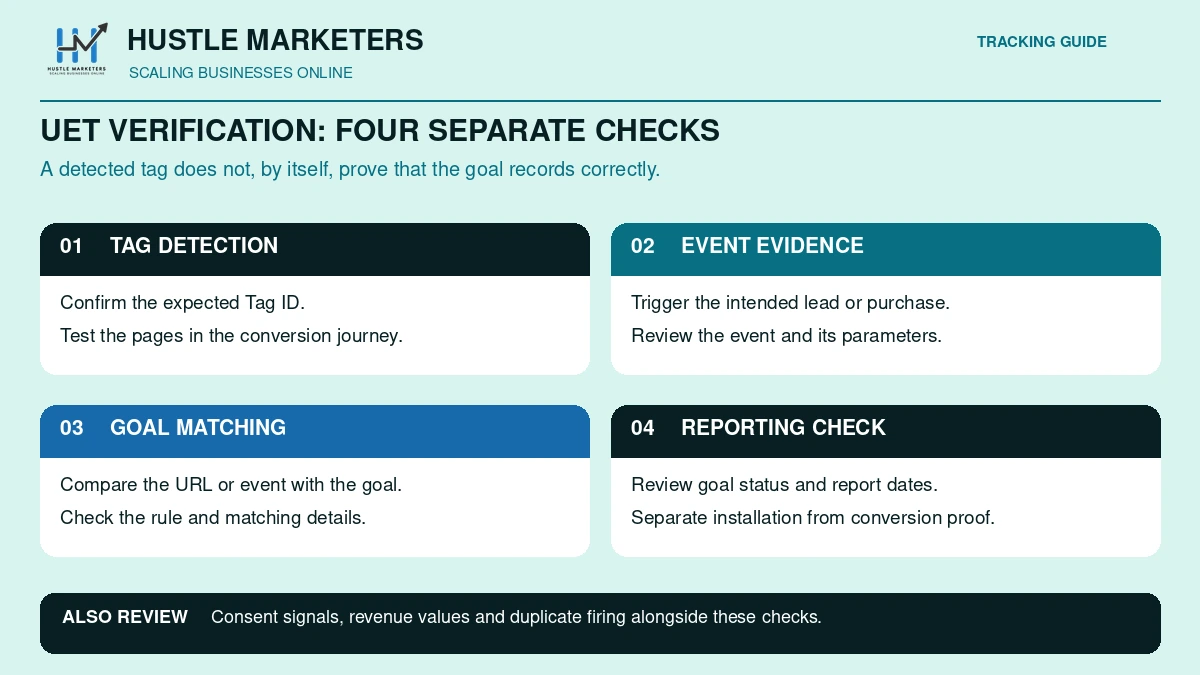
Install UET Tag Helper in Chrome or Edge, open a page on your site and confirm it detects your Tag ID without errors. Then complete a test conversion and check the goal status in Microsoft Advertising. Tag verification can take up to 24 hours, while UET conversions usually report within two hours.
What does UET Tag Helper check?
The UET Tag Helper extension checks one page at a time, showing the tags found, the events sent and any errors. Microsoft’s Tag Helper page lists 12 named errors, including an event fired from an iFrame, a non-JavaScript tag, an invalid tag ID, an incorrect currency code or revenue value and multiple tags sharing an event name. It also covers MSCLKID lost through redirects.
It has a blind spot. Microsoft’s troubleshooting page says Tag Helper does not capture custom events for code-free conversions, so an empty Events tab does not prove those are broken. Back it up in DevTools: filter the Network tab for bat.bing.com, check the ti value matches your Tag ID, then trigger the conversion and find your event.
What do UET tag and goal statuses mean?
| Status | Applies to | What it means | What to do |
|---|---|---|---|
| Unverified | Tag | Not yet seen; verification can take up to 24 hours | Wait 24 hours, then check installation |
| Active | Tag | The tag is sending data | Test your goals |
| Inactive | Tag | No data in the last 24 hours | Confirm the tag is live and GTM is published |
| Unverified | Goal | Not yet confirmed | Trigger a test conversion |
| Recording conversions | Goal | Conversions in the last 7 days | Keep monitoring |
| No recent conversions | Goal | None in the last 7 days | Check the rule, window and click volume |
| Tag inactive | Goal | Linked tag silent for 24 hours | Fix the tag first |
Tag statuses come from the UetTagTrackingStatus reference. Low-traffic sites can flip to Inactive after a day without visits.
How long does UET data take to show?
| Item | Timing |
|---|---|
| New tag verification | Up to 24 hours |
| UET conversions in reporting | Within 2 hours |
| Non-UET conversions in reporting | Within 5 hours |
| Wait before first offline upload to a new goal | 2 hours |
| Offline conversions in reporting | Up to 6 hours |
| Remarketing list membership | Minutes, with list size in reporting after about a day |
Why is my UET tag not firing or not recording conversions?
Common failures trace back to a handful of causes: the tag missing from some pages, consent blocking UET for European visitors, unpublished GTM changes, goal rules that do not match the event, redirects stripping the MSCLKID, or duplicate tags. Work through the table below in order and confirm each cause before changing anything.
| Symptom | Likely cause | How to confirm | Fix |
|---|---|---|---|
| Tag Unverified after 24 hours | Tag missing from pages, or wrong Tag ID | Tag Helper shows no tag or a different ID | Reinstall site-wide with the account’s ID |
| Tag Inactive | No hits in 24 hours, or tag removed | UET tag list status | Restore the tag |
| Goal shows No recent conversions | Rule mismatch, short window, paused goal or few clicks | Compare goal details with a real conversion | Correct the rule and retest in Tag Helper |
| Tag Helper says No UET tags found | Consent blocking UET, iframe, or GTM not published | Accept the banner and retest; use GTM Preview | Publish; load UET correctly with consent mode |
| Zero European conversions, no asc parameter | Consent default or update missing | Consent Signal column shows Missing or Moderate | Add default denied and update granted on accept |
| Conversions but no value | Goal not set to vary, lowercase currency or comma decimal | Tag Helper incorrect currency code error | Set “may vary”, send ‘USD’ with a period decimal |
| More conversions than real sales | Hard-coded plus GTM tag, overlapping or AutoEvent goals, page reloads | Tag Helper shows two tags; review the goal list | Remove duplicates, one goal per action in Conversions |
| MSCLKID missing in CRM | Redirect strips the query string, or auto-tagging off | Test a landing URL with ?msclkid= through each redirect | Preserve query strings, keep auto-tagging on |
| Custom event not matched | Goal action, category or label differs from code | Compare Tag Helper events with the goal | Align spelling and operators |
| SPA route changes missing | Only the first page load fires | Navigate with Tag Helper open | Use enableAutoSpaTracking or push page_view with page_path |
| Offline upload accepted, nothing shows | Goal under 2 hours old, non-UTC time or wrong account | Upload history | Wait, use UTC, check click IDs |
| Console: TypeError: this.shouldEnforce is not a function | A recent change or bat.js compatibility issue, per Microsoft (seen since 29 April 2025) | Browser console | Review recent changes, test other browsers with extensions off |
In a Q&A thread on Tag Helper and GTM, a user saw bat.bing.com requests in DevTools while Tag Helper found nothing, so treat Tag Helper as one check, not the verdict. For issues beyond tracking, use our Bing Ads optimization checklist.
Why don’t Microsoft Ads conversions match GA4 or Google Ads?
- Click date: Microsoft support answers in Q&A threads say conversions are reported against the ad click date, while tools such as GA4 use the conversion date.
- Cross-device: Microsoft counts cross-device conversions automatically.
- No cleanup: Microsoft does not remove test, fraudulent or duplicate conversions. CRMs and call trackers often do.
- Attribution: Microsoft defaults to last ad click, while GA4 applies its own cross-channel attribution settings.
If you compare channels, our Bing Ads vs Google Ads cost analysis only helps once both platforms count conversions the same way.
Where Microsoft’s own docs disagree
Microsoft’s help and API pages were updated at different times, so several details conflict. The biggest differences cover the remarketing list minimum, where consent code goes, how the asc value appears, whether modeled conversions are live and which TCF purposes apply. When pages conflict, follow the newer or stricter instruction and test in your own account.
| Topic | One Microsoft source says | Another Microsoft source says | What we do |
|---|---|---|---|
| Minimum remarketing list size | 300 (remarketing FAQ and RemarketingList reference) | 1,000 (UET API guide) | Plan for 1,000 |
| Where consent default code goes | Right after the UET tag (consent mode page) | As high as possible in the head, before UET (consent FAQ) | Place it before UET, as the newer consent FAQ advises |
| asc values | “G” or “D” in Tag Helper (consent FAQ) | “denied” or “granted” (consent mode page) | Accept either, as long as it changes with consent |
| Modeled conversions | Coming “soon” (consent FAQ, updated July 2026) | Available in the EEA, Switzerland and GB (August 2025 blog), discussed as live (February 2026 blog) | Treat them as live for eligible advertisers |
| TCF purposes | 1, 2, 3, 4, 7, 9, 10 (consent FAQ) | 1, 3, 4, 7, 9, 10 (TCF page) | Request all of them, including Purpose 2 |
| Clarity checkbox default | Says to clear Enable Clarity, implying it is ticked (create tag page) | New tags do not capture Clarity data by default (UET and Clarity page) | Check the box state on every new tag |
| GTM tag name | “Microsoft Advertising Universal Event Tracking” (GTM page, base tag steps) | “Bing Ads Universal Event Tracking” (same page, custom event steps) | Treat both names as the same template |
| Number of goal types | 7 goal classes (UET API guide) | 9 types, including Product and Store visits (goal types help page) | Check which types your account shows |
| When to check results | Tag verification up to 24 hours; wait 24 hours after a new tag or goal (troubleshooting page) | UET conversions within 2 hours; a support rep said recheck in three hours | Test in Tag Helper the same day, check reporting after 2 to 3 hours, judge new tags and goals after 24 |
What do several UET guides get wrong?
- 31 October 2025 is Clarity’s consent date. UET enforcement started 5 May 2025.
- Modeled conversions for UET consent mode have been available to eligible advertisers since August 2025.
- UET conversions report within 2 hours; Microsoft’s 24-hour wait covers new tags and goals, not every conversion.
- There is no “once per session” count, only All and Unique.
Frequently asked questions
These answers cover common questions advertisers ask in Microsoft Q&A threads about UET tags, from Tag Helper errors, double counting and Auto-Events to consent mode, conversion values and offline uploads. Each answer stands alone; the sections above have full steps.
How do I disable Auto-Events in Microsoft Advertising?
Auto-Events such as AutoEvent_purchase come from simplified conversion goal setup, and Microsoft does not let you edit their type or details. Find them with the Creation Method column, then check whether you can exclude or pause them. If not, contact Microsoft support and keep one purchase goal counting toward bidding.
Why is the UET Tag Helper not recognizing my tag when I set it up on Google Tag Manager?
The usual causes are an unpublished container, a consent banner blocking UET until you accept, or a trigger other than All Pages. Check GTM Preview, accept the banner and reload. If DevTools shows bat.bing.com requests with your Tag ID, the tag is firing even if Tag Helper disagrees.
Why does UET Tag Helper say “No UET tags found” when the tag is active?
Active means Microsoft received data in the last 24 hours, not that the page you are viewing has the tag. Test that exact page with consent accepted and check the tag is not inside an iframe. Confirm in the Network tab before reinstalling anything.
Why are conversions not recording when my UET tag shows active?
An active tag only proves page views arrive. You also need a goal whose URL rule or event expression matches what fires, a long enough conversion window and real ad clicks. Microsoft reports conversions against the click date, so a new conversion can appear on an earlier day.
Why did conversions stop after implementing consent mode?
Usually the default is denied but the granted update never fires, or the CMP blocks UET entirely. Check the Consent Signal column, then accept the banner and watch for the asc parameter changing. Also make sure no MUID or _uet cookies are set before the visitor interacts with the banner.
Why is conversion value not tracking for purchase conversions?
Set the goal to “Conversion action value may vary” and send revenue_value with an uppercase currency code and a period decimal. Goals from simplified setup, including AutoEvent_purchase, do not support variable revenue.
Why are offline conversion API uploads not showing in the UI?
Check the goal was at least 2 hours old, times are in UTC and after the click, each MSCLKID belongs to the same account and the goal name matches exactly. Successful uploads can take up to 6 hours to appear.
How do I set a UET tag event as a conversion goal?
Create a Custom event goal with expressions that match the event’s action, plus category or label if needed. Events that appeared without code were probably copied from GA4 tags by GTM direct integration, so copy their names exactly.
How do I implement a UET tag via GTM when the page is a SPA?
Use the current base configuration with enableAutoSpaTracking set to true. For manual control, send page_view with a page_path starting with “/” on each route change, optionally adding disableAutoPageView: true to the tag’s initialization parameters, as a Microsoft support answer describes.
Why does my goal show “No recent conversions” when UET shows purchases?
The goal rule does not match the purchase event UET receives, or those purchases did not follow ad clicks inside the window. Compare the event in Tag Helper with the goal expression character for character. The status changes once a matching conversion lands within 7 days.
Is UET consent mode required for US-only advertisers?
Microsoft enforces consent signals for visitors in the EEA, the UK and Switzerland, and UET defaults to granted in most other countries. If none of your visitors are in those regions, Microsoft will not block tracking without consent code, though local privacy laws may still require a banner. Visitors from enforced regions default to denied until your site sends consent.
Can Microsoft Ads import my Google Ads conversion goals automatically?
Yes, for online, tag-based, destination URL goals created in Google Ads. Google-hosted conversions and Smart Goals do not import, and data-driven attribution becomes last click. You still need the UET tag on your site for imported goals to record anything.
Which tools can track Bing and Microsoft Ads performance?
Start with Microsoft’s own: the UET tag for conversions, UET Tag Helper to check it fires, Microsoft Clarity for on-site behavior, and Microsoft Advertising reports for spend, search terms and placements. Add GA4 with clean UTMs for cross-channel comparison, and offline conversion imports or call tracking when leads close by phone or in a CRM. Our tracking template guide covers the UTM setup.
Why choose Hustle Marketers and Ishant Sharma for Microsoft Ads conversion tracking?
If your UET tag is live but the numbers still do not add up, an outside review usually finds the cause faster than guesswork. We set up and audit Microsoft Ads conversion tracking in the accounts we manage, from the base tag and goals to consent mode, enhanced conversions and offline imports.
We test tracking on our own site the same way. During our September 2026 audit, our Phone Click goal had never recorded an event because the Tag Manager trigger still used an old number. We rebuilt the trigger, added enhanced conversions and confirmed the events live before calling it fixed.
Ishant Sharma has worked in paid search since 2013 and leads Hustle Marketers, a Microsoft Advertising Partner and Google Partner agency. The team holds six 2026 Clutch awards and a 4.9 out of 5 rating from 591 verified client reviews, and has helped 2,500+ brands generate $780M+ in trackable revenue.
What do we set up and check in Microsoft Ads tracking?
- The UET base tag through Google Tag Manager, with duplicate tags removed
- Conversion goals with the right counting, values and conversion windows
- Enhanced conversions and consent mode for EEA, UK and Swiss visitors
- Phone click events, call extensions and offline imports of qualified leads
- Tracking templates and UTMs, so GA4 and Microsoft agree on each click
Should an agency or a consultant fix your tracking?
Our Microsoft Advertising agency team runs full account management, and our Bing Ads consultant service suits in-house teams who want an expert review. For Google and Microsoft together, our PPC management services run month to month, and you own your accounts.
Get Free Audit Worth $500. Our audit reviews your UET installation, conversion goals, revenue values, consent signals and duplicate counting, and we look for the tracking gaps that hold automated bidding back.
About the author: Ishant Sharma is a Google Ads, Microsoft Ads and SEO specialist who has worked in digital marketing since 2013, and the founder of Hustle Marketers, a Google Partner agency. Over that time he has worked with ecommerce brands and lead generation businesses on Microsoft Advertising and Google Ads, and his agency has worked with more than 2,500 brands. He sets up conversion tracking, consent and tag management for the accounts his team manages.