
Magento Layered Navigation SEO: How to Fix Faceted URL Bloat

Ishant
Published : July 30, 2026 at 4:35 am
Updated : September 11, 2026 at 7:28 am
Ishant
Summarize this blog post with:
Layered navigation is one of Magento’s best features and one of its most dangerous. It lets shoppers filter a category by color, size, price, and brand, which is great for them and potentially catastrophic for your SEO. Every filter a customer clicks creates a new URL, and with enough attributes a single category can spin off thousands, even millions, of near-duplicate pages. Google crawls a fraction of them, wastes its budget on the rest, and your real products get crawled less often. Faceted navigation is the single biggest crawl problem on the platform. This guide shows you how to keep the filtering your customers love while stopping the URL explosion that buries your catalog in search.
What is faceted navigation in Magento, and why does it hurt SEO?
Faceted navigation, which Magento calls layered navigation, is the set of filters down the side of a category page. Shoppers use it to narrow a large catalog to the products they want, and it’s genuinely great for user experience. The SEO problem is a side effect of how it works.
Each filter a shopper applies adds a parameter to the URL, so /womens-dresses becomes /womens-dresses?color=red, then ?color=red&size=m, then ?color=red&size=m&price=50-100, and on and on. Every combination is a separate URL that search engines can crawl and index. The result is three problems that quietly suppress rankings:
- Duplicate content. Dozens of filter URLs show almost the same products, so Google struggles to tell which version should rank.
- Crawl budget waste. Googlebot spends its limited crawl allowance on filter combinations instead of your real product and category pages.
- Diluted authority. Link signals scatter across near-duplicate URLs instead of concentrating on the pages you actually want to rank.
This is the technical issue that does the most damage on Magento, and getting it right is a core part of any Magento SEO program.
How does layered navigation create duplicate content and crawl budget waste?
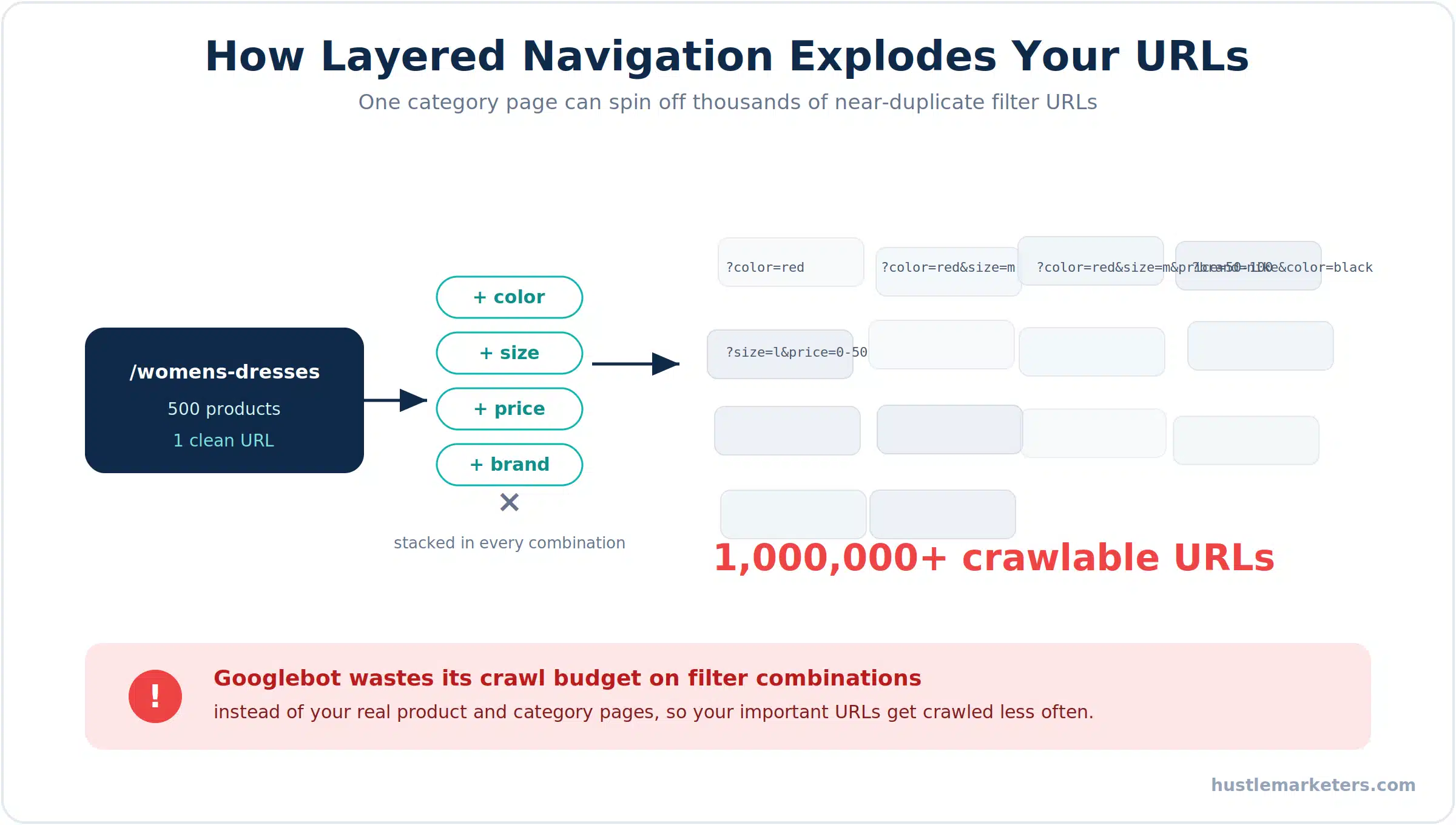
The scale of this is easy to underestimate. The math is brutal. A single category of 500 products with 20 filterable attributes can generate millions of unique filter-combination URLs, because filters can be stacked in almost endless permutations. Add sorting and pagination parameters on top, and the count multiplies again.
Googlebot will never crawl all of them. It crawls a fraction, and every filter URL it fetches is a real product or category page it didn’t. On a mid-market Magento store carrying anywhere from 5,000 to 500,000 legitimate URLs, filter bloat can push the crawlable count into the millions, which means your important pages get visited less and updated slower in the index.
Here’s the quick diagnostic: open Google Search Console and compare the number of indexed pages to your actual product count. If indexed pages massively outnumber your products, or the crawl stats report shows Googlebot spending time on parameter URLs, layered navigation is the culprit. Slow crawling and slow pages compound, which is why this pairs with your Magento speed optimization work.
Canonical, noindex, or robots.txt: which should you use for filters?
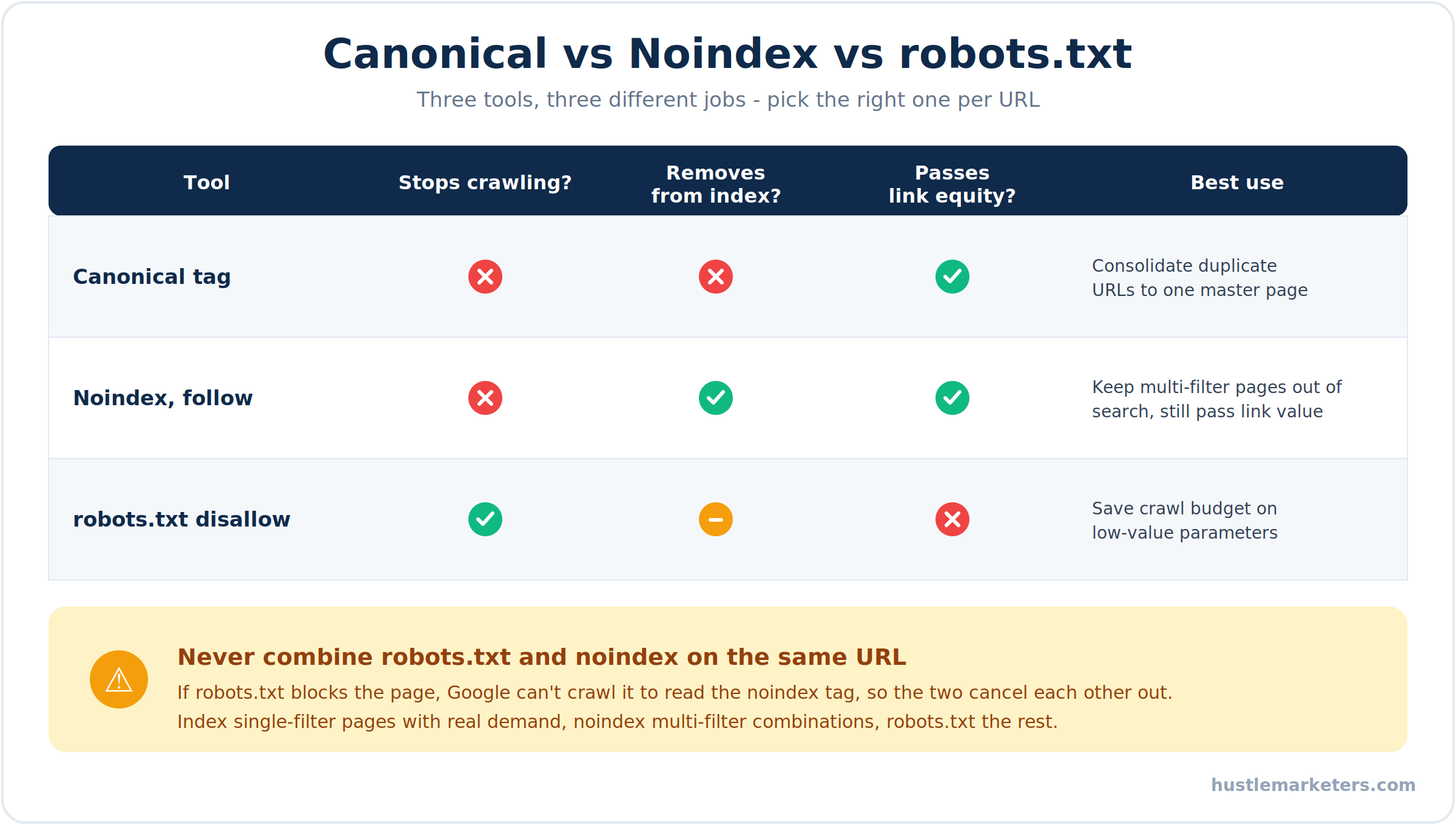
This is where most guides go wrong, because these three tools do three completely different jobs and people treat them as interchangeable. They aren’t.
- Canonical tags tell Google which URL is the real one and consolidate link signals back to it. They do not stop crawling, and Google treats them as a hint it can ignore, not a rule.
- Meta robots noindex keeps a page out of the search results, but Google still crawls it to read the tag, so it does not save crawl budget. Always use noindex,follow, never noindex,nofollow, so internal links on the page still pass value to your products.
- robots.txt disallow stops Googlebot from crawling a URL at all, which is the only one of the three that saves crawl budget. The trade-off is that blocked URLs can still appear in the index without content, and any link signals pointing to them are lost.
The rule almost nobody states clearly: never put a noindex tag and a robots.txt block on the same URL. If robots.txt blocks the page, Googlebot can’t crawl it to see the noindex, so the two cancel each other out. Pick one per URL based on what you’re trying to achieve.
One more correction, because it’s still in older guides: the Google Search Console URL Parameters tool is gone. Google retired it in 2022. If a guide tells you to configure parameter handling in Search Console, it’s out of date. Control crawling with robots.txt and noindex instead.
What’s the right layered navigation SEO strategy for your catalog?
There isn’t one universal setting. The correct approach depends on your catalog and, most importantly, on whether any filter pages match real searches. Here’s the framework that actually works, and it’s the difference between killing bloat and killing traffic.
| Filter scenario | What to do | Why |
|---|---|---|
| Single filter with real search demand, like “red dresses” or “size 10 running shoes” | Allow crawling and indexing, and optimize the meta title and content | These pages match high-intent queries and can rank and convert |
| Two or more filters applied together | Apply noindex, follow | Kills the exponential combinations while still passing link equity |
| Sorting and pagination parameters | Canonical to the clean page, plus robots.txt disallow for sort params | These never have search value and only waste crawl budget |
| Everything else and low-value combinations | robots.txt disallow the specific parameters | Protects crawl budget for real pages |
The key move here is the middle two rows. Index the single-filter pages that people actually search for, and noindex the multi-filter combinations that no one does. That one distinction captures real long-tail traffic while shutting down the combinatorial explosion. Most stores either index everything, which bloats the site, or block everything, which throws away easy rankings. The sweet spot is in between.
How do you configure layered navigation SEO in Magento’s admin?
Magento gives you a few native controls, and you should switch them on before reaching for anything else. Just know their limits going in.
- Enable category canonicals. Go to Stores, Configuration, Catalog, Catalog, Search Engine Optimization, and set Use Canonical Link Meta Tag for Categories to Yes. This adds a canonical on filtered pages pointing back to the base category as a secondary safeguard.
- Use the layered navigation noindex option. Newer Magento versions include a setting under Stores, Configuration, Catalog, Layered Navigation to add noindex to filtered pages. It handles the indexing side but not crawl budget.
- Edit robots.txt from the admin. Under Content, Design, Configuration, edit your store view, and open Search Engine Robots to add your disallow rules.
- Set attribute frontend properties. Each filterable attribute is configured under Stores, Attributes, Product, which controls whether it’s used in navigation at all.
The hard limit of native Magento is that its canonical and robots behavior is global and binary. Every category page gets the same treatment. You cannot natively say “noindex only when two or more filters are active,” or “index the color filter but block the price filter.” Those granular rules are exactly what the strategy above needs, and they require an extension, which we’ll get to.
Which robots.txt rules should you add for Magento filter URLs?
Be surgical here. A blanket rule like Disallow: /*? can accidentally block legitimate parameterized URLs you want crawled, so list the actual parameter names your store generates instead. A sensible starting point looks like this:
User-agent: *
Disallow: /*?*product_list_order=
Disallow: /*?*product_list_dir=
Disallow: /*?*product_list_limit=
Disallow: /*?*price=
Disallow: /catalogsearch/
Disallow: /checkout/
Disallow: /customer/
Disallow: /*?SID=
Add disallow lines for the specific filter attributes you don’t want crawled, using their real parameter names such as color, size, brand, or style_general. Be careful never to block your CSS and JavaScript files, since that breaks how Google renders and scores your pages. And remember the earlier rule: if you disallow a filter in robots.txt, don’t also rely on a noindex tag for it, because Google won’t be able to read that tag.
How should you handle pagination and sorting URLs?
Pagination is a related trap, and the advice on it has changed. Google stopped using rel=next and rel=prev back in 2019, so building your strategy around those tags is pointless now. Yet many Magento stores still send conflicting signals, with paginated URLs carrying a canonical that points back to page one while those same URLs still collect internal links and sit in the index.
The cleaner approach is to let each paginated page carry a self-referencing canonical, pointing to itself rather than to page one, so Google understands page two is its own valid page in the series. For sorting parameters like product_list_order and product_list_dir, which never have search value, disallow them in robots.txt as shown above. Keep your category URL structure clean and consistent, and make sure the XML sitemap only lists canonical, indexable URLs, never the filtered or sorted ones.
What is the PRG pattern for layered navigation?
For stores that want to solve this at the source, the PRG pattern, short for Post, Redirect, Get, is the most elegant fix available. Instead of filter links being normal crawlable anchor tags, they’re implemented so that applying a filter sends a POST request, the server redirects, and the shopper lands on the results by GET. The practical effect is that search engines never see crawlable filter links in the first place.
That means Googlebot doesn’t discover the combinatorial filter URLs at all, so crawl budget is preserved automatically without you having to block or noindex anything. Shoppers keep the exact same filtering experience. The PRG pattern isn’t built into Magento natively, so it comes through certain layered navigation extensions, but for large catalogs with heavy filtering it’s one of the cleanest solutions there is.
Which extensions give you advanced layered navigation SEO control?
Because native Magento can’t do per-attribute or threshold-based rules, most serious stores use an extension to get there. These are the ones that add the control the strategy above depends on:
- Amasty Improved Layered Navigation. Adds flexible canonical options such as URL Without Filters, plus per-filter index and follow controls, so you can decide exactly which filters are indexable.
- Mageworx SEO Suite Ultimate. Offers per-attribute robots configuration and threshold-based noindex rules, which is how you index single filters and noindex multi-filter combinations automatically.
- Qoliber SEO extensions. A set of tools for pretty filter URLs, custom canonical and robots tags on filtered pages, dynamic filter-aware descriptions, and sitemaps that only include the pages you want indexed.
- ElasticSuite. A powerful search and navigation layer, though its richer filtering can generate even more combinations, so it needs a deliberate SEO strategy alongside it.
Pick based on the gaps in your setup. The goal isn’t the longest feature list, it’s the ability to run the index-single-filters, noindex-combinations rule cleanly across your catalog.
Which open-source tools and code control Magento layered navigation?
Native Magento can’t do per-attribute or threshold rules, but you don’t always need a paid extension to get there. Here’s how to build an SEO-friendly layered navigation setup with the open-source ecosystem and a small amount of custom code.
Open-source and community modules
- ElasticSuite (Smile-SA/elasticsuite). A free, open-source search and merchandising engine on GitHub that replaces Magento’s default catalog search. It gives you per-category control over which filters appear and how they behave, adds virtual categories, and it’s Hyva compatible. It’s the open-source backbone many large Magento stores build their navigation on.
- JaJuMa PRG Pattern Link Masking. The cleanest way to apply the PRG pattern without building it yourself. It masks filter links using Post, Redirect, Get so search engines never crawl them, and it works on both Luma and Hyva. A useful technical detail: the POST request is never cached by full page cache, while the GET result still is, so your caching stays intact.
- Threshold-based SEO suites. Extensions like Mageworx SEO Suite and Amasty add the exact control the strategy needs. Set a minimum filter count so pages with two or more filters get noindexed automatically, then override it per attribute with rules like index,follow for color and brand.
The threshold rule in code
If you’d rather build it, the index-single, noindex-multi rule is a small custom module. The idea is a plugin that counts the active filter parameters on a category page and sets the robots meta to noindex when two or more are applied. The core logic looks like this:
// Count active layered navigation filters and noindex multi-filter pages
$filters = $this->request->getParams();
$ignore = ['id', 'p', 'product_list_order', 'product_list_dir', 'product_list_limit'];
$activeFilters = array_diff_key($filters, array_flip($ignore));

if (count($activeFilters) >= 2) {
    $pageConfig->setRobots('NOINDEX,FOLLOW');
}
Wire that into a plugin on the category view, and single-filter pages stay indexable while every multi-filter combination drops out of the index automatically. That’s the whole strategy from earlier, enforced in code across your entire catalog.
Do you need help fixing Magento layered navigation?
Here’s the honest reality. Layered navigation SEO is one of the trickiest parts of the whole platform. It mixes crawl budget theory, keyword demand analysis, and Magento configuration, and a single wrong robots.txt line or a canonical pointing the wrong way can suppress rankings across hundreds of pages before anyone notices. It rewards people who have worked on Magento at scale, not generalists.
If you want this handled properly, a Magento SEO agency can audit your filter setup and implement the full strategy end to end. If you already have developers and just need the plan, a Magento SEO consultant can map which filters to index, which to block, and hand your team the exact rules. And if you’re choosing a long-term partner, an experienced Magento SEO company that has fixed crawl bloat on large catalogs will get you there faster.
At Hustle Marketers, taming layered navigation is one of the first things we fix on a Magento store, and it was part of growing one specialty store past $14M in lifetime sales. Let me know if you’d like us to check how many filter URLs your store is leaking.
What’s the layered navigation SEO checklist?
Here’s the whole approach as an action plan, ordered by impact. Diagnose first, then control crawling, then capture the filter pages that actually earn traffic.
| Priority | Action | Why it matters |
|---|---|---|
| Critical | Compare indexed pages to product count in Search Console | Confirms whether filter bloat is the problem |
| Critical | Disallow sort and low-value filter parameters in robots.txt | Stops the biggest crawl budget waste immediately |
| Critical | Enable category canonical tags | Consolidates link signals back to base categories |
| High | Apply noindex, follow to multi-filter combinations | Removes near-duplicate pages while passing equity |
| High | Index and optimize single-filter pages with search demand | Captures high-intent long-tail traffic |
| High | Exclude noindex and filter URLs from the XML sitemap | Stops sending low-value pages to Google |
| Medium | Give paginated pages a self-referencing canonical | Handles pagination correctly after rel next and prev |
| Medium | Add an extension for per-attribute robots control | Enables the index-single, noindex-combinations rule |
| Low | Consider the PRG pattern for heavy filtering | Prevents crawlable filter links at the source |
| Low | Recheck crawl stats after changes | Confirms crawl budget shifted to real pages |
Clear the critical rows and most stores see crawl efficiency and category rankings improve within a few weeks.
Turning your filters from a liability into an asset
Layered navigation doesn’t have to be an SEO problem. Handled well, it does double duty: it gives shoppers the filtering they need and captures long-tail traffic from the single-filter pages people actually search for, all while keeping the combinatorial junk out of Google’s way. The stores that get this right treat it as a deliberate strategy, not a default setting. Diagnose the bloat, control crawling with the right tool for each job, index the filters with demand, and block the rest. Do that and you protect your crawl budget, concentrate your authority on the pages that matter, and turn one of Magento’s biggest technical weaknesses into a quiet advantage over competitors who never bothered.
Frequently asked questions about Magento layered navigation SEO
Should I noindex or block layered navigation in robots.txt?
It depends on the goal. robots.txt saves crawl budget but keeps signals from filtered pages, while noindex removes pages from search but still lets Google crawl them. Don’t use both on the same URL.
Do filtered pages ever deserve to be indexed?
Yes. Single-filter pages matching real searches like “red dresses” or “size 10 boots” can rank well. Index those, and apply noindex to multi-filter combinations that no one searches for.
Does Magento handle layered navigation SEO natively?
Only partly. It offers global canonicals and a noindex option, but per-attribute robots control and threshold rules need an extension like Amasty, Mageworx, or Qoliber.
What is the biggest layered navigation SEO mistake?
Using noindex,nofollow, which hides the page and leaks link equity. Use noindex,follow instead, so internal links on filtered pages still pass value to your products.
Can I still use the Search Console URL parameters tool?
No. Google retired it in 2022. Control crawling with robots.txt and noindex instead, and use the temporary Removals tool only for urgent cleanup of already-indexed URLs.
How do I know if layered navigation is hurting my store?
Check Search Console. If indexed pages massively outnumber your products, or crawl stats show Googlebot fetching filter URLs, faceted navigation is wasting your crawl budget.










