
Adobe Commerce SEO: What Changes at the Enterprise Level

Ishant
Published : August 6, 2026 at 4:37 am
Updated : September 11, 2026 at 7:28 am
Ishant
Summarize this blog post with:
Adobe Commerce is Magento’s enterprise edition, and if you’re running it, you’ve probably wondered whether it needs a different SEO approach than Magento Open Source. The honest answer surprises people. The SEO fundamentals are identical, because both editions share the exact same codebase. Your frontend, your speed, and your content decide your rankings far more than your license does. But Adobe Commerce layers on features that Open Source doesn’t have, from B2B accounts to Live Search to content staging, and each one adds something to your technical SEO checklist. Some create real opportunities. Others quietly create problems if nobody manages them. This guide covers what changes for SEO on Adobe Commerce, and what stays exactly the same.
What is Adobe Commerce, and does its SEO differ from Magento Open Source?
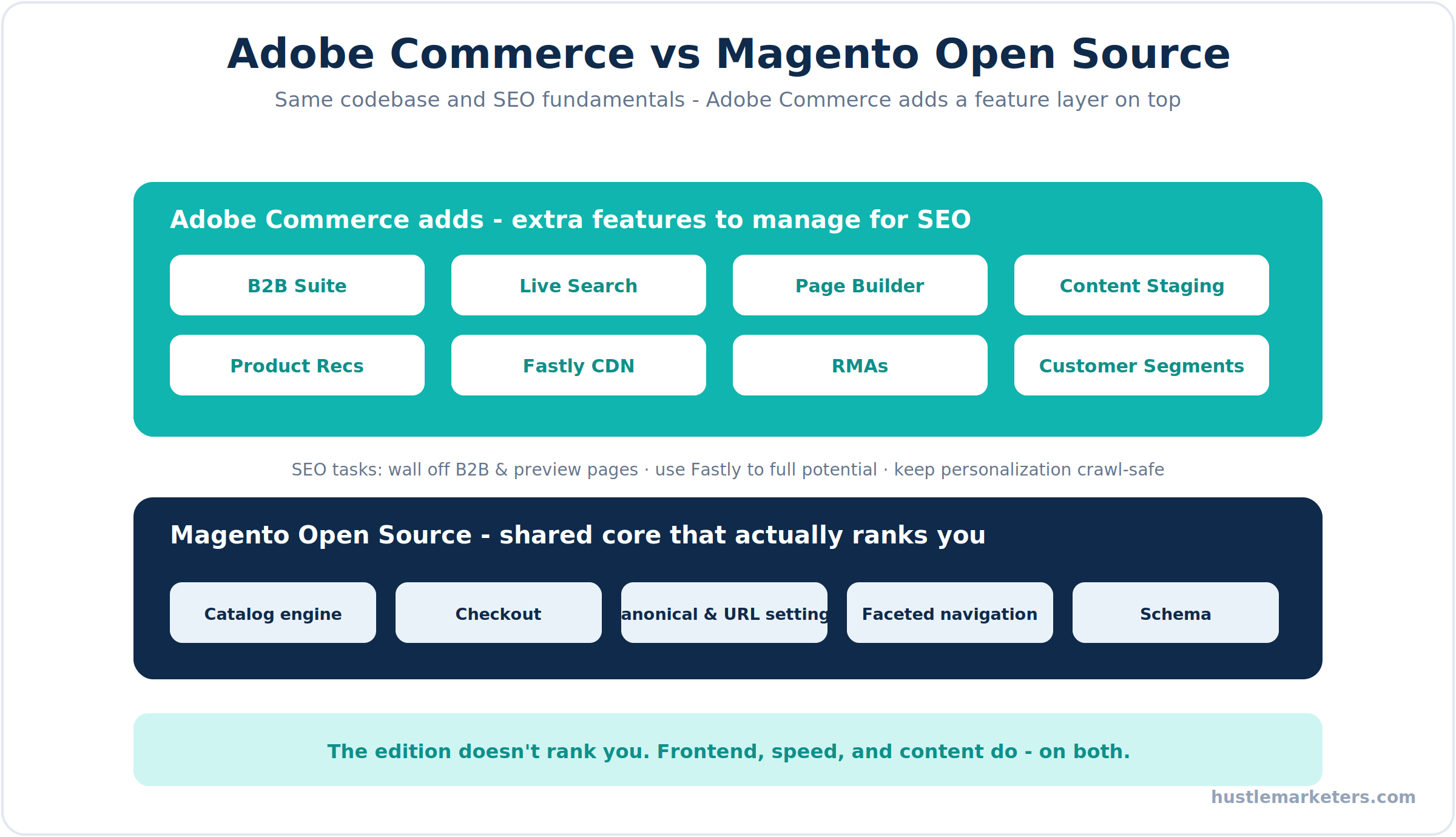
Adobe Commerce, formerly Magento Commerce and Magento Enterprise, is the licensed edition of the platform. It runs on the same core code as the free Magento Open Source, then adds a commercial feature layer: native B2B, Page Builder, Live Search, Product Recommendations, content staging, customer segments, RMAs, and Adobe support. Adobe Commerce Cloud goes further, bundling Adobe-managed hosting with Fastly CDN and an uptime SLA.
Here’s the part that matters for search. Because the two editions share the same catalog engine, checkout, and template system, the SEO basics behave identically. The edition you license does not rank you. What ranks you is your frontend choice, your site speed, and your content, the same three levers that matter on any Magento build. That’s the foundation covered in our complete Magento SEO guide, and it applies to both editions without exception.
So why a dedicated Adobe Commerce SEO guide? Because the extra features change your technical checklist in specific ways. Each one either helps your SEO or, left unmanaged, quietly hurts it. The rest of this guide walks through those differences.
Which Adobe Commerce B2B features need SEO attention?
If you sell B2B, this is usually the biggest SEO difference on the platform. Adobe Commerce ships a full B2B suite that Open Source doesn’t have: company accounts with roles and permissions, shared catalogs with customer-specific pricing, negotiable quotes, requisition lists, and purchase approval rules. These are powerful, and almost none of them should ever appear in Google.
Treat these pages the way you treat checkout and account pages. Keep them out of the index:
- Company account and user management pages hold private, logged-in data and have no business ranking.
- Negotiable quote and quote-to-order flows are private transactional pages, so noindex them.
- Requisition lists are personal reorder lists, not public content.
- Shared catalog and gated pricing pages often sit behind login, so make sure Googlebot isn’t hitting an empty or duplicate version of them.
The risk with B2B isn’t just wasted crawl budget. It’s that private, thin, or duplicate B2B pages leak into the index and dilute the store’s overall quality signals. A clean B2B setup keeps all of that walled off so Google only sees your genuinely public catalog.
How does Live Search change Adobe Commerce SEO?
Live Search is Adobe Commerce’s AI-powered search, driven by Adobe Sensei. It replaces the standard catalog search with smarter, faster results and a slick search popover, and it genuinely improves on-site search and conversions. But it changes a couple of things worth understanding for SEO.
First, the important boundary: better on-site search does not mean search result pages should be indexed. Internal search result URLs still belong out of the index, whether you’re using Live Search or the classic engine. Live Search improves the experience for shoppers already on your site, it doesn’t replace the work of optimizing your category and product pages to win the Google click in the first place.
Second, Live Search runs as a front-end widget pulling data through Adobe’s services, so make sure the category and product pages behind it are still fully crawlable and server-rendered where it counts. The takeaway: enjoy the conversion lift Live Search gives you, but keep optimizing your indexable pages as if it weren’t there.
How should you handle content staging, preview URLs, and Page Builder?
Two more Adobe Commerce features need a careful hand: content staging and Page Builder. Both are useful, and both can hurt SEO if you’re not paying attention.
Content staging and preview. Adobe Commerce lets you schedule content changes and preview them before they go live, which is great for planning seasonal campaigns and pricing. The SEO rule is simple and absolute: preview URLs must never be indexed. If Google crawls an unpublished or staged version of a page, you risk duplicate content and confusing signals. Make sure preview and staging URLs are blocked from indexing. The upside is real, though. Scheduled updates let you plan meta titles, category copy, and landing pages around seasonal demand instead of scrambling at the last minute.
Page Builder. This drag-and-drop content tool, now available in both editions, makes it easy to build rich pages, and just as easy to build bloated ones. Watch three things: use proper heading tags rather than styled text so your structure is clear, add alt text to every image you drop in, and go easy on heavy widgets like full-screen sliders and video backgrounds that drag down Core Web Vitals. A beautiful Page Builder page that loads slowly still loses rankings.
How do you use Fastly to boost SEO on Adobe Commerce Cloud?
If you’re on Adobe Commerce Cloud, you have a performance advantage baked in, and a lot of stores underuse it. Fastly CDN ships with the platform, and it’s one of the fastest ways to improve the Core Web Vitals that feed your rankings.
Put Fastly to work on more than basic caching:
- Edge caching. Fastly serves full pages from edge locations close to each shopper, cutting Time to First Byte dramatically.
- Image optimization. Fastly’s image optimizer can serve automatic WebP and resize images on the fly, which improves LCP without you storing dozens of image variants on the server.
- Edge redirects and headers. You can manage redirects and response headers at the edge through Fastly, which is fast and clean for handling migrations or bulk URL changes.
Speed is a ranking factor and a conversion factor, so this overlaps directly with your Magento speed optimization work. On Cloud, Fastly is the single biggest lever, so configure it deliberately rather than leaving it on defaults.
How do you keep personalization and customer segments SEO-safe?
Adobe Commerce can show different content to different customer segments, which is powerful for conversions and slightly risky for SEO if handled carelessly. The concern is straightforward: Google should always see your standard, canonical content, not a personalized variant meant for a logged-in segment.
Magento handles this correctly by default through its private content mechanism, loading personalized blocks separately so the cached, public version of the page is what gets served to an anonymous visitor like Googlebot. The rule to protect is never to serve search engines materially different content than you serve users, which crosses into cloaking territory. Keep personalization in the private, hole-punched sections of the page, let full page cache serve the canonical version to everyone else, and you get the conversion benefit without the SEO risk.
What technical SEO applies to every Adobe Commerce store?
Here’s the reassuring part. Underneath all the enterprise features, an Adobe Commerce store needs the exact same technical SEO foundation as any Magento store. Don’t let the fancy feature set distract you from the fundamentals that actually move rankings.
Every Adobe Commerce store still needs:
- Clean URL and canonical setup, with category paths off product URLs and canonicals enabled.
- Faceted navigation control, which is just as critical here as on Open Source. Our guide to Magento layered navigation SEO covers the full strategy.
- Fast pages and strong Core Web Vitals, ideally on a Hyva frontend.
- Structured data for products, breadcrumbs, and reviews, covered in our Magento schema markup guide.
- Accurate XML sitemaps and robots rules that include only indexable pages.
If you’re upgrading from Open Source to Adobe Commerce, which is a common and clean move since the code carries over, protect your rankings through the change the same way you would any migration. Our Magento migration guide walks through the redirect and monitoring steps.
How do you keep an enterprise Adobe Commerce store secure and current for SEO?
On an enterprise store, security and SEO are more connected than people think. A hacked store can get flagged with warnings or deindexed entirely, wiping out rankings overnight, so staying current is an SEO task as much as a security one.
- Apply patches promptly. Adobe now ships monthly isolated security patches, so keep up with them.
- Stay on supported PHP and versions. Run a current version on the 2.4 line with a supported PHP release, since older PHP no longer receives security updates.
- Move to OpenSearch. Elasticsearch support was removed in Magento 2.4.8, so migrate to OpenSearch to stay upgradeable.
- Harden the admin. Two-factor authentication, a web application firewall, and a custom admin path all reduce the risk of the kind of compromise that damages search visibility.
None of this is glamorous, but a secure, up-to-date store is a store that keeps its rankings. Neglect it and one breach can undo years of SEO work.
What open-source SEO tools and code work on Adobe Commerce?
Adobe Commerce is a commercial license, but its SEO tooling is mostly open source, and the same free modules that work on Magento Open Source work here too. You’re not locked into paid tools for good structured data or navigation control, which is worth knowing when you plan your Adobe Commerce SEO features and capabilities.
- Structured data. Open-source modules like WeltPixel Rich Snippets and outeredge’s structured data module, both on GitHub, add clean JSON-LD for products, breadcrumbs, and organization data on either edition.
- Search and navigation. ElasticSuite (Smile-SA/elasticsuite) is a free, open-source search engine that many teams run instead of, or alongside, Adobe’s Live Search, with strong control over layered navigation.
- The Mage-OS fork. For the open-source side of the ecosystem, Mage-OS is a community-maintained distribution of Magento Open Source with faster patches, useful to know if you’re weighing the platform’s open direction. For platform specifics, Adobe’s official Commerce documentation covers the SEO configuration behind each feature.
Handling B2B and preview URLs in code
The Adobe-specific SEO tasks come down to keeping the right pages out of the index. You can noindex B2B and preview pages through robots rules or layout, and on Cloud you can also handle it at the edge. A robots.txt starting point for the B2B and account areas looks like this, adjusted to your actual routes:
User-agent: *
Disallow: /company/
Disallow: /negotiable_quote/
Disallow: /requisition_list/
Disallow: /customer/
Disallow: /checkout/
Fastly edge redirects on Adobe Commerce Cloud
Because Adobe Commerce Cloud ships with Fastly, you can manage redirects and headers at the edge instead of in the application, which is faster and cleaner for migrations and bulk URL changes. Fastly lets you add redirect logic through its VCL and edge dictionaries, so a moved category can 301 at the CDN before the request ever reaches Magento. Used well, it’s one of the biggest technical advantages the Cloud edition gives you.
Do you need an Adobe Commerce SEO partner?
Here’s the honest take. Adobe Commerce SEO isn’t harder than Magento SEO at the fundamentals, but the enterprise feature set means there’s more to get right, and the stakes are higher because these are usually larger, higher-revenue stores. Getting B2B pages, staging, personalization, and Fastly configured correctly, on top of the core technical work, rewards a team that knows both SEO and the platform at depth.
If you want that handled end to end, a Magento SEO agency can run the full program across your store and its enterprise features. If you already have a development team and just need the roadmap, a Magento SEO consultant can audit your Adobe Commerce setup and hand them a prioritized plan. And if you’re selecting a long-term partner for a serious build, an experienced Magento SEO company that has worked on Adobe Commerce at scale will move faster and avoid the expensive mistakes.
At Hustle Marketers, we work across both editions, and the same technical foundation was part of growing one specialty Magento store past $14M in lifetime sales. Let me know if you’d like us to review your Adobe Commerce store.
What’s the Adobe Commerce SEO checklist?
Here’s everything above as an action plan, ordered by impact. The shared fundamentals come first because they move rankings the most, then the Adobe Commerce specifics that protect and extend them.
| Priority | Action | Why it matters |
|---|---|---|
| Critical | Fix canonicals, URLs, and faceted navigation | The same core issues that cap rankings on any Magento store |
| Critical | Optimize speed and Core Web Vitals, ideally on Hyva | The biggest ranking and conversion lever on either edition |
| Critical | Noindex B2B pages: company accounts, quotes, requisition lists | Keeps private and thin pages out of the index |
| High | Block content staging and preview URLs from indexing | Prevents duplicate and unpublished pages being crawled |
| High | Configure Fastly caching and image optimization on Cloud | Improves Core Web Vitals through edge delivery and WebP |
| High | Add product, breadcrumb, and review schema | Unlocks rich results and free product listings |
| Medium | Keep personalization in private, hole-punched sections | Serves canonical content to Google and avoids cloaking |
| Medium | Keep search result pages out of the index with Live Search | Focuses crawling on category and product pages |
| Medium | Audit Page Builder pages for headings, alt text, and weight | Stops rich content from hurting Core Web Vitals |
| Low | Apply security patches and stay on supported versions | A hacked or outdated store can lose rankings entirely |
Clear the critical rows first. The enterprise features matter, but they sit on top of fundamentals that decide the bulk of your rankings.
Enterprise features, fundamental SEO
Adobe Commerce gives you a genuinely powerful toolkit, but it’s easy to get so focused on the enterprise features that you neglect the basics that actually rank you. The winning approach is to treat Adobe Commerce SEO as two layers. The foundation is identical to any Magento store: clean URLs, controlled faceted navigation, fast pages, and solid structured data. On top of that sit the Adobe-specific tasks: walling off B2B and preview pages, using Fastly to its full potential, and keeping personalization SEO-safe. Get the foundation right first, manage the enterprise features deliberately, and your Adobe Commerce store will do what it’s built to do, which is scale organic traffic and revenue without the technical debt tripping it up.
Frequently asked questions about Adobe Commerce SEO
Is Adobe Commerce better for SEO than Magento Open Source?
No. They share the same codebase, so the SEO fundamentals are identical. Your frontend, speed, and content decide rankings, not the edition you license.
Do Adobe Commerce B2B pages get indexed?
They shouldn’t. Company account, quote, and requisition list pages hold private data and belong out of the index with noindex, just like checkout and account pages.
Does Live Search help SEO?
Indirectly. It improves on-site search and conversions, but search result pages still shouldn’t be indexed, and it doesn’t replace optimizing your category and product pages.
What is the fastest SEO win on Adobe Commerce Cloud?
Using Fastly properly. Its CDN, edge caching, and image optimization for automatic WebP all improve Core Web Vitals, which directly helps your rankings.
Should preview URLs be indexed on Adobe Commerce?
Never. Content staging preview URLs must be blocked from indexing, or Google may crawl unpublished or duplicate versions of your pages.
Does Adobe Commerce need SEO extensions?
Sometimes. The core covers the basics, but faceted navigation control and richer schema often still need an extension, exactly as they do on Magento Open Source.
How does Adobe Commerce SEO compare to Shopify and BigCommerce?
The fundamentals are similar across all three. Adobe Commerce gives deeper technical control and native B2B, while Shopify and BigCommerce trade flexibility for simplicity. Speed and content still decide rankings.










