How Shopify, Magento, WooCommerce and BigCommerce Handle Shopping Categories (and How to Map Them to Google in 2026)

Ishant
Published : October 14, 2026 at 3:30 pm
Updated : October 11, 2026 at 8:45 am
Ishant
Shopify, Magento, WooCommerce and BigCommerce all organize products with their own store categories, and none of them uses Google’s product taxonomy for navigation. Shopify is the only one with a built-in standard category field, and Shopify publishes a mapping from it to Google’s taxonomy. Magento and WooCommerce need a feed extension or plugin to map categories, and BigCommerce usually does it inside its channel app.
Google then assigns its own category to every product anyway. As of September 2026, Google’s help page says google_product_category is optional, and Google only accepts your override in three cases. So mapping still matters, but for specific jobs. Think category rules, campaign structure, alcohol, a few special product types, and channels like Meta that read the same field.
This guide shows how each platform stores categories and what its Google connector sends. It also covers when an override is worth setting and how to fix misclassifications. At Hustle Marketers we audit categories in three layers: the store category, product_type and google_product_category. Most category problems we find come from mixing those three up.
Key Observations
- google_product_category is optional in 2026. Google auto-assigns a category to every product and only accepts overrides for category-specific rules, category-based campaigns and alcohol.
- Google also names set categories for contract phones listed at a price of 0 (267), gift cards (53) and software subscriptions (313).
- Shopify has a standard product category plus a separate Google category field in the Google & YouTube app. Set both and keep them consistent.
- Magento and WooCommerce have no Google category field of their own. Map with a feed extension or plugin, and never map from merchandising categories like Sale.
- BigCommerce stores that use Feedonomics Surface get channel categories from its AI categorization. Review it before you trust it.
- Google’s taxonomy file still carries version 2021-09-21, while Shopify’s taxonomy keeps growing, so expect many Shopify categories to map to one Google node.
- Put your own structure in product_type. It is the category field you fully control for bidding and reporting.
How do different platforms like Shopify and Magento handle shopping categories?
They treat categories as store navigation first and Google data second. Only Shopify ships a standard taxonomy field. Magento, WooCommerce and BigCommerce use store-defined categories, so the link to Google’s taxonomy comes from a feed extension, a plugin or a channel app.
That matters because store categories are built for shoppers, not for Google. One product can sit in Dresses, New In and Summer Sale at the same time. Google needs one category that says what the product is.
| Platform | Store structure | Standard taxonomy field? | How google_product_category usually gets set | What to watch |
|---|---|---|---|---|
| Shopify | Collections (manual or automated) and a free-text product type | Yes: one product category from Shopify’s Standard Product Taxonomy, with Shopify Magic suggestions | Google & YouTube app field (bulk editor or CSV column), stored as a metafield | Two category fields that can disagree |
| Magento / Adobe Commerce | Category tree under one active root category per store; products in zero or more categories; attribute sets | No | Feed extension category mapping, or a custom attribute the feed reads | Products that also sit in Sale, New and brand categories |
| WooCommerce | Hierarchical product categories, flat tags, a default Uncategorized category | No | Google for WooCommerce does not map it, so Google assigns it; third-party feed plugins add a category mapper | Products stuck in Uncategorized |
| BigCommerce | Store categories (a product can sit in several) and category trees for multi-storefront | No, categories are store-defined | The channel app, for example Feedonomics Surface with AI categorization | Automated picks that nobody reviews |
In practice, the job differs by platform. On Shopify you mostly check two fields for consistency. On Magento and WooCommerce you build and maintain a mapping table. On BigCommerce you review what the channel app picked. The sections below cover each platform, then Meta and Microsoft.
What is the difference between a store category, product_type and google_product_category?
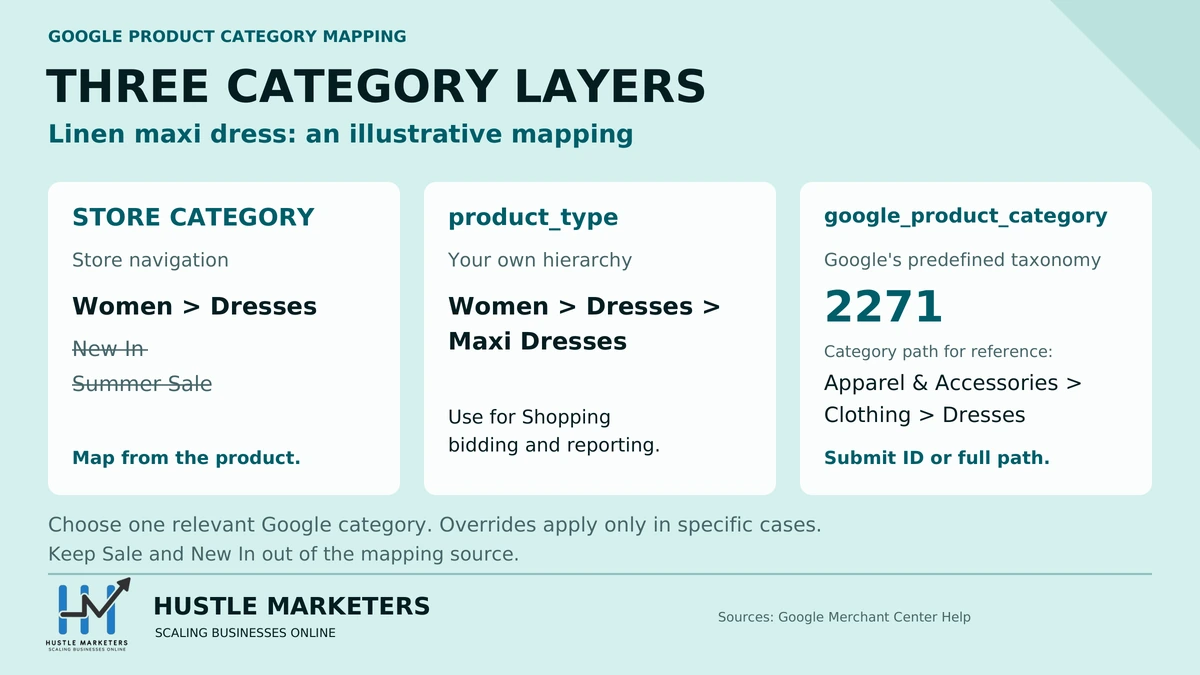
A store category is how shoppers browse your site. product_type is your own classification, sent to Google as free text. google_product_category is one node from Google’s fixed taxonomy, sent as an ID or a full path.
- Store category: Shopify collections, Magento categories, WooCommerce product categories and BigCommerce categories. Google never sees these directly unless your feed copies them into product_type.
- product_type: your own hierarchy, such as Women > Dresses > Maxi Dresses. Google’s product_type page allows up to 750 characters and up to five values, but only the first value is used for bidding and reporting.
- google_product_category: a single node from Google’s taxonomy, such as 2271 for Apparel & Accessories > Clothing > Dresses. Google’s specification says to include only one category.
Google gives a clear rule for where the two meet. If no Google category fits, or you want your own categories, use product_type instead. For the full attribute-by-attribute comparison, see our Google product data specification guide.
The mistake we see most often is copying the site menu into product_type. Menus contain Sale, New In and Gifts. Those labels help shoppers, but they tell Google nothing about the product.
Is google_product_category still required in 2026?
No. As of September 2026, Google’s Merchant Center Help page for google_product_category lists it as optional for each product. Google assigns every product a category automatically. It says accurate titles, descriptions, pricing, brand and GTINs help it categorize products correctly.
The same page says Google will only accept a category override in three cases:
- Category-specific attribute requirements. Some categories, such as Apparel & Accessories, Mobile Phones or Software, add required fields. If Google put a product there by mistake, your value can move it out.
- Campaigns built on Google product categories. If your Google Ads campaigns are structured by category, you can use the attribute to reassign products within that structure.
- Alcohol. If an alcoholic beverage gets the wrong category, you can override it so the product stays compliant.
Google also names specific categories for a few product types. Mobile phones sold on contract with a price of 0 need Electronics > Communications > Telephony > Mobile Phones (267). Gift cards should use Gift Cards & Certificates (53). Software subscriptions should use Software > Computer Software (313) or a subcategory. Alcohol belongs under Alcoholic Beverages (499676).
Which products still need a manual Google category?
Set it when one of Google’s accepted cases applies, when another channel reads it, or when Shopify requires it for social checkout. Here is the decision table Hustle Marketers uses before anyone spends hours mapping a whole catalog.
| Situation | Set google_product_category? | What to submit | Why |
|---|---|---|---|
| Non-apparel item placed in Apparel & Accessories (for example, a dog raincoat) | Yes | The correct node, such as 5004 Dog Apparel | Google accepts overrides for category-specific attribute requirements |
| Real apparel already in the right category | No override needed | Add age_group, gender, color and size instead | The category is right; the missing data is the problem |
| Shopping campaigns split by Category, with products in the wrong branch | Yes, for those products | The node your campaign structure expects | Accepted case for category-based campaigns, though product_type is usually the better split |
| Beer, wine or spirits | Yes | A node under 499676 Alcoholic Beverages | Accepted case for alcohol |
| Mobile phone on contract with a price of 0 | Yes | 267 Mobile Phones | Google requires it when the price is 0 |
| Gift cards | Yes | 53 Gift Cards & Certificates | Google asks for this node |
| Software subscriptions | Yes | 313 Computer Software or a subcategory | Google asks for this node |
| Shopify store with checkout on Instagram or Facebook | Yes | The most specific Google node | Shopify says you must, for tax reasons |
| Same feed also goes to Meta or Microsoft | Recommended | The most specific Google node | Both read the field; Meta also accepts its own list |
| Ordinary product that Google already categorizes correctly, Google only | Optional | Nothing, or the correct node for consistency | Google says it only accepts overrides in three cases |
What do most guides get wrong about Google product categories?
Several ranking guides still repeat rules that Google’s own pages no longer state. These are the ones we correct most often in audits:
- “It is required for apparel, media and software.” Google’s page says optional. Those categories add extra requirements once a product lands in them. Apparel sold to Brazil, France, Germany, Japan, the UK and the US needs age group, gender and color. Clothing and shoes also need size, per the product data specification. Google’s Shopify sync guide adds UPC, EAN or JAN for music, movies and video games, and ISBN for books.
- “Google always uses the category you send.” Google says it only accepts overrides in the three cases above.
- “Meta requires google_product_category.” Meta’s catalog reference lists both google_product_category and fb_product_category as optional. Shopify’s social checkout rule is a Shopify requirement, covered below.
- “Google released a new taxonomy in 2026 with new top-level categories.” We could not find a Google announcement. Google’s taxonomy file still shows version 2021-09-21 as of September 24, 2026.
Is Google’s product taxonomy still being updated?
The downloadable file still carries a 2021 version stamp. As of September 24, 2026, the first line of Google’s taxonomy file with IDs reads Google_Product_Taxonomy_Version: 2021-09-21. The UK English file shows the same version.
Google’s help page still calls the taxonomy continuously evolving. It also says it translates any category version published after August 2011 to the latest version. So older IDs are not rejected, but what you submit might not match what you see in Google Ads.
Shopify moves faster. Its open-source taxonomy shipped releases tagged 2025-12, 2026-02, 2026-05 and 2026-08, published between December 2025 and August 2026. The 2026-05 release, published in June 2026, alone added more than 2,000 categories. Shopify’s own integration files still map to Google’s 2021-09-21 version. Expect many detailed Shopify categories to land on one broader Google node.
Should you submit the category ID or the full path?
Submit the numeric ID. Google accepts either the ID or the full path, but never both in one value. IDs avoid typos and language problems, and Google says to use English values or IDs when the taxonomy isn’t available in your language.
How does Shopify map product categories to Google Shopping?
Shopify uses two fields: a product category from its Standard Product Taxonomy, and a separate Google product category in the Google & YouTube app. The app syncs that Google field to Merchant Center. In our audits, Shopify category problems usually trace back to those two fields disagreeing.
What is Shopify’s Standard Product Taxonomy?
It is Shopify’s own open-source category list. Shopify’s help center says every product should have a category from it, and each product can have only one category and one product type. When you add a name, description and images, Shopify Magic suggests a category.
The category does more than organize. It drives category metafields, such as size, neckline and fabric for shirts. It also sets the tax rate when you use Shopify Tax. Product type stays a free-text field for your own structure.
Shopify’s mapping files convert to and from Google’s taxonomy. The example in its docs maps Shopify’s Apparel & Accessories to Google’s category 166.
Which Shopify field does Google actually read?
Shopify’s docs don’t say which field wins when both are set, so we set both and check the result. The Google & YouTube app has a Product categorization section in its bulk editor. Google’s own Shopify guide lists adding a Google product category there as an optional step.
Behind the scenes, the app stores its Google fields as metafields in the mm-google-shopping namespace, according to Matrixify’s documentation. In the product CSV, the matching column is Google Shopping / Google Product Category, and it takes an ID or a breadcrumb.
Merchants have asked the same question in a Shopify Community thread on which field the app reads. It never got an official answer. Our working rule:
- Set the Shopify product category for tax, category metafields and other sales channels.
- Set the Google product category in the app to the matching Google node. For bulk edits, use the CSV column, Shopify Flow or a feed app.
- After the sync, check a sample in Merchant Center and in a Shopping product group split by Category.
Shopify’s Google & YouTube requirements page is clear on the fallback. If you leave the Google category blank, Google assigns one, but you might see errors.
Do you need a Google product category for Facebook and Instagram on Shopify?
Yes, if customers check out directly on Instagram or Facebook. Shopify’s help center says you must then provide Google product categories for tax reasons, even if you already set a Shopify product category.
The Facebook & Instagram channel auto-fills a Google product category on the first sync and sends it to Meta Commerce Manager. You can edit it under the channel’s synced products. Shopify’s guide to providing Google product categories walks through the screens. Our Meta catalog sync guide for Shopify covers the rest of the feed.
How do you map Magento categories to Google product categories?
You map them with a feed extension or a custom attribute. Adobe’s documentation for categories and attribute sets describes no built-in link to Google’s taxonomy, so the mapping lives in whatever builds your feed. Our guide to Magento marketing extensions covers which Magento feed and marketing extensions are still maintained in 2026.
Magento’s flexible structure is the problem. Each store has one active root category that holds its menu. Adobe’s category docs say products can be assigned to zero or more categories. So one jacket can sit in Women, Outerwear, Sale, New Arrivals and a brand category.
Feed extensions solve this with a category mapping table. In Amasty’s Product Feed guide, you click a store category and pick a Google taxonomy path from autocomplete. Mappings live under Catalog > Feeds > Categories Mapping. You can also exclude categories, which matters when a product sits in more than one.
Ishant Sharma, founder of Hustle Marketers, who has run Google Ads and Microsoft Ads accounts since 2013, uses a simple rule of thumb here. Map from the category that says what a product is, never from one that says how you sell it.
Category mapping or a custom attribute: which works better on Magento?
It depends on how clean your category tree is.
- Category mapping works when every product has one clear product category and merchandising categories are excluded. It is quick to set up and covers new products automatically.
- A custom attribute works better for large or messy catalogs. Attribute sets are the templates products are built from, so add a google_product_category attribute to the relevant sets. Fill it by import, then have the feed read it first and fall back to the category map.
Either way, keep a written list of categories the mapper must ignore. Our Magento product feed guide covers the rest of the feed setup.
How does WooCommerce set the Google product category?
Out of the box, it doesn’t. WooCommerce has no Google category field, and Google for WooCommerce does not offer one to map. Its attribute mapping docs list 15 mappable attributes, from Adult to Size Type, and google_product_category is not one of them.
The Google for WooCommerce FAQ, updated September 23, 2026, lists data requirements for the Apparel & Accessories and Media categories and notes those categories are auto-assigned by Google. So with the official extension, you get Google’s own categorization unless you add a value another way.
WooCommerce categories have a trap too. WooCommerce’s taxonomy docs say every product must have a category, so unassigned products fall into the default category, Uncategorized, which cannot be deleted while it is the default. Any mapper keyed on categories will send those products to whatever fallback you set.
You have three ways to control the value:
- A feed plugin with a category mapper. RexTheme’s Product Feed Manager maps each WooCommerce category to a Google category with autocomplete, then uses that map as the Google product category value. CTX Feed offers similar category mapping.
- A supplemental feed in Merchant Center keyed on product ID, which keeps Google for WooCommerce as the main source. Our supplemental feed guide covers the setup.
- Merchant Center attribute rules, formerly feed rules, which set the category when conditions match, such as product_type containing Dog Coats.
Pick one. Two tools writing the same attribute is a common reason categories flip back and forth. Our WooCommerce product feed guide goes deeper on plugin choice.
How does BigCommerce map categories to Google Shopping?
Mostly in the channel layer. BigCommerce categories are store-defined, and a product can sit in several: the catalog API product example shows a categories array with two IDs. Google categories usually come from the channel app instead.
One option is Feedonomics Surface. Its BigCommerce app listing, last updated July 22, 2026, says FeedAI assigns products to the correct categories for each channel automatically. It syncs to Google, Meta, Microsoft, TikTok and Pinterest on a four-hour schedule. The Basic plan is free for up to 100,000 SKUs and two connections.
Automatic is a good starting point, but review it before you scale spend. After the first sync:
- Export your top sellers and check their assigned Google categories.
- Check special cases first: alcohol, gift cards, phones on contract and software.
- Look for apparel lookalikes that picked up apparel requirements.
- Override the few that are wrong in the feed tool or a supplemental feed, not by renaming store categories.
BigCommerce’s category trees are designed for multi-storefront setups, so if you run several storefronts, check each feed separately. Our BigCommerce product feed guide covers channel setup, and our feed management software comparison helps if you outgrow Surface.
How do Meta and Microsoft handle product categories differently?
Meta accepts Google’s category or its own fb_product_category, and Microsoft’s Content API takes a googleProductCategory value. A clean Google mapping is a good base for all three channels, with a few differences.
| Channel | Category fields | Accepted values | Required? | Notes |
|---|---|---|---|---|
| Google Merchant Center | google_product_category (one value), product_type (up to five values) | Google taxonomy ID or full path | Optional; Google auto-assigns | Overrides accepted in three cases |
| Meta catalog | google_product_category or fb_product_category, plus product_type (up to 750 characters) | Google’s list or Meta’s own list, by name or ID | Optional | Meta recommends adding category-specific fields when you set a category |
| Microsoft Content API | googleProductCategory (up to 255 characters), productType (up to 750 characters) | Category string or ID | Not required when inserting a product | productType can hold several comma-separated values |
| Shopify store | Product category, product type | Shopify Standard Product Taxonomy | One category per product | Drives Shopify Tax and category metafields |
On Meta, the two category fields are alternatives. Meta’s list differs from Google’s: its own example is Clothing & Accessories > Clothing > Women’s Clothing > Tops & T-Shirts, ID 430. If your feed already carries a good Google ID, you don’t need to rebuild it for Meta unless you want Meta’s own structure.
For Microsoft, the Content API product reference was last updated on September 16, 2025. If you upload files instead of using the API, check which column names Microsoft expects before importing. Our free Feed Attribute Mapper shows what Google and Microsoft each read for every column and exports a Microsoft-ready file.
How do you build a Google product category mapping, step by step?
Start from what each product is and map it to the deepest accurate Google node. Then push it through one method and check what Google is actually using. This is the Hustle Marketers category mapping workflow we run during Shopping audits:
- Export everything. Pull each product with its store categories, product type and any current Google category. On Shopify, include the Google Shopping / Google Product Category CSV column.
- Tag merchandising categories. Mark Sale, New In, Gifts, Bestsellers and brand pages, and remove them from the mapping source.
- Pick one mapping source per product. Use a dedicated attribute if you have one. Otherwise use the deepest remaining store category, or product_type.
- Map each unique source value. Choose the deepest accurate Google node and record its numeric ID from the taxonomy file.
- Handle special cases first. Check apparel lookalikes, alcohol, gift cards, phones on contract and software subscriptions before the long tail.
- Push through one method. Use the platform connector, a feed extension, a supplemental feed or attribute rules, but only one per attribute.
- Verify. Split a Shopping product group by Category and confirm products fall where you expect. Then review Merchant Center for new apparel attribute issues.
- Recheck on change. Repeat when you add store categories, change feed apps or import a batch of new products.
Keep business logic out of this layer. Margin, seasonality and bestseller status belong in custom labels, which our guide to custom labels by margin tier covers.
Worked example: mapping an apparel store’s catalog
Assumptions: a US-targeted store on WooCommerce, Magento or BigCommerce, where products sit in several store categories. The store names are illustrative. The Google IDs come from Google’s taxonomy file, version 2021-09-21.
| Product | Store categories it sits in | Map from | product_type | google_product_category |
|---|---|---|---|---|
| Linen maxi dress | Women > Dresses; New In; Summer Sale | Women > Dresses | Women > Dresses > Maxi Dresses | 2271 Apparel & Accessories > Clothing > Dresses |
| Waterproof hiking jacket | Women > Outerwear; Hiking Shop | Women > Outerwear | Women > Outerwear > Rain Jackets | 5598 Apparel & Accessories > Clothing > Outerwear > Coats & Jackets |
| Cargo pants | Men > Pants; Sale | Men > Pants | Men > Pants > Cargo Pants | 204 Apparel & Accessories > Clothing > Pants |
| Gold hoop earrings | Accessories > Earrings; Gifts Under $50 | Accessories > Earrings | Accessories > Jewelry > Earrings | 194 Apparel & Accessories > Jewelry > Earrings |
| Dog raincoat | Pets > Dog Coats; Outerwear; Rainy Day Edit | Pets > Dog Coats | Pets > Dog > Coats | 5004 Animals & Pet Supplies > Pet Supplies > Dog Supplies > Dog Apparel |
| Digital gift card | Gifts; Gift Cards | Gift Cards | Gifts > Gift Cards | 53 Arts & Entertainment > Party & Celebration > Gift Giving > Gift Cards & Certificates |
Three rows need extra attention:
- The dog raincoat. It sits in Outerwear next to human jackets, and “raincoat” reads like apparel. Mapped from Outerwear, it becomes 5598 Coats & Jackets and, in the US, would need age group, gender, color and size. Mapped from Pets, it lands on 5004 Dog Apparel.
- The gift card. Google asks for 53 Gift Cards & Certificates, so map it explicitly even though it also sits under Gifts.
- The earrings. Jewelry is part of Apparel & Accessories in Google’s taxonomy (194 sits under 188 Jewelry), so give them a color value. Sellers raise this exact issue in a Merchant Center Community thread about color warnings on earrings.
Why is Google putting my products in the wrong category?
Usually because the title and description point somewhere else, or because your mapping used the wrong store category. Google says accurate titles, descriptions, pricing, brand and GTINs help it categorize correctly, so a vague title is often the root cause.
The first thing we check at Hustle Marketers is whether the wrong category is Google’s choice or ours. If you submitted nothing, fix the product data or override where Google allows it. If you submitted a value, fix the mapping.
| Symptom | Likely cause | Fix |
|---|---|---|
| Non-apparel item asked for age group, gender or size | Google placed it in Apparel & Accessories | Override with the correct node and rewrite the title so the product is clear |
| Earrings or other jewelry flagged for missing color | Jewelry sits under Apparel & Accessories | Add a color value; no override needed |
| Products in the wrong branch of a Category product group | Auto-assigned category is too broad or wrong | Override (accepted for category-based campaigns) or split by product_type instead |
| Alcohol flagged or limited | Wrong auto-assigned category | Submit a node under 499676 Alcoholic Beverages |
| Gift cards or software subscriptions treated as ordinary products | The node Google asks for is missing | Submit 53 for gift cards or 313 for software |
| Contract phone with a price of 0 has issues | Category not set | Submit 267 Mobile Phones |
| Submitted category does not take effect | Custom text, a typo, a non-English path, or both ID and path in one value | Use the numeric ID from the taxonomy file, and check your case is one Google accepts |
| Shopify category changed, but Google shows the old one | The app’s Google category field still holds the old value | Update the Google & YouTube app field or the CSV column, then resync |
| Many products share one odd category on Magento, WooCommerce or BigCommerce | Mapper keyed on Sale, New In or Uncategorized | Exclude merchandising categories and assign real categories |
| Category flips after each sync | Two tools writing the same attribute | Keep one source and remove the other rule or feed |
For the wider list of feed issues, see our Google Merchant Center errors guide.
How can you see which category Google is using?
Split a Standard Shopping product group by Category in Google Ads. Google Ads help describes Category as an attribute based on the Google product taxonomy, where each > marks a level you can subdivide. Products land under the branch Google is working with, so mismatches show up quickly.
Do this before and after any override. If a product stays in the wrong branch after you submit a value, check whether your case is one of the three Google accepts.
Frequently asked questions
Can a product have more than one Google product category?
No. Google’s product data specification says to include only one category, the most relevant one. If a product fits several, choose by its main function. Use product_type for extra classification, keeping in mind that only its first value is used for bidding and reporting.
What happens if you don’t set a Google product category?
Google assigns one automatically, using your product data. For most products that works well enough. The risk is a wrong assignment that triggers extra attribute rules or misplaces products in campaigns. So check your top sellers and special cases.
Where can you download the Google product taxonomy?
Google links the files from its google_product_category help page: an Excel sheet and a plain text file, both with IDs. We find the plain text file easiest to search. If the taxonomy isn’t available in your language, use the English path or the numeric ID.
Can you create your own Google product category?
No. Google only accepts predefined categories from its taxonomy. If nothing fits, Google says to use product_type for your own category. We then pick the nearest broader Google node, or leave the field empty for Google to assign.
Does the Google product category affect Shopping ad performance?
Indirectly. Google says Shopping bidding is based on the latest categories, and the category decides which extra attributes a product needs. A wrong category can block products or misplace them in campaigns. Google does not document a direct ranking boost from submitting a category.
Can you set the Google product category with a supplemental feed?
Yes. A supplemental data source with id and google_product_category columns can add or replace the value without touching your platform. Attribute rules can also set it by condition. Google’s three override cases still apply, and you should use one method per attribute so values don’t conflict.
Will changing a Shopify product category affect tax?
It can. Shopify says the product category sets the tax rate when you use Shopify Tax. Its CSV guide adds that the field is used to calculate US tax rates. Check your tax settings after any bulk category change.
How often should you review your category mapping?
Review it whenever you add store categories, change feed apps, migrate platforms or launch a product line. Outside those events, a quarterly check of top sellers and special cases suits most stores. Shopify stores should also spot-check after Shopify taxonomy releases, which came four times between December 2025 and August 2026.
Want a second opinion on your Shopping feed categories?
Hustle Marketers is a Google Partner, Meta Business Partner and Microsoft Advertising Partner. We review category mapping as part of Shopping and Performance Max work for Shopify, Magento, WooCommerce and BigCommerce stores. PPC management is a flat $600 to $800 a month per platform, month to month with no lock-in, and you keep ownership of your ad accounts. See our ecommerce PPC management services.
If you want a quick check first, request a free Google Ads audit. We look for wasted spend, including Shopping products sitting in the wrong categories or campaign branches.
About the author
Ishant Sharma is a Google Ads, Microsoft Ads and SEO specialist who has worked in digital marketing since 2013, and the founder of Hustle Marketers, a Google Partner, Meta Business Partner and Microsoft Advertising Partner agency. He works on Google Shopping feeds, category mapping and Performance Max for Shopify, Magento, WooCommerce and BigCommerce stores, and his named work includes Drought Skincare and P-REX Hobby. His agency has worked with more than 2,500 brands and holds a 5.0 rating on Clutch from 50+ reviews.
Feed quality and organic search pull on the same product data, so improving one usually lifts the other. Our ecommerce SEO guide covers the organic half of that.