WooCommerce SEO: Technical Fixes for WordPress Stores

Ishant
Published on October 28, 2026
Ishant

Written by Ishant Sharma, Founder, Hustle Marketers | Published October 28, 2026
WooCommerce is one of the most widely used ways to run an online store. It is free, it sits on WordPress, and you can build almost anything with it. That flexibility is also the problem.
Every WooCommerce store we audit has the same pattern. The owner installed WordPress, added a theme, stacked plugins on top, and turned on filters. Two years later, Google is crawling 40,000 URLs on a site with 800 products, the product pages take four seconds to respond to a tap, and the schema markup is broken because two plugins are fighting over it.
None of that is WooCommerce’s fault. It is what happens when nobody owns the technical side. We have spent years cleaning up stores like this, and the fixes follow a repeatable playbook. This guide is that playbook.
This post extends our platform SEO series. We have already covered Magento SEO and Adobe Commerce SEO. WooCommerce has different failure modes, and they deserve their own guide.
Table of Contents
- Key Observations
- WooCommerce vs Shopify SEO: The Honest Difference
- The WordPress Problem: WooCommerce Inherits Everything
- Product Page SEO on WooCommerce
- Product Schema: Plugins vs Manual
- Yoast vs Rank Math for WooCommerce
- Variable Products and Canonicals
- Site Speed and INP: The Usual WooCommerce Suspects
- Crawl Bloat: A Cleanup Checklist
- AI Search and Product Discovery
- When to Bring in Help
- A Crawl-Control Decision Matrix for Store Filters
- FAQ
- Sources and Verification
Summarize this article with:
Key Observations
- WooCommerce gives you more SEO control than Shopify, but you have to configure everything yourself. Control without configuration becomes crawl bloat.
- The biggest technical problems on Woo stores are filter and attribute URLs, duplicate archives (tags, dates, authors, formats), and plugin bloat that wrecks INP.
- Product pages need unique copy, real Product schema with price and availability, and clean canonicals on variable products.
- Yoast and Rank Math both work. Rank Math includes WooCommerce features free. Yoast charges for its WooCommerce extension. Pick one, never run both.
- Page builders like Elementor are a common speed killer on Woo stores. Test your product template, not just your homepage.
- AI search engines now recommend products directly. Clean schema and crawlable product data decide whether your store gets cited.
- Fix crawling first, then speed, then content. That order matters.
WooCommerce vs Shopify SEO: The Honest Difference
We get asked this weekly, so let’s settle it upfront.
Shopify is a closed platform. It handles hosting, rendering, canonicals, and sitemaps for you. You cannot break much, but you also cannot fix much. Its forced URL structure (/collections/, /products/) is a known annoyance, and robots.txt can only be changed through a robots.txt.liquid theme template that Shopify Support does not help with.
WooCommerce is open. You control the server, the URL structure, robots.txt, the sitemap, the schema, everything. That is a genuine advantage for technical SEO. It is also a loaded weapon. Most of the broken stores we audit are broken because of choices someone made, not because of the platform.
Here is the practical comparison:
| Factor | WooCommerce | Shopify |
|---|---|---|
| URL control | Full control, remove /product/ and /product-category/ bases if you want | Forced /products/ and /collections/ paths |
| robots.txt | Fully editable | Editable via theme, limited history of access |
| Hosting and speed | Your responsibility, varies wildly | Managed, consistent, fast CDN |
| Schema markup | Plugin or manual, flexible but easy to break | Theme dependent, often needs apps |
| Blogging and content | Native WordPress, best in class | Basic blog, limited taxonomy |
| Crawl control | Full control, but bloat by default | Locked down, less bloat, less control |
| Cost of SEO features | Mostly free plugins | Apps add monthly fees |
| Maintenance burden | High, updates and conflicts are on you | Low |
Our take after running SEO on both: WooCommerce wins for content driven stores and stores with complex catalogs that need custom crawl control. Shopify wins for teams with no technical resource. If you are choosing a platform for a larger catalog, our Magento vs Shopify comparison covers the enterprise end of that decision.
If you already run WooCommerce, the rest of this guide is for you.
The WordPress Problem: WooCommerce Inherits Everything
WooCommerce is a plugin on top of WordPress. That means your store inherits every WordPress behavior, good and bad. Four of those behaviors cause most of the SEO damage we see.
1. Duplicate archives you never asked for
WordPress creates archive pages automatically: tag archives, date archives, author archives, format archives. A blog can sometimes justify these. A store almost never can.
We audited a store last year where product tags had created over 6,000 indexable archive pages. Each one was a thin list of two or three products with no unique content. Google was crawling and partially indexing all of it, and category pages the store actually cared about were being crawled less often.
The fix takes ten minutes in Yoast or Rank Math. Noindex date archives, author archives, and format archives. Then make a real decision about product tags: either curate a small set of tag pages with unique intro content and treat them as landing pages, or noindex the lot. Do not leave hundreds of auto generated tag archives open by default.
2. Attribute and filter URLs
This is the big one. WooCommerce product attributes (size, color, brand) combined with layered navigation plugins generate parameter URLs like this:
/product-category/shoes/?filter_colour=blue&filter_size=10&orderby=price
A store with four filter attributes and ten options each can generate thousands of URL combinations before pagination and sorting parameters are added. Every one of those URLs is a near duplicate of the category page. Google crawls them anyway, and on unoptimised stores a huge share of crawl activity gets burned on filter URLs that will never rank.
Our standard fix stack:
- Canonical every filtered URL to the clean category URL. Most filter plugins do this correctly, but verify it. View source on a filtered page and check the canonical tag.
- Block the worst parameters in robots.txt.
Disallow: /*?orderby=andDisallow: /*?filter_handle most WooCommerce setups. Only do this after confirming no filtered URL has real rankings or backlinks, because blocked pages cannot pass signals. - Add rel=”nofollow” to filter links where the plugin supports it, so you stop feeding Google the URLs in the first place.
- The exception: if a filter combination has genuine search demand (“blue running shoes”), build it as a real category or landing page with its own URL, content, and self canonical. Never leave a money query dependent on a parameter URL.
Check Google Search Console under Indexing, then Pages, and look at “Crawled, currently not indexed” and “Duplicate without user-selected canonical”. If parameter URLs dominate those reports, this is your first project.
3. Plugin bloat
The average WooCommerce store we audit runs 35 to 60 plugins. Each one can load its own CSS and JavaScript on every page, whether the page needs it or not. A review widget, a popup tool, a wishlist plugin, three page builder addons, a slider nobody uses anymore.
This is not just a speed problem. It is an interactivity problem, which brings us to INP later. The audit ritual is simple: list every plugin, ask what breaks if it is removed, and remove everything without a good answer. Then use an asset manager (Perfmatters or Asset CleanUp) to stop the survivors from loading where they are not needed. Checkout scripts do not belong on your blog. Contact form scripts do not belong on product pages.
4. Page builders
Elementor, Divi, and WPBakery make store owners self sufficient. They also add layers of nested divs, extra CSS, and render blocking JavaScript to every template. We are not religious about this. Plenty of ranking stores use Elementor. But if your product template is built in a heavyweight builder and your Core Web Vitals are failing, the builder is usually on the suspect list.
If a rebuild is not realistic, mitigate: use the builder’s performance settings, disable unused widgets, and keep product and category templates as lean as possible. Save the fancy layouts for landing pages.
Product Page SEO on WooCommerce
Technical cleanup gets Google crawling the right pages. Product page optimization gets those pages ranking. The order we work in:
Titles and metas with a pattern. Set a sensible default in your SEO plugin (Product Name, Brand, Store Name), then hand write titles for your top 20 percent of products by revenue. Include the qualifier people actually search: material, size, use case, “for” phrases.
Unique product copy. Manufacturer descriptions are duplicated across every reseller on the internet. You will not outrank bigger sites with the same words. Rewrite descriptions for your best sellers first. Aim for genuinely useful copy: who it is for, what problem it solves, what makes it different, sizing or compatibility notes. Answer the questions your support inbox already receives.
Category pages are your rankable assets. For most stores, category pages target the highest volume commercial keywords, not product pages. WooCommerce category pages ship as a bare product grid. Add a short intro above the grid (100 to 200 words that actually help someone choose) and richer buying guidance below the grid if the topic supports it. Interlink related categories in the copy.
Images. Descriptive file names before upload, alt text that describes the product, WebP format, and lazy loading below the fold only. Never lazy load the main product image. That mistake alone tanks LCP on half the stores we test.
Internal linking. Related products, “frequently bought together”, and in copy links from blog content to categories. WordPress makes content marketing easy. Use the blog to build topical depth around your categories and funnel link equity to them. Our ecommerce SEO checklist covers the full on page sequence if you want the step by step version.
Reviews. Native WooCommerce reviews are fine and they feed aggregateRating schema. Collect them systematically with post purchase emails. Review content is also exactly the kind of first party detail AI search engines quote.
One thing worth separating out before schema: your Shopping feed is not your on-page SEO, and on WooCommerce it fails in its own specific ways. Feed schedules stop silently after repeated failures, and variable products trigger price mismatch errors from the page crawl. We cover all of it in the WooCommerce product feed guide.
Product Schema: Plugins vs Manual
Product schema (price, availability, ratings, brand) is what earns rich results in Google and readable product data for AI engines. On WooCommerce you have three options.
Option 1: Let your SEO plugin handle it. WooCommerce outputs basic Product schema on its own, and Yoast (with its WooCommerce extension) or Rank Math (free) will extend it with brand, identifiers, and better Offer data. This is the right answer for most stores.
Option 2: A dedicated schema plugin. Tools like Schema Pro give more field level control. Only add one if your SEO plugin genuinely cannot output what you need, and disable the overlapping schema from other sources.
Option 3: Manual JSON-LD. For custom builds or headless setups, hand rolled JSON-LD in the product template gives total control. It also means a developer owns it forever. We only recommend this when plugins conflict with a custom stack.
The most common schema failure we find is not missing schema. It is duplicate schema. The theme outputs one Product block, WooCommerce outputs another, and an SEO plugin outputs a third, with conflicting prices. Google then trusts none of them. Test a product URL in Google’s Rich Results Test and confirm exactly one Product entity with correct price, availability, and GTIN or MPN where you have them.
Those same identifier fields power your Merchant Center listings. If you sell on Google Shopping, clean product data pays twice. We covered that side in our guide to supercharging your Google Shopping feed.
Yoast vs Rank Math for WooCommerce
Every WooCommerce SEO conversation lands here eventually. We have run both across dozens of client stores. Honest comparison:
| Feature | Yoast SEO | Rank Math |
|---|---|---|
| WooCommerce schema and features | Paid WooCommerce extension | Included free |
| Free version depth | Basics covered, key features gated | Most features free, more toggles |
| Product schema control | Good with paid extension | Good, more granular free |
| Remove /product/ and /shop/ URL bases | No, needs extra plugin or code | Yes, built in free |
| Readability analysis | Best in class | Adequate |
| Plugin weight | Heavier | Lighter |
| Interface | Simple, fewer decisions | Powerful, more ways to misconfigure |
| Maturity and support ecosystem | Longest track record, huge docs | Younger but established |
| Best for | Teams that want safe defaults | Stores that want control without paying |
Our position: for a WooCommerce store starting fresh, Rank Math is the better value because the WooCommerce features are free and the plugin is lighter. For an established store already on Yoast, migrating is rarely worth the risk unless you specifically need something Yoast gates behind paid extensions. Both plugins done well beat either plugin done badly.
One rule with no exceptions: never run two SEO plugins at once. Duplicate metas, duplicate schema, duplicate sitemaps. We see it more often than you would believe.
Variable Products and Canonicals
Variable products (one product, many size and color variations) create a specific set of canonical questions on WooCommerce.
By default, WooCommerce keeps all variations on one URL and appends attributes as parameters when a shopper selects them:
/product/classic-tee/?attribute_pa_colour=navy
This is actually good default behavior. One URL collects all the links, reviews, and signals. Your job is to keep it clean:
- Confirm the parameter versions canonical back to the clean product URL. Test in view source with variations selected.
- Do not let variation parameter URLs into your XML sitemap. Yoast and Rank Math handle this correctly by default, but plugins that “improve” sitemaps sometimes break it.
- Make sure Product schema reflects the price logic sensibly. For variable products, use the offer price range or lowest price, and keep it consistent with what is on the page.
The harder question: should a variation ever get its own indexable URL? Only when it has independent search demand. If “navy classic tee” is a real query with volume, a dedicated child page or a curated category can capture it. If not, one strong canonical URL beats five weak ones. This is the same consolidation logic we apply on Magento layered navigation, and the reasoning in our Magento SEO guide transfers directly.
Site Speed and INP: The Usual WooCommerce Suspects
Core Web Vitals matter on every platform, but WooCommerce stores fail INP (Interaction to Next Paint) more often than most, because interactivity is where plugin JavaScript piles up.
The usual suspects, in the order we investigate them:
- Cheap shared hosting. WooCommerce runs database queries for carts, sessions, and filters on every visit. Slow TTFB on a $5 host cannot be cached away. Decent managed WordPress hosting is the highest leverage spend for most small stores.
- No page caching, or cache misconfigured for Woo. Cache everything except cart, checkout, and account pages. Most caching plugins have a WooCommerce mode. Turn it on.
- JavaScript from plugins executing on tap. Long INP usually traces to main thread work triggered by interactions: variation dropdowns, quantity buttons, mini cart updates, all competing with analytics scripts and popup libraries. Record a Performance trace in Chrome DevTools while clicking Add to Cart and read what is blocking.
- Page builder render weight. Covered above. Heavy DOM plus heavy CSS means slow rendering and slow interactions.
- Unoptimised images and no CDN. Solvable in an afternoon with an image plugin and Cloudflare or your host’s CDN.
Our target for product pages: LCP under 2.5 seconds and INP under 200 milliseconds on mobile, measured on field data in Search Console, not just lab scores. We go deeper on the diagnostic process in our website speed guide and the full interactivity playbook is in our Core Web Vitals INP guide.
Crawl Bloat: A Cleanup Checklist
Pulling the crawl themes together, here is the exact sequence we run on new WooCommerce audits:
- Crawl the site with Screaming Frog. Compare pages found against products plus categories plus real content pages. The gap is your bloat.
- Noindex date, author, and format archives.
- Decide tag strategy: curate or noindex.
- Canonicalise or block filter and sort parameters (see the filter section above).
- Check paginated category pages. They should be crawlable and self canonical, not canonicalised to page one and not noindexed.
- Remove cart, checkout, and account pages from the sitemap and keep them noindexed. WooCommerce and the SEO plugins handle this by default, but verify.
- Find orphaned thin pages: old landing pages, test pages, duplicate shop pages from theme demos. Redirect or remove.
- Resubmit a clean sitemap and watch GSC crawl stats over the following month.
We document this whole process in our SEO audit report template if you want the framework we use internally.
AI Search and Product Discovery
Shoppers now ask ChatGPT, Perplexity, and Google’s AI experiences for product recommendations directly. “Best waterproof hiking boots under $150” gets answered with specific products and cited stores. Whether your store appears depends on things you already control:
- Clean, complete Product schema. AI engines lean on structured data to understand price, availability, and ratings. The schema work above is dual purpose.
- Crawlable product content. If your product copy renders only through JavaScript that some AI crawlers cannot execute, you are invisible to them. Server rendered WooCommerce pages are fine by default. Heavily JavaScript dependent themes are not.
- Real descriptive copy. AI answers quote specifics: materials, dimensions, use cases, comparisons. Manufacturer boilerplate gives them nothing to quote.
- Crawler access. Check robots.txt for blanket blocks on GPTBot, PerplexityBot, and friends. Blocking them is a legitimate choice for publishers. For a store, it mostly means your competitors get recommended instead.
- Category buying guides. The “which one should I buy” content on your category pages and blog is exactly the material AI engines synthesise into recommendations.
None of this is exotic. Good technical SEO and genuinely useful product content are the inputs for AI visibility too. Stores that fixed their fundamentals are already winning citations.
When to Bring in Help
Plenty of store owners can run this playbook themselves, and we wrote it so you can. The cases where an agency makes sense: catalogs over a few thousand SKUs, stores where revenue justifies moving fast, replatforming projects, and situations where rankings dropped and nobody knows why.
Platform experience matters more than generic SEO experience here. We ran SEO for a Magento retailer whose store logged $8.05M in sales over 36 months, and grew ArmorPoxy’s organic clicks by more than 60 percent on BigCommerce, with the same crawl first methodology this guide describes. If you want us to look at your store, our SEO agency team starts every engagement with the audit sequence above.
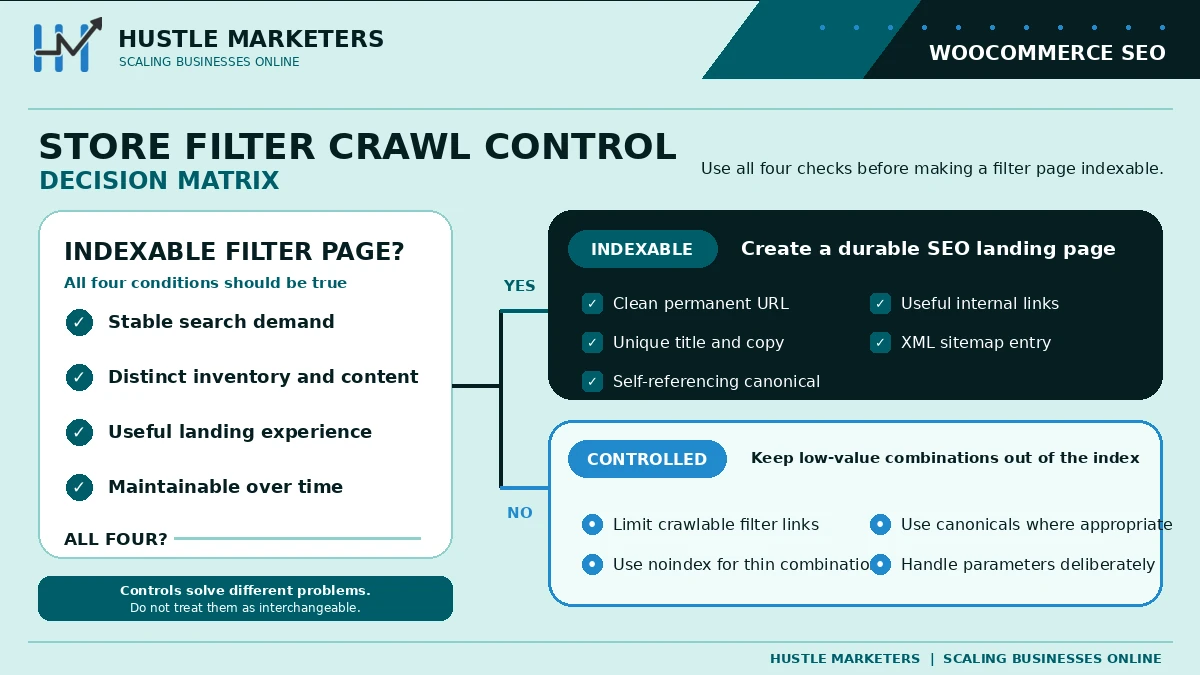
A Crawl-Control Decision Matrix for Store Filters
A filter URL should be indexable only when it represents stable search demand, has distinct inventory and content, resolves to a useful landing experience, and can be maintained over time. Otherwise, keep the crawl path controlled through the appropriate combination of internal-link design, canonicals, noindex and parameter handling. These controls solve different problems and are not interchangeable.
For indexable variants, use a clean permanent URL, unique title and copy, self-referencing canonical, useful internal links and an XML-sitemap entry. For non-indexable combinations, avoid creating endless crawlable links. Validate Product or ProductGroup markup against visible page information, and keep Merchant Center data synchronized with price and availability.
Here is the same matrix as text, so you can check your own filters one at a time:
| Check | Indexable filter page | Controlled filter combination |
|---|---|---|
| When it applies | Stable search demand, distinct inventory and content, a useful landing experience, and someone to maintain it | Any one of those four is missing |
| URL and links | Clean, permanent URL with a unique title and copy, and useful internal links to it | No endless crawlable links to every combination |
| Canonical and indexing | Self-referencing canonical | The right mix of internal-link design, canonicals, noindex and parameter handling, since each control solves a different problem |
| XML sitemap | Listed | Left out |
A clean index is valuable only when it supports commercial pages that convert. Learn how our SEO agency approaches the work, then compare the method with the evidence in our Australian pet ecommerce SEO case study.
How Hustle Marketers helps WooCommerce stores with SEO
WooCommerce stores usually come to us with the same two problems. The site is slow because it has collected fifteen plugins over four years, and the product feed is either broken or missing entirely, so the catalogue is invisible in Shopping and in free listings.
The feed half is the part most WooCommerce SEO advice skips. Free listings are unpaid traffic that comes from the same product data as your ads, so a bad feed costs you organic reach as well as ad performance. We cover that in our guide to WooCommerce product feeds and, when products show as Active but get nothing, in fixing zero free listing impressions. On the recovery side, our Silicon Lightworks case study covers getting a blocked catalogue live on Merchant Center.
Ishant Sharma has worked as a Google Ads, Microsoft Ads and SEO specialist since 2013. For WooCommerce the organic work sits under our SEO services, the store-wide programme under our ecommerce SEO agency service, and the catalogue and Shopping side under ecommerce PPC management.
FAQ
Is WooCommerce good for SEO compared to Shopify?
Yes, WooCommerce offers more SEO control than Shopify: full URL control, editable robots.txt, native blogging, and flexible schema. The trade off is that you must configure and maintain everything yourself. Shopify is more locked down but harder to break. Technical teams tend to get more out of WooCommerce; non technical teams often rank better on Shopify simply because fewer things go wrong.
Do I need an SEO plugin for WooCommerce?
Yes. WooCommerce covers basics like canonical tags and simple schema, but you need Yoast or Rank Math for meta control, sitemaps, archive noindexing, breadcrumbs, and extended Product schema. Install one, never both.
Which is better for WooCommerce, Yoast or Rank Math?
For new stores, Rank Math, because its WooCommerce features (product schema, URL base removal, granular controls) come without the separate paid extension Yoast requires. For stores already running Yoast smoothly, switching rarely pays for the risk. Both are capable when configured properly.
Why is my WooCommerce store slow?
Usually a combination of cheap hosting, too many plugins loading scripts on every page, a heavy page builder theme, and missing caching. Start with hosting and caching, then audit plugins, then optimize images. Test your product template specifically, because homepages are often fine while product pages fail.
Should I noindex product tag pages?
Noindex them unless you actively curate them. Auto generated tag archives are thin near duplicates that waste crawl budget. If specific tags match real search queries, keep a small curated set, add unique intro content to each, and noindex the rest.
How do I stop filter URLs from being indexed?
Three layers: confirm filtered URLs canonical to the clean category URL, block high volume parameters like orderby and filter_ in robots.txt once you have confirmed nothing valuable lives on them, and nofollow filter links where your plugin allows. Build dedicated pages for filter combinations that have genuine search demand.
Do variable products hurt WooCommerce SEO?
Not when configured correctly. WooCommerce keeps variations on one canonical URL by default, which concentrates ranking signals. Problems appear when variation parameter URLs get indexed or when schema pricing contradicts the page. Only give a variation its own page when it has independent search demand.
How do I add Product schema to WooCommerce without a developer?
Rank Math includes extended Product schema free, and Yoast offers it through its WooCommerce extension. Enable one, then validate a product URL in Google’s Rich Results Test. Check for duplicate Product entities from your theme and disable extras so exactly one clean block remains.
How long does WooCommerce SEO take to show results?
Technical fixes like crawl cleanup and speed improvements often show movement within four to eight weeks as Google recrawls. Content and authority building on category pages typically takes three to six months for competitive commercial terms. Larger catalogs see compounding gains over longer periods.
Can WooCommerce stores show up in ChatGPT and Perplexity recommendations?
Yes. AI engines cite stores with clean structured data, crawlable server rendered content, and specific descriptive product copy. Verify AI crawlers are not blocked in robots.txt, fix your Product schema, and write category buying guides. The same work that wins Google rich results wins AI citations.
Is WooCommerce SEO different from regular WordPress SEO?
Yes. Standard WordPress SEO ignores the problems that decide ecommerce rankings: faceted filter URLs, variable product canonicals, Product schema, category page optimization, and checkout script weight. A generic WordPress checklist will leave the highest impact ecommerce issues untouched.
Sources and Verification
Facts that can change were checked on August 10, 2026 against these primary sources:
- Google Search Central: Product structured data
- Google Search Central: ecommerce structured data
- Google Search Central: Core Web Vitals
- Google Search Central: Page experience
- web.dev: INP became a Core Web Vital
Related guides
If this one was useful, these cover the same ground for closely related businesses.
This is one piece of a bigger job. Our ecommerce SEO guide covers the rest, from crawl waste on faceted URLs to which pages actually deserve unique content.