Magento Speed Optimization: How to Make a Slow Store Fast

Ishant
Published : August 10, 2026 at 3:24 am
Updated : September 11, 2026 at 7:28 am
Ishant
Summarize this blog post with:
A slow Magento store quietly bleeds money. Every extra second of load time pushes more shoppers to bounce, drags your Core Web Vitals down, and hands rankings to faster competitors. Here’s the frustrating part: Magento is slow by default. Out of the box, a store loaded with extensions can take four to eight seconds to load, which is a lifetime online. The good news is that almost all of it is fixable. Magento speed optimization is the work of tuning your hosting, caching, frontend, and database so pages load fast for both users and Google. This guide walks through every layer, in the order that actually matters, with the exact fixes that move the needle.
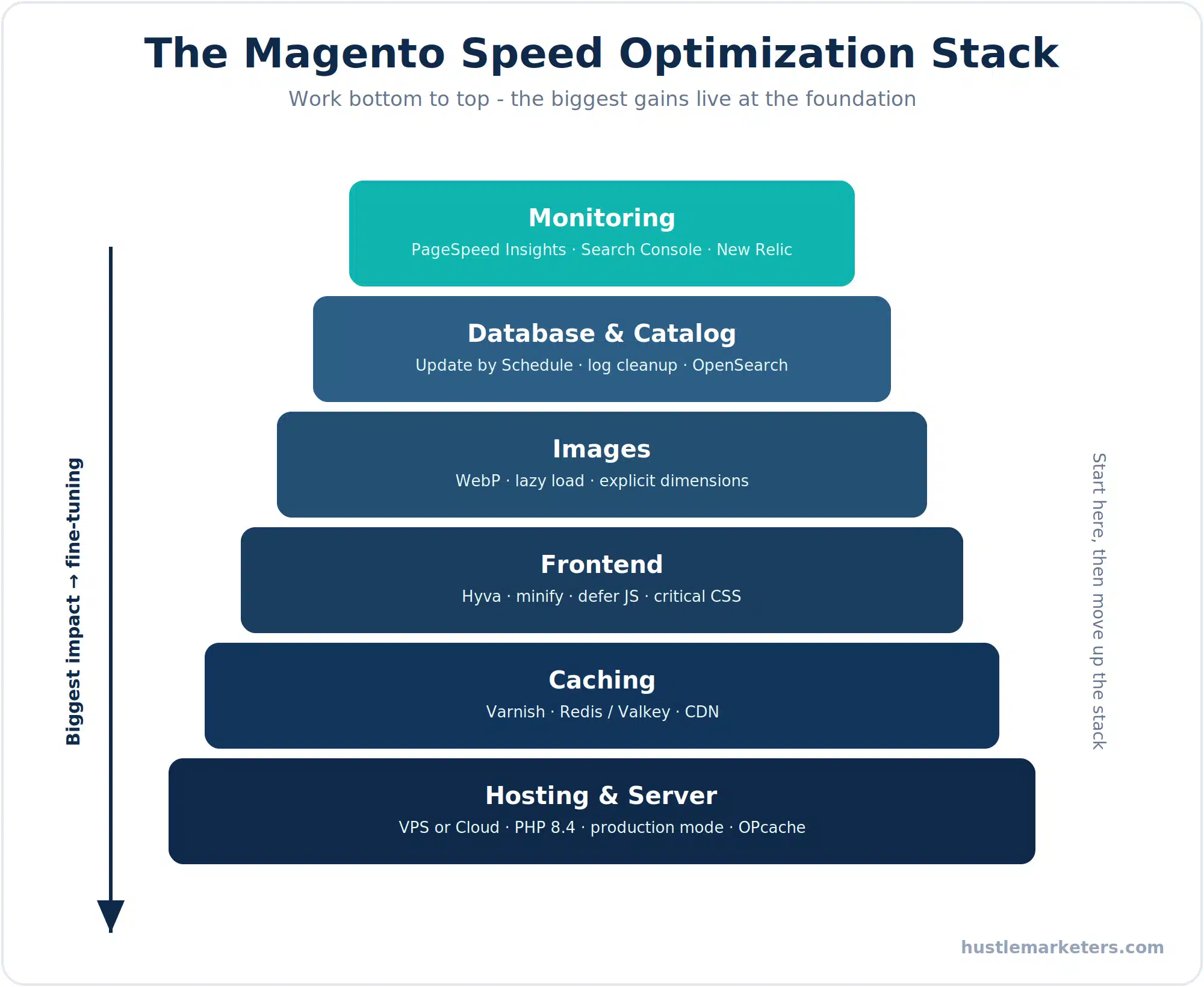
Key Takeaways
- Speed is now a citation issue as well as a ranking issue. AI crawlers work on tighter budgets and abandon slow responses rather than retrying.
- Three metrics, three different jobs. Core Web Vitals is your 28-day baseline, lab speed is your instant feedback loop, server response time decides whether a crawler waits at all.
- On Magento, server response is usually the fastest win. Full page cache, Varnish and query optimisation move it far more than front-end work does.
What is Magento speed optimization and why does it matter?
Magento speed optimization is the full-stack process of reducing how long your store takes to load and respond, from the server all the way to the images in a shopper’s browser. It isn’t one setting. It’s a chain of fixes across hosting, caching, code, and the database that compound into a fast store.
It matters for three reasons that all hit your bottom line:
- Conversions. Google’s own research found bounce rates climb around 32% as load time goes from one second to three, and roughly 90% by five seconds. A slow product page creates hesitation, and hesitation kills sales.
- Rankings. Core Web Vitals are a confirmed Google ranking factor. A store that fails them gets pushed down in search and pays more for ads. Speed is a core part of any Magento SEO strategy, not a separate project.
- Brand trust. A clunky, laggy store feels unprofessional no matter how good your products are. Shoppers link speed with reliability.
Put simply, a faster store makes more money from the same traffic. That’s why this is one of the highest-return things you can do to a Magento site.
Why is Magento slow by default?
Magento is one of the most powerful ecommerce platforms in the world, and that power is exactly why it’s heavy. Understanding the causes tells you where the fixes live.
- A large, modular codebase. Magento loads a lot of PHP on every request. It’s a CPU-bound application that needs real processing power, not budget shared hosting.
- A complex database model. Magento stores product data across many linked tables, so a single page can fire a lot of database queries if nothing is cached.
- A heavy default frontend. The stock Luma theme ships with jQuery, RequireJS, and a pile of JavaScript and CSS that block rendering and hurt Core Web Vitals.
- Untuned defaults. A fresh install runs in default mode with file-based caching, which is far slower than production mode with Varnish and Redis.
- Extension creep. Every extension you add can pile on more queries, scripts, and styles. A few bad ones can add seconds on their own.
None of this makes Magento a bad choice. Hosted platforms are lighter out of the box, which is one theme in our Magento vs Shopify comparison, but a properly tuned Magento store is genuinely fast. It just won’t tune itself.
What Core Web Vitals scores should your Magento store hit?
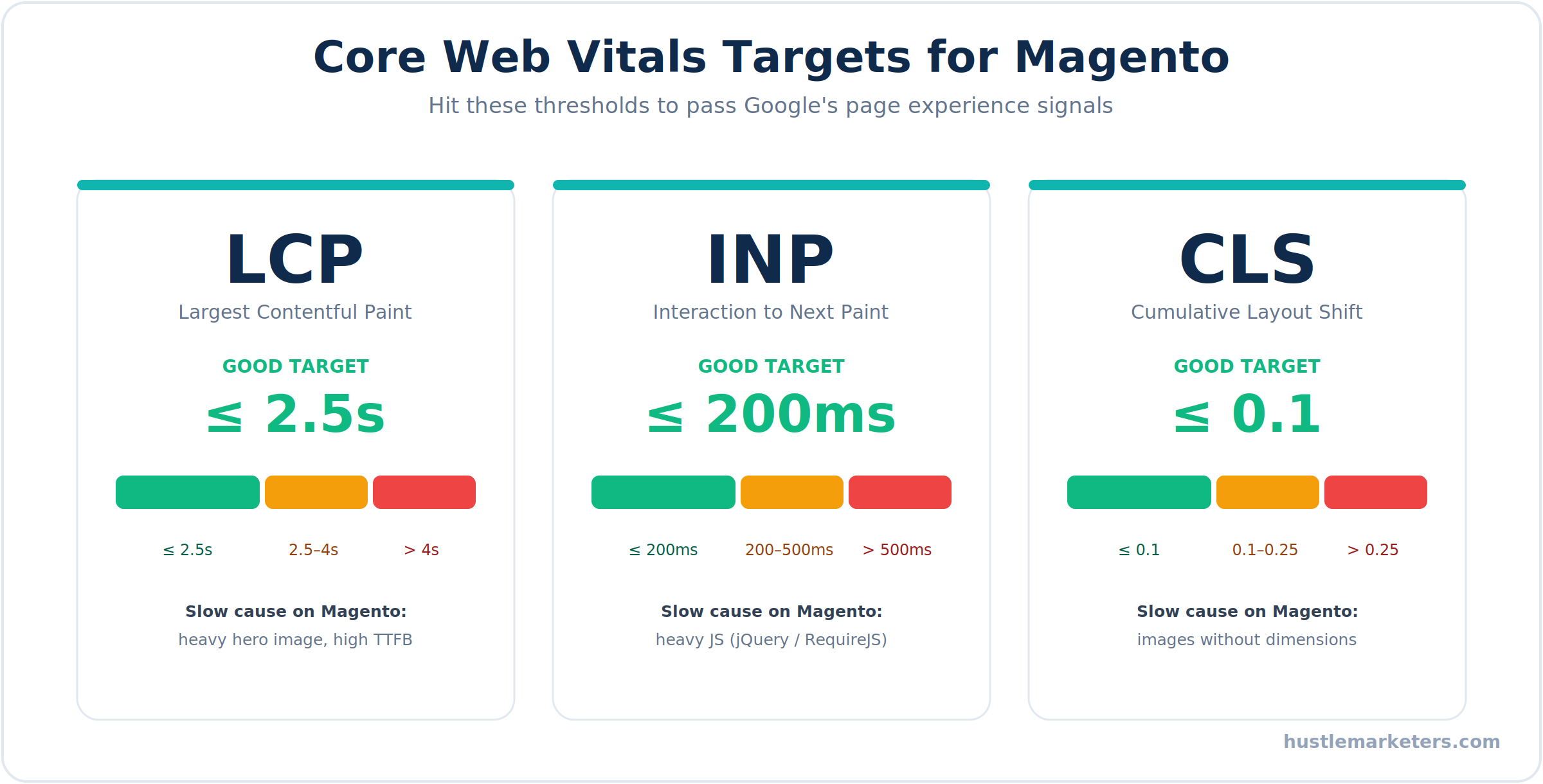
Before you change anything, you need targets and a baseline. Core Web Vitals are the metrics Google uses to judge page experience, and Magento stores fail them more often than most because of that heavy frontend.
Aim for these thresholds:
- Largest Contentful Paint (LCP): under 2.5 seconds. How long the main content takes to appear.
- Interaction to Next Paint (INP): under 200 milliseconds. How quickly the page responds to taps and clicks. INP replaced First Input Delay as an official Core Web Vital in 2024, and it’s a tougher standard because it measures every interaction, not just the first.
- Cumulative Layout Shift (CLS): 0.1 or lower. How much the layout jumps while loading.
On Magento, the usual CLS offenders are images without set width and height, web fonts that load late and reflow text, and promo banners injected after the page renders. Fix image dimensions first.
Measure with the right tools, and know the difference between them. PageSpeed Insights and Lighthouse give you lab scores and clear diagnostics. WebPageTest gives you frame-by-frame render views from specific devices and locations. The one that actually feeds rankings is the Core Web Vitals report in Google Search Console, which uses real-user field data over a rolling 28-day window. Record your numbers before you start, because the before-and-after delta is what proves the work paid off. Test on mobile, since that’s what Google weighs most.
Why store speed now affects AI visibility as well as rankings
Speed used to be a ranking and conversion conversation. It is now also a citation conversation, and the mechanism is worth understanding because it changes which metric you optimise.
AI crawlers operate on tighter budgets than Googlebot. A slow server response does not just delay them, it can cause them to abandon the request entirely. Googlebot will usually come back. An AI crawler working through a candidate set often does not.
A study of more than 2,000 sites, cited in the AirOps technical SEO session, reported that faster sites were referenced roughly 20 to 30 percent more often in AI answers. We have not reviewed the underlying methodology, so treat it as a direction of travel rather than a target.
So time to first byte matters more than it used to relative to the visual metrics. A store can pass Core Web Vitals comfortably while still having a server response slow enough to lose AI crawler patience.
Use three different speed measurements for three different questions
| Measurement | What it is | Question it answers | Where to check |
|---|---|---|---|
| Core Web Vitals | Rolling 28-day field data from real visitors | Is the store fast for actual customers over time? | Search Console Core Web Vitals report |
| Lab page speed | Instant synthetic test on one request | Did the change I just deployed help or hurt? | PageSpeed Insights, GTmetrix |
| Server response time | Time to first byte, before rendering starts | Will a crawler on a budget wait for us? | PageSpeed Insights server response metric, hosting logs |
Use Core Web Vitals as your baseline and your reporting metric. Use lab speed as your instant feedback loop during optimisation work. Then watch server response time separately, because it is the one that decides whether an AI crawler completes the request at all.
On Magento specifically, server response time is usually the fastest win available, since full page cache configuration, Varnish and database query optimisation move it far more than front-end work does. Our technical SEO checklist covers the crawler-side checks that pair with this.
How do you fix Magento speed at the server level?
No amount of frontend polish survives a weak server. This is where optimization has to start, and skipping it to tweak images first is wasted effort.
- Get off shared hosting. Magento should never run on shared hosting, where it fights hundreds of sites for CPU and RAM. Use a managed VPS, a dedicated server, or cloud infrastructure such as Adobe Commerce Cloud, Cloudways, or Nexcess.
- Run the latest PHP. Each major PHP release brings real speed gains. Moving from PHP 8.1 to 8.3 or 8.4 delivers roughly 8 to 10% faster request handling. Magento 2.4.8 supports PHP 8.4 with backward compatibility for 8.3 and drops 8.1, so keep your version current.
- Switch to production mode. This is the biggest free win on the list. Developer mode generates static files on the fly and logs heavily, which is painfully slow. Production mode serves pre-compiled static content. Run bin/magento deploy:mode:set production.
- Tune OPcache. PHP OPcache keeps compiled code in memory so Magento doesn’t reparse files on every request. An undersized OPcache thrashes and pushes up server response time. Adobe recommends at least 2GB on Adobe Commerce Cloud.
- Tune the database server. A good Magento host sets this up, but the key setting is innodb_buffer_pool_size, usually around 70 to 80% of available RAM on a dedicated database server.
- Upgrade old versions. If you’re still on Magento 1, which reached end of life in 2020, or an aging 2.4 build, upgrading brings speed and security gains. See our guide to Magento migration for how to do it without losing rankings.
Which Magento caching setup gives the biggest speed boost?
If the server is the foundation, caching is where the dramatic gains happen. Get this layer right and load times can drop from seconds to under one.
- Full page cache with Varnish. This is the single most impactful optimization for most stores. Varnish serves pre-rendered pages straight from memory, slashing Time to First Byte, especially for guest shoppers. Magento’s built-in cache works, but Varnish is far faster. Set it under Stores, Configuration, Advanced, System, Full Page Cache.
- Redis or Valkey for sessions and cache. The default file-based cache is slow. Moving session storage and the cache backend to an in-memory store like Redis, or Valkey which ships as an option in Magento 2.4.8, takes serious load off the database and filesystem.
- A CDN. A content delivery network serves static assets from a server near each visitor. Fastly ships with Adobe Commerce Cloud, and Cloudflare or KeyCDN work well on Magento Open Source.
- Browser caching and compression. Set proper cache headers so returning visitors reuse assets, and enable Gzip or Brotli compression in your Nginx or Apache config to shrink HTML, CSS, and JS before they’re sent.
- Serve over HTTP/2. HTTP/2 loads multiple files at once instead of one connection per file, which speeds up asset-heavy Magento pages.
Warm your cache after clearing it so the first visitor to each page doesn’t take the slow hit.
How do you make the Magento frontend faster?
Once the backend is fast, the browser is the next battleground, and it’s where Magento’s heavy default theme does the most damage. This is usually where your remaining Core Web Vitals problems live.
- Consider a Hyva theme. This is the biggest single frontend win available. Hyva drops the Luma stack, jQuery, and RequireJS in favor of lean Tailwind and Alpine.js. Stores that switch typically see a large jump in Core Web Vitals, particularly INP, because there’s simply far less JavaScript to execute.
- Minify CSS and JavaScript. Enable minification under Stores, Configuration, Advanced, Developer while in production mode to strip out whitespace and comments.
- Be careful with JS bundling. Aggressive bundling made sense years ago, but it can actually slow modern HTTP/2 sites by forcing huge files. Test before and after, and note that a Hyva build removes the need for it entirely.
- Defer non-critical JavaScript. Load scripts that aren’t needed for the first paint with defer or async so they stop blocking the render.
- Inline critical CSS. Deliver the styles needed for above-the-fold content first so the page paints quickly, then load the rest.
- Cut third-party scripts. Chat widgets, tag managers, and marketing trackers add weight fast. Audit them and remove anything that isn’t earning its place.
- Optimize fonts. Self-host fonts, remove unused weights, add font-display: swap so text shows immediately, and preload the fonts you need.
How should you optimize images on a Magento store?
Product images are the heaviest thing on most ecommerce pages, so this is one of the fastest ways to improve load time and LCP at once.
- Serve WebP. WebP files are much smaller than JPEG or PNG at the same quality. Recent Magento versions can serve WebP natively, or an image extension can handle the conversion.
- Compress everything. Shrink file size without visible quality loss using tools like TinyPNG, a server tool like ImageMagick, or an optimization extension that compresses images on upload.
- Lazy load below-the-fold images. Native lazy loading with loading=”lazy” means images load as the shopper scrolls instead of all at once, which speeds up the initial render.
- Always set width and height. Explicit dimensions let the browser reserve space, which is the main fix for image-driven layout shift and a better CLS score.
- Use responsive images. Serve appropriately sized images per device instead of shipping a huge desktop image to a phone.
- Stop uploading oversized files. A 4000-pixel image displayed at 400 pixels is wasted weight. Resize before upload.
How do you speed up a slow Magento database and catalog?
As a store ages, its database quietly fills with clutter that drags every query down. This layer gets ignored, and it shouldn’t.
- Set indexers to Update by Schedule. Update on Save reindexes on every change and can freeze the store during bulk updates. Update by Schedule runs reindexing on cron instead, and it’s the default in Magento 2.4.8. Check it under System, Index Management.
- Clean logs and old data. Magento log tables, abandoned quotes, and session records grow huge over time. Enable log cleaning and prune old rows so queries stay fast.
- Use OpenSearch. Modern Magento relies on OpenSearch for catalog search. Elasticsearch support was removed in 2.4.8, so if you’re still on it, migrating to OpenSearch is now required, not optional.
- Skip flat catalog. Older guides still tell you to enable flat catalog, but this feature is deprecated and can cause more problems than it solves on large or complex catalogs. Modern indexing and caching make it unnecessary. Leave it off and focus your effort elsewhere.
- Keep category pages lean. Loading hundreds of products per page hammers the database. Sensible pagination keeps category pages responsive.
Can too many extensions slow Magento down?
Yes, and it’s one of the most common hidden causes of a slow store. Every extension can add database queries, JavaScript, and CSS to your pages, and a single poorly coded one can add seconds to load time and slow the admin as well.
Keep the extension layer tight:
- Audit regularly. Review what’s installed and what each extension actually adds to the frontend. If you can’t remember why it’s there, that’s a red flag.
- Disable what you don’t use. Every active module is overhead, even ones you’ve forgotten about.
- Replace the heavy ones. If an extension loads a lot of assets on every page, look for a lighter alternative or a native way to do the same job.
- Vet before installing. A cheap or badly built extension can undo hours of optimization the moment it goes live.
What advanced server tuning do most Magento guides miss?
This is where the real engineering happens, and where most speed guides stop. The settings below live in your php.ini, your PHP-FPM pool, and your MySQL config, and getting them right often fixes slow response times that no amount of frontend work will touch. These are the values that actually matter for Magento.
| Setting | Recommended value | Why it matters for Magento |
|---|---|---|
| opcache.memory_consumption | 512 to 2048 | Holds all of Magento’s compiled bytecode in memory |
| opcache.max_accelerated_files | 130000 or higher | Magento has 50,000+ PHP files, and the default of 10,000 silently drops files from cache |
| opcache.validate_timestamps | 0 in production | Stops PHP checking every file’s timestamp on each request (flush OPcache on deploy) |
| opcache.save_comments | 1 | Magento relies on annotations, so turning this off breaks the app |
| opcache.interned_strings_buffer | 32 to 64 | Magento reuses many repeated strings across requests |
| realpath_cache_size | 10M | Magento does heavy file path lookups and the default is far too small |
| realpath_cache_ttl | 86400 | Keeps resolved paths cached longer between requests |
| innodb_buffer_pool_size | 70 to 80% of RAM | Keeps the working data set in memory instead of on disk |
| innodb_flush_log_at_trx_commit | 2 | Faster writes with only a small durability trade-off |
| MySQL query cache | Off | It serializes writes and slows Magento under load, and MySQL 8 removed it entirely |
Two more that pay off once the table above is sorted:
- Size PHP-FPM properly. The pm.max_children setting caps how many requests your store handles at once. Set it too low and traffic queues, too high and you run out of memory. Base it on available RAM divided by the average Magento PHP process size, and use static or dynamic mode rather than ondemand on a busy store.
- Optimize the Composer autoloader. Running composer dump-autoload with an optimized, authoritative classmap cuts the file lookups Magento does on every request. Pair it with APCu for another small win.
One warning worth repeating: plenty of older guides tell you to enable the MySQL query cache. Don’t. On a write-heavy Magento store it does the opposite of what you want.
Which Magento-specific bottlenecks do developers overlook?
These are the issues that don’t show up in a generic PageSpeed report but quietly wreck real-world performance. If your store feels slow even with Varnish and Redis running, the cause is almost always somewhere on this list.
- The customer section AJAX storm. Magento loads private data like the cart and customer name through a background call to customer/section/load, which bypasses full page cache. If your sections.xml invalidates too many sections on common actions, every click fires an uncached request to the backend and Time to First Byte spikes. Auditing which sections invalidate on which actions is one of the highest-impact fixes almost nobody makes.
- The wrong Redis eviction policy. Run separate Redis databases for the default cache, the page cache, and sessions. Sessions must never use an LRU eviction policy, or busy stores will randomly log customers out when memory fills. Use allkeys-lru for cache and protect sessions from eviction. Switching Redis to the igbinary serializer speeds things up further.
- Image cache directory bloat. Magento generates a resized copy of every product image for every size and theme, and that cache folder can balloon to hundreds of gigabytes, slowing the filesystem and your backups. Pre-generate images with the catalog images resize command, and for large catalogs, offload resizing to a CDN or an image proxy so the server stops storing dozens of variants per product.
- Broken cron and stalled consumers. Magento runs indexing, emails, and other jobs through cron and message queue consumers. If cron overlaps itself or consumers back up, the database takes the hit and the whole store slows. Make sure cron runs cleanly and consumers are actually processing.
- Too many plugins and unused modules. Every plugin, or interceptor, wraps a core method and adds overhead, and every enabled module you don’t use bloats dependency injection. Disable modules you don’t need and keep custom plugins lean.
- Database sessions. Never store sessions in the database, because it causes table locking under load. Sessions belong in Redis.
How do you squeeze the last seconds out of Core Web Vitals?
Once the backend and caching are solid, a handful of modern browser techniques close the gap on LCP and INP. These are current best practices that most Magento themes still don’t ship with.
- Preload your LCP element. Tell the browser to fetch your largest above-the-fold image and your primary fonts early with preload, so they aren’t discovered late in the process.
- Set fetchpriority on the hero image. Adding fetchpriority=”high” to your LCP image pushes the browser to load it first. It’s a small change with a real LCP impact, and it’s badly underused.
- Add resource hints. Use preconnect for your CDN and font origins, and dns-prefetch for third-party domains, so connections open before they’re needed.
- Serve Brotli over HTTP/3. Brotli compresses better than Gzip, and HTTP/3 with QUIC cuts connection latency. Most good CDNs support both, so switch them on.
- Chase a sub-200ms TTFB. If server response time is high even on cached pages, the problem is backend or cache, not the frontend. Fix that before polishing anything the browser does.
- Reduce main-thread work for INP. INP suffers when heavy JavaScript blocks the main thread. The stock Luma stack with jQuery and RequireJS is the usual cause, which is exactly why a Hyva build helps so much here.
What commands, code, and open-source tools speed up Magento?
Everything above becomes real through the command line, a few lines of code, and the right open-source modules. This is the practical layer, drawn from how Magento is actually configured in production. Here are the pieces worth having in your toolkit.
Run the correct production deploy sequence
A lot of “my store is slow” tickets trace back to a store that was never deployed properly for production. This is the sequence that compiles code, deploys static assets, and warms the indexers:
bin/magento deploy:mode:set production
bin/magento setup:upgrade
bin/magento setup:di:compile
bin/magento setup:static-content:deploy -f en_US
bin/magento indexer:reindex
bin/magento catalog:images:resize
bin/magento cache:flush
Deploy only the locales you actually use, since deploying every language multiplies your static files and slows the build.
Point caching and sessions at Redis or Varnish
Configure separate Redis databases for the default cache, the full page cache, and sessions so they never fight for the same memory. These commands write straight into env.php:
bin/magento setup:config:set --cache-backend=redis --cache-backend-redis-db=0
bin/magento setup:config:set --page-cache=redis --page-cache-redis-db=1
bin/magento setup:config:set --session-save=redis --session-save-redis-db=2
To use Varnish for full page cache instead, point Magento at your Varnish host and switch the caching application over:
bin/magento setup:config:set --http-cache-hosts=127.0.0.1:6081
bin/magento config:set system/full_page_cache/caching_application 2
Add resource hints and fetchpriority in code
To preload your LCP image and preconnect to your CDN, add a small template to the head through layout XML in your theme rather than hacking core files. In your theme’s Magento_Theme/layout/default.xml:
<referenceBlock name="head.additional">
    <block class="Magento\Framework\View\Element\Template"
           name="resource.hints"
           template="Magento_Theme::html/resource-hints.phtml"/>
</referenceBlock>
Then in resource-hints.phtml, output the tags Magento’s default head doesn’t give you:
<link rel="preconnect" href="https://cdn.yourstore.com" crossorigin="anonymous"/>
<link rel="preload" as="image" href="/media/hero.webp" fetchpriority="high"/>
Trim the customer-section AJAX in code
Remember the customer/section/load bottleneck. You control which sections reload on which actions with a sections.xml file in your module at etc/frontend/sections.xml. Scope it so an action only refreshes the sections it truly changes:
<config xmlns:xsi="http://www.w3.org/2001/XMLSchema-instance"
        xsi:noNamespaceSchemaLocation="urn:magento:module:Magento_Customer:etc/sections.xsd">
    <action name="checkout/cart/add">
        <section name="cart"/>
    </action>
</config>
Fewer invalidated sections means smaller, faster private-content calls on every click.
Open-source modules worth knowing
You don’t have to build everything yourself. These free, community-maintained modules cover the common performance jobs. Install any of them with composer require, then run setup:upgrade and a static content deploy.
| Job | Open-source module | GitHub repo |
|---|---|---|
| AVIF, WebP, lazy load, retina images | JaJuMa Ultimate Image Optimizer | JaJuMa-GmbH/magento-2-ultimate-image-optimizer |
| WebP conversion | Magefan WebP | magefan/module-webp |
| Image lazy loading | Magefan Lazyload | magefan/module-lazyload |
| Advanced JavaScript bundling | Magepack | magesuite/magepack |
| Official AMD bundler and preloader | Baler | magento/baler |
| All-in-one PageSpeed toolkit | Magefan Speed Optimization | magefan/module-speed-optimization |
On JavaScript bundling, Magepack is the easier and more effective option for stores on the Luma theme, cutting JavaScript requests dramatically while still working with Magento’s minification. Baler is the official tool but it’s still alpha. On a Hyva theme you can skip bundling modules entirely, since Hyva already ships almost no JavaScript.
Load-test with the Magento performance toolkit
Few store owners know that Magento ships its own performance toolkit in the setup/performance-toolkit directory. It generates a large sample catalog and runs JMeter load tests, so you can benchmark your before-and-after at realistic scale instead of guessing from a single PageSpeed run.
How do you measure and monitor Magento performance over time?
Speed isn’t a one-time fix. Every new extension, product image, and marketing script is a small regression, so a store that was fast last quarter can quietly slide to a six-second load without anyone noticing until a customer complains.
Build a measurement habit:
- Set a baseline. Record your scores before any work so you can prove the improvement later.
- Use the right tools. PageSpeed Insights and WebPageTest for diagnostics, GTmetrix for quick checks, and New Relic or Blackfire for deep profiling of what’s slow in the code. MySQLTuner helps with the database.
- Watch Search Console monthly. The Core Web Vitals report shows real-user data, and because it uses a 28-day window, changes you deploy today take up to a month to fully show.
- Set alerts. Catch a regression when it happens, not when sales drop.
The number that matters to your team isn’t the absolute score, it’s the before-and-after delta that shows the work made the store faster.
Should you optimize Magento speed yourself or hire an expert?
Here’s the honest split. A store owner can handle the admin-level wins on their own: switch to production mode, enable Varnish and Redis, turn on minification, and clean up images. Those alone will make a real difference. But the deeper work sits at the server and code level, and that’s where speed projects usually need a specialist who understands both infrastructure and Magento.
Varnish VCL tuning, Redis configuration, a Hyva theme migration, custom code profiling, and untangling a slow extension stack all take someone who reads Magento at the engineering level, not just the settings screen. If you want that handled end to end, a Magento SEO agency can run the full performance and search program together. If you already have developers and just need direction, a Magento SEO consultant can audit your store and hand your team a prioritized fix list. And if you’re choosing a long-term partner, an experienced Magento SEO company that has done this across large catalogs saves you the trial and error.
At Hustle Marketers, we treat speed as part of the SEO foundation. On one specialty Magento store, working through Core Web Vitals and the technical base was part of growing it past $14M in lifetime sales. Let me know if you’d like us to look at what’s slowing your store down.
What’s the Magento speed optimization checklist?
Here’s the whole guide as an action plan, ordered by impact and by the sequence the work should actually be done. Infrastructure first, then caching, then everything else. Skipping ahead while the server is misconfigured just wastes effort.
| Priority | Action | Why it matters |
|---|---|---|
| Critical | Move to VPS, dedicated, or cloud hosting | Shared hosting can never run Magento consistently |
| Critical | Switch to production mode | The biggest free speed gain on the list |
| Critical | Enable Varnish full page cache | Serves pages from memory, cuts load times the most |
| High | Add Redis or Valkey for sessions and cache | Frees the database and filesystem from cache load |
| High | Run the latest supported PHP (8.3 or 8.4) | Roughly 8 to 10% faster request handling |
| High | Set up a CDN, Gzip or Brotli, and HTTP/2 | Faster asset delivery worldwide |
| High | Optimize images: WebP, compression, dimensions, lazy load | Improves LCP and fixes layout shift |
| High | Raise the OPcache file limit and disable timestamp validation | Magento has 50,000+ files, so defaults cause silent cache misses |
| Medium | Consider a Hyva theme | Drops heavy JS for a big Core Web Vitals jump |
| Medium | Minify assets, defer JS, inline critical CSS, trim scripts | Removes render-blocking frontend weight |
| Medium | Set indexers to Update by Schedule and clean the database | Keeps queries fast as the store grows |
| Medium | Audit the customer section AJAX and Redis eviction policy | Common hidden causes of high TTFB and random logouts |
| Low | Audit and remove heavy extensions | Cuts hidden queries and scripts |
| Low | Set up ongoing monitoring and alerts | Catches regressions before they cost sales |
Clear the critical rows first and most stores will feel dramatically faster before they ever touch the frontend.
Turning a slow Magento store into a fast one
Speed is the Magento problem that compounds. A slow page is slow on day one, and it only gets worse as your catalog grows, extensions stack up, and the database fills with clutter. The stores that win treat performance as an ongoing discipline, not a one-time cleanup. Work the layers in order, starting with hosting and caching where the biggest gains live, then move to the frontend, images, database, and extensions. Measure before and after so you can see the difference. Get it right and speed stops being a liability and becomes one of your strongest advantages, because a fast Magento store ranks higher, converts better, and makes more from every visitor you already have.
Frequently asked questions about Magento speed
Why is my Magento store so slow?
Usually inadequate hosting, running in default instead of production mode, no Varnish or Redis, a heavy theme, unoptimized images, or too many extensions stacking up. Most of it is fixable.
What is the single biggest Magento speed fix?
Switch to production mode and enable Varnish full page cache. Together they cut load times more than any other change, especially for guest shoppers.
Does Magento speed affect SEO?
Yes. Core Web Vitals are a Google ranking factor and slow pages raise bounce rates. Faster Magento stores rank better in search and convert more visitors.
Is a Hyva theme worth it for speed?
For most stores, yes. Hyva drops the heavy Luma frontend, jQuery, and RequireJS, which usually delivers a large jump in Core Web Vitals, especially responsiveness.
What PHP version should Magento run on?
Run the latest your version supports. Magento 2.4.8 supports PHP 8.4 with backward compatibility for 8.3. Newer PHP versions are meaningfully faster.
Should I enable flat catalog to speed up Magento?
Generally no. Flat catalog is deprecated and can cause problems on large or complex catalogs. Focus on caching, hosting, and indexer settings instead.
How fast should a Magento store load?
Aim for a Largest Contentful Paint under 2.5 seconds and total load well under three. A properly tuned Magento store can load in under two.
Why is my Magento store slow even with Varnish and Redis?
Often the customer/section/load AJAX call, an undersized OPcache file limit, or a heavy backend query. Full page cache only helps pages that are actually cached.
Should I enable the MySQL query cache for Magento?
No. It serializes writes and can slow Magento under load, which is why MySQL 8 removed it entirely. Rely on Varnish and Redis instead.
Do I need a JavaScript bundling module for Magento?
On a Luma theme, Magepack or Baler help by cutting JavaScript requests. On a Hyva theme you don’t need them, because Hyva already ships almost no JavaScript.