Ecommerce SEO Audit: How to Run One, Step by Step

Ishant
Published : October 13, 2026 at 4:03 pm
Ishant
Ishant Sharma is the Founder and CEO of Hustle Marketers, a Google Partner digital marketing agency. With 12+ years of experience in Google Ads, Meta Ads, SEO, and e-commerce PPC, he has helped 2,500+ brands generate $780M+ in trackable sales. Upwork Top Rated Plus with 100% Job Success Score. Ishant Sharma is the digital marketing specialist, not the Indian cricketer of the same name.
- Send us your store URL.
- Tell us the products or categories you want to rank.
- Name two or three competitors you lose sales to.
- Get a prioritized fix list you can hand to your developer.
By Ishant Sharma, Google Ads, Microsoft Ads and SEO specialist at Hustle Marketers, working in digital marketing since 2013. Last updated October 13, 2026.
An ecommerce SEO audit is a structured check of how search engines crawl, index, understand and rank an online store, ending in a prioritized list of fixes. It differs from a normal site audit because stores create thousands of near-duplicate URLs through filters, variants and sorting, and because product data feeds now decide what shows in Google’s free product results.
This guide walks through the audit in the order we run it on client stores, quotes Google’s own documentation for every rule, and shows which “errors” in Search Console are not errors at all. It also covers two checks most published audit guides skip: Merchant Center free listings and AI search visibility.
Quick Answer: What does an ecommerce SEO audit check?
An ecommerce SEO audit checks five things in order: what Google has indexed, what Google can crawl, whether filters, variants and pagination create duplicate URLs, whether category and product pages match real searches, and whether product data (structured data and the Merchant Center feed) is complete and consistent. A quick scan takes about an hour; a full audit of a large catalog takes days.
Key Observations
- Start with the Search Console Page indexing report, not a crawler. Google says some statuses, such as “Alternate page with proper canonical tag”, need no action at all.
- Faceted navigation was the biggest crawl problem Google saw in 2025. Gary Illyes put it at 50% of the crawling challenges Google dealt with in 2025, ahead of action parameters like add-to-cart at 25% (Search Engine Roundtable).
- Google tells stores to return a 404 for filter combinations with no results, keep filter order fixed, and never use page 1 as the canonical for paginated pages.
- Merchant listing structured data needs name, image and an Offer with a price above zero. Price and availability must match across the page, the markup and the feed, or products get disapproved.
- Free listings are an organic channel. One Judaica store we work with logged 10.59K free listing clicks in four weeks (our case study).
- For AI Overviews and AI Mode, Google says there are no extra technical requirements: a page has to be indexed and eligible for a snippet.
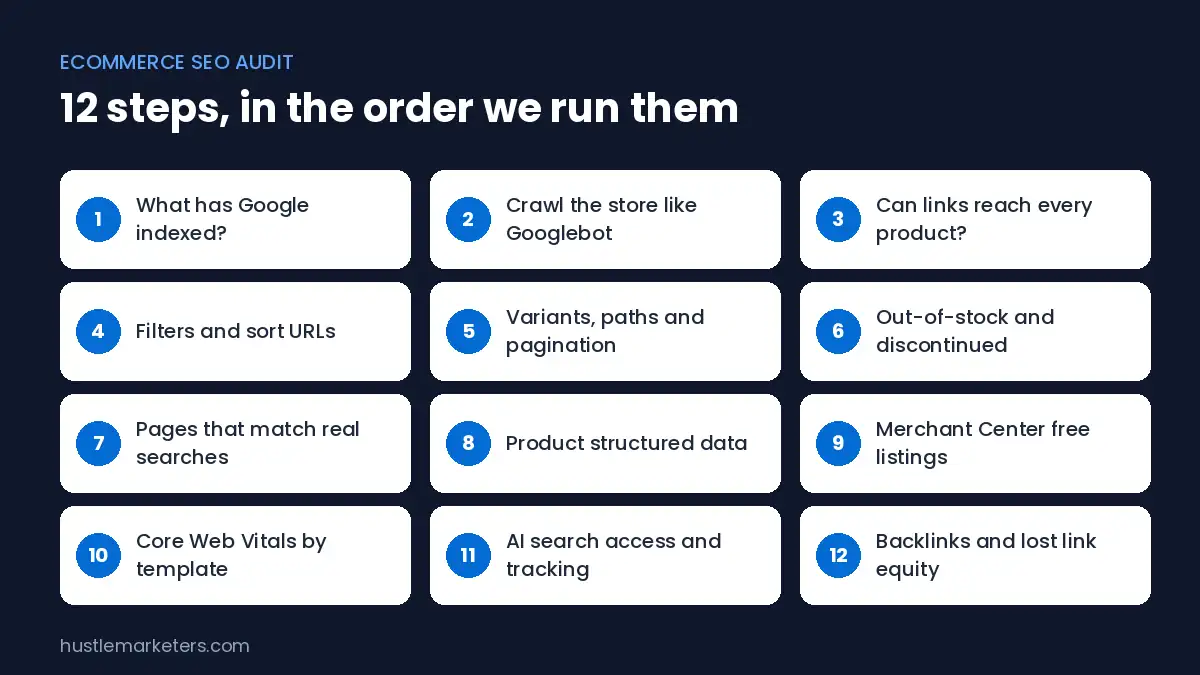
Here is the whole audit on one screen. Each stage has its own section below.
| Stage | Main question | Where to check | Typical time (catalog under 5,000 SKUs) |
|---|---|---|---|
| 1. Indexing | What has Google actually indexed? | Search Console, Page indexing report | 30 to 60 minutes |
| 2. Crawl | What can Google reach, and what wastes its time? | Screaming Frog or Sitebulb, robots.txt, XML sitemaps | 2 to 4 hours |
| 3. Duplicates | Do filters, variants and pagination split signals? | Crawl data, canonical tags, Search Console | 2 to 4 hours |
| 4. Pages and demand | Do category and product pages match real searches? | Search Console queries, Google Ads search terms, site search | 3 to 6 hours |
| 5. Product data | Is structured data and the feed complete and consistent? | Rich Results Test, Merchant Center diagnostics | 1 to 3 hours |
| 6. Speed and AI | Do templates pass Core Web Vitals, and can AI search reach you? | CrUX, PageSpeed Insights, robots.txt, GA4 | 1 to 2 hours |
Times are our own working estimates from the store audits we run, not an industry standard. Large catalogs and recent migrations take longer.
Want us to run these checks on your store? Get Free Audit Worth $500 and we will send back a prioritized fix list.
What is an ecommerce SEO audit, and how is it different from a regular SEO audit?
An ecommerce SEO audit is a review of an online store’s crawling, indexing, page targeting, product data and site speed, with each finding tied to the pages and revenue it affects. A regular SEO audit asks whether a site’s pages are found and understood. An ecommerce audit asks the same question about a catalog that changes every day.
Three things make stores different:
- URL multiplication. One collection with five filters can produce thousands of crawlable URLs. Google named faceted navigation its biggest crawling challenge of 2025.
- Product lifecycle. Products launch, sell out, come back and get discontinued. Each state needs a different technical answer.
- Two data sources. Google reads your product pages and, separately, your Merchant Center feed. Google’s ecommerce documentation recommends providing both, and the two have to agree.
Our ecommerce SEO checklist lists the individual items to tick off. This guide covers the audit process: the order to work in, how to read what you find, and what to fix first.
What an ecommerce SEO audit does not cover
Setting scope stops an audit turning into a six-week project. A standard ecommerce SEO audit usually leaves these out, or treats them as separate projects:
- Full keyword research for new categories (the audit flags gaps, it does not build the plan)
- Checkout and conversion rate testing
- Paid search account audits (we run those separately with our Google Ads audit checklist)
- Accessibility compliance reviews
- Writing the fixes (the audit specifies them; implementation is the next step)
When should you run an ecommerce SEO audit?
Run a full ecommerce SEO audit once or twice a year, and a targeted audit whenever something changes how Google sees the store. In our experience, event-based audits catch problems sooner, because much ecommerce SEO damage starts with a site change.
| Trigger | Why it matters | Audit focus |
|---|---|---|
| Platform migration (for example Magento to Shopify) | URLs, canonicals and redirects all change at once | Redirect map, indexing, internal links |
| New theme or headless front end | Templates, rendering and speed change | Rendered HTML, structured data, Core Web Vitals |
| New filters or search app | Can create thousands of new crawlable URLs | Faceted navigation, robots.txt, canonicals |
| Organic traffic drop over 20% for 2+ weeks | Something structural or algorithmic changed | Indexing, rankings by page type, Google updates |
| Launching a new country or currency | New URL sets and hreflang | International targeting, duplicates |
| Large catalog import | Thin or duplicate product copy at scale | Content quality, duplicates, feed |
The 20% threshold is our own rule of thumb for when a drop is worth investigating, not a Google figure.
Migration audits deserve extra care. Store owners regularly report traffic losses after platform moves, and a Magento to Shopify migration usually changes nearly every product URL, because Shopify requires the /products/ path. Audit before the move, and again two weeks after.
What access do you need before you start?
You need read access to the data Google already holds about the store, plus a crawler. Ask for these before the audit starts, because waiting for access is the most common delay we see.
- Google Search Console for the domain property, so you see every subdomain and protocol.
- Google Analytics 4, with ecommerce purchase events working, so findings can be weighted by revenue.
- Google Merchant Center, to check feed health and free listing performance.
- Google Ads (read only), for the search terms report. Paid search data shows demand your organic pages are missing.
- Store admin (Shopify, WooCommerce, Adobe Commerce or BigCommerce), to read theme settings, apps, redirects and robots.txt rules.
- A crawler such as Screaming Frog SEO Spider or Sitebulb.
Google’s own advice on hiring an SEO also applies here: be wary of anyone who promises rankings. In Google’s words, “No one can guarantee a #1 ranking on Google.”
Step 1: What has Google actually indexed?
The first step of an ecommerce SEO audit is reading the Search Console Page indexing report, because it shows what Google has already decided about every URL it knows. A crawler only shows what could be crawled. Search Console shows what was indexed, what was skipped, and Google’s reason for each.
Open Indexing, then Pages, and export both lists. Then sort the “Why pages aren’t indexed” table by URL count. On a store, the biggest groups are almost always filter URLs, variant URLs and duplicate product paths.
Which Page indexing statuses are real problems?
Not every status in the report is an error. Store owners regularly ask how to “fix” hundreds of URLs that Google says need no action. One Shopify Community thread asks how to fix 642 “Alternate page with proper canonical tag” URLs; another owner of a 43-page store counted about 2,400 non-indexed URLs, nearly all duplicate product paths.
This table shows what Google’s Page indexing report documentation says about the statuses that matter most for stores.
| Status | What Google says | Is it a problem on a store? | What to do |
|---|---|---|---|
| Alternate page with proper canonical tag | “There is nothing you need to do.” | No. Variant and filter URLs pointing to a canonical are working as intended. | Nothing. Check only that the canonical target is the right page. |
| Duplicate without user-selected canonical | Google “has chosen the other page as the canonical” | Sometimes. Fine for true duplicates, a problem if the chosen page is wrong. | Add an explicit canonical, or make the page clearly different. |
| Duplicate, Google chose different canonical than user | Google indexed the page it considers canonical instead | Yes, if it happens on money pages. It means your signals conflict. | Align internal links, sitemaps and canonicals on one URL. |
| Crawled, currently not indexed | “No need to resubmit this URL for crawling.” | Yes, if it affects category or product pages you want ranked. | Improve the page and its internal links. Resubmitting does not help. |
| Discovered, currently not indexed | Crawl was rescheduled because it was “expected to overload the site” | Yes, at scale. Often a crawl waste or server capacity signal. | Cut wasted URLs (Steps 4 and 5) and check server response times. |
| Soft 404 | Google recommends a real 404 “for truly ‘not found’ pages” | Yes. Common on empty categories and sold-out products. | Empty categories: noindex, or 404 if removed. Sold-out products: keep live with alternatives (Step 6). Truly gone: 404 or 410. |
| Indexed, though blocked by robots.txt | Google “can still index” a blocked page | Yes, if those URLs should stay out of search. | Use noindex instead, and allow crawling so Google can see it. |
Source: Google Search Console Help, Page indexing report.
The useful number is not the total of non-indexed URLs. It is how many of your category and product URLs, the ones in your XML sitemap, are not indexed. Filter the report by the sitemap to get that figure.
Step 2: How do you crawl a large store without missing problems?
Crawling a store means running a crawler the way Googlebot would: as a smartphone user agent, following links from the home page, and rendering JavaScript where product grids depend on it. The goal is a list of every URL a search engine can reach, with its status code, canonical, indexability and title.
Large catalogs need the right setup or the crawler runs out of memory. Screaming Frog’s guide to crawling large websites recommends database storage mode on an SSD, and gives rough capacities of about 2 to 3 million URLs with 4GB of memory allocated and about 10 million with 16GB. It also asks a sensible question: do you need to crawl every URL to get the data you need?
Our crawl settings for a store audit:
- User agent set to Googlebot Smartphone, because Google indexes the mobile version.
- JavaScript rendering on if product cards or filters load through JavaScript, then compare rendered and raw HTML.
- URL parameters for tracking (utm, gclid, fbclid) stripped so they do not inflate the crawl.
- Custom extraction for price, stock status and review count, which Screaming Frog documents for ecommerce audits. This finds sold-out products still returning 200 and categories with only one or two products.
- Connected to the Search Console and GA4 APIs, so each URL carries clicks and revenue.
Then compare three lists: URLs found by the crawl, URLs in your XML sitemaps, and URLs Google reports as indexed. Products in the sitemap but not found by the crawl are orphans. URLs found by the crawl but missing from the sitemap are often filter or parameter URLs that should not exist.
Step 3: Can Google reach every product through links?
Google finds products by following links, so every product you want indexed needs at least one crawlable link from another page. Google’s ecommerce guidance on site structure says “It’s strongly recommended to link to all products that you wish indexed,” and warns that products reachable only through a site search box may be missed.
Check these in the crawl:
- Links use standard
<a href>elements, not JavaScript click handlers. - Best sellers and key categories are linked from the home page, as Google suggests.
- Pagination links exist as real links, so products on page 5 of a category are reachable.
- Click depth of important categories is low. Pages buried deep get crawled less often.
- Orphan products (in the sitemap but with no internal links) are linked from a category or related products block.
Google says it generally works out site structure from links, not from URL patterns. A tidy URL like /mens/shoes/running/ does not tell Google the page belongs to the men’s section unless the links say so. More on structuring links is in our guide to category page vs product page SEO.
Step 4: Are filters and sort options wasting crawl budget?
Faceted navigation is the filter system on category pages (size, color, price, brand), and it was the largest single source of crawling problems Google reported across the web in 2025. Gary Illyes of Google said on the Search Off the Record podcast that faceted navigation made up 50% of the crawling challenges Google saw in 2025, with action parameters such as add-to-cart at 25% and irrelevant parameters at 10%, as reported by Search Engine Roundtable.
Google’s documentation on managing crawling of faceted navigation URLs gives specific rules an audit can test against:
| Google’s rule | What to check in the audit |
|---|---|
| Often there is “no good reason to allow crawling of filtered items” | Are filtered URLs blocked in robots.txt, or at least canonicalized? |
| Return an HTTP 404 “when a filter combination doesn’t return results” | Do empty filter combinations return 200 with “no products found”? |
| Keep “the logical order of the filters” the same (for filters in the URL path) | If filters are in the path, do /shoes/red/m/ and /shoes/m/red/ both resolve? With parameters, check that reordered parameters are not linked as separate URLs. |
| Use the standard & separator for parameters | Does the platform use commas, semicolons or brackets in filter URLs? |
| Filters in URL fragments (#) “will have no impact on crawling” | Could low-value filters move into fragments? |
| Canonicals may “decrease the crawl volume of non-canonical versions” over time | Is canonicalization used where blocking is not possible? |
Source: Google Search Central, faceted navigation.
One caution before blocking anything. If filter URLs are already indexed, let Google crawl them with a canonical or noindex until they drop out, then block them. A robots.txt block hides those tags from Google, and blocked URLs can stay indexed.
There is one exception worth finding. Some filtered pages match real searches, such as “black leather boots” or “waterproof hiking jackets”. Those should not be blocked.
Instead, they should become proper, indexable category or landing pages with their own title, copy and internal links. In our audits, separating filters with search demand from filters without it is usually the single most valuable finding. Our Magento layered navigation guide shows how this works on one platform.
Step 5: Are variants, collection paths and pagination creating duplicates?
Duplicate URLs on stores come from three places: product variants, the same product reachable through several category paths, and paginated category pages. Each one has a documented fix, and the audit checks whether the store follows it.
Product variants
Google’s guidance on URL structure for ecommerce sites says each variant can have its own URL, as a path or a parameter, and the canonical should leave out the optional variant parameter. Check that variant URLs (for example ?variant=123 on Shopify) point their canonical at the main product URL, and that the main product URL is the one in the sitemap and in internal links.
Products under several category paths
On Shopify, a product can load at /products/name and at /collections/category/products/name. Shopify canonicalizes these to /products/name. Older or customized themes still link the collection-aware URL, so it gets crawled. Check your theme’s product card links.
Shopify Community experts note these URLs cannot be 301 redirected because Shopify can still render them; the fix is making product links point to /products/name directly. On Adobe Commerce, the canonical link settings for categories and products are separate switches, and Adobe recommends enabling both.
Pagination
Google’s pagination documentation is clear on three points stores often get wrong:
- Give each page a unique URL, such as ?page=2.
- “Don’t use the first page of a paginated sequence as the canonical page.” Each page should canonicalize to itself.
- Google no longer uses rel=”next” and rel=”prev”. Plain links between pages do the work.
Infinite scroll and “load more” buttons need the same treatment. Google’s crawlers don’t click buttons or trigger JavaScript that needs a user action, so products loaded that way need crawlable paginated URLs behind them.
Step 6: How should out-of-stock and discontinued products be handled?
Out-of-stock handling depends on whether the product is coming back. Google Search has no single document on this, so the audit uses Merchant Center rules and Google’s public statements together. The common mistake is removing temporarily sold-out products, which throws away rankings that would have returned with the stock.
| Situation | Recommended handling | Why |
|---|---|---|
| Temporarily out of stock | Keep the page live, show availability as out of stock in the page, the markup and the feed | Merchant Center says availability must match across the landing page and structured data, and a mismatch “will trigger a product disapproval” |
| Out of stock in Merchant Center | Show it as unavailable on the page: clear text such as “Sold out”, a grayed-out Buy button, or disabled variant options. In-stock items need a working Buy button | Merchant Center landing page requirements; a stricter March 2026 rule was relaxed in May 2026, as reported by Search Engine Roundtable |
| Out of stock for a long time | Add alternatives and a back-in-stock signup so the page stays useful | John Mueller has said a sold-out page could be treated like a soft 404, as reported by Search Engine Journal |
| Discontinued, with a close replacement | 301 redirect to the replacement or the parent category | Keeps links and sends shoppers somewhere useful |
| Discontinued, no replacement | Return 404 or 410, and remove it from the feed | Merchant Center tells you to remove discontinued items from the data source |
| Pre-order or backorder | Set preorder or backorder availability with an availability date | Both values require a date in Merchant Center |
Sources: Merchant Center Help, availability attribute, plus the reports linked in the table.
In the crawl, use custom extraction to find sold-out products returning 200 with no alternatives, and discontinued products still in the sitemap. Both are common, and both are quick fixes.
Step 7: Do category and product pages match what people search for?
This step checks whether the store has a page for each important search, and only one. Category pages usually carry the commercial searches (“women’s trail running shoes”), while product pages carry model and brand searches. The audit looks for searches with no matching page and searches split across two pages.
Use three data sources together:
- Search Console queries. Export queries with the landing page. A query showing two or more of your URLs over the same period is a cannibalization signal worth checking.
- Google Ads search terms. If the store runs Shopping or Search ads, the search terms report shows real queries that triggered your ads and converted. Terms that convert in paid search but have no matching category page are the clearest gaps an SEO audit can find. This is the step most SEO-only audits skip.
- On-site search. GA4 site search data shows what shoppers type once they are already on the store. Repeated searches with no matching category point to missing pages.
Then check each priority category page for the basics:
- A unique title tag and H1 built around the main search, not the internal category name.
- A short, useful intro that helps a shopper choose, not 600 words of keyword filler under the grid.
- Product descriptions that are not copied word for word from the manufacturer across many stores.
- No near-empty categories. Google’s URL structure guidance suggests noindex for empty categories, or a 404 if the category is removed.
If thin or duplicated product copy is widespread, our guide to thin content on ecommerce sites covers how to fix it at scale.
Step 8: Is your product structured data correct and consistent?
Product structured data tells Google a page sells a product, at a price, in a stock state. For merchant listing experiences, Google’s merchant listing documentation requires name, image and offers on the Product, and the offer must be an Offer, because “merchant listings require an Offer” rather than an AggregateOffer.
| Property | Required or recommended | Audit check |
|---|---|---|
| name, image | Required on Product | Present on every product template |
| offers (Offer) | Required on Product | Offer, not AggregateOffer, for merchant listings |
| price and priceCurrency | Required on Offer | Price greater than zero and equal to the visible price |
| availability | Recommended on Offer | Matches the page and the feed |
| gtin, mpn, sku, brand | Recommended | Filled where the product has them |
| hasMerchantReturnPolicy, shippingDetails | Recommended | Google suggests a sitewide policy in Organization markup |
| aggregateRating, review | Recommended | Only from real reviews shown on the page |
Source: Google Search Central, merchant listing structured data.
The failure we find most often is not missing markup. It is markup that validates but is wrong: a sale price on the page, the old price in the schema, and a third price in the feed. Test a sample of products in Google’s Rich Results Test, then compare the price and availability against the live page and the Merchant Center item. Our product schema markup guide and free schema checker help with this step.
Step 9: Is Merchant Center sending you free organic clicks?
Free listings are Google’s unpaid product results, fed by your Merchant Center product data. Google says they can show on surfaces including the Shopping tab, Search, Images, Lens and YouTube, though “your products aren’t guaranteed to show across Google” (Merchant Center Help). Because they are organic, they belong in an SEO audit, yet most of the ranking audit guides we reviewed leave them out.
Check in Merchant Center:
- Free listings are enabled and products are approved for them.
- Disapprovals and “limited performance” issues, fixed in order of affected products.
- Price and availability mismatches between the feed and the landing page.
- Product titles written the way shoppers search, with a product type of three or more levels, as Google recommends.
- Organic click trends in the Merchant Center performance reports.
Here is what this looks like on a real store. For one Judaica store we work with, organic online store clicks from free listings reached 10.59K, up 36.6%, comparing August 28 to September 24, 2026 against the previous period in Merchant Center. Most of the store’s product clicks from Google came through the free side. The full breakdown is in our Judaica ecommerce SEO case study.
If products show zero free listing impressions, start with our guide to why free listings get no impressions, then the full product feed optimization process. Our Google Merchant Center audit template covers the feed side in detail.
Not sure whether your feed or your site is holding you back? Get Free Audit Worth $500. We check the site and the Merchant Center account together.
Step 10: Do product and category templates pass Core Web Vitals?
Core Web Vitals measure loading (Largest Contentful Paint), responsiveness (Interaction to Next Paint) and visual stability (Cumulative Layout Shift) for real users. Google’s thresholds for a good experience are LCP of 2.5 seconds or less, INP of 200 milliseconds or less, and CLS of 0.1 or less, measured at the 75th percentile of page loads, according to web.dev. INP replaced First Input Delay as a Core Web Vital in 2024.
On a store, test by template, not by individual URL. Product pages, category pages, the cart and the home page each share one template, so one fix improves thousands of pages.
- Use field data (the Search Console Core Web Vitals report and CrUX) before lab scores. A PageSpeed Insights lab score is a diagnosis tool, not the pass or fail Google uses.
- Check the 75th percentile on mobile, where most stores fail first.
- Look at app and script bloat. Review widgets, chat tools and tracking tags often load on every product page.
- Check that the main product image is not lazy loaded, since it is usually the LCP element.
Our ecommerce Core Web Vitals guide covers fixes by platform, and the INP guide covers the responsiveness metric in depth.
Step 11: Can AI search find and cite your store?
AI search visibility for a store means being cited or recommended in Google AI Overviews, AI Mode, ChatGPT and Perplexity when shoppers ask product questions. For Google’s AI features, the AI features documentation says a page must be indexed and eligible to show a snippet, and “There are no additional technical requirements.” So Steps 1 to 10 are the foundation for AI search too.
The audit adds four checks:
- Crawler access. Read robots.txt and any CDN or firewall bot rules. Check that search crawlers are allowed, including OAI-SearchBot for ChatGPT search and PerplexityBot for Perplexity. Blocking a training crawler and blocking a search crawler are different decisions.
- Snippet controls. Make sure product and category templates do not carry nosnippet or a very low max-snippet value by accident.
- Product data. Google’s AI features page also tells merchants to keep Merchant Center data current and structured data matching visible text.
- Measurement. Google counts AI feature clicks in the Performance report’s “Web” search type. Since August 2026, Search Console also has Search Generative AI performance reports showing AI Overviews and AI Mode impressions. Add a GA4 view of AI assistant referrals for ChatGPT, Gemini and others.
For one Shopify hobby store we work with, visits from AI assistants such as ChatGPT, Gemini and Claude went from 489 to 2,807 sessions, comparing July 8 to October 5, 2026 with April 8 to July 6, 2026, measured with GA4’s AI Assistant channel. The full breakdown is in the hobby store SEO case study, and the wider method is in our guide to AI SEO for ecommerce.
Step 12: Do backlinks belong in an ecommerce SEO audit?
Yes, but as a short check rather than the center of the audit. On most stores, indexing, duplicates and page targeting cost more traffic than a weak link profile. The backlink review answers three questions:
- Which pages earn links? On stores it is usually the home page and a few blog posts, so internal links from those pages to key categories matter.
- Do any old URLs with links now return 404? Redirect them to the closest live page. These are common after migrations and discontinued product clean-ups.
- Is there anything unusual, such as a sudden spike of links from unrelated sites? Note it, but do not rush into a disavow file without a clear reason.
How do you prioritize what the audit finds?
Prioritize ecommerce SEO audit findings by how many revenue-earning pages they affect, multiplied by how badly, divided by the effort to fix. A canonical bug on the product template outranks fifty missing alt texts, because it touches every product at once. Rank findings by money at stake, not by how alarming the tool’s warning color looks.
| Tier | What belongs here | Examples | When to fix |
|---|---|---|---|
| Tier 1: Blocking | Stops revenue pages being crawled, indexed or shown | Accidental noindex on a template, robots.txt blocking /collections/, canonicals pointing at the wrong product, feed suspended | This week |
| Tier 2: Template-wide | One fix improves hundreds of pages | Variant canonicals, empty filters returning 200, schema price mismatch, slow LCP on product template | This month |
| Tier 3: Demand gaps | Searches with no matching page, or two pages competing | Missing filtered landing pages, cannibalizing categories, thin category intros | Next 60 to 90 days |
| Tier 4: Hygiene | Real but low impact | Missing alt text on old products, long title tags, minor redirect chains | Batch with routine work |
To weight by revenue, join the crawl to GA4 landing page revenue and Search Console clicks. A finding on URLs that earned 60% of last quarter’s organic revenue goes first, even if the tool rates it as a warning rather than an error.
This is also the honest answer to the “80/20 rule in SEO” question people ask: on most stores, a handful of template-level issues explain most of the lost visibility. The audit’s job is to find those few, not to produce the longest list.
Which platform-specific issues should you check?
Every ecommerce platform has default behaviors that create predictable SEO issues, so a store audit adds a short platform check on top of the general steps. On Shopify that means collection paths and robots.txt edits; on Adobe Commerce, canonical settings and layered navigation; on WooCommerce, accidental noindex and filter plugins.
| Platform | Check | Detail |
|---|---|---|
| Shopify | Collection-aware product URLs | Theme links to /collections/x/products/y create crawlable duplicates; change the theme to link to /products/y |
| Shopify | robots.txt edits | Shopify calls editing robots.txt.liquid an “unsupported customization” and warns incorrect use “can result in loss of all traffic” (Shopify Help). Review any custom file line by line |
| Shopify | Filter app URLs | Search and filter apps can expose filter URLs to Google; check they are blocked or canonicalized |
| WooCommerce | Accidental noindex | Check the shop page, product categories and the WordPress search engine visibility setting; manual noindex on the shop page is a recurring WordPress.org forum problem |
| WooCommerce | Attribute and filter URLs | Layered navigation widgets and filter plugins create parameter URLs; handle as in Step 4 |
| Adobe Commerce (Magento) | Canonical settings | Enable “Use Canonical Link Meta Tag” for both categories and products, as Adobe recommends |
| Adobe Commerce (Magento) | Layered navigation and store views | Filter combinations and multiple store views multiply URLs; check hreflang and canonicals per store view |
| BigCommerce | Faceted search and product URL settings | Check how faceted search URLs are exposed and that the product URL format is consistent across the catalog |
Platform-specific guides go deeper: common Shopify SEO issues, WooCommerce technical SEO, Magento SEO and BigCommerce SEO.
What tools do you need for an ecommerce SEO audit?
You can run a solid ecommerce SEO audit with free Google tools plus one crawler. Paid suites add backlink data, rank tracking and convenience, but the most important evidence comes from Google’s own accounts.
| Tool | Cost | Used for |
|---|---|---|
| Google Search Console | Free | Indexing, queries, Core Web Vitals field data, links, AI Overviews and AI Mode impressions |
| Google Analytics 4 | Free | Revenue by landing page, site search, AI assistant referrals |
| Google Merchant Center | Free | Feed health, free listing clicks, price and availability mismatches |
| Rich Results Test and PageSpeed Insights | Free | Structured data validation, lab speed diagnosis |
| Screaming Frog SEO Spider | Free up to 500 URLs, paid license above | Full crawl, custom extraction, rendering |
| Semrush or Ahrefs | Paid | Backlinks, competitor gaps, position tracking, AI visibility tracking |
| Google Ads | Account needed | Search terms report to find demand gaps |
How much does an ecommerce SEO audit cost?
An ecommerce SEO audit costs anywhere from nothing (doing it yourself with free tools) to several thousand dollars for an agency audit of a large catalog. Price follows catalog size, platform complexity and whether the audit includes implementation guidance.
| Option | Typical cost | What you get |
|---|---|---|
| DIY with free tools | Your time, roughly one to three working days for a small store | Full control, but you need to know what the data means |
| Free audit from an agency | Free | A first look at the biggest issues; depth varies by agency |
| Agency audit, smaller store | One agency says audits for stores under 1,000 products “start around $2,500” (PixelChefs) | Full technical and content audit with a fix list |
| Agency audit, large or complex store | $4,500 to $8,000 at the same agency for larger stores with complex filtering; another quotes from $185 an hour for 40 to 120 hours (1Digital) | Deep crawl, log files, platform-level fixes |
Market prices are published figures checked on October 13, 2026, not our prices. They change, so confirm with each provider.
At Hustle Marketers, the first audit is free (worth $500), and ongoing SEO starts from $500 a month, scoped to the store. Our breakdown of SEO audit cost covers pricing in more detail, and our ecommerce SEO packages page explains what ongoing work includes.
Can ChatGPT do an SEO audit?
ChatGPT can help with an SEO audit, but it cannot run one on its own. It has no access to your Search Console, Merchant Center or analytics data unless you export and share it, and it does not crawl a full catalog the way a crawler does. What it does well is explaining a status, summarizing a large export, drafting fix tickets and spotting patterns in data you give it.
Use AI as an assistant to the audit, not as the auditor. Every finding still needs evidence from Google’s own tools, and every recommendation should be checked against Google’s documentation before a developer changes a template.
What should an audit report include?
A useful ecommerce SEO audit report is a prioritized list of findings, not a 90-page PDF of tool screenshots. Each finding should let a developer act on it without a meeting.
| Field | What it contains |
|---|---|
| Finding | One sentence describing the problem |
| Evidence | Screenshot or export from Search Console, the crawler or Merchant Center |
| Affected URLs | The full URL list, or the template and a URL count |
| Impact | Pages, clicks or revenue at stake |
| Fix | The exact change, with the relevant Google documentation linked |
| Owner and tier | Who fixes it and how urgent it is (Tier 1 to 4) |
| How to verify | What to check after the fix, and when |
After fixes go live, re-check the Page indexing report and Search Console clicks by page type after four and eight weeks. Changes to indexing and rankings take time to show, so judge results on trends, not on the first few days.
Ecommerce SEO audit FAQs
How often should you do an ecommerce SEO audit?
Run a full ecommerce SEO audit once or twice a year, and a targeted audit after any migration, theme change, new filter app or sustained traffic drop. Monthly, a 30-minute check of the Page indexing report and Merchant Center diagnostics catches most new problems early.
How long does an ecommerce SEO audit take?
A quick scan of the main issues takes about an hour. A full audit of a store with a few thousand products usually takes two to five working days, and large catalogs or recent migrations take longer because crawling and analysis scale with URL count.
Can I do an ecommerce SEO audit myself?
Yes. With Search Console, GA4, Merchant Center and a crawler, a store owner can follow the steps in this guide. The hard part is interpretation: knowing which statuses are harmless and which fixes are safe on your platform. Get help before editing robots.txt, canonicals or redirects at template level.
Can you do an ecommerce SEO audit with free tools?
Mostly, yes. Google Search Console, GA4, Merchant Center, the Rich Results Test and PageSpeed Insights are free, and Screaming Frog is free for crawls up to 500 URLs. Paid tools mainly add backlink data, competitor research and larger crawls.
Why does Search Console say hundreds of my product pages are not indexed?
On most stores, the bulk of non-indexed URLs are variant, filter and collection-path duplicates, not real product pages. Check how many URLs from your XML sitemap are not indexed. That number, not the total, tells you whether there is a real problem.
Can I bulk request indexing for “Crawled, currently not indexed” pages?
There is no bulk option, and Google says there is no need to resubmit those URLs for crawling. Google has already seen the page and decided not to index it for now. Improving the page, its internal links and the site’s overall quality is what changes the outcome.
Should I hide sold-out products?
Not if they are coming back. Keep temporarily sold-out products live, mark them out of stock on the page, in the structured data and in the feed, and offer alternatives. Redirect or remove only products that are discontinued for good.
Should product variants be one URL or separate pages?
Usually one main product URL, with variants as parameters that canonicalize to it. A variant deserves its own indexable page only when people search for it specifically and the page can be meaningfully different, such as a color that has its own search demand.
What is the difference between an SEO audit and a website audit?
An SEO audit focuses on how search engines crawl, index and rank the store. A website audit is broader and can include design, conversion rate, accessibility, security and checkout. An ecommerce SEO audit often flags conversion issues it notices, but does not test them.
Does an ecommerce SEO audit improve sales?
The audit itself changes nothing. Sales improve when the fixes it identifies are implemented, especially Tier 1 and Tier 2 issues that affect many revenue pages. That is why a good audit ranks findings by revenue at stake and ends with a fix plan, not just a score.
Get a free ecommerce SEO audit
If you would rather have this done for you, send us your store. We run the indexing, crawl, duplicate, product data, Merchant Center, speed and AI search checks from this guide, and send back a prioritized fix list your developer can act on. We work on Shopify, WooCommerce, Magento (Adobe Commerce) and BigCommerce stores, with a delivery team in India serving US clients.
You can also read how we approach ongoing work on our ecommerce SEO agency page, or how to compare providers in our guide to choosing an ecommerce SEO agency.
How we created this guide
We read 15 ranking guides and agency pages on ecommerce SEO audits, Google’s Search Central and Merchant Center documentation, Shopify, Adobe and Screaming Frog documentation, and store owner questions in the Shopify Community and WordPress.org forums. Rules are quoted from the primary source and linked where they appear.
Client figures come from our own case studies, with their date ranges. AI tools helped organize the research, and a person checked every fact, figure and link against its source before publishing.