Meta Advantage+ Catalog Ads in 2026: Setup, Match Rate and What Just Changed

Ishant
Published : October 20, 2026 at 9:30 am
Updated : October 22, 2026 at 6:13 am
Ishant

Written by Ishant Sharma, Google Ads, Microsoft Ads and SEO specialist since 2013 | Published October 20, 2026 | Facts checked September 18, 2026
Search for a Meta catalog ads guide today and you will be told to pick your catalog at the ad set. In accounts that have the new experience, that is no longer where it lives. Meta has moved catalog selection for sales campaigns up to campaign setup.
Meta says it plainly on its own product page for catalog ads:
Your product catalog now works across all sales campaigns, not just one ad format (formerly known as Advantage+ catalog ads). Select your catalog under Product data when setting up your campaign, then choose the creative format that fits your goals.
The help center carries the same notice: “We’re changing how you create new campaigns with the sales objective using a catalog. If you see the new experience, you’ll select your catalog only during campaign setup.”
So if you opened Ads Manager recently and could not find the setting every tutorial pointed you at, nothing is broken. The tutorials are behind. This guide covers what the setup looks like now, the pixel parameters that decide whether any of it works, and the diagnostics Meta documents but rarely get written up.
Table of Contents
- What changed in Meta catalog ads, and what should I call them now?
- What do I actually need before I can run catalog ads?
- How do I check my catalog match rate, and what is a good one?
- Why does my product set say it is empty when it clearly has products?
- What are Show products, product showcase and catalog product video?
- Can I run catalog ads without the sales objective?
- How should I split budget between catalog ads and Advantage+ sales campaigns?
- How is a Meta catalog different from a Google Shopping feed?
- What does a sane launch sequence look like?
- Meta Advantage+ catalog ads FAQs
What changed in Meta catalog ads, and what should I call them now?
Four labels, one underlying thing. I am deliberately not putting dates on these transitions, because Meta has not published a clean changelog and the dates circulating in the niche contradict each other.
Dynamic Product Ads was the original name. You will still see it in forums, in agency decks and in guides updated this year. It is not wrong, it is just old.
Dynamic ads came next, when Meta dropped “Product” because the format had expanded past retail into travel, auto, hotels and real estate.
Advantage+ catalog ads replaced that when Meta pulled its automation products under the Advantage+ label. Most current guides stop here.
Products from your catalog is Meta’s current label, with the catalog itself connected under Product data at campaign setup. Meta’s own wording on its product page is “Advantage+ catalog ads (now Products from your catalog)”.
This matters beyond vocabulary. Under the previous model, catalog ads needed their own ad set with a catalog attached. Under the new one, your catalog products can appear inside a normal brand ad, which is a different tactic with different economics.
Meta is mid-migration, so both experiences exist. The help center says “if you see the new experience”, and its best practice tabs still say “Improve the performance of your Advantage+ catalog ads”. Check which one your account has before you follow any instructions, including these.
Advantage+ catalog ads and Advantage+ sales campaigns are not the same thing
This gets confused constantly, including by pages that rank for the comparison.
A catalog ad is a creative format. An Advantage+ sales campaign is a campaign type. You can run a catalog inside an Advantage+ sales campaign. You can also run one without. They are answers to different questions: one is what the ad shows, the other is how the campaign is structured and optimized.
Descriptions that contrast “a curated product set” against “your entire catalog” are picking up a real difference in defaults. The problem is that they file two different kinds of thing under one heading, which leaves people choosing between them as though they were alternatives.
What do I actually need before I can run catalog ads?
Meta lists four requirements. The fourth is the one that breaks accounts.
| Requirement | What it means | Commonly missed |
|---|---|---|
| A catalog in Commerce Manager | Must sit inside a business portfolio | No |
| Meta Pixel installed | With the required events and parameters, not just the base code | Partly |
| Meta SDK, if you have an app | With the required app events | No |
| Connect your pixel or SDK to your catalog | An explicit linking step in Commerce Manager | Yes |
That fourth one is its own action. Installing the pixel and creating the catalog does not link them. Until you connect them, Meta has no way to tie an on-site product view to a catalog item, which means no retargeting, no match rate, and ads that either fail to deliver or fall back to broad product selection with no personalization.
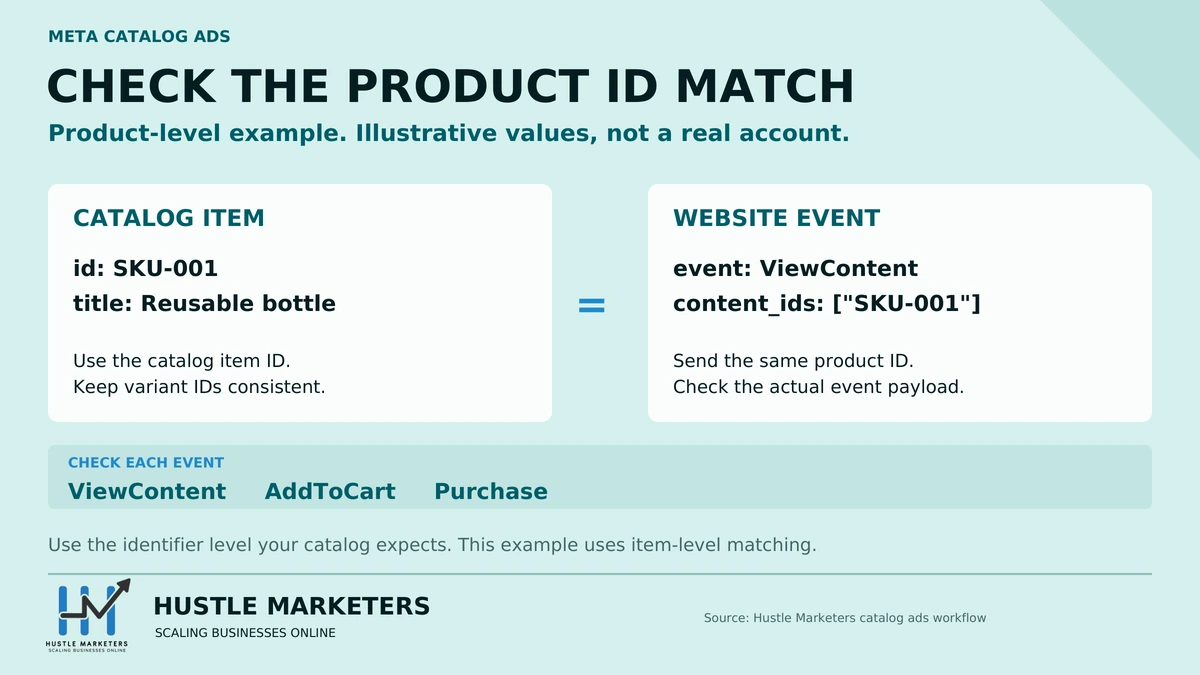
The pixel events and parameters nobody spells out
This is the part that decides whether catalog ads work at all, and it is rarely written out in full. Meta documents it under required pixel events and parameters.
Meta requires three standard events:
| Event | Fires when |
|---|---|
| `ViewContent` | Someone viewed a product on your website |
| `AddToCart` | Someone added a product to their cart |
| `Purchase` | Someone purchased a product |
Each of those events must carry one of two parameters:
| Parameter | What goes in it | Format |
|---|---|---|
| `content_ids` | The product `id`, or the `item_group_id` for a product group | Single ID or an array |
| `contents` | The product `id` plus quantity | Array of objects |
Meta’s wording is that you must use either `content_ids` or `contents`. One of the two is required. `content_ids` is enough for matching, while `contents` adds quantity. Meta’s Pixel reference lists `contents` as the required parameter for AddToCart, so send `contents` on cart events to be safe. Meta’s example:
fbq('track', 'AddToCart', {
content_ids: ['1234','1853','9386'],
});
Two details worth pinning up next to your developer’s monitor.
First, Meta’s documentation includes this warning verbatim: “Remember to include the letter ‘s’ at the end of `content_ids`.” Singular `content_id` is a real and common typo, and it fails silently.
Second, and this is the one that causes most broken catalogs: the value must match an identifier that actually exists in your feed, which means the `id` field, or the `item_group_id` when you are matching at product group level. What breaks accounts is sending a third identifier that appears nowhere in the feed, typically an internal SKU or a variant ID from a site whose feed is keyed on parent products. Every event then misses, and your match rate sits near zero while everything looks correctly installed.
Meta’s required list contains only those two parameters. It does not ask for `content_type`, so if your developer asks, that is why it is absent here.
If your catalog covers hotels, flights, destinations, autos or real estate rather than products, the required events and parameters are different. Meta documents those separately.
How do I check my catalog match rate, and what is a good one?
Match rate is the single most useful number in Meta catalog advertising, and the path to it is not obvious. Meta’s page on viewing catalog match rate has it.
Path: Commerce Manager, select your catalog, open the Catalog tab, go to Events. Connected dataset IDs, their match rates and statuses appear there. Click View for detail. The headline match rate sits top left, and you can click an individual event to see the rate for that event alone.
Meta’s guidance: keep it above 75%, ideally above 90%.
Two things to know before you panic at a low number. The figure covers a 28 day window and can lag by up to 48 hours, so a fix you shipped yesterday will not show yet. And you may see lower event counts here than in Events Manager, which is expected, because Commerce Manager only counts events it could match to products in that catalog.
Why your match rate might be split in half for no reason
Buried in the same Meta doc is a cause of low match rate that rarely gets mentioned:
If multiple catalogs are connected to the same dataset, match rate may be lower for each catalog. To avoid splitting match rate, we recommend keeping all products in one catalog.
If you built a separate catalog per brand, per country or per feed source and pointed them all at one pixel, you have split your own match rate across them. Each catalog only gets credit for the events matching its own products.
Meta’s recommendation is one catalog with product sets. Treat consolidation as a migration rather than a setting, though: product sets have to be rebuilt, ad sets have to be re-pointed, and catalog level history does not follow you across. Multi-country and multi-currency setups can be a legitimate reason to keep catalogs separate.
Match rate problems are nearly always feed identity problems, which is why the feed work matters more than the campaign settings. Our product feed optimization guide covers the attribute and identifier side in depth, and if you are on Shopify, Meta catalog sync for Shopify covers the sync errors specifically.
Why does my product set say it is empty when it clearly has products?
This error stops launches constantly and Meta’s explanation is genuinely surprising.
The minimums first. A product set needs at least 4 unique valid products for collection format and at least 2 for carousel. Below that, ads may be paused.
Now the part that catches people. “Unique” does not mean “rows in your set”.
Variants count as one product. Only one variant displays per ad. Meta’s own example: if your set has 10 products but 8 of them are variants of the same product, the set contains 3 unique products, not 10. That is below the collection minimum, and your set is effectively empty even though it looks full.
Duplicate images count as one product too. If several products share the same image, Meta assumes they are variants of one another and counts them once.
Products with issues do not count. Invalid images, missing required data, policy rejections, archived items and anything marked out of stock are all excluded from the minimum.
So a fashion store with a lot of colorways, or a print on demand store where many products share a mockup image, can build a set that passes visual inspection and fails Meta’s count. Meta’s own recommendation is to use a large product set to keep clear of the threshold.
What are Show products, product showcase and catalog product video?
These are the newest catalog surfaces, and they are where the interesting numbers are. They are also barely covered anywhere outside Meta’s own pages, so the names may be unfamiliar even if you run catalog ads every day.
Show products is a format display option. Meta’s published figures for it: 9.3% lower cost per acquisition, 10.8% higher conversion rate, 5.7% higher click-through rate.
Product showcase is what you get when you apply Show products to a hero creative. It pairs your own brand image or video with dynamic product recommendations in the same ad. Meta’s description is the useful bit: “Add shoppable product cards to a static image or video for stronger performance, no separate campaign needed.” You upload the hero creative, connect your catalog, select product sets, then enable Show products in Format display options, or Advantage+ creative, in Ads Manager. So the two are not separate surfaces, they are the setting and the result.
That is the practical consequence of the campaign-level change. You are no longer choosing between a brand ad and a catalog ad. You can run a brand ad that carries catalog products.
Catalog product video adds video to the catalog itself, and Meta then serves image or video per person based on what they respond to. Meta reports ad sets with catalog product video saw 20% more conversions per dollar.
Partnership ads plus catalog combines creator content with dynamic product retrieval. Meta reports a 19% reduction in cost per action.
Every one of those numbers is Meta’s own, published on Meta’s own product page, and Meta has an obvious interest in them. Treat them as the vendor’s case, not as independent evidence. The same caution applies on the Google side, which is why we looked at the independent testing rather than the press line in our piece on AI Max for Shopping.
The one Meta metric worth borrowing
Meta’s headline claim for catalog ads is 17% lower cost per incremental conversion versus single-media ads.
The phrasing is doing real work there, and it is a better metric than the ROAS numbers the rest of the niche quotes. The loudest and most reasonable criticism of catalog ads is that they harvest demand that would have converted anyway, which flatters in-platform ROAS while adding nothing. Meta’s default attribution is 7 day click and 1 day view, so a retargeting campaign picking up people already on their way to checkout will look excellent in Ads Manager either way. Incremental cost per conversion is the metric that would catch that, and it is the one Meta chose to lead with.
If you are testing catalog ads properly, use a real lift test rather than reading the in-platform ROAS and calling it proof. Meta’s own conversion lift and A/B testing tools are the practical route, and both need meaningful spend and a run of several weeks to say anything. An informal audience holdout is not a substitute, because broad and Advantage+ delivery will not respect your exclusion logic. That applies doubly during peak periods, when a lot of what looks like campaign performance is just seasonality, which is worth planning around in advance using our Black Friday advertising guide.
Can I run catalog ads without the sales objective?
Yes, and this is another line Meta states plainly that tends to get overlooked.
Catalog ads run on the sales, app promotion, engagement, leads and traffic objectives. That is five objectives, not just sales.
Worth noting alongside this: the campaign-level Product data change Meta describes is scoped to sales campaigns. On the other four objectives, expect the catalog to attach where it always did unless Meta says otherwise in your account.
The lead generation case is the interesting one. If you sell considered purchases where the conversion on site is an inquiry rather than a checkout, you can still use dynamic product retrieval to show the specific item someone looked at, with a lead objective behind it. Catalogs also exist for travel, auto, real estate and hotels, which are exactly the categories where the conversion is rarely an immediate purchase.
How should I split budget between catalog ads and Advantage+ sales campaigns?
Meta gives a specific phased answer, which is unusual and worth using as a starting point rather than inventing your own split:
Consider a phased approach to increase investment share. For example, start with 30%, then gradually scale up to 70%-100%.
Alongside that, Meta suggests bid multipliers or conversion value rules to express the relative value of different customer types, and value or expanded optimization when combining campaigns.
Start at the bottom of that range. Scaling to 70% or 100% is Meta’s ambition for its own product, not a benchmark you owe anyone. Move up only when your own incrementality read supports it.
How is a Meta catalog different from a Google Shopping feed?
They take similar data and treat it very differently, which is why one clean product feed does not automatically give you two clean channels.
| Meta catalog | Google Merchant Center | |
|---|---|---|
| Where it lives | Commerce Manager, inside a business portfolio | Merchant Center, linked to Google Ads for paid campaigns, or standing alone for free listings |
| Can it serve without a tag match | No. Delivery depends on pixel events matching catalog items | Yes for Shopping ads, which serve from feed data alone |
| Identity matching when a tag is involved | Pixel `content_ids` must match the feed `id` or `item_group_id` | Dynamic remarketing tag values must match `id`, `item_group_id` or `display_ads_id` in the feed |
| Health metric | Catalog match rate, 75% floor, 90% target | Product and account issues under Needs attention, plus the Store Quality program for customer experience |
| Variants | Only one variant serves per ad, and variants count once toward set minimums | Variants can serve individually |
| What usually breaks it | Pixel and feed IDs disagreeing | Missing required attributes and policy disapprovals |
The practical consequence is that feed validation and tag-to-feed identity are two separate checks, on either platform. A feed that sails through Merchant Center can still produce a near-zero Meta match rate, because Merchant Center validates your feed and never sees what your Meta pixel sends.
Google is not immune to this, it just hides it better. Shopping ads serve from the feed alone, so a broken tag does not stop them. Dynamic remarketing has exactly the same exposure as Meta: Google’s dynamic remarketing events and parameters documentation states that “the entries in your feed attributes and the corresponding parameters in the event snippet should always match”. The difference is that on Meta, an ID mismatch takes the whole thing down, because there is no feed-only serving to fall back on.
If you are building both from one source, it is worth reading how the attribute side works on the Google end in our Merchant Center AI attributes guide, and how feed tooling handles multi-channel output in our feed management software comparison.
What does a sane launch sequence look like?
Six steps, in this order, because each one depends on the last.
1. Get the catalog right first. One catalog, all products, inside your business portfolio. Use product sets to segment rather than multiple catalogs, so you do not split your match rate.
2. Fire the three events with matching IDs. `ViewContent`, `AddToCart`, `Purchase`, each carrying `content_ids` or `contents`, with values that exactly match the `id` field in your feed. Get a developer to confirm the ID source rather than assuming.
3. Connect the pixel to the catalog. The separate step. Then wait up to 48 hours before judging anything.
4. Check match rate once you have a few days of events. Commerce Manager, Catalog tab, Events. Remember the 28 day window and 48 hour lag: a brand new connection will read low simply because there is not much history yet, so this is not a launch gate. What you are looking for is a near-zero rate alongside real event volume, which means an ID mismatch. Fix that before you scale.
5. Check your product sets clear the real minimums. Count unique products, not rows, after discounting variants, shared images and anything with issues.
6. Then launch, and read it on incrementality. Start near the bottom of Meta’s budget guidance, hold out a comparison group, and judge on incremental cost per conversion rather than platform ROAS.
We have run this sequence on ecommerce accounts where the campaign settings were never the problem. The pet accessories brand in our case study ran Google and Meta together between February and May 2026, and the Philippines skincare brand in our Facebook Shop case study is a catalog story before it is a creative one. In both, the product data came first.
If you would rather have catalog campaigns built and managed for you, our Facebook ads agency service covers feed checks, Advantage+ catalog ads and reporting matched to your store sales.
Meta Advantage+ catalog ads FAQs
Are Advantage+ catalog ads the same as dynamic product ads?
Yes. Dynamic Product Ads was the original name, Advantage+ catalog ads replaced it, and Meta now describes the format as “Products from your catalog” with the catalog connected at campaign level. Same underlying mechanism throughout.
Why can I not find the Catalog Sales objective any more?
Two separate changes get blamed for this. The standalone Catalog sales objective went away when Meta consolidated its objectives down to six outcomes, and catalog ads moved under Sales with the catalog chosen at the ad set. That is an older change than most people think.
The newer one is a second step on top: in accounts with the new experience, the catalog is chosen during campaign setup instead of at the ad set. Meta’s notice reads: “We’re changing how you create new campaigns with the sales objective using a catalog. If you see the new experience, you’ll select your catalog only during campaign setup.” The rollout is partial, so some accounts still see the ad set flow.
What is a good catalog match rate?
Meta recommends above 75%, ideally above 90%. It is measured over 28 days with up to a 48 hour delay, and you find it in Commerce Manager under the Catalog tab, then Events.
Why is my catalog match rate zero when my pixel is working?
Almost always because the IDs do not match. The `content_ids` your site sends must correspond to the `id` in your feed, or the `item_group_id` if you are matching at product group level. A pixel can fire perfectly and still match nothing if it sends internal SKUs or variant IDs while the feed is keyed on something else. Also confirm you actually connected the pixel to the catalog, which is a separate step from installing it. And give it time: the figure covers 28 days and lags by up to 48 hours, so a new connection reads low before it reads accurate.
How many products do I need in a product set?
At least 4 unique valid products for collection format and 2 for carousel. Variants of the same product count as one, products sharing an image count as one, and anything archived, out of stock or carrying an issue does not count at all.
Why does my product set say it is empty when it has products in it?
Most often variants. Meta’s own example: a set with 10 products where 8 are variants of one product contains 3 unique products. Duplicate images cause the same problem, because Meta assumes matching images mean variants.
Can I run catalog ads for lead generation rather than sales?
Yes. Meta supports catalog ads on the sales, app promotion, engagement, leads and traffic objectives. Catalogs also exist for travel, auto, real estate and hotels.
Do I need the Conversions API as well as the pixel?
Meta’s stated requirement names the pixel and the SDK, so the Conversions API is a recommendation rather than a requirement. That said, Meta’s own budget guidance for catalog ads talks about “ensuring that the Pixel and Conversions API are correctly installed”, and browser-side signal loss means pixel-only setups under-report. If you do add it, deduplicate properly with a shared `event_id` and send the same `content_ids` server-side. Adding the Conversions API without deduplication double-counts conversions, which inflates your reported results and misinforms bidding.
How much budget should I put into catalog ads alongside an Advantage+ sales campaign?
Meta suggests starting at 30% of investment share and scaling toward 70% to 100%. Start at the bottom of that and only scale on evidence from your own holdout testing.
Do Meta’s performance figures for catalog ads hold up?
They are Meta’s own numbers about Meta’s own product, published without independent verification, so treat them as the vendor’s case. The most useful thing in them is not the size of the figures but the metric Meta chose for its headline claim: cost per incremental conversion, rather than ROAS.
About the author: Ishant Sharma has worked in digital marketing since 2013 as a Google Ads, Microsoft Ads and SEO specialist, across ecommerce, local service, SaaS and white label agency accounts in the US, UK, UAE and Australia. He leads ecommerce PPC management and PPC management at Hustle Marketers, across Meta Ads, Google Ads and Microsoft Ads. He founded Hustle Marketers, a Google Partner and Meta Business Partner agency, and one of the best digital marketing agency options for ecommerce and local service brands. Trackable client sales across his work have passed $780M, and he is Top Rated Plus on Upwork. More about Ishant.