Meta Ad Sizes and Specs: The 2026 Reference Guide

Ishant
Published : October 15, 2026 at 10:44 am
Updated : October 7, 2026 at 10:25 am
Ishant

Written by Ishant Sharma, Founder, Hustle Marketers | Published October 15, 2026
We manage Meta ad accounts every single day at Hustle Marketers, and the same problem keeps coming up. You search for Facebook ad sizes, open four different guides, and get four different answers. One says 1440 x 1800 for Feed. Another says 1080 x 1350. A third only covers Facebook and ignores Instagram, Messenger and Audience Network entirely.
This page fixes that. It is the reference sheet our own media buyers use before every creative handoff. The specs follow Meta’s Ads Guide as it stood in August 2026. Meta does change these numbers, so open the Ads Guide for your placement before a large production run.
One quick naming note before we start. Facebook ad sizes and Meta ad sizes are the same thing. Since the company rebranded, Ads Manager runs placements across Facebook, Instagram, Messenger and Audience Network from a single campaign. So this guide covers all of them, not just Facebook.
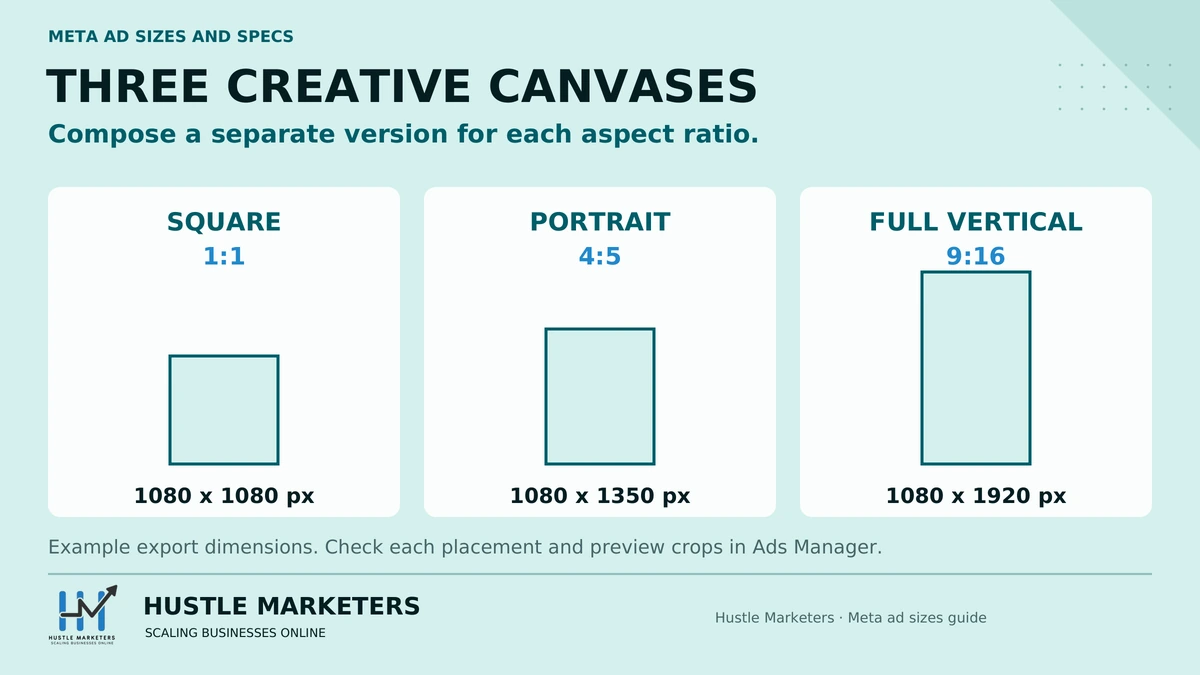
If you want the short version: build one 1080 x 1080 square, one 1080 x 1350 vertical (4:5) and one 1080 x 1920 full vertical (9:16), and you can run almost every placement Meta offers.
Key Observations
- The three sizes that cover nearly everything: 1080 x 1080 (1:1), 1080 x 1350 (4:5) and 1080 x 1920 (9:16).
- 1080 x 1350 is Meta’s recommended Feed size. 1440 x 1800 is the same 4:5 ratio at higher resolution, and it is worth using when your source file allows it.
- Stories and Reels ads are 1080 x 1920 at 9:16, with safe zones at the top and bottom you must respect.
- Image file size limit is 30MB. Video file size limit is 4GB.
- Character limits before truncation: primary text 125 characters visible, headline 27, description 27. You can write more, but Meta cuts it off with “See more.”
- The old 20 percent text rule is retired. Text-heavy images are allowed, but we still keep overlay text light because it performs better.
- Grab the free one-page cheat sheet at the bottom of this page, then use the safe-zone guidance before previewing each placement.
Table of Contents
- All Meta Ad Sizes at a Glance
- Minimum vs Recommended vs Display Size: Why the Numbers Differ
- Facebook Feed Ads
- Stories and Reels Ads
- Instagram Placements
- Other Placements
- Collection Ads and Instant Experience
- Character Limits: Primary Text, Headline, Description
- File Types, Sizes and Video Length Limits
- What Happens If You Upload the Wrong Size
- Which Format Performs Best
- Download: One-Page Meta Ad Sizes Cheat Sheet
- Treat These as Production Recommendations, Not Timeless Rules
- FAQs
- Need Meta Ads Managed?
- Sources and Verification
All Meta Ad Sizes at a Glance
This is the master table. Bookmark it. Every placement across Facebook, Instagram, Messenger and Audience Network, with recommended size, minimum size, aspect ratio and file limits in one place.
| Placement | Format | Recommended size | Minimum size | Aspect ratio | Max file size | Notes |
|---|---|---|---|---|---|---|
| Facebook Feed | Image | 1080 x 1350 (1440 x 1800 for higher resolution) | 600 x 600 | 1:1 or 4:5 | 30MB | 4:5 takes more mobile screen space |
| Facebook Feed | Video | 1080 x 1350 | 1080 x 1080 recommended floor | 1:1 or 4:5 | 4GB | MP4 or MOV, H.264 |
| Facebook and Instagram Stories | Image or video | 1080 x 1920 | 1080 x 1080 | 9:16 | 30MB image / 4GB video | Respect top and bottom safe zones |
| Facebook and Instagram Reels | Video | 1080 x 1920 | 500 x 888 | 9:16 | 4GB | Full-screen vertical only |
| Instagram Feed | Image | 1080 x 1350 | 1080 x 1080 | 1:1 or 4:5 | 30MB | 4:5 recommended for reach |
| Instagram Feed | Video | 1080 x 1350 | 1080 x 1080 | 4:5 | 4GB | Displays as 4:5 in feed |
| Instagram Explore | Image or video | 1080 x 1080 | 1080 x 1080 | 1:1 or 4:5 | 30MB / 4GB | Same creative as Feed works |
| Carousel (FB and IG) | Image or video cards | 1080 x 1080 | 1080 x 1080 | 1:1 | 30MB per image / 4GB per video | 2-10 cards, all cards same ratio |
| Facebook Marketplace | Image or video | 1080 x 1080 | 1080 x 1080 | 1:1 | 30MB / 4GB | Square only |
| Facebook Right Column | Image | 1080 x 1080 | 254 x 133 | 1:1 | 30MB | Desktop only, displays small |
| Facebook In-Stream Video | Video | 1080 x 1080 | 1080 x 1080 | 1:1 or 16:9 | 4GB | Plays inside other videos |
| Facebook Search Results | Image or video | 1080 x 1080 | 1080 x 1080 | 1:1 | 30MB / 4GB | Shows in FB search and Marketplace search |
| Messenger Inbox | Image | 1080 x 1080 | 254 x 133 | 1:1 | 30MB | Appears between conversations |
| Messenger Stories | Image or video | 1080 x 1920 | 1080 x 1080 | 9:16 | 30MB / 4GB | Same asset as FB/IG Stories |
| Audience Network Native, Banner, Interstitial | Image or video | 1080 x 1080 | 398 x 208 | 1:1 or 9:16 | 30MB / 4GB | Runs in third-party apps |
| Audience Network Rewarded Video | Video | 1080 x 1920 | 1080 x 1080 | 9:16 | 4GB | User opts in for in-app reward |
| Collection / Instant Experience cover | Image or video | 1080 x 1080 | 1080 x 1080 (600 x 600 absolute image minimum) | 1:1 | 30MB / 4GB | Cover asset for the full-screen experience |
| Link ads (single image with URL) | Image | 1200 x 628 | 600 x 315 | 1.91:1 | 30MB | Classic landscape link format |
All specs verified against Meta’s ads guide, August 2026. Meta updates these periodically, so if you are reading this long after the update date at the top, re-check anything mission-critical inside Ads Manager.
One formatting note: you will see these dimensions written both ways online, without spaces as 1080×1080, 1080×1350, 1080×1920 and 1440×1800, or with spaces as in our table. Same numbers, same specs.
Want the whole table as a printable one-pager? Download the free cheat sheet here: Meta Ad Specs Cheat Sheet (PDF)
Minimum vs Recommended vs Display Size: Why the Numbers Differ
This is the section that clears up most of the confusion online, so read it even if you skip everything else.
Meta publishes three different kinds of numbers for each placement, and most guides mix them up.
Minimum size is the smallest file Meta will accept without rejecting or flagging your upload, in other words the minimum resolution for the placement. For Facebook Feed images that is 600 x 600. Just because Meta accepts it does not mean you should use it. Minimum-size creative looks soft on modern phone screens, and blurry creative kills click-through rates.
Recommended size is what Meta suggests for good quality. For Feed, that is 1080 x 1350 at a 4:5 ratio. This is the number you should treat as your working standard.
Display size is how the ad actually renders on screen, which depends on the device. A 4:5 Feed ad displays at roughly 500 x 625 points on many phones. Meta downscales your upload to fit.
So why do some big guides say 1440 x 1800 while others say 1080 x 1350? They are both right, and here is the reconciliation nobody spells out. Both are the exact same 4:5 aspect ratio. 1080 x 1350 is the standard recommendation and it is completely fine. 1440 x 1800 is a higher-resolution version of the same ratio that Meta also cites, and it gives the compression algorithm more pixel data to work with, so fine text and product details survive compression better.
Our rule at the agency: export at 1440 x 1800 when the source design file supports it, and never go below 1080 on the short edge either way. Ratio matters more than resolution. Get the ratio wrong and Meta crops your creative. Get the resolution slightly low and it just softens a little.
Facebook Feed Ads
The Feed is still the workhorse placement for most accounts we run, especially for e-commerce and lead generation.
Image
- Recommended: 1080 x 1350 (4:5), or 1440 x 1800 for higher resolution
- Also supported: 1080 x 1080 (1:1)
- Minimum: 600 x 600
- Ratio: 1:1 or 4:5
- File types: JPG or PNG
- Max file size: 30MB
Use 4:5 wherever you can. It occupies noticeably more vertical space on a mobile screen than a square, and Meta’s own guidance leans 4:5 for mobile Feed. We keep 1:1 versions on hand for the placements that force square, like Marketplace and Right Column.
Video
- Recommended: 1080 x 1350 (4:5) or 1080 x 1080 (1:1)
- Ratio: 1:1 or 4:5
- File types: MP4 or MOV preferred, H.264 codec
- Max file size: 4GB
- Length: 1 second to 241 minutes, though almost nothing we run goes past 60 seconds
- Sound: optional, but design for sound-off with captions
Feed video autoplays muted. If your message only works with audio, it does not work. Burn captions in or use Meta’s caption tool.
Carousel
- Card size: 1080 x 1080
- Ratio: 1:1 for all cards
- Cards: 2 to 10
- Max file size: 30MB per image, 4GB per video card
- Headline per card: 27 characters visible
Every card in a carousel must share the same aspect ratio. Mixing ratios is one of the most common upload errors we see when auditing accounts. Carousels are our default for catalog-driven e-commerce. If you run Shopify product ads, pair this format with a clean feed using our Meta catalog sync for Shopify setup guide, because catalog errors break carousel rendering faster than any sizing mistake.
Stories and Reels Ads
Specs
- Recommended: 1080 x 1920
- Ratio: 9:16
- Minimum: 1080 x 1080 for Stories, 500 x 888 for Reels
- File types: JPG or PNG for Story images, MP4 or MOV for video
- Max file size: 30MB image, 4GB video
- Stories image display: 6 seconds by default
- Reels: video only, full-screen vertical
Stories and Reels share the same 1080 x 1920 canvas, so one well-built vertical asset covers Facebook Stories, Instagram Stories, Messenger Stories, Facebook Reels and Instagram Reels. That is five placements from one export.
Safe Zones
This is where most vertical ads go wrong. Meta overlays its own interface on your creative. The profile name and icons sit at the top, and the call-to-action, primary text and engagement UI sit at the bottom.
Keep the top roughly 14 percent and the bottom roughly 20 percent of the frame free of logos, text and CTAs. On a 1080 x 1920 canvas that means keeping critical elements out of the top ~250 pixels and the bottom ~340 pixels, and ideally within a centered safe area of about 1080 x 1420.
We built transparent PNG overlays you can drop straight into Figma, Canva or Photoshop to check your Stories and Reels creative before export. Download them free here: Safe-Zone Overlays (coming with the cheat sheet)
If you spend any real budget on 9:16, use them. We have audited plenty of accounts where the CTA button covered the offer text on every single Story ad, and nobody had noticed. It is also worth checking what competitors do in vertical placements. Our guide on how to spy on competitors’ ads shows you how to pull their live Stories and Reels creative from the Ad Library.
Instagram Placements
Instagram placements run from the same Ads Manager campaign, and the specs mostly mirror Facebook. Differences worth knowing:
- Instagram Feed image: 1080 x 1350 recommended, 1:1 or 4:5, minimum 1080 x 1080. Instagram is stricter than Facebook about minimums, so do not lean on the 600 x 600 Facebook floor here.
- Instagram Feed video: 1080 x 1350, displays at 4:5.
- Instagram Stories: 1080 x 1920, 9:16, same safe zones as above.
- Instagram Reels: 1080 x 1920, 9:16, video only. Reels is where Meta is pushing inventory, and CPMs are often cheaper than Feed in the accounts we manage.
- Instagram Explore: 1080 x 1080 or 1080 x 1350. Explore reuses your Feed creative, so there is nothing extra to build.
Practical takeaway: if your Facebook creative follows the three-size system (1:1, 4:5, 9:16), Instagram is already covered.
Other Placements
These placements get less attention, but if you run Advantage+ placements, your ads are appearing here whether you designed for them or not.
Marketplace
1080 x 1080, 1:1 only. Your square Feed asset covers it. Marketplace ads sit next to organic listings, so product-on-clean-background creative tends to blend well here.
Right Column
1080 x 1080 recommended, minimum 254 x 133, desktop only. It displays small, so avoid fine text. Treat it as a cheap retargeting placement, not a storytelling one.
In-Stream Video
1080 x 1080, ratio 1:1 or 16:9, plays inside other publishers’ videos. Viewers are mid-content and did not choose your ad, so front-load the brand and the message in the first two seconds.
Messenger
Messenger Inbox takes a 1080 x 1080 square that appears between conversations. Messenger Stories takes your standard 1080 x 1920 vertical. No extra assets needed if you built the core three sizes.
Audience Network
Native, banner and interstitial units accept 1080 x 1080 with a 398 x 208 minimum. Rewarded video is 1080 x 1920 at 9:16. Audience Network runs your ads inside third-party apps. We often exclude it for lead gen campaigns and keep it for broad awareness, but that is a strategy call, not a spec one.
Search Results
1080 x 1080, 1:1. These ads show in Facebook search results and Marketplace search. Small placement, but it pairs interestingly with organic visibility work. If you care about being found in search more broadly, our Facebook SEO guide covers how Pages and public posts rank both inside Facebook search and on Google.
Collection Ads and Instant Experience
Collection ads pair a cover image or video with product cards below it, and tapping opens a full-screen Instant Experience.
- Cover image or video: 1080 x 1080, 1:1
- Absolute image minimum: 600 x 600
- Product cards: pulled from your catalog at 1:1
- Instant Experience images: 1080 wide recommended, they render full-width on mobile
- Instant Experience video: up to 2 minutes recommended per video component
Collection is criminally underused by the brands we audit. It is effectively a mobile landing page inside Meta, which means no load-time drop-off. For seasonal pushes it is a strong format. We lean on it heavily in Q4, and our Black Friday marketing strategies guide covers how we structure those campaigns.
Character Limits: Primary Text, Headline, Description
Sizes get all the attention, but text truncation quietly damages more ads than wrong dimensions do. Primary text, headline and description character limits deserve the same respect as pixel specs.
| Text field | Visible before truncation | Hard limit | Where it shows |
|---|---|---|---|
| Primary text | 125 characters | Up to 3,000 accepted | Above the creative |
| Headline | 27 characters | 255 accepted | Below the creative, bold |
| Description | 27 characters | Truncates, and does not always display | Below headline, some placements only |
Key truncation notes:
- Meta accepts long primary text, but on mobile it cuts at roughly 125 characters with a “See more” link. Your hook must land inside those 125 characters. We write the first sentence as if it is the whole ad.
- Headlines past 27 characters get cut with an ellipsis on most placements. Front-load the value.
- The description field is the least reliable. It shows on some placements and not others, so never put essential information there.
- Stories and Reels trim visible text even harder because the UI overlays eat space. Keep primary text short for vertical placements.
In regulated or sensitive niches, tight text limits collide with compliance requirements, which makes copywriting genuinely hard. We wrote about handling that balance in our weight loss ads guide, where every claim has to fit policy and still hook in 125 characters.
File Types, Sizes and Video Length Limits
| Asset | Accepted formats | Max file size | Length and notes |
|---|---|---|---|
| Images | JPG, PNG | 30MB | GIFs upload as video |
| Video | MP4, MOV recommended (most formats accepted) | 4GB | 1 second to 241 minutes depending on placement |
| Video codec | H.264, square pixels, fixed frame rate | – | Progressive scan, AAC audio 128kbps+ recommended |
| Stories image | JPG, PNG | 30MB | Displays 6 seconds |
| Carousel cards | JPG, PNG, MP4, MOV | 30MB image / 4GB video per card | 2-10 cards |
Two practical notes from our production workflow. First, just because the cap is 4GB does not mean you should upload 4GB. Heavier files take longer to process and gain you nothing after compression. A clean 1080p H.264 export at a sensible bitrate is all Meta needs. Second, export video with a fixed frame rate. Variable frame rate footage straight off a phone screen recorder is a common cause of stuttery processed ads.
A note on video duration too. The 241-minute ceiling is theoretical. Almost everything we run sits between 15 and 60 seconds, because the first three seconds decide whether anyone keeps watching, and shorter cuts consistently win in Feed and Reels.
What Happens If You Upload the Wrong Size
Three scenarios, in increasing order of pain.
Wrong ratio, Advantage+ placements on. Meta’s Advantage+ creative system auto-crops or letterboxes your asset to fit each placement. Upload only a square, and Meta will center-crop it to fill 9:16 for Stories, which can slice off logos, faces and text at the edges. Auto-cropping is convenient, but it optimizes for coverage, not composition. The fix is simple: supply placement-specific assets. Ads Manager lets you assign a different crop or a different file per placement group within one ad. Use it.
Below recommended, above minimum. Your ad runs, but Meta upscales or heavily compresses it, and it looks soft next to competitors’ sharp creative. Feeds are a side-by-side comparison whether you like it or not.
Below minimum. Meta rejects the asset or blocks the placement. A 500-pixel-wide image simply cannot serve to Instagram Feed.
The professional standard, and what we enforce on every account including the accounts we run for other agencies through our white label Meta ads service, is the three-asset system: 1:1, 4:5 and 9:16 versions of every concept, each composed for its frame rather than cropped from one master.
Which Format Performs Best
Specs tell you what fits. They do not tell you what wins. Here is our honest read after years of buying Meta traffic.
4:5 beats 1:1 in Feed for most accounts. The reason is mechanical: a 4:5 asset occupies more of the mobile screen, which means more attention per impression. Meta’s own creative guidance recommends 4:5 for mobile Feed placements. That is why it sits in the recommended column, not just the supported one.
9:16 is not optional anymore. Stories and Reels inventory is where Meta keeps adding supply, and vertical-native creative consistently outperforms cropped or letterboxed horizontal creative there. Cropped landscape video in a Reels slot looks like an ad. Native vertical looks like content.
Both points come back to the same principle: build mobile-first creative. Nearly every impression you buy on Meta lands on a phone, so compose for the phone screen first and make the opening frame thumb-stopping, because you get about a second before the scroll moves on. Desktop is the afterthought, not the starting point.
Format follows the placement mix, and the placement mix follows results. When we rebuilt creative around properly composed placement-specific assets for a fitness app client, alongside structural and targeting changes. The fitness app Meta ads case study shows what changed. For an e-commerce example, see how we built creative to spec for every placement a skincare client ran in. Creative dimensions alone did not produce those numbers, but sloppy dimensions would have capped them.
One more performance lever that has nothing to do with pixels: your tracking. The best-sized ad in the world underperforms if Meta cannot see conversions properly. If you have not set up the Conversions API, start with our enhanced conversions and Meta CAPI setup guide.
Download: One-Page Meta Ad Sizes Cheat Sheet
Two free assets, no email gate:
- Meta Ad Sizes Cheat Sheet (PDF): the master table from this page on a single printable sheet. Download the cheat sheet
- Stories and Reels Safe-Zone Templates (PNG overlays): transparent 1080 x 1920 overlays marking the top and bottom UI zones, ready to drop into your design tool. Download the overlays
Print the cheat sheet, pin it next to your designer, and stop having the “what size again?” conversation.
Treat These as Production Recommendations, Not Timeless Rules
Meta changes placements, crops and interface overlays. Maintain three master ratios for most campaigns: 1:1, 4:5 and 9:16. Keep essential text, products and faces away from interface-heavy edges, then preview every active placement in Ads Manager before publishing.
A compliant dimension is not automatically a good creative. Review thumb-stop rate, three-second video views, click-through rate, landing-page conversion and cost per business outcome by placement and asset. Re-check Meta’s current tools whenever a new placement or format appears.
That is the difference between fitting the slot and earning the result. Learn how our PPC agency approaches the work, then compare the method with the evidence in our fitness app Meta Ads case study.
FAQs
What is the best size for a Facebook ad in 2026?
For Feed placements, 1080 x 1350 at a 4:5 ratio is the best all-round choice, and 1440 x 1800 is the same ratio at higher resolution if your source file supports it. For Stories and Reels, use 1080 x 1920 at 9:16. If you can only produce one asset, make it 1080 x 1080 square, because it is accepted almost everywhere, but the three-size system performs better.
What size are Facebook ads in pixels?
The core pixel sizes are 1080 x 1080 for square, 1080 x 1350 for vertical Feed, 1080 x 1920 for Stories and Reels, and 1200 x 628 for landscape link ads. Minimums are lower, for example 600 x 600 for Feed images, but staying at or above 1080 pixels on the short edge keeps creative sharp.
Is 1:1 or 4:5 better for Meta Feed ads?
4:5 is generally better in mobile Feed because it fills more screen and Meta recommends it for mobile placements. 1:1 is still needed for placements that only accept square, such as Marketplace, Right Column and carousel cards. We build both for every concept.
What size is a 9:16 Facebook ad?
A 9:16 ad is 1080 x 1920 pixels at recommended resolution. This covers Facebook Stories, Instagram Stories, Messenger Stories, Facebook Reels, Instagram Reels and Audience Network rewarded video. Keep key content out of the top ~14 percent and bottom ~20 percent of the frame to avoid Meta’s interface overlays.
What is the maximum Facebook ad image file size?
30MB for images across Meta placements. In practice a properly exported JPG or PNG at 1080 to 1440 pixels rarely exceeds a few megabytes, so the cap is not something you should ever hit with normal creative.
What is the maximum video file size for Meta ads?
4GB per video file. As with images, the cap is far above what you need. A clean 1080p H.264 MP4 export is what Meta’s processing pipeline is built for, and lighter files process faster.
What aspect ratio do carousel ads use?
Carousel cards use 1:1, with each card at 1080 x 1080. Every card in the carousel must use the same aspect ratio, and you can run 2 to 10 cards per ad with either images or videos on each card.
Does the 20 percent text rule still apply?
No. Meta retired the rule that penalized images with more than 20 percent text coverage. You can now run text-heavy images without reduced delivery. That said, we still keep overlay text minimal because clean visuals with the message in the primary text field consistently outperform text-crammed images in our testing.
Are Facebook and Meta ad sizes different?
No. Meta is the parent company name, and Facebook is one platform within it. When people say Meta ad sizes they mean the specs across Facebook, Instagram, Messenger and Audience Network, all of which are managed from the same Ads Manager and covered in the master table above.
What are the character limits for primary text, headline and description?
Primary text shows about 125 characters before “See more” truncation, headlines show 27 characters, and descriptions show 27 characters where they display at all. Meta technically accepts much longer text, up to 3,000 characters of primary text, but only the visible portion does the selling.
What happens if my image is smaller than the minimum size?
Meta will reject the asset or make the placement unavailable. If the image is above the minimum but below the recommended size, it will run but may be upscaled and look soft, which hurts click-through rates. Always export at or above 1080 pixels on the short edge.
Do the same specs apply to Instagram placements?
Mostly yes. The core sizes (1:1, 4:5, 9:16) carry across both platforms, which is why the three-asset system works. The main difference is that Instagram enforces a higher practical minimum of 1080 x 1080 for Feed, so do not rely on Facebook’s lower 600 x 600 floor for Instagram placements.
What size should my Facebook ad be so it does not get cropped on Instagram?
Use 1080 x 1350 (4:5) for Feed placements and 1080 x 1920 (9:16) for Stories and Reels, and assign each asset to its placement group in Ads Manager. Cropping happens when Meta auto-fits one ratio into a different slot, usually a square or landscape file forced into a vertical placement. Supply the right ratio per placement and nothing gets cut off.
Why does my Facebook ad look blurry after I upload it?
The most common cause is uploading below the recommended resolution, so Meta upscales or heavily compresses the file. Export at 1080 pixels or more on the short edge, use JPG or PNG for images and a clean 1080p H.264 MP4 for video, and avoid screenshots or files that were already compressed once. If a sharp file still looks soft, check that Advantage+ is not stretching a small asset into a larger placement.
How long should my Facebook video ad be?
Aim for 15 to 30 seconds for most campaigns, even though Meta allows a video duration of up to 241 minutes on many placements. Shorter videos hold attention better in Feed and Reels, and the first three seconds decide whether anyone stays. Put the hook and the brand up front and treat everything after 30 seconds as optional.
Can I just make one image and use it for every Facebook ad placement?
You can, if it is 1080 x 1080 square, because that size is accepted almost everywhere. But you will leave performance on the table: 4:5 fills more of the mobile screen in Feed, and Stories and Reels look best with native 9:16 creative. The three-asset system (1:1, 4:5 and 9:16) is a small amount of extra work for a meaningful gain.
What is the smallest image size Facebook will accept for an ad?
600 x 600 pixels is the minimum for Facebook Feed images, and Instagram Feed effectively requires 1080 x 1080. Meeting the minimum only means your ad will not be rejected. It will still look soft next to competitors’ creative, so treat 1080 pixels on the short edge as your real floor.
Do Reels ads need a different video than Stories ads?
No. One 1080 x 1920 vertical video covers Facebook Stories, Instagram Stories, Messenger Stories, Facebook Reels and Instagram Reels. The only caveat is safe zones: keep text, logos and CTAs out of the top roughly 14 percent and bottom roughly 20 percent of the frame so Meta’s interface does not cover them.
Need Meta Ads Managed?
Specs are the easy part. Making creative that converts inside those specs is where accounts are won. If you would rather have a team that lives in Ads Manager handle it, from creative sizing to tracking to scaling, we do exactly that for brands and for agencies. Take a look at our Meta ads case studies or reach out to Hustle Marketers for a free account review. And if you are also working on organic visibility, start with our companion guide on Facebook SEO.
Sources and Verification
Facts that can change were checked on August 10, 2026 against these primary sources: